2022 TOYOTA TUNDRA HYBRID API SP
[x] Cancel search: API SPPage 56 of 618
561-2. Child safety
Owners Manual_USA_M0C031_en
install the child restraint system.
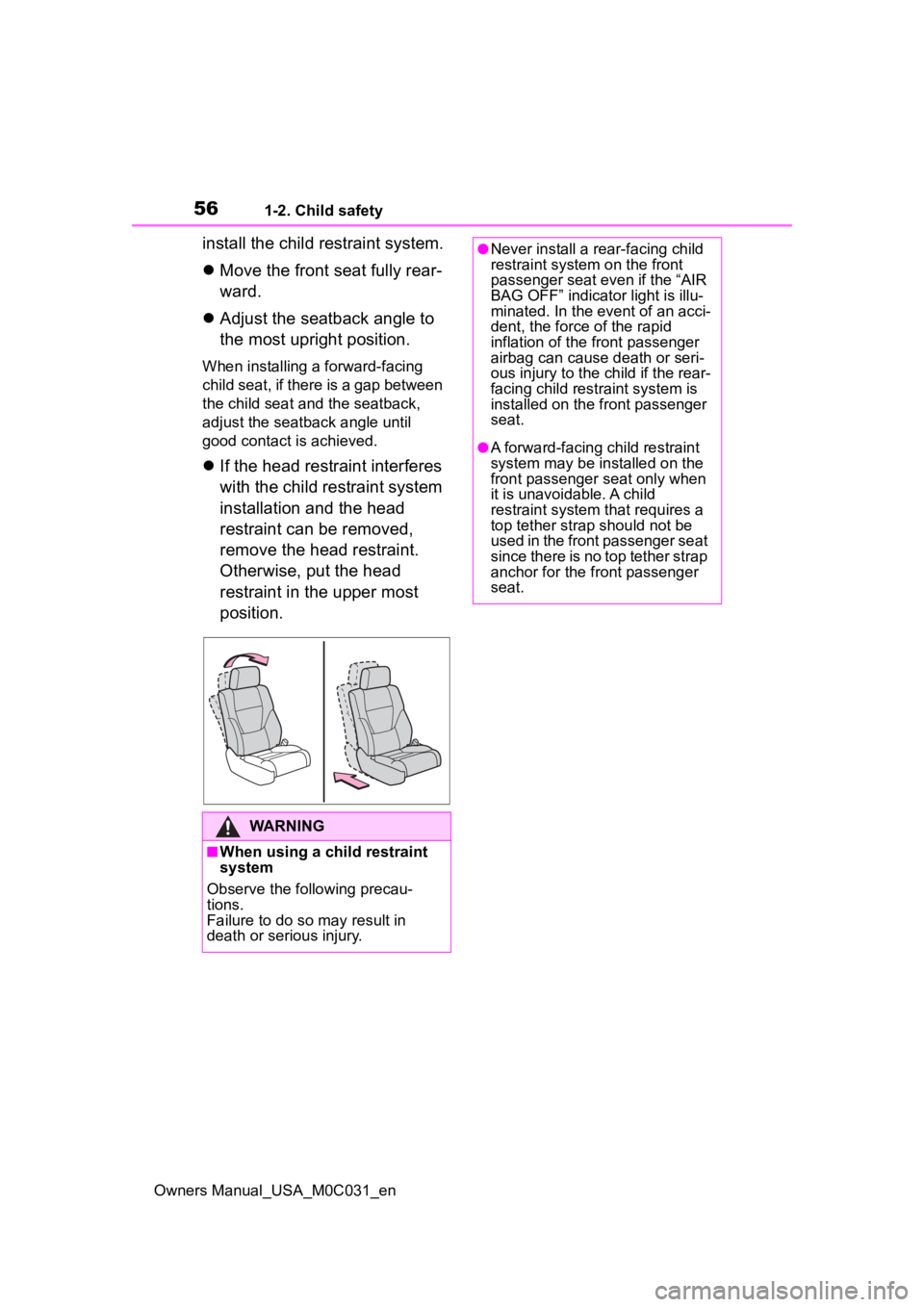
Move the front seat fully rear-
ward.
Adjust the seatback angle to
the most upright position.
When installing a forward-facing
child seat, if there is a gap between
the child seat and the seatback,
adjust the seatback angle until
good contact is achieved.
If the head restraint interferes
with the child restraint system
installation and the head
restraint can be removed,
remove the head restraint.
Otherwise, put the head
restraint in the upper most
position.
WARNING
■When using a child restraint
system
Observe the following precau-
tions.
Failure to do so m ay result in
death or serious injury.
●Never install a rear-facing child
restraint system on the front
passenger seat even if the “AIR
BAG OFF” indicator light is illu-
minated. In the event of an acci-
dent, the force of the rapid
inflation of the front passenger
airbag can cause death or seri-
ous injury to the child if the rear-
facing child restraint system is
installed on the front passenger
seat.
●A forward-facing child restraint
system may be installed on the
front passenger seat only when
it is unavoidable. A child
restraint system that requires a
top tether strap should not be
used in the front passenger seat
since there is no top tether strap
anchor for the front passenger
seat.
Page 93 of 618

932-1. Instrument cluster
Owners Manual_USA_M0C031_en
2
Vehicle status information and indicators
■Display items
Odometer
Displays the total distance the vehi-
cle has been driven.
Trip meter A/Trip meter B
Displays the distance the vehicle
has been driven since the meter
was last reset. Trip meters A and B
can be used to record and display
different distances independently.
Distance until next engine oil
change
Displays the distance the vehicle
can be driven until an oil change is
necessary.
■Changing the display
Each time the “ODO TRIP”
switch is pressed, the displayed
item will be changed. When the
trip meter is displayed, pressing
and holding the switch will reset
the trip meter.
WARNING
For example, there is a lag
between the driver’s shifting and
the new gear number appearing
on the display. This lag could
cause the driver to downshift
again, causing rapid and exces-
sive engine braking and possibly
an accident resulting in death or
injury.
NOTICE
■To prevent damage to the
engine and its components
●Do not let the i ndicator needle
of the tachomete r enter the red
zone, which indicates the maxi-
mum engine speed.
●The engine may be overheating
if the engine coolant tempera-
ture gauge is in the red zone
(H). In this case, immediately
stop the vehicle in a safe place,
and check the engine after it
has cooled completely.
( P.535)
■Voltmeter
When the voltmeter indicates 19
V or higher or 9 V or lower while
the hybrid system is operating,
there may be a 12- volt battery or
charging system malfunction.
Have the vehicle inspected at
your Toyota dealer.
■Engine oil pressure gauge
When the value of the engine oil
pressure gauge drops while the
engine is running, stop the vehicle
in a safe place immediately and
check the amoun t of engine oil.
( P.458)
When the oil pressure drops even
though the engine oil amount has
not decreased, or i f the oil pres-
sure does not increase when
engine oil is added, contact your
Toyota dealer, as there may be a
problem with the lubrication sys-
tem.
Odometer and trip meter
display
Page 174 of 618
1744-1. Before driving
Owners Manual_USA_M0C031_en
WARNING
■When driving on slippery
road surfaces
●Sudden braking, acceleration
and steering may cause tire
slippage and reduce your ability
to control the vehicle.
●Sudden acceleration, engine
braking due to shifting, or
changes in engine speed could
cause the vehicle to skid.
●After driving through a puddle,
lightly depress the brake pedal
to make sure that the brakes
are functioning properly. Wet
brake pads may prevent the
brakes from functioning prop-
erly. If the brakes on only one
side are wet and not functioning
properly, steering control may
be affected.
■When shifting the shift lever
●Do not let the vehicle roll back-
ward while a forward driving
position is selected, or roll for-
ward while the shift lever is in R.
Doing so may result in an acci-
dent or damage to the vehicle.
●Do not shift the shift lever to P
while the vehicle is moving.
Doing so can damage the trans-
mission and may result in a loss
of vehicle control.
●Do not shift the shift lever to R
while the vehicle is moving for-
ward.
Doing so can damage the trans-
mission and may result in a loss
of vehicle control.
●Do not shift the shift lever to a
driving position while the vehicle
is moving backward.
Doing so can damage the trans-
mission and may result in a loss
of vehicle control.
●Moving the shift lever to N while
the vehicle is moving will disen-
gage the hybrid system. Engine
braking is not available with the
hybrid system disengaged.
●Be careful not to shift the shift
lever with the accelerator pedal
depressed. Shifting the shift
lever to any positions other than
P or N may lead to unexpected
rapid acceleration of the vehicle
that may cause an accident and
result in death or serious injury.
■If you hear a squealing or
scraping noise (brake pad
wear indicators)
Have the brake pads checked and
replaced by your Toyota dealer, or
any reliable repairer as soon as
possible.
Rotor damage may result if the
pads are not replaced when
needed.
It is dangerous to drive the vehicle
when the wear limits of the brake
pads and/or those of the brake
discs are exceeded.
■When the vehicle is stopped
●Do not depress the accelerator
pedal unnecessarily.
If the shift lever is any position
other than P or N, the vehicle
may accelerate suddenly and
unexpectedly, causing an acci-
dent.
●In order to prevent accidents
due to the vehic le rolling away,
always keep depressing the
brake pedal while stopped with
the “READY” indicator is illumi-
nated, and apply the parking
brake as necessary.
Page 177 of 618
1774-1. Before driving
Owners Manual_USA_M0C031_en
4
Driving
When the following unusual
operation is performed with the
accelerator pedal depressed,
the hybrid system output may be
restrained.
• When the shift lever is shifted to R
*.
• When the shift lever is shifted
from P or R to forward drive
shift position such as D
*.
When the system o perates, a mes-
sage appears on the multi-informa-
tion display. Read the message and
follow the instruction.
*: Depending on the situation, the shift position may not be
changed.
■Drive-Start Control (DSC)
When the TRAC is turned off
( P.376), sudden start restraint
control also does not operate. If
your vehicle have trouble escaping
from the mud or fr esh snow due to
sudden start restraint operation,
deactivate TRAC ( P.376) so that
the vehicle may become able to
escape from the mud or fresh snow.
Also, sudden start restraint control
will not operate in the following con-
ditions:
●When the front-wheel drive control
switch is in “4H” or “4L” position.
(4WD models only)
●When AUTO LSD mode, the drive
start control does not operate. (if
equipped)
●When Multi-terrain Select is
selected. (if equipped)
NOTICE
■If you get a flat tire while driv-
ing
A flat or damaged tire may cause
the following situations. Hold the
steering wheel firmly and gradu-
ally depress the brake pedal to
slow down the vehicle.
●It may be difficult to control your
vehicle.
●The vehicle will make abnormal
sounds or vibrations.
●The vehicle will lean abnor-
mally.
Information on what to do in case
of a flat tire ( P.515)
■When encountering flooded
roads
Do not drive on a road that has
flooded after heavy rain, etc.
Doing so may cause the following
serious damage to the vehicle:
●Engine stalling
●Short in electrical components
●Engine damage caused by
water immersion
In the event that you drive on a
flooded road an d the vehicle
becomes flooded or stuck in mud
or sand, be sure to have your Toy-
ota dealer check the following:
●Brake function
●Changes in quantity and quality
of oil and fluid used for the
engine, transmission, transfer
(4WD vehicles), differential, etc.
●Lubricant condition for the pro-
peller shaft, bearings and sus-
pension joints (where possible),
and the function of all joints,
bearings, etc.
Sudden start restraint
control (Drive-Start Con-
trol [DSC])
Page 237 of 618
2374-5. Using the driving support systems
Owners Manual_USA_M0C031_en
4
Driving
●Intersection right/left turn assistance (pre-collision braking)
When the turn signal lights are not flashing, support for turning left or right at
an intersection which targets on coming vehicles does not work.
When the system judges that a trailer is detected, intersection support is dis-
abled for vehicles and pedestrians.
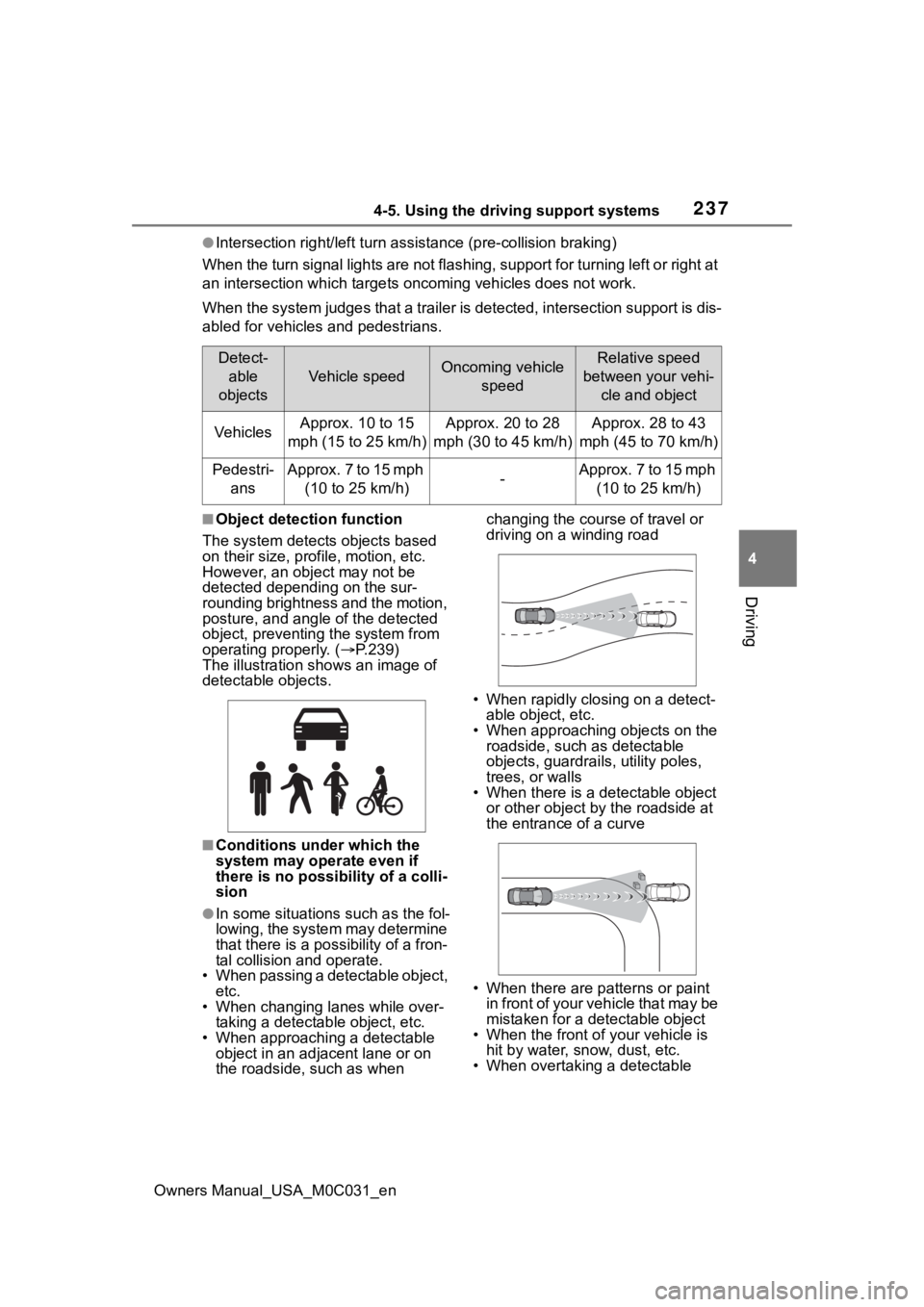
■Object detection function
The system detects objects based
on their size, profile, motion, etc.
However, an object may not be
detected depending on the sur-
rounding brightness and the motion,
posture, and angle of the detected
object, preventing the system from
operating properly. ( P.239)
The illustration sh ows an image of
detectable objects.
■Conditions under which the
system may operate even if
there is no possibility of a colli-
sion
●In some situations such as the fol-
lowing, the system may determine
that there is a po ssibility of a fron-
tal collision and operate.
• When passing a detectable object, etc.
• When changing lanes while over- taking a detectable object, etc.
• When approaching a detectable
object in an adjacent lane or on
the roadside, such as when changing the course of travel or
driving on a winding road
• When rapidly closing on a detect- able object, etc.
• When approaching objects on the roadside, such as detectable
objects, guardrails, utility poles,
trees, or walls
• When there is a d etectable object
or other object by the roadside at
the entrance of a curve
• When there are patterns or paint in front of your vehicle that may be
mistaken for a detectable object
• When the front of your vehicle is hit by water, snow, dust, etc.
• When overtaking a detectable
Detect-
able
objects
Vehicle speedOncoming vehicle speedRelative speed
between your vehi- cle and object
VehiclesApprox. 10 to 15
mph (15 to 25 km/h)Approx. 20 to 28
mph (30 to 45 km/h)Approx. 28 to 43
mph (45 to 70 km/h)
Pedestri- ansApprox. 7 to 15 mph (10 to 25 km/h)-Approx. 7 to 15 mph (10 to 25 km/h)
Page 239 of 618

2394-5. Using the driving support systems
Owners Manual_USA_M0C031_en
4
Driving
• While steering into the direction of oncoming traffic
• When the vehicle is lifted up using
an aftermarket lift kit
• When the vehicle is lifted up more than 4 in. (101 mm)
■Situations in which the system
may not operate properly
●In some situations such as the fol-
lowing, an object may not be
detected by the radar sensor and
front camera, preventing the sys-
tem from operating properly:
• When a detectable object is approaching your vehicle
• When your vehicle or a detectable object is wobbling
• If a detectable object makes an
abrupt maneuver (such as sudden
swerving, accelera tion or deceler-
ation)
• When your vehicle approaches a detectable object rapidly
• When a detectable object is not
directly in front of your vehicle
• When a detectable object is near a wall, fence, guardrail, manhole
cover, vehicle, steel plate on the
road, etc.
• When a detectable object is under
a structure
• When part of a detectable object is hidden by an object, such as
large baggage, an umbrella, or guardrail
• When there are many things which can reflect the radio waves
of the radar in the vicinity (tunnels,
truss bridges, gravel roads, snow
covered road that have tracks,
etc.)
• When there is an effect on the radio waves to the radar that is
installed on another vehicle
• When multiple det ectable objects
are close together
• If the sun or other light is shining directly on a detectable object
• When a detectable object is a
shade of white and looks
extremely bright
• When a detectable object appears
to be nearly the same color or
brightness as its surroundings
• If a detectable object cuts or sud-
denly emerges in front of your
vehicle
• When the front of your vehicle is
hit by water, snow, dust, etc.
• When a very bright light ahead, such as the sun or the headlights
of oncoming traffic, shines directly
into the front camera
• When approaching the side or
front of a vehicle ahead
• If a vehicle ahead is a motorcycle
• If a vehicle ahead is narrow, such as a personal mobility vehicle
• If a preceding vehicle has a small rear end, such as an unloaded
truck
• If a preceding vehicle has a low rear end, such as a low bed trailer
• If a vehicle ahead has extremely high ground clearance
Page 267 of 618

2674-5. Using the driving support systems
Owners Manual_USA_M0C031_en
4
Driving
Meter control switches
Turning the Blind Spot Monitor
on/off.
Outside rear view mirror indi-
cators
When a vehicle is detected in a
blind spot of the outside rear view
mirrors or approaching rapidly from
behind into a blind spot, the outside
rear view mirror indicator on the
detected side will illuminate. If the
turn signal lever is operated toward
the detected side, the outside rear
view mirror indicator flashes.
■Outside rear vie w mirror indica-
tor visibility
In strong sunlight, the outside rear
view mirror indicator may be difficult
to see.
■When “Blind Spot Monitor
Unavailable” is shown on the
multi-information display
Ice, snow, mud, etc., may be
attached to the rear bumper around
the sensors. ( P.269) The system
should return to normal operation
after removing the ice, snow, mud,
etc., from the rear bumper. Addition-
ally, the sensors may not operate
normally when drivin g in extremely
hot or cold environments.
BSM (Blind Spot Moni-
tor)
The Blind Spot Monitor is a
system that uses rear side
radar sensors installed on
the inner side of the rear
bumper on the left and right
side to assist the driver for
lane changing decision.
WARNING
■Cautions regarding the use of
the system
The driver is solely responsible for
safe driving. Always drive safely,
taking care to o bserve your sur-
roundings.
The Blind Spot Monitor is a sup-
plementary function which alerts
the driver that a v ehicle is in a
blind spot of the outside rear view
mirrors or is approaching rapidly
from behind into a blind spot. Do
not overly rely on the Blind Spot
Monitor. As the function cannot
judge if it is safe to change lanes,
over reliance could lead to an
accident resulting in death or seri-
ous injury.
As the system may not function
correctly under certain condi-
tions, the driver’s own visual con-
firmation of safety is necessary.
System components
Page 270 of 618

2704-5. Using the driving support systems
Owners Manual_USA_M0C031_enbusy parking lot, area surrounded
with trees (camping ground) or in
an environment with objects in the
immediate environment that pre-
vent sensors from sufficiently
detecting the trailer.
■Trailer Length Detection (TLD)
●Once a trailer is detected and if
the trailer length in the meter is
selected as “Auto”, the TLD func-
tion will estimate the
trailer length
using the Blind Spot Monitor sen-
sors. In order to estimate
the trailer length
with TLD function and detection
area, make at least two 90 degree
turns.
If the trailer length is entered manu-
ally via multi-information display
input, the detection area is also
adjusted to exceed the length of the
trailer.
●Depending on some trailer types
and the dimensions of the trailer
TMW performance may be
degraded.
■Vehicles that can be detected by the Blind Spot Monitor
The Blind Spot Monitor uses rear side radar sensors to detect the fol-
lowing vehicles traveling in adjacent lanes and advises the dri ver of
the presence of such vehicles v ia the indicators on the outside rear
view mirrors.
When not towing a trailer
Vehicles approaching in adjacen t lanes that may not be visible
using the outside rear view mirrors (the blind spots)
Vehicles that are approaching r apidly in adjacent lanes that are
not visible using the outside rear view mirrors (the blind spots)
When towing a trailer
Blind Spot Monitor operation