2022 TOYOTA TUNDRA HYBRID differential
[x] Cancel search: differentialPage 4 of 618
4TABLE OF CONTENTS
Owners Manual_USA_M0C031_en
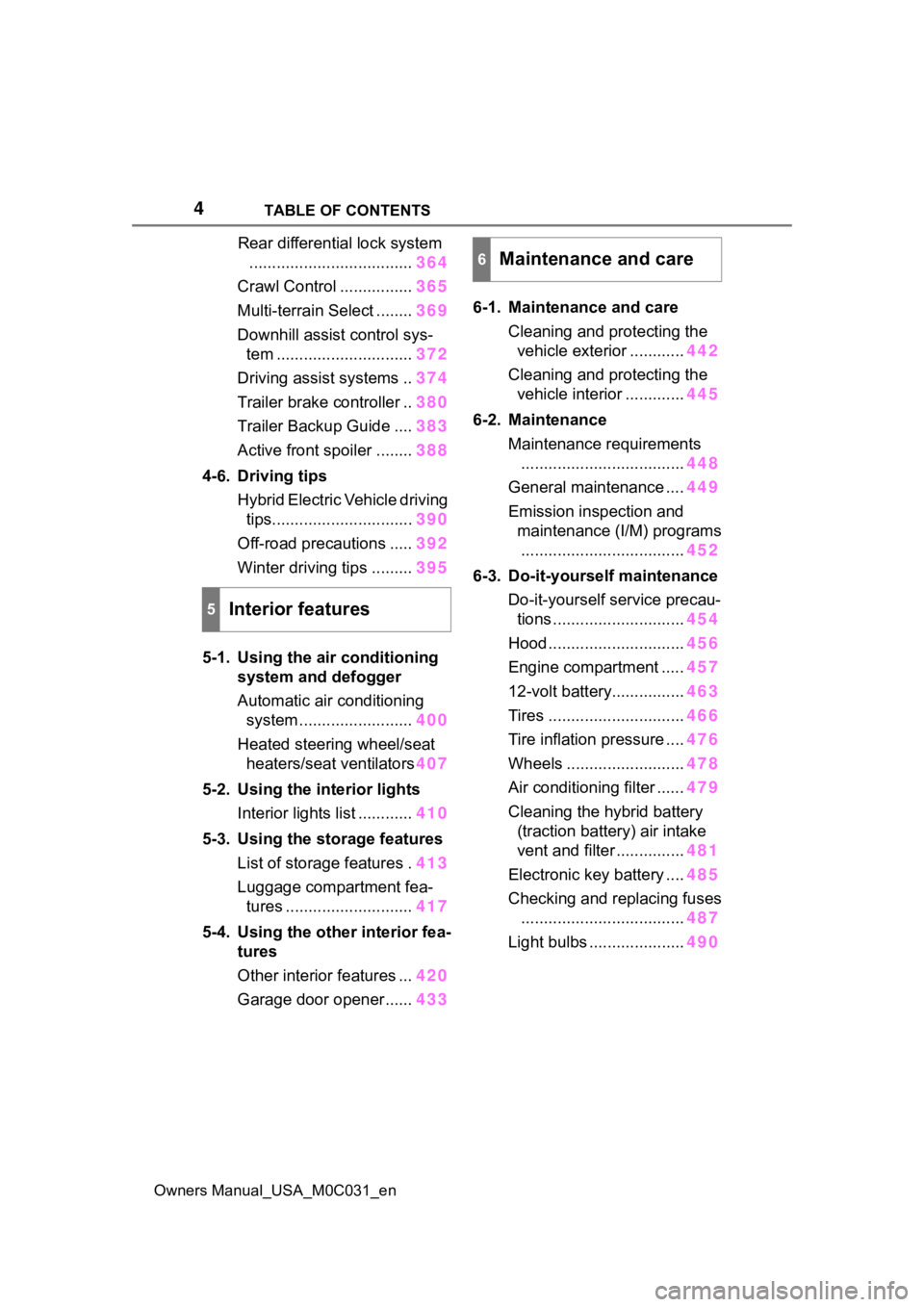
Rear differential lock system
.................................... 364
Crawl Control ................ 365
Multi-terrain Select ........ 369
Downhill assist control sys- tem .............................. 372
Driving assist systems .. 374
Trailer brake controller .. 380
Trailer Backup Guide .... 383
Active front spoiler ........ 388
4-6. Driving tips Hybrid Electric Vehicle driving tips............................... 390
Off-road precautions ..... 392
Winter driving tips ......... 395
5-1. Using the air conditioning
system and defogger
Automatic air conditioning system ......................... 400
Heated steering wheel/seat heaters/seat ventilators 407
5-2. Using the interior lights Interior lights list ............ 410
5-3. Using the storage features List of storage features . 413
Luggage compartment fea- tures ............................ 417
5-4. Using the other interior fea- tures
Other interior features ... 420
Garage door opener...... 4336-1. Maintenance and care
Cleaning and protecting the vehicle exterior ............ 442
Cleaning and protecting the vehicle interior ............. 445
6-2. Maintenance Maintenance requirements.................................... 448
General maintenance .... 449
Emission inspection and maintenance (I/M) programs.................................... 452
6-3. Do-it-yourself maintenance Do-it-yourself service precau-tions ............................. 454
Hood .............................. 456
Engine compartment ..... 457
12-volt battery................ 463
Tires .............................. 466
Tire inflation pressure .... 476
Wheels .......................... 478
Air conditioning filter ...... 479
Cleaning the hybrid battery (traction battery) air intake
vent and filter ............... 481
Electronic key battery .... 485
Checking and replacing fuses .................................... 487
Light bulbs ..................... 490
5Interior features
6Maintenance and care
Page 20 of 618
20Pictorial index
Owners Manual_USA_M0C031_en
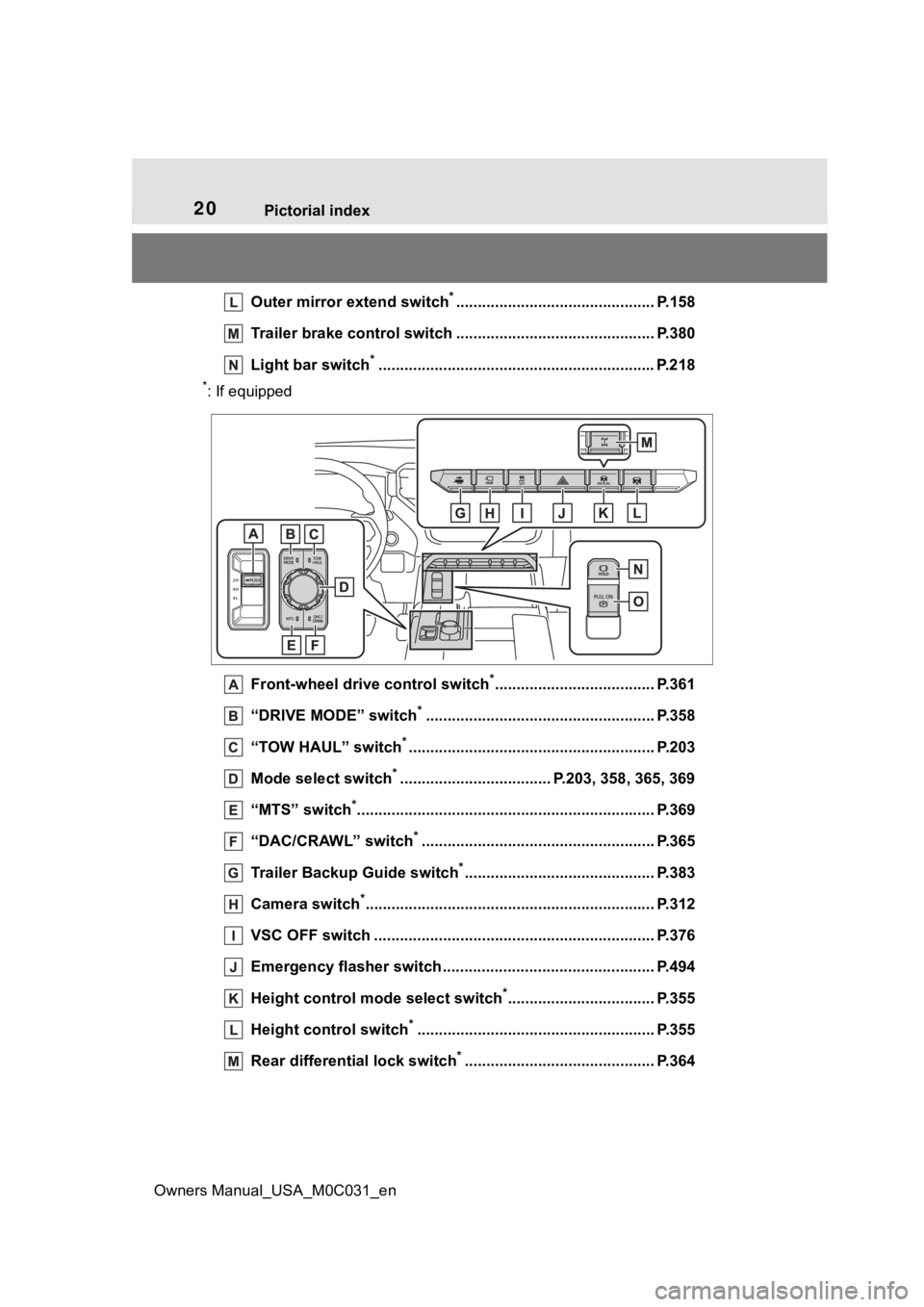
Outer mirror extend switch*.............................................. P.158
Trailer brake control switc h .............................................. P.380
Light bar switch
*............................................................... .P.218
*: If equipped
Front-wheel drive control switch
*..................................... P.361
“DRIVE MODE” switch
*..................................................... P.358
“TOW HAUL” switch
*......................................................... P.203
Mode select switch
*................................... P.203, 358, 365, 369
“MTS” switch
*............................................................... ...... P.369
“DAC/CRAWL” switch
*...................................................... P.365
Trailer Backup Guide switch
*............................................ P.383
Camera switch
*............................................................... .... P.312
VSC OFF switch ................................................. ................ P.376
Emergency flasher switch ....................................... .......... P.494
Height control mode select switch
*.................................. P.355
Height control switch
*....................................................... P.355
Rear differential lock switch
*............................................ P.364
Page 88 of 618
882-1. Instrument cluster
Owners Manual_USA_M0C031_en
*1: These lights turn on when the power switch is turned to ON to
indicate that a system check is
being performed. They will turn
off after the hybrid system is
started, or after a few seconds.
There may be a malfunction in a
system if the light does not come
on, or turn off. Have the vehicle
inspected by your Toyota dealer.
*2: This light illuminates on the multi-informatio n display with a
message.
*3: Intuitive parking assist OFF indi- cator turns on when the power
switch is turned to ON while the
Intuitive parking assist function is
on. It will turn off after a few sec-
onds.
(Flashes)
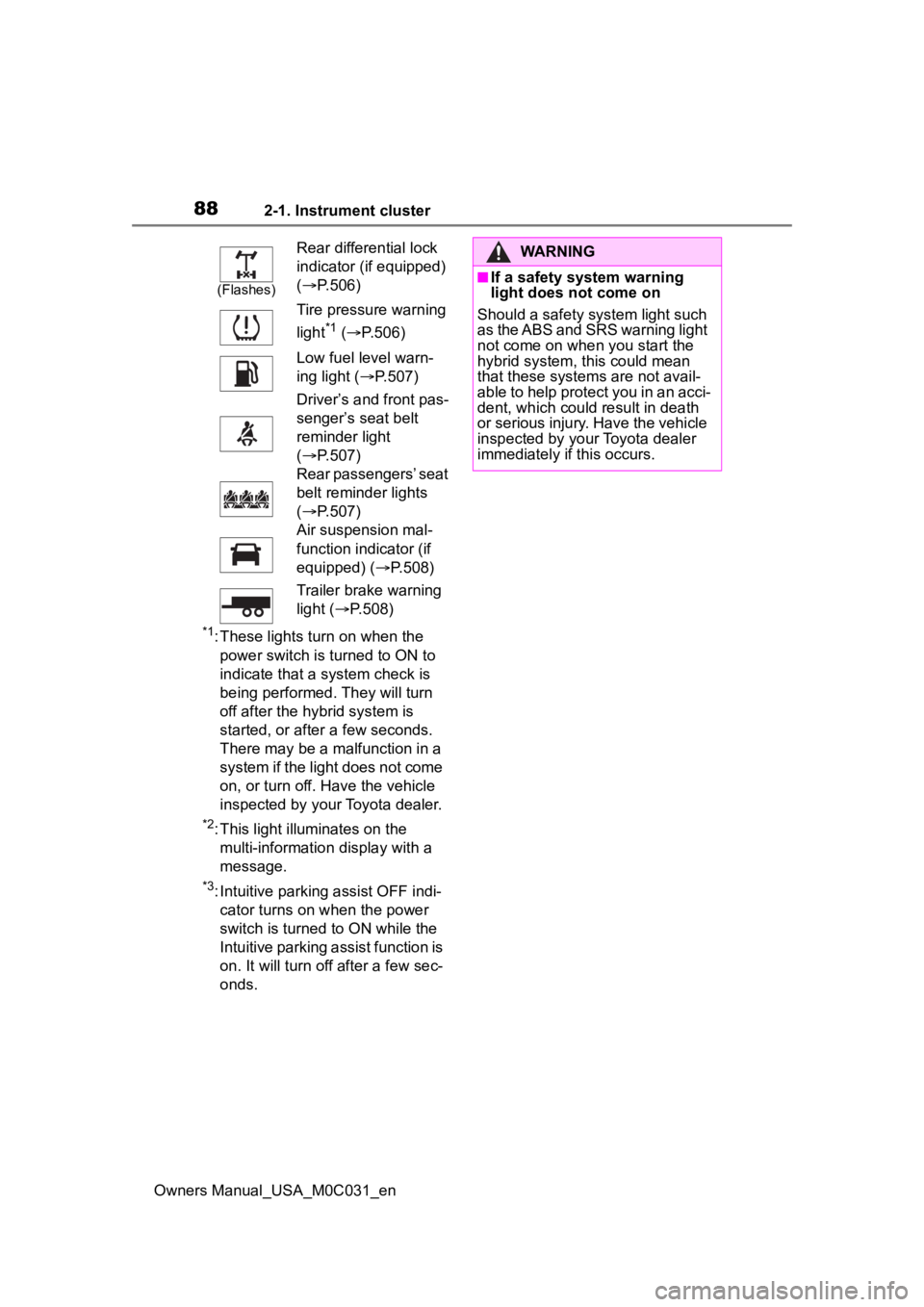
Rear differential lock
indicator (if equipped)
( P.506)
Tire pressure warning
light
*1 ( P.506)
Low fuel level warn-
ing light ( P.507)
Driver’s and front pas-
senger’s seat belt
reminder light
( P.507)
Rear passengers’ seat
belt reminder lights
( P.507)
Air suspension mal-
function indicator (if
equipped) ( P.508)
Trailer brake warning
light ( P.508)
WARNING
■If a safety system warning
light does not come on
Should a safety system light such
as the ABS and SRS warning light
not come on when you start the
hybrid system, this could mean
that these system s are not avail-
able to help protect you in an acci-
dent, which could result in death
or serious injury. Have the vehicle
inspected by you r Toyota dealer
immediately if this occurs.
Page 90 of 618
902-1. Instrument cluster
Owners Manual_USA_M0C031_en
*1: This light illuminates on the multi-information display with a
message.
*2: Depending on the operating con-ditions of the system, the color
and state (illuminat ed/blinking) of
the indicator change.
*3: The light comes on when the system is turned off.
*4: Intuitive parking assist OFF indi-cator turns on wh en the power
switch is turned t o ON while the
Intuitive parking assist function is
on. It will turn off after a few sec-
onds.
*5: These lights tu rn on when the
power switch is turned to ON to
indicate that a system check is
being performed. They will turn
off after the hybrid system is
started, or after a few seconds.
There may be a malfunction in a
system if the lights do not turn
on, or turn off. Have the vehicle
inspected by your Toyota dealer.
*6: This light illuminates on the out- side rear view mirrors.
*7: This light illuminates on the over-head console.
*8: When the outside temperature is approximately 37°F (3°C) or
lower, the indicator will flash for
approximately 10 seconds, then
stay on.
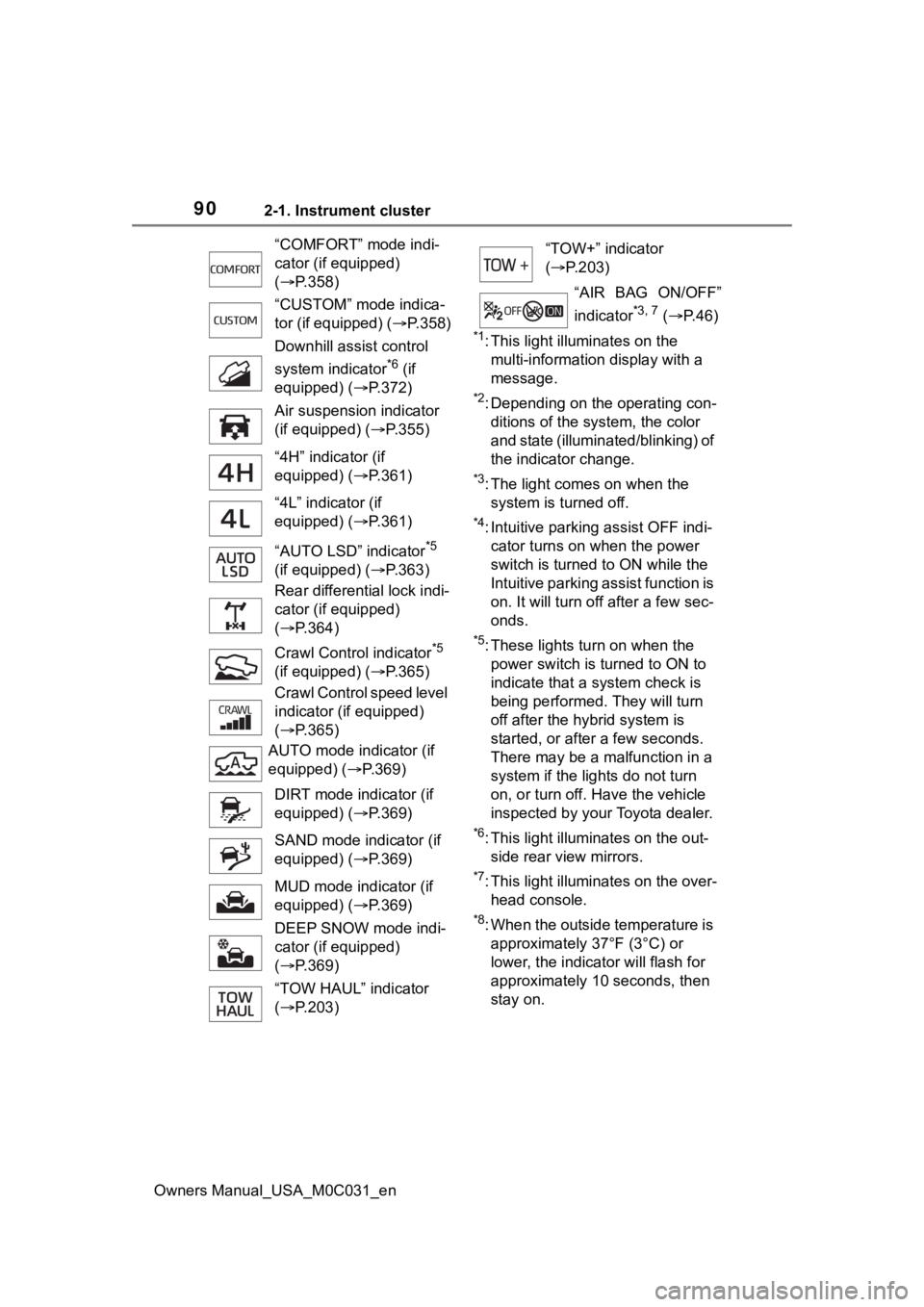
“COMFORT” mode indi-
cator (if equipped)
(
P.358)
“CUSTOM” mode indica-
tor (if equipped) ( P.358)
Downhill assist control
system indicator
*6 (if
equipped) ( P.372)
Air suspension indicator
(if equipped) ( P.355)
“4H” indicator (if
equipped) ( P.361)
“4L” indicator (if
equipped) ( P.361)
“AUTO LSD” indicator
*5
(if equipped) ( P.363)
Rear differential lock indi-
cator (if equipped)
( P.364)
Crawl Contro l indicator
*5
(if equipped) ( P.365)
Crawl Control speed level
indicator (if equipped)
( P.365)
AUTO mode indicator (if
equipped) ( P.369)
DIRT mode indicator (if
equipped) ( P.369)
SAND mode indicator (if
equipped) ( P.369)
MUD mode indicator (if
equipped) ( P.369)
DEEP SNOW mode indi-
cator (if equipped)
( P.369)
“TOW HAUL” indicator
( P.203)
“TOW+” indicator
( P.203)
“AIR BAG ON/OFF”
indicator
*3, 7 ( P. 4 6 )
Page 177 of 618
1774-1. Before driving
Owners Manual_USA_M0C031_en
4
Driving
When the following unusual
operation is performed with the
accelerator pedal depressed,
the hybrid system output may be
restrained.
• When the shift lever is shifted to R
*.
• When the shift lever is shifted
from P or R to forward drive
shift position such as D
*.
When the system o perates, a mes-
sage appears on the multi-informa-
tion display. Read the message and
follow the instruction.
*: Depending on the situation, the shift position may not be
changed.
■Drive-Start Control (DSC)
When the TRAC is turned off
( P.376), sudden start restraint
control also does not operate. If
your vehicle have trouble escaping
from the mud or fr esh snow due to
sudden start restraint operation,
deactivate TRAC ( P.376) so that
the vehicle may become able to
escape from the mud or fresh snow.
Also, sudden start restraint control
will not operate in the following con-
ditions:
●When the front-wheel drive control
switch is in “4H” or “4L” position.
(4WD models only)
●When AUTO LSD mode, the drive
start control does not operate. (if
equipped)
●When Multi-terrain Select is
selected. (if equipped)
NOTICE
■If you get a flat tire while driv-
ing
A flat or damaged tire may cause
the following situations. Hold the
steering wheel firmly and gradu-
ally depress the brake pedal to
slow down the vehicle.
●It may be difficult to control your
vehicle.
●The vehicle will make abnormal
sounds or vibrations.
●The vehicle will lean abnor-
mally.
Information on what to do in case
of a flat tire ( P.515)
■When encountering flooded
roads
Do not drive on a road that has
flooded after heavy rain, etc.
Doing so may cause the following
serious damage to the vehicle:
●Engine stalling
●Short in electrical components
●Engine damage caused by
water immersion
In the event that you drive on a
flooded road an d the vehicle
becomes flooded or stuck in mud
or sand, be sure to have your Toy-
ota dealer check the following:
●Brake function
●Changes in quantity and quality
of oil and fluid used for the
engine, transmission, transfer
(4WD vehicles), differential, etc.
●Lubricant condition for the pro-
peller shaft, bearings and sus-
pension joints (where possible),
and the function of all joints,
bearings, etc.
Sudden start restraint
control (Drive-Start Con-
trol [DSC])
Page 193 of 618

1934-1. Before driving
Owners Manual_USA_M0C031_en
4
Driving
brakes too frequently. This
could cause the brakes to
overheat and result in
reduced braking efficiency.
Due to the added load of the
trailer, your vehicle’s hybrid
system may overheat on hot
days (at temperatures over
85°F [30°C]) when driving up
a long or steep grade. If the
engine coolant temperature
gauge indicates overheating,
immediately turn off the air
conditioning (if in use), pull
your vehicle off the road and
stop in a safe spot. ( P.535)
Always place wheel blocks
under both the vehicle’s and
the trailer’s wheels when
parking. Apply the parking
brake firmly, and put the
transmission in P. Avoid park-
ing on a slope, but if unavoid-
able, do so only after
performing the following:
1 Apply the brakes and keep
them applied.
2 Have someone place wheel
blocks under both the vehi-
cle’s and trailer’s wheels.
3 When the wheel blocks are in
place, release the brakes
slowly until the blocks absorb
the load.
4 Apply the parking brake
firmly.
5 Shift into P and turn off the
hybrid system.
When restarting after parking
on a slope:
1 With the transmission in P,
start the hybrid system. Be
sure to keep the brake pedal
pressed.
2 Shift into a forward gear. If
reversing, shift into R.
3 If the parking brake is in man-
ual mode, release the park-
ing brake. ( P.205)
4 Release the brake pedal, and
slowly pull or back away from
the wheel blocks. Stop and
apply the brakes.
5 Have someone retrieve the
blocks.
■Break-in schedule
If your vehicle is new or equipped
with any new power train compo-
nents (such as an engine, transmis-
sion, transfer [4WD models], rear
differential or wheel bearing), Toyota
recommends that y ou do not tow a
trailer until the vehicle has been
driven for over 500 miles (800 km).
After the vehicle has been driven for
over 500 miles (800 km), you can
start towing. However, for the next
500 miles (800 km), drive the vehi-
cle at a speed of less than 50 mph
(80 km/h) when towing a trailer, and
avoid full throttle acceleration.
■Maintenance
●If you tow a trailer, your vehicle
will require more fr equent mainte-
nance due to the additional load.
(See “Owner’s Warranty Informa-
tion Booklet” or “Scheduled Main-
tenance Guide” / “Owner’s Manual
Supplement”.)
●Retighten the fixing bolts of the
towing ball and bracket after
Page 265 of 618

2654-5. Using the driving support systems
Owners Manual_USA_M0C031_en
4
Driving
any reasons other than the above,
there may be a malfunction in the
system. Contact your Toyota dealer.
■Automatic cancelation of con-
stant speed control mode
Constant speed control mode is
automatically cance led in the follow-
ing situations:
●Actual vehicle speed is more than
approximately 10 mph (16 km/h)
below the set vehicle speed.
●Actual vehicle speed falls below
approximately 20 mph (30 km/h).
●VSC is activated.
●TRAC is activated for a period of
time.
●When the VSC or TRAC system is
turned off.
●When the brake control or output
restriction control of a driving sup-
port system operates. (For exam-
ple: Pre-Collision System, Drive-
Start Control)
●The center differential lock/unlock
is not completed within 5 seconds
while the cruise con trol system is
on.
●The parking brake is operated.
If constant speed control mode is
automatically canceled for any rea-
sons other than the above, there
may be a malfunction in the system.
Contact your Toyota dealer.
■Brake operation
A brake operation sound may be
heard and the brake pedal response
may change, but the se are not mal-
functions.
■Warning messages and buzzers
for dynamic radar cruise con-
trol with full-speed range
Warning messages and buzzers are
used to indicate a system malfunc-
tion or to inform the driver of the
need for caution while driving. If a
warning message is shown on the
multi-information display, read the
message and follow the instruc- tions.(
P.228, 511)
■When the sensor may not be
correctly detecting the vehicle
ahead
In the case of the following and
depending on the conditions, oper-
ate the brake pedal when decelera-
tion of the system is insufficient or
operate the accelerator pedal when
acceleration is required.
As the sensor may not be able to
correctly detect th ese types of vehi-
cles, the approach warning
( P.263) may not be activated.
●Vehicles that cut in suddenly
●Vehicles traveling at low speeds
●Vehicles that are not moving in the
same lane
●Vehicles with small rear ends
(trailers with no load on board,
etc.)
●Motorcycles traveling in the same
lane
●When water or snow thrown up by
the surrounding vehicles hinders
the detecting of the sensor
●When your vehicle is pointing
upwards (caused by a heavy load
in the luggage compartment, etc.)
●Preceding vehicle has an
extremely high ground clearance
Page 272 of 618
2724-5. Using the driving support systems
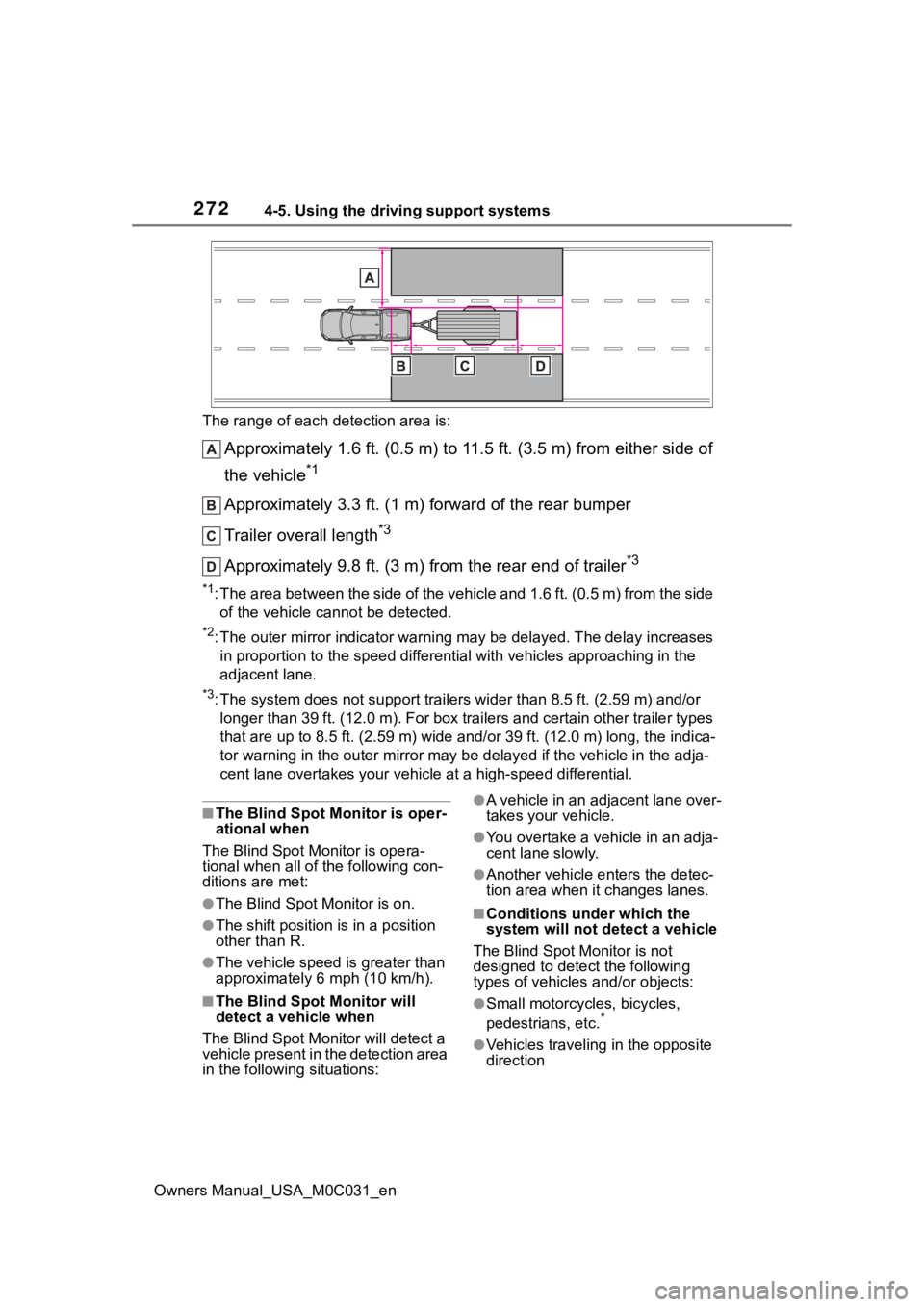
Owners Manual_USA_M0C031_enThe range of each detection area is:
Approximately 1.6 ft. (0.5 m) to 11.5 ft. (3.5 m) from either s
ide of
the vehicle
*1
Approximately 3.3 ft. (1 m) forward of the rear bumper
Trailer overall length
*3
Approximately 9.8 ft. (3 m) from the rear end of trailer*3
*1: The area between the side of the vehicle and 1.6 ft. (0.5 m) f rom the side
of the vehicle cannot be detected.
*2: The outer mirror indicator warning may be delayed. The delay i ncreases
in proportion to the speed differential with vehicles approaching in the
adjacent lane.
*3: The system does not support trailers wider than 8.5 ft. (2.59 m) and/or
longer than 39 ft. (12.0 m). For box trailers and certain other trailer types
that are up to 8.5 ft. (2.59 m) wide and/or 39 ft. (12.0 m) lon g, the indica-
tor warning in t he outer mirror may be de layed if the vehicle in the adja-
cent lane overtakes your vehicle at a high-speed differential.
■The Blind Spot Monitor is oper-
ational when
The Blind Spot Monitor is opera-
tional when all of the following con-
ditions are met:
●The Blind Spot Monitor is on.
●The shift position is in a position
other than R.
●The vehicle speed is greater than
approximately 6 mph (10 km/h).
■The Blind Spot Monitor will
detect a veh icle when
The Blind Spot Mon itor will detect a
vehicle present in the detection area
in the followin g situations:
●A vehicle in an adjacent lane over-
takes your vehicle.
●You overtake a vehicle in an adja-
cent lane slowly.
●Another vehicle enters the detec-
tion area when it changes lanes.
■Conditions under which the
system will not detect a vehicle
The Blind Spot Monitor is not
designed to detect the following
types of vehicles and/or objects:
●Small motorcycles, bicycles,
pedestrians, etc.*
●Vehicles traveling in the opposite
direction