2022 TOYOTA SEQUOIA ECU
[x] Cancel search: ECUPage 118 of 592
1183-2. Opening, closing and locking the doors
SEQUOIA_OM_USA_OM0C047U
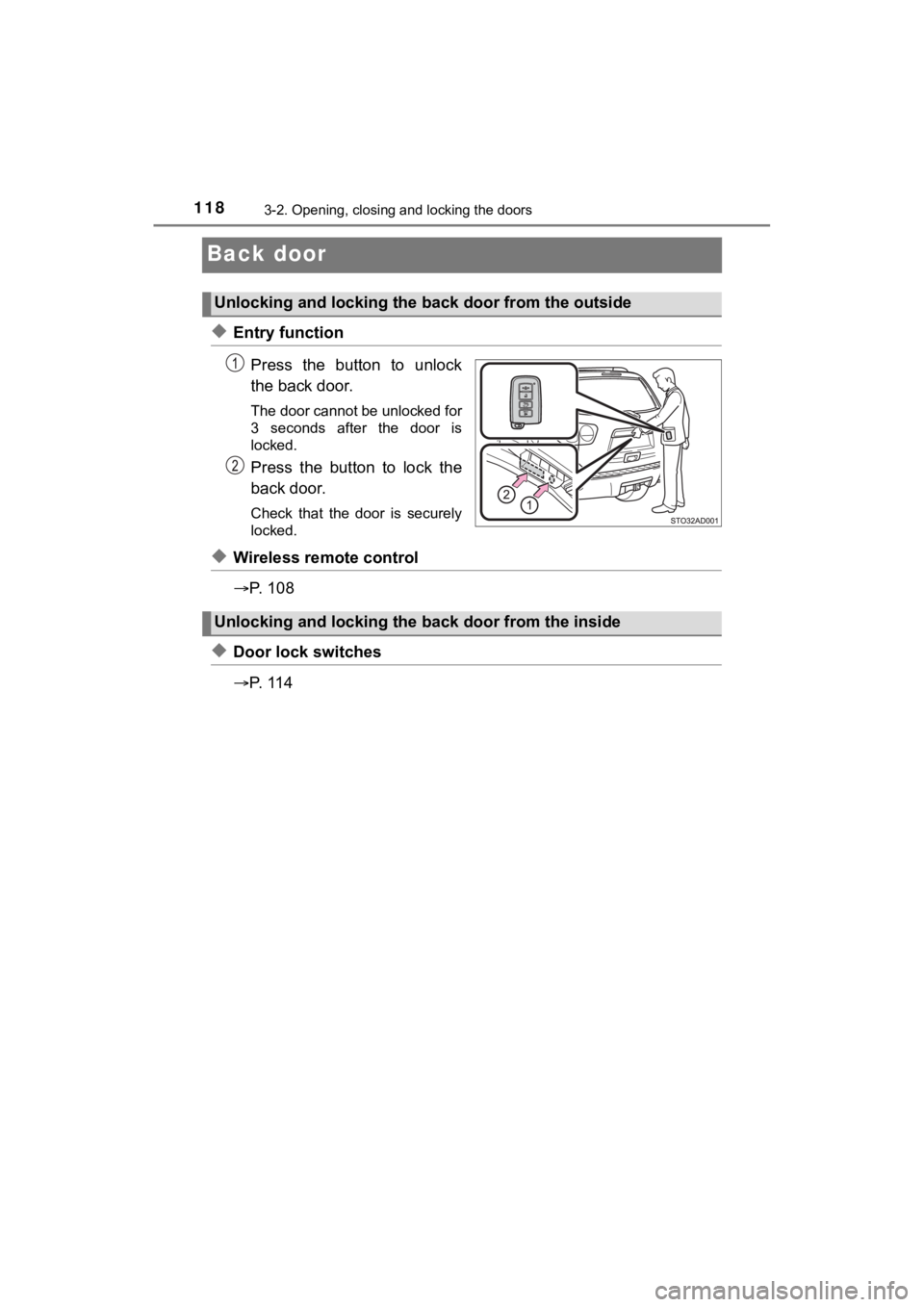
Back door
◆Entry functionPress the button to unlock
the back door.
The door cannot be unlocked for
3 seconds after the door is
locked.
Press the button to lock the
back door.
Check that the door is securely
locked.
◆Wireless remote control
P. 1 0 8
◆Door lock switches
P. 1 1 4
Unlocking and locking the back door from the outside
Unlocking and locking the back door from the inside
Page 123 of 592

1233-2. Opening, closing and locking the doors
3
Operation of each component
SEQUOIA_OM_USA_OM0C047U
WARNING
■Operating the back door
Observe the following precautions.
Failure to do so may cause parts of the body to be caught, resu lting in death
or serious injury.
● Remove any heavy loads, such as snow and ice, from the back door
before opening it. Failure to do so may cause the back door to suddenly
shut again after it is opened.
● When opening or closing the back door, thoroughly check to make sure
the surrounding area is safe.
● If anyone is in the vicinity, make sure they are safe and let them know that
the back door is about to open or close.
● Use caution when opening or closing the back door in windy weat her as it
may move abruptly in strong wind.
● The back door may suddenly shut if it is
not opened fully. It is more difficult to
open or close the back door on an
incline than on a level surface, so
beware of the back door unexpectedly
opening or closing by itself. Make sure
that the back door is fully open and
secure before using the luggage com-
partment.
● When closing the back door, take extra
care to prevent your fingers, etc., from
being caught.
● When closing the back door, make sure
to press it lightly on its outer surface. If
the back door handle or back door strap
is used to fully close the back door, it
may result in hands or arms being
caught.
Page 125 of 592

1253-2. Opening, closing and locking the doors
3
Operation of each component
SEQUOIA_OM_USA_OM0C047U
WARNING
■Power back door (if equipped)
Observe the following precautions when operating the power back door.
Failure to do so may cause death or serious injury.
● Check the safety of the surrounding area to make sure there are no obsta-
cles or anything that could cause any of your belongings to get caught.
● If anyone is in the vicinity, make sure they are safe and let them know that
the back door is about to open or close.
● If the power back door system is turned off with the main switch while the
back door is operating automatically, the automatic operation is stopped.
The back door then has to be operated manually. Take extra care when on
an incline, as the back door may open or close unexpectedly.
● If the operating conditions of the power back door are no longe r met, a
buzzer may sound and the back door may stop opening or closing. The
back door then has to be operated manually. Take extra care whe n on an
incline, as the back door may open or close abruptly.
● On an incline, the back door may suddenly shut after it opens. Make sure
the back door is fully open and secure.
● In the following situations, the power back door may detect an abnormality
and automatic operation may be stopped. In this case, the back door has
to be operated manually. Take extra care in this situation, as the stopped
back door may suddenly open or close, causing an accident.
• When the back door contacts an obstacle
• When the battery voltage suddenly drops, such as when the engine switch is turned to ON or the engine is started during automati c opera-
tion
● If a bicycle carrier or similar heavy object is attached to the back door, the
power back door may not operate, causing itself to malfunction, or the
back door may suddenly shut again after being opened, causing some-
one’s hands, head or neck to be caught and injured. When installing an
accessory part to the back door, using a genuine Toyota part is recom-
mended.
Page 132 of 592

1323-2. Opening, closing and locking the doors
SEQUOIA_OM_USA_OM0C047U■
Note for the entry function
●Even when the electronic key is within the effective range (det ection areas),
the system may not operate properly in the following cases:
• The electronic key is too close to the window or outside door handle, near
the ground, or in a high place when the doors are locked or unl ocked.
• The electronic key is on the instrument panel or floor, or in the console
box or glove box when the engine is started or engine switch mo des are
changed.
● Do not leave the electronic key on top of the instrument panel or near the
door pockets when exiting the vehicle. Depending on the radio w ave recep-
tion conditions, it may be detected by the antenna outside the cabin and the
door will become lockable from the outside, possibly trapping the electronic
key inside the vehicle.
● As long as the electronic key is within the effective range, th e doors may be
locked or unlocked by anyone. However, only the doors detecting the elec-
tronic key can be used to unlock the vehicle.
● Even if the electronic key is not inside the vehicle, it may be possible to start
the engine if the electronic key is near the window.
● The doors may unlock or lock if a large amount of water splashe s on the
door handle, such as in the rain or in a car wash, when the electronic key is
within the effective range. (The doors will automatically be lo cked after
approximately 60 seconds if the doors are not opened and closed.)
● If the wireless remote control is used to lock the doors when t he electronic
key is near the vehicle, there is a possibility that the door m ay not be
unlocked by the entry function. (Use the wireless remote contro l to unlock
the doors.)
● Touching the door lock or unlock sensor while wearing gloves ma y prevent
lock or unlock operation. Remove the gloves and touch the lock sensor
again.
● When the lock operation is performed using the lock sensor, rec ognition sig-
nals will be shown up to two consecutive times. After this, no recognition
signals will be given.
● If the door handle becomes wet while the electronic key is with in the effec-
tive range, the door may lock and unlock repeatedly. In this ca se, follow the
following correction procedures to wash the vehicle:
• Place the electronic key in a location 6 ft. (2 m) or more awa y from the
vehicle. (Take care to ensure that the key is not stolen.)
• Set the electronic key to battery-saving mode to disable the s mart key
system. ( P. 130)
● If the electronic key is inside the vehicle and a door handle b ecomes wet
during a car wash, a message may be shown on the multi-informat ion dis-
play and a buzzer will sound outside the vehicle. To turn off t he alarm, lock
all the doors.
Page 147 of 592

1473-3. Adjusting the seats
3
Operation of each component
SEQUOIA_OM_USA_OM0C047U
WARNING
■When folding the rear seatbacks down
Observe the following precautions.
Failure to do so may result in death or serious injury.
● Do not fold the seatbacks down while driving.
● Stop the vehicle on level ground, set the parking brake and shi ft the shift
lever to P.
● Do not allow anyone to sit on a folded seatback or in the luggage compart-
ment while driving.
● Do not allow children to enter the luggage compartment.
■ Seat adjustment
● To reduce the risk of sliding under the lap belt during a collision, do not
recline the seat more than necessary.
If the seat is too reclined, the lap belt may slide past the hips and apply
restraint forces directly to the abdomen, or your neck may contact the
shoulder belt, increasing the risk of death or serious injury i n the event of
an accident.
Adjustments should not be made while driving as the seat may un expect-
edly move and cause the driver to lose control of the vehicle.
● Take care when adjusting the seat position to ensure that other passen-
gers are not injured by the moving seat.
● Do not put your hands under the seat or near the moving parts to avoid
injury.
Fingers or hands may become jammed in the seat mechanism.
● Do not depress the second seat release pedal from the third seat while the
second seat is occupied.
■ After returning the rear seatback to the upright position
Observe the following precautions.
Failure to do so may result in death or serious injury.
● Make sure the seatback is securely locked by pushing it forward and rear-
ward on the top.
● Check that the seat belts are not twisted or caught in the seatback.
Page 156 of 592

1563-4. Adjusting the steering wheel and mirrors
SEQUOIA_OM_USA_OM0C047U
Steering wheel
Manual adjustment type
Hold the steering wheel and
push the lever down.
Adjust to the ideal position by
moving the steering wheel hori-
zontally and vertically.
After adjustment, pull the lever up
to secure the steering wheel.
Power adjustment type
Operating the switch moves the steering wheel in the following direc-
tions:
Up
Down
Toward the driver
Away from the driver
The steering wheel ca n be adjusted to a comfortable position.
Adjustment procedure
1
2
Page 157 of 592

1573-4. Adjusting the steering wheel and mirrors
3
Operation of each component
SEQUOIA_OM_USA_OM0C047U
To sound the horn, press on or
close to the mark.
■The steering wheel can be adjusted when (power adjustment type)
The engine switch is in ACC or ON.
■ Automatic adjustment of the st eering position (if equipped)
A desired steering position can be entered to memory and recall ed automati-
cally by the driving position memory system. ( P. 149)
■ Power easy access system (vehicles with driving position memory )
The steering wheel move in accordance with engine switch mode a nd the
driver’s seat belt condition. ( P. 149)
■ After adjusting the steering wheel (manual adjustment type)
Make sure that the steering wheel is securely locked.
The horn may not sound if the steering wheel is not securely locked.
Horn
WARNING
■Caution while driving
Do not adjust the steering wheel while driving.
Doing so may cause the driver to mishandle the vehicle and caus e an acci-
dent, resulting in death or serious injury.
■ After adjusting the steering wheel (manual adjustment type)
Make sure that the steering wheel is securely locked.
Otherwise, the steering wheel may move suddenly, possibly causi ng an
accident, resulting in death or serious injury.
Page 182 of 592

1824-1. Before driving
SEQUOIA_OM_USA_OM0C047U
WARNING
Observe the following precautions.
Failure to do so may result in death or serious injury.
■If you hear a squealing or scraping noise (brake pad wear limit indica-
tors)
Have the brake pads checked and replaced by your Toyota dealer as soon
as possible.
Rotor damage may result if the pads are not replaced when neede d.
It is dangerous to drive the vehicle when the wear limits of the brake pads
and/or those of the brake discs are exceeded.
■ When the vehicle is stopped
● Do not race the engine.
If the vehicle is in any gear other than P or N, the vehicle may accelerate
suddenly and unexpectedly, causing an accident.
● In order to prevent accidents due to the vehicle rolling away, always keep
depressing the brake pedal while the engine is running, and apply the
parking brake as necessary.
● If the vehicle is stopped on an incline, in order to prevent ac cidents caused
by the vehicle rolling forward or backward, always depress the brake pedal
and securely apply the parking brake as needed.
● Avoid revving or racing the engine.
Running the engine at high speed while the vehicle is stopped may cause
the exhaust system to overheat, which could result in a fire if combustible
material is nearby.