Page 240 of 592

2404-3. Operating the lights and wipers
SEQUOIA_OM_USA_OM0C047U
Washer/wiper dual
operation
Pulling the lever operates the wip-
ers and washer.
Wipers will automatically operate a
couple of times after the washer
squirts.
■The windshield wiper and washer can be operated when
The engine switch is in ON.
■ If no windshield washer fluid sprays
Check that the washer nozzles are not blocked if there is washe r fluid in the
washer fluid reservoir.
WARNING
■ Caution regarding the use of washer fluid
When it is cold, do not use the washer fluid until the windshie ld becomes
warm. The fluid may freeze on the windshield and cause low visi bility. This
may lead to an accident, resulting in death or serious injury.
NOTICE
■ When the windshield is dry
Do not use the wipers, as they may damage the windshield.
■ When the washer fluid tank is empty
Do not operate the switch continually as the washer fluid pump may over-
heat.
■ When a nozzle becomes blocked
In this case, contact your Toyota dealer.
Do not try to clear it with a pin or other object. The nozzle will be damaged.
Page 242 of 592
2424-3. Operating the lights and wipers
SEQUOIA_OM_USA_OM0C047U
Ty p e BIntermittent window
wiper operation
Normal window wiper
operation
Washer/wiper dual oper-
ation
Washer/wiper dual oper-
ation
The wiper will automatically
operate a couple of times after
the washer squirts.
(After operating several times,
the wiper operates one more
time after a short delay to pre-
vent dripping.)
■The rear window wiper and washer can be operated when
●The engine switch is in ON.
● The back window is completely closed.
■ If no washer fluid sprays
Check that the washer nozzle is not blocked if there is washer fluid in the
washer fluid reservoir.
■ Customization
Settings (e.g. washer linkage wiper control) can be changed.
(Customizable features P. 548)
Page 243 of 592
2434-3. Operating the lights and wipers
4
Driving
SEQUOIA_OM_USA_OM0C047U
NOTICE
■When the rear window is dry
Do not use the wiper, as it may damage the rear window.
■ When the washer fluid tank is empty
Do not operate the switch continually as the washer fluid pump may over-
heat.
■ When a nozzle becomes blocked
In this case, contact your Toyota dealer.
Do not try to clear it with a pin or other object. The nozzle will be damaged.
Page 266 of 592

2664-5. Using the driving support systems
SEQUOIA_OM_USA_OM0C047U• When driving in inclement weather such as heavy rain, fog, snow or a
sandstorm
• When the vehicle is hit by water, snow, dust, etc., from a vehicle ahead
• When driving through steam or smoke
• When driving in a place where the surrounding brightness changes sud- denly, such as at the entrance or exit of a tunnel
• When a very bright light, such as the sun or the headlights of oncoming
traffic, shines directly into the front camera
• When the surrounding area is dim, such as at dawn or dusk, or while at
night or in a tunnel
• After the engine has started the vehicle has not been driven for a certain amount of time
• While making a left/right turn and for a few seconds after mak ing a left/
right turn
• While driving on a curve and for a few seconds after driving o n a curve
• If your vehicle is skidding
• If the wheels are misaligned
• If a wiper blade is blocking the front camera
• The vehicle is wobbling.
• The vehicle is being driven at extremely high speeds.
• When driving on a hill
• If the radar sensor or front camera is misaligned • If the front of the vehicle is raised or
lowered
Page 286 of 592

2864-5. Using the driving support systems
SEQUOIA_OM_USA_OM0C047U
■Dynamic radar cruise control can be set when
●The shift lever is in D or range 4 or higher of S has been sele cted.
● Vehicle speed is at or above approximately 30 mph (50 km/h).
■ Accelerating after setting the vehicle speed
The vehicle can accelerate by operating the accelerator pedal. After acceler-
ating, the set speed resumes. However, during vehicle-to-vehicl e distance
control mode, the vehicle speed may decrease below the set spee d in order
to maintain the distance to the preceding vehicle.
■ Automatic cancelation of vehicle-to-vehicle distance control mode
Vehicle-to-vehicle distance control mode is automatically cance led in the fol-
lowing situations:
● Actual vehicle speed falls at or below approximately 25 mph (40 km/h).
● VSC is activated.
● TRAC is activated for a period of time.
● When the VSC or TRAC system is turned off.
● The sensor cannot detect correctly because it is covered in some way.
● Pre-collision braking is activated.
● The operation cannot be switched for 5 seconds or more after operating the
four-wheel drive control or the center differential lock switch . (4WD models)
If vehicle-to-vehicle distance control mode is automatically ca nceled for any
other reason, there may be a malfunction in the system. Contact your Toyota
dealer.
Page 287 of 592

2874-5. Using the driving support systems
4
Driving
SEQUOIA_OM_USA_OM0C047U■
Automatic cancelation of c onstant speed control mode
Constant speed control mode is automatically canceled in the following situa-
tions:
● Actual vehicle speed is more than approximately 10 mph (16 km/h ) below
the set vehicle speed.
● Actual vehicle speed falls below approximately 25 mph (40 km/h) .
● VSC is activated.
● TRAC is activated for a period of time.
● When the VSC or TRAC system is turned off.
● Pre-collision braking is activated.
● The operation cannot be switched for 5 seconds or more after operating the
four-wheel drive control or the center differential lock switch . (4WD models)
If constant speed control mode is automatically canceled for an y other rea-
son, there may be a malfunction in the system. Contact your Toyota dealer.
■ Brake system operation sound
If the brakes are applied automatically while the vehicle is in vehicle-to-vehi-
cle distance control mode, a brake system operation sound may b e heard.
This does not indicate a malfunction.
■ Warning messages and buzzers for d ynamic radar cruise control
Warning messages and buzzers are used to indicate a system malfunction or
to inform the driver of the need for caution while driving. If a warning message
is shown on the multi-information display, read the message and follow the
instructions.
■ When the sensor may not be correctly detect ing the vehicle ahead
In the case of the following and depending on the conditions, o perate the
brake pedal when deceleration of the system is insufficient or operate the
accelerator pedal when acceleration is required.
As the sensor may not be able to correctly detect these types o f vehicles, the
approach warning ( P. 284) may not be activated.
● Vehicles that cut in suddenly
● Vehicles traveling at low speeds
● Vehicles that are not moving in the same lane
Page 317 of 592
3174-5. Using the driving support systems
4
Driving
SEQUOIA_OM_USA_OM0C047U
Four-wheel drive system
“2WD” (high speed position, two-wheel drive)
Use this for normal driving on dry hard-surfaced roads. This position gives
greater economy, quietest ride and least wear.
“4H” (high speed position, four-wheel drive)
Use this for driving only on tracks that permit the tires slide , like off-road,
icy or snow-covered roads. This position provides greater tract ion than
two-wheel drive.
The “4HI” indicator will come on.
“4L” (low speed position, four-wheel drive)
Use this for maximum power and traction. Use “4L” for climbing or
descending steep hills, off-road driving, and hard pulling in s and, mud or
deep snow.
The “4LO” indicator will come on.
Center differentia l lock switch (P. 318)
Indicators
Use the front-wheel drive control lever or switch to select the fol-
lowing transfer modes:
Page 318 of 592
3184-5. Using the driving support systems
SEQUOIA_OM_USA_OM0C047U■
Shifting from “2WD” to “4H”
Reduce vehicle speed to less than 62 mph (100 km/h).
Turn the front-wheel drive control switch to “4H”.
The “4HI” indicator will turn on.
■
Shifting from “4H” to “2WD”
Reduce vehicle speed to less than 62 mph (100 km/h).
Turn the front-wheel drive control switch to “2WD”.
The “4HI” indicator will go off.
■
Shifting from “4H” to “4L” Stop the vehicle completely and continue to depress the brake
pedal.
Shift the shift lever to N.
Push and turn the front-wheel drive control switch to “4L”.
The “4LO” indicator will turn on.
■
Shifting from “4L” to “4H”
Stop the vehicle completely and continue to depress the brake
pedal.
Shift the shift lever to N.
Turn the front-wheel drive control switch to “4H”.
The “4LO” indicator will go off.
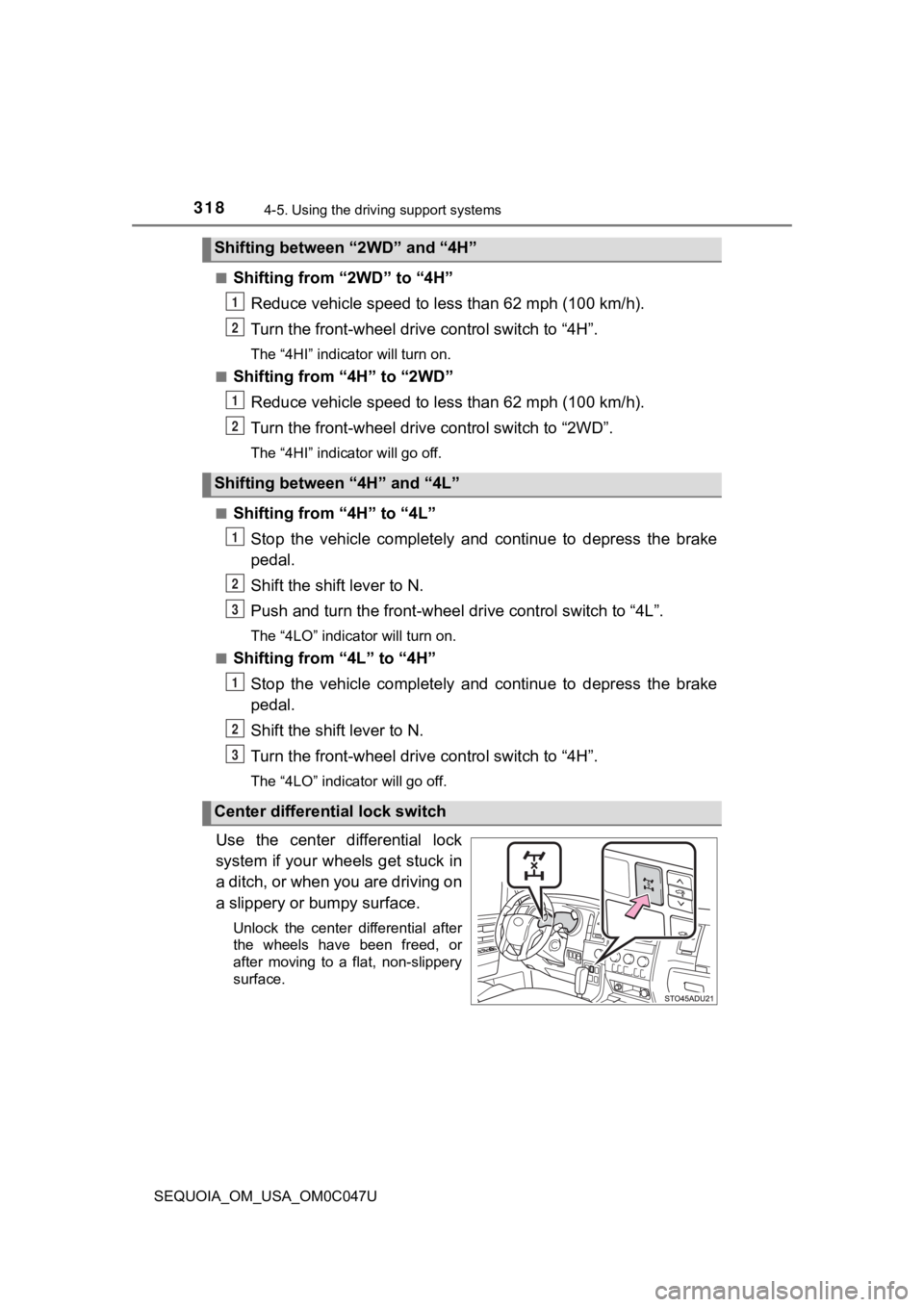
Use the center differential lock
system if your wheels get stuck in
a ditch, or when you are driving on
a slippery or bumpy surface.
Unlock the center differential after
the wheels have been freed, or
after moving to a flat, non-slippery
surface.
Shifting between “2WD” and “4H”
Shifting between “4H” and “4L”
Center differential lock switch
1
2
1
2
1
2
3
1
2
3


