2022 TOYOTA RAV4 PLUG-IN HYBRID instrument cluster
[x] Cancel search: instrument clusterPage 180 of 662

1783-1. Instrument cluster
A variety of information can be dis-
played by selecting a menu icon.
Additionally, warning or sugges-
tion/advice pop-up displays will be dis-
played in some situations.
Menu icons ( P.178)
QThe multi-information display is
displayed when
The power switch is in ON.
QWhen changing driving mode
OBackground color of the multi-informa- tion display is changed following the selected driving mode. ( P.387)
OBackground color of the multi-informa- tion display is changed following the
selected driving mode or when Trail Mode is turned on. ( P.387, 389)
QLiquid crystal display
Small spots or light spots may appear
on the display. This phenomenon is characteristic of liquid crystal displays, and there is no problem continuing to
use the display.
The multi-information display is
operated using the meter control
switches.
Scroll the screen*/switch the dis-
play*/move the cursor
Press: Enter/Set
Press and hold: Reset/Display
customizable items
Return to the previous screen
Call sending/receiving and his-
tory display (if equipped)
Linked with the hands-free sys-
tem, sending or receiving call is
displayed. For details regarding
the hands-free system, refer to
“Navigation and multimedia sys-
tem owner’s manual” or “Multi-
media Owner’s Manual”.
*: On screens where the screen can be
scrolled and the display can be
switched, a scroll bar or a round icon
that shows the number of registered
screens is displayed.
Information related to each icon
can be displayed by selecting the
icon with the meter control
switches.
Some of the information may be dis-
played automatically depending on the
situation.
Changing the display
C
A
WARNING
QCaution for use while driving
For safety, avoid operating the meter control switch while driving as much
as possible, and do not look continu- ously at the multi-information display while driving. Stop the vehicle and
operate the meter control switch. Fail- ure to do so may cause a steering wheel operation error, resulting in an
unexpected accident.
Menu icons
B
C
D
Page 181 of 662

179
3 3-1. Instrument cluster
Vehicle status information and indicators
Select to display fuel consumption
data in various forms.
QPower Consumption/Fuel
Economy
The display contents are different in
EV mode or AUTO EV/HV mode,
and HV mode.
EV mode or AUTO EV/HV mode
EV driving range
Displays the EV driving range with charge remaining in the hybrid battery
(traction battery). (P.102)
Distance to empty
Displays the driving range with remain-
ing fuel. (P.182)
Average power consumption
Displays the average power consump-
tion since the function was reset or the
average power consumption after start-
ing.
*1, 2, 3
The average power consumption
selected by “Power Consumption” on
the screen is displayed. (P.184)
Current power consumption
Displays the instantaneous current
power consumption.
*1: Use the displayed power consump-
tion as a reference only.
*2: Average power consumption since
the function was reset can be reset
by pressing and holding .
*3: Average power consumption after
starting is reset each time the hybrid
system stops.
HV mode
EV driving range
Displays the EV driving range with
charge remaining in the hybrid battery
IconDisplay
Driving information display
(P.179)
Driving support system
information display
(P.182)
Audio system-linked dis-
play (P.182)
Vehicle information display
(P.183)
Settings display (P.184)
Warning message display
(P.187)
Driving information display
A
B
C
D
A
Page 182 of 662

1803-1. Instrument cluster
(traction battery). (P.90)
Distance to empty
Displays the driving range with remain-
ing fuel. (P.182)
Average fuel economy
Displays the average fuel economy
since the function was reset or the
average fuel economy after starting or
refueling.
*1, 2, 3
The average fuel economy selected by
“Fuel Economy” on the screen is
displayed. (P.184)
Current fuel economy
Displays the instantaneous current fuel
Economy.
*1: Use the displayed fuel consumption
as a reference only.
*2: Average fuel economy since the
function was reset can be reset by
pressing and holding .
*3: Average fuel economy after starting
is reset each time the hybrid system
stops.
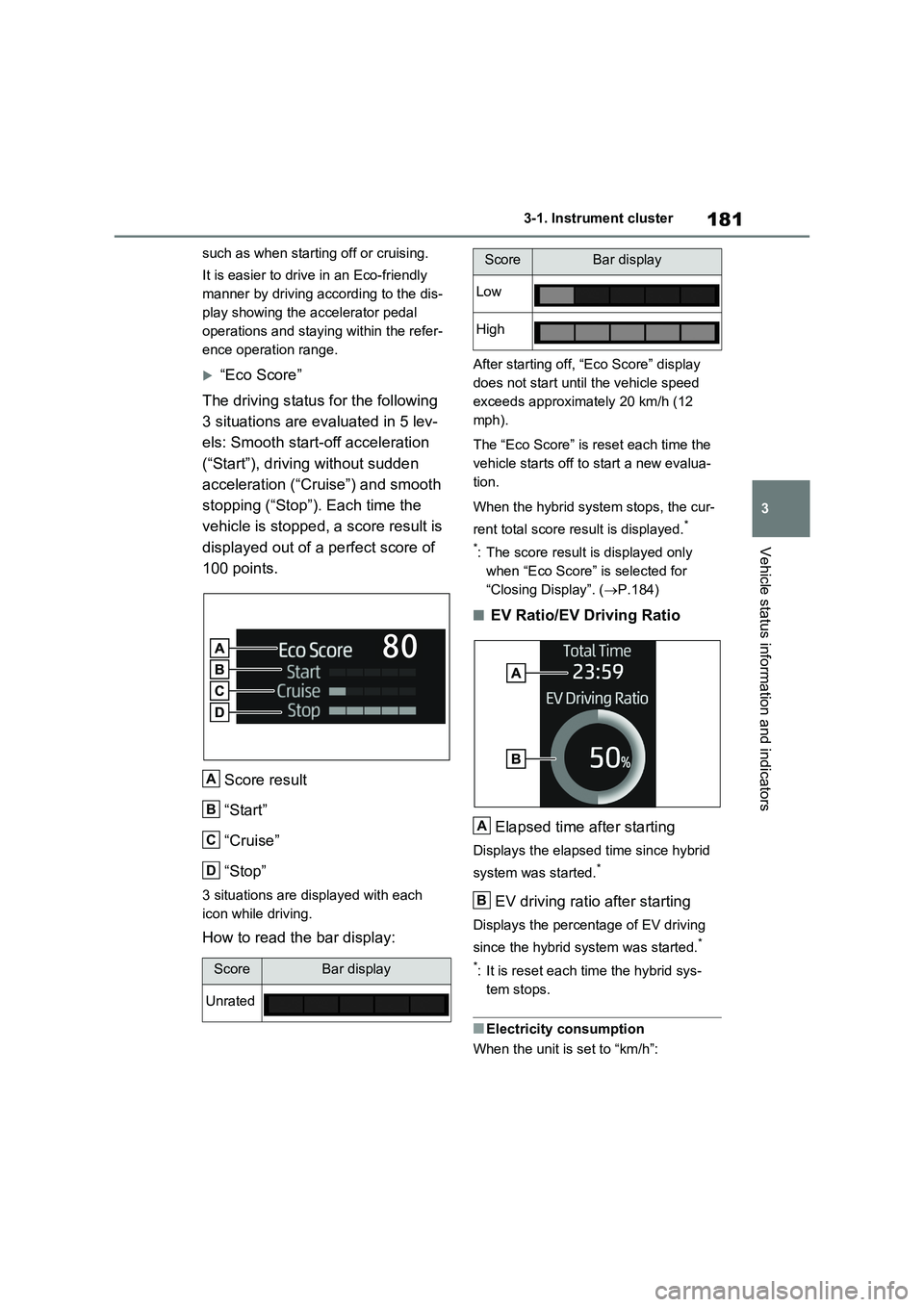
QECO Accelerator Guid-
ance/“Eco Score”
Displays a reference operation
range for using the accelerator
pedal according to driving condi-
tions, and a score result that evalu-
ates the current driving status.ECO Accelerator Guidance
“Eco Score”
ECO Accelerator Guidance
ECO area
Shows that the vehicle is being driven
in an Eco-friendly manner.
Power area
Shows that an Eco-friendly driving
range is being exceeded (during full
power driving etc.).
Current acceleration
Reference operation range
A zone is displayed in blue under the
Eco area which can be used as a refer-
ence operation range for using the
accelerator pedal according to driving
conditions such as starting off and
cruising.
The ECO Accelerator Guidance display
changes according to the driving status,
B
C
D
A
B
A
B
C
D
Page 183 of 662
181
3 3-1. Instrument cluster
Vehicle status information and indicators
such as when starting off or cruising.
It is easier to drive in an Eco-friendly
manner by driving according to the dis-
play showing the accelerator pedal
operations and staying within the refer-
ence operation range.
“Eco Score”
The driving status for the following
3 situations are evaluated in 5 lev-
els: Smooth start-off acceleration
(“Start”), driving without sudden
acceleration (“Cruise”) and smooth
stopping (“Stop”). Each time the
vehicle is stopped, a score result is
displayed out of a perfect score of
100 points.
Score result
“Start”
“Cruise”
“Stop”
3 situations are displayed with each
icon while driving.
How to read the bar display:
After starting off, “Eco Score” display
does not start until the vehicle speed
exceeds approximately 20 km/h (12
mph).
The “Eco Score” is reset each time the
vehicle starts off to start a new evalua-
tion.
When the hybrid system stops, the cur-
rent total score result is displayed.
*
*
: The score result is displayed only
when “Eco Score” is selected for
“Closing Display”. (P.184)
QEV Ratio/EV Driving Ratio
Elapsed time after starting
Displays the elapsed time since hybrid
system was started.
*
EV driving ratio after starting
Displays the percentage of EV driving
since the hybrid system was started.
*
*
: It is reset each time the hybrid sys-
tem stops.
QElectricity consumption
When the unit is set to “km/h”:
ScoreBar display
Unrated
A
B
C
D
Low
High
ScoreBar display
A
B
Page 184 of 662

1823-1. Instrument cluster
Electricity consumption is the consump-
tion rate of the electricity when EV driv-
ing is performed and equivalent to the
fuel consumption for the gasoline vehi-
cles. For this vehicle, electricity con-
sumed per 100 km (“kWh/100 km”) is
displayed as electricity consumption on
each screen.
When the unit is set to “MPH” (if
equipped):
Electricity consumption is the consump-
tion rate of the electricity when EV driv-
ing is performed and equivalent to the
fuel consumption for the gasoline vehi-
cles. For this vehicle, driven distance
per kWh of electricity consumed
(“miles/kWh”) is displayed as electricity
consumption on each screen.
QEV driving range
OWhen the air conditioning system is
operating, is displayed next to
the EV driving range and the EV driv-
ing range with the air conditioning sys-
tem on is displayed.
OThe EV driving range may shorten
even when not driving due to power
consumption by the system.
OFor details, refer to “EV driving range”
(P.102)
QDistance to empty
OThis distance is computed based on
your average fuel consumption. As a
result, the actual distance that can be
driven may differ from that displayed.
OWhen only a small amount of fuel is
added to the tank, the display may not
be updated. When refueling, turn the
power switch off. If the vehicle is refu-
eled without turning the power switch
off, the display may not be updated.
OWhen “Refuel” is displayed, the
remaining fuel amount is low and the
distance that can be driven with the
remaining fuel cannot be calculated.
Refuel immediately.
QECO Accelerator Guidance/“Eco
Score” will not operate when
The ECO Accelerator Guidance/“Eco Score” will not operate in the following
situations:
OThe Hybrid System Indicator is not
operating.
OThe vehicle is being driven using the
dynamic radar cruise control with full-
speed range.
QDriving support system infor-
mation display
Select to display the operational
status of the following systems:
LTA (Lane Tracing Assist)
*
(P.318)
Dynamic radar cruise control
with full-speed range
* (P.332)
Cruise control
* (P.344)
Speed limiter
* (P.347)
*: If equipped
QNavigation system-linked dis-
play (if equipped)
Select to display the following navi-
gation system-linked information.
Route guidance
Compass display
Select to enable selection of an
audio source or track on the dis-
play.
Driving support system
information display
Audio system-linked display
Page 185 of 662

183
3 3-1. Instrument cluster
Vehicle status information and indicators
QDrive information
2 items that are selected using the
“Drive Info Items” setting (average
speed, distance and total time) can
be displayed vertically.
The displayed information changes
according to the “Drive Info Type”
setting (since the system was
started or between resets).
(P.184)
Use the displayed information as a ref-
erence only.
Following items will be displayed.
“Trip”
• “Average Speed”: Displays the aver-
age vehicle speed since hybrid sys-
tem start
*
• “Distance”: Displays the distance
driven since hybrid system start*
• “Total Time”: Displays the elapsed
time since hybrid system start*
*
: These items are reset each time the
hybrid system stops.
“Total”
• “Average Speed”: Displays the aver-
age vehicle speed since the display
was reset
*
• “Distance”: Displays the distance
driven since the display was reset*
• “Total Time”: Displays the elapsed
time since the display was reset*
*
: To reset, display the desired item and
press and hold .
QEnergy monitor
P.193
QTire pressure
P.465
QAWD system display
Front tire direction display
Displays the operation amount and
direction of the steering wheel via
changes to the front tires on the dis-
play.
Torque distribution display
Displays the drive status of each wheel
in 6 steps from 0 to 5.
G-force display*
Displays the size and direction of the G-
force applied to the vehicle via changes
to the position of the ball on the display.
Maximum G-force course*
This item is linked with the G-force dis-
play and the course of the past move-
ment of the ball is displayed.
Press and hold to reset the record.
Wheel spin display
When a tire is spinning, its icon on the
display changes its color and blinks.
*: This item is displayed only when driv-
ing mode is set to sport mode.
Vehicle information display
A
B
C
D
E
Page 186 of 662

1843-1. Instrument cluster
Vehicle settings and the content
displayed on the screen can be
changed by using the meter control
switches.
QSetting procedure
1Operate or of the meter
control switches and select .
2Operate or of the meter
control switches and select the
desired item.
• If the function is turned on and
off or the volume, etc. is changed
on the setting screen, the setting
is changed each time is
pressed.
• For functions that allow opera-
tion contents, display contents,
etc., of function to be selected,
the setting screen is displayed by
pressing and holding . When
the setting screen is displayed,
select the setting or desired
value (time, etc.) with .
3After changing the settings,
press of the meter control
switches.
Q LTA (Lane Tracing Assist)
(if equipped) (P.318)
Select to set up the following items.
“Lane Center”
Select to enable/disable the lane cen-
tering function.
“Steering Assist”
Select to enable/disable steering wheel
assistance.
“Alert”
Select to change each notification
method of the lane departure alert.
“Sensitivity”
Select to set the lane departure alert
sensitivity.
“Sway Warning”
Select to enable/disable the vehicle
sway warning.
“Sway Sensitivity”
Select to set the vehicle sway warning
sensitivity.
Q PCS (Pre-Collision Sys-
tem) (if equipped) (P.311)
Select to set up the following items.
PCS on/off
Select to enable/disable the pre-colli-
sion system.
“Sensitivity”
Select to change the pre-collision warn-
ing timing.
Q BSM (Blind Spot Monitor)
(if equipped) (P.349)
Select to set up the following items.
BSM (Blind Spot Monitor) on/off
Select to enable/disable the BSM sys-
tem.
“Brightness”
Select to switch the brightness of the
outside rear view mirror indicators.
(P.349)
“Sensitivity”
Select to change the alert timing for an
approaching vehicle.
Settings display
Page 187 of 662

185
3 3-1. Instrument cluster
Vehicle status information and indicators
Q (Toyota parking assist-
sensor) (P.371)
Select to set up the following items.
Toyota parking assist-sensor
on/off
Select to enable/disable the Toyota
parking assist-sensor.
“Volume”
Select to set the volume of the buzzer
which sounds when the Toyota parking
assist-sensor is operated.
QRCTA (Rear Crossing Traffic
Alert) (if equipped) (P.349)
RCTA (Rear Crossing Traffic
Alert) on/off
Select to enable/disable the RCTA sys-
tem.
“Volume”
Select to change the RCTA buzzer vol-
ume.
Q PKSB (Parking Support
Brake System) (if equipped)
(P.379)
Select to enable/disable the Park-
ing Support Brake function.
Q“HUD Main” (if equipped)
(P.189)
HUD on/off
Select to enable/disable the head-up
display.
“HUD Brightness/Position”
Select to adjust the brightness or verti-
cal position of the head-up display.
“HUD Driving Support”
Select to change the items displayed
on the head-up display.
“HUD Rotation”
Select to adjust the angle of the head-
up display.
Q RSA (Road Sign Assist)
(if equipped) (P.328)
Select to set up the following items.
Road Sign Assist on/off
Select to enable/disable the RSA sys-
tem.
“Notification Method”
Select to change each notification
method used to notify the driver when
the system detects driving conditions
that are prohibited by signs.
“Notification Level”
Select to change each notification level
used to notify the driver when the sys-
tem recognizes a speed limit sign.
QDRCC (RSA) (if equipped)
(P.340)
Select to enable/disable the
Dynamic Radar Cruise Control with
Road Sign Assist.
QVehicle Settings
“Charging Settings”
Select to set up the following items.
• “Charging Schedule”
Select to register or change the
charging schedule. (P.143)
• “Charging Current”
Select to change the charging current.
(P.124)
• “Battery Heater”
Select to enable/disable the battery
heater. (P.127)
• “Battery Cooler”