Page 399 of 748

3995-3. Connectivity settings
5
Audio
1Press the “MENU” button.
2 Select “Setup”.
3 Select “Wi-Fi
*”.
*:Wi-Fi® is a registered trademark
of Wi-Fi Alliance
®.
4 Select the desired item to be
set.
Select to enable/disable the
Wi-Fi
® Hotspot function.
( P.399) Select to check/change the
access point password.
(
P.400)
Select to display hints for
connecting to the vehicle via
Wi-Fi
®.
Select to make the access
point searchable/unsearch-
able.
Select to check/change the
security protocol of the
access point (for authentica-
tion and encryption).
( P.400)
Select to change the access
point name (SSID). ( P.400)
Select to change the Wi-Fi
®
connection channel (within
the 2.4GHz frequency band).
( P.400)
●If any settings have been
changed, it will be necessary to
reset the Wi-Fi
® system to com-
plete the changes. To reset the
Wi-Fi
® system, select “Yes” on the
pop-up displayed after changing
the settings.
When the Wi-Fi® Hotspot func-
tion is enabled, the system
checks for a valid Hotspot ser-
vice subscription.
If a Hotspot service subscription
has not been started, connect
your device to the in-vehicle
Changing the Wi-Fi® set-
tings
A
(QDEOLQJ�GLVDEOLQJ�WKH�
:L�)L
Š�+RWVSRW�IXQFWLRQ
B
C
D
E
F
G
Page 400 of 748

4005-3. Connectivity settings
access point to start your sub-
scription. A trial subscription
may be available.
Contact your Toyota dealer for
details about the Toyota Apps.
1Select “Password”.
2 Check that the following
screen is displayed.
Displays the password
Select to display/hide the
entered password.
Select to change the pass-
word.
1 Select “Change Password”.
2 Enter the desired password
and select “OK”.
When setting/changing a
password, observe the follow-
ing guidelines to help prevent
the password from being
cracked by a third party:
• Use an 8-character or longer
password consisting of letters and numbers. (Non-ASCII char-
acters will not be recognized by
the system.)
• Change the password regularly.
• If you write the password down, do not leave it somewhere where
it would be visible.
• Do not use the same password for vehicle Wi-Fi
® Hotspot as
other accounts already protected
by a password.
• Avoid using easy to identify words, such as your vehicle’s
model name or license plate
number, simple dictionary words,
or words with simple obfuscation,
such as c@t (for cat), as your
password.
1 Select “Security”.
2 Select the desired security
protocol.
1 Select “Access Point Name”.
2 Enter the desired access
point name (SSID) and select
“OK”.
1 Select “Channel”.
Checking/changing the
password
Changing the passwordA
B
C
&KDQJLQJ�WKH�VHFXULW\�SUR�
WRFRO
&KDQJLQJ�WKH�DFFHVV�SRLQW�
QDPH��66,'\f
6HOHFWLQJ�D�:L�)L
Š�FRQQHF�
WLRQ�FKDQQHO
Page 402 of 748
4025-3. Connectivity settings
Communication standards
IEEE 802.11b
IEEE 802.11g
IEEE 802.11n (2.4GHz)
Security
WPA™
WPA2™
• WPA™ and WPA2™ are trade-
marks of Wi-Fi Alliance
®.
Specifications
Page 407 of 748

4075-4. Apple CarPlay/Android Auto
5
Audio
SymptomSolution
An Apple Car-
Play/Android Auto con-
nection cannot be
established.
Check if the device supports Apple Car-
Play/Android Auto.
Check if Apple CarPlay/Android Auto is
enabled on the connected device.
Check that the Android Auto application is
installed to the device to be connected.
For details, refer to
https://www.apple.com/ios/carplay/
,
https://www.and roid.com/auto/
.
For available countries or areas for Apple Car-
Play, refer to https://www.apple.com/ios/
feature-availability/# apple carplay.
Check if “Apple CarPlay”/“Android Auto” of
“Projection Settings” on the general settings
screen is set to on. ( P.410)
Check if the USB cable be ing used is securely
connected to the device and USB port.
Try connecting the smartphone directly to the
USB port in the vehicle, without using the hub.
For Apple CarPlay: Check if the Lightning cable
being used is certified by Apple and check if Siri
is enabled.
After checking all of the above, try to establish
an Apple CarPlay/Android Auto connection.
( P.403)
When an Apple Car-
Play/Android Auto con-
nection is established and
a video is being played,
the video is not displayed,
but audio is output
through the system.
As the system is not designed to play video
through Apple CarPlay/Android Auto, this is not
a malfunction.
Although an Apple Car-
Play/Android Auto con-
nection is established,
audio is not output
through the system.
The system may muted or the volume may be
low. Increase the system volume.
Page 415 of 748
4155-5. Other settings
5
Audio
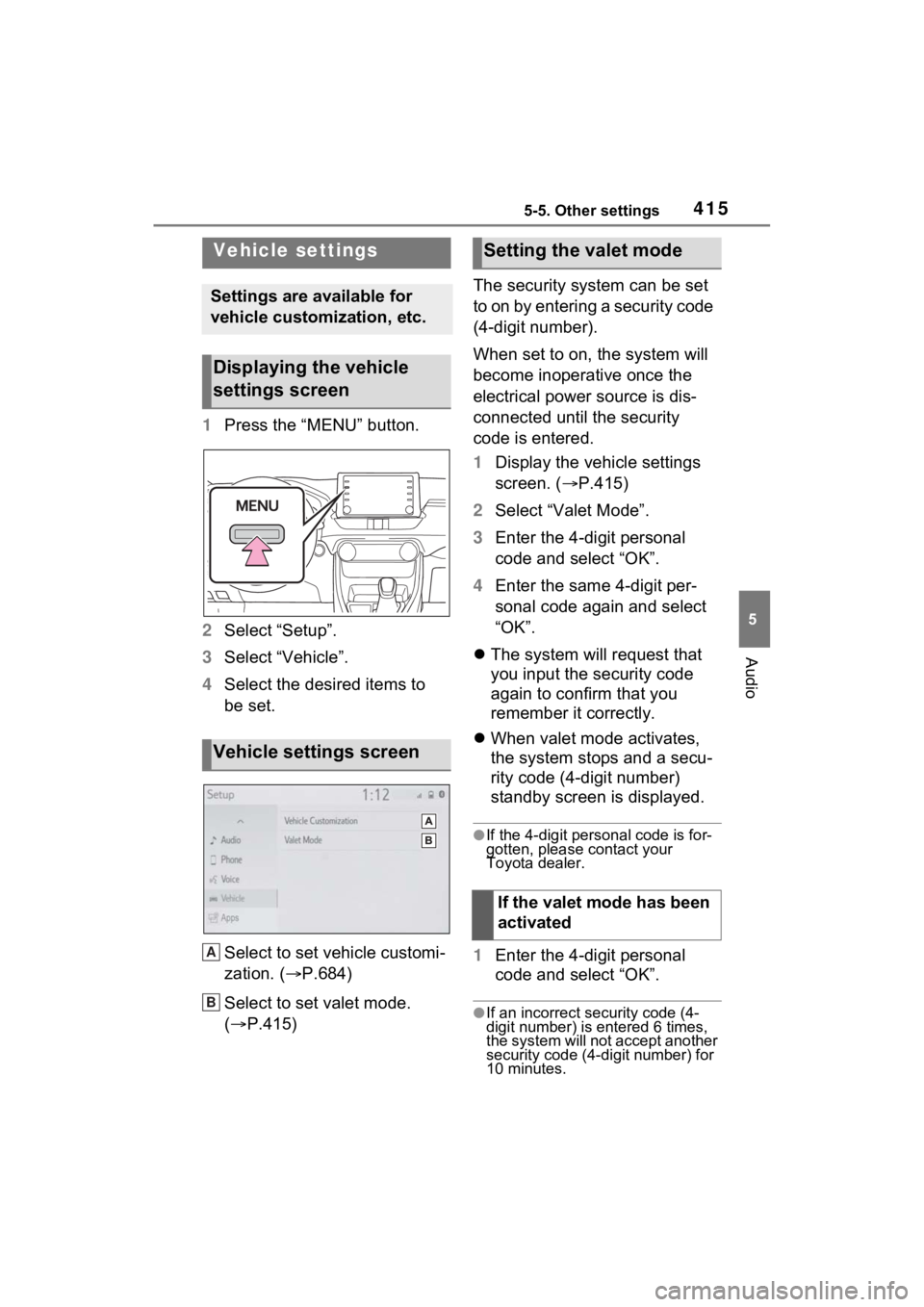
1Press the “MENU” button.
2 Select “Setup”.
3 Select “Vehicle”.
4 Select the desired items to
be set.
Select to set vehicle customi-
zation. ( P.684)
Select to set valet mode.
( P.415) The security system can be set
to on by entering a security code
(4-digit number).
When set to on, the system will
become inoperative once the
electrical power source is dis-
connected until the security
code is entered.
1
Display the vehicle settings
screen. ( P.415)
2 Select “Valet Mode”.
3 Enter the 4-digit personal
code and select “OK”.
4 Enter the same 4-digit per-
sonal code again and select
“OK”.
The system will request that
you input the security code
again to confirm that you
remember it correctly.
When valet mode activates,
the system stops and a secu-
rity code (4-digit number)
standby screen is displayed.
●If the 4-digit personal code is for-
gotten, please contact your
Toyota dealer.
1 Enter the 4-digit personal
code and select “OK”.
●If an incorrect security code (4-
digit number) is entered 6 times,
the system will not accept another
security code (4-digit number) for
10 minutes.
Vehicle settings
Settings are available for
vehicle customization, etc.
Displaying the vehicle
settings screen
Vehicle settings screen
A
B
6HWWLQJ�WKH�Y\
DOHW�PRGH
,I�WKH�YDOHW�PRGH�KDV�EHHQ�
DFWLYDWHG
Page 426 of 748

4265-7. Radio operation
*: This function is not made avail-able in some countries or areas.
Up to 20 channels can be regis-
tered as presets in the cache.
For channel registration, refer to
( P.440).
1 Select channels registered to
smart favorites.
2 Select “SXM Replay”.
●Caches up to 30 minutes for each
Smart Favorite preset.
●The radio plays the track from
start when that track has not previ-
ously been heard by the user and
the station is registered as a smart
favorite.
●When “SXM Tune Start” is turned
on ( P.423), the current song is
played from the beginning when
you select the channel.
●Displays icons on the channels
registered to smart favorites.
( P.421)
When problems occur with the Si riusXM tuner, a message will
appear on the screen. Referring to the table below to identify the
problem, take the suggested corrective action
*.
*: This function is not made availa ble in some countries or areas.
●Contact the SiriusXM Listener Ca re Center at 1-877-447-0011 (U.S.A.) or
Smart favorites*
Refer to the table below to identify the problem and take
the suggested corrective action
MessageExplanation
“Check
Antenna”
The SiriusXM antenna is not c onnected. Check whether the
SiriusXM antenna cable is atta ched securely. Contact your
Toyota dealer fo r assistance.
A short circuit occurs in the antenna or the surrounding
antenna cable. Contact your T oyota dealer for assistance.
“No Signal”The SiriusXM signal is too weak at the current location. Wait
until your vehicle reaches a l ocation with a stronger signal.
“Chan
Unavailable”The channel you selected is not broadcasting any program-
ming. Select another channel.
“Ch Unsub- scribed”
The channel you selected is no longer available. Wait for
about 2 seconds until the radio returns to the previous chan-
nel or “Ch 001”. If i t does not change automatically, select
another channel.
“Subscription Updated”Subscription is updated. Select “OK” to clear this message.
Page 456 of 748

4565-12. Voice command system operation
voice command operation,
select “Resume” or press the
talk switch.
●If the system does not respond or
the confirmation screen does not
disappear, press the talk switch
and try again.
●If a voice command cannot be rec-
ognized 3 consecutive times,
voice recognition will be canceled.
●Voice recognition prompts can be
changed on the voice settings
screen. ( P.414)
This function can be used to cancel
voice guidance by turning the voice
prompts off. When you press the
talk switch while using this setting, a
beep sounds, and then you can
immediately say a command.
●Some voice guidance can be can-
celed by setting voice prompts to
off. Use this setting when it is
desirable to say a command
immediately after pressing the talk
switch and hearing a beep.
To increase voice recognition
performance, use the “Tutori-
als” and “Voice Training” func-
tions on the “Getting Started
with Voice” screen. These func-
tions are only available when
the vehicle is not moving.
The “Tutorials” and “Voice
Training” functions can also be
started on the voice settings
screen. ( P.414)
1 Press the talk switch. 2
Select the desired item to be
set.
Select to display the voice
command tutorials.
Select to train the voice com-
mand system.
The user will be a sked to say 10
sample phrases. This will help the
voice command system adapt to
the user’s accent.
Select to prevent the screen
from being displayed again.
Select to proceed to the
voice command screen.
Increasing the voice rec-
ognition performance
A
B
C
D
Page 469 of 748

4695-14. Phone operation (Hands-free system for cellular phones)
5
Audio
●International phone calls may not
be made depending on the type of
Bluetooth
® phone you have.
●The list should group together
consecutive entries with the same
phone number and same call
type. For example, two calls from
John’s mobile would be displayed
as follows: John (2)
Calls can be made using regis-
tered contacts which can be
selected from a contact list.
( P.469)
1 Display the phone top
screen. ( P.463)
2 Select “Favorites” and select
the desired contact.
3 Select the desired number.
4 Check that the dialing screen
is displayed.
Calls can be made by using
contact data which is transferred
from a registered cellular phone.
( P.481)
Up to 5000 contacts (maximum
of 4 phone numbers, e-mail
addresses and addresses per
contact) can be registered in the
contact list.
1 Display the phone top
screen. ( P.463)
2 Select “Contacts” and select
the desired contact. 3
Select the desired number.
“Add Favorite”/“Remove Favorite”:
Select to register/remove the con-
tact in the favo rites list. (P.486)
“E-mail Addresses”: Select to dis-
play all registered e-mail addresses
for the contact.
“Addresses”: Select to display all
registered addresses for the con-
tact.
4 Check that the dialing screen
is displayed.
■For PBAP compatible
Bluetooth
® phones when
“Automatic Transfer” is set
to on ( P.481)
Contacts are transferred auto-
matically.
By favorites list
By contacts list
When the contact list is
empty