2022 TOYOTA PROACE VERSO Disconnect
[x] Cancel search: DisconnectPage 249 of 360
249
In the event of a breakdown
8
Starting using another
battery
If the vehicle's battery is flat, the engine can be started using a backup battery (either external or from another vehicle) and jump leads or using a battery booster.
WARNI NG
Never start the engine by connecting a battery charger.Never use a 24 V or higher battery booster.Check beforehand that the backup battery has a nominal voltage of 12 V and a capacity at least equal to that of the discharged battery.The two vehicles must not be in contact with each other.Switch off all electricity-consuming equipment on both vehicles (audio system, wipers, lighting, etc.).Make sure that the jump leads are well away from the engine’s moving parts (fan, belt, etc.).Do not disconnect the (+) terminal while the engine is running.
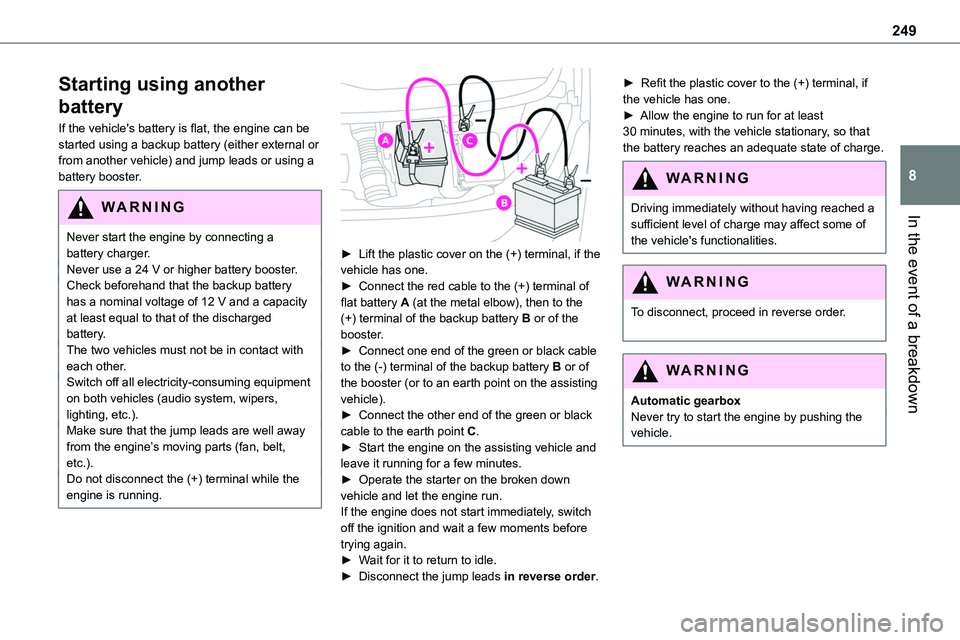
► Lift the plastic cover on the (+) terminal, if the vehicle has one.► Connect the red cable to the (+) terminal of flat battery A (at the metal elbow), then to the (+) terminal of the backup battery B or of the booster.► Connect one end of the green or black cable to the (-) terminal of the backup battery B or of the booster (or to an earth point on the assisting vehicle).► Connect the other end of the green or black
cable to the earth point C.► Start the engine on the assisting vehicle and leave it running for a few minutes.► Operate the starter on the broken down vehicle and let the engine run.If the engine does not start immediately, switch off the ignition and wait a few moments before trying again.► Wait for it to return to idle.► Disconnect the jump leads in reverse order.
► Refit the plastic cover to the (+) terminal, if the vehicle has one.► Allow the engine to run for at least 30 minutes, with the vehicle stationary, so that the battery reaches an adequate state of charge.
WARNI NG
Driving immediately without having reached a sufficient level of charge may affect some of the vehicle's functionalities.
WARNI NG
To disconnect, proceed in reverse order.
WARNI NG
Automatic gearboxNever try to start the engine by pushing the vehicle.
Page 250 of 360

250
Charging the battery using a
battery charger
For optimum service life of the battery, it is essential to maintain an adequate state of charge.In some circumstances, it may be necessary to charge the battery:– When using the vehicle mainly for short
journeys.– If the vehicle is to be taken off the road for several weeks.Consult any authorized Toyota retailer or Toyota authorized repairer, or any reliable repairer.
WARNI NG
To charge the vehicle's battery yourself, use only a charger compatible with lead-acid batteries with a nominal voltage of 12 V.
WARNI NG
Follow the instructions provided by the manufacturer of the charger.Never reverse polarities.
NOTIC E
It is not necessary to disconnect the battery.
► Switch the ignition off.
► Switch off all electrical consumers (audio system, lighting, wipers, etc.).
► Switch off charger B before connecting the cables to the battery, so as to avoid any dangerous sparks.► Ensure that the charger cables are in good condition.► Lift the plastic cover on the (+) terminal, if the vehicle has one.► Connect the cables of charger B as follows:• the positive (+) red cable to the (+) terminal of battery A,• the negative (-) black cable to earth point C on the vehicle.► At the end of the charging operation, switch off charger B before disconnecting the cables from battery A.
WARNI NG
If this label is present, use only a 12 V charger to avoid causing irreversible damage to the electrical components.
24V
12V
WARNI NG
Never try to charge a frozen battery - risk of explosion!If the battery has frozen, have it checked by any authorized Toyota retailer or Toyota authorized repairer, or any reliable repairer who will verify that the internal components have not been damaged and that the case
has not cracked, which would mean a risk of toxic and corrosive acid leaking.
Page 251 of 360

251
In the event of a breakdown
8
Disconnecting the battery
In order to maintain an adequate state of charge for starting the engine, we recommend disconnecting the battery if the vehicle is to be unused for an extended period.Before disconnecting the battery:► Close all openings (doors, tailgate, windows).► Switch off all electricity-consuming devices (audio system, wipers, lamps, etc.).
► Switch off the ignition and wait for 4 minutes.After accessing the battery, it is only necessary to disconnect the (+) terminal.
Quick-release terminal clamp
Disconnecting the (+) terminal
► Depending on equipment, lift the plastic cover
on the (+) terminal.► Raise lever A fully to release clamp B.► Remove clamp B by lifting it off.
Reconnecting the (+) terminal
► Raise lever A fully.► Refit open clamp B on the (+) terminal.► Push clamp B fully down.► Lower lever A to lock clamp B.► Depending on equipment, lower the plastic cover on the (+) terminal.
WARNI NG
Do not force the lever, as it will not lock in place if the clamp is not positioned correctly; start the procedure again.
Following reconnection
After reconnecting the battery, turn on the ignition and wait 1 minute before starting the engine, to enable the electronic systems to initialise.If minor problems nevertheless persist following this operation, contact any authorized Toyota retailer or Toyota authorized repairer, or any reliable repairer.
Referring to the relevant section, reinitialise certain equipment:– Remote control key or electronic key (depending on version).– Electric windows.– Electric doors,– Date and time.– Preset radio stations.
NOTIC E
The Stop & Start system may not be operational during the trip following the first engine start.In this case, the system will only be available again after a continuous period of immobilisation of the vehicle, a period which depends on the exterior temperature and the state of charge of the battery (up to about 8 hours).
Page 274 of 360

274
Press OK to confirm.
Select "Bluetooth Connections management" and confirm. The list of paired telephones is displayed.Press OK to confirm.
Indicates that a device is connected.
NOTIC E
A number indicates the profile of the connection with the system:– 1 for media or 1 for telephone.– 2 for media and telephone.
Indicates connection of the audio steaming profile.Indicates connection of the hands-free telephone profile.Select a telephone.
Press OK to confirm.
Then select and confirm:
– "Connect telephone" / "Disconnect telephone" : to connect / disconnect the
telephone or the hands-free kit only.– "Connect media player" / "Disconnect media player" : to connect / disconnect streaming only.
– "Connect telephone + media player" / "Disconnect telephone + media player" : to connect / disconnect the telephone (hands-free kit and streaming).– "Delete connection": to delete the pairing.
NOTIC E
When you delete a pairing in the system, remember to delete it from your telephone as well.
Press OK to confirm.
Receiving a call
An incoming call is announced by a ring and a superimposed display in the screen.Select the "YES" tab in the screen using the buttons.Confirm with OK.
Press this button at the steering mounted controls to accept the call.
Making a call
In the "Telephone" menu.Select "Call".Select "Dial".
OrSelect "Directory".OrSelect "Calls list".
Confirm with OK.
Press this button for more than two seconds for access to your directory, then navigate using the thumb wheel.
Ending a call
In the "Telephone" menu.Select "End call".
Confirm with OK to end the call.During a call, press one of these buttons for more than two seconds.
NOTIC E
The system accesses the telephone's contacts directory, depending on its compatibility, and while it is connected via Bluetooth.
NOTIC E
With certain telephones connected by Bluetooth you can send a contact to the directory of the audio system.Contacts imported in this way are saved in a permanent directory visible to all, whatever the telephone connected.The menu for the directory is not accessible if it is empty.
Page 286 of 360

286
Telephone
USB sockets
Depending on equipment, for more information on the USB sockets compatible with CarPlay® or Android Auto applications, refer to the "Ease of use and comfort" section.
NOTIC E
For the list of compatible smartphones, visit the Manufacturer's website in your country.
NOTIC E
Synchronising a smartphone enables users to display applications that support the smartphone’s CarPlay® or Android Auto technology on the vehicle’s screen. For CarPlay® technology, the CarPlay® function must first be activated on the smartphone.Unlock the smartphone for the communication process between the smartphone and the system to work.As principles and standards are constantly changing, we recommend keeping the smartphone's operating system up-to-date, together with the date and time on the smartphone and the system.
CarPlay® smartphone
connection
Depending on country.
NOTIC E
On connecting the USB cable, the CarPlay® function deactivates the system's Bluetooth® mode.The "CarPlay" function requires the use of a compatible smartphone and compatible applications.
Connect the USB cable. The smartphone charges when connected by the USB cable.From the system, press Telephone to display the CarPlay® interface.OrIf the smartphone has already connected by Bluetooth®.Connect the USB cable. The smartphone charges when connected by the USB cable.From the system, press "Telephone" to display the main page.Press the "PHONE" button to go to the secondary page.
Press "CarPlay" to display the CarPlay® interface.
NOTIC E
When the USB cable is disconnected and the ignition is switched off then back on, the system will not automatically switch to Radio Media mode; the source must be changed manually.
The CarPlay® navigation can be accessed
at any time by pressing the system's Navigation button.
Android Auto smartphone
connection
Depending on country.On the smartphone, download the Android Auto application.
NOTIC E
The "Android Auto" function requires the use of a compatible smartphone and applications.
Telephone not connected by
Bluetooth®
Connect a USB cable. The smartphone charges when connected by a USB cable.
From the system, press "Telephone" to display the main page.Press "Android Auto" to start the application in the system.
Page 288 of 360

288
NOTIC E
The profiles compatible with the system are: HFP, OPP, PBAP, A2DP, AVRCP, MAP and PAN.
Visit the Brand's website for more information (compatibility, additional help, etc.).
Automatic reconnection
On returning to the vehicle, if the last telephone connected is present again, it is automatically recognised and within about 30 seconds after switching on the ignition, the pairing is established automatically (Bluetooth activated).To modify the connection profile:Press Telephone to display the main page.Press the "PHONE" button to access the secondary page.Press "Bluetooth connection" to display the list of paired devices.Press the "Details" button for a paired device.Select one or more profiles.
Press "OK" to confirm.
Managing paired telephones
This function lets you connect or disconnect a device or delete a pairing.
Press Telephone to display the main page.Press the "PHONE" button to access the secondary page.Press "Bluetooth connection" to display the list of paired devices.Press on the name of the telephone selected in the list to disconnect it.Press again to connect it.
Deleting a telephone
Press the basket at the top right of the screen to display a basket alongside the telephone chosen.Press the basket alongside the telephone chosen to delete it.
Receiving a call
An incoming call is announced by a ring and a superimposed display in the screen.Make a short press on the steering mounted PHONE button to accept an incoming call.AndMake a long press
on the steering mounted PHONE button to reject the call.OrPress "End call".
Making a call
WARNI NG
Using the telephone is not recommended while driving.Parking the vehicle.Make the call using the steering mounted controls.
Calling a new number
Press Telephone to display the main page. Enter the phone number using the digital keypad.Press "Call" to start the call.
Calling a contact
Press Telephone to display the main page. Or press and hold
the steering mounted PHONE button.
Press "Contacts".Select the desired contact from the displayed list.
Press "Call".
Page 306 of 360

306
Connectivity
Press Applications to display the main page.Press "Connectivity" to access the CarPlay® or Android Auto functions.
CarPlay® smartphone
connection
Depending on country.
NOTIC E
On connecting the USB cable, the CarPlay® function deactivates the system's Bluetooth® mode.The "CarPlay" function requires the use of a compatible smartphone and compatible applications.
Connect the USB cable. The smartphone charges when connected by the USB cable.Press "Telephone" to display the CarPlay® interface.OrConnect the USB cable. The smartphone charges when connected by the USB cable.
From the system, press "Applications" to display the main page.Press "Connectivity" to access the "CarPlay®” function.
Press "CarPlay" to display the CarPlay® interface.
NOTIC E
When the USB cable is disconnected and the ignition is switched off then back on, the system will not automatically switch to Radio Media mode; the source must be changed manually.
Android Auto smartphone
connection
Depending on country.
NOTIC E
Install the "Android Auto" application on the smartphone via "Google Play".The "Android Auto" function requires the use of a compatible smartphone and compatible applications.
Connect the USB cable. The smartphone charges when connected by the USB cable.From the system, press "Applications" to display the main page.Press "Connectivity" to access the "Android Auto” function.Press "Android Auto" to start the
application in the system.
During the procedure, several screen pages relating to certain features are displayed.Accept to start and complete the connection.Access to the different audio sources remains available in the margin of the Android Auto display, using the touch buttons located in the upper bar.Access to the menus for the system is possible
at any time using the dedicated buttons.
NOTIC E
In Android Auto mode, the function that displays rolling menus by briefly pressing the screen with three fingers is disabled.
NOTIC E
There may be a pause before applications become available, depending on the quality of the network.
Car Apps
Press Applications to display the main page.Press "Car Apps" to display the applications home page.
Internet Browser
Press Applications to display the main page.
Page 313 of 360

313
TOYOTA Pro Touch with navigation system
12
Press the "OPTIONS" button to access the secondary page.Select "Bluetooth connection" to display the list of paired devices.Press the "Details" button.
Select one or more profiles.
Press "OK" to confirm.
Managing paired telephones
This function lets you connect or disconnect a device or delete a pairing.Press Telephone to display the main page.Press the "OPTIONS" button to access the secondary page.Select "Bluetooth connection" to display the list of paired devices.Press on the name of the telephone selected in the list to disconnect it.Press again to connect it.
Deleting a telephone
Select the basket at top right of the screen to display a basket alongside the telephone chosen.Press the basket alongside the telephone chosen to delete it.
Receiving a call
An incoming call is announced by a ring and a superimposed display in the screen.Make a short press on the steering mounted telephone button to accept an incoming call.AndMake a long press
on the steering mounted telephone button to reject the call.OrSelect "End call" on the touch screen.
Making a call
WARNI NG
Using the telephone is not recommended while driving.Park the vehicle.Make the call using the steering mounted controls.
Calling a new number
Press Telephone to display the main
page. Enter the phone number using the digital keypad.Press "Call" to start the call.
Calling a contact
Press Telephone to display the main page.Or press and hold
the steering mounted telephone button.
Select "Contact".Select the desired contact from the displayed list.
Select "Call".
Calling a recently used
number
Press Telephone to display the main page.OrPress and hold
the steering mounted telephone button.
Select "Calls".Select the desired contact from the displayed list.
NOTIC E
It is always possible to make a call directly from the telephone; as a safety measure, first
park the vehicle.