2022 TOYOTA MIRAI heater
[x] Cancel search: heaterPage 344 of 556
3446-1. Using the air conditioning system and defogger
Owners Manual_USA_M62084_en
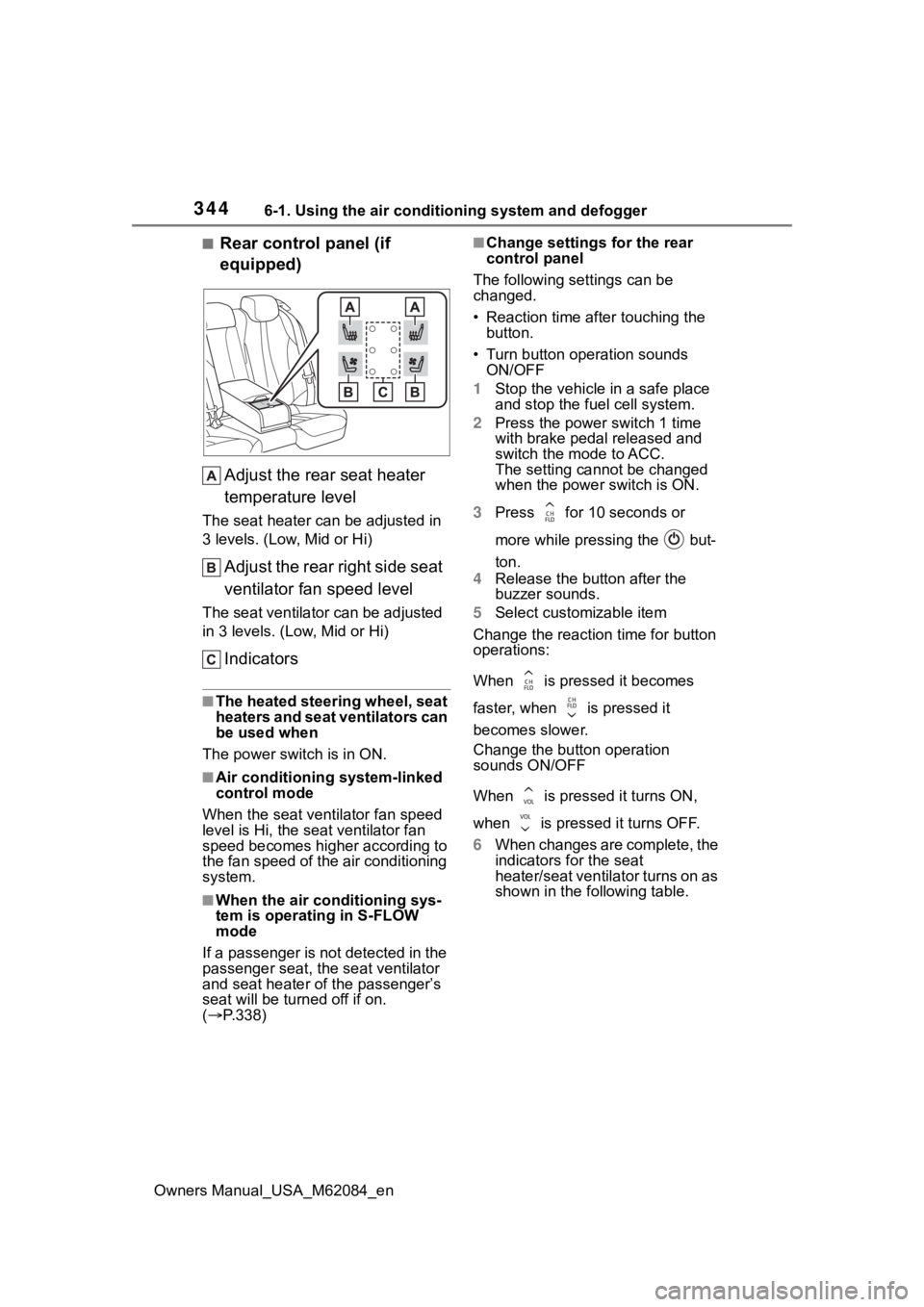
■Rear control panel (if
equipped)Adjust the rear seat heater
temperature level
The seat heater can be adjusted in
3 levels. (Low, Mid or Hi)
Adjust the rear right side seat
ventilator fan speed level
The seat ventilator can be adjusted
in 3 levels. (Low, Mid or Hi)
Indicators
■The heated steering wheel, seat
heaters and seat ventilators can
be used when
The power swit ch is in ON.
■Air conditioning system-linked
control mode
When the seat ventilator fan speed
level is Hi, the s eat ventilator fan
speed becomes higher according to
the fan speed of the air conditioning
system.
■When the air conditioning sys-
tem is operating in S-FLOW
mode
If a passenger is not detected in the
passenger seat, the seat ventilator
and seat heater of the passenger’s
seat will be turne d off if on.
( P.338)
■Change settings for the rear
control panel
The following settings can be
changed.
• Reaction time after touching the button.
• Turn button operation sounds ON/OFF
1 Stop the vehicle in a safe place
and stop the fuel cell system.
2 Press the power switch 1 time
with brake pedal released and
switch the mode to ACC.
The setting cannot be changed
when the power switch is ON.
3 Press for 10 seconds or
more while pressing the but-
ton.
4 Release the button after the
buzzer sounds.
5 Select customizable item
Change the reaction time for button
operations:
When is pressed it becomes
faster, when is pressed it
becomes slower.
Change the button operation
sounds ON/OFF
When is pressed it turns ON,
when is pressed it turns OFF.
6 When changes are complete, the
indicators for the seat
heater/seat ventilator turns on as
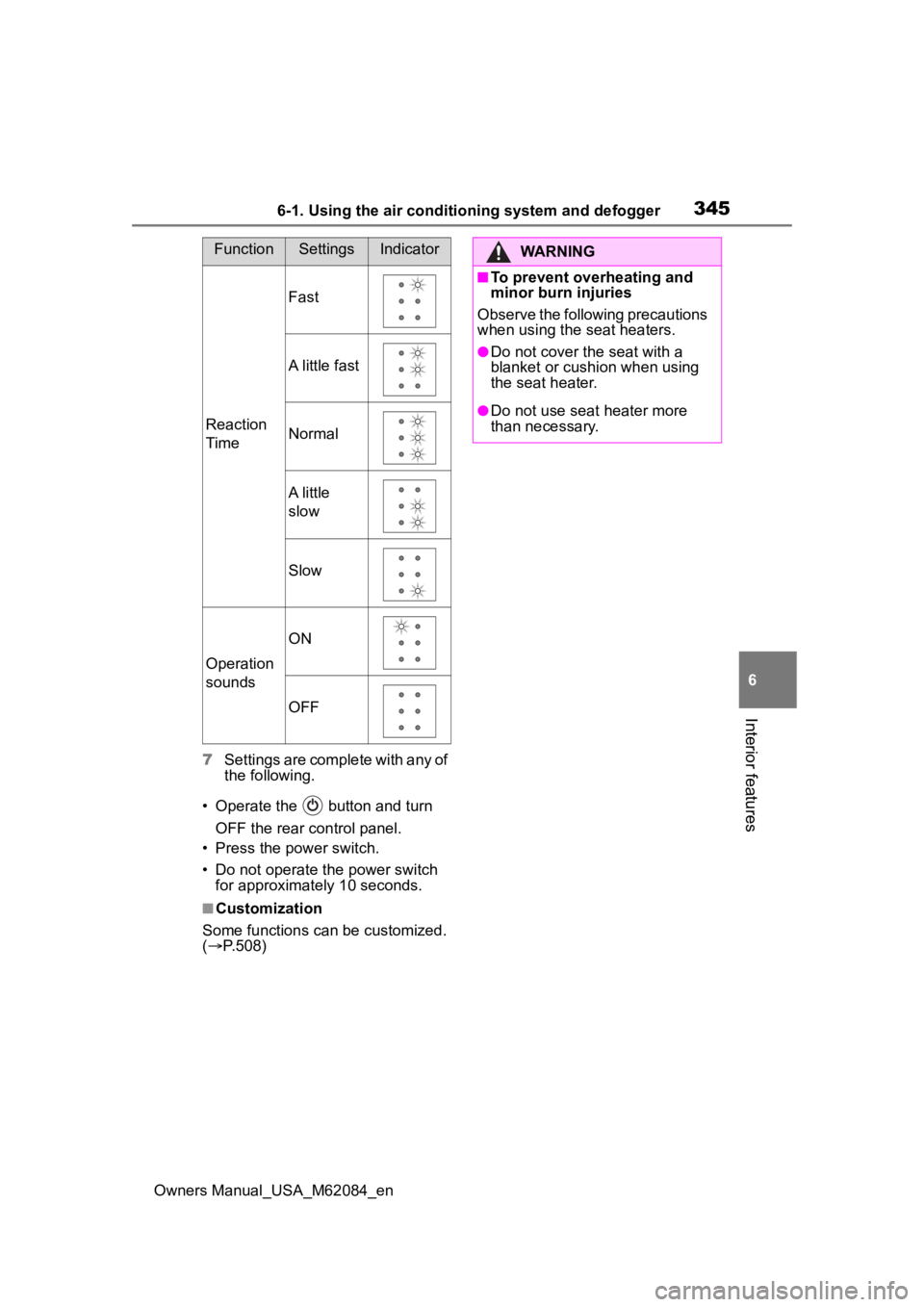
shown in the following table.
Page 345 of 556
3456-1. Using the air conditioning system and defogger
Owners Manual_USA_M62084_en
6
Interior features
7 Settings are complete with any of
the following.
• Operate the button and turn OFF the rear control panel.
• Press the power switch.
• Do not operate the power switch for approximately 10 seconds.
■Customization
Some functions can be customized.
( P.508)
FunctionSettingsIndicator
Reaction
Time
Fast
A little fast
Normal
A little
slow
Slow
Operation
sounds
ON
OFF
WARNING
■To prevent overheating and
minor burn injuries
Observe the following precautions
when using the seat heaters.
●Do not cover the seat with a
blanket or cushion when using
the seat heater.
●Do not use seat heater more
than necessary.
Page 350 of 556
3506-3. Using the storage features
Owners Manual_USA_M62084_en
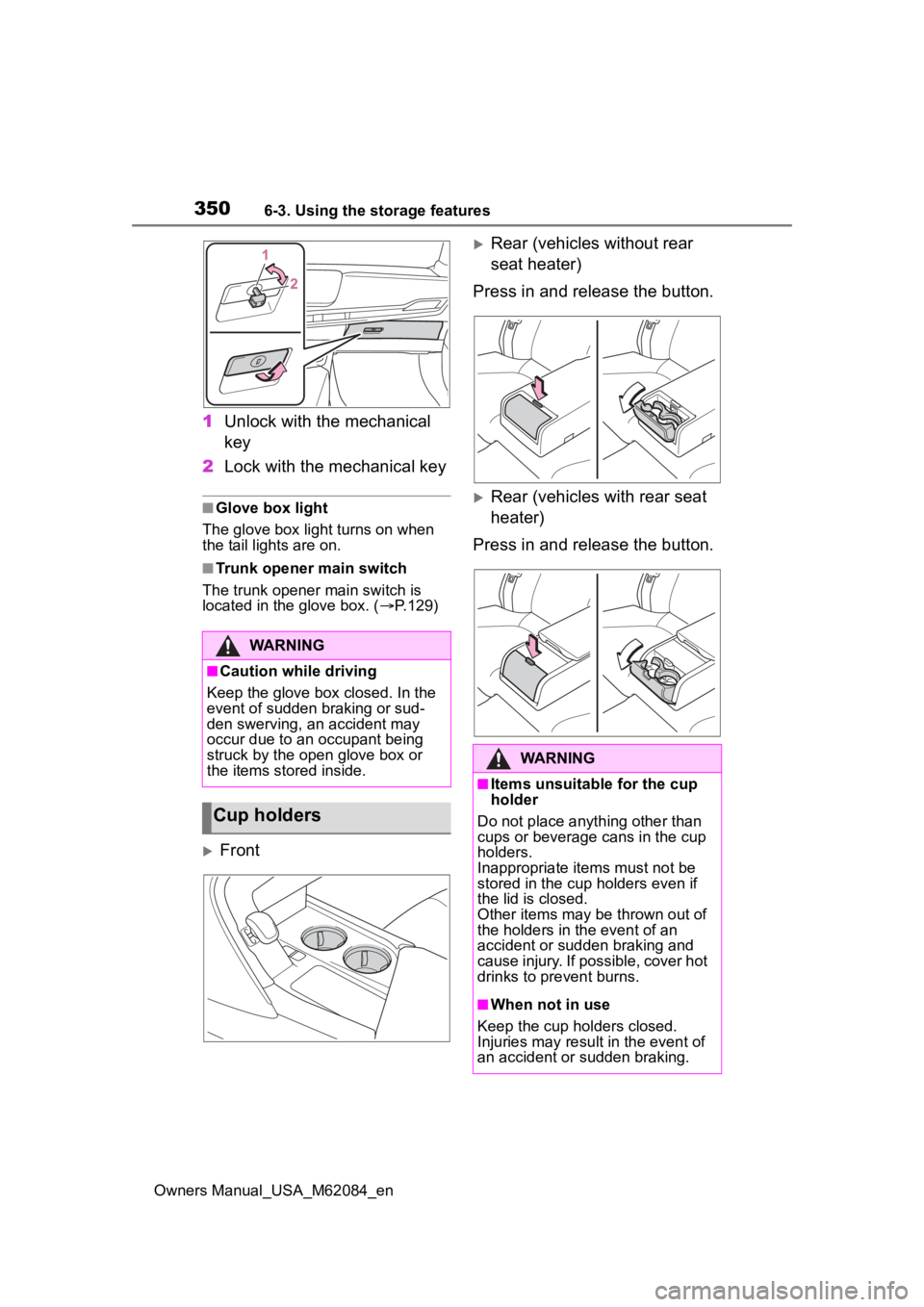
1Unlock with the mechanical
key
2 Lock with the mechanical key
■Glove box light
The glove box light turns on when
the tail lights are on.
■Trunk opener main switch
The trunk opener main switch is
located in the glove box. ( P.129)
Front
Rear (vehicles without rear
seat heater)
Press in and release the button.
Rear (vehicles with rear seat
heater)
Press in and release the button.
WARNING
■Caution while driving
Keep the glove box closed. In the
event of sudden braking or sud-
den swerving, an accident may
occur due to an occupant being
struck by the open glove box or
the items stored inside.
Cup holders
WARNING
■Items unsuitable for the cup
holder
Do not place anyth ing other than
cups or beverage cans in the cup
holders.
Inappropriate items must not be
stored in the cup holders even if
the lid is closed.
Other items may be thrown out of
the holders in the event of an
accident or sudden braking and
cause injury. If possible, cover hot
drinks to pre vent burns.
■When not in use
Keep the cup holders closed.
Injuries may resul t in the event of
an accident or sudden braking.
Page 351 of 556
3516-3. Using the storage features
Owners Manual_USA_M62084_en
6
Interior features
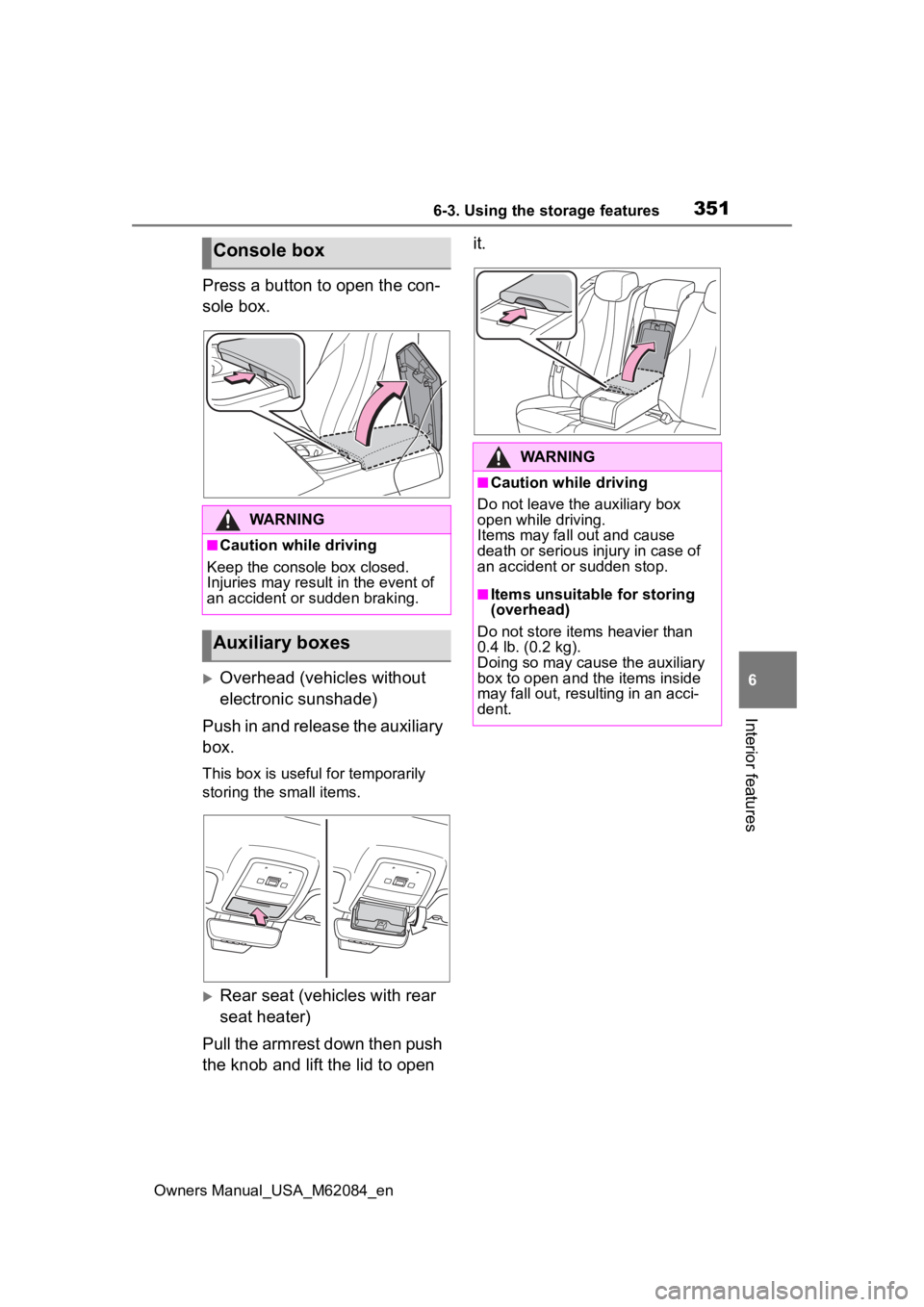
Press a button to open the con-
sole box.
Overhead (vehicles without
electronic sunshade)
Push in and release the auxiliary
box.
This box is useful for temporarily
storing the small items.
Rear seat (vehicles with rear
seat heater)
Pull the armrest down then push
the knob and lift the lid to open it.
Console box
WARNING
■Caution while driving
Keep the console box closed.
Injuries may result in the event of
an accident or sudden braking.
Auxiliary boxes
WARNING
■Caution while driving
Do not leave the auxiliary box
open while driving.
Items may fall out and cause
death or serious injury in case of
an accident or sudden stop.
■Items unsuitable for storing
(overhead)
Do not store items heavier than
0.4 lb. (0.2 kg).
Doing so may cause the auxiliary
box to open and the items inside
may fall out, resulting in an acci-
dent.
Page 353 of 556
3536-4. Using the other interior features
Owners Manual_USA_M62084_en
6
Interior features
6-4.Using the other interior features
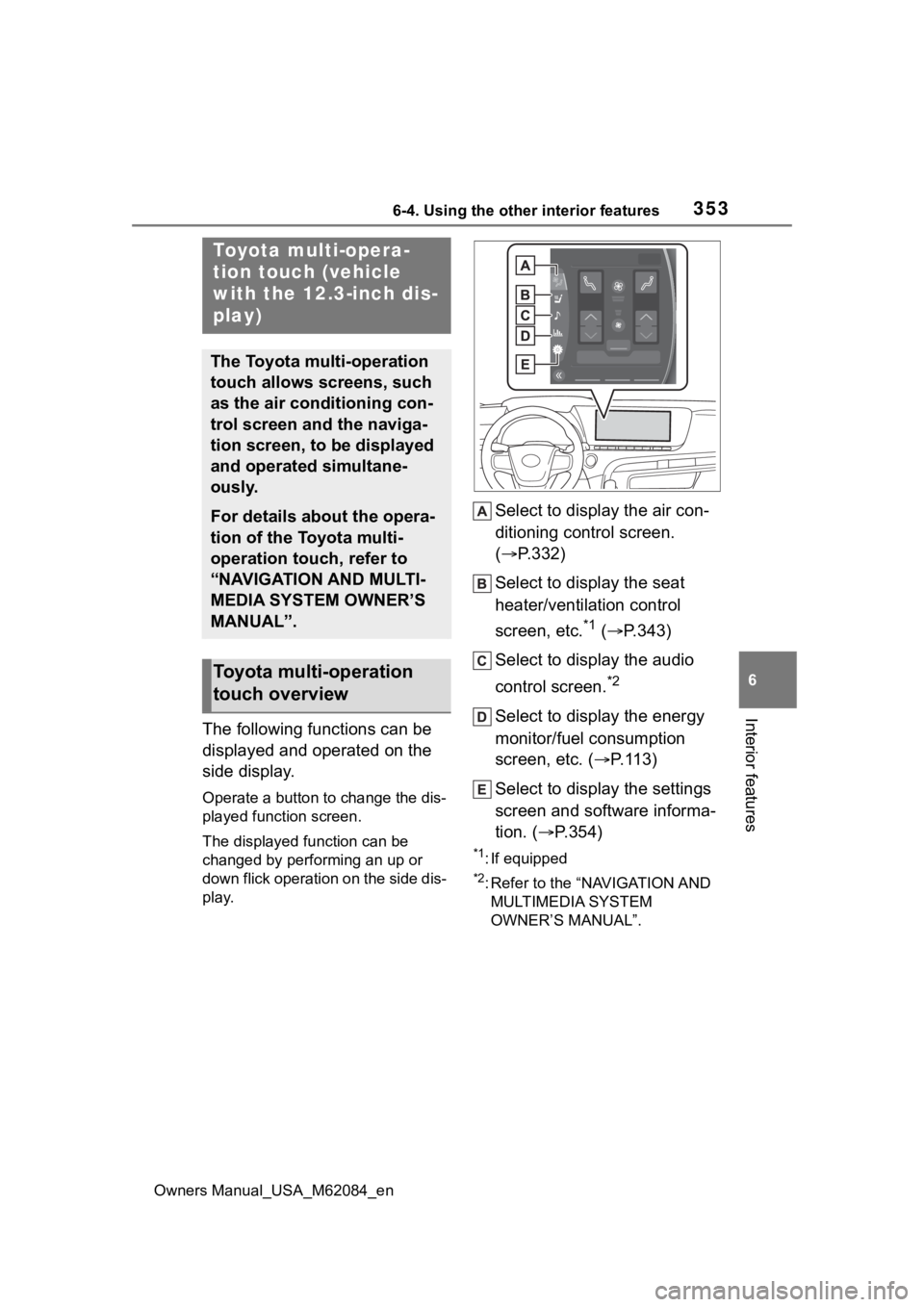
The following functions can be
displayed and operated on the
side display.
Operate a button to change the dis-
played function screen.
The displayed function can be
changed by performing an up or
down flick operation on the side dis-
play.
Select to display the air con-
ditioning control screen.
( P.332)
Select to display the seat
heater/ventilation control
screen, etc.
*1 ( P.343)
Select to display the audio
control screen.
*2
Select to display the energy
monitor/fuel consumption
screen, etc. ( P.113)
Select to display the settings
screen and software informa-
tion. ( P.354)
*1: If equipped
*2: Refer to the “NAVIGATION AND
MULTIMEDIA SYSTEM
OWNER’S MANUAL”.
Toyota multi-opera-
tion touch (vehicle
with the 12.3-inch dis-
play)
The Toyota multi-operation
touch allows screens, such
as the air conditioning con-
trol screen and the naviga-
tion screen, to be displayed
and operated simultane-
ously.
For details about the opera-
tion of the Toyota multi-
operation touch, refer to
“NAVIGATION AND MULTI-
MEDIA SYSTEM OWNER’S
MANUAL”.
Toyota multi-operation
touch overview
Page 366 of 556
3666-4. Using the other interior features
Owners Manual_USA_M62084_endevices and then press the
AC120V switch again.
●Check the charge of the traction
battery (
P.111). If the charge is
low, shift the shift position to P,
allow the fuel ce ll system to oper-
ate to charge the traction battery,
and then press the AC120V
switch again.
●If the temperature inside the vehi-
cle is high, such as after the vehi-
cle has been parked under the
sun, move the vehicle to a shaded
area, use the air conditioning sys-
tem to sufficiently cool the interior,
and then press the AC120V
switch again.
●When it is particularly cold, the
power outlets may not be able to
be used, to protect the traction
battery. In that case, drive the
vehicle and use the power outlets
after the traction battery has
warmed up.
●When the fuel door is open, close
the door and press the AC120V
switch again.
If the power outlets cannot be used
even after performing the appropri-
ate procedures above, have the
vehicle inspected by your Toyota
dealer.
●If any electrical device has mal-
functioned, park the vehicle in a
safe location and turn the AC
inverter off.
●If the protection f unction activates
and power is cut, perform the fol-
lowing procedure.
1 Stop the vehicle in a safe place
and set the parking brake.
2 Ensure that the shift position is in
P or N.
3 Check that the power consumed
by the electrical devices is within
1500 W and any device has not
malfunctioned.
4 Press the AC 120 V switch.
If the inside of the vehicle is hot,
open the windows to lower the tem- perature and turn the switch back on
once the inside of the vehicle
reaches a normal temperature. If
following the procedure above does
not restore power, have the vehicle
inspected at your Toyota dealer.
WARNING
■For safe use
Observe the following precau-
tions.
Failure to do so may lead to an
accident, resulting in death or
serious injury.
●Do not use devices such as the
following when driving:
• Devices which cannot be prop- erly secured within the vehicle.
• Devices which may distract the driver and be a hindrance to
safe driving, such as a TV, DVD
player, etc.
• Unsecured devices which gen- erate heat, such as a toaster,
microwave, electric heater, elec-
tric kettle, coffee maker, etc., as
they may cause burns or a fire
in the case of sudden braking or
an accident.
• Devices which may fall under the pedals and prevent the
brake pedal from being
depressed.
●Do not use devices which pro-
duce steam while the windows
are closed. Doing so may cause
the windows to fog up, reducing
visibility and making it difficult to
drive safely. Also, the steam
may damage or negatively
affect other devices. If the
device must be used, stop the
vehicle and open the windows
before use.
Page 367 of 556
3676-4. Using the other interior features
Owners Manual_USA_M62084_en
6
Interior features
WARNING
●Do not use damaged electronic
devices. The power supply
function may not be able to be
used.
●Do not disconnect the plug of a
device while your hands are wet
or insert a pin o r other object
into the pow er outlet. Also, if a
liquid or snow is on the power
outlet, dry the outlet before
using it.
●Do not attempt to modify, disas-
semble or repair a power outlet.
For information on repairs, con-
tact your Toyota dealer.
●Do not let children touch the
power outlets.
●Keep the power outlets free of
dust and foreign matter. Also,
regularly clean the power outlet.
●If the plug of a device fits
loosely in a pow er outlet, even
though it is fully inserted,
replace the power outlet. For
information on replacement,
contact your Toyota dealer.
■Using the power outlets while
parked or stopped
Observe the following precau-
tions.
Failure to do so may lead to an
accident, possibly resulting in
death or serious injury.
●Make sure to engage the park-
ing brake and shift the shift posi-
tion to P.
●Do not leave the vehicle unat-
tended while the READY indica-
tor is illuminated and a device is
connected to a power outlet.
●Do not place luggage or get
near the vicinity of the tailpipe.
●Make sure that the hood is
closed. Do not put your head or
hands anywhere inside the fuel
cell unit room, as the cooling
fans may operate suddenly. If
too close, hands and clothing
(especially a tie, scarf, etc.) may
get caught in a fan.
●Do not stop the vehicle near
objects which burn easily.
●Install and use appropriately
related devices to make air sup-
ply and exhaust ventilation pos-
sible in places where ventilation
is bad, such as within garages,
and places where the vehicle is
surrounded (places where snow
accumulates).
●Do not use in places where ven-
tilation is bad, such as within
garages where there are no air
supply and exhaust ventilation
devices, and places where the
vehicle is surrounded (places
where snow accumulates, etc.).
●Do not use the power outlets if
the vehicle has a vehicle cover
installed.
●Do not sleep in the vehicle while
using devices such as an elec-
tric heater.
■Devices to be connected
●Read the instruction manual
included with the electronic
device being used and observe
the precautions that are stated
regarding the product.
●Do not use when the power plug
or electronic device are dam-
aged.
●Malfunctions or poor operations
may occur when the outside
temperatures are particularly
high or low.
Page 385 of 556
3857-1. Maintenance and care
Owners Manual_USA_M62084_en
7
Maintenance and care
Remove dirt using a water-
dampened soft cloth or syn-
thetic chamois.
Wipe the surface with a dry,
soft cloth to remove any
remaining moisture.
■Cleaning the areas with satin-
finish metal accents
The metal areas use a layer of real
metal for the surface. It is necessary
to clean them regularly. If dirty areas
are left uncleaned for long periods
of time, they may be difficult to
clean.
Remove dirt and dust using a
vacuum cleaner.
Wipe off any excess dirt and
dust with a soft cloth damp-
ened with diluted detergent.
Use a diluted water solution of
approximately 5% neutral wool
NOTICE
• Steering wheel: Organic sub-
stances, such as thinner, and
cleaner that contains alcohol
●Do not use polish wax or polish
cleaner. The instrument panel’s
or other interior part’s painted
surface may be damaged.
■Preventing damage to leather
surfaces
Observe the following precautions
to avoid damage to and deteriora-
tion of leather surfaces:
●Remove any dust or dirt from
leather surfaces immediately.
●Do not expose the vehicle to
direct sunlight for extended peri-
ods of time. Park the vehicle in
the shade, especially during
summer.
●Do not place items made of
vinyl, plastic, or containing wax
on the upholstery, as they may
stick to the leather surface if the
vehicle interior heats up signifi-
cantly.
■Water on the floor
Do not wash the vehicle floor with
water.
Vehicle systems such as the
audio system may be damaged if
water comes into contact with
electrical components such as the
audio system above or under the
floor of the vehicle. Water may
also cause the body to rust.
■When cleaning the inside of
the windshield
Do not allow glass cleaner to con-
tact the lens. Also, do not touch
the lens. ( P.207)
■Cleaning the inside of the rear
window
●Do not use glass cleaner to
clean the rear window, as this
may cause damage to the rear
window defogger heater wires
or antenna. Use a cloth damp-
ened with lukewarm water to
gently wipe the window clean.
Wipe the window in strokes run-
ning parallel to the heater wires
or antenna.
●Be careful not to scratch or
damage the heater wires or
antenna.
Cleaning the areas with
satin-finish metal accents
Cleaning the leather areas