Page 351 of 568
3515-2. Using the air conditioning system and defogger
5
Interior features
WARNING
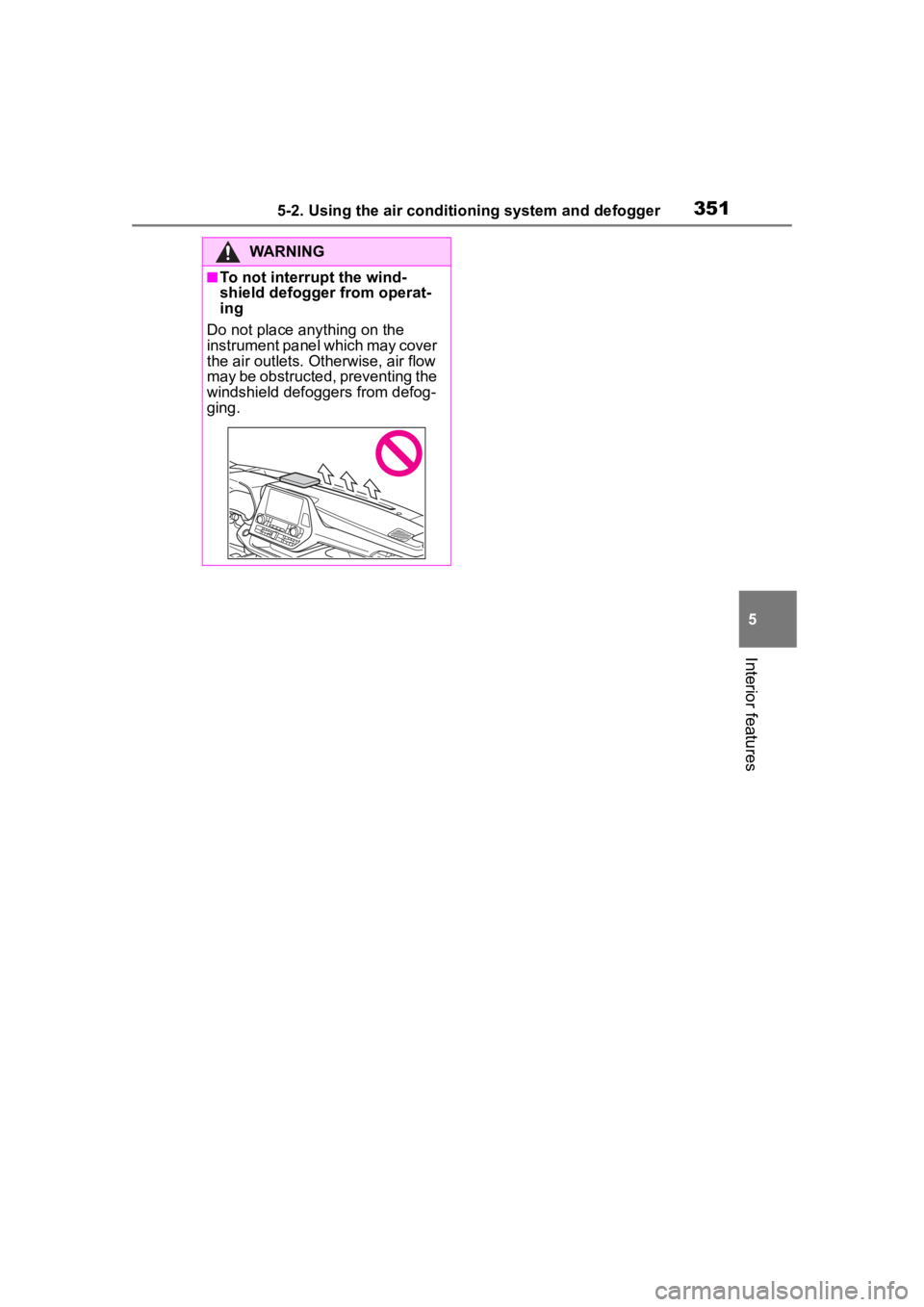
■To not interrupt the wind-
shield defogger from operat-
ing
Do not place anything on the
instrument panel which may cover
the air outlets. Otherwise, air flow
may be obstructed, preventing the
windshield defoggers from defog-
ging.
Page 352 of 568
3525-2. Using the air conditioning system and defogger
*: If equipped
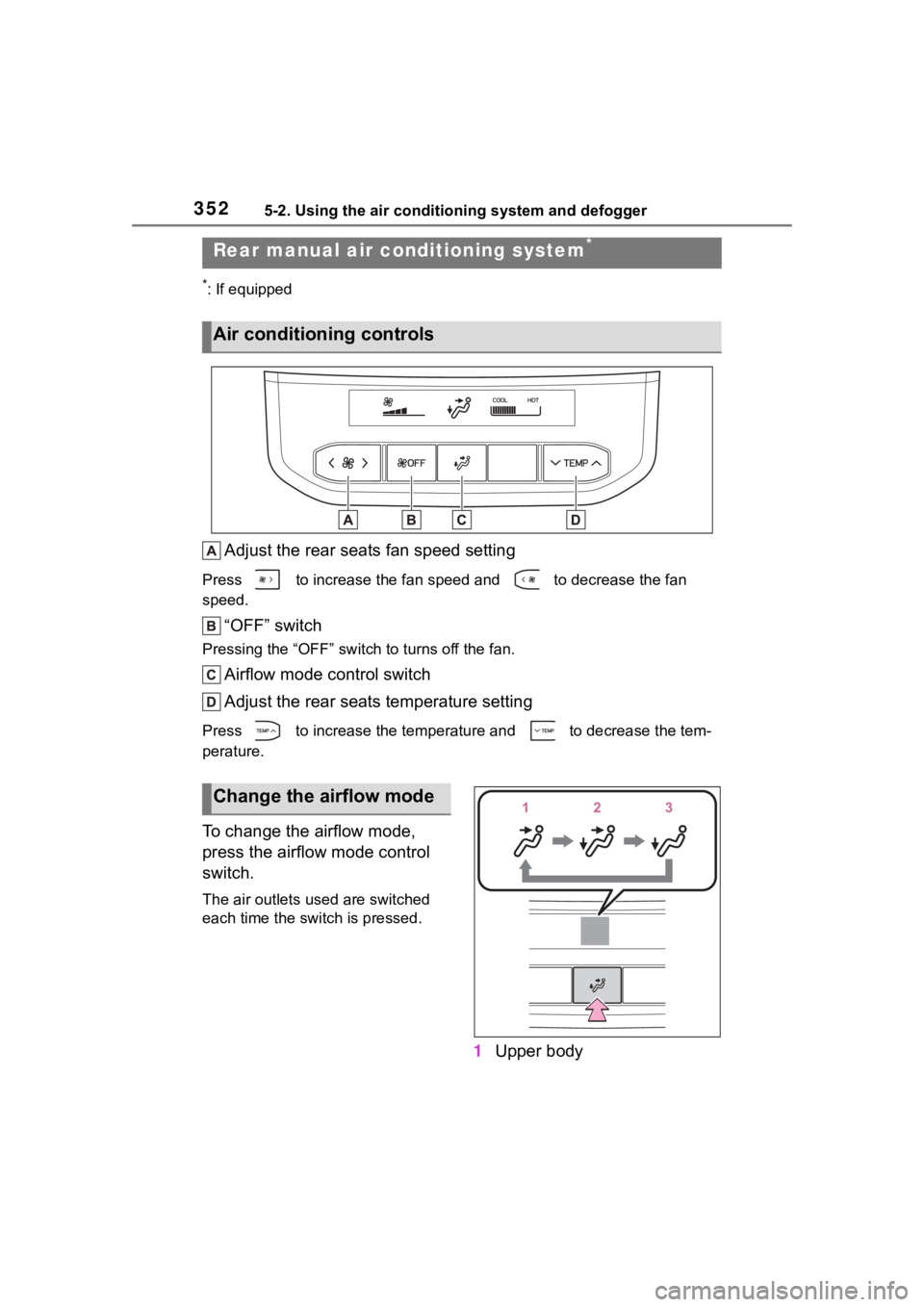
Adjust the rear seats fan speed setting
Press to increase the fan speed and to decrease the fan
speed.
“OFF” switch
Pressing the “OFF” switch to turns off the fan.
Airflow mode control switch
Adjust the rear seats temperature setting
Press to increase the temperature and to decrease the tem-
perature.
To change the airflow mode,
press the airflow mode control
switch.
The air outlets used are switched
each time the switch is pressed.
1Upper body
Rear manual air c onditioning system*
Air conditioning controls
Change the airflow mode
Page 353 of 568
3535-2. Using the air conditioning system and defogger
5
Interior features
2Upper body and feet
3 Feet
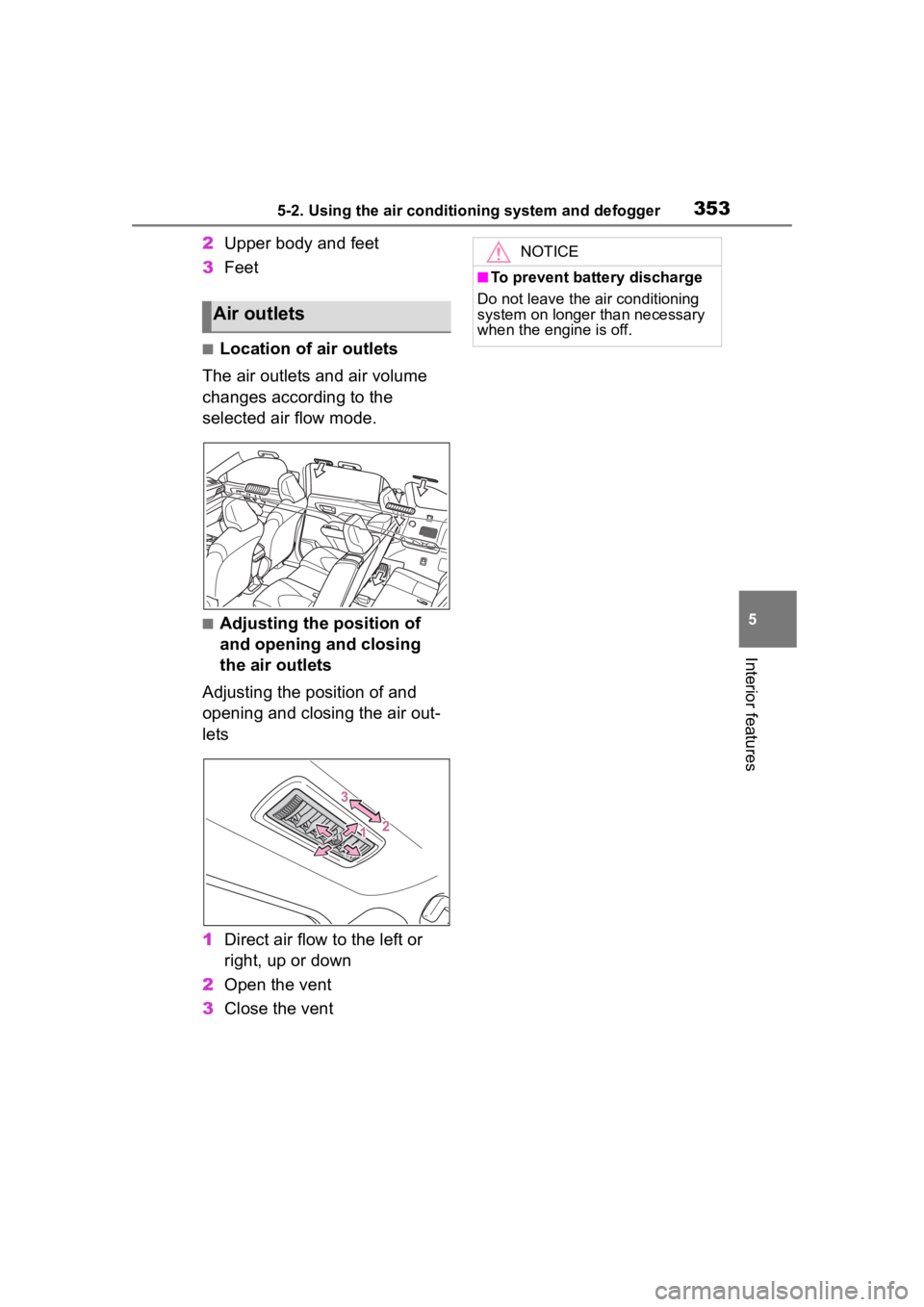
■Location of air outlets
The air outlets and air volume
changes according to the
selected air flow mode.
■Adjusting the position of
and opening and closing
the air outlets
Adjusting the position of and
opening and closing the air out-
lets
1 Direct air flow to the left or
right, up or down
2 Open the vent
3 Close the vent
Air outlets
NOTICE
■To prevent battery discharge
Do not leave the air conditioning
system on longer than necessary
when the engine is off.
Page 354 of 568
3545-2. Using the air conditioning system and defogger
*: If equipped
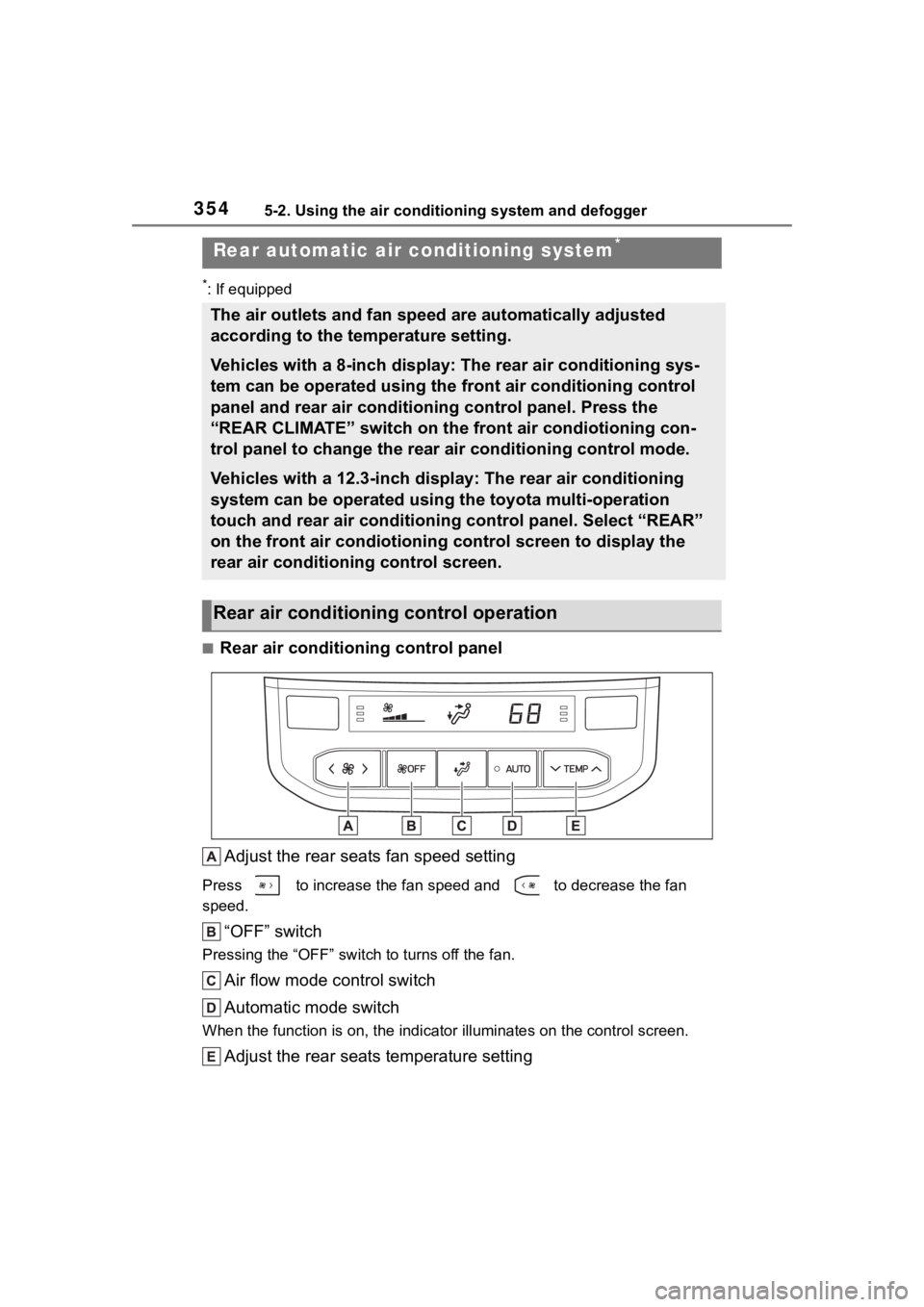
■Rear air conditioning control panelAdjust the rear seats fan speed setting
Press to increase the fan speed and to decrease the fan
speed.
“OFF” switch
Pressing the “OFF” switc h to turns off the fan.
Air flow mode control switch
Automatic mode switch
When the function is on, the indi cator illuminates on the control screen.
Adjust the rear seats temperature setting
Rear automatic air conditioning system*
The air outlets and fan speed are automatically adjusted
according to the temperature setting.
Vehicles with a 8-inch display: The rear air conditioning sys-
tem can be operated using the front air conditioning control
panel and rear air conditioning control panel. Press the
“REAR CLIMATE” switch on the front air condiotioning con-
trol panel to change the rear air conditioning control mode.
Vehicles with a 12.3-inch display: The rear air conditioning
system can be operated using the toyota multi-operation
touch and rear air conditioning control panel. Select “REAR”
on the front air condiotioning control screen to display the
rear air conditioning control screen.
Rear air conditioning control operation
Page 356 of 568
3565-2. Using the air conditioning system and defogger
control indicator is displayed for several seconds.
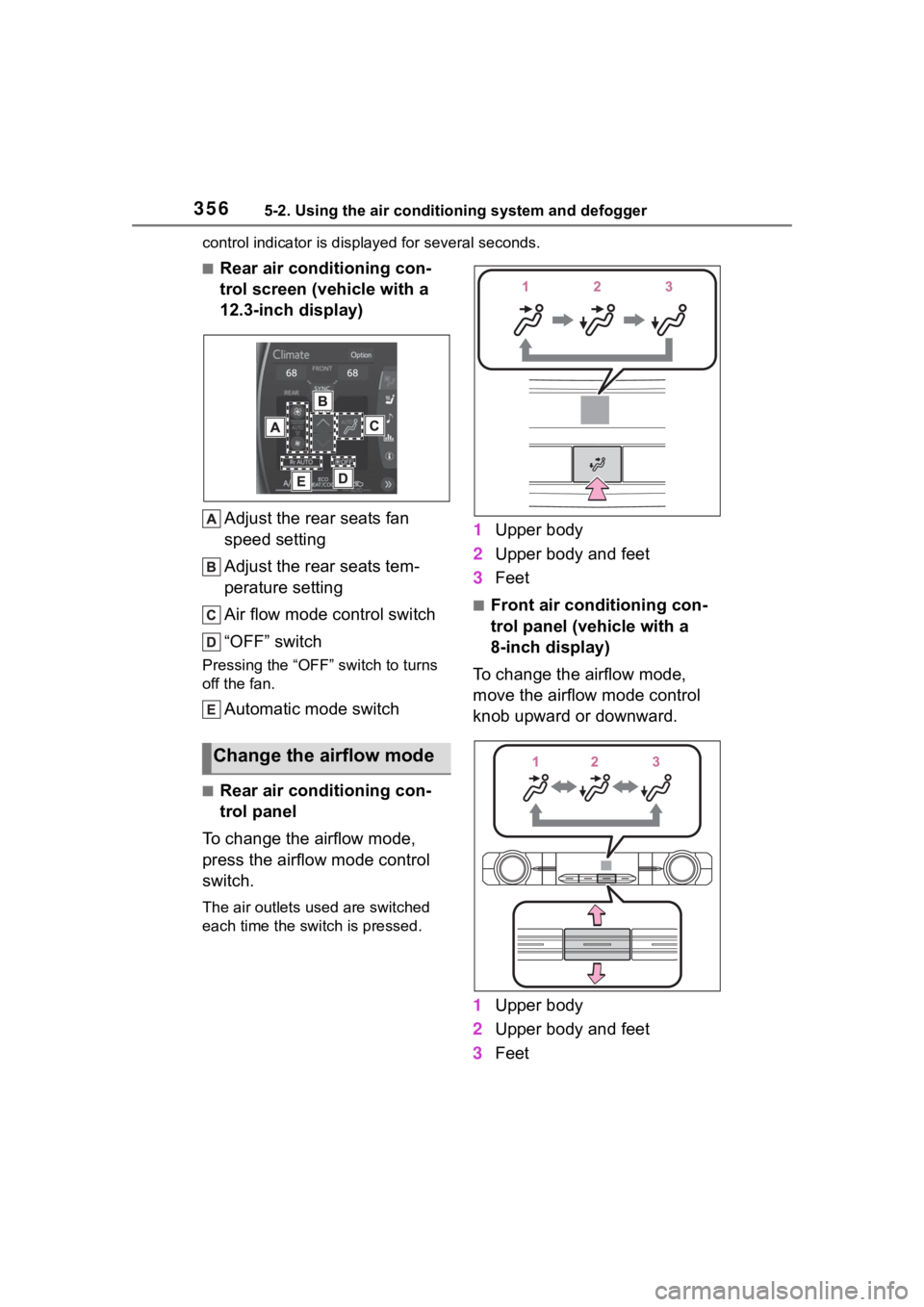
■Rear air conditioning con-
trol screen (vehicle with a
12.3-inch display)
Adjust the rear seats fan
speed setting
Adjust the rear seats tem-
perature setting
Air flow mode control switch
“OFF” switch
Pressing the “OFF” switch to turns
off the fan.
Automatic mode switch
■Rear air conditioning con-
trol panel
To change the airflow mode,
press the airflow mode control
switch.
The air outlets used are switched
each time the switch is pressed.
1 Upper body
2 Upper body and feet
3 Feet
■Front air conditioning con-
trol panel (vehicle with a
8-inch display)
To change the airflow mode,
move the airflow mode control
knob upward or downward.
1 Upper body
2 Upper body and feet
3 Feet
Change the airflow mode
Page 357 of 568
3575-2. Using the air conditioning system and defogger
5
Interior features
■Rear air conditioning con-
trol screen (vehicle with a
12.3-inch display)
To change the airflow mode,
select the airflow mode control
switch.
The air outlets used are switched
each time the switch is selected.
: Air flows to the upper body
: Air flows to the upper body and
feet
: Air flows to the feet
1Press the automatic mode
switch.
2 Adjust the temperature set-
ting.
3 To stop the operation, press
the “OFF” switch.
If the fan speed setting or air
flow modes are operated, the
automatic mode indicator goes
off. However, automatic mode
for functions other than that
operated is maintained.
■Using automatic mode
Fan speed is adjusted automati-
cally according to the temperature
setting and the ambient conditions.
Therefore, the fan may stop for a
while until warm or cool air is ready
to flow immediately after the auto-
matic mode switch is pressed.
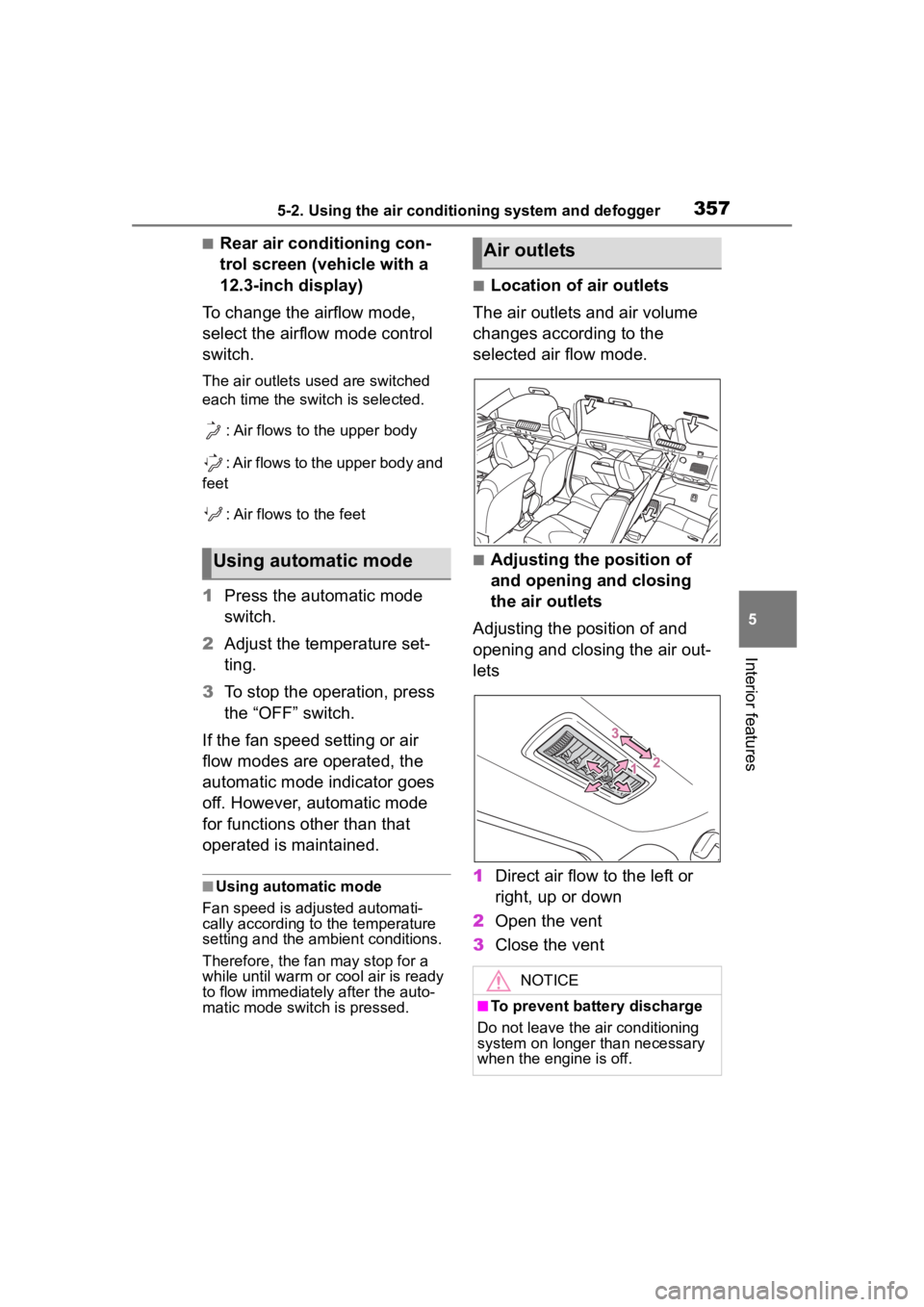
■Location of air outlets
The air outlets and air volume
changes according to the
selected air flow mode.
■Adjusting the position of
and opening and closing
the air outlets
Adjusting the position of and
opening and closing the air out-
lets
1 Direct air flow to the left or
right, up or down
2 Open the vent
3 Close the ventUsing automatic mode
Air outlets
NOTICE
■To prevent battery discharge
Do not leave the air conditioning
system on longer than necessary
when the engine is off.
Page 368 of 568
3685-4. Using the storage features
Front of console
Rear of console box (if
equipped)
■Cable pass through (Instru-
ment panel)
The open tray is provided with a
hole that allows cables to be passed
through the tray from the USB port,
USB charging ports or power outlet.
Remove the cover.
WARNING
■Items unsuitable for the open
tray
Observe the following precautions
when putting items in the open
tray. Failure to do so may cause
items to be thrown out of the tray
in the event of s udden braking or
steering. In these cases, the items
may interfere with pedal operation
or cause driver distraction, result-
ing in an accident.
●Do not store ite ms in the tray
that can easily shift or roll out.
●Do not stack items in the tray
higher than the tray’s edge.
●Do not put items in the tray that
may protrude over the tray’s
edge.
Page 382 of 568
3825-5. Using the other interior features
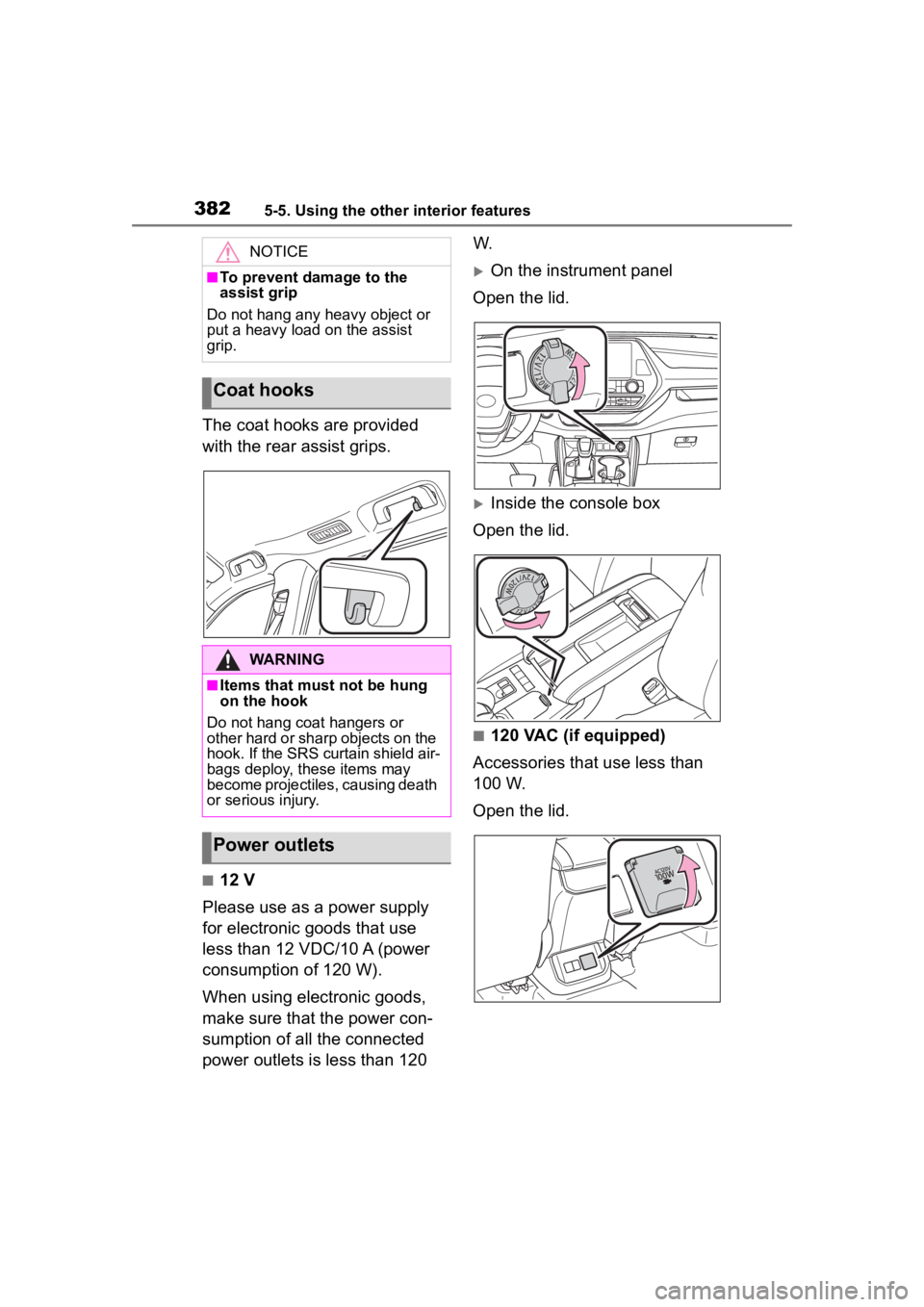
The coat hooks are provided
with the rear assist grips.
■12 V
Please use as a power supply
for electronic goods that use
less than 12 VDC/10 A (power
consumption of 120 W).
When using electronic goods,
make sure that the power con-
sumption of all the connected
power outlets is less than 120 W.
On the instrument panel
Open the lid.
Inside the console box
Open the lid.
■120 VAC (if equipped)
Accessories that use less than
100 W.
Open the lid.
NOTICE
■To prevent damage to the
assist grip
Do not hang any heavy object or
put a heavy load on the assist
grip.
Coat hooks
WARNING
■Items that must not be hung
on the hook
Do not hang coat hangers or
other hard or sharp objects on the
hook. If the SRS curtain shield air-
bags deploy, these items may
become projectiles, causing death
or serious injury.
Power outlets