2022 TOYOTA COROLLA charging
[x] Cancel search: chargingPage 79 of 678

77
1
1-4. Theft deterrent system
For safety and security
●A person inside the vehicle opens a
door, the trunk or hood, or unlocks the vehicle.
●A person inside the vehicle unlocks the door using the inside lock buttons.
●The battery is recharged or replaced when the vehicle is locked. ( P.516)
■Alarm-operated door lock
In the following cases, depending on the
situation, the door may automatically
lock to prevent improper entry into the vehicle:
●When a person remaining in the vehi-cle unlocks the door and the alarm is
activated.
●While the alarm is activated, a person
remaining in the vehicle unlocks the
door.
●When recharging or replacing the bat-
tery
NOTICE
■To ensure the system operates correctly
Do not modify or remove the system.
If modified or removed, the proper operation of the system cannot be
guaranteed.
Page 83 of 678
81
2
2-1. Instrument cluster
Vehicle status information and indicators
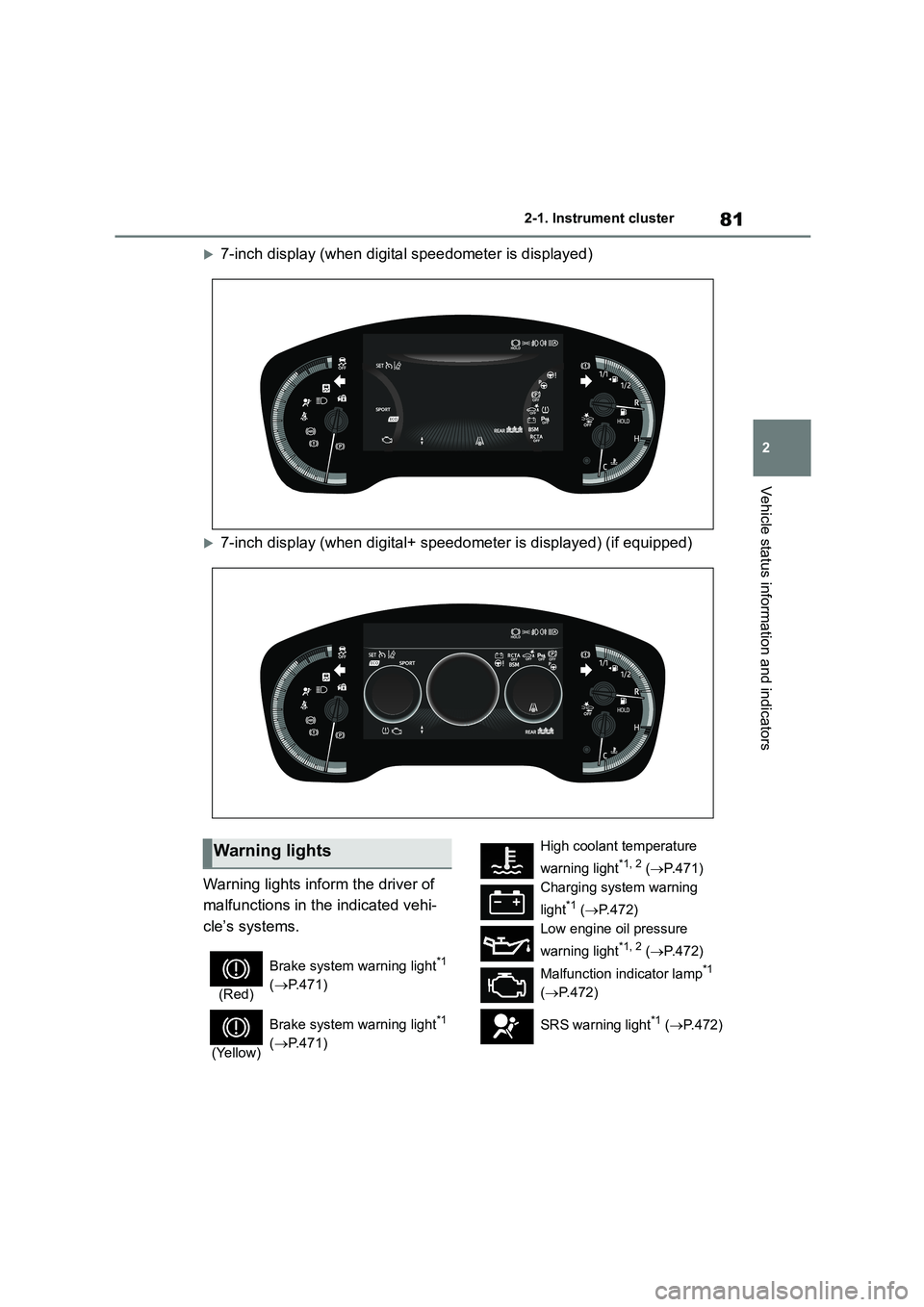
7-inch display (when digital speedometer is displayed)
7-inch display (when digital+ speedometer is displayed) (if equipped)
Warning lights inform the driver of
malfunctions in the indicated vehi-
cle’s systems.
Warning lights
(Red)
Brake system warning light*1
( P.471)
(Yellow)
Brake system warning light*1
( P.471)
High coolant temperature
warning light*1, 2 ( P.471)
Charging system warning
light*1 ( P.472)
Low engine oil pressure
warning light*1, 2 ( P.472)
Malfunction indicator lamp*1
( P.472)
SRS warning light*1 ( P.472)
Page 111 of 678
109
3
3-1. Key information
Before driving
Vehicles with a smart entry & start
system
●The standard battery life is 1 to 2
years.
●If the battery becomes low, an alarm
will sound in the cabin and a message will be shown on the multi-information
display when the engine is stopped.
●To reduce key battery depletion when
the electronic key is to not be used for
long periods of time, set the electronic key to the batter y-saving mode.
( P.122)
●As the electronic key always receives
radio waves, the battery will become
depleted even if the electronic key is not used. The following symptoms
indicate that the electronic key battery
may be depleted. Replace the battery when necessary. ( P.449)
• The smart entry & start system or the
wireless remote control does not oper- ate.
• The detection area becomes smaller.
• The LED indicator on the key surface does not turn on.
●To avoid serious deterioration, do not leave the electronic key within 1 m (3
ft.) of the following electrical appli-
ances that produce a magnetic field: •TVs
• Personal computers
• Cellular phones, cordless phones and battery chargers
• Recharging cellular phones or cord-
less phones • Table lamps
• Induction cookers
●If the electronic key is near the vehicle
for longer than necessary, even if the
smart entry & start system is not oper-
ated, the key battery may become depleted faster than normal.
■Replacing the battery
P.449
■If “New Key Registered Contact
Your Dealer if You Did Not Register a New Key” is shown on the
multi-information display (vehicles
with a smart entry & start system)
This message will be displayed each
time the driver’s door is opened when
the doors are unlocked from the outside for approximately 10 days after a new
electronic key has been registered.
If this message is displayed but you have not had a new electronic key regis-
tered, ask any authorized Toyota retailer
or Toyota authorized repairer, or any reli- able repairer to check if an unknown
electronic key (other than those in your
possession) has been registered.
■If a wrong key is used
The key cylinder rotates freely, isolated
from the internal mechanism.
NOTICE
■To prevent key damage
●Do not drop the keys, subject them to strong shocks or bend them.
●Do not expose the keys to high temperatures for long periods of
time.
●Do not get the keys wet or wash
them in an ultrasonic washer etc.
●Vehicles with a smart entry & start
system: Do not attach metallic or
magnetic materials to the keys or place the keys close to such materi-
als.
●Do not disassemble the keys.
●Do not attach a sticker or anything else to the surface of the key.
●Vehicles with a smart entry & start system: Do not place the keys near
objects that produce magnetic
fields, such as TVs, audio systems and induction cookers.
Page 159 of 678
157
4
4-1. Before driving
Driving
of your vehicle and trailer and
ensure that the vehicle-to-vehicle
distance is sufficient before execut-
ing lane changes.
■Transmission information
Multidrive
To maintain engine braking effi-
ciency and charging system perfor-
mance when using engine braking,
do not use the transmission in D,
must be in M and select gear step 4
or lower. ( P. 1 6 5 )
Manual transmission
Refrain from driving in 6th gear to
maintain the effectiveness of
engine braking and to maintain
charging system performance.
■If the engine overheats
Towing a loaded trailer up a long,
steep incline in temperatures
exceeding 30°C (85°F) may result
in the engine overheating. If the
engine coolant temperature gauge
indicates that the engine is over-
heating, turn the air conditioning off
immediately, leave the road and
stop the vehicle in a safe place.
( P.518)
■When parking the vehicle
Always place wheel chocks under
the wheels of both the vehicle and
trailer. Firmly set the parking brake
and shift the shift lever to P
(Multidrive) and 1 or R (manual
transmission).
WA R N I N G
Follow all the instructions described in
this section. Failure to do so could
cause an accident resulting in death or serious injury.
■Trailer towing precautions
When towing, make sure that none of
the weight limits are exceeded.
( P.153)
■Vehicle speed in towing
Observe the legal maximum speeds
for trailer towing.
■Before descending hills or long
declines
Reduce speed and downshift. How-
ever, never downshift suddenly while
descending steep or long downhill grades.
■Operation of the brake pedal
Do not hold the brake pedal
depressed often or for long periods of
time. Doing so may result in the brake overheating or reduce braking effects.
■To avoid accident or injury
●Vehicles with a compact spare tire:
Do not tow a trailer when the com-
pact spare tire is installed on your vehicle.
●Vehicles with the emergency tire puncture repair kit: Do not tow a
trailer when the tire installed is
repaired with the emergency tire puncture repair kit.
●Do not use the following systems when trailer towing.
• Cruise control (if equipped)
• Dynamic radar cruise control (if
equipped)
• Dynamic radar cruise control with
full-speed range (if equipped)
Page 167 of 678
165
4
4-2. Driving procedures
Driving
*: If equipped
*1: To improve fuel efficiency and
reduce noise, shift the shift lever to D
for normal driving.
*2: Except for M15A-FKS engine
*3: For M15A-FKS engine
■If “Transmission Oil Temp. High
Stop in a Safe Place and See Owner’s Manual” is displayed on
the multi-information display (for
M15A-FKS engine)
Reduce speed by easing off the acceler-
ator pedal. Stop the vehicle in a safe
place, shift the shift lever to P and let the
engine idle until the warning message
goes out.
When the warning message goes out,
the vehicle can be driven again.
If the warning message does not go out after waiting a while, have your vehicle
inspected by any authorized Toyota
retailer or Toyota authorized repairer, or any reliable repairer.
■When driving with the cruise con-
trol, dynamic radar cruise control
or dynamic radar cruise control with full-speed range activated (if
equipped)
Even when switching the driving mode to sport mode with the intent of enabling
engine braking, engine braking will not
occur because cruise control, dynamic radar cruise control or dynamic radar
cruise control with full-speed range will
not be canceled. ( P.314)
■Restraining sudden start (Drive-Start Control)
P. 1 4 6
■G AI-SHIFT
G AI-SHIFT automatica lly selects a suit- able gear for sporty driving according to
driver’s input and driving conditions. G
AI-SHIFT operates automatically when the shift lever is in D and sport mode is
selected for the driving mode. (Selecting
other than sport mode or shifting the shift lever to the M position cancels this
function.)
■After recharging/reconnecting the
battery
P. 5 1 6
Multidrive*
Select the shift position
depending on your purpose
and situation.
Shift position purpose and
functions
Shift posi-
tionObjective or function
PParking the vehicle/start-
ing the engine
RReversing
N
Neutral
(Condition in which the
power is not transmitted)
DNormal driving*1
M
7-speed sport sequential
shiftmatic mode driving*2
( P.167)
10-speed sport sequen-
tial shiftmatic mode driv-
ing*3 ( P.168)
WA R N I N G
■When driving on slippery road
surfaces
Do not accelerate or shift the shift gears suddenly.
Sudden changes in engine braking
may cause the vehicle to spin or skid, resulting in an accident.
Page 181 of 678
179
4
4-3. Operating the lights and wipers
Driving
are turned on.
■Battery-saving function
In order to prevent the battery of the vehicle from discharging, if the light
switch is in the or position
when the engine switch is turned off the battery saving function will operate and
automatically turn off all the lights after
approximately 20 minutes. When the engine switch is turned to ON, the bat-
tery-saving function will be disabled.
When any of the following are per- formed, the battery-saving function is
canceled once and then reactivated. All
the lights will turn off automatically 20 minutes after the battery- saving func-
tion has been reactivated:
●When the headlight switch is operated
●When a door is opened or closed
■Customization
Some functions can be customized.
( P.538)
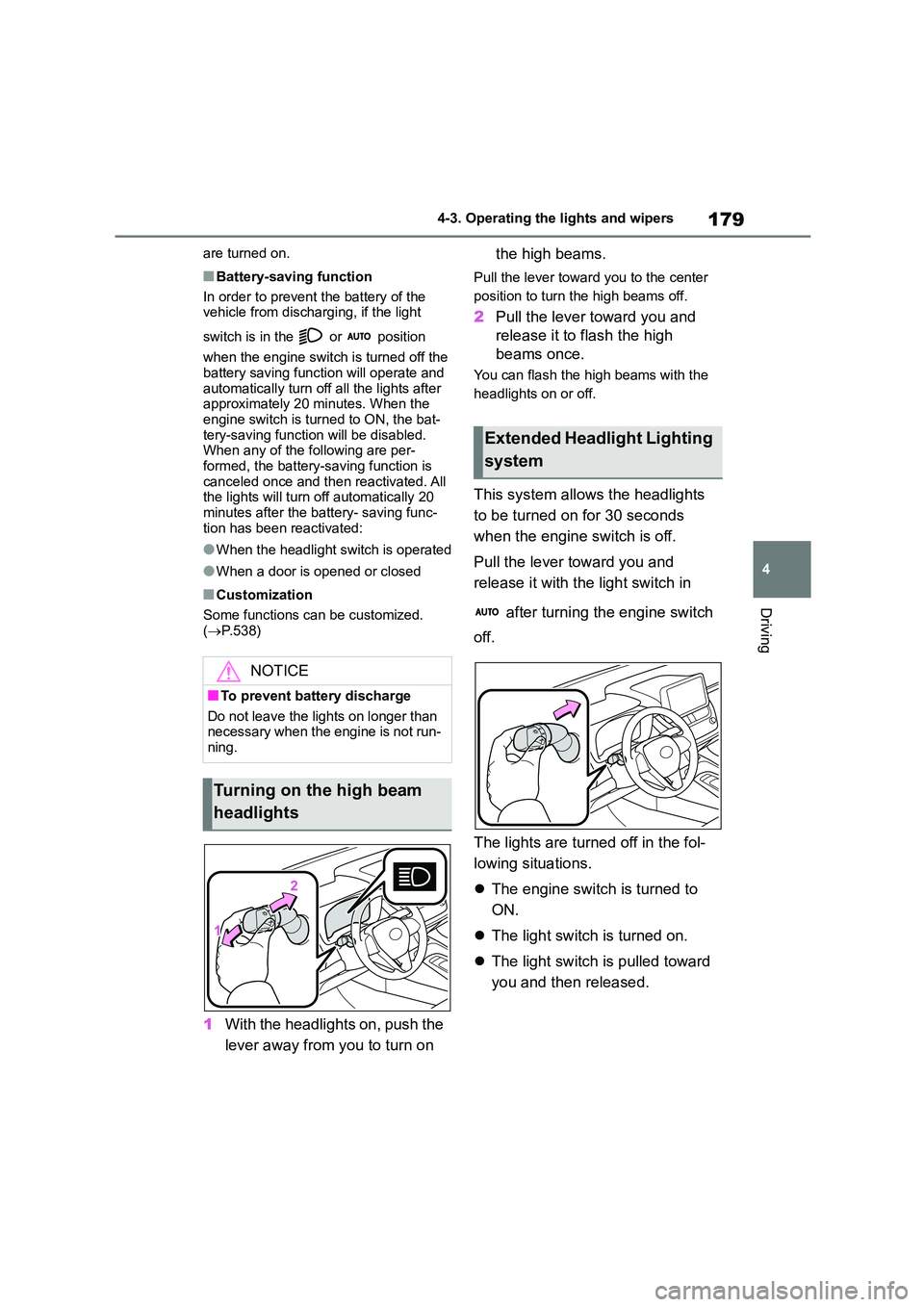
1With the headlights on, push the
lever away from you to turn on
the high beams.
Pull the lever toward you to the center
position to turn the high beams off.
2 Pull the lever toward you and
release it to flash the high
beams once.
You can flash the high beams with the
headlights on or off.
This system allows the headlights
to be turned on for 30 seconds
when the engine switch is off.
Pull the lever toward you and
release it with the light switch in
after turning the engine switch
off.
The lights are turned off in the fol-
lowing situations.
The engine switch is turned to
ON.
The light switch is turned on.
The light switch is pulled toward
you and then released.
NOTICE
■To prevent battery discharge
Do not leave the lights on longer than necessary when the engine is not run-
ning.
Turning on the high beam
headlights
Extended Headlight Lighting
system
Page 403 of 678
401
6
6-4. Other interior features
Interior features
6-4.Other interior features
The USB charging port are used to
supply 2.1 A of electricity at 5 V to
external devices.
The USB charging port are for
charging only. They are not
designed for data transfer or other
purposes.
Depending on the external device,
it may not charge properly. Refer to
the manual included with the device
before using a USB charging port.
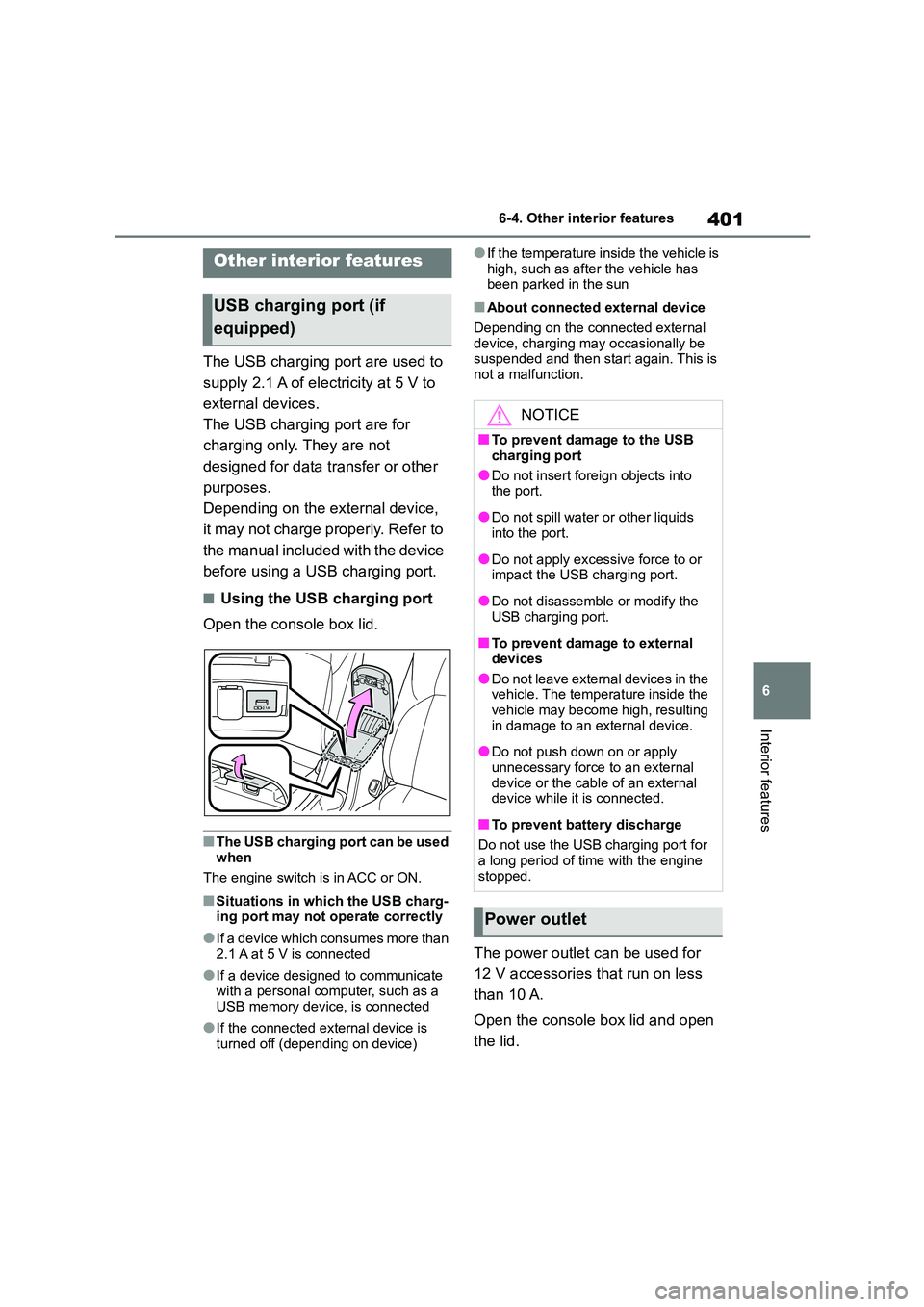
■Using the USB charging port
Open the console box lid.
■The USB charging port can be used
when
The engine switch is in ACC or ON.
■Situations in which the USB charg- ing port may not operate correctly
●If a device which consumes more than
2.1 A at 5 V is connected
●If a device designed to communicate
with a personal computer, such as a USB memory device, is connected
●If the connected external device is turned off (depending on device)
●If the temperature inside the vehicle is
high, such as afte r the vehicle has been parked in the sun
■About connected external device
Depending on the connected external
device, charging may occasionally be suspended and then start again. This is
not a malfunction.
The power outlet can be used for
12 V accessories that run on less
than 10 A.
Open the console box lid and open
the lid.
Other interior features
USB charging port (if
equipped)
NOTICE
■To prevent damage to the USB
charging port
●Do not insert foreign objects into
the port.
●Do not spill water or other liquids
into the port.
●Do not apply excessive force to or
impact the USB charging port.
●Do not disassemble or modify the
USB charging port.
■To prevent damage to external
devices
●Do not leave external devices in the vehicle. The temperature inside the
vehicle may become high, resulting
in damage to an external device.
●Do not push down on or apply
unnecessary force to an external device or the cable of an external
device while it is connected.
■To prevent battery discharge
Do not use the USB charging port for
a long period of time with the engine stopped.
Power outlet
Page 404 of 678

4026-4. Other interior features
■The power outlet can be used when
The engine switch is in ACC or ON.
■When turning the engine switch off
Disconnect electrical devices with
charging functions, such as mobile bat- tery packs.
If such devices are left connected, the
engine switch may not be turned off nor- mally.
A portable device, such as a
smartphone or mobile battery, can
be charged by just placing it on the
charging area, provided the device
is compatible with the Qi wireless
charging standard created by the
Wireless Power Consortium.
The wireless charger cannot be
used with a portable device that is
larger than the charging area. Addi-
tionally, depending on the portable
device, the wireless charger may
not operate properly. Refer to the
operation manual of the portable
device.
■The “Qi” symbol
The “Qi” symbol is a trademark of
the Wireless Power Consortium.
■Name for all parts
Power supply switch
Operation indicator light
Charge area
NOTICE
■To prevent the fuse from being
blown
Do not use an accessory that uses more than 12 V 10 A.
■To avoid damaging the power outlet
Close the power outlet lid when the
power outlet is not in use. Foreign objects or liquids that enter
the power outlet may cause a short
circuit.
■To prevent the battery from being
discharged
Do not use the power outlet longer
than necessary when the engine is
not running.
Wireless charger (if
equipped)