Page 4 of 612

4TABLE OF CONTENTS
iPod/iPhone (Apple CarPlay)......................................... 339
Android Auto ...................... 342
Bluetooth
® audio ................ 343
5-8. Audio/visual remote controls Steering switches ............... 347
5-9. Audio settings Setup .................................. 349
5-10. Tips for operating the audio/visual system
Operating information......... 350
5-11. Voice command system oper- ation
Voice command system ..... 358
Command list ..................... 361
5-12. Mobile Assistant operation Mobile Assistant ................. 365
5-13. Phone operation (Hands-free system for cellular phones)
Quick reference .................. 367
Some basics ...................... 368
Placing a call using the Blue-
tooth
® hands-free system 372
Receiving a call using the Blue-
tooth
® hands-free system 375
Talking on the Bluetooth
®
hands-free system ........... 376
Bluetooth
® phone message
function ............................ 378
5-14. Phone settings Setup .................................. 382
5-15. What to do if... (Bluetooth
®)
Troubleshooting ................. 392
5-16. Connected Services Overview Functional overview ........... 396
Type A: Function achieved by using a smart phone or DCM......................................... 397Type B: Function achieved by
using DCM and the system......................................... 400
Type C: Function achieved by using DCM ....................... 401
Type D: Function achieved by using DCM and a smartphone......................................... 401
5-17. Connected Services Opera- tion
Toyota apps........................ 403
5-18. Toyota apps settings Setup.................................. 407
6-1. Using the air conditioning system and defogger
Manual air conditioning system......................................... 410
Automatic air conditioning sys- tem ................................... 416
Heated steering wheel/seat heaters ............................. 424
6-2. Using the interior lights Interior lights list ................. 426
6-3. Using the storage features List of storage features ...... 428
Luggage compartment features ......................................... 431
6-4. Other interior features Other interior features ........ 433
7-1. Maintenance and care Cleaning and protecting the vehicle exterior................. 446
Cleaning and protecting the vehicle interior.................. 449
6Interior features
7Maintenance and care
Page 21 of 612
21Pictorial index
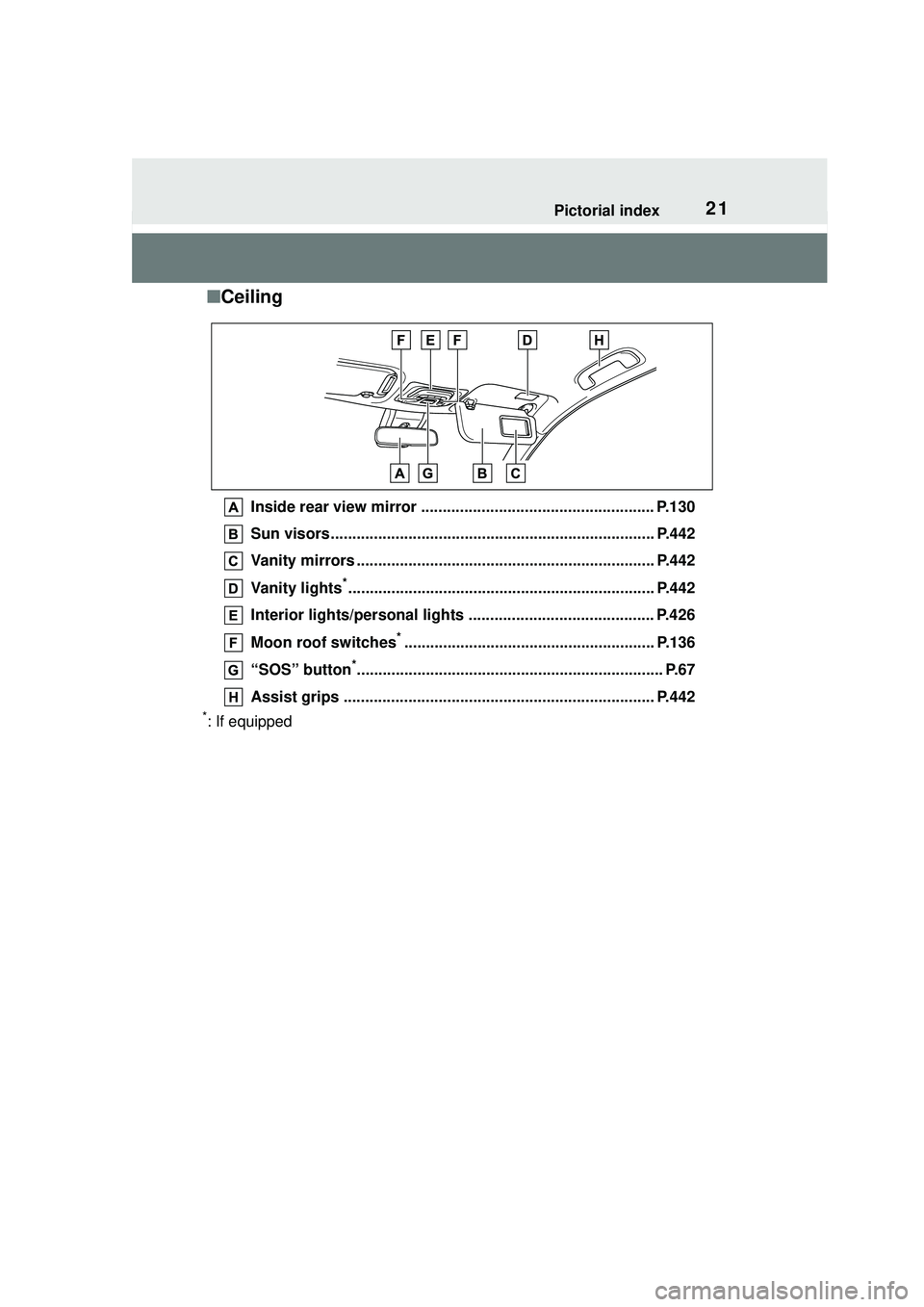
■Ceiling
Inside rear view mirror ...................................................... P.130
Sun visors........................................................................... P.442
Vanity mirrors ..................................................................... P.442
Vanity lights
*....................................................................... P.442
Interior lights/personal lights ........................................... P.426
Moon roof switches
*.......................................................... P.136
“SOS” button
*....................................................................... P.67
Assist grips ........................................................................ P.442
*: If equipped
Page 33 of 612

331-1. For safe use
1
For safety and security
airbag sensor assembly (ECU) controls airbag deployment based on
information obtained from the sensors etc. shown in the system
components diagram above. This information includes crash sever-
ity and occupant information. As the airbags deploy, a chemical
reaction in the inflators quickly fills the airbags with non-toxic gas to
help restrain the motion of the occupants.
■If the SRS airbags deploy
(inflate)
●Slight abrasions, burns, bruising
etc., may be sustained from SRS
airbags, due to the extremely high
speed deployment (inflation) by
hot gases.
●A loud noise and white powder will
be emitted.
●Parts of the airbag module (steer-
ing wheel hub, airbag cover and
inflator) as well as the front seats,
parts of the front and rear pillars,
and roof side rails, may be hot for
several minutes. The airbag itself
may also be hot.
●The windshield may crack.
●All of the doors will be unlocked.
( P.106)
●The brakes and st op lights will be
controlled automatically. ( P.270)
●The interior lights will turn on auto-
matically. ( P.427)
●The emergency flashers will turn
on automatically. ( P.496)
●Fuel supply to the engine will be
stopped. ( P.504)
●For Safety Connect subscribers, if
any of the following situations
occur, the system is designed to
send an emergency call to the
response center, notifying them of
the vehicle’s location (without
needing to push the “SOS” button)
and an agent will a ttempt to speak
with the occupants to ascertain
the level of emergency and assis-
tance required. If the occupants
are unable to communicate, the
agent automatically treats the call as an emergency and helps to dis-
patch the necessary emergency
services. (
P. 6 7 )
• An SRS airbag is deployed.
• A seat belt pretensioner is acti-
vated.
• The vehicle is involved in a severe
rear-end collision.
■SRS airbag deployment condi-
tions (SRS front airbags)
●The SRS front airbags will deploy
in the event of an impact that
exceeds the set threshold level
(the level of force corresponding
to an approximately 12 - 18 mph
[20 - 30 km/h] fr ontal collision with
a fixed wall that does not move or
deform).
However, this threshold velocity will
be considerably higher in the follow-
ing situations:
• If the vehicle strikes an object, such as a parked vehicle or sign
pole, which can move or deform
on impact
• If the vehicle is involved in an underride collision, such as a colli-
sion in which the front of the vehi-
cle “underrides”, or goes under,
the bed of a truck
●Depending on the type of collision,
it is possible that only the seat belt
pretensioners will activate.
●The SRS front airbags for the front
passenger will not activate if there
is no passenger sitting in the front
passenger seat. However, the
SRS front airbags for the front
passenger may deploy if luggage
is put in the seat, even if the seat
is unoccupied.
Page 80 of 612
802-1. Instrument cluster
If the BSM outside rear view mirror
indicators do not illuminate or do
not turn off, there may be a mal-
function in the system.
If this occurs, have the vehicle
inspected by your Toyota dealer.
*5: This light illuminates on the out-side rear view mirrors.
*6: This light illuminates on the multi-information display.
*7: When the outside temperature is approximately 37°F (3°C) or
lower, this indicator will flash for
approximately 10 seconds, then
stay on.
*8: This light illuminates on the front interior/personal lights.
Page 409 of 612
409
6
6
Interior features
Interior features
.6-1. Using the air conditioning system and defogger
Manual air conditioning sys- tem ............................ 410
Automatic air conditioning system ....................... 416
Heated steering wheel/seat heaters ...................... 424
6-2. Using the interior lights Interior lights list .......... 426
6-3. Using the storage features List of storage features.................................. 428
Luggage compartment fea- tures .......................... 431
6-4. Other interior features Other interior features . 433
Page 426 of 612
4266-2. Using the interior lights
6-2.Using the interior lights
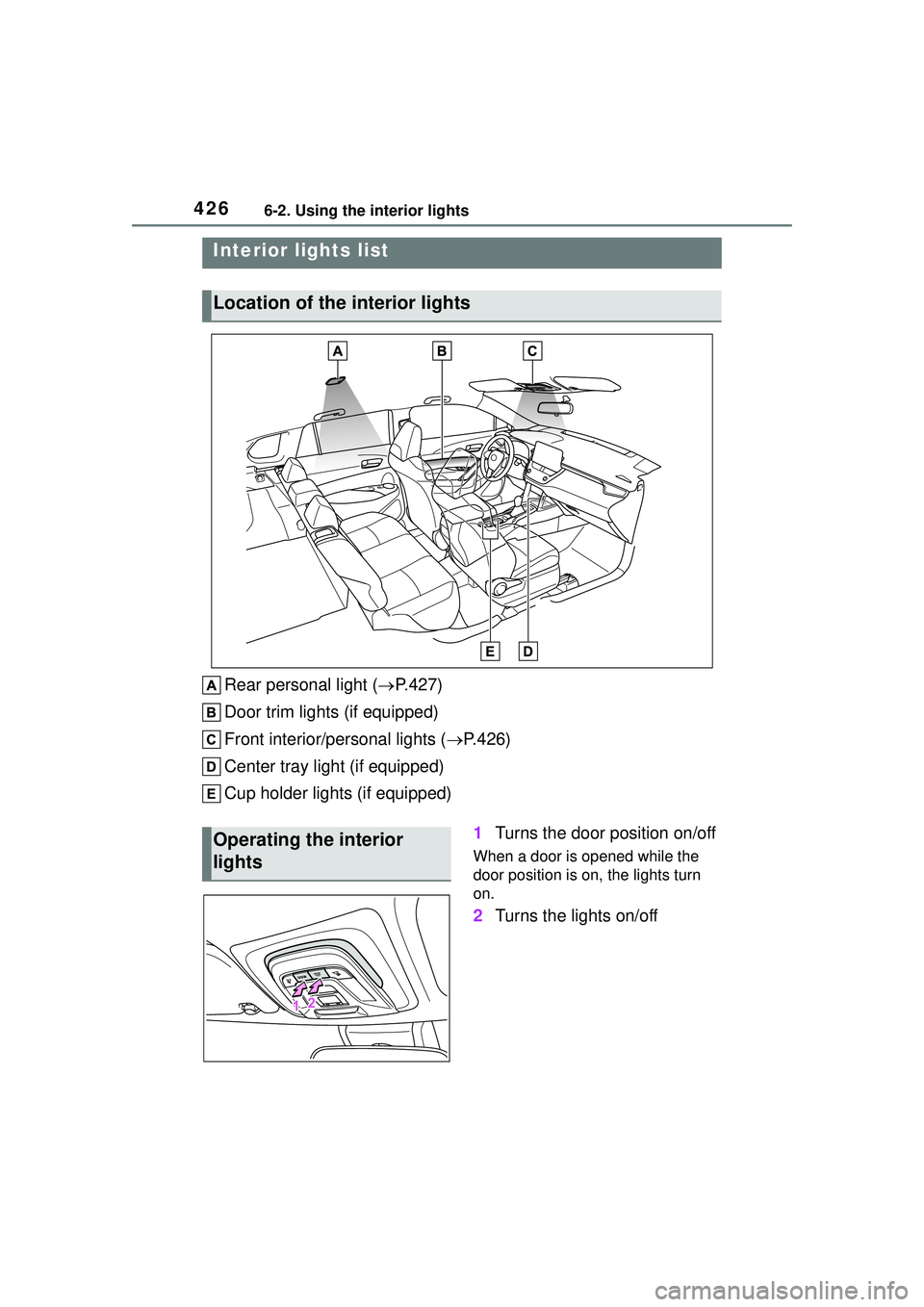
Rear personal light (P.427)
Door trim lights (if equipped)
Front interior/personal lights ( P.426)
Center tray light (if equipped)
Cup holder lights (if equipped)
1Turns the door position on/off
When a door is opened while the
door position is on, the lights turn
on.
2Turns the lights on/off
Interior lights list
Location of the interior lights
Operating the interior
lights
Page 427 of 612
4276-2. Using the interior lights
6
Interior features
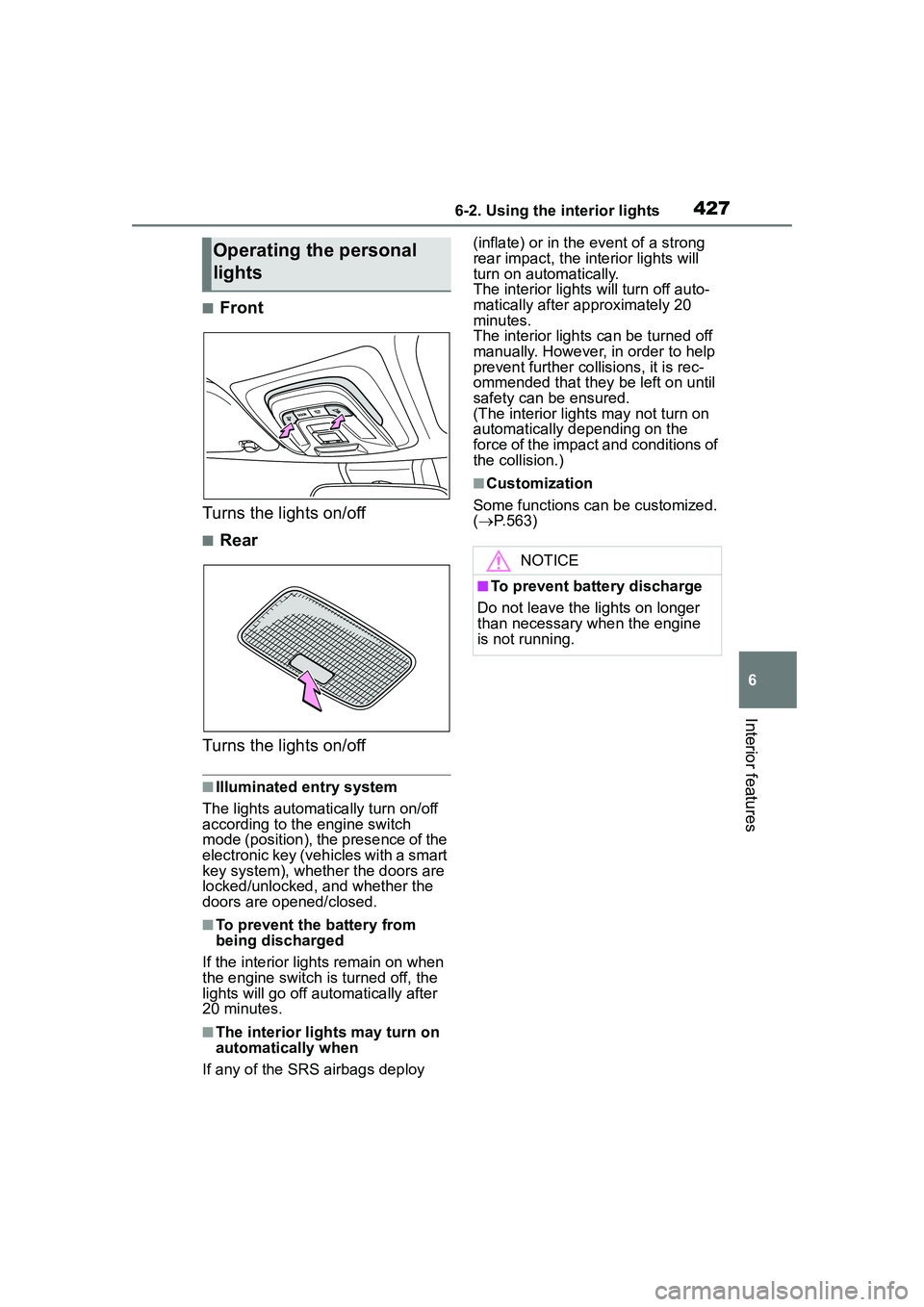
■Front
Turns the lights on/off
■Rear
Turns the lights on/off
■Illuminated entry system
The lights automatically turn on/off
according to the engine switch
mode (position), the presence of the
electronic key (vehicles with a smart
key system), whether the doors are
locked/unlocked, and whether the
doors are opened/closed.
■To prevent the battery from
being discharged
If the interior light s remain on when
the engine switch is turned off, the
lights will go off automatically after
20 minutes.
■The interior lights may turn on
automatically when
If any of the SRS airbags deploy (inflate) or in the event of a strong
rear impact, the interior lights will
turn on automatically.
The interior light
s will turn off auto-
matically after approximately 20
minutes.
The interior lights can be turned off
manually. However, in order to help
prevent further collisions, it is rec-
ommended that they be left on until
safety can be ensured.
(The interior lights may not turn on
automatically depending on the
force of the impact and conditions of
the collision.)
■Customization
Some functions can be customized.
( P.563)
Operating the personal
lights
NOTICE
■To prevent battery discharge
Do not leave the lights on longer
than necessary when the engine
is not running.
Page 429 of 612
4296-3. Using the storage features
6
Interior features
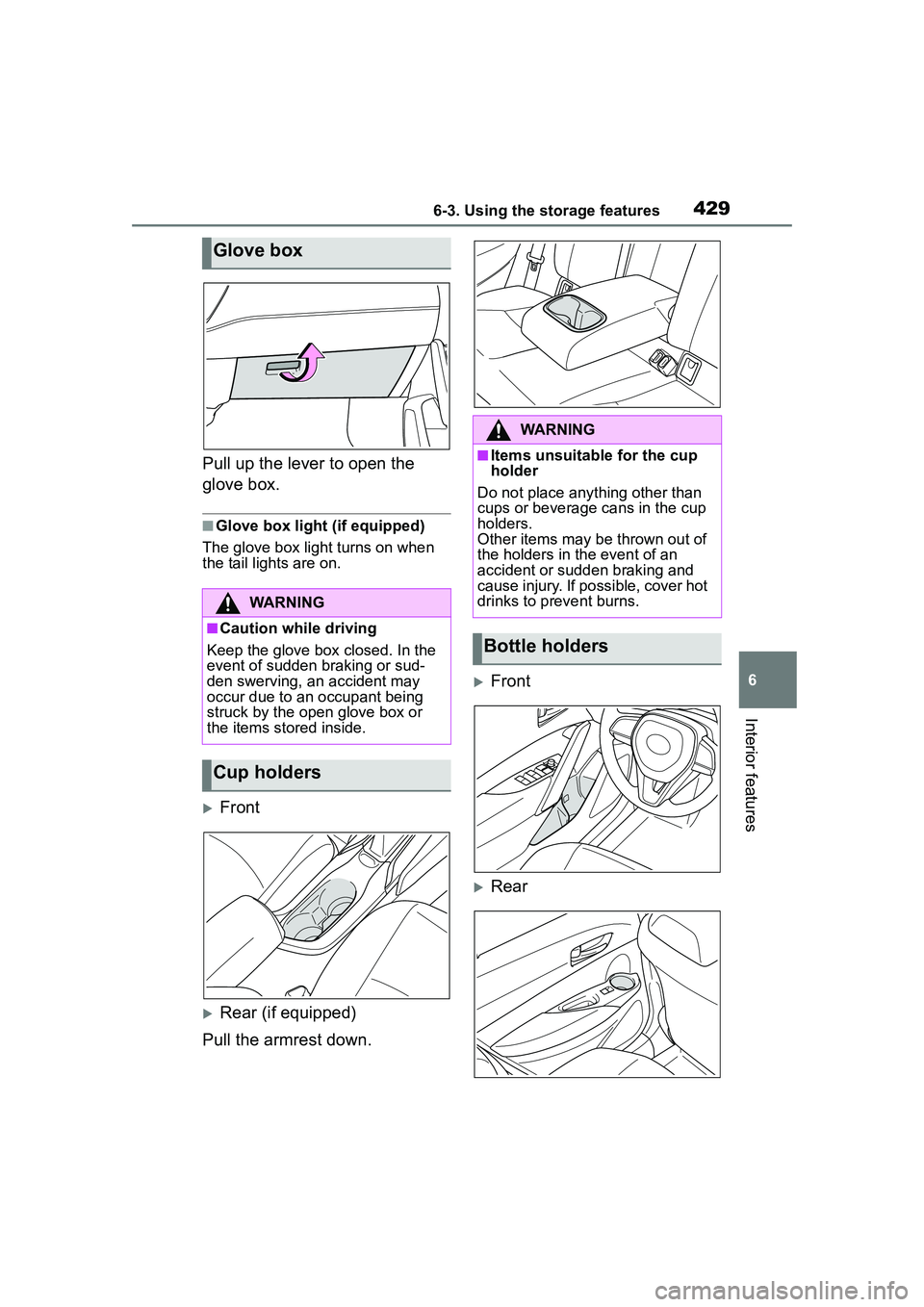
Pull up the lever to open the
glove box.
■Glove box light (if equipped)
The glove box light turns on when
the tail lights are on.
Front
Rear (if equipped)
Pull the armrest down.
Front
Rear
Glove box
WARNING
■Caution while driving
Keep the glove box closed. In the
event of sudden braking or sud-
den swerving, an accident may
occur due to an occupant being
struck by the open glove box or
the items stored inside.
Cup holders
WARNING
■Items unsuitable for the cup
holder
Do not place anything other than
cups or beverage cans in the cup
holders.
Other items may be thrown out of
the holders in the event of an
accident or sudden braking and
cause injury. If possible, cover hot
drinks to prevent burns.
Bottle holders