2022 TOYOTA CAMRY API SN
[x] Cancel search: API SNPage 330 of 664

3304-5. Using the driving support systems
CAMRY_U
Multi-information display
Turning the BSM function on/off.
(P. 331)
Outside rear view mirror indica-
tors
When a vehicle is detected in a
blind spot of the outside rear view
mirrors or approaching rapidly from
behind into a blind spot, the out-
side rear view mirror indicator on
the detected side will illuminate. If
the turn signal lever is operated
toward the detected side, the out-
side rear view mirror indicator
flashes.
“BSM” indicator
When the BSM function is turned on, the indicator illuminates.
BSM (Blind Spot Monitor)
: If equipped
The Blind Spot Monitor is a system that uses rear side radar se n-
sors installed on the inner side of the rear bumper on the left and
right side to assist the driver in confirming safety when chang-
ing lanes.
System components
1
2
3
Page 333 of 664

3334-5. Using the driving support systems
4
Driving
CAMRY_U
The BSM function uses radar sensors to detect the following vehicles
traveling in an adjacent lane in the area that is usually not r eflected in
the outside rear view mirror (the blind spot), and advises the driver of
the presence of such vehicles via the indicators on the outside rear
view mirrors.
Vehicles that are traveling in areas that are not visible using the out-
side rear view mirrors (the blind spots)
Vehicles that are approaching rapidly from behind in areas that are
not visible using the outside re ar view mirrors (the blind spots)
The areas that vehicles can be detected in are outlined below.
The range of the detecti on area extends to:
Approximately 1.6 ft. (0.5 m) to 11.5 ft. (3.5 m) from either s ide of
the vehicle
The area between the side of the vehicle and 1.6 ft. (0.5 m) fr om the side
of the vehicle cannot be detected
Approximately 3.3 ft. (1 m) f orward of the rear bumper
Approximately 9.8 ft. (3 m) from the rear bumper
BSM function
BSM function detection areas
1
2
1
2
3
Page 334 of 664

3344-5. Using the driving support systems
CAMRY_U
Approximately 9.8 ft. (3 m) to 19 7 ft. (60 m) from the rear bumper
The greater the difference in speed between your vehicle and the detected
vehicle is, the farther away the vehicle will be detected, causing the out-
side rear view mirror indicator to illuminate or flash
■The BSM function is operational when
●The BSM function is turned on
● Vehicle speed is greater than approximately 10 mph (16 km/h).
■ The BSM function will detect a vehicle when
●A vehicle in an adjacent lane overtakes your vehicle.
● Your vehicle overtakes a vehicle in an adjacent lane slowly.
● Another vehicle enters the detection area when it changes lanes.
■ Conditions under which the system will not detect a vehicle
The BSM function is not designed to detect the following types of vehicles
and/or objects:
● Small motorcycles, bicycles, pedestrians, etc.
*
●Vehicles traveling in the opposite direction
● Guardrails, walls, signs, parked vehicles and similar stationary objects
*
●Following vehicles that are in the same lane*
●Vehicles driving 2 lanes across from your vehicle*
●Vehicles which are being overtaken rapidly by your vehicle
*: Depending on the conditions, detection of a vehicle and/or object may
occur.
4
WARNING
■ Cautions regarding the use of the system
The driver is solely responsible for safe driving. Always drive safely, taking
care to observe your surroundings.
The BSM function is a supplementary function which alerts the driver that a
vehicle is present in the blind spot. Do not overly rely on the BSM function.
The function cannot judge if it is safe to change lanes, theref ore over reli-
ance could cause an accident resulting in death or serious inju r y.
According to conditions, the system may not function correctly. Therefore
the driver’s own visual confirmation of safety is necessary.
Page 421 of 664
4215-4. Other interior features
CAMRY_U
5
Interior features
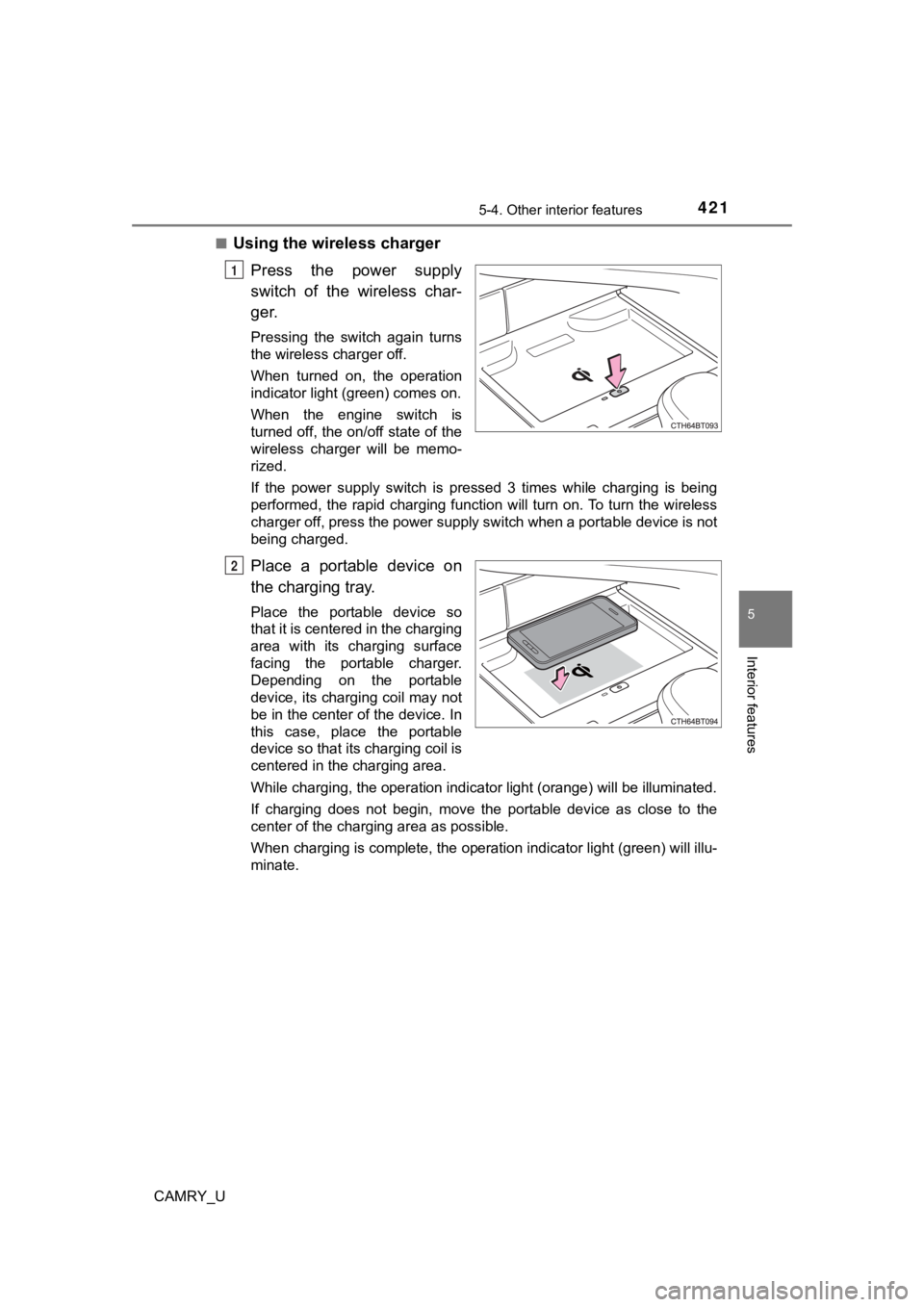
■Using the wireless charger
Press the power supply
switch of the wireless char-
ger.
Pressing the switch again turns
the wireless charger off.
When turned on, the operation
indicator light (green) comes on.
When the engine switch is
turned off, the on/off state of the
wireless charger will be memo-
rized.
If the power supply switch is pressed 3 times while charging is being
performed, the rapid charging function will turn on. To turn th e wireless
charger off, press the power supply switch when a portable devi ce is not
being charged.
Place a portable device on
the charging tray.
Place the portable device so
that it is centered in the charging
area with its charging surface
facing the portable charger.
Depending on the portable
device, its charging coil may not
be in the center of the device. In
this case, place the portable
device so that its charging coil is
centered in the charging area.
While charging, the operation indicator light (orange) will be illuminated.
If charging does not begin, move the portable device as close t o the
center of the charging area as possible.
When charging is complete, the operation indicator light (green ) will illu-
minate.
1
2
Page 422 of 664

4225-4. Other interior features
CAMRY_U■
Recharging function
●
If a certain amount of time has elapsed since charging complete d
and the portable device has not been moved, the wireless char-
ger will restart charging.
● If a portable device is moved significantly within the charging
area, the charging coil may disconnect and charging may tempo-
rarily be stopped. However, if a charging coil is detected within
the charging area, the charging coil inside the wireless charge r
will move near the other coil and charging will resume.
■Rapid charging function
●Portable devices, such as the fo llowing, can be rapidly charged.
• Rapid charging capable devices which conform to WPC Ver 1.2.4.
• 7.5 W charging capable iPhones (iPhone 8 and later)
●To turn the rapid charging function on, press the power supply
switch 3 times while charging is being performed. If rapid
charging is possible, the operation indicator will change from illu-
minated (orange) to alternating between (green) and (orange).
● When charging is finished, the rapid charging function will tur n
off. To perform rapid charging again, turn the rapid charging f unc-
tion back on.
Page 423 of 664
4235-4. Other interior features
CAMRY_U
5
Interior features
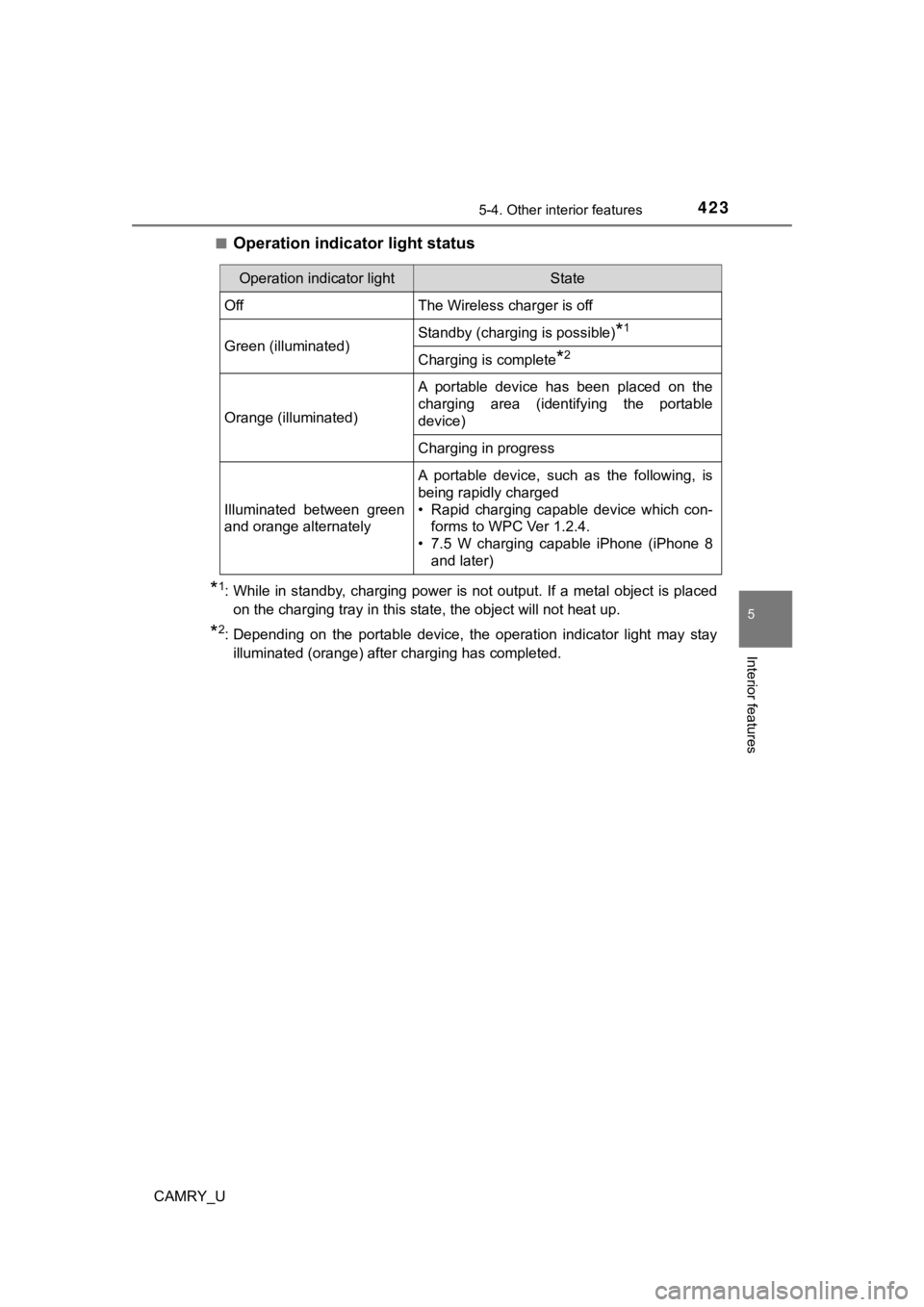
■Operation indicator light status
*1: While in standby, charging power is not output. If a metal obj ect is placed
on the charging tray in this state, the object will not heat up .
*2: Depending on the portable device, the operation indicator ligh t may stay
illuminated (orange) after charging has completed.
Operation indicator lightState
OffThe Wireless charger is off
Green (illuminated)Standby (charging is possible)*1
Charging is complete*2
Orange (illuminated)
A portable device has been placed on the
charging area (identifying the portable
device)
Charging in progress
Illuminated between green
and orange alternately
A portable device, such as the following, is
being rapidly charged
• Rapid charging capable device which con- forms to WPC Ver 1.2.4.
• 7.5 W charging capable iPhone (iPhone 8 and later)
Page 425 of 664

4255-4. Other interior features
CAMRY_U
5
Interior features
■The wireless charger can be operated when
The engine switch is in ACCESSORY or IGNITION ON mode.
■ Portable devices that can be charged
●Portable devices compatible with the Qi wireless charging stand ard can be
charged by the wireless charger. However, compatibility with all devices
which meet the Qi wireless charging standard is not guaranteed.
● The wireless charger is designed to supply low power electricit y (5 W or
less) to a cellular phone, smartphone, or other portable device .
● However, portable devices, such as the following, can be charge d with more
than 5 W.
• 7.5 W charging compatible iPhones can be charged at 7.5 W or l ess.
• Portable devices which conform to WPC Ver 1.2.4 can be charged at 10
W or less.
■ Using the smart key system
During charging, when the smart key system searches for an elec tronic key,
charging may be temporarily suspended.
■ If a cover or accessory is attached to the portable device
Do not charge a portable device if a cover or accessory which i s not Qi com-
patible is attached. Depending on the type of cover and/or acce ssory
attached, it may not be possible to charge the portable device. If the portable
device is placed on the charging area and does not charge, remo ve the cover
and/or accessories.
■ If interference is heard in AM ra dio broadcasts while charging
● Turn off the wireless charger and check if the noise is reduced . If noise is
reduced, press and hold the power supply switch of the wireless charger for
2 seconds. The frequency of the wireless charger is changed and noise may
be reduced. When the frequency is changed, the operation indica tor light
will blink (orange) 2 times.
● Rapid charging for iPhones is performed using a specific radio wave fre-
quency.
Depending on the version of iOS installed, while the frequency is being
changed, rapid charging may not be performed.
■ Charging precautions
While charging, the wireless charger and the portable device wi ll become
warm. This is not a malfunction.
If a portable device becomes warm while charging and charging stops due to
the protection function of the portable device, wait until the portable device
cools down and charge it again.
Also, to decrease the temperature inside the wireless charger, a fan may
operate. This does not indicate a malfunction.
Page 429 of 664
4295-4. Other interior features
CAMRY_U
5
Interior features
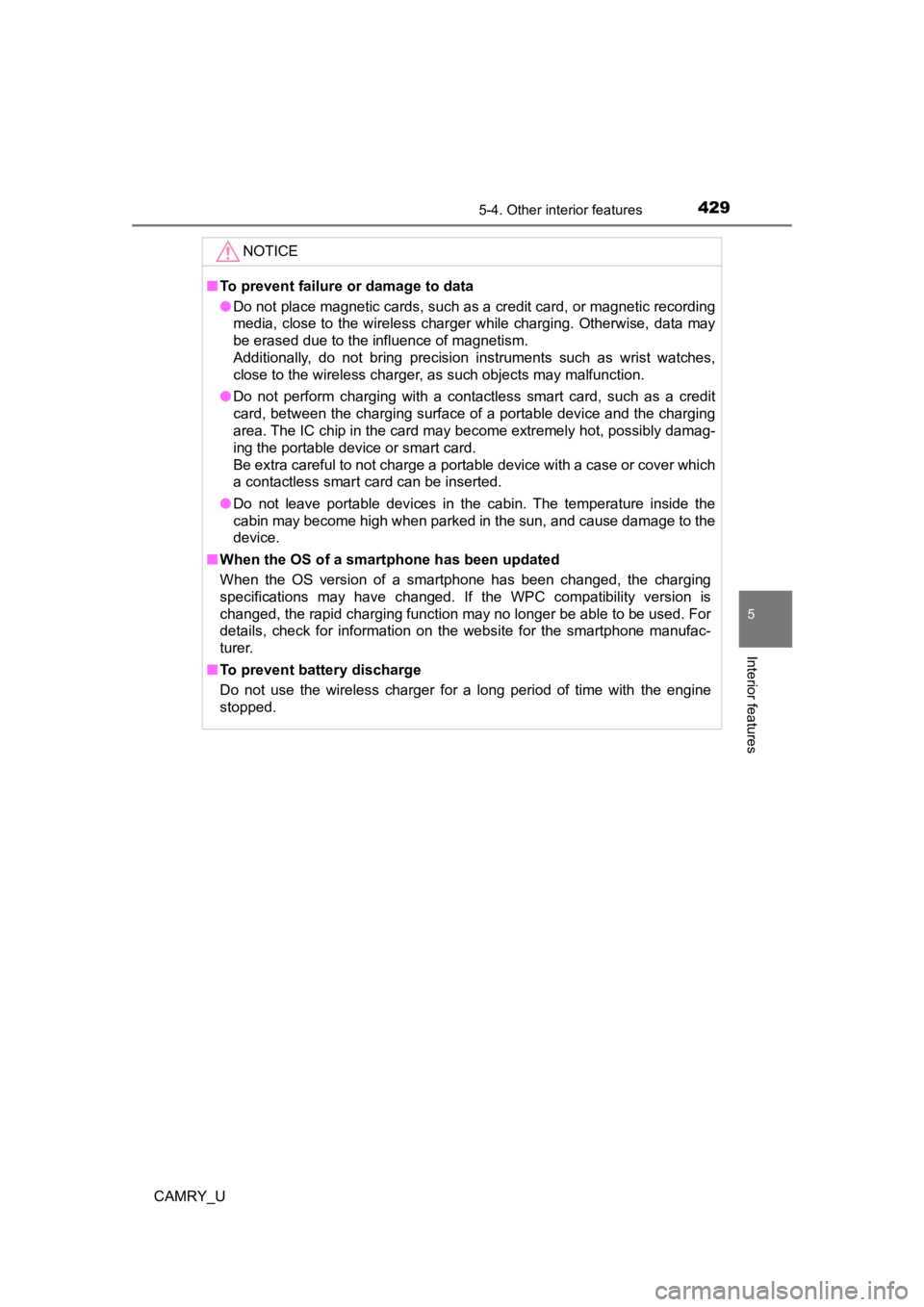
NOTICE
■To prevent failure or damage to data
● Do not place magnetic cards, such as a credit card, or magnetic recording
media, close to the wireless charger while charging. Otherwise, data may
be erased due to the influence of magnetism.
Additionally, do not bring precision instruments such as wrist watches,
close to the wireless charger, as such objects may malfunction.
● Do not perform charging with a contactless smart card, such as a credit
card, between the charging surface of a portable device and the charging
area. The IC chip in the card may become extremely hot, possibl y damag-
ing the portable device or smart card.
Be extra careful to not charge a portable device with a case or cover which
a contactless smart card can be inserted.
● Do not leave portable devices in the cabin. The temperature ins ide the
cabin may become high when parked in the sun, and cause damage to the
device.
■ When the OS of a smartphone has been updated
When the OS version of a smartphone has been changed, the charg ing
specifications may have changed. If the WPC compatibility version is
changed, the rapid charging function may no longer be able to be used. For
details, check for information on the website for the smartphone manufac-
turer.
■ To prevent battery discharge
Do not use the wireless charger for a long period of time with the engine
stopped.