Page 231 of 624

2314-3. Operating the lights and wipers
4
Driving
For Canada
The headlights, day-
time running lights
(P.
232) and all the lights
listed below turn on and
off automatically.
(When the power
switch is in ON mode)
The side marker, park-
ing, tail, license plate,
instrument panel lights,
and daytime running
lights
(P. 232) turn
on.
The headlights and all the lights listed above (except day-
time running lights) turn on.
With the headlights on, push
the lever away from you to turn
on the high beams.
Pull the lever toward you to the
center position to turn the high
beams off.
Pull the lever toward you and
release it to flash the high
beams once.
You can flash the high beams with the headlights on or off.
AFS (Adaptive Front-lighting System) secures excellent visibility at
intersections and on curves by automatically adjusting the direction of
the light axis of the headlights according to vehicle speed and the
degree of the tire’s angle as controlled by steering input.
AFS operates at speeds of 6 mph (10 km/h) or higher.
1
2
Turning on the high beam headlights
3
1
2
AFS (Adaptive Front-lighting System) (if equipped)
Page 243 of 624
2434-4. Refueling
4
Driving
WARNING
■When refueling
Observe the following precautions to prevent fuel overflowing from the fuel
tank:
●Securely insert the fuel nozzle into the fuel filler neck.
●Stop filling the tank after the fuel nozzle automatically clicks off.
●Do not top off the fuel tank.
NOTICE
■Refueling
●Finish refueling within 30 minutes. If more than 30 minutes passes, the
internal valve closes. In this condition, fuel may overflow during the refuel-
ing process.
Press the fuel filler door opener switch again.
●Do not spill fuel during refueling.
Doing so may damage the vehicle, such as causing the emission control
system to operate abnormally or damaging fuel system components or the
vehicle’s painted surface.
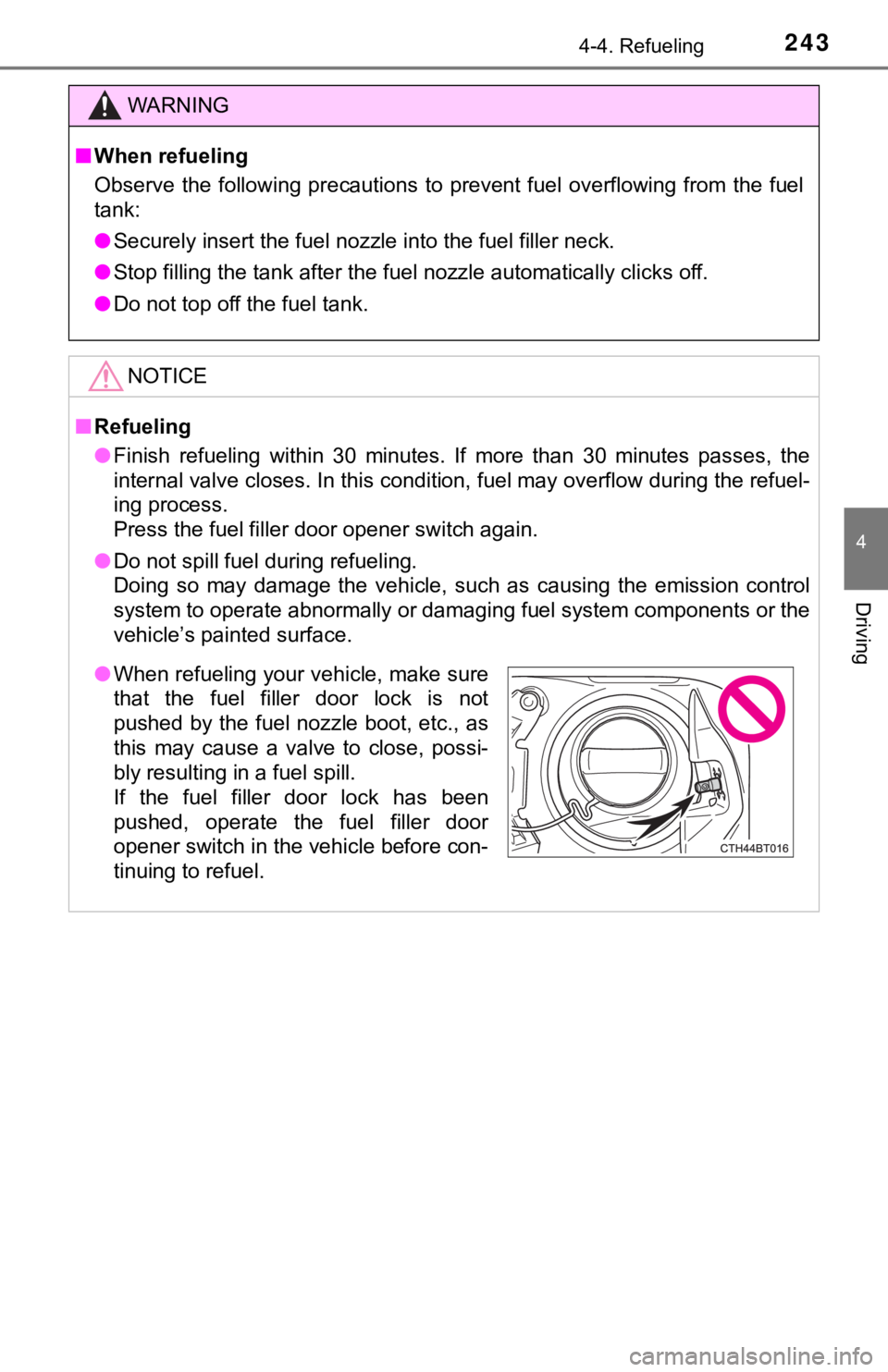
●When refueling your vehicle, make sure
that the fuel filler door lock is not
pushed by the fuel nozzle boot, etc., as
this may cause a valve to close, possi-
bly resulting in a fuel spill.
If the fuel filler door lock has been
pushed, operate the fuel filler door
opener switch in the vehicle before con-
tinuing to refuel.
Page 245 of 624

2454-4. Refueling
4
Driving
■If the fuel filler door cannot be opened
■When “Check Fuel Cap” is displayed on the multi-information display
The fuel tank cap may be unfastened or loose. Turn the power switch off,
check the cap and tighten it securely. If the message remains, wait a few sec-
onds and then turn the power switch off once again. Remove the cover inside the trunk and
pull the lever.
WARNING
■When replacing the fuel tank cap
Do not use anything but a genuine Toyota fuel tank cap designed for your
vehicle. Doing so may cause a fire or other incident which may result in
death or serious injury.
NOTICE
■When opening the fuel filler door manually
●Do not open the fuel filler door manually except in an emergency. Fuel
may overflow.
●Using the lever to open the fuel filler door may not allow for an adequate
reduction in fuel tank pressure before refueling. To prevent fuel from spill-
ing out, turn the cap slowly when removing it.
●During refueling, fuel may spill out from the filler opening due to air being
discharged from inside the fuel tank. Therefore, fill the fuel tank carefully
and slowly.
Page 315 of 624

3154-5. Using the driving support systems
4
Driving
■The BSM function is operational when
●The BSM function is turned on
●Vehicle speed is greater than approximately 10 mph (16 km/h).
■The BSM function will detect a vehicle when
●A vehicle in an adjacent lane overtakes your vehicle.
●Your vehicle overtakes a vehicle in an adjacent lane slowly.
●Another vehicle enters the detection area when it changes lanes.
■Conditions under which the system will not detect a vehicle
The BSM function is not designed to detect the following types of vehicles
and/or objects:
●Small motorcycles, bicycles, pedestrians, etc.
*
●Vehicles traveling in the opposite direction
●<002a005800440055004700550044004c004f0056000f0003005a0044004f004f0056000f00030056004c004a00510056000f0003005300440055004e00480047000300590048004b004c0046004f00480056000300440051004700030056004c0050004c00
4f0044005500030056005700440057004c0052005100440055[y objects
*
●Following vehicles that are in the same lane*
●Vehicles driving 2 lanes across from your vehicle*
●Vehicles which are being overtaken rapidly by your vehicle
*: Depending on the conditions, detection of a vehicle and/or object may
occur.
■Conditions under which the system may not function correctly
●The BSM function may not detect vehicles correctly in the following condi-
tions:
• When the sensor is misaligned due to a strong impact to the sensor or its
surrounding area
• When driving on a road surface that is wet with standing water during bad
weather, such as heavy rain, snow, or fog
• When mud, snow, ice, a sticker, etc. is covering the sensor or surround-
ing area on the rear bumper
• When there is a significant difference in speed between your vehicle and
the vehicle that enters the detection area
• When a vehicle is in the detection area from a stop and remains in the
detection area as your vehicle accelerates
• When driving up or down consecutive steep inclines, such as hills, a dip
on the road, etc.
• When driving on roads with sharp bends, consecutive curves, or uneven
surfaces
• When multiple vehicles are approaching with only a small gap between
each vehicle
• When vehicle lanes are wide, or when driving on the edge of a lane, and
the vehicle in an adjacent lane is far away from your vehicle
• When the vehicle that enters the detection area is traveling at about the
same speed as your vehicle
• When there is a significant difference in height between your vehicle and
the vehicle that enters the detection area
Page 316 of 624
3164-5. Using the driving support systems
• Directly after the BSM function is turned on
●Instances of the BSM function unnecessarily detecting a vehicle and/or
object may increase under the following conditions:
• When the sensor is misaligned due to a strong impact to the sensor or its
surrounding area
• When the distance between your vehicle and a guardrail, wall, etc. that
enters the detection area is short
• When there is only a short distance between your vehicle and a following
vehicle
• When vehicle lanes are narrow, or when driving on the edge of a lane,
and a vehicle traveling in a lane other than the adjacent lanes enters the
detection area
• When items such as a bicycle carrier are installed on the rear of the vehi-
cle
• When driving up and down consecutive steep inclines, such as hills, dips
on the road, etc.
• When driving on roads with sharp bends, consecutive curves, or uneven
surfaces
Page 403 of 624
4035-4. Other interior features
5
Interior features
The HomeLink® wireless control system in your vehicle has 3 buttons
which can be programmed to operate 3 different devices. Refer to the
programming methods on the following pages to determine the
method which is appropriate for the device.
HomeLink
® indicator light
Garage door operation indica-
tors
Buttons
Garage door opener
: If equipped
The garage door opener can be programmed to operate garage
doors, gates, entry doors, door locks, home lighting systems,
security systems, and other devices.
System components
1
2
3
Page 423 of 624

4236-2. Maintenance
6
Maintenance and care
Vehicle interior
ItemsCheck points
Accelerator pedal
• The accelerator pedal should
move smoothly (without uneven
pedal effort or catching).
Hybrid transmission “Park” mecha-
nism• When parked on a slope and the
shift lever is in P, is the vehicle
securely stopped?
Brake pedal
• Does the brake pedal move
smoothly?
• Does the brake pedal have appro-
priate clearance from the floor?
(P. 549)
• Does the brake pedal have the
correct amount of free play?
(P. 549)
Brakes
• The vehicle should not pull to one
side when the brakes are applied.
• The brakes should work effec-
tively.
• The brake pedal should not feel
spongy.
• The brake pedal should not get
too close to the floor when the
brakes are applied.
Head restraints (adjustable type)• Do the head restraints move
smoothly and lock securely?
Indicators/buzzers• Do the indicators and buzzers
function properly?
Lights • Do all the lights come on?
Parking brake
• Does the parking brake operate
normally?
• When parked on a slope and the
parking brake is on, is the vehicle
securely stopped?
Page 430 of 624
4306-3. Do-it-yourself maintenance
WARNING
■Pre-driving check
Check that the hood is fully closed and locked.
If the hood is not locked properly, it may open while the vehicle is in motion
<0044005100470003004600440058005600480003004400510003004400460046004c0047004800510057000f0003005a004b004c0046004b000300500044005c00030055004800560058004f00570003004c005100030047004800440057004b0003005200
550003005600480055004c0052005800560003004c0051004d[ury.
■After installing the support rod into the slot
Make sure the rod supports the hood securely preventing it from falling
down onto your head or body.
NOTICE
■When closing the hood
Be sure to return the support rod to its clip before closing the hood. Closing
<0057004b00480003004b0052005200470003005a004c0057004b00030057004b0048000300560058005300530052005500570003005500520047000300510052005700030046004f004c00530053004800470003004600520058004f004700030046004400
580056004800030057004b00480003004b0052005200470003[to bend.


