2022 TOYOTA CAMRY HYBRID ECO mode
[x] Cancel search: ECO modePage 291 of 624

2914-5. Using the driving support systems
4
Driving
This mode employs a radar to detect the presence of vehicles up to
approximately 328 ft. (100 m) ahead, determines the current vehicle-
to-vehicle following distance, and operates to maintain a suitable fol-
lowing distance from the vehicle ahead. The desired vehicle-to-vehi-
cle distance can also be set by operating the vehicle-to-vehicle
distance switch.
When driving on downhill slopes, the vehicle-to-vehicle distance may
become shorter.
Example of constant speed cruising
When there are no vehicles ahead
The vehicle travels at the speed set by the driver.
Example of deceleration cruising and follow-up cruising
When a preceding vehicle driving slower than the set speed
appears
When a vehicle is detected running ahead of you, the system automatically
decelerates your vehicle. When a greater reduction in vehicle speed is
necessary, the system applies the brakes (the stop lights will come on at
this time). The system will respond to changes in the speed of the vehicle
ahead in order to maintain the vehicle-to-vehicle distance set by the driver.
Approach warning warns you when the system cannot decelerate suffi-
ciently to prevent your vehicle from closing in on the vehicle ahead.
When the vehicle ahead of you stops, your vehicle will also stop (vehicle is
stopped by system control). After the vehicle ahead starts off, pressing the
“+ RES” switch or depressing the accelerator pedal (start-off operation) will
resume follow-up cruising. If the start-off operation is not performed, sys-
tem control continues to keep your vehicle stopped.
Driving in vehicle-to-vehicle distance control mode
1
2
Page 292 of 624

2924-5. Using the driving support systems
When the turn signal lever is operated and your vehicle moves to an over-
taking lane while driving at 50 mph (80 km/h) or more, the vehicle will
accelerate to help to overtake a passing vehicle.
The system’s identification of what is an overtaking lane may be deter-
mined solely based on the location of the steering wheel in the vehicle (left
side driver position versus right side driver position.) If the vehicle is driven
to a region where the overtaking lane is on a different side from where the
vehicle is normally driven, the vehicle may accelerate when the turn signal
lever is operated in the opposite direction to the overtaking lane (e.g., if the
driver normally operates the vehicle in a region where the overtaking lane
is to the right but then drives to a region where the overtaking lane is to the
<004f004800490057000f00030057004b0048000300590048004b004c0046004f0048000300500044005c00030044004600460048004f004800550044005700480003005a004b0048005100030057004b004800030055004c004a004b005700030057005800
55005100030056004c004a00510044004f0003004c00560003[activated).
Example of acceleration
When there are no longer any preceding vehicles driving slower
than the set speed
The system accelerates until the set speed is reached. The system then
returns to constant speed cruising.
Press the cruise control main
switch to activate the cruise
control.
Dynamic radar cruise control indi-
cator will come on and a message
will be displayed on the multi-infor-
mation display.
Press the switch again to deacti-
vate the cruise control.
If the cruise control main switch is pressed and held for 1.5 seconds or
more, the system turns on in constant speed control mode. (P. 298)
Accelerate or decelerate, with
accelerator pedal operation, to
the desired vehicle speed (at or
above approximately 20 mph
[30 km/h]) and press the “- SET”
switch to set the speed.
Cruise control “SET” indicator will
come on.
The vehicle speed at the moment
the switch is released becomes the
set speed.
Setting the vehicle speed (vehicle-to-vehicle distance control
mode)
3
1
2
Page 298 of 624

2984-5. Using the driving support systems
When constant speed control mode is selected, your vehicle will main-
tain a set speed without controlling the vehicle-to-vehicle distance.
Select this mode only when vehicle-to-vehicle distance control mode
does not function correctly due to a dirty radar, etc.
With the cruise control off,
press and hold the cruise con-
trol main switch for 1.5 seconds
or more.
Immediately after the switch is
pressed, the dynamic radar cruise
control indicator will come on.
Afterwards, it switches to the cruise
control indicator.
Switching to constant speed control mode is only possible when operating
the switch with the cruise control off.
Accelerate or decelerate, with
accelerator pedal operation, to
the desired vehicle speed (at or
above approximately 20 mph
[30 km/h]) and press the “- SET”
switch to set the speed.
Cruise control “SET” indicator will
come on.
The vehicle speed at the moment
the switch is released becomes the
set speed.
Adjusting the speed setting: P. 293
Canceling and resuming the speed setting: P. 295
Selecting constant speed control mode
1
2
Page 299 of 624

2994-5. Using the driving support systems
4
Driving
■Dynamic radar cruise control with full-speed range can be set when
●The shift lever is in D.
●The desired set speed can be set when the vehicle speed is approximately
20 mph (30 km/h) or more.
(However, when the vehicle speed is set while driving at below approxi-
mately 20 mph [30 km/h], the set speed will be set to approximately 20 mph
[30 km/h].)
■Accelerating after setting the vehicle speed
The vehicle can accelerate by operating the accelerator pedal. After acceler-
ating, the set speed resumes. However, during vehicle-to-vehicle distance
control mode, the vehicle speed may decrease below the set speed in order
to maintain the distance to the preceding vehicle.
■When the vehicle stops while follow-up cruising
●Pressing the “+ RES” switch while the vehicle ahead stops will resume fol-
low-up cruising if the vehicle ahead starts off within approximately 3 sec-
onds after the switch is pressed.
●If the vehicle ahead starts off within 3 seconds after your vehicle stops, fol-
low-up cruising will be resumed.
■Automatic cancelation of vehicle-to-vehicle distance control mode
Vehicle-to-vehicle distance control mode is automatically canceled in the fol-
lowing situations:
●VSC is activated.
●TRAC is activated for a period of time.
●When the VSC or TRAC system is turned off.
●The sensor cannot detect correctly because it is covered in some way.
●When the brake control or output restriction control of a driving support sys-
tem operates. (For example: Pre-Collision System, Drive-Start Control)
●The parking brake is operated.
●The vehicle is stopped by system control on a steep incline.
●The following are detected when the vehicle has been stopped by system
control:
• The driver is not wearing a seat belt.
• The driver’s door is opened.
• The vehicle has been stopped for about 3 minutes
If vehicle-to-vehicle distance control mode is automatically canceled for any
reasons other than the above, there may be a malfunction in the system.
Contact your Toyota dealer.
Page 320 of 624
3204-5. Using the driving support systems
■Buzzer operation and distance to an object
A buzzer sounds when the sensors are operating.
●The buzzer sounds faster as the vehicle approaches an object.
When the vehicle comes within the following distance of the
object, the buzzer sounds continuously: Approximately 1.0 ft. (30
cm).
●When 2 or more objects are detected simultaneously, the buzzer
system responds to the nearest object. If one or both come within
the above distances, the beep will repeat a long tone, followed by
fast beeps.
●Automatic buzzer mute function
After a buzzer begins sounding, if the distance between the vehi-
cle and the detected object does not become shorter, the buzzer
will be muted automatically.
(However, if the distance between the vehicle and object is 1.0 ft.
(30 cm) or less, this function will not operate.)
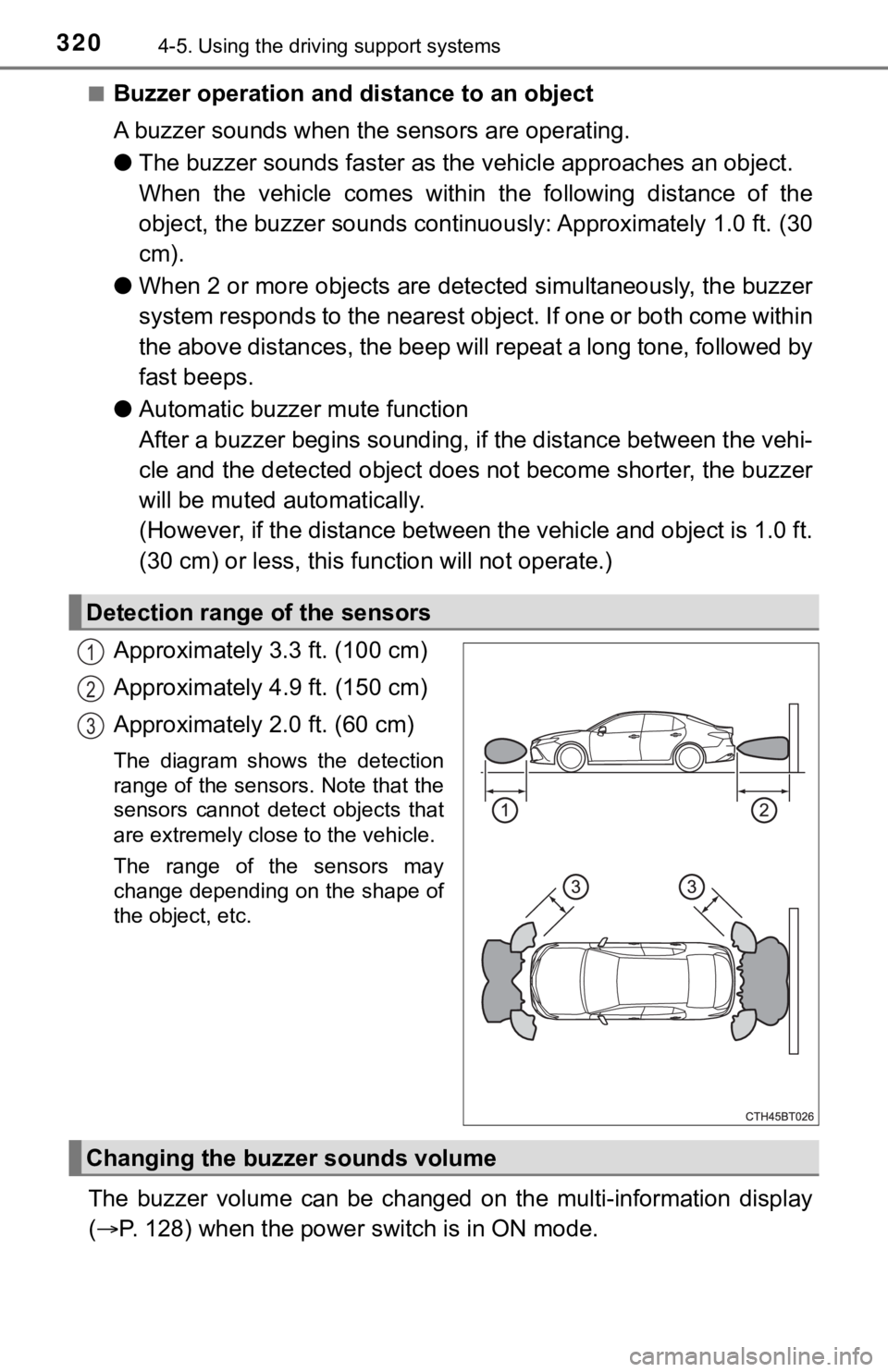
Approximately 3.3 ft. (100 cm)
Approximately 4.9 ft. (150 cm)
Approximately 2.0 ft. (60 cm)
The diagram shows the detection
range of the sensors. Note that the
sensors cannot detect objects that
are extremely close to the vehicle.
The range of the sensors may
change depending on the shape of
the object, etc.
The buzzer volume can be changed on the multi-information display
(P. 128) when the power switch is in ON mode.
Detection range of the sensors
1
2
3
Changing the buzzer sounds volume
Page 336 of 624

3364-5. Using the driving support systems
Vehicles with 7-inch multi-information display
Press
/ of the meter control switches, select .
Press
/ of the meter control switches, select .
Press of the meter control switch.
When the RCD function is disabled, the RCD OFF indicator (P.
97) illuminates.
If the rear camera detection func-
tion detects a pedestrian in the
detection area, the buzzer and
icon will operate as shown in the
following table:
■The rear camera detection function is operational when
The rear camera detection function is operational when the following condi-
tions are met:
●The power switch is in the ON mode.
●RCD function is on.
●The shift lever is in R.
When a pedestrian is detected
1
2
3
AreaBuzzerIcon
Sounds repeatedly
Blinks 3 times and then stays onWhen the vehicle is stationary:
Sounds 3 times
When the vehicle is backing up:
Sounds repeatedly
When it is determined that a
pedestrian will enter area
within a few seconds: Sounds
repeatedlyWhen it is determined that a
pedestrian will enter area
within a few seconds: Blinks 3
times and then stays on
1
2
311
Page 339 of 624

3394-5. Using the driving support systems
4
Driving
WARNING
■Cautions regarding the use of the system
The recognition and control capabilities for this system are limited.
The driver should always drive safely by always being responsible without
over relying on the system and have a understanding of the surrounding sit-
uations.
■To ensure the system can operate properly
Observe the following, otherwise there is the danger that could lead to an
accident.
●Always clean the camera without damaging it.
●Do not install market electronic parts (such as Illuminated license plate,
fog lamps, etc.) in the camera vicinity.
●Do not subject the camera vicinity to strong impacts. If the vicinity is sub-
jected to a strong impact, have the vehicle inspected at your Toyota dealer.
●Do not disassemble, remodel or paint the camera.
●<002700520003005100520057000300440057005700440046004b000300440046004600480056005600520055004c00480056000300520055000300560057004c0046004e00480055005600030057005200030057004b004800030046004400500048005500
440011[
●Do not install market protection parts (bumper trim, etc.) to the rear
bumper.
●Maintain suitable tire air pressure.
●Make sure the trunk is completely closed.
■RCD function is turned off
In the following situations the system turns off. The RCD function may not
operate properly and thus there is the danger that an accident may occur.
●The contents mentioned above are not observed.
●Suspensions other than Toyota genuine parts are installed.
Page 345 of 624

3454-5. Using the driving support systems
4
Driving
■If the Parking Support Brake function has operated
If the vehicle is stopped due to operation of the Parking Support Brake func-
tion, the Parking Support Brake system will be disabled and the PKSB OFF
indicator will illuminate. If the Parking Support Brake operates unnecessarily,
brake control can be canceled by depressing the brake pedal or waiting for
approximately 2 seconds for it to automatically be canceled. Then, the vehicle
can be operated by depressing the accelerator pedal.
■Re-enabling the Parking Support Brake system
To re-enable the Parking Support Brake system when it is disabled due to
operation of the Parking Support Brake function, either enable the system
again (P. 341), or turn the power switch off and then back to ON mode.
Additionally, if the object becomes no longer in the traveling direction of the
vehicle or if the traveling direction of the vehicle changes (such as changing
from moving forward to backing up, or from backing up to moving forward),
the system will be re-enabled automatically.
■If “PKSB Unavailable” and “Parking Assist Unavailable Clean Parking
Assist Sensor” are displayed on the multi-information display and the
PKSB OFF indicator is illuminating
●A sensor may be covered with ice, snow, dirt, etc. In this case, remove the
ice, snow, dirt, etc., from the sensor to return the system to normal. If this
message is shown even after removing dirt from the sensor, or shown when
the sensor was not dirty to begin with, have the vehicle inspected at your
Toyota dealer.
●A sensor may be frozen. Once the ice melts, the system will return to nor-
mal.
●Water may be continuously flowing over the sensor surface, such as in a
heavy rain. When the system determines that it is normal, the system will
return to normal.