2022 TOYOTA CAMRY HYBRID brake sensor
[x] Cancel search: brake sensorPage 323 of 624
3234-5. Using the driving support systems
4
Driving
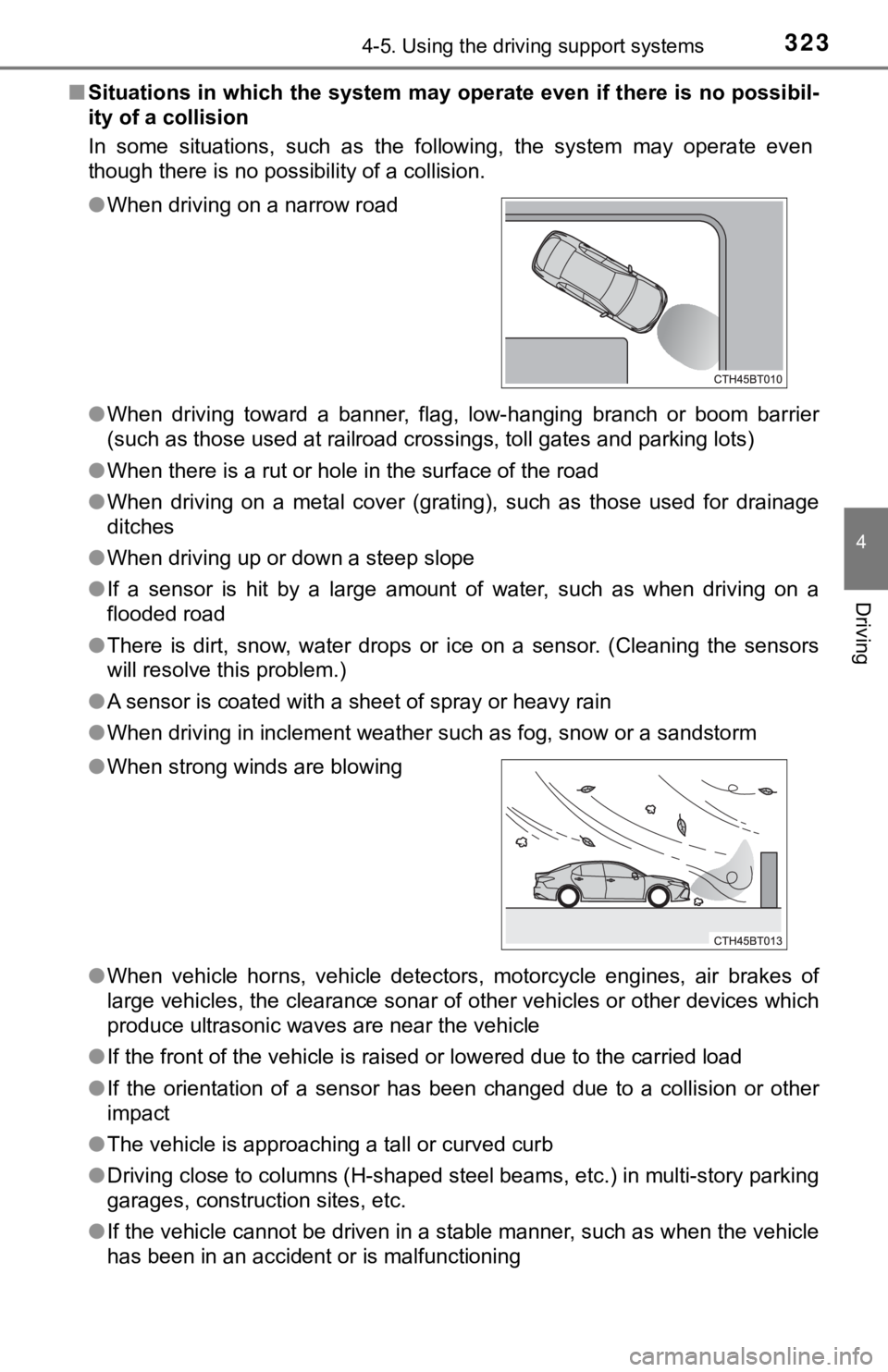
■Situations in which the system may operate even if there is no possibil-
ity of a collision
In some situations, such as the following, the system may operate even
though there is no possibility of a collision.
●When driving toward a banner, flag, low-hanging branch or boom barrier
(such as those used at railroad crossings, toll gates and parking lots)
●When there is a rut or hole in the surface of the road
●When driving on a metal cover (grating), such as those used for drainage
ditches
●When driving up or down a steep slope
●If a sensor is hit by a large amount of water, such as when driving on a
flooded road
●There is dirt, snow, water drops or ice on a sensor. (Cleaning the sensors
will resolve this problem.)
●A sensor is coated with a sheet of spray or heavy rain
●When driving in inclement weather such as fog, snow or a sandstorm
●When vehicle horns, vehicle detectors, motorcycle engines, air brakes of
large vehicles, the clearance sonar of other vehicles or other devices which
produce ultrasonic waves are near the vehicle
●If the front of the vehicle is raised or lowered due to the carried load
●If the orientation of a sensor has been changed due to a collision or other
impact
●The vehicle is approaching a tall or curved curb
●Driving close to columns (H-shaped steel beams, etc.) in multi-story parking
garages, construction sites, etc.
●If the vehicle cannot be driven in a stable manner, such as when the vehicle
has been in an accident or is malfunctioning ●When driving on a narrow road
●When strong winds are blowing
Page 340 of 624

3404-5. Using the driving support systems
■Parking Support Brake function (static objects)
Ultrasonic sensors are used to detect static objects, such as a wall,
in the detection area when driving at a low speed or backing up.
(P. 348)
■Parking Support Brake function (rear-crossing vehicles)
Rear radar sensors are used to detect approaching vehicles in the
detection area behind the vehicle when backing up. (P. 352)
PKSB (Parking Suppor t Brake)
: If equipped
The Parking Support Brake system consists of the following
functions that operate when driving at a low speed or backing
up, such as when parking. When the system determines that the
possibility of a collision with a detected object is high, a warning
operates to urge the driver to take evasive action. If the system
determines that the possibility of a collision with a detected
object is extremely high, the brakes are automatically applied to
help avoid the collision or help reduce the impact of the colli-
sion.
PKSB (Parking Support Brake) system
Page 341 of 624

3414-5. Using the driving support systems
4
Driving
Front corner sensors
Front center sensors
Rear corner sensors
Rear center sensors
The Parking Support Brake can be enabled/disabled on the multi-
information display. All of the Parking Support Brake functions (static
objects and rear-crossing vehicles) are enabled/disabled simultane-
ously.
Use the meter control switches to enable/disable the parking support
brake. (P. 109, 126)
Press
/ of the meter control switches, select .
Press
/ of the meter control switches, select .
Press of the meter control switch.
Select the “Yes” and push .
When the Parking Support Brake is disabled, the PKSB OFF indicator illu-
minates.
To re-enable the system when it was disabled, select on the multi-infor-
mation display, select and then “On”. If disabled using this method, the
system will not be re-enabled by turning the power switch off and then to
ON mode.
Types of sensors
1
2
3
4
Turning the Parking Support Brake on/off
1
2
3
4
Page 345 of 624

3454-5. Using the driving support systems
4
Driving
■If the Parking Support Brake function has operated
If the vehicle is stopped due to operation of the Parking Support Brake func-
tion, the Parking Support Brake system will be disabled and the PKSB OFF
indicator will illuminate. If the Parking Support Brake operates unnecessarily,
brake control can be canceled by depressing the brake pedal or waiting for
approximately 2 seconds for it to automatically be canceled. Then, the vehicle
can be operated by depressing the accelerator pedal.
■Re-enabling the Parking Support Brake system
To re-enable the Parking Support Brake system when it is disabled due to
operation of the Parking Support Brake function, either enable the system
again (P. 341), or turn the power switch off and then back to ON mode.
Additionally, if the object becomes no longer in the traveling direction of the
vehicle or if the traveling direction of the vehicle changes (such as changing
from moving forward to backing up, or from backing up to moving forward),
the system will be re-enabled automatically.
■If “PKSB Unavailable” and “Parking Assist Unavailable Clean Parking
Assist Sensor” are displayed on the multi-information display and the
PKSB OFF indicator is illuminating
●A sensor may be covered with ice, snow, dirt, etc. In this case, remove the
ice, snow, dirt, etc., from the sensor to return the system to normal. If this
message is shown even after removing dirt from the sensor, or shown when
the sensor was not dirty to begin with, have the vehicle inspected at your
Toyota dealer.
●A sensor may be frozen. Once the ice melts, the system will return to nor-
mal.
●Water may be continuously flowing over the sensor surface, such as in a
heavy rain. When the system determines that it is normal, the system will
return to normal.
Page 346 of 624

3464-5. Using the driving support systems
WARNING
■Cautions regarding the use of the system
Do not overly rely on the system, as doing so may lead to an accident.
Always drive while checking the safety of the surroundings of the vehicle.
Depending on the vehicle and road conditions, weather, etc., the system
may not operate.
The detection capabilities of sensors and radars are limited. Always drive
<005a004b004c004f004800030046004b00480046004e004c0051004a00030057004b0048000300560044004900480057005c00030052004900030057004b0048000300560058005500550052005800510047004c0051004a00560003005200490003005700
4b0048000300590048004b004c0046004f00480011[
●The driver is solely responsible for safe driving. Always drive carefully, tak-
ing care to observe your surroundings. The Parking Support Brake system
is designed to provide support to lessen the severity of collisions. How-
ever, it may not operate in some situations.
●The Parking Support Brake system is not designed to stop the vehicle
completely. Additionally, even if the system has stopped the vehicle, it is
<00510048004600480056005600440055005c0003005700520003004700480053005500480056005600030057004b00480003004500550044004e004800030053004800470044004f0003004c0050005000480047004c004400570048004f005c0003004400
560003004500550044004e0048000300460052005100570055[ol will be
canceled after approximately 2 seconds.
●It is extremely dangerous to check the system operations by intentionally
driving the vehicle into the direction of a wall, etc. Never attempt such
actions.
■When to disable the Parking Support Brake
In the following situations, disable the Parking Support Brake as the system
may operate even though there is no possibility of a collision.
●When inspecting the vehicle using a chassis roller, chassis dynamo or free
roller
●When loading the vehicle onto a boat, truck or other transport vessel
●If the suspension has been modified or tires of a size other than specified
are installed
●If the front of the vehicle is raised or lowered due to the carried load
●When equipment that may obstruct a sensor is installed, such as a towing
eyelet, bumper protector (an additional trim strip, etc.), bicycle carrier, or
snow plow
●When using automatic car washing devices
●If the vehicle cannot be driven in a stable manner, such as when the vehi-
cle has been in an accident or is malfunctioning
●When the vehicle is driven in a sporty manner or off-road
●When the tires are not properly inflated
●When the tires are very worn
●When a tire chains or compact spare tire is used
Page 348 of 624

3484-5. Using the driving support systems
The system will operate in situations such as the following if an object
is detected in the traveling direction of the vehicle.
■When traveling at a low speed and the brake pedal is not
depressed, or is depressed late
Parking Suppor t Brake function (static
objects)
: If equipped
If a collision with an object may occur due to the vehicle sud-
denly moving forward due to an accidental accelerator pedal
operation, the vehicle moving the unintended direction due to
the wrong shift position being selected, or while parking or trav-
eling at low speeds, the sensors detect objects, such as a wall,
in the traveling direction of the vehicle, and the system operates
to lessen an impact with an object and reduce the resulting dam-
age.
Examples of system operation
Page 352 of 624

3524-5. Using the driving support systems
The system will operate in situations such as the following if an object
is detected in the traveling direction of the vehicle.
■When reversing, a vehicle is approaching and the brake pedal
is not depressed, or is depressed late
Parking Suppor t Brake function (rear-
crossing vehicles)
: If equipped
If a radar sensor detects a vehicle approaching from the right or
left at the rear of the vehicle and the system determines that the
possibility of a collision is high, this function will perform brake
control to reduce the likelihood of an impact with the approach-
ing vehicle.
Examples of system operation
Page 596 of 624

596What to do if... (Troubleshooting)
●The seat belt reminder light is flashing
Are the driver and the passenger wearing the seat belts? (P. 500)
●The parking brake indicator is on
Is the parking brake released? (P. 223)
Depending on the situation, other types of warning buzzer may also sound.
(P. 497, 507)
●Did anyone inside the vehicle open a door during setting the alarm?
The sensor detects it and the alarm sounds. (P. 90)
To stop the alarm, turn the power switch to ON mode or start the hybrid
system.
●Is the message displayed on the multi-information display?
Check the message on the multi-information display. (P. 507)
●When a warning light turns on or a warning message is displayed, refer to
P. 497, 507.
●Stop the vehicle in a safe place and replace the flat tire with the spare
tire. (P. 513)
●Try the procedure for when the vehicle becomes stuck in mud, dirt, or
snow. (P. 541)
A warning buzzer sounds during driving
An alarm is activated and the horn sounds
A warning buzzer sounds when leaving the vehicle
A warning light turns on or a warning message is displayed
When a problem has occurred
If you have a flat tire
The vehicle becomes stuck