2022 TOYOTA BZ4X certification
[x] Cancel search: certificationPage 76 of 674

74
Owners Manual_Europe_M42D76_en
1-3. Emergency assistance
■Free/Open Source Software Information
This product contains Free/Open Source Software (FOSS).
The license information and/or the source code of such FOSS can be found at the
following URL.
http://www.opensourceautomotive.com/dcm/19MC/
■Certification
P. 5 9 4
[email protected]
Czech Republic/Hungary/[email protected]
[email protected] og
[email protected]
[email protected]
Francedelegue.protectiondonnees@toyota-
europe.com
[email protected]
Great [email protected]
[email protected]
[email protected]
[email protected]
[email protected]
Netherlandswww.toyota.nl/klantenservice
[email protected]
[email protected]
[email protected]
[email protected]
[email protected]
[email protected]/[email protected]
[email protected]
[email protected]
CountryContact information
Page 284 of 674
282
Owners Manual_Europe_M42D76_en
5-4. Using the driving support systems
●When the driver’s eyes are blocked by
the frame of eyeglasses, sunglasses, hair, etc.
●When there is a device inside the vehicle that radiates near infrared rays, such as a non-genuine driver
monitoring system.
■Certification
P. 6 3 5
*: If equipped
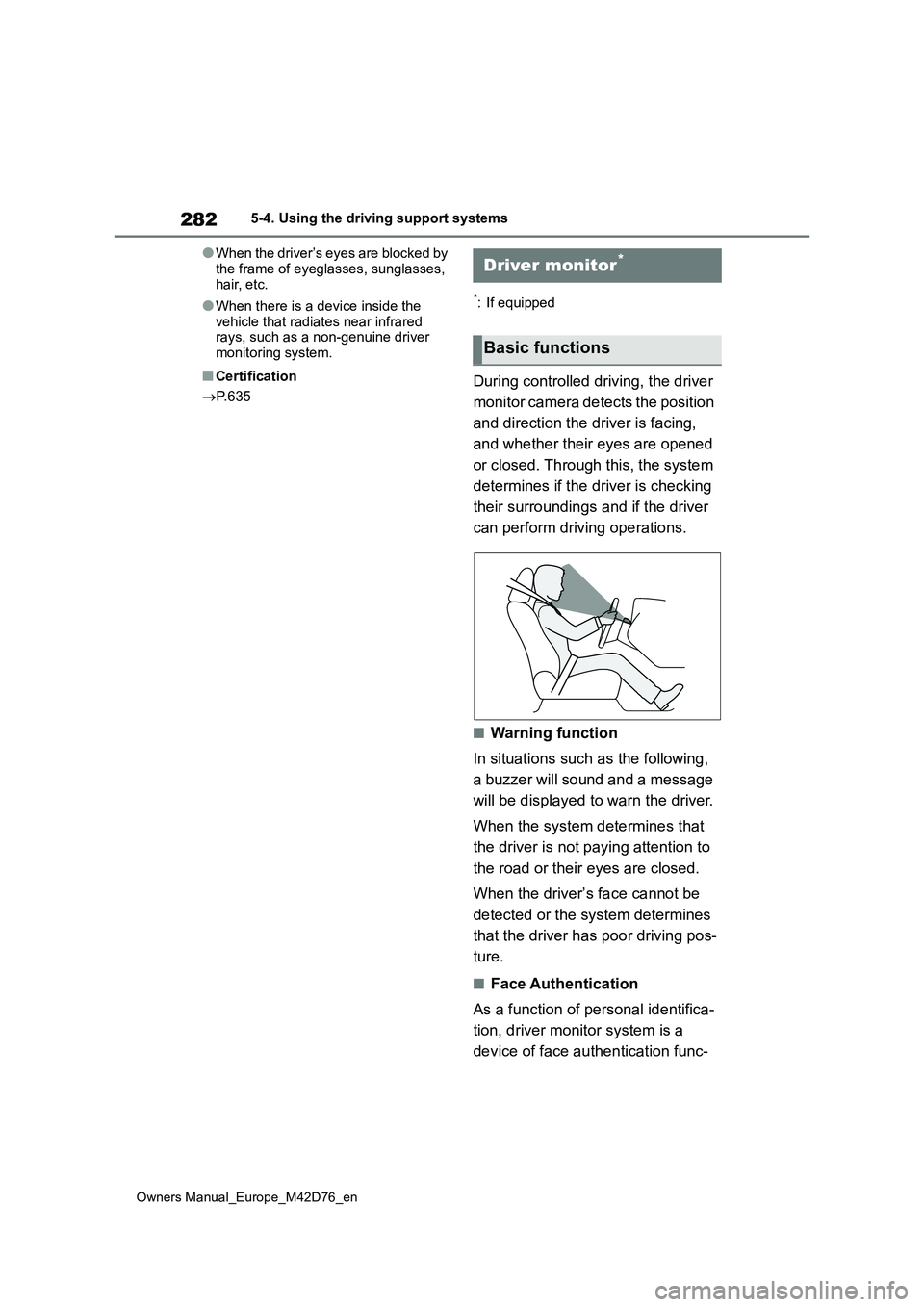
During controlled driving, the driver
monitor camera detects the position
and direction the driver is facing,
and whether their eyes are opened
or closed. Through this, the system
determines if the driver is checking
their surroundings and if the driver
can perform driving operations.
■Warning function
In situations such as the following,
a buzzer will sound and a message
will be displayed to warn the driver.
When the system determines that
the driver is not paying attention to
the road or their eyes are closed.
When the driver’s face cannot be
detected or the system determines
that the driver has poor driving pos-
ture.
■Face Authentication
As a function of personal identifica-
tion, driver monitor system is a
device of face authentication func-
Driver monitor*
Basic functions
Page 326 of 674

324
Owners Manual_Europe_M42D76_en
5-4. Using the driving support systems
*: If equipped
Meter control switches
Turning the Blind Spot Monitor on/off.
Outside rear view mirror indica-
tors
When a vehicle is detected in a blind
spot of the outside rear view mirrors or
approaching rapidly from behind into a
blind spot, the outside rear view mirror
indicator on the detected side will illumi-
nate. If the turn signal lever is operated
toward the detected side, the outside
rear view mirror indicator flashes.
Driving assist information indica-
tor
Illuminates when the Blind Spot Monitor
is turned off. At this time, “Blind Spot
Monitor OFF” will be displayed on the
multi-information display.
■Outside rear view mirror indicator
visibility
In strong sunlight, the outside rear view mirror indicator may be difficult to see.
■Customization
Some functions can be customized. ( P.570)
■Certification
P. 6 4 3
BSM (Blind Spot Moni-
tor)*
The Blind Spot Monitor is a
system that uses rear side
radar sensors installed on the
inner side of the rear bumper
on the left and right side to
assist the driver in confirming
safety when changing lanes.
WARNING
■Cautions regarding the use of
the system
●The driver is solely responsible for safe driving. Always drive safely,
taking care to observe your sur- roundings.
●The Blind Spot Monitor is a supple-mentary function which alerts the driver that a vehicle is in a blind
spot of the outside rear view mirrors or is approaching rapidly from
behind into a blind spot. Do not overly rely on the Blind Spot Moni-tor. As the function cannot judge if it
is safe to change lanes, over reli- ance could lead to an accident resulting in death or serious injury.
As the system may not function cor- rectly under certain conditions, the
driver’s own visual confirmation of safety is necessary.
System components
Page 452 of 674

450
Owners Manual_Europe_M42D76_en
6-4. Using the other interior features
standard is not guaranteed.
●The wireless charger is designed to supply low power electricity (5 W or
less) to a cellular phone, smartphone, or other portable device.
●Failure to do so may result in the pos-sibility of fire, However, portable devices, such as the following, can be
charged with more than 5 W. • 7.5 W charging compatible iPhones can be charged at 7.5 W or less.
• Portable devices which conform to WPC Ver 1.2.4 (Extended Power pro-file) can be charged at 10 W or less.
■When covers and accessories are
attached to portable devices
Do not charge in situations where cover and accessories not able to handle Qi
are attached to the portable device. Depending on the type of cover (includ-ing for certain genuine manufacturer
parts) and accessory, it may not be pos- sible to charge.When charging is not performed even
with the portable device placed on the charge area, remove the cover and accessories.
■Charging precautions
●If the electronic key cannot be detected in the cabin, charging cannot
be performed. When a door is opened and closed, charging may be tempo-rarily suspended.
●While charging, the wireless charger and the portable device will become
warm. This is not a malfunction. If a portable device becomes warm while charging and charging stops
due to the protection function of the portable device, wait until the portable device cools down and charge it
again.
●Depending on usage of the portable
device, it may not be fully charged. This is not a malfunction.
■Important points of the wireless charger
●If the electronic key cannot be
detected within the vehicle interior,
charging can not be done. When the door is opened and closed, charging may be temporarily suspended.
●When charging, the wireless charging device and portable device will get
warmer, however this is not a mal- function. When a portable device gets warm while charging may stop due to
the protection function on the portable device side. In this case, when the temperature of the portable drops sig-
nificantly, charge again. The fan may start operating to lower the temperature inside the wireless
charger, however this is not a mal- function.
■Sound generated during operation
When the power supply switch is turned
on or while a portable device is being identified, operation sounds may be heard. This is not a malfunction.
■Cleaning the wireless charger
P. 4 6 0
■Certification
P. 6 6 2
WARNING
■Caution while driving
When charging a portable device, for safety reasons, the driver should not operate the main part of the portable
device while driving.
■Caution while in motion
Do not charge lightweight devices such as wireless headphones while in motion. These devices are very light
and may be ejected from the charging tray, which may lead to unforeseen accidents.
Page 503 of 674

501
7
Owners Manual_Europe_M42D76_en
7-3. Do-it-yourself maintenance
Maintenance and care
1Turn the power switch off.
Confirm that the charging connector is not connected. Also, do not use the
Remote Air Conditioning System during the procedure.
2 Open the fuse box cover.
Motor compartment
Push the tab in and lift the lid off.
Left side instrument panel (left-
hand drive vehicles)
Remove the lid.
WARNING
■To prevent battery explosion or leakage of flammable liquid or
gas
●Replace the battery with a new bat- tery of the same type. If a wrong
type of battery is used, it may explode.
●Do not expose batteries to extremely low pressure due to high altitude or extremely high tempera-
tures.
●Do not burn, break or cut a battery.
■Certification for the electronic key battery
CAUTION RISK OF EXPLOSION IF BATTERY IS REPLACED BY AN INCORRECT
TYPE. DISPOSE OF USED BATTERIES ACCORDING TO THE
INSTRUCTIONS.
NOTICE
■When replacing the battery
Use a screwdriver of appropriate size. Applying excessive force may deform or damage the cover.
■For normal operation after replacing the battery
Observe the following precautions to prevent accidents:
●Always work with dry hands.
Moisture may cause the battery to rust.
●Do not touch or move any other component inside the remote con-trol.
●Do not bend either of the battery terminals.
Checking and replacing
fuses
If any of the electrical compo-
nents do not operate, a fuse
may have blown. If this hap-
pens, check and replace the
fuses as necessary.
Checking and replacing
fuses