2022 TOYOTA AYGO X change time
[x] Cancel search: change timePage 211 of 494

209
4
Owner's Manual_Europe_M99V08_en
4-5. Using the driving support systems
Driving
Approximately 100 cm (3.3 ft.)
Approximately 150 cm (4.9 ft.)
Approximately 60 cm (2.0 ft.)
The diagram shows the detection range
of the sensors. Note that the sensors
cannot detect objects that are
extremely close to the vehicle.
The range of the sensors may change
depending on the shape of the object,
etc.
■The distance and buzzer
*: Automatic buzzer mute function is enabled. ( P.209)
■Buzzer operation and dis-
tance to an object
A buzzer sounds when the sensors
are operating.
The buzzer beeps faster as the
vehicle approaches an object.
When the vehicle comes within
approximately 30 cm (1.0 ft.) of
the object, the buzzer sounds
continuously.
When 2 or more sensors simulta-
neously detect a static object,
the buzzer sounds for the near-
est object.
Even when the sensors are oper-
ating, the buzzer will be muted in
some situations. (automatic
buzzer mute function)
■Adjusting the buzzer volume
The buzzer volume can be adjusted
on the multi-information display.
Use the meter control switches to
change settings. ( P. 8 3 )
1 Press / of the meter con-
trol switches to select .
2 Press / of the meter con-
trol switches to select and
then press and hold .
3 Select the volume and then
press .
Each time the switch is pressed, the volume level will change between 1, 2,
Approximate distance to obstacleBuzzer
Front sensor:
100 cm to 60 cm (3.3 ft. to 2.0 ft.)*
Rear sensor:
150 cm to 60 cm (4.9 ft. to 2.0 ft.)*
Slow
60 cm to 45 cm (2.0 ft. to 1.5 ft.)*Medium
45 cm to 30 cm (1.5 ft. to 1.0 ft.)*Fast
30 cm to 15 cm (1.0 ft. to 0.5 ft.)ContinuousLess than 15 cm (0.5 ft.)
Page 217 of 494
215
4
Owner's Manual_Europe_M99V08_en
4-5. Using the driving support systems
Driving
WARNING
■TRC/VSC may not operate effec- tively when
Directional control and power may not be achievable while driving on slip-pery road surfaces, even if the
TRC/VSC system is operating. Drive the vehicle carefully in conditions where stability and power may be
lost.
■Active Cornering Assist does not
operate effectively when
●Do not overly rely on Active Corner- ing Assist. Active Cornering Assist
may not operate effectively when accelerating down slopes or driving on slippery road surfaces.
●When Active Cornering Assist fre-quently operates, Active Cornering
Assist may temporarily stop operat- ing to ensure proper operation of the brakes, TRC and VSC.
■Hill-start assist control does not operate effectively when
●Do not overly rely on hill-start assist control. Hill-start assist control may not operate effectively on steep
inclines and roads covered with ice.
●Unlike the parking brake, hill-start
assist control is not intended to hold the vehicle stationary for an extended period of time. Do not
attempt to use hill-start assist con- trol to hold the vehicle on an incline, as doing so may lead to an acci-
dent.
■When the TRC/VSC is activated
The slip indicator light flashes. Always drive carefully. Reckless driving may cause an accident. Exercise particular
care when the indicator light flashes.
■When the TRC/VSC systems are turned off
Be especially careful and drive at a
speed appropriate to the road condi- tions. As these are the systems to help ensure vehicle stability and driv-
ing force, do not turn the TRC/VSC systems off unless necessary.
■Replacing tires
Make sure that all tires are of the specified size, brand, tread pattern
and total load capacity. In addition, make sure that the tires are inflated to the recommended tire inflation pres-
sure level. The ABS, TRC and VSC systems will not function correctly if different tires
are installed on the vehicle. Contact any authorized Toyota retailer or Toyota authorized repairer, or any
reliable repairer for further information when replacing tires or wheels.
■Handling of tires and the suspen-sion
Using tires with any kind of problem
or modifying the suspension will affect the driving assist systems, and may cause a system to malfunction.
■Secondary Collision Brake
Do not rely solely upon the Secondary
Collision Brake. This system is designed to help reduce the possibil-ity of further damage due to a second-
ary collision, however, that effect changes according to various condi-tions. Overly relying on the system
may result in death or serious injury.
Page 227 of 494
225
5
Owner's Manual_Europe_M99V08_en
5-1. Using the air conditioning system and defogger
Interior features
■Setting the fan speed
To adjust the fan speed, turn the
fan speed control dial clockwise
(increase) or counterclockwise
(decrease).
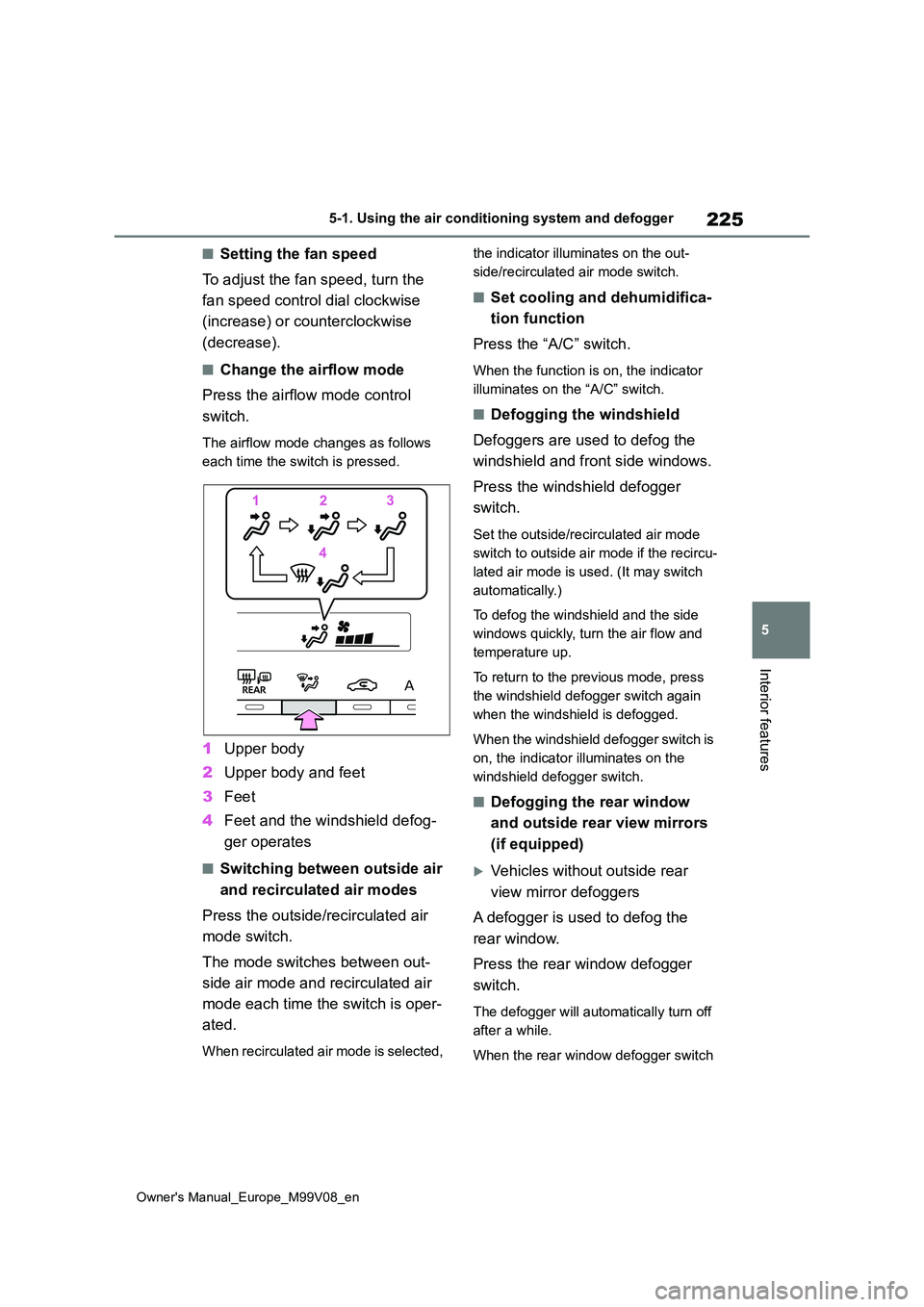
■Change the airflow mode
Press the airflow mode control
switch.
The airflow mode changes as follows
each time the switch is pressed.
1 Upper body
2 Upper body and feet
3 Feet
4 Feet and the windshield defog-
ger operates
■Switching between outside air
and recirculated air modes
Press the outside/recirculated air
mode switch.
The mode switches between out-
side air mode and recirculated air
mode each time the switch is oper-
ated.
When recirculated air mode is selected,
the indicator illuminates on the out-
side/recirculated air mode switch.
■Set cooling and dehumidifica-
tion function
Press the “A/C” switch.
When the function is on, the indicator
illuminates on the “A/C” switch.
■Defogging the windshield
Defoggers are used to defog the
windshield and front side windows.
Press the windshield defogger
switch.
Set the outside/recirculated air mode
switch to outside air mode if the recircu-
lated air mode is used. (It may switch
automatically.)
To defog the windshield and the side
windows quickly, turn the air flow and
temperature up.
To return to the previous mode, press
the windshield defogger switch again
when the windshield is defogged.
When the windshield defogger switch is
on, the indicator illuminates on the
windshield defogger switch.
■Defogging the rear window
and outside rear view mirrors
(if equipped)
Vehicles without outside rear
view mirror defoggers
A defogger is used to defog the
rear window.
Press the rear window defogger
switch.
The defogger will automatically turn off
after a while.
When the rear window defogger switch
Page 241 of 494

239
5
Owner's Manual_Europe_M99V08_en
5-4. Other interior features
Interior features
• Flashing repeatedly once every sec-
ond (Orange)
• Repeatedly flashes 3 times continu-
ously (Orange)
• Repeatedly flashes 4 times continu-
ously (Orange)
■The wireless charger can be oper- ated when
The engine switch is in ACC or ON.
■Usable portable devices
●Qi standard wireless charge standard
can be used on compatible devices. However, not all Qi standard devices
and compatibility are guaranteed.
●Starting with mobile phones and smartphones, it is aimed for low
power electrically supplied portable devices of no more than 5W.
■When covers and accessories are attached to portable devices
Do not charge in situations where cover and accessories not able to handle Qi are attached to the portable device.
Depending on the type of cover and accessory, it may not be possible to charge. When charging is not performed
even with the portable device placed on the charge area, remove the cover and accessories.
■While charging, noise enters the
AM radio
Turn off the wireless charger and con- firm that the noise has decreased. If the
noise decreases, continuously pushing the power supply switch of the wireless charger for 2 seconds, the frequency of
the charger can be changed and the noise can be reduced. Also, on that occasion, the operation indicator light
will flash orange 2 times.
■Important points of the wireless charger
●If the electronic key cannot be detected within the vehicle interior, charging cannot be done. When the
door is opened and closed, charging may be temporarily suspended.
●When charging, the wireless charging device and portable device will get warmer, however this is not a mal-
function. When a portable device gets warm while charging, charging may stop
due to the protection function on the portable device side. In this case, when the temperature of the portable
device drops significantly, charge again.
●Depending on usage of the portable device, it may not be fully charged.This is not a malfunction.
●When using a mobile phone near a
Suspected causesHandling method
Vehicle to charger
communication
failure.
Contact any autho-
rized Toyota
retailer or Toyota
authorized
repairer, or any
reliable repairer
Suspected causesHandling method
A foreign sub-
stance is between
the portable device
and charge area.
Remove the for-
eign substance
from between por-
table device and
the charge area.
The portable
device is out of
sync due to the
device being
shifted from the
center of the
charge area.
Place the portable
device near the
center of the
charge area.
Suspected causesHandling method
Temperature ris-
ing within the wire-
less charger.
Stop charging at
once and start
charging again
after a while.
Page 337 of 494

335
7
Owner's Manual_Europe_M99V08_en
7-2. Steps to take in an emergency
When trouble arises
the engine switch will turn to ACC.
3Firmly depress the brake pedal
(Multidrive) or clutch pedal
(manual transmission) and
check that is shown on the
multi-information display.
4 Press the engine switch shortly
and firmly.
In the event that the engine still
cannot be started, contact any
authorized Toyota retailer or Toyota
authorized repairer, or any reliable
repairer.
■Stopping the engine
Shift the shift lever to P (Multidrive) or N (manual transmission) and press the
engine switch as you normally do when stopping the engine.
■Electronic key battery
As the above procedure is a temporary
measure, it is recommended that the electronic key battery be replaced immediately when the battery is
depleted. ( P.275)
■Changing engine switch modes
Release the brake pedal (Multidrive) or clutch pedal (manual transmission) and
press the engine switch in step 3 above. The engine does not start and modes will be changed each time the switch is
pressed. ( P.133)
If you have a set of jumper (or
booster) cables and a second vehi-
cle with a 12-volt battery, you can
jump start your vehicle by following
the steps below.
1 Open the hood. (P.255)
If the vehicle batter y is
discharged
The following procedures may
be used to start the engine if
the vehicle’s battery is dis-
charged.
You can also call any autho-
rized Toyota retailer or Toyota
authorized repairer, or any reli-
able repairer or a qualified
repair shop.
Restarting the engine
Page 356 of 494

354
Owner's Manual_Europe_M99V08_en
8-2. Customization
8-2.Customiz ation
■Changing by using the naviga-
tion/multimedia system screen
(vehicles with 7-inch/8-inch
display multimedia system)
1 Press the “MENU” button.
2 Select “Setup” on the “Menu”
screen.
3 Select “Vehicle” on the “Setup”
screen.
4 4 Select “Vehicle customiza-
tion”.
Various setting can be changed. Refer to the list of settings that can be
changed for details.
■Changing by using the meter
control switches
1 Press / of the meter con-
trol switches to select .
2 Press / of the meter con-
trol switches to select the
desired item to be customized.
3 Press or press and hold .
The available settings will differ
depending on if is pressed or
pressed and held. Follow the instruc-
tions on the display.
Some function settings are changed simultaneously with other fu nctions
being customized. Contact any authorized Toyota retailer or Toy ota autho-
rized repairer, or any reliable repairer for further details.
Settings that can be changed using the 7-inch/8-inch display m ultimedia
Customizable features
Your vehicle includes a variety
of electronic features that can
be personalized to suit your
preferences. The settings of
these features can be changed
using the multi-information
display, the nav igation/multi-
media system screen or at any
authorized Toyota retailer or
Toyota authorized repairer, or
any reliable repairer.
Customizing vehicle fea-
turesWARNING
■During customization
As the engine needs to be running
during customization, ensure that the vehicle is parked in a place with ade-quate ventilation. In a closed area
such as a garage, exhaust gases including harmful carbon monoxide (CO) may collect and enter the vehi-
cle. This may lead to death or a seri- ous health hazard.
NOTICE
■During customization
To prevent battery discharge, ensure that the engine is running while cus-
tomizing features.
Customizable features
Page 357 of 494

355
8
Owner's Manual_Europe_M99V08_en
8-2. Customization
Vehicle specifications
system
Settings that can be changed using the meter control switches
Settings that can be changed by any authorized Toyota retailer or Toy ota
authorized repairer, or any reliable repairer
Definition of symbols: O = Available, — = Not available
■Gauges, meters and multi-information display ( P.79, 83)
*1: For details about each function: P. 8 6
*2: The default setting varies according to country.
*3: Spanish, Russian, French, German, Italian, Dutch, Turkish, Polish, Hebrew, Nor-
wegian, Swedish, Danish, Ukrainian, Finnish, Greek, Czech, Port uguese, Roma-
nian, Slovakian, Hungarian, Flemish
Function*1Default settingCustomized setting
Language*2English*3OO—
Units*2L/100 kmkm/LOO—miles (MPG)
Eco Driving Indicator
Light*4OnOff—O—
Fuel economy display
Total average
(Average fuel
consumption
[after reset])
Trip average (Aver-
age fuel consump-
tion [after start])—O—Tank average (Aver-
age fuel consump-
tion [after refuel])
Audio system linked dis-
play*4OnOff—O—
Drive information typeAfter startAfter reset—O—
Drive information items
(First item)Distance
Average vehicle
speed—O—
Elapsed time
Drive information items
(Second item)Elapsed time
Average vehicle
speed—O—
Distance
Pop-up displayOnOff—O—
Page 359 of 494

357
8
Owner's Manual_Europe_M99V08_en
8-2. Customization
Vehicle specifications
■Turn signal lever (P.140)
■Lights (P.143)
*: If equipped
■Rear window wiper (P.152)
■PCS (Pre-Collision System) (P.161)
*: The system is automatically enabled each time the engine switch is turned to ON.
Extended headlight light-
ing function (Time elapsed
before headlights automati-
cally turn off)
30 seconds
60 seconds
——O90 seconds
120 seconds
FunctionDefault settingCustomized setting
Times of flashing of the
lane change signal flashers3Off——O4 to 7
FunctionDefault settingCustomized setting
Welcome lamp*OnOff——O
FunctionDefault settingCustomized setting
Back door opening linked
rear window wiper stop
function
OffOn——O
Washer linked rear window
wiper operationOnOff——O
Shift position linked rear
window wiper operationOnly onceOff——OContinuous
FunctionCustomized setting
PCS (Pre-Collision System)*On/Off—O—
Adjust alert timingEarly/Middle/Late—O—
FunctionDefault settingCustomized setting