2022 TOYOTA 4RUNNER front radar
[x] Cancel search: front radarPage 87 of 616
872. Instrument cluster
2
Instrument cluster
4RUNNER (U)
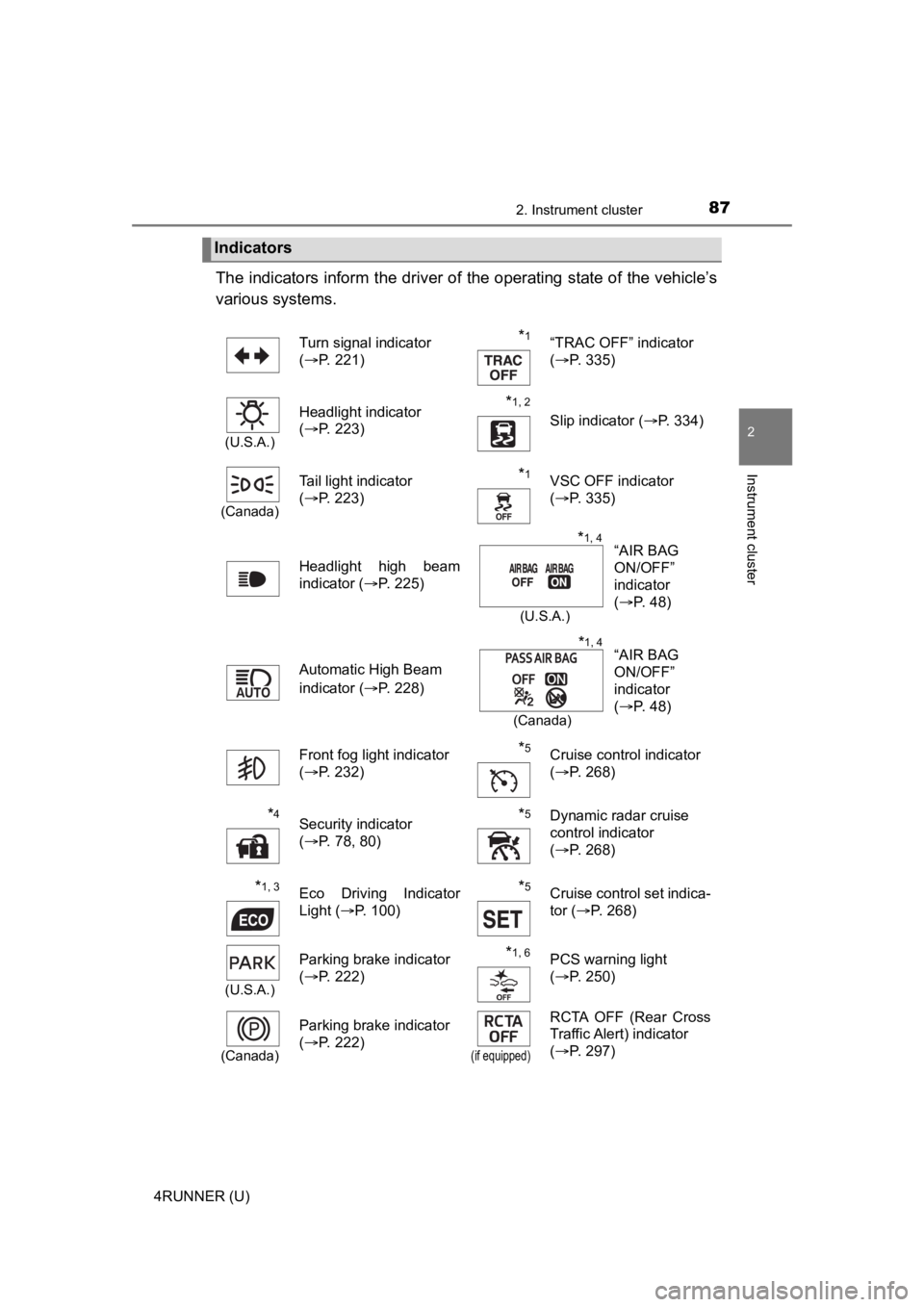
The indicators inform the driver of the operating state of the vehicle’s
various systems.
Indicators
Turn signal indicator
( P. 221)*1“TRAC OFF” indicator
(P. 335)
(U.S.A.)
Headlight indicator
(P. 223)*1, 2 Slip indicator ( P. 334)
(Canada)
Tail light indicator
(P. 223) *1VSC OFF indicator
(P. 335)
Headlight high beam
indicator ( P. 225)
Automatic High Beam
indicator ( P. 228)
Front fog light indicator
( P. 232)
*5Cruise control indicator
(P. 268)
*4Security indicator
(P. 78, 80)*5Dynamic radar cruise
control indicator
(P. 268)
*1, 3Eco Driving Indicator
Light ( P. 100)*5Cruise control set indica-
tor (P. 268)
(U.S.A.)
Parking brake indicator
(P. 222)*1, 6PCS warning light
(P. 250)
(Canada)
Parking brake indicator
(P. 222)
(if equipped)
RCTA OFF (Rear Cross
Traffic Alert) indicator
(P. 297)
“AIR BAG
ON/OFF”
indicator
(P. 48)*1, 4
(U.S.A.)
“AIR BAG
ON/OFF”
indicator
(P. 48)*1, 4
(Canada)
Page 244 of 616
2444-5. Using the driving support systems
4RUNNER (U)
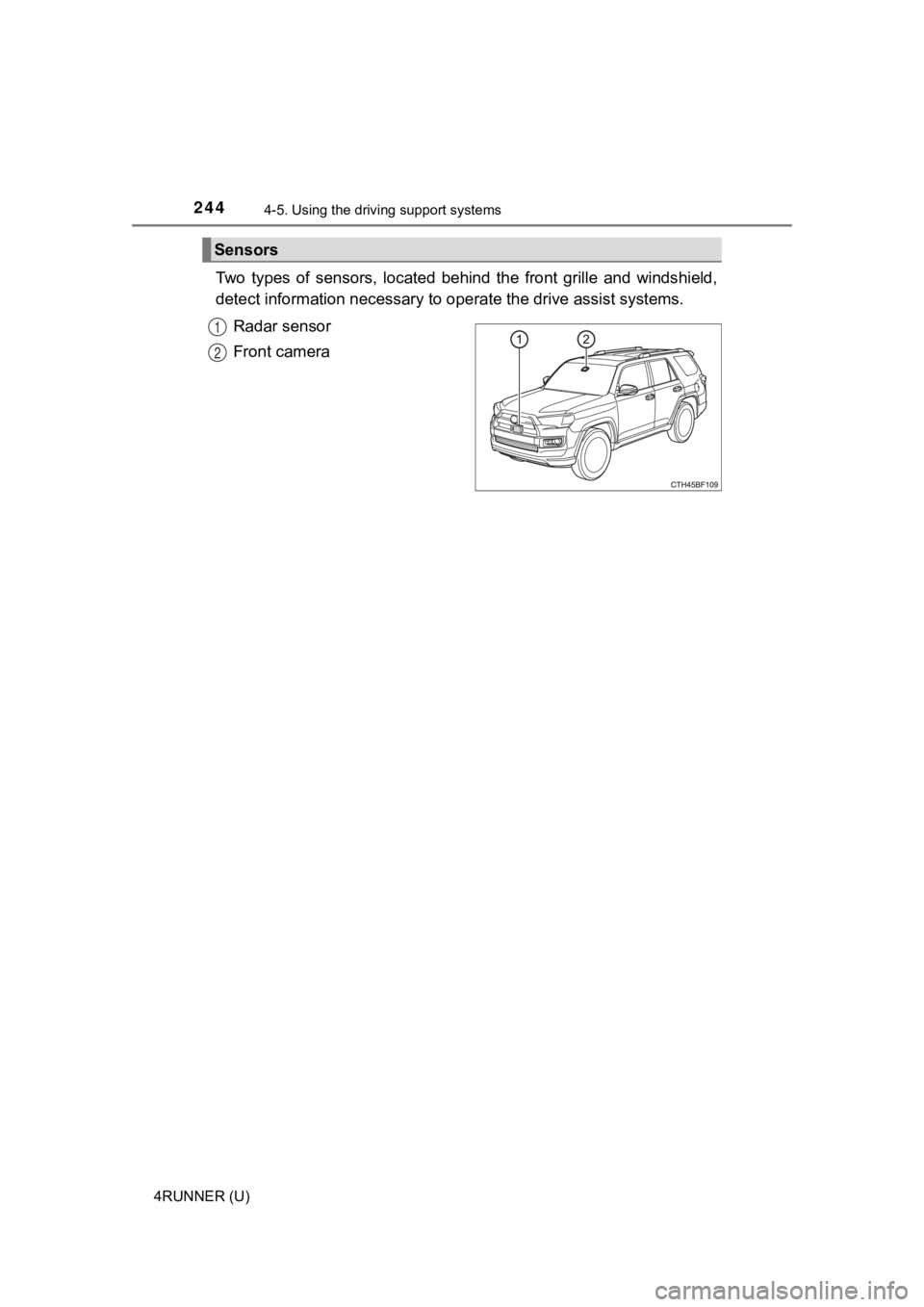
Two types of sensors, located behind the front grille and winds hield,
detect information necessary to operate the drive assist systems.
Radar sensor
Front camera
Sensors
1
2
Page 245 of 616
2454-5. Using the driving support systems
4
Driving
4RUNNER (U)
WARNING
■To avoid malfunction of the radar sensor
Observe the following precautions.
Otherwise, the radar sensor may not operate properly, possibly leading to
an accident resulting in death or serious injury.
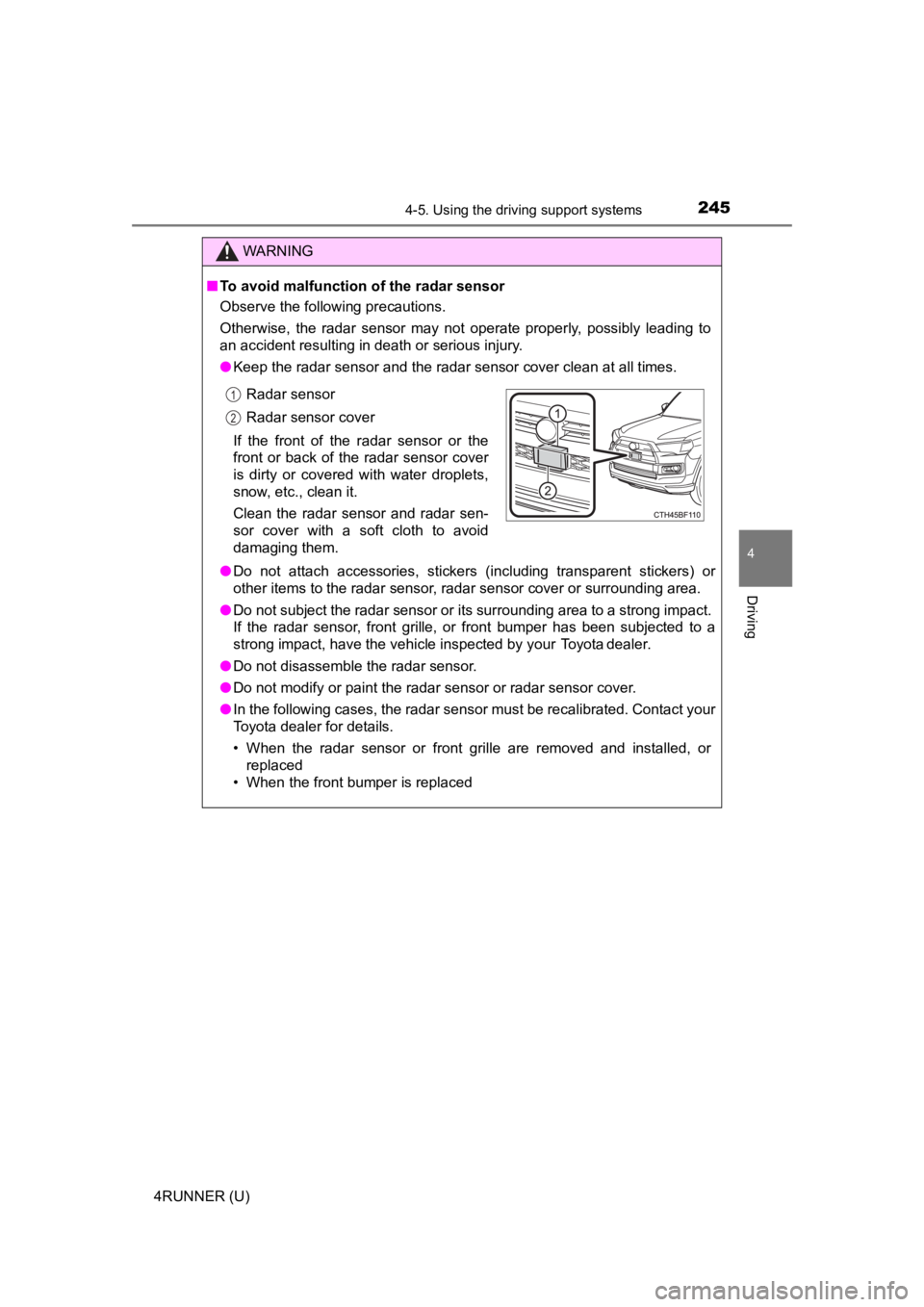
● Keep the radar sensor and the radar sensor cover clean at all times.
● Do not attach accessories, stickers (including transparent stic kers) or
other items to the radar sensor, radar sensor cover or surrounding area.
● Do not subject the radar sensor or its surrounding area to a st rong impact.
If the radar sensor, front grille, or front bumper has been sub jected to a
strong impact, have the vehicle inspected by your Toyota dealer.
● Do not disassemble the radar sensor.
● Do not modify or paint the radar sensor or radar sensor cover.
● In the following cases, the radar sensor must be recalibrated. Contact your
Toyota dealer for details.
• When the radar sensor or front grille are removed and installe d, or
replaced
• When the front bumper is replaced
Radar sensor
Radar sensor cover
If the front of the radar sensor or the
front or back of the radar sensor cover
is dirty or covered with water droplets,
snow, etc., clean it.
Clean the radar sensor and radar sen-
sor cover with a soft cloth to avoid
damaging them.
1
2
Page 248 of 616
2484-5. Using the driving support systems
4RUNNER (U)
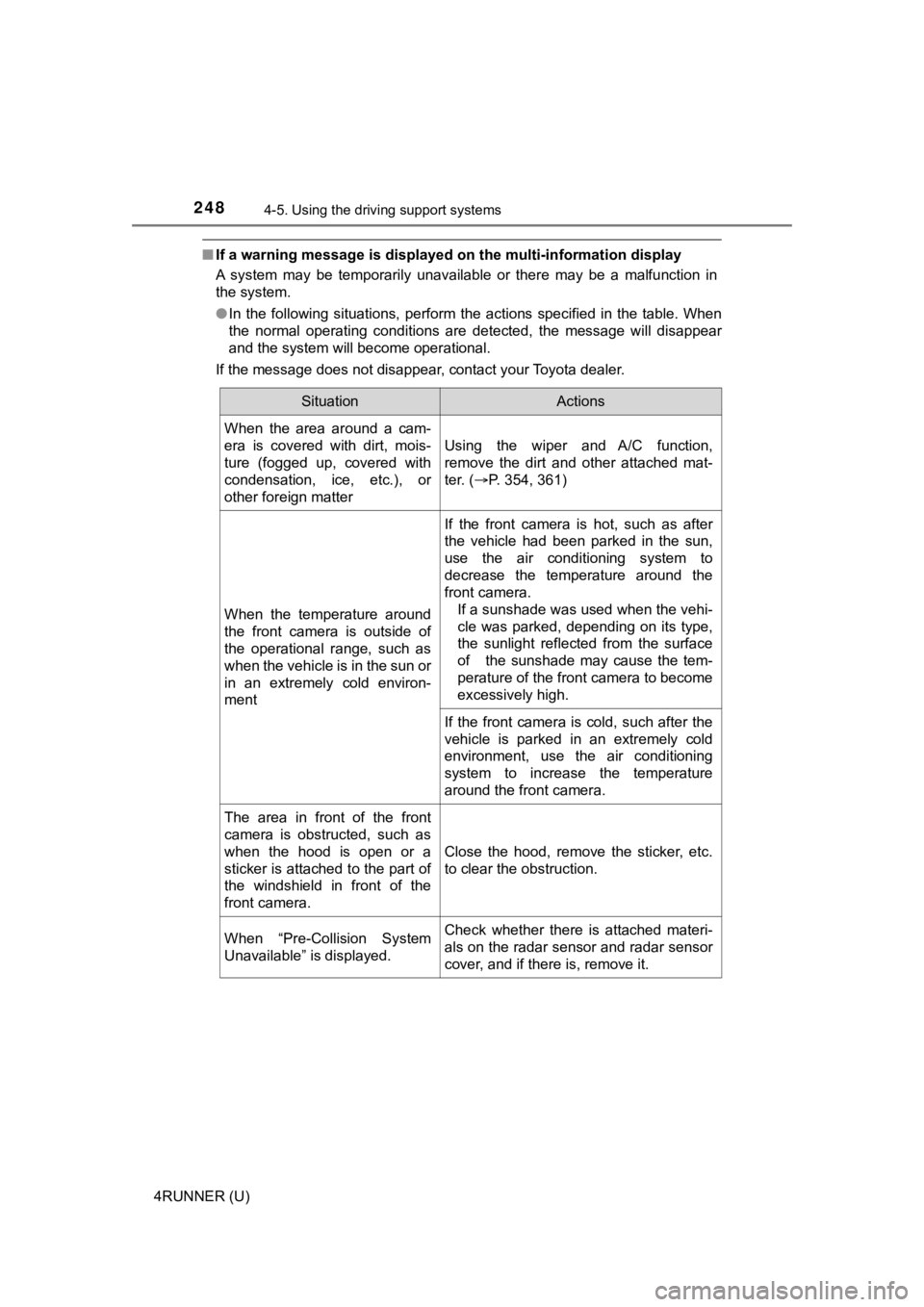
■If a warning message is displayed on the multi-information disp lay
A system may be temporarily unavailable or there may be a malfu nction in
the system.
● In the following situations, perform the actions specified in t he table. When
the normal operating conditions are detected, the message will disappear
and the system will become operational.
If the message does not disappear, contact your Toyota dealer.
SituationActions
When the area around a cam-
era is covered with dirt, mois-
ture (fogged up, covered with
condensation, ice, etc.), or
other foreign matter
Using the wiper and A/C function,
remove the dirt and other attached mat-
ter. ( P. 354, 361)
When the temperature around
the front camera is outside of
the operational range, such as
when the vehicle is in the sun or
in an extremely cold environ-
ment
If the front camera is hot, such as after
the vehicle had been parked in the sun,
use the air conditioning system to
decrease the temperature around the
front camera.
If a sunshade was used when the vehi-
cle was parked, depending on its type,
the sunlight reflected from the surface
of the sunshade may cause the tem-
perature of the front camera to become
excessively high.
If the front camera is cold, such after the
vehicle is parked in an extremely cold
environment, use the air conditioning
system to increase the temperature
around the front camera.
The area in front of the front
camera is obstructed, such as
when the hood is open or a
sticker is attached to the part of
the windshield in front of the
front camera.
Close the hood, remove the sticker, etc.
to clear the obstruction.
When “Pre-Collision System
Unavailable” is displayed.Check whether there is attached materi-
als on the radar sensor and radar sensor
cover, and if there is, remove it.
Page 249 of 616

2494-5. Using the driving support systems
4
Driving
4RUNNER (U)●
In the following situations, if the situation has changed (or the vehicle has
been driven for some time) and the normal operating conditions are
detected, the message will disappear and the system will become opera-
tional.
If the message does not disappear, contact your Toyota dealer.
• When the temperature around the radar sensor is outside of the opera- tional range, such as when the vehicle is in the sun or in an e xtremely
cold environment
• When the front camera cannot detect objects in front of the ve hicle, such
as when driving in the dark, snow, or fog, or when bright lights are shining
into the front camera
• Depending on the conditions in the vicinity of the vehicle, th e radar may
judge the surrounding environment can not be properly recognize d. In
that case, “Pre-Collision Syst em Unavailable” is displayed.
Page 250 of 616
2504-5. Using the driving support systems
4RUNNER (U)
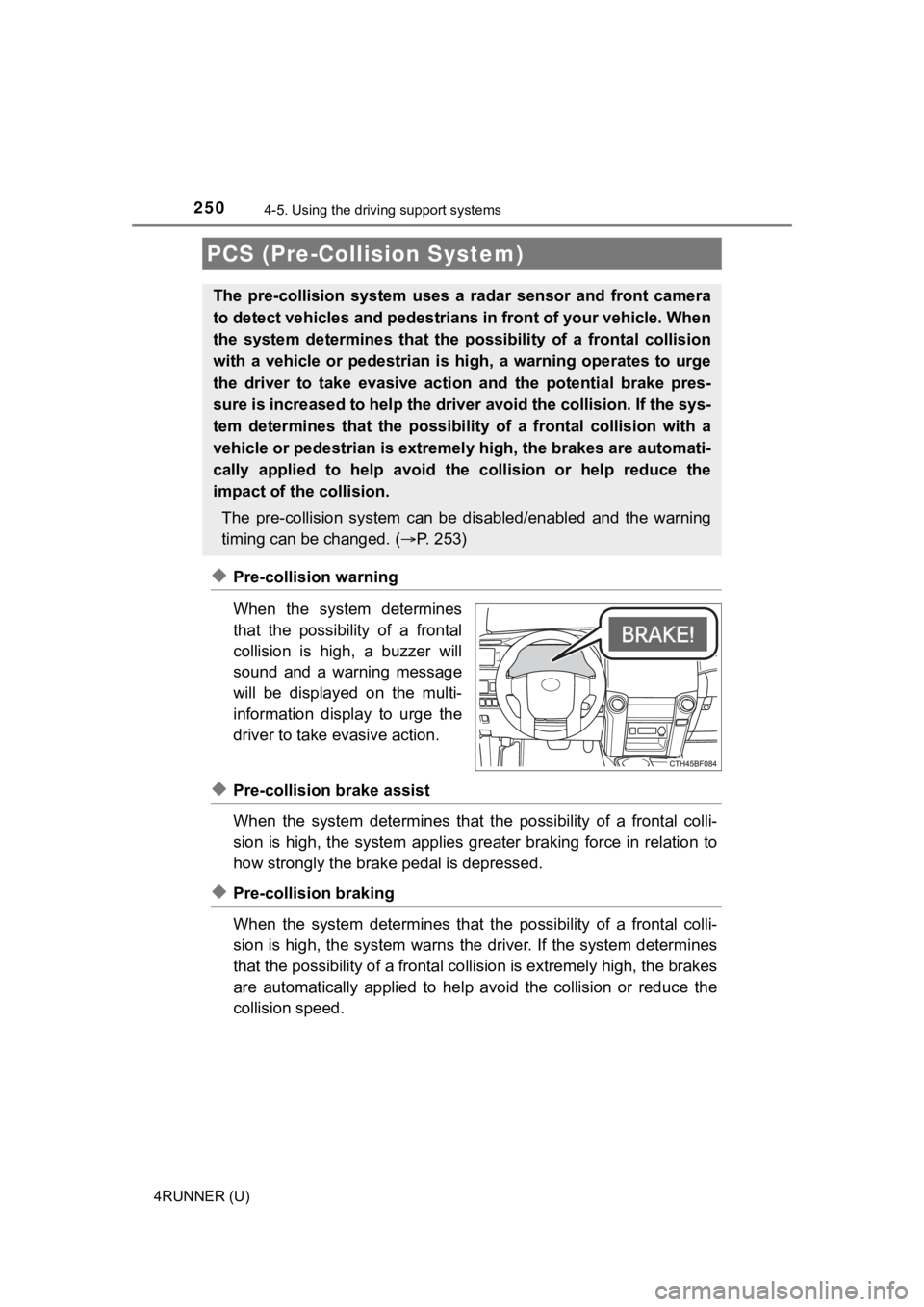
◆Pre-collision warning
When the system determines
that the possibility of a frontal
collision is high, a buzzer will
sound and a warning message
will be displayed on the multi-
information display to urge the
driver to take evasive action.
◆Pre-collision brake assist
When the system determines that the possibility of a frontal colli-
sion is high, the system applies greater braking force in relat ion to
how strongly the brake pedal is depressed.
◆Pre-collision braking
When the system determines that the possibility of a frontal colli-
sion is high, the system warns the driver. If the system determ ines
that the possibility of a frontal collision is extremely high, the brakes
are automatically applied to hel p avoid the collision or reduce the
collision speed.
PCS (Pre-Collision System)
The pre-collision system uses a radar sensor and front camera
to detect vehicles and pedestrians in front of your vehicle. Wh en
the system determines that the possibility of a frontal collisi on
with a vehicle or pedestrian i s high, a warning operates to urg e
the driver to take evasive action and the potential brake pres-
sure is increased to help the driver avoid the collision. If the sys-
tem determines that the possibi lity of a frontal collision with a
vehicle or pedestrian is extremely high, the brakes are automat i-
cally applied to hel p avoid the collision or help reduce the
impact of the collision.
The pre-collision system can b e disabled/enabled and the warnin g
timing can be changed. ( P. 2 5 3 )
Page 252 of 616
2524-5. Using the driving support systems
4RUNNER (U)
WARNING
■When to disable the pre-collision system
In the following situations, disable the system, as it may not operate prop-
erly, possibly leading to an accident resulting in death or serious injury:
● When the vehicle is being towed
● When your vehicle is towing another vehicle
● When transporting the vehicle via truck, boat, train or similar means of
transportation
● When the vehicle is raised on a lift with the engine running and the tires
are allowed to rotate freely
● When inspecting the vehicle using a drum tester such as a chass is dyna-
mometer or speedometer tester, or when using an on vehicle whee l bal-
ancer
● When a strong impact is applied to the front bumper or front gr ille, due to
an accident or other reasons
● If the vehicle cannot be driven in a stable manner, such as when the vehi-
cle has been in an accident or is malfunctioning
● When the vehicle is driven in a sporty manner or off-road
● When the tires are not properly inflated
● When the tires are very worn
● When tires of a size other than specified are installed
● When tire chains are installed
● When a compact spare tire or an emergency tire puncture repair kit is used
● If equipment (snow plow, etc.) that may obstruct the radar sens or or front
camera is temporarily installed to the vehicle
Page 257 of 616
2574-5. Using the driving support systems
4
Driving
4RUNNER (U)• When the vehicle is hit by water, snow, dust, etc. from a vehicle ahead
• When driving through steam or smoke
• When there are patterns or paint on the road or a wall that may be mis-
taken for a vehicle or pedestrian
• When driving near an object that reflects radio waves, such as a large
truck or guardrail
• When driving near a TV tower, broadcasting station, electric power plant, or other location where strong radio waves or electrical noise may be
present
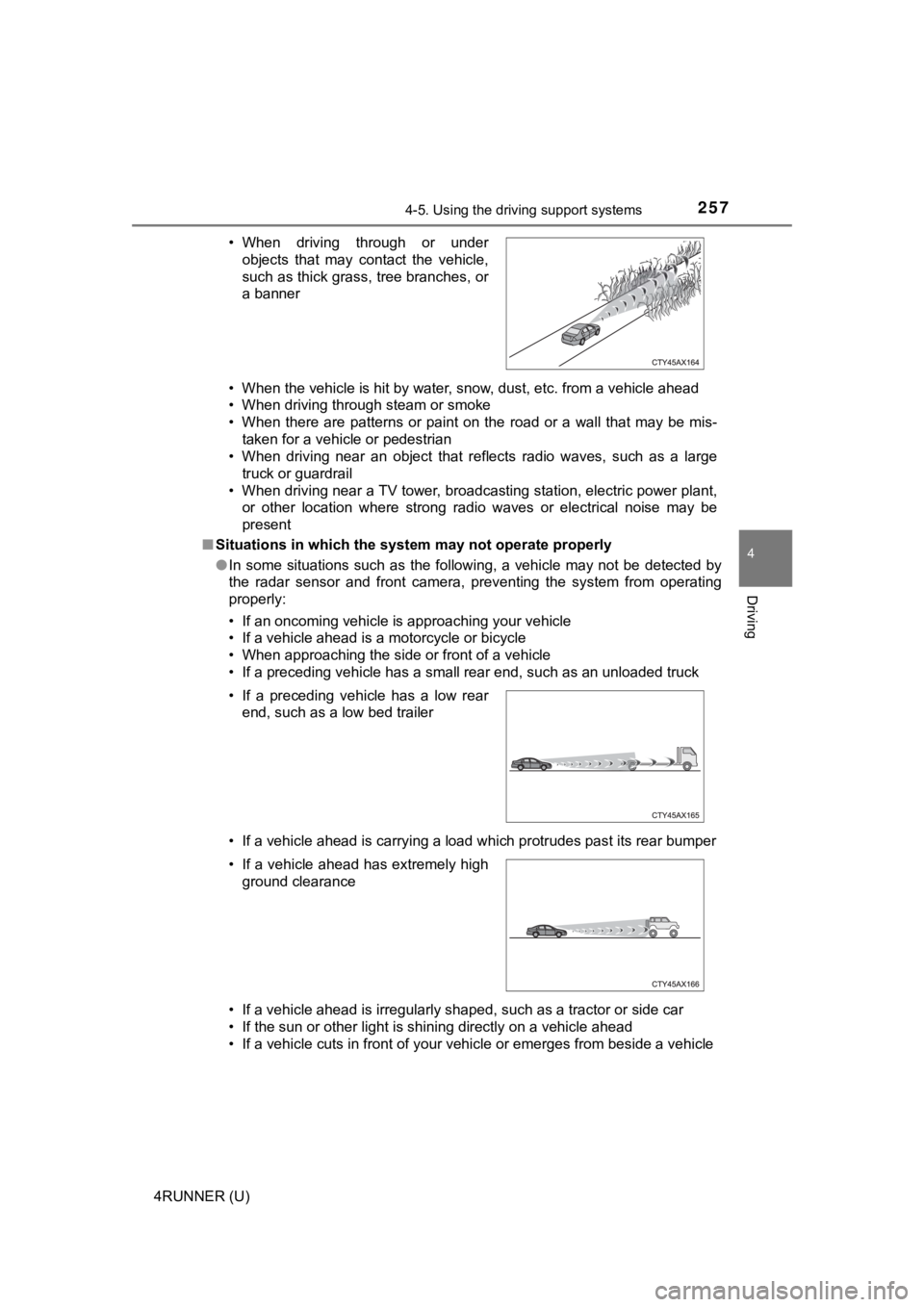
■ Situations in which the syst em may not operate properly
● In some situations such as the following, a vehicle may not be detected by
the radar sensor and front camera, preventing the system from operating
properly:
• If an oncoming vehicle is approaching your vehicle
• If a vehicle ahead is a motorcycle or bicycle
• When approaching the side or front of a vehicle
• If a preceding vehicle has a small rear end, such as an unload ed truck
• If a vehicle ahead is carrying a load which protrudes past its rear bumper
• If a vehicle ahead is irregularly shaped, such as a tractor or side car
• If the sun or other light is shining directly on a vehicle ahe ad
• If a vehicle cuts in front of your vehicle or emerges from bes ide a vehicle
• When driving through or under
objects that may contact the vehicle,
such as thick grass, tree branches, or
a banner
• If a preceding vehicle has a low rear end, such as a low bed trailer
• If a vehicle ahead has extremely high ground clearance