Page 89 of 616

892. Instrument cluster
2
Instrument cluster
4RUNNER (U)
*1: These lights turn on when the engine switch is turned to the “ON” position(vehicles without a smart key system) or the engine switch is turned to
IGNITION ON mode (vehicles with a smart key system) to indicate that a
system check is being performed. They will turn off after the engine is
started, or after a few seconds. There may be a malfunction in a system if
the lights do not come on, or do not turn off. Have the vehicle inspected by
your Toyota dealer.
*2: This light flashes to indicate that the system is operating.
*3: This light does not turn on when the system is disabled.
*4: This light illuminates on the center panel.
*5: This light illuminates on the multi-information display.
*6: This light turns on when the system is off.
*7: In order to confirm operation, the BSM outside rear view mirror indicators illuminate in the following situations:
• When the engine switch is turned to IGNITION ON mode while the sys-
tem is set to on.
• When the system is set to on while the engine switch is in IGN ITION ON
mode.
*8: This light illuminates on the outside rear view mirrors.
WARNING
■ If a safety system warning light does not come on
Should a safety system light such as the ABS and SRS warning li ght not
come on when you start the engine, this could mean that these s ystems are
not available to help protect you in an accident, which could result in death
or serious injury. Have the vehicle inspected by your Toyota dealer immedi-
ately if this occurs.
Page 90 of 616
902. Instrument cluster
4RUNNER (U)
Tachometer
Displays the engine speed in revolutions per minute
Engine coolant temperature gauge
Displays the engine coolant temperature
Multi-information display
Presents the driver with a variety of vehicle data (P. 92)
Fuel gauge
Displays the quantity of fuel remaining in the tank
Speedometer
Displays the vehicle speed
Odometer/trip meter display change button
Switches the trip information.
Odometer/trip meter display
Shift position and shift range
Displays the selected shift position or selected shift range ( P. 216)
Gauges and meters
The displayed content may differ depending on the type of
meter.
1
2
3
4
5
6
7
8
Page 91 of 616

912. Instrument cluster
2
Instrument cluster
4RUNNER (U)
Switches between odometer and
trip meter displays. When the trip
meter is displayed, pressing and
holding the button will reset the
trip meter.
The brightness of the instrument panel lights can be adjusted.Brighter
Darker
■The meters and display illuminate when
Vehicles without a smart key system
The engine switch is in the “ON” position.
Vehicles with a smart key system
The engine switch is in IGNITION ON mode.
■ The brightness of the instrument panel lights
When the headlight switch is turned to on, the brightness will be reduced
slightly unless the control dial is turned fully upward.
Changing the display
Instrument panel light control
1
2
NOTICE
■ To prevent damage to the engine and its components
● Do not let the indicator needle of the tachometer enter the red zone, which
indicates the maximum engine speed.
● The engine may be overheating if the engine coolant temperature gauge is
in the red zone (H). In this case, immediately stop the vehicle in a safe
place, and check the engine after it has cooled completely. ( P. 527)
Page 95 of 616
952. Instrument cluster
2
Instrument cluster
4RUNNER (U)
Items displayed can be switched by pressing or up and down.
■After StartAverage fuel economy
*
Displays the average fuel con-
sumption since the engine was
started.
Average vehicle speed
Displays the average vehicle
speed since the engine was
started.
Elapsed time
Displays the elapsed time since the engine was started.
*: Use the displayed average fuel economy as a reference.
■
After Reset Current fuel economy
Displays the current rate of fuel
consumption.
Average fuel economy*1,2
Displays the average fuel con-
sumption since the function was
reset.
Average speed*2
Displays the average vehicle
speed since the function was
reset.
Elapsed time*2
Displays the elapsed time since the function was reset.
*1: Use the displayed average fuel economy as a reference.
*2: Pressing and holding will reset.
Drive information
1
2
3
1
2
3
4
Page 96 of 616
962. Instrument cluster
4RUNNER (U)■
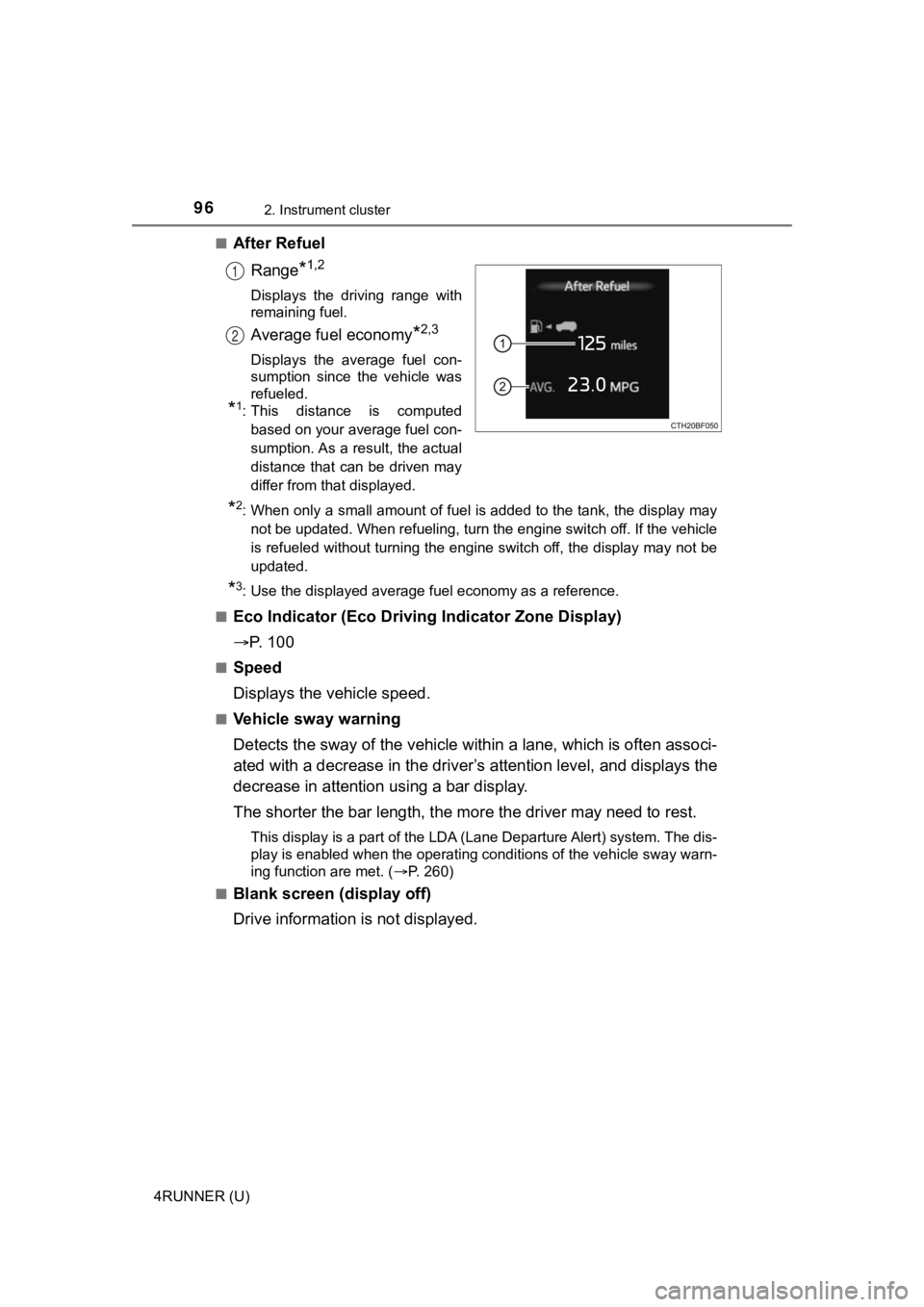
After Refuel
Range
*1,2
Displays the driving range with
remaining fuel.
Average fuel economy*2,3
Displays the average fuel con-
sumption since the vehicle was
refueled.
*1: This distance is computedbased on your average fuel con-
sumption. As a result, the actual
distance that can be driven may
differ from that displayed.
*2: When only a small amount of fuel is added to the tank, the dis play may
not be updated. When refueling, turn the engine switch off. If the vehicle
is refueled without turning the engine switch off, the display may not be
updated.
*3: Use the displayed average fuel economy as a reference.
■
Eco Indicator (Eco Drivi ng Indicator Zone Display)
P. 1 0 0
■Speed
Displays the vehicle speed.
■Vehicle sway warning
Detects the sway of the vehicle within a lane, which is often associ-
ated with a decrease in the driv er’s attention level, and displays the
decrease in attention using a bar display.
The shorter the bar length, the m ore the driver may need to rest.
This display is a part of the LDA (Lane Departure Alert) system. The dis-
play is enabled when the operating conditions of the vehicle sw ay warn-
ing function are met. ( P. 260)
■
Blank screen (display off)
Drive information is not displayed.
1
2
Page 101 of 616

1012. Instrument cluster
2
Instrument cluster
4RUNNER (U)■
Pop-Up display
The pop-up display is displayed on the multi-information displa y according to
the operating conditions of the following functions:
● Route guidance display of the navigation system-linked system ( if equipped)
● Incoming call display of the hands-free phone system
The pop-up display function can be disabled.
■ Tire inflation pressure
●It may take a few minutes to display the tire inflation pressur e after the
engine switch is turned to IGNITION ON mode. It may also take a few min-
utes to display the tire inflation pressure after inflation pre ssure has been
adjusted.
● “---” may be displayed if the tire information cannot be determined due to
unfavorable radio wave conditions.
● Tire inflation pressure changes with temperature. The displayed values may
also be different from the values measured using a tire pressur e gauge.
■ Outside temperature display
In the following situations, the correct outside temperature ma y not be dis-
played, or the display may take longer than normal to change:
● When the vehicle is stopped, or moving at low speeds (less than 12 mph [20
km/h])
● When the outside temperature has changed suddenly (at the entra nce/exit
of a garage, tunnel, etc.)
● When “--” or “E” is displayed, the system may be malfunctioning. Take your
vehicle to Toyota dealer.
■ Liquid crystal display
Small spots or light spots may appear on the display. This phen omenon is
characteristic of liquid crystal displays, and there is no prob lem continuing to
use the display.
Page 102 of 616
1022. Instrument cluster
4RUNNER (U)
WARNING
■Caution for use while driving
For safety, avoid operating the meter control switches while dr iving as much
as possible, and do not look continuously at the multi-informat ion display
while driving. Stop the vehicle and operate the meter control switches. Fail-
ure to do so may cause a steering wheel operation error, resulting in an
unexpected accident.
■ Cautions while setting up the display
As the engine needs to be running during setting up the display , ensure that
the vehicle is parked in a place with adequate ventilation. In a closed area
such as a garage, exhaust gases including harmful carbon monoxi de (CO)
may collect and enter the vehicle. This may lead to death or a serious
health hazard.
■ The multi-information display at low temperatures
Allow the interior of the vehicle to warm up before using the multi-informa-
tion display. At extremely low temperatures, the multi-information display
monitor may respond slowly, and display changes may be delayed.
For example, there is a lag between the driver’s shifting and the new gear
number appearing on the display. This lag could cause the drive r to down-
shift again, causing rapid and excessive engine braking and pos sibly an
accident resulting in death or serious injury.
NOTICE
■ While setting up the display
To prevent battery discharge, ensure that the engine is running while setting
up the display features.
Page 108 of 616

1083-1. Key information
4RUNNER (U)■
Key battery depletion
Vehicles with a smart key system
● The standard battery life is 1 to 2 years.
● If the battery becomes low, an alarm will sound in the cabin wh en the engine
stops.
● As the electronic key always receives radio waves, the battery will become
depleted even if the electronic key is not used. The following symptoms indi-
cate that the electronic key battery may be depleted. Replace the battery
when necessary. ( P. 455)
• The smart key system or the wireless remote control does not o perate.
• The detection area becomes smaller.
• The LED indicator on the key surface does not turn on.
● To avoid serious deterioration, do not leave the electronic key within 3 ft. (1
m) of the following electrical appliances that produce a magnet ic field:
•TVs
• Personal computers
• Cellular phones, cordless phones and battery chargers
• Recharging cellular phones or cordless phones
• Table lamps
• Induction cookers
Vehicles without a smart key system
If the wireless remote control function does not operate, the b attery may be
depleted. Replace the battery when necessary. ( P. 455)
■ Precautions when disconnecting the battery (vehicles with a sma rt key
system)
● In some cases, it may not be possible to unlock the doors using the smart
key system immediately after the battery has been disconnected. Use the
wireless remote control or the mechanical key to lock or unlock the doors.
● The engine may not start on the first attempt after reconnectin g the battery
but will start normally after the second attempt. This is not a malfunction.
● The engine switch mode is memorized by the vehicle. When the ba ttery is
reconnected, the system will return to the mode it was in befor e the battery
was disconnected. Before disconnecting the battery, turn the en gine switch
off.
If you are unsure what mode the engine switch was in when the b attery was
disconnected, be especially careful when reconnecting the batte ry.