2022 SUZUKI JIMNY main
[x] Cancel search: mainPage 72 of 421

BEFORE DRIVING
Keys
54G489
Your vehicle comes with a pair of identical keys. Keep one of the keys as a spare key in a safe place. One key can open all of the locks on the vehicle.
The key identification number is stamped on a metal tag provided with the keys or on the keys. Keep the tag in a safe place. If you lose your keys, you will need this number to have new keys made. Write the number below for your future reference.
I KEY NUMBER:
2-1
Immobilizer system
This system is designed to help prevent vehicle theft by electronically disabling the engine starting system. The engine can be started only with your vehicle's original immobilizer ignition key, which has an electronic identification code programmed in it. The key communicates the identification code to the vehicle when the ignition switch is turned to "ON" position. If you need to make spare keys, see a SUZUKI dealer. The vehicle must be programmed with the correct identification code for the spare. A key made by an ordinary locksmith will not work.
80JM122
If the immobilizer warning light blinks when the ignition switch is in "ON" position, the engine will not start.
NOTICE
Do not modify or remove the immobilizer system. If modified or removed, the system cannot be properly operated.
NOTE: If the immobilizer system warning light blinks or comes on, a message may be shown on the information display. This immobilizer system is maintenancefree.
It this light blinks, turn the ignition switch to "LOCK" position, and then turn it back to "ON" position. It the light still blinks after the ignition switch is turned back to "ON" position, there may be something wrong with your key or with the immobilizer system. Ask a SUZUKI dealer to have the system inspected.
Page 73 of 421
NOTE: If you lose your immobilizer ignition key, ask a SUZUKI dealer as soon as possible to deactivate the lost one, and to make a new key. If you own other vehicles with immobilizer keys, keep those keys away from the ignition switch when using your SUZUKI vehicle. Otherwise, the engine may not be started because they may interfere with your SUZUKI vehicle's immobilizer system. If you attach any metal objects to the immobilizer key, it may not start the engine.
NOTICE
The immobilizer key is sensitive electronic instruments. To avoid damaging them: Do not expose them to impacts, moisture or high temperature such as on the dashboard under direct sunlight. Keep them away from magnetic objects.
Ignition key reminder
A buzzer sounds intermittently to remind you to remove the ignition key if it is in the ignition keyhole when the driver's door is opened.
Door locks
Side door locks
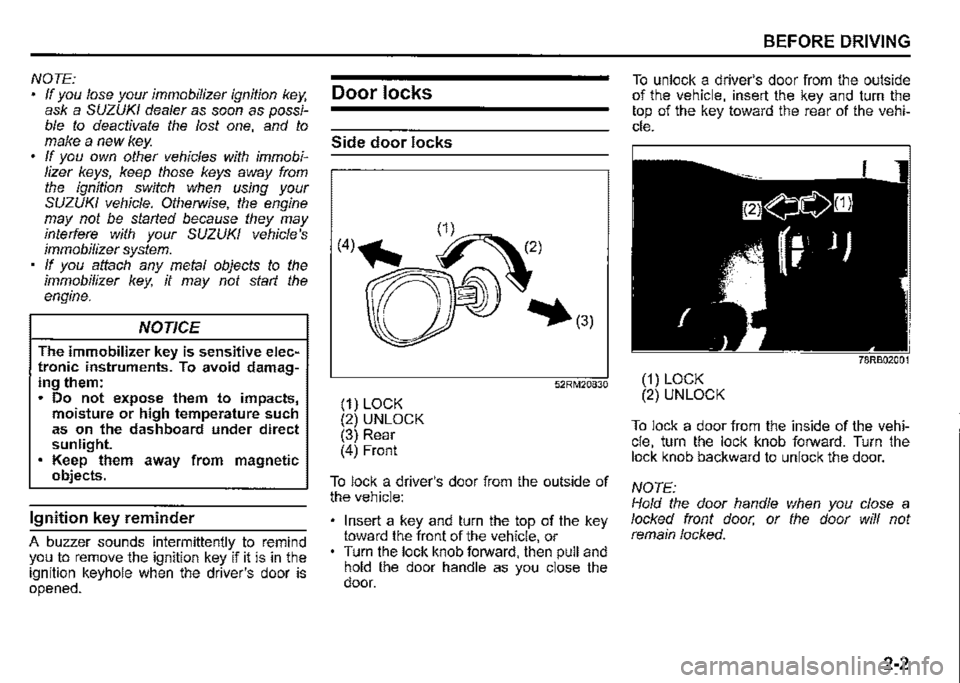
(1) LOCK (2) UNLOCK (3) Rear (4) Front
52RM20830
To lock a driver's door from the outside of the vehicle:
Insert a key and turn the top of the key toward the front of the vehicle, or Turn the lock knob forward, then pull and hold the door handle as you close the door.
BEFORE DRIVING
To unlock a driver's door from the outside of the vehicle, insert the key and turn the top of the key toward the rear of the vehicle.
78RB02001
(1) LOCK (2) UNLOCK
To lock a door from the inside of the vehicle, turn the lock knob forward. Turn the lock knob backward to unlock the door.
NOTE: Hold the door handle when you close a locked front door, or the door will not remain locked.
2-2
Page 79 of 421
80JM133
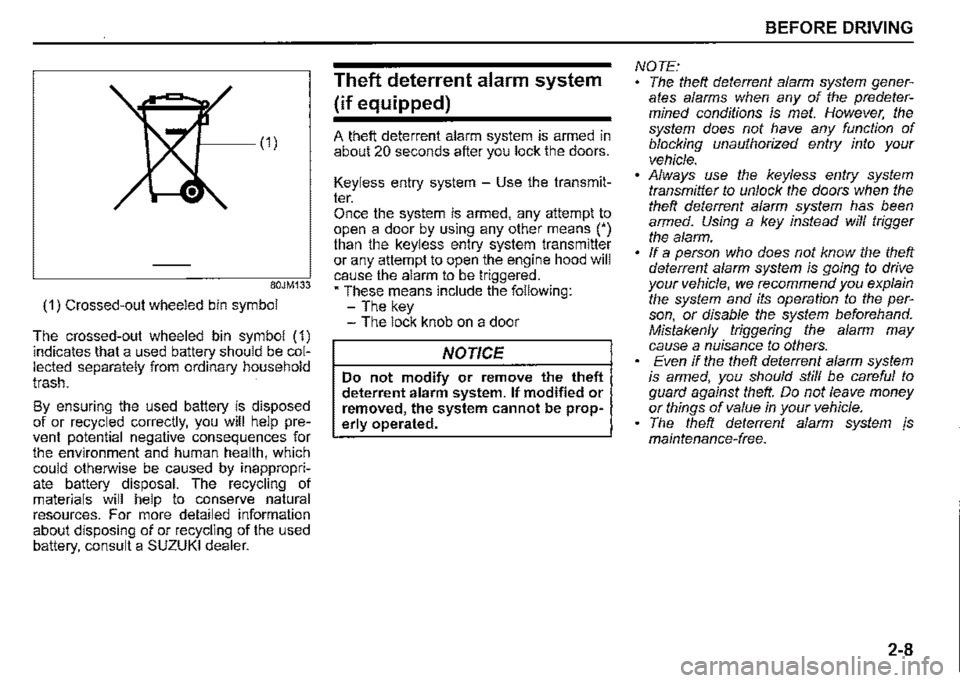
(1) Crossed-out wheeled bin symbol
The crossed-out wheeled bin symbol (1) indicates that a used battery should be collected separately from ordinary household trash.
By ensuring the used battery is disposed of or recycled correctly, you will help prevent potential negative consequences for the environment and human health, which could otherwise be caused by inappropriate battery disposal. The recycling of materials will help to conserve natural resources. For more detailed information about disposing of or recycling of the used battery, consult a SUZUKI dealer.
Theft deterrent alarm system
(if equipped)
A theft deterrent alarm system is armed in about 20 seconds after you lock the doors.
Keyless entry system -Use the transmitter. Once the system is armed, any attempt to open a door by using any other means (') than the keyless entry system transmitter or any attempt to open the engine hood will cause the alarm to be triggered. • These means include the following: -The key -The lock knob on a door
NOTICE
Do not modify or remove the theft deterrent alarm system. If modified or removed, the system cannot be properly operated.
BEFORE DRIVING
NOTE: The theft deterrent alarm system generates alarms when any of the predetermined conditions is met. However, the system does not have any function of blocking unauthorized entry into your vehicle. Always use the keyless entry system transmitter to unlock the doors when the theft deterrent alarm system has been armed. Using a key instead will trigger the alarm. If a person who does not know the theft deterrent alarm system is going to drive your vehicle, we recommend you explain the system and its operation to the person, or disable the system beforehand. Mistakenly triggering the alarm may cause a nuisance to others. Even if the theft deterrent alarm system is armed, you should still be careful to guard against theft. Do not leave money or things of value in your vehicle. The theft deterrent alarm system js maintenance-free.
2-8
Page 80 of 421
BEFORE DRIVING
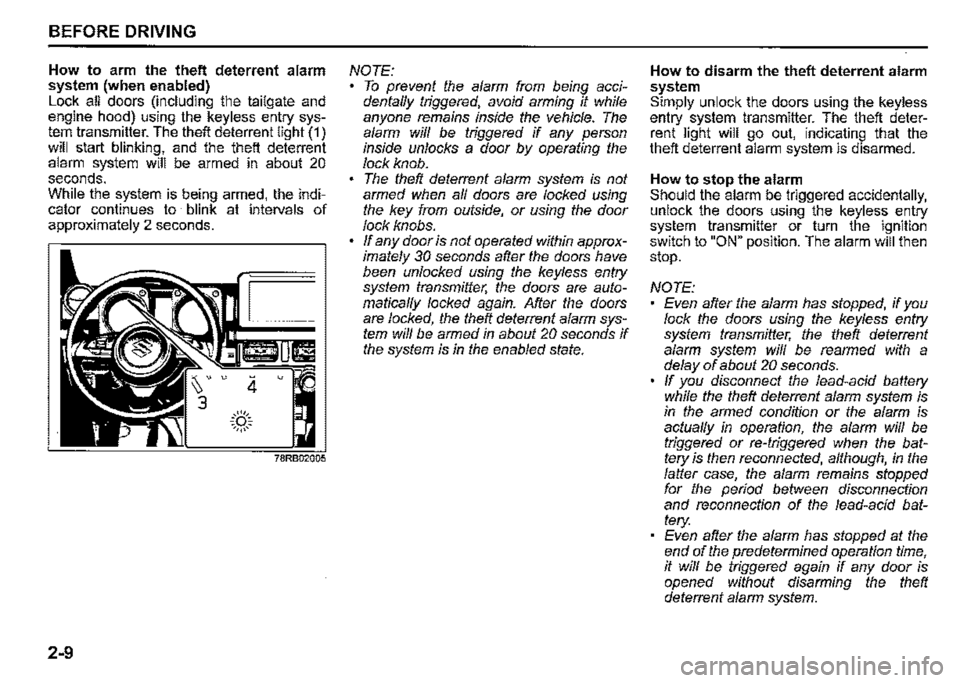
How to arm the theft deterrent alarm system (when enabled) Lock all doors (including the tailgate and engine hood) using the keyless entry system transmitter. The theft deterrent light (1) will start blinking, and the theft deterrent alarm system will be armed in about 20 seconds. While the system is being armed, the indicator continues to blink at intervals of approximately 2 seconds.
2-9
4 u
.::(')::. ~,,,,,~
NOTE: To prevent the alarm from being accidentaffy triggered, avoid arming it while anyone remains inside the vehicle. The alarm wiff be triggered if any person inside unlocks a door by operating the lock knob. The theft deterrent alarm system is not armed when af/ doors are locked using the key from outside, or using the door lock knobs. ff any door is not operated within approximately 30 seconds after the doors have been unlocked using the keyless entry system transmitter, the doors are automaticaf/y locked again. After the doors are locked, the theft deterrent alarm system wiff be armed in about 20 seconds if the system is in the enabled state.
How to disarm the theft deterrent alarm system Simply unlock the doors using the keyless entry system transmitter. The theft deterrent light will go out, indicating that the theft deterrent alarm system is disarmed.
How to stop the alarm Should the alarm be triggered accidentally, unlock the doors using the keyless entry system transmitter or turn the ignition switch to "ON" position. The alarm will then stop.
NOTE: Even after the alarm has stopped, if you lock the doors using the keyless entry system transmitter, the theft deterrent alarm system wiff be rearmed with a delay of about 20 seconds. ff you disconnect the lead-acid battery while the theft deterrent alarm system is in the armed condition or the alarm is actuaf/y in operation, the alarm will be triggered or re-triggered when the battery is then reconnected, although, in the falter case, the alarm remains stopped for the period between disconnection and reconnection of the lead-acid battery: Even after the alarm has stopped at the end of the predetermined operation time, it wiff be triggered again if any door is opened without disarming the theft deterrent alarm system.
Page 83 of 421

Pinching prevention function
(if equipped)
The driver's window is equipped with a pinching prevention function. This function detects a foreign object that is caught in the window as it is being closed by AUTOUP feature, which allows you to close the window without holding the window switch in UP position, and stops the window from closing to prevent damage.
A. WARNING
To avoid injuring an occupant by window entrapment, check that no part of the occupant's body such as hands or head is in the path of the electric window when closing it. This function may not detect an object due to the size, hardness, or position of the object being caught in the closing window.
A.CAUTION
The pinching prevention function does not operate while you are holding the window switch in UP position. The pinching prevention function may not detect an object caught in the window just before the window is fully closed.
NOTE: Even if you cannot close the window by the AUTO-UP feature because there may be something wrong with the pinching prevention function, you can close the window by holding the window switch in UP position. If you drive in extreme off-road condition, the pinching prevention function may operate accidentally because the window reacts to vehicle jolting.
Pinching prevention function initialization When you disconnect and reconnect the lead-acid battery or replace the fuse, the function will be deactivated. In this condition, the AUTO-DOWN feature will be deactivated, while the AUTO-UP feature may remain activated. The pinching prevention function needs to be initialized.
BEFORE DRIVING
To initialize the pinching prevention function, use the following procedure: 1) Turn the ignition switch to "ON" posi
tion. 2) Open the driver's window fully by holding the window switch in DOWN position. 3) Close the driver's window by holding the switch in UP position, and keep holding the switch for 2 seconds after the window is fully closed. 4) Check the driver's window to see if the AUTO-DOWN/UP feature works.
A. WARNING
Whenever you disconnect and reconnect the lead-acid battery or replace the fuse, the pinching prevention function needs to be initialized. The pinching prevention function will not be activated until the initialization is completed.
If the AUTO-DOWN/UP feature will not work after initialization, there might be something wrong with the pinching prevention function. Have your vehicle inspected by a SUZUKI dealer.
2-12
Page 92 of 421

BEFORE DRIVING
Trip meter The trip meter can be used to measure the distance traveled on short trips or between fuel stops. You can use the trip meter A or trip meter B independently.
To reset the trip meter, push and hold the trip meter selector knob (1) until the display shows a.a.
NOTE: The indicated maximum value of the trip meter is 9999.9. When you run past the maximum value, the indicated value will return to 0. 0. ·
Odometer The odometer records the total distance the vehicle has been driven.
NOTICE
Keep track of your odometer reading and check the maintenance schedule regularly for required services. Increased wear or damage to certain parts can result from failure to perform required services at the proper mileage intervals.
2-21
Instantaneous fuel consumption The display shows the value of instantaneous fuel consumption only when the vehicle is moving.
NOTE: The display does not show the value unless the vehicle is moving. Depending on the vehicle's specification, the fuel consumption units of initial setting are indicated as U100km or km/L. For "U100km" setting, the indicated maximum value of instantaneous fuel consumption is 30. No more than 30 will be indicated on the display even if the actual instantaneous fuel consumption is higher. For "km/L" setting, the indicated maximum value of instantaneous fuel consumption is 50. No more than 50 will be indicated on the display even if the actual instantaneous fuel consumption is higher. The indication on the display may be delayed if fuel consumption is greatly affected by driving conditions. The display shows estimated values. Indications may not be the same as actual values. For "U100km" or "km/L" setting, you can change the units that instantaneous fuel consumption is displayed in. Refer to ',<\verage fuel consumption" in this section.
Average fuel consumption If you previously selected average fuel consumption setting, the display shows average fuel consumption from the last reset to the present when the ignition switch is turned "ON".
To reset the average fuel consumption, push and hold the indicator selector knob (2) for a while when the display shows the average fuel consumption.
NOTE: When you reset the indication or reconnect the terminals to the lead-acid battery, the value of average fuel consumption will be shown after driving for a while.
Page 103 of 421

NOTE: If you refuel when the ignition switch is "ON", the driving range may not indicate the correct value. When you reconnect the terminals to the lead-acid battery, the value of driving range will be shown after driving for a period of time.
Average speed If you selected average speed the last time you drove the vehicle, the display indicates the last value of average speed from previous driving when the ignition switch is turned "ON". Unless you reset the value of average speed, the display indicates the value of average speed which includes average speed during previous driving.
To reset the value of average speed, push and hold the indicator selector knob (3) for a while when the display indicates an average speed. The display shows "---" and then indicates a new average speed after driving for a short time.
NOTE: When you reconnect the terminals to the lead-acid battery, the value of average speed will be shown after driving for a period of time.
Driving time The display shows the total amount of driving time since the indication was reset. To reset the driving time, push and hold the indicator selector knob (3) for a while when the display shows the driving time.
NOTE: When you reset the indication or reconnect the terminals to the lead-acid battery, the driving time will be shown after driving for a while. The indicated maximum value of driving time is 99:59:59. No more than the maximum value will be indicated on the display until you reset the driving time.
Gearshift indicator
The display (D) shows the gearshift indicator.
Refer to "Gearshift indicator" in "OPERATING YOUR VEHICLE" section.
BEFORE DRIVING
Trip meter
The display (E) shows the trip meter.
The trip meter can be used to measure the distance traveled on short trips or between fuel stops. You can use trip meter A or trip meter B independently.
To reset the trip meter, push and hold the trip meter selector knob (2) for a while.
NOTE: The indicated maximum value of the trip meter is 9999.9. When you run past the maximum value, the indicated value will return to 0.0.
Odometer
The display (F) shows the odometer.
The odometer records the total distance the vehicle has been driven.
NOTICE
Keep track of your odometer reading and check the maintenance schedule regularly for required services. Increased wear or damage to certain parts can result from failure to perform required services at the proper mileage intervals.
2-32
Page 110 of 421

BEFORE DRIVING
Warning and indicator lights
NOTE: If warning and indicator lights blink or come on, the corresponding messages may be shown on the information display. If your vehicle is equipped with the "Emergency road assistance -global navigation satellite system (ERA-GLONASS)", the information display also indicates warning and indicator message related to the system. For information on this message, refer to "Emergency Road Assistance -Global Navigation Satellite System (ERA-GLONASS)" in "For Russia and other countries adopting ERAGLONASS" in the "SUPPLEMENT" section.
Low tyre pressure warning light {if equipped)
{l)
52D305
As an added fuel efficiency feature, your vehicle is equipped with a tyre pressure monitoring system (TPMS) that uses a low tyre pressure warning light to inform you
2-39
when one or more of your tyres is significantly under-inflated.
When the ignition switch is turned "ON", this light comes on briefly so you can check that the light is working.
When the low tyre pressure warning light is lit, one or more of your tyres is significantly under-inflated. You should stop and check your tyres as soon as possible, and inflate them to the proper pressure as indicated on the vehicle's tyre information placard. Driving on a significantly under-inflated tyre causes the tyre to overheat and can lead to tyre failure. Under-inflation also reduces fuel efficiency and tyre tread life, and may affect the vehicle's handling and stopping ability. Each tyre, including the spare, should be checked at least once a month when cold and set to the recommended inflation pressure as specified in the vehicle placard.
The low tyre pressure warning light is also used to inform you of a TPMS malfunction. When the system detects a malfunction, this light will blink for about 75 seconds and then remain continuously illuminated. This sequence will be repeated after the ignition switch is turned "ON" as long as the malfunction exists.
NOTE: The low tyre pressure warning light may not come on immediately if you have a sudden loss of air pressure.
A WARNING
Failure to take corrective action when the low tyre pressure warning light is not working or when it comes on and blinks while driving can lead to an accident. If the low tyre pressure warning light does not come on for 2 seconds after the ignition switch is turned "ON", the light or comes on and blinks while driving, have your vehicle inspected by a SUZUKI dealer. Even if the light turns off after blinking, indicating that the monitoring system has recovered, you should still have the system checked by a SUZUKI dealer.