2022 SUZUKI CELERIO not available
[x] Cancel search: not availablePage 18 of 201

0-6
76MH1-74E
55KS0-74E
11) Any vehicle which has been used for purposes other thanwhat it was designed for.
12) Any damage or deterioration caused by industrial pollutionand bird droppings.
13) Insignificant defects which do not affect the function of thevehicle including without limitation, sound, vibration and fluid seep.
14) Any natural wear and tear including without limitation, agingetc.
15) Installation and usage of domestic LPG gas/LPG Cylinder.
16) V-belts, hoses and gas leaks (For Maruti Suzuki AC vehicle).
17) Any vehicle retrofitted with LPG/CNG kits.
(5) Extent of Warranty:This warranty is the entire written warranty given by Maruti Suzuki
for Maruti Suzuki vehicles and no dealer or its or his agent or
employee is authorised to extend or enlarge this warranty and no
dealer or its or his agent or employee is authorised to make any
oral warranty on Maruti Suzuki’s behalf.
Maruti Suzuki reserves the right to add any improvements or
change the design of any model at any time with no obligation to
make the same changes on units previously sold.
(6) Warranty Service:To obtain warranty service, the complete vehicle must be pre-
sented at the owner’s expenses to any authorised Maruti Suzuki
dealer.
(7) Owner’s Warranty ResponsibIlities:It is responsibility of each owner to:
– Make certain that the warranty registration/PDl card was
completed at the time of delivery of the vehicle;
– Have performed, at his own expenses, by an Maruti Suzuki
authorised dealer/service station all the service inspections
specified in the Maruti Suzuki “Owner’s Manual and Service
Booklet and maintain adequate proof that such service
inspections have been performed.
– Make certain that the Maruti Suzuki authorised dealer/ser-
vice station performing the service inspection has certified
the work on the “Maintenance Service Record” page in the
“Owner’s Manual and Service Booklet and
– Present the Maruti Suzuki “Owner’s Manual and Service
Booklet to the authorised Maruti Suzuki dealer whenever
requesting service inspections or warranty service.
If the “Owner’s Manual and Service Booklet should be lost or
destroyed the owner should consult the authorised Maruti Suzuki
dealer from whom the vehicle was purchased for instructions con-
cerning replacement of the “Owner’s Manual and Service Booklet.
(8) Disclaimer of Consequential Damage:Maruti Suzuki assumes no responsibility for loss of vehicle, loss of
time, inconvenience or any other indirect incidental or consequen-
tial damage resulting from the vehicle not being available to the
owner because of any defect covered by this warranty.
(9) Change of OwnerEven if ownership of the vehicle changes, the remaining warranty
period is effective for the new owner.
7
Page 19 of 201

0-7
76MH1-74E
EMISSION WARRANTY POLICY
Maruti Suzuki offers the Emission Warranty on all Maruti Suzuki vehicles (apart from the Regular Warranty and will run parallel tothe regular product warranty) only in four metropolitan cities (NewDelhi, Kolkata, Mumbai and Chennai) with effect from July 1st,2001.
Te r m s :The Emission Warranty will be applicable for 80,000 kms or 3years (Whichever comes earlier) from the date of delivery to thefirst owner. The remaining warranty terms will be valid in case ofany change in ownership provided the production of all valid docu-ments.
Conditions:1. Under Emission Waranty, Warranty claims will be admitted fora prima facie examination, in case vehicle fails to meet theEmission Standard as specified in sub rule (2) of rule no. 115of Central Motor Vehicles Rules (CMVR), 1989.
2. The warranty claims will only be accepted after examinationcarried out by Maruti Suzuki or it’s dealer which leads to firmconclusions that thea) Original settings have not been tempered in any case.b) Part (as given in Annexure - A) has a manufacturing defect.c) Vehicle is unable to meet the Emission Standards (as givenin 1.), inspite of the vehicle having been maintained andused in accordance with the instructions as specified inOwner’s Manual and Service Booklet and the used fuel anddifferent oils (Engine oil, Transmission oil, Brake oil etc.) arealso as per specification.
3. The method of examination for deciding the warranty of theparts will be at the sole discretion of Maruti Suzuki and it’sdealer and results of the examination will be final and binding.If after examination, the warrantable condition is not estab-lished, Maruti Suzuki and it’s dealer has the right to charge all,or part of the cost of such examination.
4. Under Emission Warranty, the parts (as given in Annexure - A)will be changed free of cost, but the consumables will becharged as per actual.
5. If the part covered under Emission Warranty or the associatedparts, are not independently replaceable, on account of thesebeing integral parts of a complete assembly, Maruti Suzuki andit’s dealer will have the sole discretion to replace either theentire assembly or by using some of the parts of the systemthrough suitable repairs or modifications.
6. Any consequential repairs or replacement of parts which maybe found necessary to establish compliance of Emission War-ranty, will not be considered under warranty, unless the same isunder product warranty. The consumable will be charged asper actual under such repair or replacement.
7. Maruti Suzuki will not be responsible for the cost of transporta-tion of the vehicle to the nearest Maruti Suzuki dealer work-shop or any loss due to non-availability of the vehicle duringthe period of lodging of a warranty claim and examination and/or repair by Maruti Suzuki dealer.
8. Maruti Suzuki will not be responsible for any penalty that maybe charged by statutory authorities on account of failure tocomply with the EMISSION STANDARDS.
9. Emission Waranty will not be affected on the change of owner,provided all the documents are available.
8
Page 21 of 201

1-1
FUEL RECOMMENDATION
76MH1-74E
10
Fuel Recommendation
Petrol EngineYou must use unleaded petrol with an octane number (RON) of 91 or higher.
Petrol/Ethanol blends Blends of unleaded petrol and ethanol (grain alcohol), also known as gasohol, arecommercially available in some areas. Blends of this type may be used in your vehicle if they are no more than 10% etha-nol. Make sure this petrol-ethanol blend has octane ratings no lower than those recommended for petrol.
Petrol/Methanol blends Blends of unleaded petrol and methanol(wood alcohol) are also commercially avail- able in some areas. DO NOT USE fuels containing more than 5% methanol underany circumstances. Fuel system damage or vehicle performance problems resulting from the use of such fuels are not theresponsibility of MARUTI SUZUKI and may not be covered under the New Vehicle Warranty.Fuels containing 5% or less methanol may be suitable for use in your vehicle if they contain cosolvents and corrosion inhibi-tors.
NOTE: If you are not satisfied with the driveability or fuel economy of your vehicle when youare using a petrol/alcohol blend, you should switch back to unleaded petrol con- taining no alcohol.
Diesel EngineThe diesel fuel should be with CetaneNumber (CN) higher than 51 and sulfur content less than 350 ppm (parts per mil- lion). MARUTI SUZUKI recommends touse the diesel fuel conformable to EN590. Do not use marine diesel fuel, heating oils and so forth.NOTICE
The fuel tank has an air space toallow for fuel expansion in hotweather. If you continue to add fuel after the filler nozzle has automati- cally shut off or an initial blowbackoccurs, the air chamber will become full. Exposure to heat when fully fuelled in this manner will result inleakage due to fuel expansion. To prevent such fuel leakage, stop filling after the filler nozzle has automati-cally shut off, or when using an alter- native non-automatic system, initial vent blowback occurs.
NOTICE
Be careful not to spill fuel containingalcohol while refueling. If fuel is spilled on the vehicle body, wipe it up immediately. Fuels containing alco-hol can cause paint damage, which is not covered under the New Vehicle Limited Warranty.
NOTICE
The fuel tank has an air space toallow for fuel expansion in hotweather. If you continue to add fuel after the filler nozzle has automati- cally shut off or an initial blow backoccurs, the air chamber will become full. Exposure to heat when fully fuelled in this manner will result inleakage due to fuel expansion. To prevent such fuel leakage, stop filling after the filler nozzle has automati-cally shut off, or when using an alter- native non-automatic system, initial vent blowback occurs.
NOTICE
Be careful not to spill fuel containingalcohol while refueling. If fuel is spilled on the vehicle body, wipe it up immediately. Fuels containing alco-hol can cause paint damage, which is not covered under the New Vehicle Limited Warranty.
76MH1-74E
Page 44 of 201

2-22
BEFORE DRIVING
76MH1-74E
76MH1-74E
Child Restraint System for India
Child Restraint
The suitability of each passenger’s seat position for carriage of children and fitting of child restraint system is shown in the table below. Whenever you carry children up to 12 years of age, properly use the child restraints which conform to AIS 072, the standard for child restraints, referring to the table.
MASS GROUP
Seating position (or other site)
Fr on t PassengerRear OutboardRear CentreIntermediate OutboardIntermediate Centre
Group 0 Up to 10 kgXUXN.A.N.A.
Group 0+Up to 13 kgXUXN.A.N.A.
Group I9 to 18 kgXUXN.A.N.A.
Group II15 to 25 kgXUXN.A.N.A.
Group III22 to 36 kgXUXN.A.N.A.
Key of letters to be inserted in the above table: U =Suitable for ‘universal’ category restraints approved for use in this mass group X =Seat position not suitable for children in this mass group N.A = Seat position not available for children in this mass group. NOTE: ‘universal’ is the category in the AIS 072.
33
Page 109 of 201

5-13
OTHER CONTROLS AND EQUIPMENT
76MH1-74E
76MH1-74E
faster if you open the windows briefly while you operate the air conditioner with the air intake selector at “FRESH AIR”and the blower at high speed.
DehumidifyingSet the air flow selector to a desired air flow selector position, the temperature selector to the desired temperature position and theblower speed selector to the desired blower speed position. Also select “FRESH AIR” and turn on the “A/C” switch.
NOTE:Because the air conditioner dehumidifiesthe air, turning it on will help keep the win- dows clear, even when blowing heated air using the “DEFROST” or “HEAT &DEFROST” functions.
76MH0A090
NOTE:If you need maximum defrosting:• set the air flow selector to “DEFROST”,
• set the blower speed selector to HIGH, • adjust the temperature selector to the HOT end, • turn on the “A/C” switch, and• adjust the side outlets so the air blows on the side windows.
MaintenanceIf you do not use the air conditioner for a long period, such as during winter, it may not give the best performance when youstart using it again. To help maintain opti- mum performance and durability of your air conditioner, it needs to be run periodically.Operate the air conditioner at least once a month for one minute with the engine idling. This circulates the refrigerant and oiland helps protect the internal components.
NOTE: Your vehicle uses the air conditioning refrigerant HFC-134a, commonly called “R-134a”. R-134a replaced R-12 around1993 for automotive applications. Other refrigerants are available, including recy- cled R-12, but only R-134a should be usedin your vehicle.
Radio Antenna
68KN028
The radio antenna on the roof is remov-able. To remove the antenna, turn it coun-terclockwise. To reinstall the antenna, turn it clockwise firmly by hand.
EXAMPLE
NOTICE
Using the wrong refrigerant may damage your air conditioning sys- tem. Use R-134a only. Do not mix or replace the R-134a with other refrig-erants.
NOTICE
To avoid damage to the radio antenna: • Remove the antenna when using anautomatic car wash. • Remove the antenna when the antenna hits anything such as alow ceiling in a parking garage or putting a car cover over your vehi- cle.
EXAMPLE
98
Page 111 of 201
5-15
OTHER CONTROLS AND EQUIPMENT
76MH1-74E
76MH1-74E
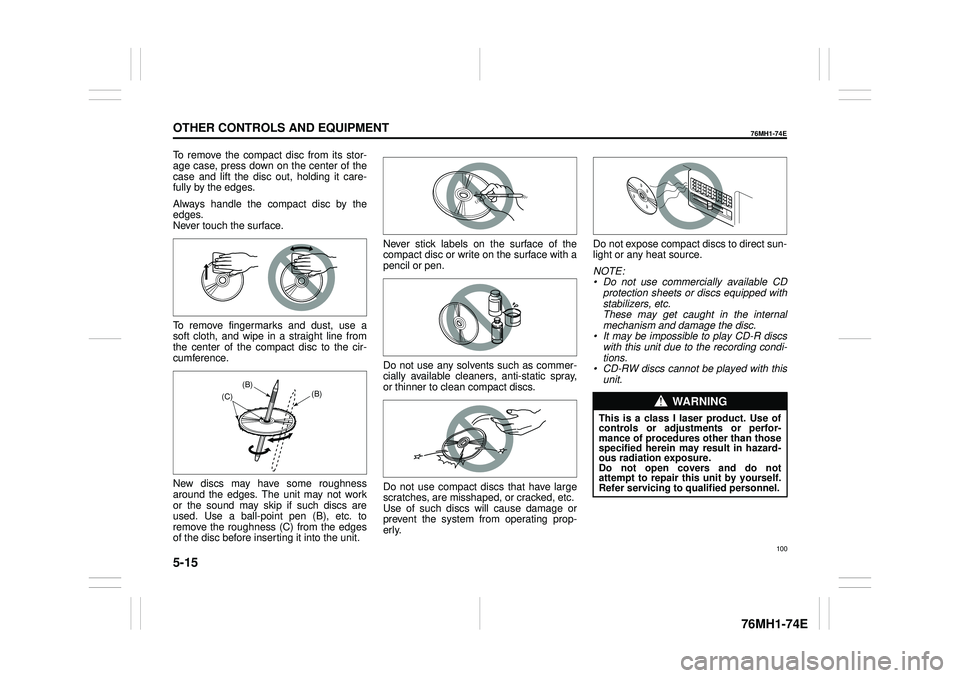
To remove the compact disc from its stor- age case, press down on the center of the case and lift the disc out, holding it care-fully by the edges.
Always handle the compact disc by the edges. Never touch the surface.
To remove fingermarks and dust, use a soft cloth, and wipe in a straight line fromthe center of the compact disc to the cir- cumference.
New discs may have some roughness around the edges. The unit may not work or the sound may skip if such discs areused. Use a ball-point pen (B), etc. to remove the roughness (C) from the edges of the disc before inserting it into the unit.
Never stick labels on the surface of the compact disc or write on the surface with apencil or pen.
Do not use any solvents such as commer- cially available cleaners, anti-static spray, or thinner to clean compact discs.
Do not use compact discs that have large scratches, are misshaped, or cracked, etc. Use of such discs will cause damage or prevent the system from operating prop-erly.
Do not expose compact discs to direct sun- light or any heat source.
NOTE: • Do not use commercially available CD protection sheets or discs equipped with stabilizers, etc.These may get caught in the internal mechanism and damage the disc. • It may be impossible to play CD-R discswith this unit due to the recording condi- tions. • CD-RW discs cannot be played with thisunit.(B) (B) (C)WA R N I N G
This is a class I laser product. Use of controls or adjustments or perfor-mance of procedures other than thosespecified herein may result in hazard- ous radiation exposure. Do not open covers and do notattempt to repair this unit by yourself.Refer servicing to qualified personnel.
100
Page 122 of 201
5-26
OTHER CONTROLS AND EQUIPMENT
76MH1-74E
76MH1-74E
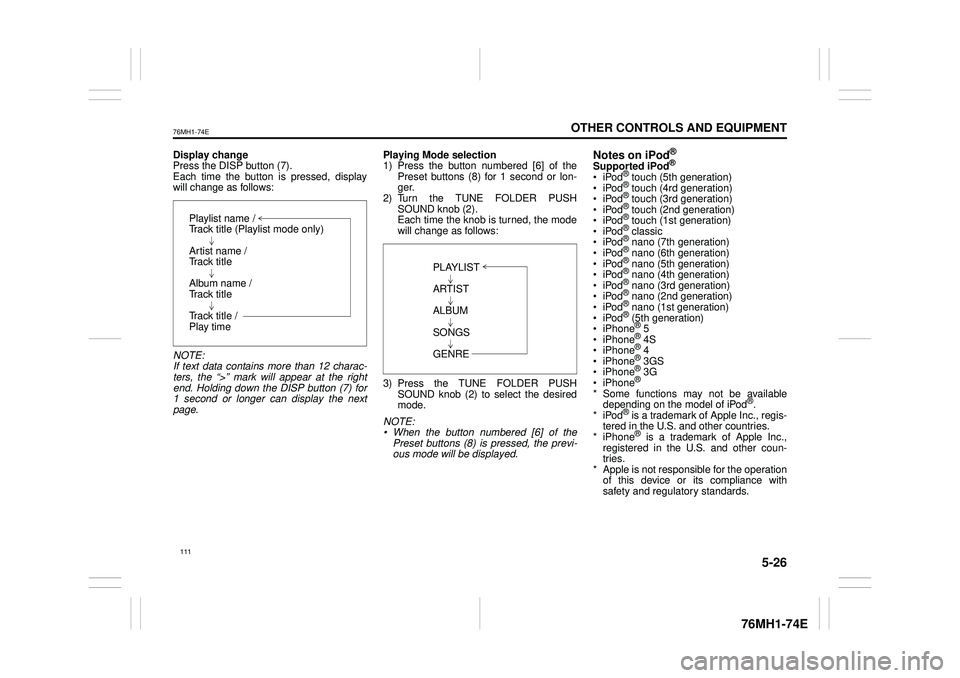
Display change Press the DISP button (7). Each time the button is pressed, displaywill change as follows:
NOTE: If text data contains more than 12 charac- ters, the “>” mark will appear at the right end. Holding down the DISP button (7) for1 second or longer can display the next page.
Playing Mode selection 1) Press the button numbered [6] of the Preset buttons (8) for 1 second or lon-ger. 2) Turn the TUNE FOLDER PUSH SOUND knob (2).Each time the knob is turned, the mode will change as follows:
3) Press the TUNE FOLDER PUSH SOUND knob (2) to select the desired mode.
NOTE: • When the button numbered [6] of thePreset buttons (8) is pressed, the previ- ous mode will be displayed.
Notes on iPod®
Supported iPod®
® touch (5th generation)® touch (4rd generation) ® touch (3rd generation)® touch (2nd generation) ® touch (1st generation) ® classic® nano (7th generation) ® nano (6th generation) ® nano (5th generation)® nano (4th generation) ® nano (3rd generation) ® nano (2nd generation)® nano (1st generation) ® (5th generation) iPhone® 5 iPhone® 4S iPhone® 4 iPhone® 3GS iPhone® 3G iPhone®
* Some functions may not be available depending on the model of iPod®. *iPod® is a trademark of Apple Inc., regis- tered in the U.S. and other countries.* iPhone® is a trademark of Apple Inc., registered in the U.S. and other coun- tries.* Apple is not responsible for the operation of this device or its compliance with safety and regulatory standards.
Playlist name /Track title (Playlist mode only)
Artist name / Track title
Album name / Track title
Track title / Play time
PLAYLIST
ARTIST
ALBUM
SONGS
GENRE
111
Page 133 of 201

5-37
OTHER CONTROLS AND EQUIPMENT
76MH1-74E
76MH1-74E
NOTE: When selecting “Go Back”, the previous menu will be displayed.
Deletion of audio device information (Delete Audio)Follow the instructions below to delete the registered information of audio device. 1) Press the Bluetooth® setup button (6). The Bluetooth® setup menu will be dis- played. 2) Turn the TUNE FOLDER PUSHSOUND knob (2) to select “Setup Blue- tooth”, and press the knob (2) to deter- mine the selection.3) Turn the TUNE FOLDER PUSH SOUND knob (2) to select “List Audio”, and press the knob (2) to determine theselection. 4) Turn the TUNE FOLDER PUSH SOUND knob (2) to select an audiodevice to be deleted, and press the knob (2) to determine the selection. 5) Turn the TUNE FOLDER PUSHSOUND knob (2) to select “Delete”, and press the knob (2) to determine the selection.6) Turn the TUNE FOLDER PUSH SOUND knob (2) to select “Delete?”, and press the knob (2) to determine theselection. 7) Turn the TUNE FOLDER PUSH SOUND knob (2) to select “Confirm”,and press the knob (2) to complete the deletion.
NOTE: When selecting “Go Back”, the previous menu will be displayed.
Disclaimer for Bluetooth® function Depending on the mobile phone models, some phones may not be compatible fully or partially (some function may berestricted). Connectivity or voice quality may get affected depending on circumstances. After the ignition switch is turned to the “ON” position, the audio system takes few seconds to detect and connect to theBluetooth® device (if already paired). Make sure that you are aware of all applicable local laws and accordinglyuse Bluetooth device.
Remote Audio Controls
(if equipped)Controlling of basic functions of the audio system is available us ing the switches on the steering wheel.
Adjusting the volume To increase the volume, hold down “+” of the VOL switch (1). The volume will keepon being increased until the switch is released. To decrease the volume, hold down “-” ofthe VOL switch (1). The volume will keep on being decreased until the switch is released. To mute the sound, press the switch (2).
Selecting the mode Press the switch (3). Each time the button is pressed, the mode will change as follows:
It is possible to turn on the audio system by pressing the switch (3).
(2)(3)
(1) (4)
FM1 (Radio)
FM2 (Radio)
CD
Bluetooth® audio (if equipped)
AUX (if equipped)
USB (iPod®) (if equipped)
AM (Radio)
122