Page 38 of 124

DRIVING THE VEHICLE
5-Speed Manual Transmission
The manual transmission is a fully synchronised 5-forward and 1-reverse speed
transmission. To shift into reverse gear from 5th gear, you must first return the shift lever
into the neutral position, then shift into reverse gear.
Automatic Transmission Shift Mode
The Continuously Variable Transmission (CVT)
is electronically controlled and provides two
different driving mode combinations: normal
and manual or normal and low.
Normal Mode
When the select lever is in the “D” (Drive)
position, the transmission is in normal shift
mode. The select lever position indicator in the
Combination Meter Display (CMD) shows “D”
and the transmission automatically shifts into a
suitable forward gear.
Low Mode(if equipped)
Low Mode is for using engine braking when
going downhill, etc. Moving the select lever left
into the “L” position from the “D” (Drive)
position causes the transmission to change into Low Mode. The shift position indicator
shows “L” as the selected gear.
Manual Mode (if equipped)
In manual mode, you select the desired gear position to obtain necessary acceleration and
engine braking. Move the select lever left from the “D” position into the “M” position to
select manual mode. The gear position indicator in the Combination Meter Display (CMD)
shows the currently selected gear. Arrow-shaped indicators show when upshifting or
downshifting is available. To shift, use the paddle shift control switches behind the steering
wheel.
CVT Select Lever
OPERATING THE VEHICLE
36
Page 40 of 124
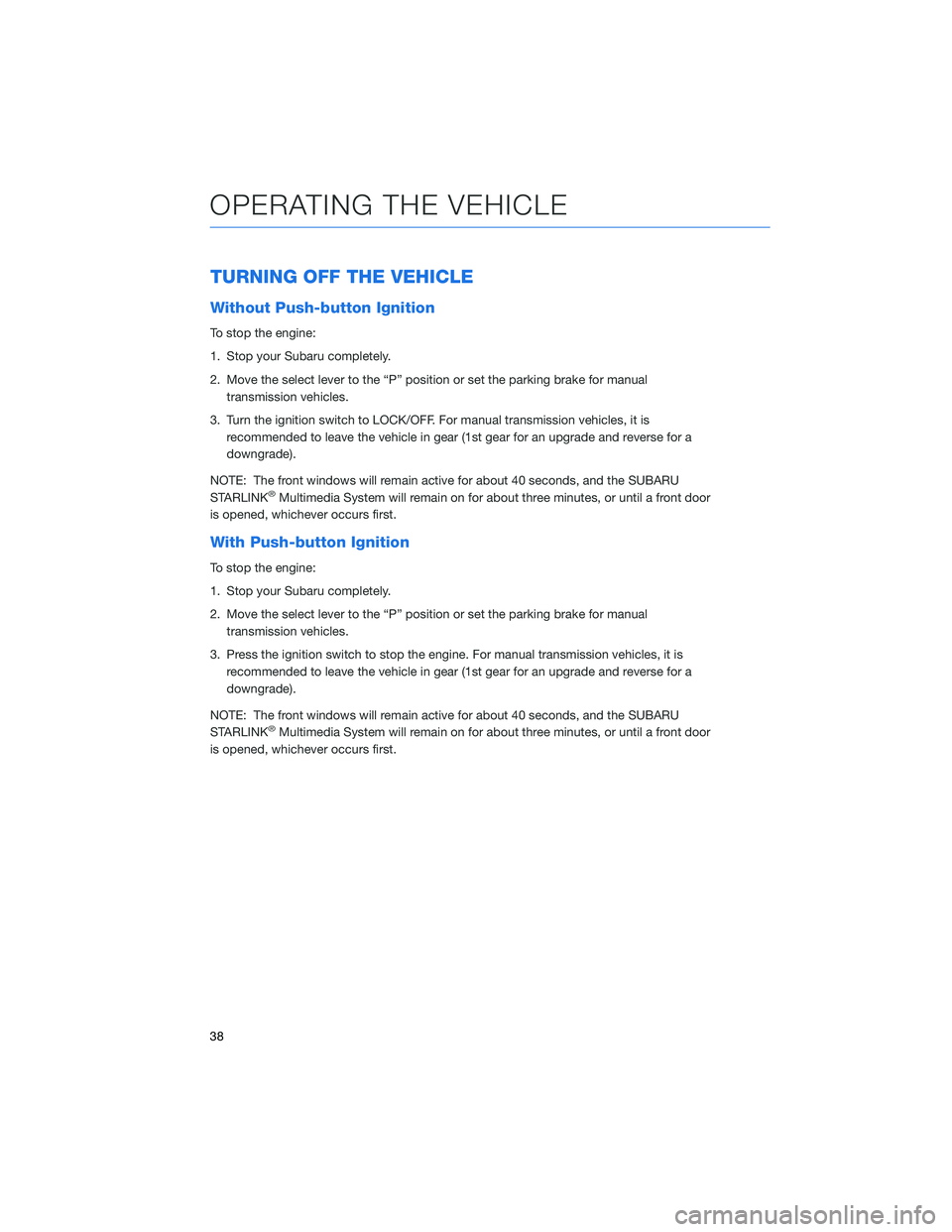
TURNING OFF THE VEHICLE
Without Push-button Ignition
To stop the engine:
1. Stop your Subaru completely.
2. Move the select lever to the “P” position or set the parking brake for manualtransmission vehicles.
3. Turn the ignition switch to LOCK/OFF. For manual transmission vehicles, it is recommended to leave the vehicle in gear (1st gear for an upgrade and reverse for a
downgrade).
NOTE: The front windows will remain active for about 40 seconds, and the SUBARU
STARLINK
®Multimedia System will remain on for about three minutes, or until a front door
is opened, whichever occurs first.
With Push-button Ignition
To stop the engine:
1. Stop your Subaru completely.
2. Move the select lever to the “P” position or set the parking brake for manual transmission vehicles.
3. Press the ignition switch to stop the engine. For manual transmission vehicles, it is recommended to leave the vehicle in gear (1st gear for an upgrade and reverse for a
downgrade).
NOTE: The front windows will remain active for about 40 seconds, and the SUBARU
STARLINK
®Multimedia System will remain on for about three minutes, or until a front door
is opened, whichever occurs first.
OPERATING THE VEHICLE
38
Page 43 of 124
LATCH/ANCHOR
Your Subaru is equipped with Lower Anchors
and Tethers for Children (LATCH). For
maximum safety, first carefully read the LATCH
system instructions from the device
manufacturer, as well as the installation
instructions in your Owner’s Manual, to
properly install the LATCH compatible restraint
system. Use the appropriate seatbelts or
anchorages provided in your Subaru. Children
age 12 and under must properly occupy the
rear seat at all times.
For more information, please refer to
“Seat, seatbelt and SRS airbags” in your
Owner’s Manual.
PASSENGER/CARGO AREAS
41
Page 46 of 124
SPARE TIRE AND JACK
A jack and other maintenance tools are stored
in the tool bucket in the center of the spare
tire, located under the trunk/cargo area floor.
Your vehicle is equipped with the following
maintenance tools:
• Jack
• Jack handle
• Screwdriver
• Towing hook (eye bolt)
• Wheel nut wrench
For more information, please refer to “In Case of Emergency” in your Owner’s Manual.
PASSENGER/CARGO AREAS
44
Page 48 of 124
2.0L ENGINE
1Brake Fluid Reservoir/Clutch Fluid
Reservoir (MT Models)
2 Fuse Box
3 Battery
4 Windshield Washer Tank
5 Radiator Cap 6
Engine Oil Filler Cap
7 Engine Coolant Reservoir
8 Engine Oil Filter
9 Engine Oil Dipstick
10 Air Cleaner Element
The table below lists recommended first service items. Your maintenance needs may
vary depending on your driving conditions. Please consult with your retailer and refer to
the Warranty and Maintenance Booklet for complete information and recommended
replacement intervals.
Maintenance Item Maintenance Interval
6 months or
6,000 Miles 12 months
or
12,000 Miles
Replace Engine Oil and Filter • •
Rotate and Inspect Tires • •
Replace HVAC System A/C filter •
Inspect Clutch Operation (Manual
Transmission) •
Inspect Brake System, Steering
System, and Suspension Components •
ENGINE COMPARTMENT
46
Page 50 of 124
ROOF RAIL CAPACITY(Hatchback Models — if equipped)
CROSS BARS DYNAMIC ROOF RAILS DYNAMIC ROOF RAILS STATIC
150 Pounds 176 Pounds 700 Pounds
For more information, please refer to “Driving Tips” in your Owner’s Manual.
TRAILER TOWING CAPACITY
Your Subaru is neither designed nor intended to be used for trailer towing. Therefore, never
tow a trailer with your vehicle.
For more information, please refer to “Driving Tips” in your Owner’s Manual.
TIRE PRESSURE MONITORING SYSTEM (TPMS)
Your Subaru has a Tire Pressure Monitoring System (TPMS) that
tracks the pressure of each individual tire. You can learn more by
scanning the QR code to see a video with tips and more information
about your Subaru’s TPMS.
The TPMS screen, if equipped, shows individual tire
pressure in the Combination Meter Display. Use the
“i/Set” switch to display the TPMS screen.
TPMS Screen
ADDITIONAL SPECIFICATIONS
48
Page 51 of 124
Units for the TPMS can be customized to Psi or KPa in the
Combination Meter Display. Pull and hold the “i/Set” switch on the
Menu Entering Screen, select “Screen Settings,” and then select
“Tire Pressure Units.” Scan the QR code for a helpful “how to”
video on adjusting the settings.
Tire pressure specification is listed on the tire
inflation pressure label located on the driver’s
side door pillar and in the table below. For
complete tire pressure specifications and
information, please refer to the tire
specifications in your Owner’s Manual.
Tire Inflation Pressure
Front Wheel Rear Wheel Temporary Spare Tire 33 psi 32 psi 60 psi
NOTE: The temporary spare tire must be used only on a rear wheel. If a front wheel tire
gets punctured, replace the wheel with a rear wheel and install the temporary spare tire in
place of the removed rear wheel.
Tire Inflation Pressure Label
ADDITIONAL SPECIFICATIONS
49
Page 57 of 124
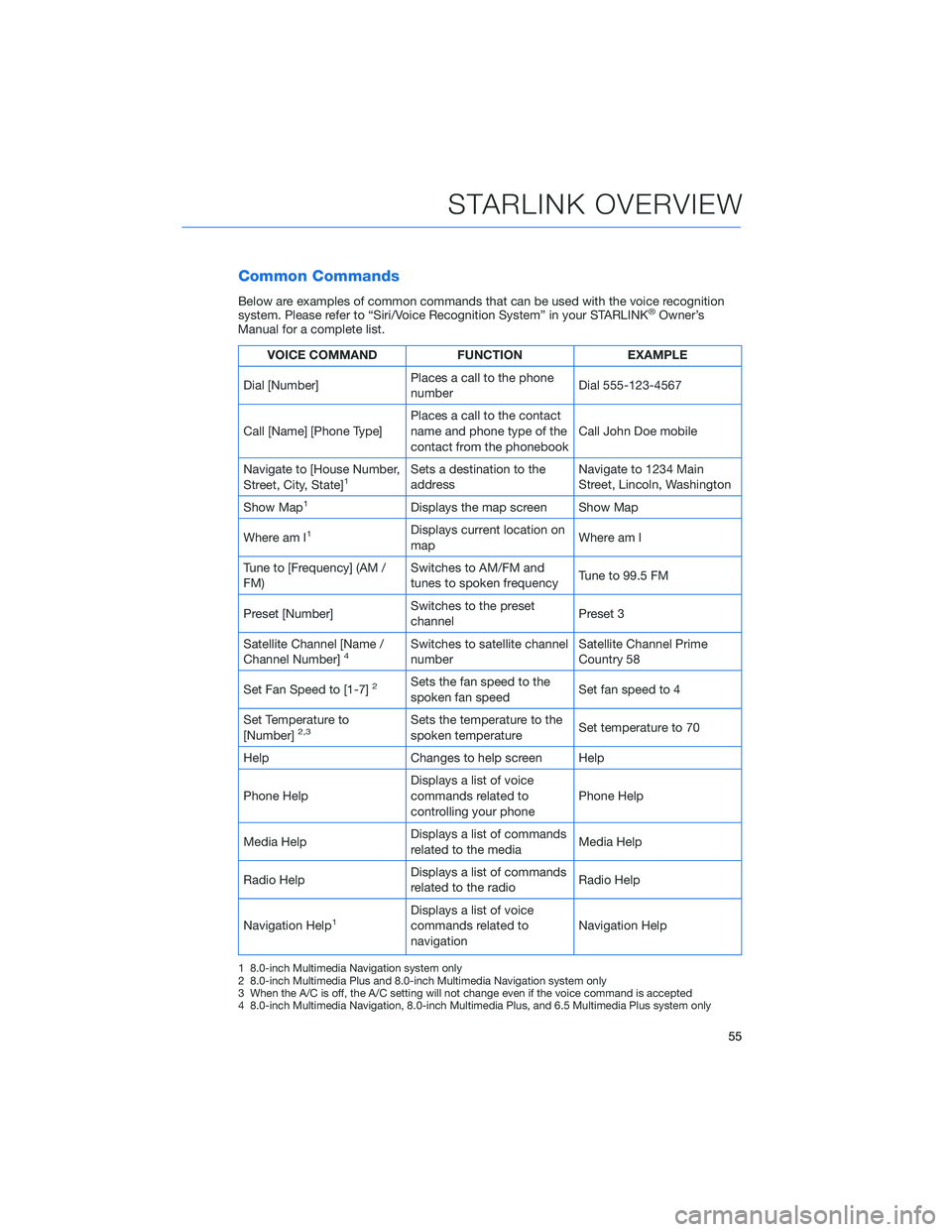
Common Commands
Below are examples of common commands that can be used with the voice recognition
system. Please refer to “Siri/Voice Recognition System” in your STARLINK®Owner’s
Manual for a complete list.
VOICE COMMAND FUNCTIONEXAMPLE
Dial [Number] Places a call to the phone
number Dial 555-123-4567
Call [Name] [Phone Type] Places a call to the contact
name and phone type of the
contact from the phonebook Call John Doe mobile
Navigate to [House Number,
Street, City, State]
1Sets a destination to the
address Navigate to 1234 Main
Street, Lincoln, Washington
Show Map
1Displays the map screen Show Map
Where am I
1Displays current location on
map Where am I
Tune to [Frequency] (AM /
FM) Switches to AM/FM and
tunes to spoken frequency
Tune to 99.5 FM
Preset [Number] Switches to the preset
channel Preset 3
Satellite Channel [Name /
Channel Number]
4Switches to satellite channel
number Satellite Channel Prime
Country 58
Set Fan Speed to [1-7]
2Sets the fan speed to the
spoken fan speed Set fan speed to 4
Set Temperature to
[Number]
2,3Sets the temperature to the
spoken temperature Set temperature to 70
Help Changes to help screen Help
Phone Help Displays a list of voice
commands related to
controlling your phone Phone Help
Media Help Displays a list of commands
related to the media Media Help
Radio Help Displays a list of commands
related to the radio Radio Help
Navigation Help
1Displays a list of voice
commands related to
navigation Navigation Help
1 8.0-inch Multimedia Navigation system only
2 8.0-inch Multimedia Plus and 8.0-inch Multimedia Navigation system only
3 When the A/C is off, the A/C setting will not change even if the voice command is accepted
4 8.0-inch Multimedia Navigation, 8.0-inch Multimedia Plus, and 6.5 Multimedia Plus system only
STARLINK OVERVIEW
55


