Page 165 of 432
Combination Meter Display (Color TFT)
159
Instruments and Controls3
■
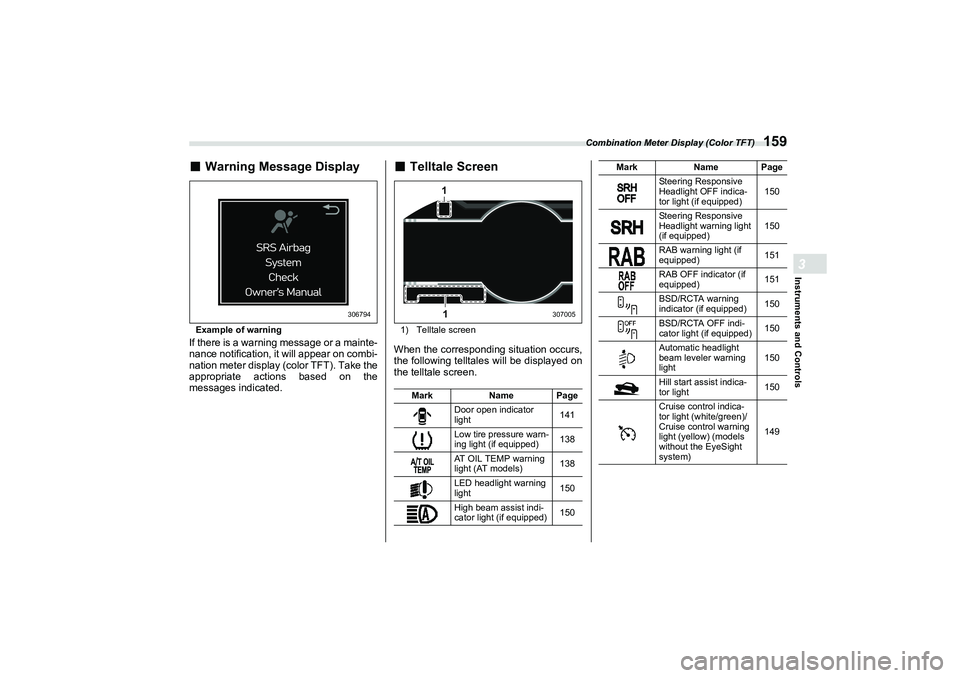
Warning Message DisplayExample of warningIf there is a warning message or a mainte-
nance notification, it will appear on combi-
nation meter display (color TFT). Take the
appropriate actions based on the
messages indicated.
■
Telltale Screen1) Telltale screenWhen the corresponding situation occurs,
the following telltales will be displayed on
the telltale screen.
306794
MarkName Page
Door open indicator
light 141
Low tire pressure warn-
ing light (if equipped) 138
AT OIL TEMP warning
light (AT models) 138
LED headlight warning
light 150
High beam assist indi-
cator light (if equipped) 150
11
307005
Steering Responsive
Headlight OFF indica-
tor light (if equipped)150
Steering Responsive
Headlight warning light
(if equipped) 150
RAB warning light (if
equipped) 151
RAB OFF indicator (if
equipped) 151
BSD/RCTA warning
indicator (if equipped) 150
BSD/RCTA OFF indi-
cator light (if equipped) 150
Automatic headlight
beam leveler warning
light 150
Hill start assist indica-
tor light 150
Cruise control indica-
tor light (white/green)/
Cruise control warning
light (yellow) (models
without the EyeSight
system) 149
Mark
Name Page
B5=B8.ERRN 15� ページ 2021年7月5日 月曜日 午後>1時>1>1分
Page 166 of 432

Center Information Display (CID)
1603-8. Center InformationDisplay (CID)■
Features
All information is displayed on the center
information display, including vehicle
settings, vehicle status, and audio opera-
tion. The center information display can also be
used to set and initialize the center infor-
mation display itself.
NOTE
When the vehicle is in motion,
certain functions and selections may
not be available.
The language and units for both the
center information display and the
combination meter display (color TFT)
can be changed. For details, refer to
"Car settings"
P165.
The images displayed in this
Owner’s Manual are sample images.
The actual image may vary depending
on the region and vehicle specifica-
tions.
■
Touch Screen Operations
The center information display has a
touch screen. Operations are performed
by touching the touch screen directly.
▼
Touch
Quickly touch and release once.
WARNING
Always pay attention to safe driving
when operating the center informa-
tion display while the vehicle is in
motion. When operation of the cen-
ter information display is disturbing
your awareness and ability to con-
centrate on driving, stop the vehicle
in a safe place before performing
operations on the display. Also, do
not concentrate on the display
while driving. Doing so could result
in an accident.
Items Page
Maintenance information 171
Vehicle settings 161
Rear view camera 263
Audio/telephoneRefer to
the sepa-
rate audio Owner’s
Manual.
EyeSight (if equipped) Refer to
the
Owner’s Manual
supple-
ment for
the Eye-
Sight sys- tem.
Items
Page
306863
B5=B8.ERRN 160 ページ 2021年7月5日 月曜日 午後>1時>1>1分
Page 167 of 432
Center Information Display (CID)
161
Instruments and Controls3
– CONTINUED –
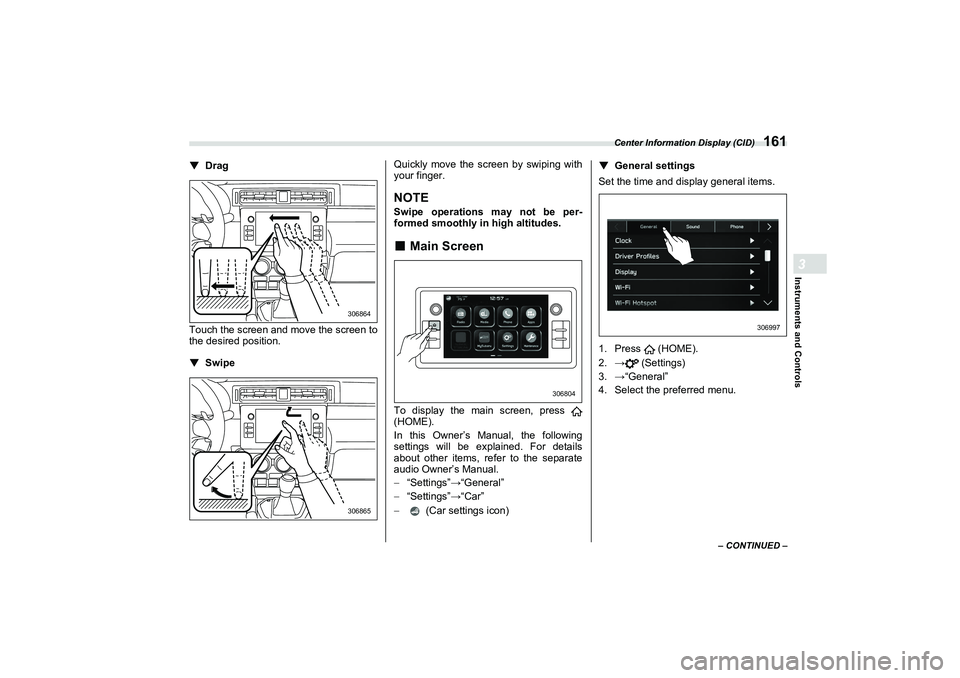
▼
Drag
Touch the screen and move the screen to
the desired position.
▼Swipe Quickly move the screen by swiping with
your finger.
NOTESwipe operations may not be per-
formed smoothly in high altitudes.■
Main Screen
To display the main screen, press
(HOME).
In this Owner’s Manual, the following
settings will be explained. For details
about other items, re
fer to the separate
audio Owner’s Manual.
� “Settings” �:“General”
� “Settings” �:“Car”
� (Car settings icon) ▼
General settings
Set the time and display general items.
1. Press (HOME).
2. �: (Settings)
3. �:“General”
4. Select the preferred menu.
306864306865
306804
306997
B5=B8.ERRN 161 ページ 2021年7月5日 月曜日 午後>1時>1>1分
Page 168 of 432

Center Information Display (CID)
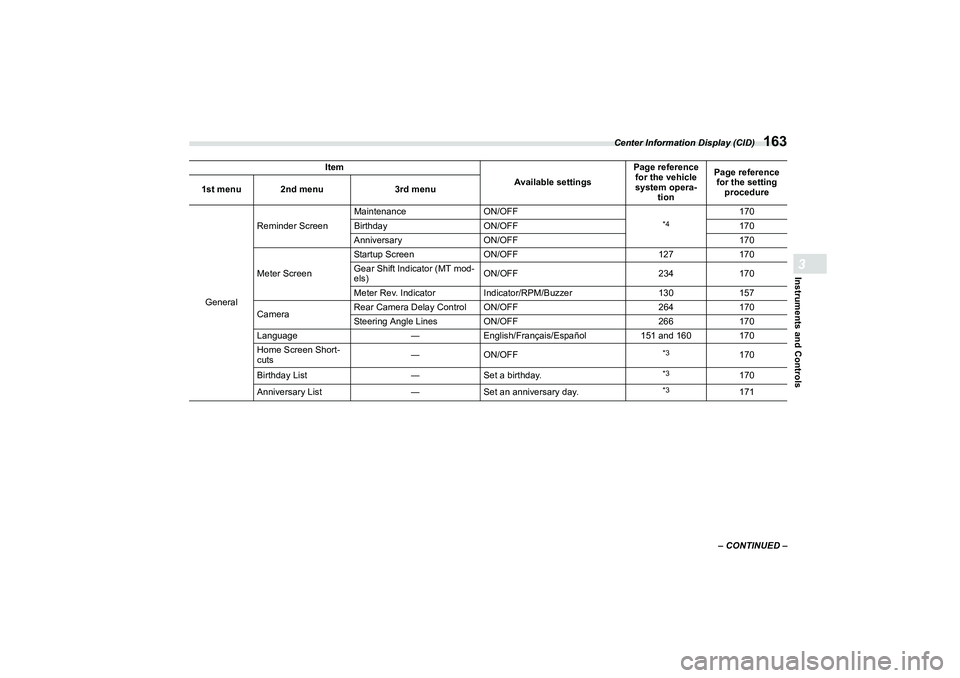
162The setting adjustments to the following items can be manually changed to meet your personal requirements.
Item
Available settingsPage reference
for the vehicle
system opera- tion Page reference
for the setting
procedure
1st menu 2nd menu
3rd menu
General Clock
Time Setting
*1
Auto/Manual
172172
Time Setting
*2
Sync With Phone/Manual 172
Clock Format 12H/24H 170
Driver Profiles ―Default/4 users
*3
―
Display Display Off
Turn the screen off. ―170
Brightness Dial ON/OFF 130170
Brightness/Contrast Set and adjust the brightness and
contrast of the display.
170
170
Wi-Fi Wi-Fi
ON/OFF
*3
―
Connected to:
Select the registered devise.
Available Wi-Fi Networks Add
Wi-Fi Protected Setup PIN Setup/Push Button Setup
Registered Wi-Fi Networks ―
Wi-Fi Hotspot Wi-Fi Hotspot
ON/OFF
*4
―
Wi-Fi name (SSID):
―
Security Type: ―
Password: ―
Broadcast Frequency: 2.4 GHz/5 GHz
SSID Broadcast ON/OFF
Connected Devices: ―
A4600BEscusenvhch03.fm 162 ページ 2021年7月9日 金曜日 午後4時33分
Page 169 of 432
Center Information Display (CID)
163
Instruments and Controls3
– CONTINUED –
General
Reminder Screen
Maintenance
ON/OFF
*4
170
Birthday ON/OFF 170
Anniversary ON/OFF 170
Meter Screen Startup Screen
ON/OFF 127170
Gear Shift Indicator (MT mod-
els) ON/OFF
234170
Meter Rev. Indicator Indicator/RPM/Buzzer 130157
Camera Rear Camera Delay Control ON/OFF
264170
Steering Angle Lines ON/OFF 266170
Language ―English/Français/Español 151 and 160170
Home Screen Short-
cuts ―
ON/OFF
*3
170
Birthday List ―Set a birthday.
*3
170
Anniversary List ―Set an anniversary day.
*3
171
Item
Available settingsPage reference
for the vehicle
system opera- tion Page reference
for the setting procedure
1st menu 2nd menu
3rd menu
B5=B8.ERRN 163 ページ 2021年7月5日 月曜日 午後>1時>1>1分
Page 176 of 432
Center Information Display (CID)
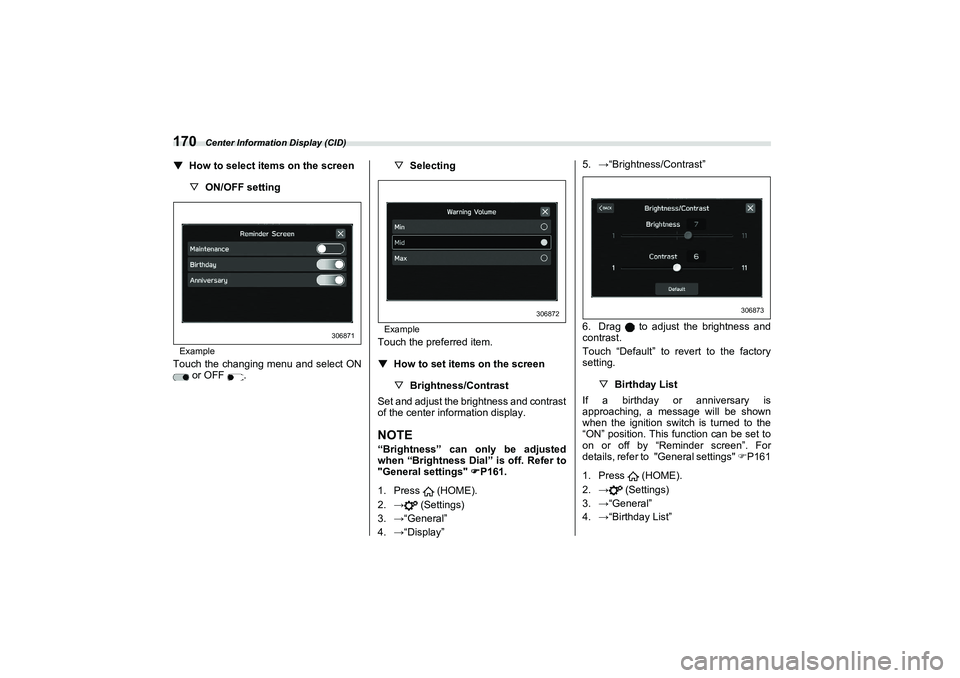
170▼
How to select items on the screen
▽ON/OFF settingExampleTouch the changing menu and select ON
or OFF . ▽
Selecting
ExampleTouch the preferred item.
▼
How to set items on the screen
▽Brightness/Contrast
Set and adjust the brightness and contrast
of the center information display.
NOTE“Brightness” can only be adjusted
when “Brightness Dial” is off. Refer to
"General settings"
P161.
1. Press (HOME).
2. �: (Settings)
3. �:“General”
4. �:“Display” 5.
�:“Brightness/Contrast”
6. Drag to adjust the brightness and
contrast.
Touch “Default” to revert to the factory
setting. ▽ Birthday List
If a birthday or anniversary is
approaching, a message will be shown
when the ignition switch is turned to the
“ON” position. This function can be set to
on or off by “Reminder screen”. For
details, refer to "General settings" P161
1. Press (HOME).
2. �: (Settings)
3. �:“General”
4. �:“Birthday List”
306871
306872
306873
B5=B8.ERRN 1�0 ページ 2021年7月5日 月曜日 午後>1時>1>1分
Page 178 of 432
Clock
172Maintenance Schedule setting:
The setting procedure is the same as
“Engine Oil” setting, but touch the “Mainte-
nance Schedule” item in step 2.NOTETouch “Reset” to reset each setting.
Touch “Update” to revert to the
default value.
3-9. ClockFor models with a genuine SUBARU
audio system, the clock can be adjusted
using either auto mode or manual mode.■
Setting the Clock Manually
1. Turn the ignition switch to the “ON”
position.
2. Press (HOME).
3. Touch (Settings).
4. �:“General”
5. �:“Clock”
6. �:“Time Setting” 7.
�:“Manual”
8. �: or
9. �:“OK”
NOTEThe clock setting screen can also be
displayed by touching the clock on the
status bar.
306807
306875
B5=B8.ERRN 1�2 ページ 2021年7月5日 月曜日 午後>1時>1>1分
Page 187 of 432
Steering Responsive Headlight (SRH) (If Equipped)
181
Instruments and Controls3
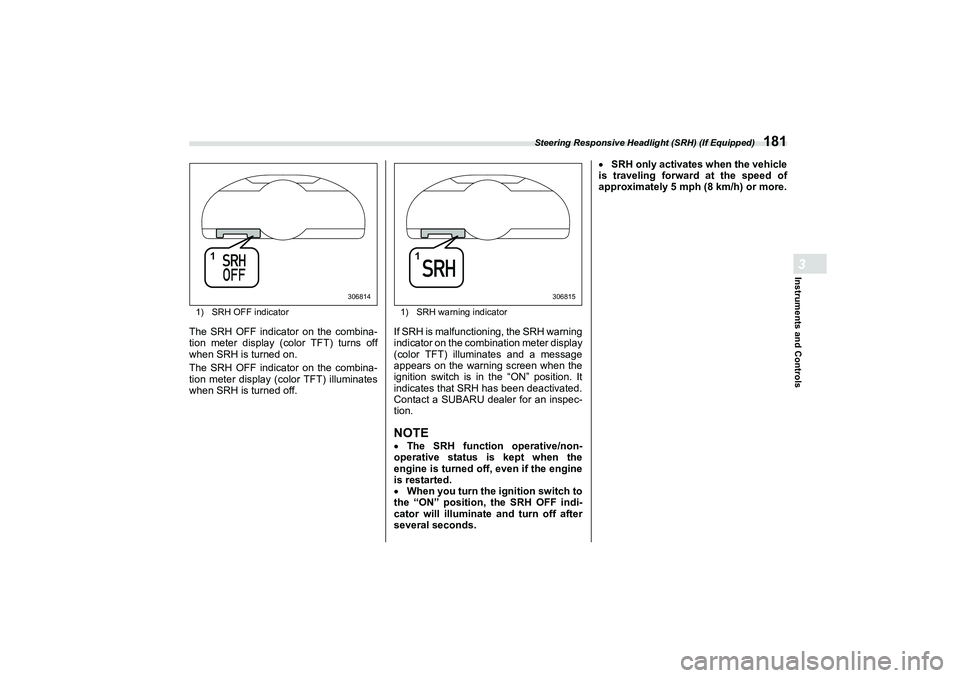
1)SRH OFF indicatorThe SRH OFF indicator on the combina-
tion meter display (color TFT) turns off
when SRH is turned on.
The SRH OFF indicator on the combina-
tion meter display (color TFT) illuminates
when SRH is turned off.
1) SRH warning indicatorIf SRH is malfunctioning, the SRH warning
indicator on the combination meter display
(color TFT) illuminates and a message
appears on the warning screen when the
ignition switch is in the “ON” position. It
indicates that SRH has been deactivated.
Contact a SUBARU dealer for an inspec-
tion.NOTEThe SRH function operative/non-
operative status is kept when the
engine is turned off, even if the engine
is restarted.
When you turn the ignition switch to
the “ON” position, the SRH OFF indi-
cator will illuminate and turn off after
several seconds.
SRH only activates when the vehicle
is traveling forward at the speed of
approximately 5 mph (8 km/h) or more.
1
306814
1
306815
B5=B8.ERRN 1�1 ページ 2021年7月5日 月曜日 午後>1時>1>1分