Page 160 of 432
Combination Meter Display (Color TFT)
154Pressing and holding will reset the
average vehicle speed/driving time/
driving distance.
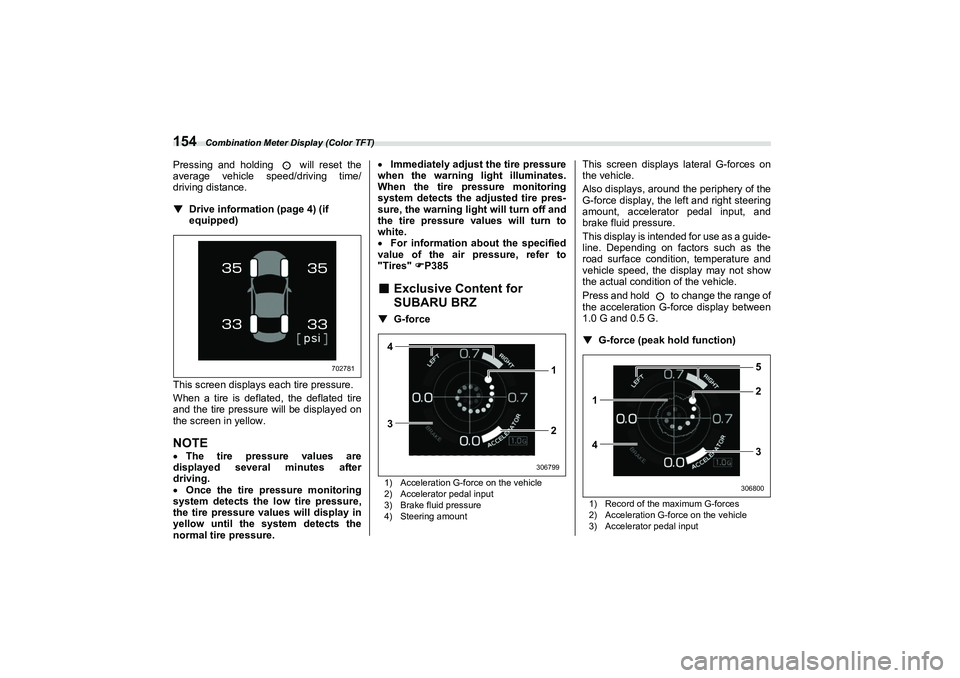
▼Drive information (page 4) (if
equipped)
This screen displays each tire pressure.
When a tire is deflated, the deflated tire
and the tire pressure will be displayed on
the screen in yellow.NOTE The tire pressure values are
displayed several minutes after
driving.
Once the tire pressure monitoring
system detects the low tire pressure,
the tire pressure values will display in
yellow until the system detects the
normal tire pressure.
Immediately adjust the tire pressure
when the warning light illuminates.
When the tire pr essure monitoring
system detects the adjusted tire pres-
sure, the warning ligh t will turn off and
the tire pressure values will turn to
white.
For information about the specified
value of the air pressure, refer to
"Tires" P385
■ Exclusive Content for
SUBARU BRZ▼ G-force1) Acceleration G-force on the vehicle
2) Accelerator pedal input
3) Brake fluid pressure
4) Steering amount
This screen displays lateral G-forces on
the vehicle.
Also displays, around the periphery of the
G-force display, the left and right steering
amount, accelerator pedal input, and
brake fluid pressure.
This display is intended for use as a guide-
line. Depending on factors such as the
road surface conditi on, temperature and
vehicle speed, the display may not show
the actual condition of the vehicle.
Press and hold to change the range of
the acceleration G-force display between
1.0 G and 0.5 G.
▼ G-force (peak ho ld function)1) Record of the maximum G-forces
2) Acceleration G-force on the vehicle
3) Accelerator pedal input
702781
4
3 1
2
306799
1
42 5
3
306800
A4600BEscusenvhch03.fm 154 ページ 2021年7月5日 月曜日 午後4時23分
Page 163 of 432
Combination Meter Display (Color TFT)
157
Instruments and Controls3
– CONTINUED –
■
Driving Support System
Settings Display
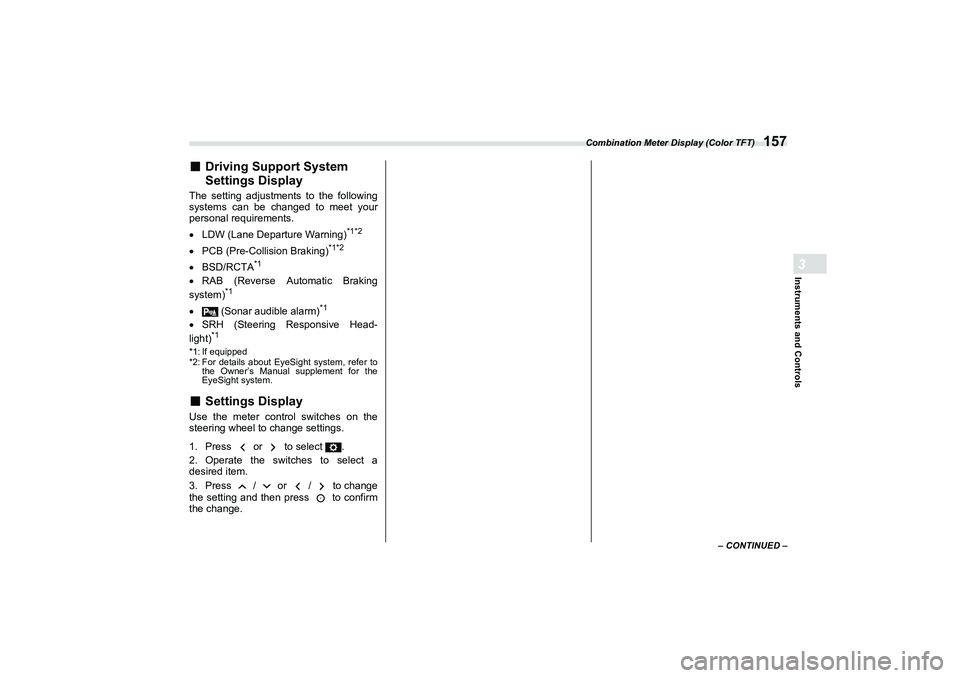
The setting adjustments to the following
systems can be changed to meet your
personal requirements.
LDW (Lane Departure Warning)
*1*2
PCB (Pre-Collision Braking)
*1*2
BSD/RCTA
*1
RAB (Reverse Automatic Braking
system)
*1
(Sonar audible alarm)
*1
SRH (Steering Responsive Head-
light)
*1
*1: If equipped
*2: For details about EyeSight system, refer to the Owner’s Manual supplement for the
EyeSight system.■
Settings Display
Use the meter control switches on the
steering wheel to change settings.
1. Press or to select .
2. Operate the switches to select a
desired item.
3. Press / or / to change
the setting and then press to confirm
the change.
B5=B8.ERRN 15� ページ 2021年7月5日 月曜日 午後>1時>1>1分
Page 164 of 432
Combination Meter Display (Color TFT)
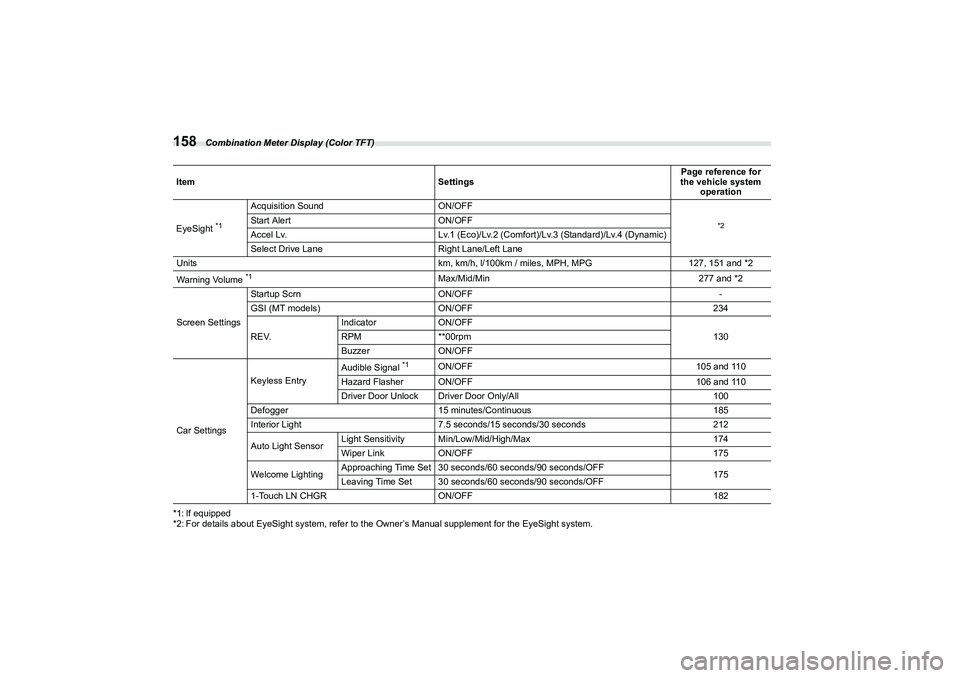
158*1: If equipped
*2: For details about EyeSight system, refer to the Owner’s Manual supplement for the EyeSight system.Item
SettingsPage reference for
the vehicle system
operation
EyeSight
*1
Acquisition Sound ON/OFF
*2
Start AlertON/OFF
Accel Lv. Lv.1 (Eco)/Lv.2 (Comfort)/Lv.3 (Standard)/Lv.4 (Dynamic)
Select Drive Lane Right Lane/Left Lane
Units km, km/h, l/100km / miles, MPH, MPG127, 151 and *2
Warning Volume *1
Max/Mid/Min 277 and *2
Screen Settings Startup Scrn
ON/OFF -
GSI (MT models) ON/OFF 234
R E V. Indicator
ON/OFF
130
RPM **00rpm
Buzzer ON/OFF
Car Settings Keyless Entry
Audible Signal
*1
ON/OFF
105 and 110
Hazard Flasher ON/OFF 106 and 110
Driver Door Unlock Driver Door Only/All 100
Defogger 15 minutes/Continuous 185
Interior Light 7.5 seconds/15 seconds/30 seconds 212
Auto Light Sensor Light Sensitivity Min/Low/Mid/High/Max
174
Wiper Link ON/OFF 175
Welcome Lighting Approaching Time Set 30 seconds/60 seconds/90 seconds/OFF
175
Leaving Time Set 30 seconds/60 seconds/90 seconds/OFF
1-Touch LN CHGR ON/OFF 182
B5=B8.ERRN 15� ページ 2021年7月5日 月曜日 午後>1時>1>1分
Page 165 of 432
Combination Meter Display (Color TFT)
159
Instruments and Controls3
■
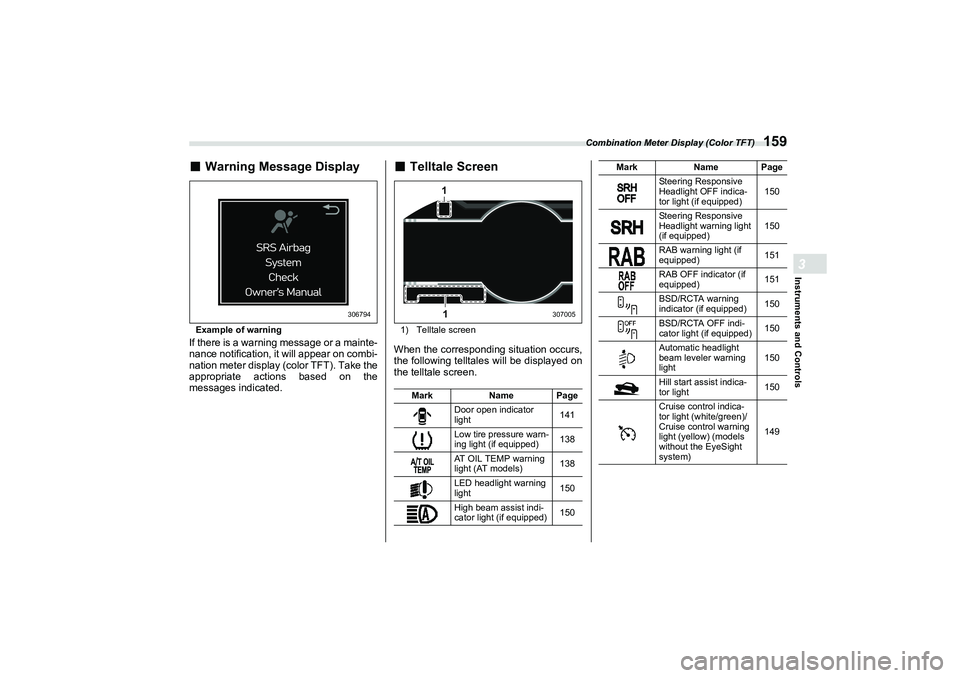
Warning Message DisplayExample of warningIf there is a warning message or a mainte-
nance notification, it will appear on combi-
nation meter display (color TFT). Take the
appropriate actions based on the
messages indicated.
■
Telltale Screen1) Telltale screenWhen the corresponding situation occurs,
the following telltales will be displayed on
the telltale screen.
306794
MarkName Page
Door open indicator
light 141
Low tire pressure warn-
ing light (if equipped) 138
AT OIL TEMP warning
light (AT models) 138
LED headlight warning
light 150
High beam assist indi-
cator light (if equipped) 150
11
307005
Steering Responsive
Headlight OFF indica-
tor light (if equipped)150
Steering Responsive
Headlight warning light
(if equipped) 150
RAB warning light (if
equipped) 151
RAB OFF indicator (if
equipped) 151
BSD/RCTA warning
indicator (if equipped) 150
BSD/RCTA OFF indi-
cator light (if equipped) 150
Automatic headlight
beam leveler warning
light 150
Hill start assist indica-
tor light 150
Cruise control indica-
tor light (white/green)/
Cruise control warning
light (yellow) (models
without the EyeSight
system) 149
Mark
Name Page
B5=B8.ERRN 15� ページ 2021年7月5日 月曜日 午後>1時>1>1分
Page 166 of 432

Center Information Display (CID)
1603-8. Center InformationDisplay (CID)■
Features
All information is displayed on the center
information display, including vehicle
settings, vehicle status, and audio opera-
tion. The center information display can also be
used to set and initialize the center infor-
mation display itself.
NOTE
When the vehicle is in motion,
certain functions and selections may
not be available.
The language and units for both the
center information display and the
combination meter display (color TFT)
can be changed. For details, refer to
"Car settings"
P165.
The images displayed in this
Owner’s Manual are sample images.
The actual image may vary depending
on the region and vehicle specifica-
tions.
■
Touch Screen Operations
The center information display has a
touch screen. Operations are performed
by touching the touch screen directly.
▼
Touch
Quickly touch and release once.
WARNING
Always pay attention to safe driving
when operating the center informa-
tion display while the vehicle is in
motion. When operation of the cen-
ter information display is disturbing
your awareness and ability to con-
centrate on driving, stop the vehicle
in a safe place before performing
operations on the display. Also, do
not concentrate on the display
while driving. Doing so could result
in an accident.
Items Page
Maintenance information 171
Vehicle settings 161
Rear view camera 263
Audio/telephoneRefer to
the sepa-
rate audio Owner’s
Manual.
EyeSight (if equipped) Refer to
the
Owner’s Manual
supple-
ment for
the Eye-
Sight sys- tem.
Items
Page
306863
B5=B8.ERRN 160 ページ 2021年7月5日 月曜日 午後>1時>1>1分
Page 172 of 432
Center Information Display (CID)
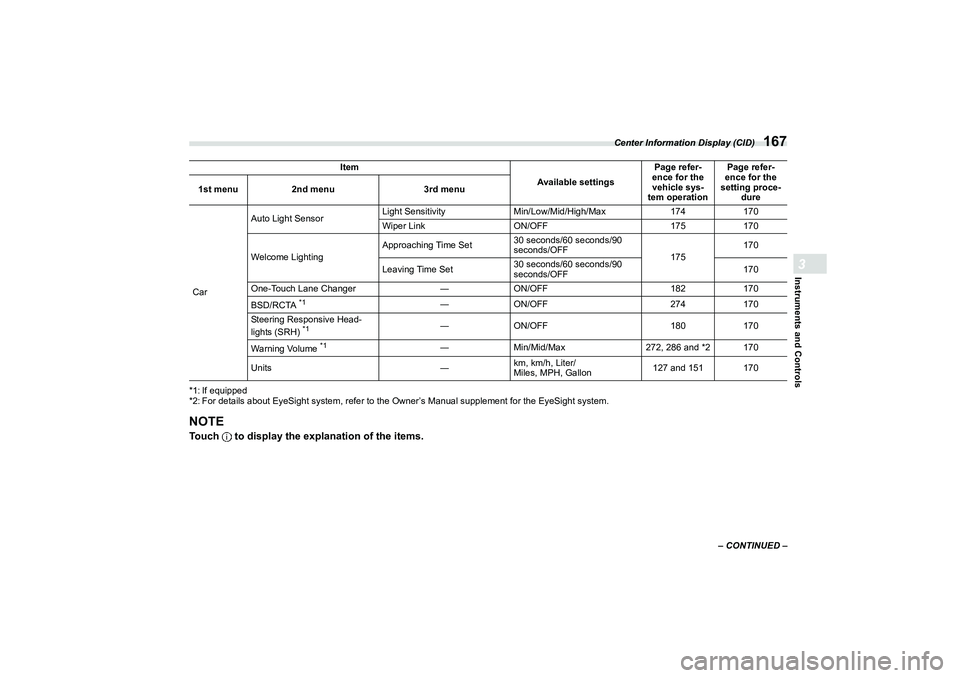
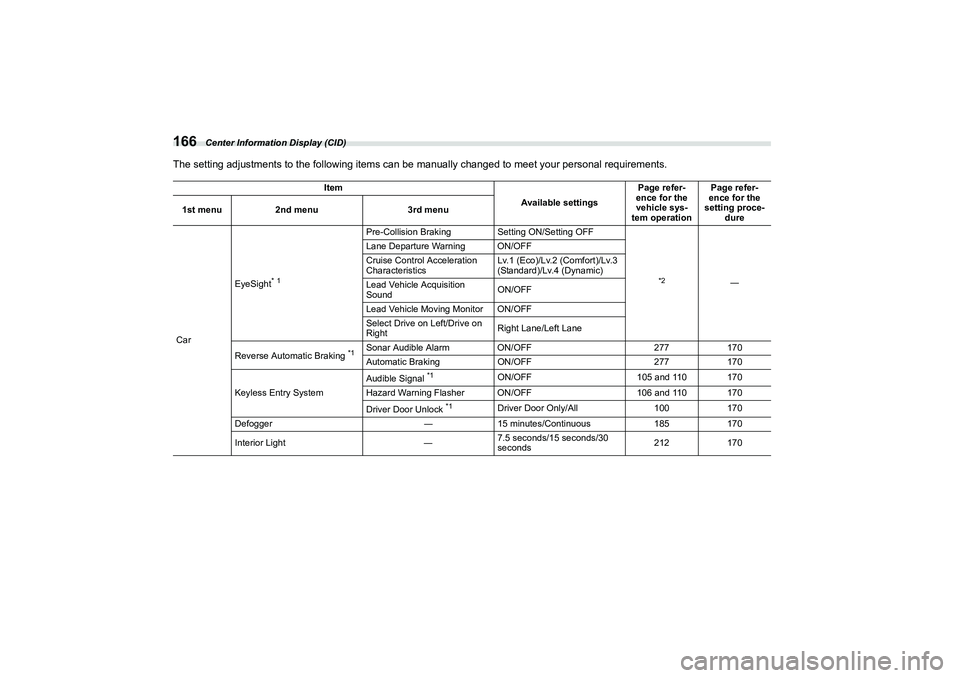
166The setting adjustments to the following items can be manually changed to meet your personal requirements.
Item
Available settingsPage refer-
ence for the
vehicle sys-
tem operation Page refer-
ence for the
setting proce- dure
1st menu
2nd menu 3rd menu
Car EyeSight
* 1
Pre-Collision Braking
Setting ON/Setting OFF
*2
―
Lane Departure Warning ON/OFF
Cruise Control Acceleration
Characteristics
Lv.1 (Eco)/Lv.2 (Comfort)/Lv.3
(Standard)/Lv.4 (Dynamic)
Lead Vehicle Acquisition
Sound ON/OFF
Lead Vehicle Moving Monitor ON/OFF
Select Drive on Left/Drive on
Right Right Lane/Left Lane
Reverse Automatic Braking
*1
Sonar Audible Alarm ON/OFF 277170
Automatic Braking ON/OFF 277170
Keyless Entry System Audible Signal
*1
ON/OFF
105 and 110 170
Hazard Warning Flasher ON/OFF 106 and 110 170
Driver Door Unlock
*1
Driver Door Only/All 100170
Defogger ―15 minutes/Continuous 185170
Interior Light ―7.5 seconds/15 seconds/30
seconds 212
170
B5=B8.ERRN 166 ページ 2021年7月5日 月曜日 午後>1時>1>1分
Page 173 of 432
Center Information Display (CID)
167
Instruments and Controls3
– CONTINUED –
*1: If equipped
*2: For details about EyeSight system, refer to the Owner’s Manual supplement for the EyeSight system.
NOTETouch to display the explanation of the items.Car Auto Light Sensor
Light Sensitivity
Min/Low/Mid/High/Max 174170
Wiper Link ON/OFF 175170
Welcome Lighting Approaching Time Set
30 seconds/60 seconds/90
seconds/OFF
175170
Leaving Time Set 30 seconds/60 seconds/90
seconds/OFF 170
One-Touch Lane Changer ―ON/OFF 182170
BSD/RCTA
*1
― ON/OFF 274170
Steering Responsive Head-
lights (SRH)
*1
― ON/OFF 180170
Warning Volume
*1
― Min/Mid/Max 272, 286 and *2 170
Units ―km, km/h, Liter/
Miles, MPH, Gallon 127 and 151 170
Item
Available settingsPage refer-
ence for the
vehicle sys-
tem operation Page refer-
ence for the
setting proce-
dure
1st menu
2nd menu 3rd menu
B5=B8.ERRN 16� ページ 2021年7月5日 月曜日 午後>1時>1>1分
Page 175 of 432
Center Information Display (CID)
169
Instruments and Controls3
– CONTINUED –
*1: If equipped
*2: For details about EyeSight system, refer to the Owner’s Manual supplement for the EyeSight system. Item
Available settingsPage reference for
the vehicle system
operation Page reference for
the setting proce-
dure
1st menu
2nd menu
Vehicle Control Cruise Control Accel-
eration Characteris-
tics
*1
Lv.1 (Eco)/Lv.2 (Comfort)/Lv.3 (Standard)/Lv.4
(Dynamic)
*2
―
Steering Responsive
Headlights (SRH)
*1
ON/OFF 180170
Driving Assistance
*1
Pre-Collision Braking S etting ON/Setting OFF
*2
―
Lane Departure
Warning ON/OFF
BSD/RCTA ON/OFF 268170
Others Warning Volume
*1
Min/Mid/Max
277 and *2―
Units km, km/h, Liter/Miles, MPH, Gallon 127 and 151170
B5=B8.ERRN 16� ページ 2021年7月5日 月曜日 午後>1時>1>1分