2022 RAM CHASSIS CAB towing
[x] Cancel search: towingPage 209 of 428
MULTIMEDIA207
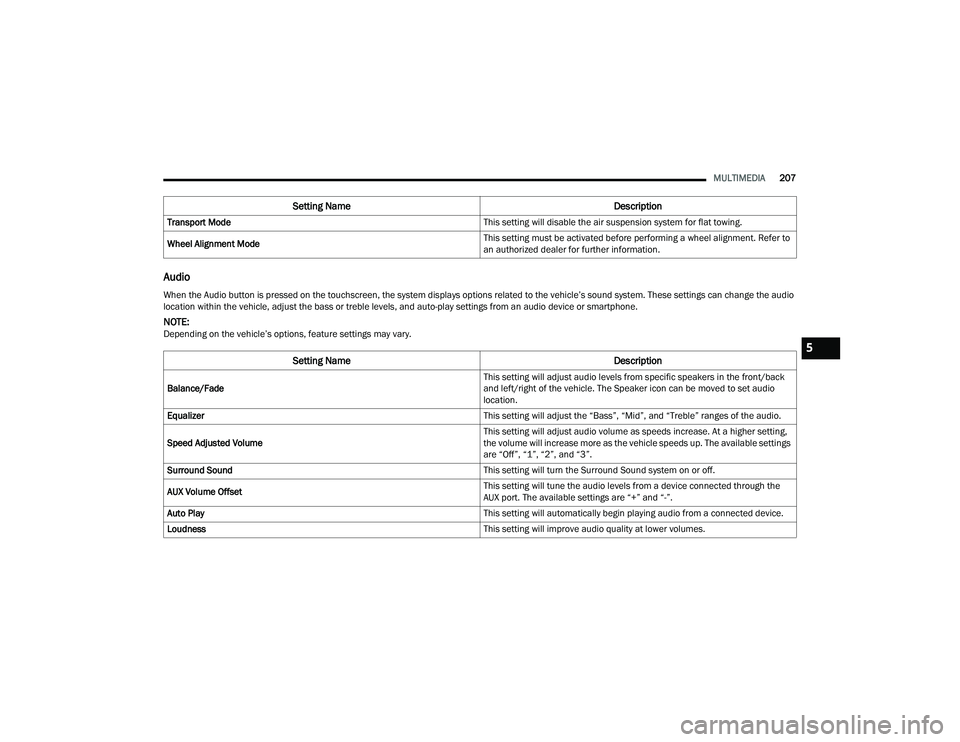
Audio
Transport Mode This setting will disable the air suspension system for flat towing.
Wheel Alignment Mode This setting must be activated before performing a wheel alignment. Refer to
an authorized dealer for further information.
Setting Name
Description
When the Audio button is pressed on the touchscreen, the system displays options related to the vehicle’s sound system. These settings can change the audio
location within the vehicle, adjust the bass or treble levels, and auto-play settings from an audio device or smartphone.
NOTE:Depending on the vehicle’s options, feature settings may vary.
Setting NameDescription
Balance/Fade This setting will adjust audio levels from specific speakers in the front/back
and left/right of the vehicle. The Speaker icon can be moved to set audio
location.
Equalizer This setting will adjust the “Bass”, “Mid”, and “Treble” ranges of the audio.
Speed Adjusted Volume This setting will adjust audio volume as speeds increase. At a higher setting,
the volume will increase more as the vehicle speeds up. The available settings
are “Off”, “1”, “2”, and “3”.
Surround Sound This setting will turn the Surround Sound system on or off.
AUX Volume Offset This setting will tune the audio levels from a device connected through the
AUX port. The available settings are “+” and “-”.
Auto Play This setting will automatically begin playing audio from a connected device.
Loudness This setting will improve audio quality at lower volumes.
5
22_DPF_OM_EN_USC_t.book Page 207
Page 250 of 428
248MULTIMEDIA
do not have an active subscription, push the
ASSIST button and press the Activate button on the
touchscreen to activate services.
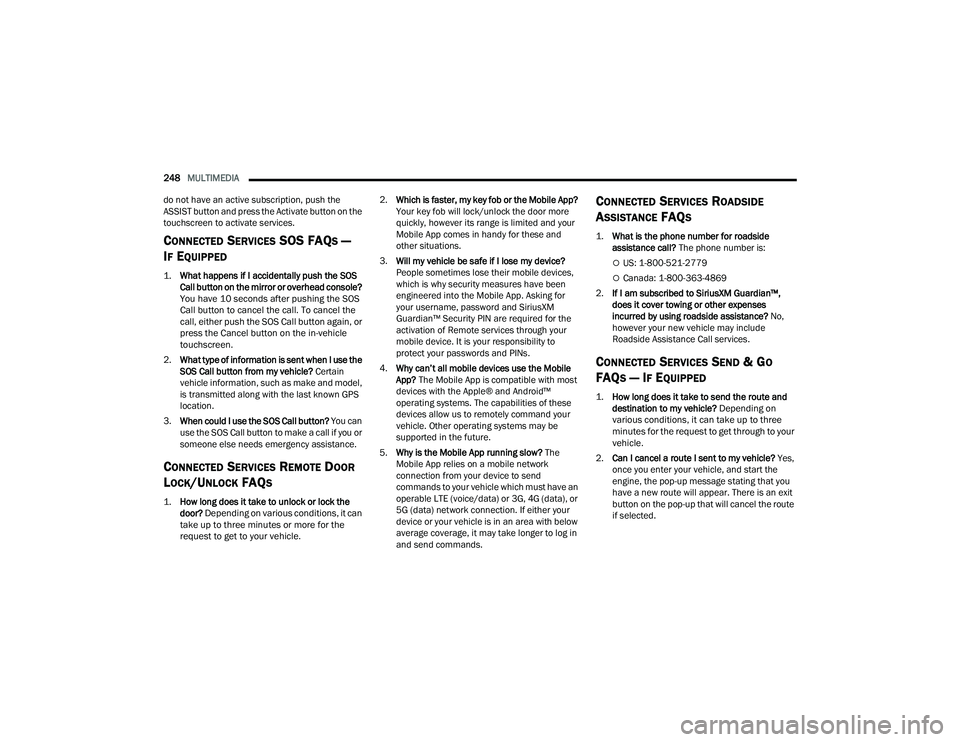
CONNECTED SERVICES SOS FAQS —
I
F EQUIPPED
1.
What happens if I accidentally push the SOS
Call button on the mirror or overhead console?
You have 10 seconds after pushing the SOS
Call button to cancel the call. To cancel the
call, either push the SOS Call button again, or
press the Cancel button on the in-vehicle
touchscreen.
2. What type of information is sent when I use the
SOS Call button from my vehicle? Certain
vehicle information, such as make and model,
is transmitted along with the last known GPS
location.
3. When could I use the SOS Call button? You can
use the SOS Call button to make a call if you or
someone else needs emergency assistance.
CONNECTED SERVICES REMOTE DOOR
L
OCK/UNLOCK FAQS
1.
How long does it take to unlock or lock the
door?
Depending on various conditions, it can
take up to three minutes or more for the
request to get to your vehicle.
2.
Which is faster, my key fob or the Mobile App?
Your key fob will lock/unlock the door more
quickly, however its range is limited and your
Mobile App comes in handy for these and
other situations.
3. Will my vehicle be safe if I lose my device?
People sometimes lose their mobile devices,
which is why security measures have been
engineered into the Mobile App. Asking for
your username, password and SiriusXM
Guardian™ Security PIN are required for the
activation of Remote services through your
mobile device. It is your responsibility to
protect your passwords and PINs.
4. Why can’t all mobile devices use the Mobile
App? The Mobile App is compatible with most
devices with the Apple® and Android™
operating systems. The capabilities of these
devices allow us to remotely command your
vehicle. Other operating systems may be
supported in the future.
5. Why is the Mobile App running slow? The
Mobile App relies on a mobile network
connection from your device to send
commands to your vehicle which must have an
operable LTE (voice/data) or 3G, 4G (data), or
5G (data) network connection. If either your
device or your vehicle is in an area with below
average coverage, it may take longer to log in
and send commands.
CONNECTED SERVICES ROADSIDE
A
SSISTANCE FAQS
1.
What is the phone number for roadside
assistance call? The phone number is:
US: 1-800-521-2779
Canada: 1-800-363-4869
2. If I am subscribed to SiriusXM Guardian™,
does it cover towing or other expenses
incurred by using roadside assistance? No,
however your new vehicle may include
Roadside Assistance Call services.
CONNECTED SERVICES SEND & GO
FAQ
S — IF EQUIPPED
1.
How long does it take to send the route and
destination to my vehicle?
Depending on
various conditions, it can take up to three
minutes for the request to get through to your
vehicle.
2. Can I cancel a route I sent to my vehicle? Yes,
once you enter your vehicle, and start the
engine, the pop-up message stating that you
have a new route will appear. There is an exit
button on the pop-up that will cancel the route
if selected.
22_DPF_OM_EN_USC_t.book Page 248
Page 267 of 428

SAFETY265
The gear selection must match vehicle uphill
direction (i.e., vehicle facing uphill is in forward
gear; vehicle backing uphill is in REVERSE gear).
HSA will work in REVERSE gear and all forward
gears. The system will not activate if the trans -
mission is in PARK or NEUTRAL. For vehicles
equipped with a manual transmission, if the
clutch is pressed, HSA will remain active.
Disabling And Enabling HSA
This feature can be turned on or turned off. To
change the current setting, proceed as follows:
If disabling HSA using your instrument cluster
display, see Ú page 81 for further information.
If disabling HSA using Uconnect Settings, see
Úpage 191 for further information.
Towing With HSA
HSA will also provide assistance to mitigate roll
back while towing a trailer.
Ready Alert Braking (RAB)
RAB may reduce the time required to reach full
braking during emergency braking situations. It
anticipates when an emergency braking situation
may occur by monitoring how fast the throttle is
released by the driver. The Electronic Brake
Control system will prepare the brake system for a
panic stop.
Traction Control System (TCS)
The TCS monitors the amount of wheel spin of
each of the driven wheels. If wheel spin is
detected, the TCS may apply brake pressure to the
spinning wheel(s) and/or reduce engine power to
provide enhanced acceleration and stability. A
feature of the TCS, Brake Limited Differential (BLD)
functions similarly to a limited slip differential and
controls the wheel spin across a driven axle. If one
wheel on a driven axle is spinning faster than the
other, the system will apply the brake of the
spinning wheel. This will allow more engine power
to be applied to the wheel that is not spinning. BLD
may remain enabled even if TCS and Electronic
Stability Control (ESC) are in reduced modes.WARNING!
There may be situations where the Hill Start
Assist (HSA) will not activate and slight rolling
may occur, such as on minor hills or with a
loaded vehicle, or while pulling a trailer. HSA is
not a substitute for active driving involvement. It
is always the driver’s responsibility to be
attentive to distance to other vehicles, people,
and objects, and most importantly brake
operation to ensure safe operation of the vehicle
under all road conditions. Your complete
attention is always required while driving to
maintain safe control of your vehicle. Failure to
follow these warnings can result in a collision or
serious personal injury.
WARNING!
If you use a trailer brake controller with your
trailer, the trailer brakes may be activated and
deactivated with the brake switch. If so, there
may not be enough brake pressure to hold
both the vehicle and the trailer on a hill when
the brake pedal is released. In order to avoid
rolling down an incline while resuming accel -
eration, manually activate the trailer brake or
apply more vehicle brake pressure prior to
releasing the brake pedal.
HSA is not a parking brake. Always apply the
parking brake fully when exiting your vehicle.
Also, be certain to place the transmission in
PARK.
Failure to follow these warnings can result in a
collision or serious personal injury.
6
22_DPF_OM_EN_USC_t.book Page 265
Page 268 of 428

266SAFETY
Trailer Sway Control (TSC)
TSC uses sensors in the vehicle to recognize an
excessively swaying trailer and will take the
appropriate actions to attempt to stop the sway.
NOTE:TSC cannot stop all trailers from swaying. Always
use caution when towing a trailer and follow the
trailer tongue weight recommendations
Úpage 173.
When TSC is functioning, the ESC Activation/
Malfunction Indicator Light will flash, the engine
power may be reduced and you may feel the
brakes being applied to individual wheels to
attempt to stop the trailer from swaying. TSC is
disabled when the ESC system is in the “Partial
Off” or “Full Off” modes.
AUXILIARY DRIVING SYSTEMS
FORWARD COLLISION WARNING (FCW)
W
ITH MITIGATION — IF EQUIPPED
FCW with Mitigation provides the driver with
audible warnings, visual warnings (within the
instrument cluster display), and may apply a brake
jerk to warn the driver when it detects a potential
frontal collision. The warnings and limited braking
are intended to provide the driver with enough time
to react, avoid or mitigate the potential collision.
NOTE:FCW monitors the information from the forward
looking sensors as well as the Electronic Brake
Controller (EBC), to calculate the probability of a
forward collision. When the system determines
that a forward collision is probable, the driver will
be provided with audible and visual warnings as
well as a possible brake jerk warning.
If the driver does not take action based upon these
progressive warnings, then the system will provide
a limited level of active braking to help slow the
vehicle and mitigate the potential forward collision.
If the driver reacts to the warnings by braking and
the system determines that the driver intends to
avoid the collision by braking but has not applied
sufficient brake force, the system will compensate
and provide additional brake force as required. If an FCW with Mitigation event begins at a speed
below 32 mph (52 km/h), the system may provide
the maximum braking possible to mitigate the
potential forward collision. If the Forward Collision
Warning with Mitigation event stops the vehicle
completely, the system will hold the vehicle at
standstill for two seconds and then release the
brakes.
FCW Message
When the system determines a collision with the
vehicle in front of you is no longer probable, the
warning message will be deactivated Úpage 412.
WARNING!
If TSC activates while driving, slow the vehicle
down, stop at the nearest safe location, and
adjust the trailer load to eliminate trailer sway.
22_DPF_OM_EN_USC_t.book Page 266
Page 320 of 428

318IN CASE OF EMERGENCY
7. Install wheel center cap (if equipped) and remove wheel blocks. Do not install chrome or
aluminum wheel center caps on the spare
wheel. This may result in cap damage.
8. Lower the jack to its fully closed position. Stow the replaced tire and tools as previously
described.
9. Adjust the tire pressure when possible.
10. After 25 miles (40 km), check the lug nut torque Ú page 397 with a torque wrench to
ensure that all lug nuts are properly seated
against the wheel.
Dual Rear Wheels
Slots in the wheels will assist in properly orienting
the inner and outer wheels. Align these slots when
assembling the wheels for best access to the tire
valve on the inner wheel. The tires of both dual
wheels must be completely off the ground when
tightening to ensure wheel centering and
maximum wheel clamping. Dual wheel models require a special heavy-duty lug
nut tightening adapter (included with the vehicle)
to correctly tighten the lug nuts. Also, when it is
necessary to remove and install dual rear wheels,
use a proper vehicle lifting device.
NOTE:When installing a spare tire (if equipped) as part of
a dual rear wheel end combination, the tire
diameter of the two individual tires must be
compared. If there is a significant difference, the
larger tire should be installed in a front location.
The correct direction of rotation for dual tire instal
-
lations must also be observed.
It is recommended that wheel stud nuts be kept
torqued to specifications at all times. Torque wheel
stud nuts to specifications at each lubrication
interval Ú page 397.
Wheel Nuts
All wheel nuts should be tightened occasionally to
eliminate the possibility of wheel studs being
sheared or the bolt holes in the wheels becoming
elongated. This is especially important during the
first few hundred miles/kilometers of operation to
allow the wheel nuts to become properly set. All
wheel nuts should first be firmly seated against the
wheel. The wheel nuts should then be tightened to
recommended torque. Tighten the wheel nuts to
final torque in increments. Progress around the
bolt circle, tightening the wheel nut opposite to the wheel nut just previously tightened until final
torque is achieved Ú
page 397.
TO STOW THE FLAT OR SPARE —
I
F EQUIPPED
Refer to Upfitters Body Builder’s Guide for
information on stowing your spare tire (if
equipped).
HUB CAPS/WHEEL COVERS —
I
F EQUIPPED
The hub caps must be removed before raising the
vehicle off the ground.
For 3500 Single Rear-Wheel (SRW) models, use
the flat end of the lug wrench to hook and pull off
the hub cap. Find the opening in the hub cap,
insert the lug wrench, and pull off the cap. If you
need to pry against the wheel, protect the wheel
surface.
WARNING!
A loose tire or jack thrown forward in a collision
or hard stop, could endanger the occupants of
the vehicle. Always stow the jack parts and the
spare tire in the places provided.
CAUTION!
Use extreme caution when removing the front
and rear wheel covers. Damage can occur to the
center cap and/or the wheel if screwdriver type
tools are used. A pulling motion, not a pry off
motion, is recommended to remove the caps.
22_DPF_OM_EN_USC_t.book Page 318
Page 327 of 428

IN CASE OF EMERGENCY325
TOWING A DISABLED VEHICLE
This section describes procedures for towing a disabled vehicle using a commercial towing service. If the transmission and drivetrain are operable, disabled
vehicles may also be towed as described Ú page 185.
CAUTION!
Racing the engine or spinning the wheels may lead to transmission overheating and failure. Allow the engine to idle with the transmission in NEUTRAL for
at least one minute after every five rocking-motion cycles. This will minimize overheating and reduce the risk of transmission failure during prolonged efforts
to free a stuck vehicle.
When “rocking” a stuck vehicle by shifting between DRIVE and REVERSE, do not spin the wheels faster than 15 mph (24 km/h), or drivetrain damage may
result.
Revving the engine or spinning the wheels too fast may lead to transmission overheating and failure. It can also damage the tires. Do not spin the wheels
above 30 mph (48 km/h) while in gear (no transmission shifting occurring).
Towing ConditionWheels OFF The
Ground 2WD Models
4WD Models
Flat Tow NONEIf transmission is operable:
Transmission in NEUTRAL
30 mph (48 km/h) max speed
15 miles (24 km) max distance (6–speed transmission)
30 miles (48 km) max distance (8–speed transmission) Detailed instructions
Úpage 185
Auto Transmission in PARK
Transfer Case in NEUTRAL
Tow in forward direction
Wheel Lift Or Dolly Tow Front
NOT ALLOWED
Rear OK NOT ALLOWED
Flatbed ALL BEST METHOD BEST METHOD
7
22_DPF_OM_EN_USC_t.book Page 325
Page 328 of 428

326IN CASE OF EMERGENCY
Proper towing or lifting equipment is required to
prevent damage to your vehicle. Use only tow bars
and other equipment designed for this purpose,
following equipment manufacturer’s instructions.
Use of safety chains is mandatory. Attach a tow bar
or other towing device to main structural members
of the vehicle, not to fascia/bumpers or associated
brackets. State and local laws regarding vehicles
under tow must be observed.
If you must use the accessories (wipers,
defrosters, etc.) while being towed, the ignition
must be in the ON/RUN mode, not the ACC mode.
If the key fob is unavailable or the vehicle's battery
is discharged, Ú page 323.
TWO-WHEEL DRIVE MODELS
FCA US LLC recommends towing your vehicle with
all four wheels OFF the ground using a flatbed.
If flatbed equipment is not available, and the
transmission is operable, the vehicle may be towed (with the rear wheels on the ground) under the
following conditions:
The transmission must be in NEUTRAL
Ú
page 323.
The towing speed must not exceed 30 mph
(48 km/h).
The towing distance must not exceed 15 miles
(24 km) for 6–speed transmission, or 30 miles
(48 km) for 8–speed transmission.
If the transmission is not operable, or the vehicle
must be towed faster than 30 mph (48 km/h) or
farther than 15 miles (24 km) for 6–speed
transmission, or 30 miles (48 km) for 8–speed
transmission, tow with the rear wheels OFF the
ground. Acceptable methods are to tow the vehicle
on a flatbed, or with the front wheels raised and
the rear wheels on a towing dolly, or (when using a
suitable steering wheel stabilizer to hold the front
wheels in the straight position) with rear wheels
raised and the front wheels ON the ground.
FOUR-WHEEL DRIVE MODELS
FCA US LLC recommends towing with all wheels
OFF the ground. Acceptable methods are to tow
the vehicle on a flatbed or with one end of vehicle
raised and the opposite end on a towing dolly.
If flatbed equipment is not available, and the
transfer case is operable, the vehicle may be
towed (in the forward direction, with ALL wheels on
the ground), IF the transfer case is in NEUTRAL and
the transmission is in PARK Ú page 185.
CAUTION!
Do not use sling type equipment when towing.
Vehicle damage may occur.
When securing the vehicle to a flatbed truck,
do not attach to front or rear suspension
components. Damage to your vehicle may
result from improper towing.
CAUTION!
Towing this vehicle in violation of the above
requirements can cause severe engine and/or
transmission damage. Damage from improper
towing is not covered under the New Vehicle
Limited Warranty.
CAUTION!
Front or rear wheel lifts must not be used (if
the remaining wheels are on the ground).
Internal damage to the transmission or
transfer case will occur if a front or rear wheel
lift is used when towing.
Towing this vehicle in violation of the above
requirements can cause severe transmission
and/or transfer case damage. Damage from
improper towing is not covered under the New
Vehicle Limited Warranty.
22_DPF_OM_EN_USC_t.book Page 326
Page 329 of 428

IN CASE OF EMERGENCY327
EMERGENCY TOW HOOKS —
I
F EQUIPPED
Your vehicle may be equipped with emergency tow
hooks.
Emergency Tow Hooks
NOTE:For off-road recovery, it is recommended to use
both of the front tow hooks to minimize the risk of
damage to the vehicle.ENHANCED ACCIDENT RESPONSE SYSTEM
(EARS)
This vehicle is equipped with an Enhanced
Accident Response System.
This feature is a communication network that
takes effect in the event of an impact Úpage 290.
EVENT DATA RECORDER (EDR)
This vehicle is equipped with an event data
recorder (EDR). The main purpose of an EDR is to
record data that will assist in understanding how a
vehicle’s systems performed under certain crash
or near crash-like situations, such as an air bag
deployment or hitting a road obstacle Úpage 291.
WARNING!
Do not use a chain for freeing a stuck vehicle.
Chains may break, causing serious injury or
death.
Stand clear of vehicles when pulling with tow
hooks. Tow straps may become disengaged,
causing serious injury.
CAUTION!
Tow hooks are for emergency use only, to rescue
a vehicle stranded off-road. Do not use tow
hooks for tow truck hookup or highway towing.
You could damage your vehicle.
7
22_DPF_OM_EN_USC_t.book Page 327