2022 RAM 1500 wheel
[x] Cancel search: wheelPage 94 of 496

92GETTING TO KNOW YOUR VEHICLE
(Continued)
PICKUP BOX
The pickup box has many features designed for
utility and convenience.
Pickup Box Features
NOTE:If you are installing a Toolbox, Ladder Rack or
Headache Rack at the front of the Pickup Box, you
must use Mopar® Box Reinforcement Brackets
that are available from an authorized dealer. You can carry wide building materials (sheets of
plywood, etc.) by building a raised load floor. Place
lumber across the box in the indentations provided
above the wheel housings and in the bulkhead
dividers to form the floor.
There are stampings in the sheet metal on the
inner side bulkheads of the box in front of and
behind both wheel housings. Place wooden boards
across the box from side to side to create separate
load compartments in the pickup box.
There are four tie-down cleats bolted to the lower
sides of the pickup box that can sustain loads up
to 1,000 lb (450 kg) total.
1 — Upper Load Floor Indents
2 — Bulk Head Dividers
3 — Cleats
WARNING!
The pickup box is intended for load carrying
purposes only, not for passengers, who should
sit in seats and use seat belts.
Care should always be exercised when oper
-
ating a vehicle with unrestrained cargo.
Vehicle speeds may need to be reduced.
Severe turns or rough roads may cause
shifting or bouncing of the cargo that may
result in vehicle damage. If wide building
materials are to be frequently carried, the
installation of a support is recommended. This
will restrain the cargo and transfer the load to
the pickup box floor.
If you wish to carry more than 600 lb (272 kg)
of material suspended above the wheelhouse,
supports must be installed to transfer the
weight of the load to the pickup box floor or
vehicle damage may result. The use of proper
supports will permit loading up to the rated
payload.
Unrestrained cargo may be thrown forward in
an accident causing serious or fatal injury.
WARNING!
22_DT_OM_EN_USC_t.book Page 92
Page 98 of 496

96GETTING TO KNOW YOUR VEHICLE
(Continued)
If equipped, a 115 Volt (400 Watts Maximum)
inverter may be located inside the RamBox of your
vehicle. The inverter can be turned on by the
Instrument Panel Power Inverter switch located to
the left of the steering wheel. The RamBox inverter
can power cellular phones, electronics and
other low power devices requiring power up to
400 Watts. Certain video game consoles exceed
this power limit, as will most power tools.
RamBox Power Inverter
The Instrument Panel Power Inverter switch is only
found on vehicles equipped with a RamBox. The
switch only controls on/off operation of the power
outlet in the RamBox; it does not control on/off
operation of the power outlets located inside the
cabin of the vehicle.
Instrument Panel Power Inverter Switch
RAMBOX SAFETY WARNING
Carefully follow these warnings to help prevent
personal injury or damage to your vehicle:
RamBox Emergency Release Lever
As a security measure, an Emergency Release
Lever is built into the storage bin cover latching
mechanism.
In the event of an individual being locked inside
the storage bin, the storage bin cover can be
opened from inside of the bin by pulling on the
glow-in-the-dark lever attached to the storage bin
cover latching mechanism.
Emergency Release Lever
WARNING!
Always close the storage bin covers when your
vehicle is unattended.
Do not allow children to have access to the
storage bins. Once in the storage bin, young
children may not be able to escape. If trapped
in the storage bin, children can die from suffo -
cation or heat stroke.
In an accident, serious injury could result if the
storage bin covers are not properly latched.
Do not drive the vehicle with the storage bin
covers open.
Keep the storage bin covers closed and
latched while the vehicle is in motion.
Do not use a storage bin latch as a tie-down.
WARNING!
22_DT_OM_EN_USC_t.book Page 96
Page 116 of 496

114GETTING TO KNOW YOUR INSTRUMENT PANEL
PREMIUM INSTRUMENT CLUSTER
D
ESCRIPTIONS — DIESEL
1. Tachometer
Indicates the engine speed in revolutions
per minute (RPM x 1000).
2. Instrument Cluster Display
When the appropriate conditions exist, this
display shows the instrument cluster
display messages Ú page 114.
The display always shows one of the main
menu items after ignition on.
3. Speedometer
Indicates vehicle speed.
4. Diesel Exhaust Fluid (DEF) Gauge
The DEF Gauge displays the actual level of
Diesel Exhaust Fluid in the DEF tank. DEF is
required to maintain normal vehicle opera -
tion and emissions compliance. If some -
thing is wrong with the gauge, a DEF
Warning Message or Malfunction Indicator
Light (MIL) will be displayed Ú page 125.
NOTE:
• The DEF tank on these vehicles is
designed with a large amount of full
reserve. So the level sensor will indicate
a full reading even before the tank is completely full. To put it another way,
there’s additional storage capacity in the
tank above the Full mark that’s not repre
-
sented in the gauge. You may not see any
movement in the reading – even after
driving up to 2,000 miles (3,219 km) in
some cases.
• The gauge may take up to five seconds to update after adding a gallon or more of
DEF to the DEF tank. If you have a fault
related to the DEF system, the gauge may
not update to the new level. See an
authorized dealer for service.
• The DEF gauge may also not immediately update after a refill if the temperature of
the DEF fluid is below 12°F (-11°C). The
DEF line heater will possibly warm up the
DEF fluid and allow the gauge to update
after a period of run time. Under very cold
conditions, it is possible that the gauge
may not reflect the new fill level for
several drives.
• Outside temperature can affect DEF consumption. In cold conditions, 12°F
(-11°C) and below, the DEF gauge needle
can stay on a fixed position and may not
move for extended periods of time. This is
a normal function of the system.
5. Fuel Gauge
The pointer shows the level of fuel in the
fuel tank when the ignition switch is in the
ON/RUN position.
The fuel pump symbol points to
the side of the vehicle where the
fuel filler door is located.
INSTRUMENT CLUSTER DISPLAY
Your vehicle will be equipped with an instrument
cluster display, which offers useful information to
the driver. With the ignition in the OFF mode,
opening/closing of a door will activate the display
for viewing, and display the total miles, or
kilometers, in the odometer. Your instrument
cluster display is designed to display important
information about your vehicle’s systems and
features. Using a driver interactive display located
on the instrument panel, your instrument cluster
display can show you how systems are working and
give you warnings when they are not. The steering
wheel mounted controls allow you to scroll through
the main menus and submenus. You can access
the specific information you want and make
selections and adjustments.
22_DT_OM_EN_USC_t.book Page 114
Page 117 of 496
GETTING TO KNOW YOUR INSTRUMENT PANEL115
INSTRUMENT CLUSTER DISPLAY
L
OCATION AND CONTROLS
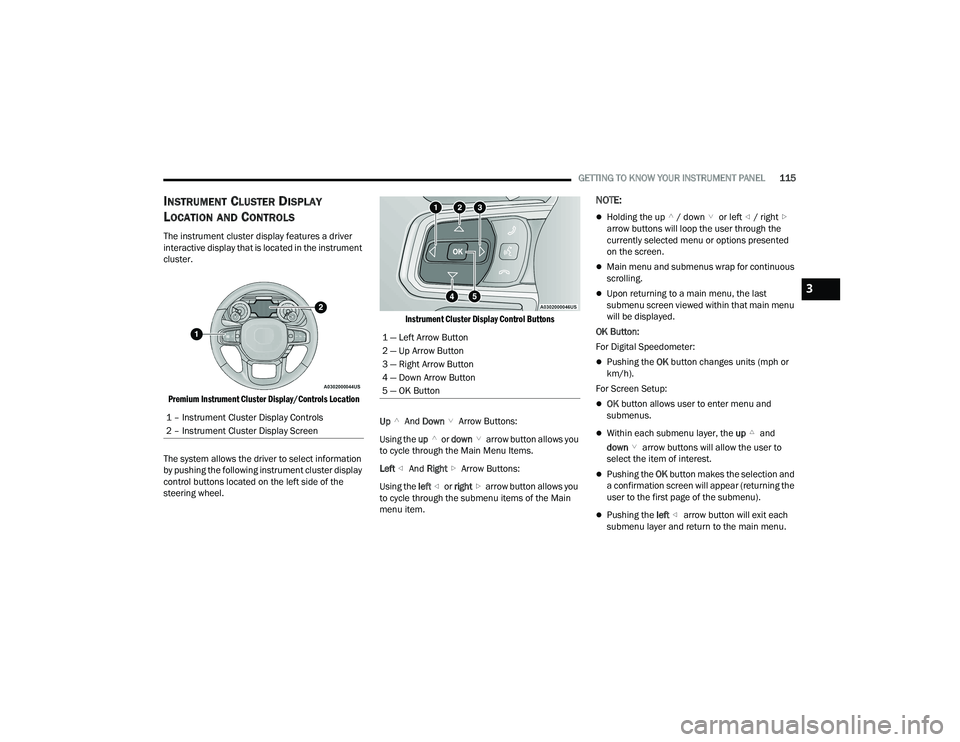
The instrument cluster display features a driver
interactive display that is located in the instrument
cluster.
Premium Instrument Cluster Display/Controls Location
The system allows the driver to select information
by pushing the following instrument cluster display
control buttons located on the left side of the
steering wheel.
Instrument Cluster Display Control Buttons
Up And Down Arrow Buttons:
Using the up or down arrow button allows you
to cycle through the Main Menu Items.
Left And Right Arrow Buttons:
Using the left or right arrow button allows you
to cycle through the submenu items of the Main
menu item.
NOTE:
Holding the up / down or left / right
arrow buttons will loop the user through the
currently selected menu or options presented
on the screen.
Main menu and submenus wrap for continuous
scrolling.
Upon returning to a main menu, the last
submenu screen viewed within that main menu
will be displayed.
OK Button:
For Digital Speedometer:
Pushing the OK button changes units (mph or
km/h).
For Screen Setup:
OK button allows user to enter menu and
submenus.
Within each submenu layer, the up and
down arrow buttons will allow the user to
select the item of interest.
Pushing the OK button makes the selection and
a confirmation screen will appear (returning the
user to the first page of the submenu).
Pushing the left arrow button will exit each
submenu layer and return to the main menu.
1 – Instrument Cluster Display Controls
2 – Instrument Cluster Display Screen
1 — Left Arrow Button
2 — Up Arrow Button
3 — Right Arrow Button
4 — Down Arrow Button
5 — OK Button
3
22_DT_OM_EN_USC_t.book Page 115
Page 119 of 496

GETTING TO KNOW YOUR INSTRUMENT PANEL117
Off Road – If Equipped
Push and release the up or down arrow
button until the Off Road menu icon is displayed in
the instrument cluster display. Push and release
the left or right arrow button to scroll through
the information submenus.
Drivetrain
Front Wheel Angle: displays the graphical
and numerical value of calculated average
front wheel angle from the steering wheel
orientation.
Transfer Case Lock Status: displays “Lock”
graphic only during 4WD High, 4WD High
Part Time, 4WD Low status.
Axle Lock And Sway Bar Status (If
Equipped): displays front and rear or rear
only axle locker graphic, and sway bar
connection graphic with text message
(connected or disconnected).
Pitch And Roll
Displays the pitch and roll of the vehicle in
the graphic with the angle number on the
screen.
NOTE:When vehicle speed becomes too high to display
the pitch and roll, “- -” will display in place of the
numbers, and the graphic will be grayed out. A
message indicating the necessary speed for the
feature to become available will also display.
Driver Assist — If Equipped
The Driver Assist menu displays the status of the
ACC and LaneSense systems.
Push and release the up or down arrow
button until the Driver Assist menu is displayed in
the instrument cluster display.
Adaptive Cruise Control (ACC) Feature
The instrument cluster display displays the current
ACC system settings. The information displayed
depends on ACC system status.
Push the ACC on/off button (located on the
steering wheel) until one of the following displays
in the instrument cluster display:
Adaptive Cruise Control Off
When ACC is deactivated, the display will read
“Adaptive Cruise Control Off.” Adaptive Cruise Control Ready
When ACC is activated but the vehicle speed
setting has not been selected, the display will read
“Adaptive Cruise Control Ready.”
Push the SET + or the SET- button (located on the
steering wheel) and the following will display in the
instrument cluster display:
ACC SET
When ACC is set, the set speed will display in the
instrument cluster Ú
page 178.
The ACC screen may display once again if any ACC
activity occurs, which may include any of the
following:
Distance Setting Change
System Cancel
Driver Override
System Off
ACC Proximity Warning
ACC Unavailable Warning
LaneSense — If Equipped
The instrument cluster display displays the current
LaneSense system settings. The information
displayed depends on LaneSense system status
and the conditions that need to be met
Ú page 137.
3
22_DT_OM_EN_USC_t.book Page 117
Page 129 of 496

GETTING TO KNOW YOUR INSTRUMENT PANEL127
BATTERY SAVER ON/BATTERY SAVER
M
ODE MESSAGE — ELECTRICAL LOAD
R
EDUCTION ACTIONS — IF EQUIPPED
This vehicle is equipped with an Intelligent Battery
Sensor (IBS) to perform additional monitoring of
the electrical system and status of the vehicle
battery.
In cases when the IBS detects charging system
failure, or the vehicle battery conditions are
deteriorating, electrical load reduction actions will
take place to extend the driving time and distance
of the vehicle. This is done by reducing power to or
turning off non-essential electrical loads.
Load reduction is only active when the engine is
running. It will display a message if there is a risk
of battery depletion to the point where the vehicle
may stall due to lack of electrical supply, or will not
restart after the current drive cycle.
When load reduction is activated, the message
“Battery Saver On Some Systems May Have
Reduced Power” will appear in the instrument
cluster. These messages indicate the vehicle battery has a
low state of charge and continues to lose electrical
charge at a rate that the charging system cannot
sustain.NOTE:
The charging system is independent from load
reduction. The charging system performs a diag
-
nostic on the charging system continuously.
If the Battery Charge Warning Light is on it may
indicate a problem with the charging system
Ú page 129.
The electrical loads that may be switched off
(if equipped), and vehicle functions which can be
affected by load reduction:
Heated Seats / Vented Seats / Heated Wheel
Rear Defroster And Heated Mirrors
HVAC System
115 Volts AC Power Inverter System
Audio and Telematics System
Loss of the battery charge may indicate one or
more of the following conditions:
The charging system cannot deliver enough
electrical power to the vehicle system because
the electrical loads are larger than the capability
of charging system. The charging system is still
functioning properly.
Turning on all possible vehicle electrical loads
(e.g. HVAC to max settings, exterior and interior
lights, overloaded power outlets +12 Volts,
115 Volts AC, USB ports) during certain driving
conditions (city driving, towing, frequent stop -
ping).
Installing options like additional lights, upfitter
electrical accessories, audio systems, alarms
and similar devices.
Unusual driving cycles (short trips separated by
long parking periods).
The vehicle was parked for an extended period
of time (weeks, months).
The battery was recently replaced and was not
charged completely.
The battery was discharged by an electrical load
left on when the vehicle was parked.
The battery was used for an extended period
with the engine not running to supply radio,
lights, chargers, +12 Volt portable appliances
like vacuum cleaners, game consoles and
similar devices.
3
22_DT_OM_EN_USC_t.book Page 127
Page 136 of 496

134GETTING TO KNOW YOUR INSTRUMENT PANEL
Your vehicle has also been equipped with a TPMS
malfunction indicator to indicate when the system
is not operating properly. The TPMS malfunction
indicator is combined with the low tire pressure
telltale. When the system detects a malfunction,
the telltale will flash for approximately one minute
and then remain continuously illuminated. This
sequence will continue upon subsequent vehicle
start-ups as long as the malfunction exists. When
the malfunction indicator is illuminated, the
system may not be able to detect or signal low tire
pressure as intended. TPMS malfunctions may
occur for a variety of reasons, including the
installation of replacement or alternate tires or
wheels on the vehicle that prevent the TPMS from
functioning properly. Always check the TPMS
malfunction telltale after replacing one or more
tires or wheels on your vehicle to ensure that the
replacement or alternate tires and wheels allow
the TPMS to continue to function properly.
YELLOW INDICATOR LIGHTS
Air Suspension Payload Protection
Indicator Light — If Equipped
This indicator light will illuminate to
indicate that the maximum payload may
have been exceeded or load leveling
cannot be achieved at its current ride
height. Protection Mode will automatically be
selected to “protect” the air suspension system, air
suspension adjustment is limited due to payload.
Air Suspension Off-Road 1 Indicator Light —
If Equipped
This light will illuminate when the air
suspension system is set to the Off-Road
1 setting Ú page 165.
Air Suspension Off-Road 2 Indicator Light —
If Equipped
This light will illuminate when the air
suspension system is set to the Off-Road
2 setting Úpage 165.
Air Suspension Normal Height Indicator
Light— If Equipped
This light will illuminate when the air
suspension system is set to the Normal
setting Úpage 165.
Air Suspension Aerodynamic Height
Indicator Light— If Equipped
This light will illuminate when the air
suspension system is set to the
Aerodynamic setting.
Air Suspension Ride Height Raising
Indicator Light— If Equipped
This light will blink and alert the driver
that the vehicle is changing to a higher
ride height.
CAUTION!
The TPMS has been optimized for the original
equipment tires and wheels. TPMS pressures
and warning have been established for the tire
size equipped on your vehicle. Undesirable
system operation or sensor damage may result
when using replacement equipment that is not
of the same size, type, and/or style. Aftermarket
wheels can cause sensor damage. Using
aftermarket tire sealants may cause the Tire
Pressure Monitoring System (TPMS) sensor to
become inoperable. After using an aftermarket
tire sealant it is recommended that you take
your vehicle to an authorized dealer to have your
sensor function checked.
22_DT_OM_EN_USC_t.book Page 134
Page 137 of 496

GETTING TO KNOW YOUR INSTRUMENT PANEL135
Air Suspension Ride Height Lowering
Indicator Light— If Equipped
This light will blink and alert the driver
that the vehicle is changing to a lower
ride height.
Cargo Light — If Equipped
This indicator light will illuminate when
the cargo light is activated by pushing the
cargo light button on the headlight
switch.
Forward Collision Warning Off Indicator
Light — If Equipped
This indicator light illuminates to indicate
that Forward Collision Warning is off.
Low Diesel Exhaust Fluid (DEF) Indicator
Light — If Equipped
The Low DEF Indicator will illuminate if
the vehicle is low on Diesel Exhaust Fluid
(DEF) Úpage 209.
NEUTRAL Indicator Light — If Equipped
This light alerts the driver that the 4WD
power transfer case is in the NEUTRAL
mode and the front and rear driveshafts
are disengaged from the powertrain.
Rear Axle Lock Indicator Light
This light indicates when the rear axle
lock has been activated.
Entry/Exit Indicator Light—
If Equipped
This light will illuminate when the vehicle
is automatically lowered from ride height
position downward for easy entry and exit
of the vehicle Ú page 165.
TOW/HAUL Indicator Light
This indicator light will illuminate when
TOW/HAUL mode is selected.
Trailer Merge Assist Indicator Light —
If Equipped
This indicator light will illuminate to
indicate when Trailer Merge Assist has
been activated Ú page 319.
4WD Indicator Light — If Equipped
This light alerts the driver that the vehicle
is in the four-wheel drive mode, and the
front and rear driveshafts are
mechanically locked together forcing the
front and rear wheels to rotate at the same speed.
4WD Low Indicator Light — If Equipped
This light alerts the driver that the vehicle
is in the 4WD Low mode. The front and
rear driveshafts are mechanically locked
together forcing the front and rear
wheels to rotate at the same speed. Low range
provides a greater gear reduction ratio to provide
increased torque at the wheels Ú page 160.
4WD High Indicator Light — If Equipped
This light alerts the driver that the vehicle
is in the 4WD High mode. The front and
rear driveshafts are mechanically locked
together forcing the front and rear
wheels to rotate at the same speed.
Wait To Start Indicator Light — If Equipped
This indicator light will illuminate for
approximately two seconds when the
ignition is turned to the RUN position. Its
duration may be longer based on colder
operating conditions. Vehicle will not initiate start
until telltale is no longer displayed Ú page 146.
NOTE:The Wait To Start Indicator Light may not illuminate
if the intake manifold temperature is warm
enough.
3
22_DT_OM_EN_USC_t.book Page 135