2022 PEUGEOT 301 ECO mode
[x] Cancel search: ECO modePage 69 of 148
67
Practical information
Peugeot & TotalEnergies,
a partnership in performance !
For more than 25 years of partnership, TotalEnergies and Peugeot have
pushed the limits of performance in sports competition with historic
victories, in endurance races or in rallies. Today, the two brands continue
their common motorsport adventure by setting out to conquer the 24h
of Le Mans and the FIA World Endurance Championship in the Hybrid
Hypercar category. So many challenges for which Peugeot exclusively
recommends high-tech Quartz lubricants for the protection of its
engines throughout their life. TotalEnergies therefore equips Peugeot
vehicles with Quartz lubricants from their fi rst fi lling in the factory to the
approved maintenance networks to guarantee them optimal day-to-
day operation. Peugeot & TotalEnergies: offi cial partners in performance !
Keep your engine younger for longer !
Quartz Ineo Xtra First 0W-20 is a very high performance lubricant
resulting from the joint work of the Peugeot and TotalEnergies R&D
teams. Its innovative technology extends your engine’s life while
reaching signifi cant fuel savings and thus limiting CO
2 emissions. The
product is now available in new packaging* made of 50% recycled
material and 100% recyclable.
* 1L & 5L produced in Europe
7Compatibility of fuels
Petrol fuels conforming to the EN228 standard
containing up to 5% and 10% ethanol
respectively.
Diesel fuels conforming to the EN590, EN16734
and EN16709 standards and containing up to
7%, 10%, 20% and 30% fatty acid methyl ester
respectively. The use of B20 or B30 fuels, even
occasionally, imposes special maintenance
conditions referred to as "Arduous conditions".
Paraffinic Diesel fuel conforming to the EN15940
standard.
The use of any other type of (bio) fuel (e.g. pure or diluted vegetable or animal
oils, domestic fuel) is strictly prohibited - risk
of damaging the engine and fuel system!
The only fuel additives authorised for use are those that meet the B715001 (Petrol)
or B715000 (Diesel) standards.
Diesel at low temperature
At temperatures below 0 °C (+32 °F), the
formation of paraffins in summer-type Diesel fuels could prevent the engine from operating
correctly
. In these temperature conditions, use
winter-type Diesel fuel and keep the fuel tank
more than 50 % full.
At temperatures below -15 °C (+5 °F) to avoid
problems starting, it is best to park the vehicle
under shelter (heated garage).
Travelling abroad
Certain fuels could damage your vehicle’s
engine.
In certain countries, the use of a particular
fuel may be required (specific octane rating,
specific trade name, etc.) to ensure correct
operation of the engine.
For all additional information, consult a dealer.
Refuelling
Fuel tank capacity: approximately 50 litres.
Reserve level: approximately 5 litres.
Low fuel level
When the low fuel level is reached, this
warning lamp lights up on the instrument
panel. When it first comes on, about 5 litres of
fuel remain.
You must refuel as soon as possible to avoid
running out of fuel.
For more information on Running out of fuel
(Diesel), refer to the corresponding section.
A small arrow by the warning lamp indicates which side of the vehicle the
fuel filler flap is located on.
Stop & Start
Never refuel with the engine in STOP
mode; you must switch off the ignition.
Refuelling
Additions of fuel must be of at least 5 litres, in
order to be registered by the fuel gauge.
Opening the filler flap may create a noise caused
by an inrush of air
. This vacuum is entirely
normal, resulting from the sealing of the fuel
system.
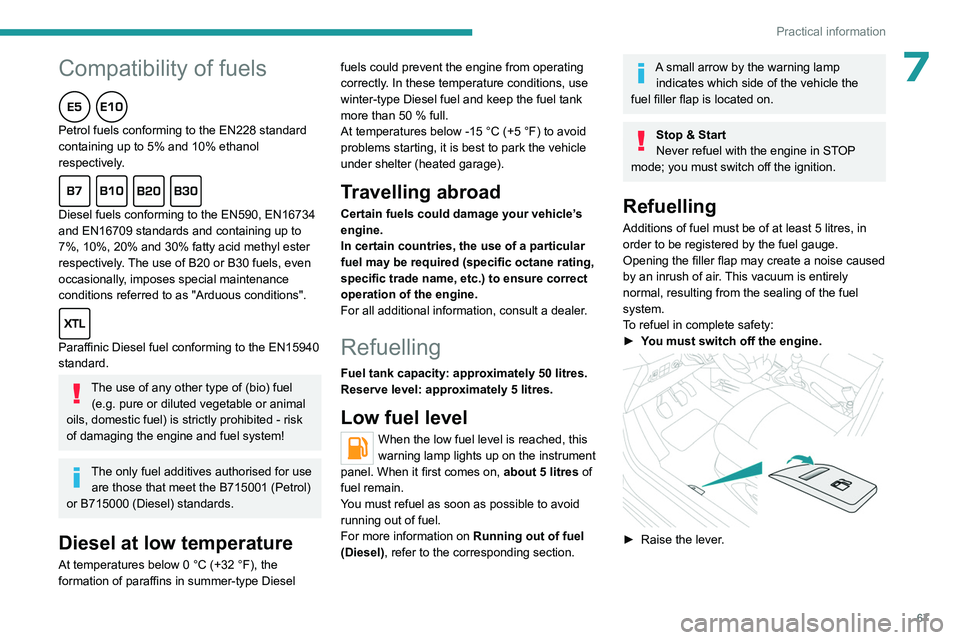
To refuel in complete safety:
►
Y
ou must switch off the engine.
► Raise the lever .
Page 71 of 148

69
Practical information
7Observe the legislation in force in your
country relating to the use of snow
chains and maximum authorised speeds.
Use only the chains designed to be fitted to the
type of wheel fitted to your vehicle :
Original tyre size Maximum link size 185/65 R15 9 mm
195/55 R16
For more information on snow chains, contact a
PEUGEOT dealer or a qualified workshop.
Installation tips
► To fit the snow chains during a journey, stop
the vehicle on a flat surface at the side of the
road.
►
Apply the parking brake and position any
wheel chocks under the wheels to prevent
movement of the vehicle.
►
Fit the snow chains following the instructions
provided by the manufacturer
.
►
Move off gently and drive for a few moments,
without exceeding 31
mph (50 km/h).
►
Stop the vehicle and check that the snow
chains are correctly tightened.
It is strongly recommended that you
practise fitting the snow chains on a level
and dry surface before setting off.
Avoid driving with snow chains on roads that have been cleared of snow to avoid
damaging the vehicle's tyres and the road
surface. If the vehicle is fitted with alloy
wheels, check that no part of the chain or its
fixings is in contact with the wheel rim.
Energy economy mode
This system manages the duration of use of
certain functions, in order to conserve a sufficient
level of charge in the battery with the ignition off.
After switching off the engine and for a maximum
cumulative period of around 30 minutes, you can
continue to use functions such as the audio and
telematics system, dipped beam headlamps or
courtesy lamps.
Selecting the mode
A confirmation message is displayed when
energy economy mode is entered, and the active
functions are placed on standby.
If a telephone call is in progress at the
time, it will be maintained for around 10
minutes via the audio system’s hands-free
system.
Exiting the mode
These functions are automatically reactivated the
next time the vehicle is used.
To restore the use of these functions
immediately, start the engine and let it run:
– For less than 10 minutes, to use the
equipment for approximately 5 minutes.
–
For more than 10 minutes, to use the
equipment for approximately 30 minutes.
Let the engine run for the specified duration to
ensure that the battery charge is sufficient.
T
o recharge the battery, avoid repeatedly or
continuously restarting the engine.
A flat battery prevents the engine from starting.
For more information on the 12
V battery,
refer to the corresponding section.
Load reduction mode
This system manages the use of certain
functions according to the level of charge
remaining in the battery.
When the vehicle is being driven, the load
reduction function temporarily deactivates certain
functions, such as the air conditioning and the
heated rear screen.
The deactivated functions are reactivated
automatically as soon as conditions permit.
Towing device
Load distribution
► Distribute the load in the trailer so that the
heaviest items are as close as possible to the
axle, and the nose weight approaches the
maximum permitted without exceeding it.
Page 78 of 148

76
Practical information
brake must be adjusted, even between two
services.
This system must be checked by a PEUGEOT
dealer or a qualified workshop.
Wheels and tyres
The inflation pressure of all tyres, including the spare wheel, must be
checked on "cold” tyres.
The pressures indicated on the tyre pressure
label are valid for "cold" tyres. If you have driven
for more than 10 minutes or more than 6 miles
(10 kilometres) at over 31 mph (50
km/h), add
0.3 bar (30 kPa) to the values indicated on the
label.
Under-inflation increases energy
consumption. Non-compliant tyre
pressures cause tyres to wear prematurely
and have an adverse effect on the vehicle's
road holding - risk of accident!
Driving with worn or damaged tyres reduces the
braking and road holding performance of the
vehicle. Regularly check the condition of the
tyres (tread and sidewalls) and rims as well as
the presence of the valve caps.
When the wear indicators no longer appear set
back from the tread, the depth of the grooves is
less than 1.6 mm; replace the tyres as soon as
possible.
Using different size wheels and tyres from those
specified can affect the lifetime of tyres, wheel
rotation, ground clearance, the speedometer
reading and have an adverse effect on road
holding.
Fitting different tyres on the front and rear axles
can cause the ESC to mistime.
Always mark the direction of rotation on the tyres
that will be stored when fitting winter or summer
tyres. Store them in a cool, dry place and away
from direct exposure to the sun's rays.
Winter or 4-seasons tyres can be
identified by this symbol on their
sidewalls.
Free-wheeling
In certain situations, it is necessary to put the
vehicle into free-wheeling mode (e.g. towing, on
a rolling road, automatic car wash (Wash mode),
rail or sea transport).
Never leave the vehicle unattended with
the vehicle into free-wheeling mode.
With manual or automatic
gearbox and manual parking
brake
/
To release them
► With the vehicle stationary and engine
running, depress the brake pedal.
► With a manual gearbox, place the gear lever
into neutral.
►
With an automatic gearbox, place the gear
selector to mode
N.
►
Release the parking brake.
►
Release the brake pedal, then switch off the
engine.
Reverting to normal operation
► Apply the parking brake.
► With an automatic gearbox, place the gear
selector to mode
P.
Advice on care and maintenance
General recommendations
Observe the following recommendations to avoid
damaging the vehicle.
Exterior
Never use a high-pressure jet wash in
the engine compartment - risk of
damaging the electrical components!
Do not wash the vehicle in bright sunshine or
extremely cold conditions.
When washing the vehicle in an
automatic roller-brush car wash, be sure
Page 100 of 148
98
Bluetooth® audio system
Bluetooth® audio system
As a safety measure and because it requires sustained attention by the driver,
the pairing of a Bluetooth mobile telephone
with the Bluetooth hands-free system of your
audio system must be done with the vehicle
stationary and the ignition on.
Your audio system is coded in such a way that it will only operate in your
vehicle.
All work on the system must be carried out
exclusively by a dealer or qualified workshop,
to avoid any risk of electrocution, fire or
mechanical faults.
To avoid discharging the battery, the audio system may switch off after a few
minutes if the engine is not running.
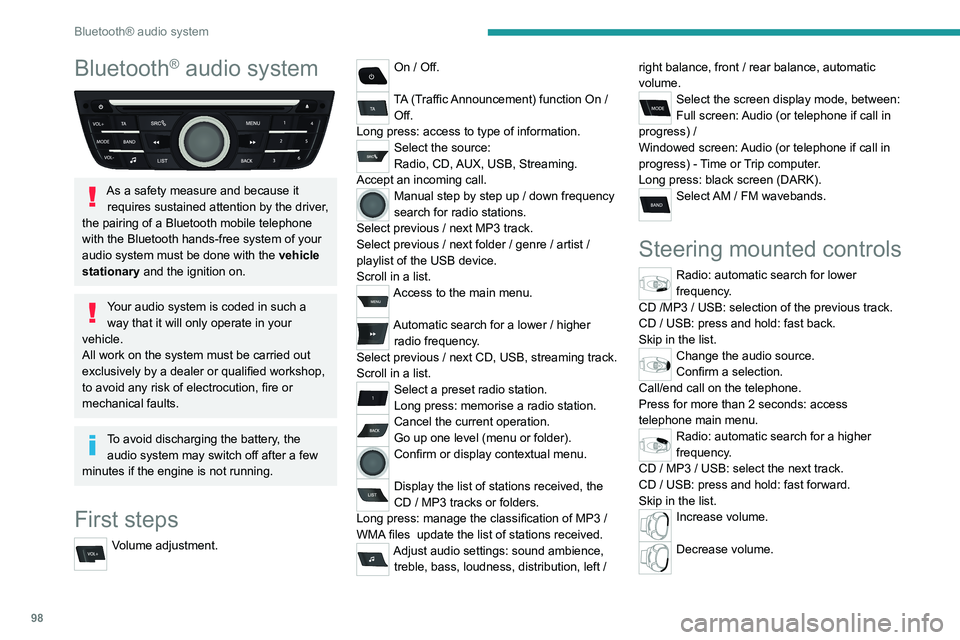
First steps
Volume adjustment.
On / Off.
TA (Traffic Announcement) function On /
Off.
Long press: access to type of information.
Select the source:
Radio, CD, AUX, USB, Streaming.
Accept an incoming call.
Manual step by step up / down frequency
search for radio stations.
Select previous
/ next MP3 track.
Select previous
/ next folder / genre / artist /
playlist of the USB device.
Scroll in a list.
Access to the main menu.
Automatic search for a lower / higher
radio frequency .
Select previous
/ next CD, USB, streaming track.
Scroll in a list.
Select a preset radio station.
Long press: memorise a radio station.
Cancel the current operation.
Go up one level (menu or folder).
Confirm or display contextual menu.
Display the list of stations received, the
CD
/ MP3 tracks or folders.
Long press: manage the classification of MP3
/
WMA files
update the list of stations received.
Adjust audio settings: sound ambience, treble, bass, loudness, distribution, left / right balance, front
/ rear balance, automatic
volume.
Select the screen display mode, between:
Full screen: Audio (or telephone if call in
progress)
/
Windowed screen: Audio (or telephone if call in
progress)
- Time or Trip computer.
Long press: black screen (DARK).
Select AM / FM wavebands.
Steering mounted controls
Radio: automatic search for lower
frequency.
CD /MP3 / USB: selection of the previous track.
CD / USB: press and hold: fast back.
Skip in the list.
Change the audio source.
Confirm a selection.
Call/end call on the telephone.
Press for more than 2 seconds: access
telephone main menu.
Radio: automatic search for a higher
frequency.
CD / MP3 / USB: select the next track.
CD / USB: press and hold: fast forward.
Skip in the list.
Increase volume.
Decrease volume.
Page 106 of 148
104
Bluetooth® audio system
Correction allows numbers to be deleted
one at a time.
Press the thumb wheel to confirm and
place the call.
Making a call - Recently
called numbers
(Depending on the compatibility of the phone)To display the "TELEPHONE" menu:
–
Press and hold SRC/TEL
.
–
Or
, press the thumb wheel to display the
context menu. Select "Call" and confirm.
–
Or
, press MENU, select "Telephone" and
confirm. Select "Call" and confirm.
Select "Calls list" and confirm.
Select the number and confirm to start the
call.
The calls list includes calls sent and received in the vehicle using the
connected telephone.
It is possible to make a call directly from
the telephone; park the vehicle first as a
safety measure.
Making a call - From the
directory of contacts
To display the "TELEPHONE" menu:
–
Press and hold SRC/TEL
.
–
Or
, press the thumb wheel to display the
context menu. Select “Call" and confirm.
–
Or
, press MENU, select “Telephone" and
confirm. Select “Call" and confirm.
Select “Directory" and confirm
Select a contact then confirm.
Home / Work / Mobile
(depending on the information available in the
contact records of the connected telephone).
Select the number and confirm.
Receiving a call
An incoming call is announced by a ring and
a superimposed display in the multifunction
screen.
"YES" to accept the call is
selected by default.
Press the thumb wheel to accept the call.
Select "NO" and confirm to reject the call.
or
Press one of these buttons to
accept the call.
A long press on BACK or on SRC/TEL also rejects an
incoming call.
Managing calls
During a call, press the thumb wheel to
display the contextual menu.
Hang up
In the contextual menu, select “Hang up"
to end the call.
A long press on one of these buttons also ends the call.
Secret - Mute
(so that the caller cannot hear)In the contextual menu:
–
select “
Micro OFF " to switch off the
microphone.
–
deselect “
Micro OFF" to switch the
microphone on.
Combined mode
(to leave the vehicle without ending the call)In the contextual menu:
–
select “
Telephone mode " to transfer the call
to the telephone.
–
deselect “
Telephone mode" to transfer the
call to the vehicle.
Page 107 of 148
105
Bluetooth® audio system
10In some cases, the combined mode must
be activated from the telephone.
If contact has been cut off, when you
reconnect on returning to the vehicle,
the Bluetooth connection will be restored
automatically (depending on the compatibility
of the telephone).
Interactive voice response
From the contextual menu, select “DTMF
tones" and confirm to use the digital
keypad to navigate in the interactive voice
response menu.
Consultation call
From the contextual menu, select
“Switch" and validate to return to a call
left on hold.
Directory
The directory of the telephone is transmitted to the system,
depending on the compatibility of the
telephone.
The directory is temporary and depends on
the Bluetooth connection.
The contacts, imported from the telephone to the audio system
directory, are saved in a permanent directory
visible to all, regardless of the telephone
connected.
To access the directory, press and hold SRC/TEL.
or
Press on the thumb wheel then select
“Call" and confirm.
Select “Directory" to see the list of
contacts.
To modify the contacts saved in the system, press MENU then select
“Telephone" and confirm.
Select “Directory management" and
confirm
You can:
–
“Consult an entry",
–
“Delete an entry",
–
“Delete all entries".
Audio settings
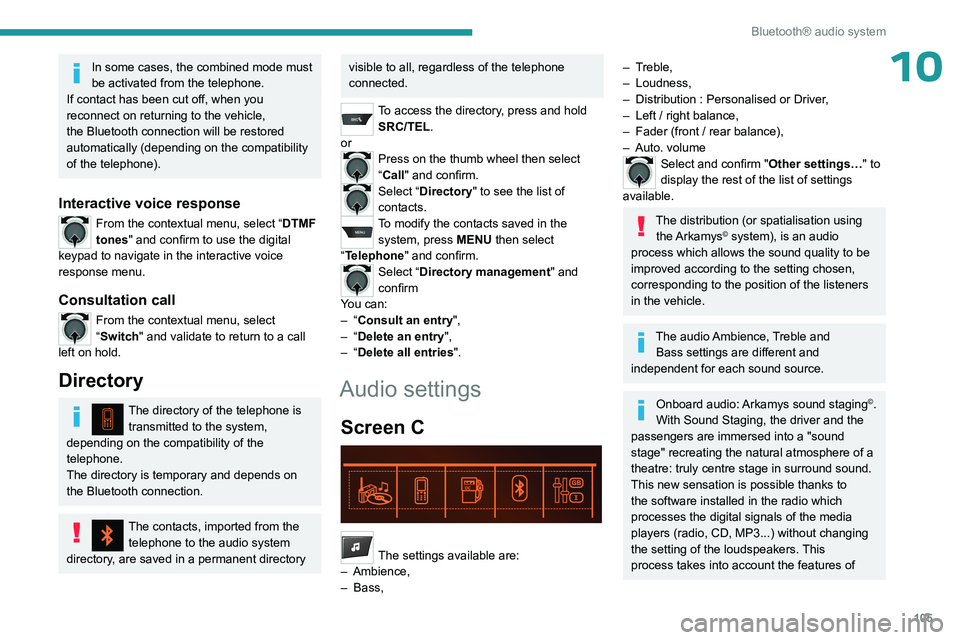
Screen C
Press ¯ to display the audio settings menu.
The settings available are:
–
Ambience,
–
Bass,
– Treble,
– Loudness,
–
Distribution : Personalised or Driver
,
–
Left / right balance,
–
Fader (front / rear balance),
–
Auto. volume
Select and confirm "Other settings…" to
display the rest of the list of settings
available.
The distribution (or spatialisation using the Arkamys© system), is an audio
process which allows the sound quality to be
improved according to the setting chosen,
corresponding to the position of the listeners
in the vehicle.
The audio Ambience, Treble and Bass settings are different and
independent for each sound source.
Onboard audio: Arkamys sound staging©.
With Sound Staging, the driver and the
passengers are immersed into a "sound
stage" recreating the natural atmosphere of a
theatre: truly centre stage in surround sound.
This new sensation is possible thanks to
the software installed in the radio which
processes the digital signals of the media
players (radio, CD, MP3...) without changing
the setting of the loudspeakers. This
process takes into account the features of
Page 108 of 148
106
Bluetooth® audio system
the passenger compartment for optimum
performance.
The Arkamys
© software installed in your audio
system processes the digital signals of all
the media players (radio, CD, MP3...) and
makes it possible to recreate a natural sound
setting, with a harmonious placement of the
instruments and voices in space, facing the
passengers, positioned at the height of the
windscreen.
Frequently asked
questions
The following information groups together the answers to the most frequently asked questions
concerning your audio system.
There is a difference in sound quality
between the different audio sources (radio,
CD, etc.).
To allow for optimal listening quality, the audio
settings (Volume, Bass, Treble, Ambience,
Loudness) can be tailored to different sound
sources, which can generate audible differences
when changing source (radio, CD, etc.).
Check that the audio settings (Volume, Bass,
Treble, Ambience, Loudness) are adapted to
the sources listened to. It is advisable to set
the AUDIO functions (Bass, Treble, Front-Rear
Fader, Left-Right Balance) to the middle position,
select the musical ambience "None" and set the loudness correction to the "Active" position in CD
mode or to the "Inactive" position in radio mode.
When changing the settings for treble and
bass, the ambience setting is deselected.
When changing the ambience setting, treble
and bass are reset to zero.
Choosing an ambience imposes settings for
treble and bass. Modifying one without the other
is not possible.
Modify the treble and bass settings or the
ambience setting to obtain the desired sound
quality.
When changing the balance setting,
distribution is deselected.
Choosing a distribution setting imposes a
balance setting. Modifying one without the other
is not possible.
Modify the balance or distribution settings to
obtain the desired sound quality.
The reception quality of the tuned radio
station gradually deteriorates or the stored
stations are not working (no sound, 87.5 Mhz
is displayed, etc.).
1.The vehicle is too far from the transmitter of
the station or no transmitter is present in the
geographical area.
Activate the RDS mode and start a new search
for the station so that the system can check
whether a stronger transmitter is available in the
geographic area.
2.The environment (hills, buildings, tunnels,
basement car parks, etc.) block reception,
including in RDS tracking mode.This phenomenon is normal and does not
indicate a failure of the audio equipment.
3.The aerial is absent or has been damaged (for
example when going through an automatic car
wash or in an underground car park).
Have the antenna checked by the network
PEUGEOT.
Sound cut-outs of 1 to 2
seconds in radio
mode.
During this brief sound cut-out, the RDS
searches for another frequency giving better
reception of the station.
Switch off the RDS function if the phenomenon is
too frequent and always on the same route.
The traffic announcement (TA) is displayed. I
do not receive any traffic information.
The radio station does not broadcast traffic
information.
Tune to a radio station which broadcasts traffic
information.
The stored stations are not found (no sound,
87.5 MHz is displayed, etc.).
An incorrect waveband is selected.
Press the BAND button to return to the
waveband on which the stations are stored.
The CD is ejected every time or is not played.
The CD is upside down, cannot be read, does
not contain audio files or contains audio files
of a format that cannot be played by the audio
system.
The CD is protected by an anti-pirating system
not recognised by the audio system.
Page 109 of 148
107
Bluetooth® audio system
10– Check that the CD is inserted in the player the
right way up.
–
Check the condition of the CD: the CD cannot
be played if it is too badly damaged.
–
Check the content in the case of a recorded
CD: consult the advice in the "Audio" section.
–
The audio system’
s CD player does not read
DVDs.
–
Because of low quality
, certain burned CDs
will not be read by the audio system.
The CD sound is of poor quality.
1.The CD used is scratched or of poor quality.
Insert good quality CDs and store them in
suitable conditions.
2.The audio settings (bass, treble, ambience) are
unsuitable.
Return bass and treble settings to 0, without
selecting an ambience.
I am unable to connect my Bluetooth
telephone.
1.It is possible that Bluetooth is switched off on
the telephone or that the telephone has been
made not visible.
–
Check that your telephone has Bluetooth
switched on.
–
Check in the telephone settings that it is
"visible to all".
2.
The Bluetooth telephone is not compatible with
the system.
To check the compatibility of your telephone
(services), visit the Manufacturer's website in
your country.
The Bluetooth connection is cut.The battery of the peripheral may not be
sufficiently charged.
Charge the battery of the peripheral device.
The "USB peripheral error" or "Peripheral not
recognised" message appears on the screen.
The USB memory stick is not recognised. The
memory stick could be corrupt.
Reformat the memory stick (FAT 32).
A telephone connects automatically,
disconnecting another telephone.
Automatic connection overrides manual
connection.
Modify the telephone settings to remove
automatic connection.
The Apple
® player is not recognised when
connecting to the USB port.
The Apple
® player is of a generation that is not
compatible with a USB connection.
Connect the Apple
® player to the AUX Jack
socket using a suitable cable (not supplied).
The hard disk or peripheral is not recognised
when connecting to the USB socket.
Some hard disks and devices need a power
supply greater than is provided by the audio
system.
Connect the peripheral to the 230 V socket, the
12V socket or an external power supply.
Ensure that the device does not transmit
a voltage greater than 5 V (risk of
destruction of the system).
When streaming, the sound cuts
momentarily. Some telephones prioritise connection of the
"hands-free" profile.
Delete the "hands-free" connection profile to
improve streaming.
In "Random all" play, not all of the tracks are
played.
In "Random all" play, the system can only take
into account up to 999 tracks.
With the engine off, the audio system
switches off after a few minutes of use.
When the engine is switched off, the audio
system operating time depends on the battery
charge.
The switch-off is normal: the audio system
switches to economy mode and switches off to
prevent discharging the vehicle's battery.
Start the vehicle’s engine to increase the battery
charge.
The message "the audio system is
overheated" appears on the display.
In order to protect the installation if the
surrounding temperature is too high, the audio
system switches to an automatic thermal
protection mode leading to a reduction of the
volume or stopping of the playing of the CD.
Switch the audio system off for a few minutes to
allow the system to cool.