2022 PEUGEOT 301 ABS
[x] Cancel search: ABSPage 94 of 148
92
In the event of a breakdown
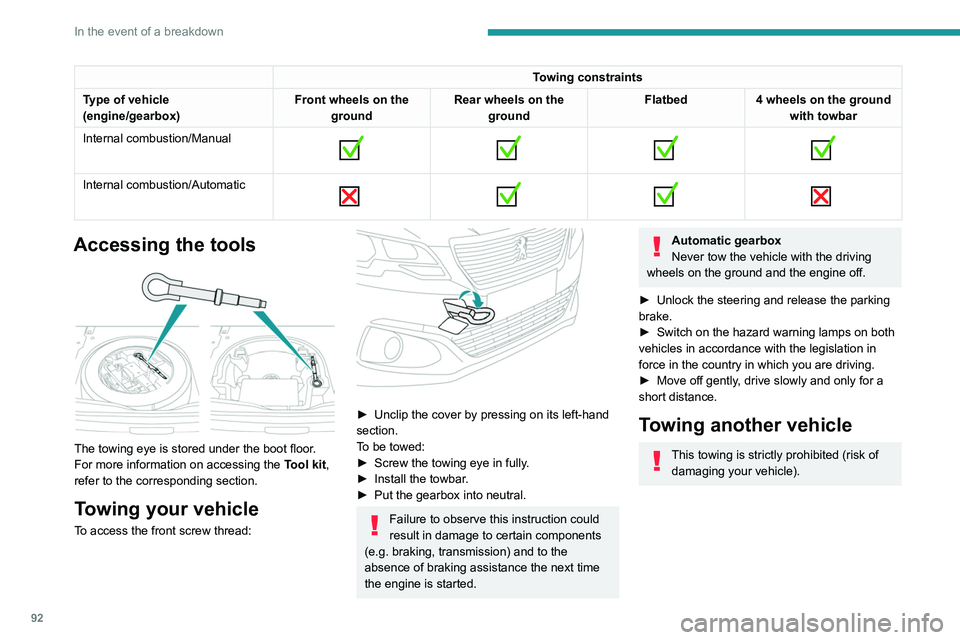
Towing constraints
Type of vehicle
(engine/gearbox) Front wheels on the
ground Rear wheels on the
ground Flatbed
4 wheels on the ground
with towbar
Internal combustion/Manual
Internal combustion/Automatic
Accessing the tools
The towing eye is stored under the boot floor.
For more information on accessing the
Tool kit,
refer to the corresponding section.
Towing your vehicle
To access the front screw thread:
► Unclip the cover by pressing on its left-hand
section.
T
o be towed:
►
Screw the towing eye in fully
.
►
Install the towbar
.
►
Put the gearbox into neutral.
Failure to observe this instruction could
result in damage to certain components
(e.g. braking, transmission) and to the
absence of braking assistance the next time
the engine is started.
Automatic gearbox
Never tow the vehicle with the driving
wheels on the ground and the engine off.
►
Unlock the steering and release the parking
brake.
►
Switch on the hazard warning lamps on both
vehicles in accordance with the legislation in
force in the country in which you are driving.
►
Move off gently
, drive slowly and only for a
short distance.
Towing another vehicle
This towing is strictly prohibited (risk of damaging your vehicle).
Page 108 of 148
106
Bluetooth® audio system
the passenger compartment for optimum
performance.
The Arkamys
© software installed in your audio
system processes the digital signals of all
the media players (radio, CD, MP3...) and
makes it possible to recreate a natural sound
setting, with a harmonious placement of the
instruments and voices in space, facing the
passengers, positioned at the height of the
windscreen.
Frequently asked
questions
The following information groups together the answers to the most frequently asked questions
concerning your audio system.
There is a difference in sound quality
between the different audio sources (radio,
CD, etc.).
To allow for optimal listening quality, the audio
settings (Volume, Bass, Treble, Ambience,
Loudness) can be tailored to different sound
sources, which can generate audible differences
when changing source (radio, CD, etc.).
Check that the audio settings (Volume, Bass,
Treble, Ambience, Loudness) are adapted to
the sources listened to. It is advisable to set
the AUDIO functions (Bass, Treble, Front-Rear
Fader, Left-Right Balance) to the middle position,
select the musical ambience "None" and set the loudness correction to the "Active" position in CD
mode or to the "Inactive" position in radio mode.
When changing the settings for treble and
bass, the ambience setting is deselected.
When changing the ambience setting, treble
and bass are reset to zero.
Choosing an ambience imposes settings for
treble and bass. Modifying one without the other
is not possible.
Modify the treble and bass settings or the
ambience setting to obtain the desired sound
quality.
When changing the balance setting,
distribution is deselected.
Choosing a distribution setting imposes a
balance setting. Modifying one without the other
is not possible.
Modify the balance or distribution settings to
obtain the desired sound quality.
The reception quality of the tuned radio
station gradually deteriorates or the stored
stations are not working (no sound, 87.5 Mhz
is displayed, etc.).
1.The vehicle is too far from the transmitter of
the station or no transmitter is present in the
geographical area.
Activate the RDS mode and start a new search
for the station so that the system can check
whether a stronger transmitter is available in the
geographic area.
2.The environment (hills, buildings, tunnels,
basement car parks, etc.) block reception,
including in RDS tracking mode.This phenomenon is normal and does not
indicate a failure of the audio equipment.
3.The aerial is absent or has been damaged (for
example when going through an automatic car
wash or in an underground car park).
Have the antenna checked by the network
PEUGEOT.
Sound cut-outs of 1 to 2
seconds in radio
mode.
During this brief sound cut-out, the RDS
searches for another frequency giving better
reception of the station.
Switch off the RDS function if the phenomenon is
too frequent and always on the same route.
The traffic announcement (TA) is displayed. I
do not receive any traffic information.
The radio station does not broadcast traffic
information.
Tune to a radio station which broadcasts traffic
information.
The stored stations are not found (no sound,
87.5 MHz is displayed, etc.).
An incorrect waveband is selected.
Press the BAND button to return to the
waveband on which the stations are stored.
The CD is ejected every time or is not played.
The CD is upside down, cannot be read, does
not contain audio files or contains audio files
of a format that cannot be played by the audio
system.
The CD is protected by an anti-pirating system
not recognised by the audio system.
Page 110 of 148
108
PEUGEOT Connect Radio
PEUGEOT Connect
Radio
Multimedia audio system -
Applications - Bluetooth
®
telephone
The functions and settings described
vary according to the vehicle version and
configuration, as well as the country of sale.
For safety reasons and because they
require sustained attention by the driver,
the following operations must be carried out
with the vehicle stationary and the ignition
on:
–
Pairing the smartphone with the system via
Bluetooth.
–
Using the smartphone.
–
Connecting to the CarPlay® or Android
Auto applications (certain applications stop
displaying when the vehicle is moving).
–
Changing the system settings and
configuration.
The system is protected so that it only operates in the vehicle.
The message Energy economy mode is
displayed when the system is about to go into
standby.
The system’s Open Source Software (OSS) source codes are available at the
following addresses:
https://www.groupe-psa.com/fr/oss/
https://www.groupe-psa.com/en/oss/
First steps
With the engine running, a press mutes
the sound.
With the ignition off, a press turns the system on.
Increase or decrease the volume using
the wheel or the "plus" or "minus" buttons
(depending on the equipment).
Use the buttons on either side of or below the
touch screen to access the menus, then press
the virtual buttons on the touch screen.
Depending on the model, use the "Source" and
"Menu" buttons on the left of the touch screen to
access the menus, then press the virtual buttons
on the touch screen.
At all times it is possible to display the rolling
menus by pressing the screen briefly with three
fingers.
All touch-sensitive areas on the screen are
white.
On pages with multiple tabs at the bottom of the
screen, you can switch between pages either
by tapping the tab for the desired page or by
swiping the pages to the left or right with your
finger.
Press in the shaded area to go back up a level
or confirm.
Press the back arrow to go back a level or
confirm.
The touch screen is of the "capacitive" type.
To clean the screen, use a soft, non-abrasive
cloth (e.g. spectacles cloth) with no additional
product.
Do not use sharp objects on the screen.
Do not touch the screen with wet hands.
Certain information is displayed permanently in
the upper bar of the touch screen:
–
Air conditioning status information (depending
on version), and direct access to the
corresponding menu.
–
Radio Media and
Telephone menu status
information.
–
Privacy status information.
–
Access to the touch screen and digital
instrument panel settings.
Audio source selection (depending on
equipment):
–
FM/DAB/AM radio stations (depending on
equipment).
–
T
elephone connected via Bluetooth and
Bluetooth multimedia broadcast (streaming).
–
USB Memory stick.
–
Media player connected via the auxiliary
socket (depending on equipment).
Page 126 of 148
124
Alphabetical index
A
ABS 36
Accessories
35
Additive, Diesel
74–75
Adjusting headlamps
33
Adjusting head restraints
21
Adjusting seat
21–22
Adjusting the date
12, 119
Adjusting the headlamp beam height
33
Adjusting the height and reach of the
steering wheel
23
Adjusting the time
12, 118
Advice on care and maintenance
76
Advice on driving
6, 49–50
Airbags
39–41, 43
Airbags, curtain
40
Airbags, front
40–41, 43
Airbags, lateral
40–41
Air conditioning
24
Air conditioning, electronic (with
display screen)
26–27
Air conditioning, manual (without
display screen)
25
Air vents
24
Alarm
19–20
Anti-lock braking system (ABS)
36
Antitheft / Immobiliser
16
Armrest, front
28–29
Ashtray, portable
28
Assistance, emergency braking
36
Audio streaming (Bluetooth)
102–103, 114
B
Battery 88
Battery, 12 V
69, 74–75, 88–90
Battery, charging
88–89
Battery, remote control
17
Blanking screen (snow shield)
70
Bluetooth (hands-free)
102, 116
Bluetooth (telephone)
116–117
Bodywork
77
Bonnet
71–72
Boot
18–19
Boot (opening)
15
Brake discs
75
Brake lamps
86
Brakes
75
Braking assistance system
36
Brightness
11 8
Bulbs (changing)
83–84, 86
C
Capacity, fuel tank 67
Care of the bodywork
77
CD
100
CD, MP3
100
Central locking
16
Changing a bulb
83–84, 86
Changing a fuse
87
Changing a wheel
80
Changing a wiper blade
33–34
Changing the remote control battery 17
Changing to free-wheeling
76
Checking the levels
73–74
Checks
72, 74–75
Checks, routine
74–75
Child lock
44, 47–48
Children
38, 44–47
Children (safety)
48
Child seats
38, 41–44
Child seats, conventional
43
Child seats, ISOFIX
45–47
Cigar lighter
29
Cleaning (advice)
76–78
Clock
12
Closing the boot
18–19
Closing the doors
18
Connection, Apple CarPlay
11 5
Connection, Bluetooth
116–117
Connection, MirrorLink
11 5
Control, emergency boot release
19
Control, emergency door
17
Control stalk, lighting
31
Control stalk, wipers
33
Courtesy lamps
30
Cruise control
62–64
D
DAB (Digital Audio Broadcasting) -
Digital radio
11 3
Date (setting)
12, 119