2022 NISSAN PATHFINDER height
[x] Cancel search: heightPage 256 of 647

Manual Mode:
If power operation is not available, the lif t-
gate may be operated manually. Power op-
eration may not be available if multiple ob-
stacles have been detected in a single
power cycle or if battery voltage is low.
If the power lif tgate opener switch
OAis
pushed during power open or close, the
power operation will be canceled and the
lif tgate can be operated manually.
To open the lif tgate manually, push the lif t-
gate opener switch
OAand lif t the lif tgate.
To close, lower and push the lif tgate down
securely.
LIFTGATE POSITION SETTING (if so
equipped)
The lif tgate can be set to open to a specific
height by performing the following:
1. Open the lif tgate using the lif tgate opener switch or the Intelligent Key.
2. Pull the lif tgate down to the desired po- sition and hold the lif tgate (the lif tgate
will have some resistance when being
manually adjusted). 3. While holding the lif tgate in position,
push and hold the lif tgate switch
located on the lif tgate for approximately
5 seconds or until two beeps are heard.
The lif tgate will open to the selected posi-
tion setting. To change the position of the
lif tgate, repeat steps 1-3 for setting the po-
sition of the lif tgate.
MOTION-ACTIVATED LIFTGATE
(if so equipped)
The lif tgate can be operated using a quick
kicking motion under the center of the rear
bumper.
To operate, the Intelligent Key must be
within 31.5 in (80 cm) of the lif tgate.
LPD3162LPD3012
Pre-driving checks and adjustments3-25
Page 259 of 647

Manual lif tgate release (if so
equipped)
If the lif tgate cannot be locked or unlocked
with the door lock switch or the Intelligent
Key due to a discharged battery, follow
these steps:
1. Remove the cover
OAon the inside of the
lif tgate.
2. Move the lever
OBas illustrated to open
the lif tgate.
It is recommended that you visit a NISSAN
dealer as soon as possible for repair.
Power lif tgate release (if so
equipped)
If the lif tgate cannot be opened with the
instrument panel switch, lif tgate opener
switch or key fob due to a discharged bat-
tery, follow these steps:
1. Remove the cover
OAon the inside of the
lif tgate.
2. Move the lever
OBas illustrated to open
the lif tgate.
It is recommended that you visit a NISSAN
dealer as soon as possible for repair. The lif tgate can be set to open to a specific
height by performing the following:
1. Open the lif tgate using the lif tgate
opener switch or the Intelligent Key.
2. Pull the lif tgate down to the desired po- sition and hold the lif tgate (the lif tgate
will have some resistance when being
manually adjusted).
3. While holding the lif tgate in position, push and hold the lif tgate switch
located on the lif tgate for approximately
5 seconds or until two beeps are heard.
The lif tgate will open to the selected posi-
tion setting. To change the position of the
lif tgate, repeat Steps 1-3 for setting the po-
sition of the lif tgate.
LPD2646SPA2778
LIFTGATE POSITION SETTING
3-28Pre-driving checks and adjustments
Page 365 of 647

BSW SYSTEM LIMITATIONS
WARNING
Listed below are the system limitations
for the BSW system. Failure to operate
the vehicle in accordance with these
system limitations could result in seri-
ous injury or death.
• The BSW system cannot detect all ve-
hicles under all conditions.
• The radar sensors may not be able to
detect and activate BSW when cer-
tain objects are present such as:
– Pedestrian, bicycles, animals.
– Vehicles such as motorcycles, low
height vehicles, or high ground
clearance vehicles.
– Oncoming vehicles.
– Vehicles remaining in the detec-
tion zone when you accelerate
from a stop.
– A vehicle merging into an adjacent
lane at a speed approximately the
same as your vehicle.
– A vehicle approaching rapidly
from behind.
– A vehicle which your vehicle over-
takes rapidly.
LSD4262
For vehicles with the 12.3 inch (31.2 cm) display
5-54Starting and driving
Page 378 of 647

I-BSI SYSTEM LIMITATIONS
WARNING
Listed below are the system limitations
for the I-BSI system. Failure to operate
the vehicle in accordance with these
system limitations could result in seri-
ous injury or death.
• The I-BSI system cannot detect all
vehicles under all conditions.
• The radar sensors may not be able to
detect and activate I-BSI when cer-
tain objects are present such as:
– Pedestrians, bicycles, or animals.
– Vehicles such as motorcycles, low
height vehicles, or high ground
clearance vehicles.
– Vehicles remaining in the detec-
tion zone when you accelerate
from a stop. For additional infor-
mation, see “BSI driving situa-
tions” (P. 5-68).
– Oncoming vehicles.
– A vehicle merging into an adjacent
lane at a speed approximately the
same as your vehicle.
– A vehicle approaching rapidly
from behind. –
A vehicle which your vehicle over-
takes rapidly.
– A vehicle that passes through the
detection zone quickly.
• The radar sensors’ detection zone is
designed based on a standard lane
width. When driving in a wider lane,
the radar sensors may not detect ve-
hicles in an adjacent lane. When driv-
ing in a narrow lane, the radar sen-
sors may detect vehicles driving two
lanes away.
• The radar sensors are designed to ig-
nore most stationary objects; how-
ever, objects such as guardrails,
walls, foliage and parked vehicles
may occasionally be detected. This is
a normal operation condition.
• The following conditions may reduce
the ability of the radar to detect other
vehicles:
– Severe weather
– Road spray
– Ice/frost/dirt build-up on the
vehicle •
Do not attach stickers (including
transparent material), install acces-
sories or apply additional paint near
the radar sensors. These conditions
may reduce the ability of the radar to
detect other vehicles.
• The camera may not detect lane
markers in the following situations
and the I-BSI system may not oper-
ate properly.
– On roads where there are multiple
parallel lane markers; lane mark-
ers that are faded or not painted
clearly; yellow painted lane mark-
ers; non-standard lane markers;
lane markers covered with water,
dirt, snow, etc.
– On roads where discontinued lane
markers are still detectable.
– On roads where there are sharp
curves.
– On roads where there are sharply
contrasting objects, such as shad-
ows, snow, water, wheel ruts,
seams or lines remaining af ter
road repairs.
– On roads where the traveling lane
merges or separates.
Starting and driving5-67
Page 446 of 647
–The braking force becomes poor
due to wet brakes af ter driving
through a puddle or washing the
vehicle.
• Turn the RAB system off in the follow-
ing conditions to prevent the occur-
rence of an unexpected accident
resulting from sudden system op-
eration:
– The vehicle is towed.
– The vehicle is carried on a flatbed
truck.
– The vehicle is on the chassis
dynamometer.
– The vehicle drives on an uneven
road surface.
– The vehicle is towing an object (if
so equipped).
– Suspension parts other than
those designated as Genuine
NISSAN parts are used. (If the ve-
hicle height or the vehicle body in-
clination is changed, the system
may not detect an obstacle
correctly.)
– If the vehicle is using an accessory
like a bike rack, or cargo carrier
that blocks the sensors. •
Excessive noise (e.g., audio system
volume, an open vehicle window) will
interfere with the chime sound, and it
may not be heard.
SYSTEM MALFUNCTION
If the RAB system malfunctions, it will be
turned off automatically, the RAB system
warning light will illuminate, and the “Mal-
function” warning message will appear in
the vehicle information display.
Action to take
If the warning light illuminates, park the ve-
hicle in a safe location, turn the engine off,
and restart the engine. If the warning light
continues to illuminate, have the RAB sys-
tem checked. It is recommended that you
visit a NISSAN dealer for this service.
NOTE:
If the RAB system cannot be operated
temporarily, the RAB system warning
light blinks.
SYSTEM MAINTENANCE
Observe the following items to ensure
proper operation of the system:
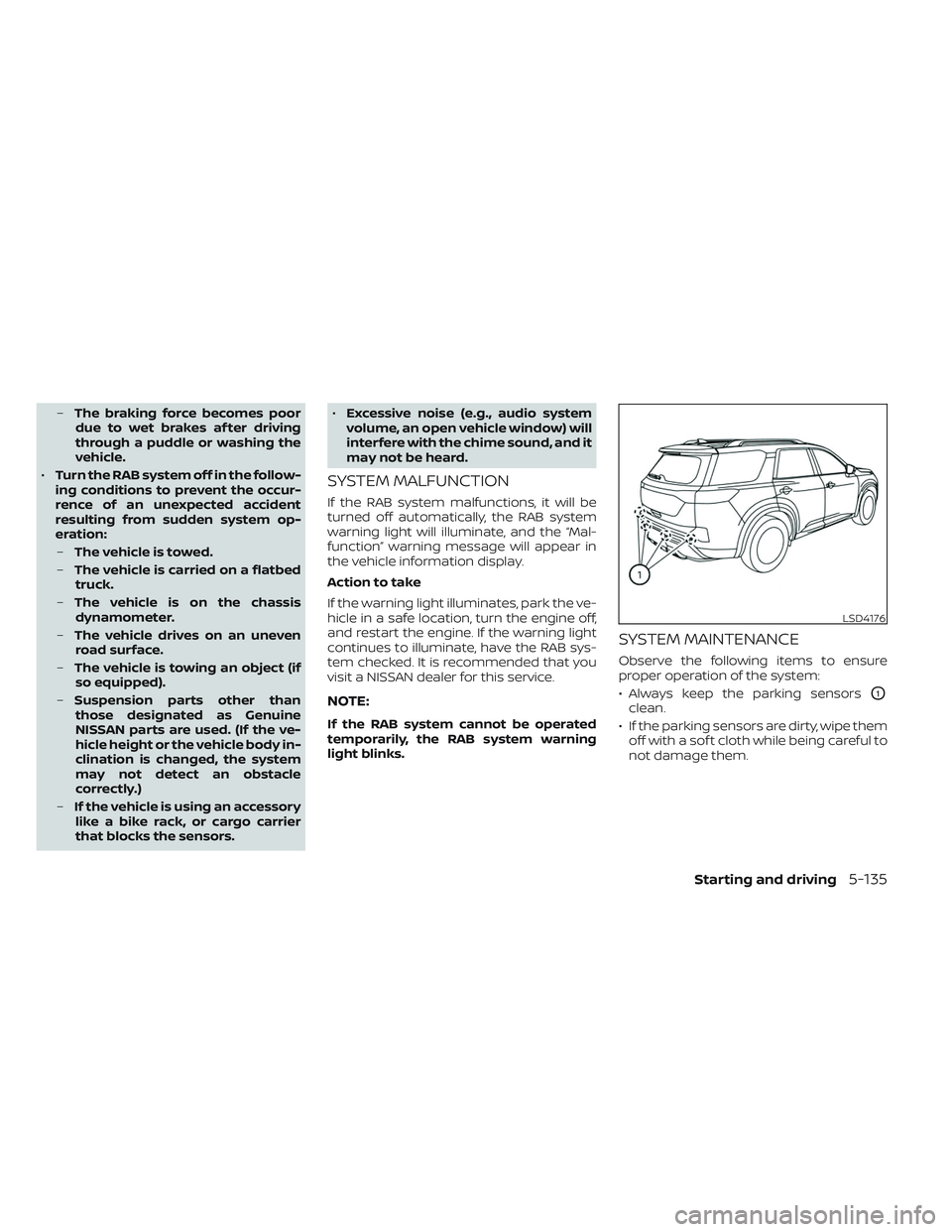
• Always keep the parking sensors
O1
clean.
• If the parking sensors are dirty, wipe them off with a sof t cloth while being careful to
not damage them.
LSD4176
Starting and driving5-135
Page 454 of 647

–When the vehicle or pedestrian is
offset from the vehicle’s forward
path.
– If the speed difference between
the two vehicles is small.
– The pedestrian’s profile is par-
tially obscured or unidentifiable;
for example, due to transporting
luggage, pushing a stroller, wear-
ing bulky or very loose-fitting
clothing or accessories, or being
in a unique posture (such as rais-
ing hands).
– There is poor contrast of a person
to the background, such as having
clothing color or pattern which is
similar to the background.
– For approximately 15 seconds af-
ter starting the engine.
– If the vehicle ahead has a unique
or unusual shape, extremely low
or high clearance heights, or un-
usual cargo loading or is narrow
(for example, a motorcycle).
– When the vehicle or pedestrian is
located near a traffic sign, a reflec-
tive area (for example, water on
road), or is in a shadow.
– When multiple pedestrians are
grouped together. –
When the view of the pedestrian is
obscured by a vehicle or other
object.
– While towing a trailer or other
vehicle.
• The system performance may de-
graded in the following conditions:
– The vehicle is driven on a slippery
road.
– The vehicle is driven on a slope.
– Excessively heavy baggage is
loaded in the rear seat or the
cargo area of your vehicle.
• The system is designed to automati-
cally check the sensor’s (radar and
camera) functionality, within certain
limitations. The system may not de-
tect some forms of obstruction of the
sensor area such as ice, snow or
stickers, for example. In these cases,
the system may not be able to warn
the driver properly. Be sure that you
check, clean and clear sensor areas
regularly.
• In some road and traffic conditions,
the AEB with Pedestrian Detection
system may unexpectedly apply par-
tial braking. When acceleration is
necessary, depress the accelerator
pedal to override the system. •
The AEB with Pedestrian Detection
system may operate when a pattern,
object, shadow or lights are detected
that are similar to the outline of ve-
hicles or pedestrians, or if they are
the same size and position as a ve-
hicle or motorcycle’s tail lights.
• The system may keep operating
when the vehicle ahead is turning
right or lef t.
• The system may operate when your
vehicle is approaching and passing a
vehicle ahead.
• Depending on the road shape
(curved road, entrance and exit of the
curve, winding road, lane regulation,
under construction, etc.), the system
may operate temporarily for the on-
coming vehicle in front of your
vehicle.
Starting and driving5-143
Page 554 of 647

If the brakes do not operate properly have
the brakes checked. It is recommended
that you visit a NISSAN dealer for this
service.
Self-adjusting brakes
Your vehicle is equipped with self-adjusting
brakes.
The front and rear disc-type brakes self-
adjust every time the brake pedal is
applied.
WARNING
Have your brake system checked if the
brake pedal height does not return to
normal. It is recommended that you
visit a NISSAN dealer for this service.
Brake pad wear indicators
The disc brake pads on your vehicle have
audible wear indicators. When a brake pad
requires replacement, a high pitched
scraping or screeching sound will be heard
when the vehicle is in motion. The noise will
be heard whether or not the brake pedal is
depressed. Have the brakes checked as
soon as possible if the wear indicator
sound is heard. Under some driving or climate conditions,
occasional brake squeak, squeal or other
noise may be heard. Occasional brake
noise during light to moderate stops is nor-
mal and does not affect the function or
performance of the brake system.
Proper brake inspection intervals should
be followed.
For additional information re-
garding brake inspections, see appropriate
maintenance schedule information in the
"Maintenance and schedules" section of
this manual.
If any electrical equipment does not oper-
ate, check for an open fuse.
Fuses are used in the passenger and en-
gine compartment. Spare fuses are pro-
vided and can be found in the passenger
compartment fuse box.
When installing a fuse make sure the fuse is
installed in the fuse box securely.
LDI2997
BRAKES FUSES
Do-it-yourself8-21
Page 567 of 647

TIRE LABELING
Federal law requires tire manufac-
turers to place standardized infor-
mation on the sidewall of all tires.
This information identifies and de-
scribes the fundamental character-
istics of the tire and also provides the
Tire Identification Number (TIN) for
safety standard certification. The TIN
can be used to identif y the tire in
case of a recall.
O1Tire size (example: P215/65R15
95H)
1. P: The “P” indicates the tire is de- signed for passenger vehicles (not
all tires have this information).
2. Three-digit number (215): This number gives the width in milli-
meters of the tire from sidewall
edge to sidewall edge. 3. Two-digit number (65): This num-
ber, known as the aspect ratio,
gives the tire's ratio of height to
width.
4. R: The “R” stands for radial.
5. Two-digit number (15): This num- ber is the wheel or rim diameter in
inches.
WDI0394
Example
WDI0395
Example
8-34Do-it-yourself