Selecting t
Selecting t
he dr
he dr iv
ive pr
e progr ogram
am #
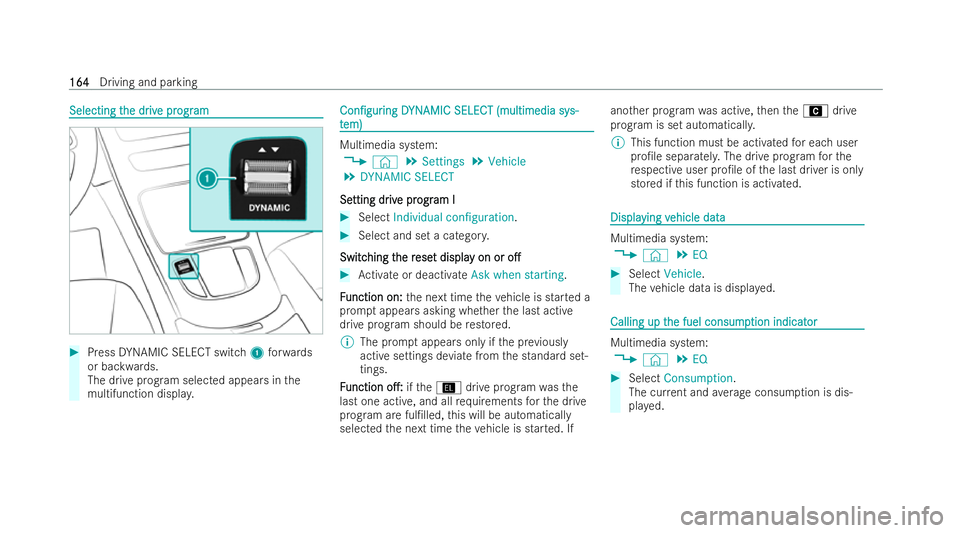
Press DYNAMIC SELECT switch 1forw ards
or backwards.
The drive prog ram selected appears in the
multifunction displa y. Con�/gur Con�/gur
ing
ingD
DYN
YNAMIC SELECT (multimedia sy AMIC SELECT (multimedia sy s-
s-
t
t em)
em) Multimedia system:
4 © 5
Settings 5
Vehicle
5 DYNAMIC SELECT
Se
Se tting dr
tting dr iv
ive pr
e pr ogr
ogram I
am I #
Select Individual configuration. #
Select and set a categor y.
Switc
Switc hing t
hing t he r
he rese
eset displa
t displa y on or
y on or o�.
o�. #
Activate or deactivate Ask when starting.
F
F unction on:
unction on: the next time theve hicle is star ted a
prom ptappears asking whe ther the last active
drive prog ram should be restored.
% The prom ptappears only if the pr eviously
active settings deviate from the standard set-
tings.
F
F unction
unction o�.:
o�.:ifth eÎ drive prog ram wa sthe
last one active, and all requ irements forth e drive
prog ram are ful�/lled, this will be automatically
selected the next time theve hicle is star ted. If ano
ther prog ram wa s active, then theA drive
prog ram is set automaticall y.
% This function must be activated for each user
pro�/le separatel y.The drive prog ram forthe
re specti veuser pro�/le of the last driver is only
stored if this function is activated. Displa
Displa
ying v
ying vehicle data
ehicle data Multimedia system:
4 © 5
EQ #
Select Vehicle.
The vehicle data is displ ayed. Calling up t
Calling up t
he fuel consump
he fuel consump tion indicat
tion indicator
or Multimedia system:
4 © 5
EQ #
Select Consumption.
The cur rent and average consum ption is dis-
pla yed. 164
164
Driving and parking