2022 MAZDA MODEL MX-30 EV key battery
[x] Cancel search: key batteryPage 155 of 547

CAUTION
If there is a problem with the power
switch, the power switch indicator
light (amber) flashes. In this case,
the EV system could be started,
however, consult an Authorized
Mazda Dealer as soon as possible.
NOTE
Under the following conditions,
the KEY warning light (red) flashes
in the instrument cluster or the
KEY warning indication is
displayed on the
multi-information display and the
EV system will not start:
The key battery is dead.The key is out of operational
range.
The key is placed in areas where
it is di fficult for the system to
detect the signal.
A key from another
manufacturer similar to the key
is in the operational range.
If the power switch indicator light
(amber) flashes, the EV system
may no longer be able to start
using the usual starting method.
Depress the brake pedal
completely and continue to press
the power switch until the EV
system is started completely. After
the EV system has started, the
power switch indicator light
(green) turns o ff and the power
switch is switched ON.
If you attempt to start the EV
system while the selector lever is
in a position other than P, a
message is displayed on the
multi-information display to urge
you to shift the selector lever to
the P position.
Shift the selector lever to the P
position and then start the EV
system.
The function to start the EV
system only by carrying the key
can be disabled, preventing
people using a heart pacemaker
or other medical device from
being negatively a ffected.
5. Make sure that the READY indication is displayed in the
instrument cluster.
▼Starting the EV System When the
Key Battery is Dead
CAUTION
Key operation
Do not allow the fo
llowing conditions.
Otherwise, the vehicle will not receive
the signal from the key correctly and
the EV system may not start.
Metal parts of other keys or metal
objects touch the key.
When Driving
Starting and Stopping the EV System
4-6
MX -30_8JD4-EA -21G_Edition2_new 2021-5-18 14:38:07
Page 156 of 547
Spare keys or keys for other vehicles
equipped with an immobilizer
system touch or come near the key.
Devices for electronic purchases, or
security passage touch or come near
the key.
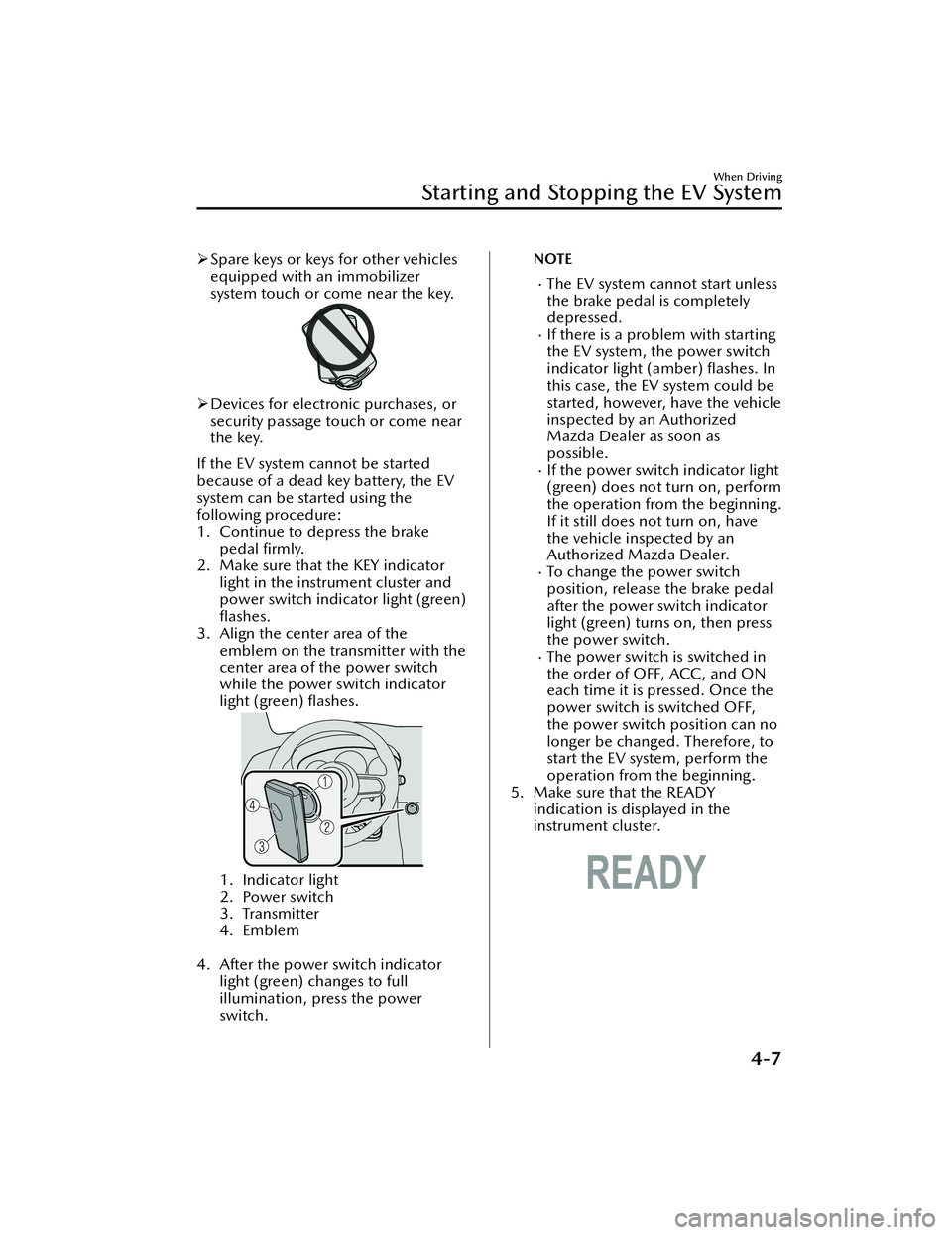
If the EV system cannot be started
because of a dead key battery, the EV
system can be started using the
following procedure:
1. Continue to depress the brake pedal firmly.
2. Make sure that the KEY indicator light in the instrument cluster and
power switch indicator light (green)
flashes.
3. Align the center area of the emblem on the transmitter with the
center area of the power switch
while the power switch indicator
light (green) flashes.
1. Indicator light
2. Power switch
3. Transmitter
4. Emblem
4. After the power switch indicator light (green) changes to full
illumination, press the power
switch.
NOTE
The EV system cannot start unless
the brake pedal is completely
depressed.
If there is a problem with starting
the EV system, the power switch
indicator light (amber) flashes. In
this case, the EV system could be
started, however, have the vehicle
inspected by an Authorized
Mazda Dealer as soon as
possible.
If the power switch indicator light
(green) does not turn on, perform
the operation from the beginning.
If it still does not turn on, have
the vehicle inspected by an
Authorized Mazda Dealer.
To change the power switch
position, release the brake pedal
after the power switch indicator
light (green) turns on, then press
the power switch.
The power switch is switched in
the order of OFF, ACC, and ON
each time it is pressed. Once the
power switch is switched OFF,
the power switch position can no
longer be changed. Therefore, to
start the EV system, perform the
operation from the beginning.
5. Make sure that the READY indication is displayed in the
instrument cluster.
When Driving
Starting and Stopping the EV System
4-7
MX -30_8JD4-EA -21G_Edition2_new 2021-5-18 14:38:07
Page 157 of 547

Stopping the EV System
▼When Stopping the EV System
1. Shift the selector lever to the P
position.
2. Press the power switch. The READY
indication is not displayed in the
instrument cluster and the EV
system stops, and then the power
switch is switched OFF.
WARNING
Other than for an emergency
situation, do not attempt to stop the
EV system while driving the vehicle:
If the EV system is stopped while
driving the vehicle, loss of brake power
and power steering functions could
occur, making it di fficult to control the
vehicle which could result in an
accident.
CAUTION
Before leaving the vehicle, make sure
that the power switch is switched OFF
(READY indication is not displayed).
NOTE
Key battery
If the system detects that the key's
remaining battery power is low when
the power switch is switched from
ON to ACC or OFF, the KEY indicator
light (green) flashes in the instrument
cluster or the KEY warning indication
is displayed on the multi-information
display.
Refer to Starting the EV System When
the Key Battery is Dead on page 4-6.
Selector lever position
Because the AUTO P (parking lock)
function operates, the power
switch can be switched OFF even
with the selector lever in a position
other than P, however, for reasons
of safety, shift the selector lever to
the P position and then switch the
power switch OFF.
If you switch the power switch OFF
with the selector lever in a position
other than P, a warning sound and
a display indication notify you that
the selector lever position and the
shift position do not match.
Power switch position
If you leave or try to leave the vehicle
without switching the power switch
OFF, the KEY warning light (red) fl ashing , a display indication, and a
warning sound notify you that the
power switch is not switched OFF.
▼ Emergency EV System Stop
Pressing the power switch continuously
or pressing it quickly any number of
times even if the vehicle is not
stopped, will stop the EV system. The
power switch switches to ACC.
When Driving
Starting and Stopping the EV System
4-8
MX
-30_8JD4-EA -21G_Edition2_new 2021-5-18 14:38:07
Page 402 of 547

6Maintenance and Care
How to keep your Mazda in top condition.
Essential Information................. 6-2 Introduction.......................... 6-2
Scheduled Maintenance............ 6-4 Scheduled Maintenance......... 6-4
Owner Maintenance................. 6-7 Owner Maintenance
Precautions........................... 6-7
Hood.................................... 6-8
Motor Compartment
Overview............................ 6-10
Coolant.............................. 6-11
Brake Fluid.......................... 6-12
Washer Fluid....................... 6-13
Lubrication system............... 6-14
Wiper Blades....................... 6-14
Lead-acid Battery................. 6-19
Key Battery Replacement...... 6-21
Tires.................................... 6-23
Light Bulbs...........................6-26
Fuses.................................. 6-27
Appearance Care.................... 6-34 Exterior Care....................... 6-34
Interior Care........................ 6-40
6-1
MX-30_8JD4-EA -21G_Edition2_new 2021-5-18 14:38:07
Page 422 of 547

Key Battery Replacement
▼Key Battery Replacement
If the buttons on the transmitter are
inoperable and the operation indicator
light does not
flash, the battery may be
dead.
Replace with a new battery before the
transmitter becomes unusable.
CAUTION
Make sure the battery is installed
correctly. Battery leakage could occur
if it is not installed correctly.
When replacing the battery, be
careful not to touch any of the
internal circuitry and electrical
terminals, bend the electrical
terminals, or get dirt in the
transmitter as the transmitter could
be damaged.
There is the danger of explosion if
the battery is not correctly replaced.
Dispose of used batteries according
to the following instructions.
Insulate the plus and minus
terminals of the battery using
cellophane or equivalent tape.
Never disassemble.
Never throw the battery into fire or
water.
Never deform or crush.
Replace only with the same type
battery (CR2032 or equivalent).
The following conditions indicate that
the battery power is low:
A message, “Low Key Fob Battery.
Replace Battery” is displayed on the
multi-information display when the
power switch is switched OFF.
The system does not operate and the
operation indicator light on the
transmitter does not flash when the
buttons are pressed.
The system's operational range is
reduced.
Incorrect battery replacement
operation may damage the key.
Replacing the battery at an Authorized
Mazda Dealer is recommended. If
replacing the battery by yourself,
follow the instruction.
Replacing the key battery
1. Remove the lower cover while sliding the knob in the direction of
the arrow.
2. Press in the tab to unlock the upper
cover.
Maintenance and Care
Owner Maintenance
6-21
MX -30_8JD4-EA -21G_Edition2_new 2021-5-18 14:38:07
Page 477 of 547

“Low Key Fob Battery. Replace
Battery” is displayed/When the light
is flashing
When the key battery is low, the
indication is displayed when the power
switch is switched OFF.
Action to be taken
Replace the key battery.
If Trouble Arises
Warning/Indicator Lights and Warning Sounds
7-32
MX -30_8JD4-EA -21G_Edition2_new 2021-5-18 14:38:07
Page 479 of 547

Display*1*2ContentAction to be taken
Tra ffic Jam Assist Opera-
tion Canceled Drive
Safely This message is indicated when the
Tra
ffic Jam Assist (TJA) have been can-
celed other than by the driver. Have your vehicle inspected by an
Authorized Mazda Dealer.
Distance & Speed Alert
Operation Canceled
Drive Safely This message is indicated when the
Distance & Speed Alert (DSA) have
been canceled other than by the driv-
er.
Have your vehicle inspected by an
Authorized Mazda Dealer.
Cruise Control Opera-
tion Canceled. Drive
Safely This message is indicated when the
Cruise Control have been canceled
other than by the driver.
Have your vehicle inspected by an
Authorized Mazda Dealer.
Emergency Braking Acti-
vated. Depress Brake
Pedal to Hold Stop This message is indicated after the
Smart Brake Support (SBS) brakes op-
erate and when the SBS is canceled.
Depress the brake pedal.
Touch Key Fob to Push
Button Start Switch This message is indicated when the
key battery is weak (battery dead or
damaged key). Touch the key against power switch
to start the EV system.
Refer to Starting the EV System When
the Key Battery is Dead on page 4-6.
Depress Brake Pedal to
Start Vehicle This message is displayed when the
power switch is pressed without de-
pressing the brake pedal. To start the EV system, press the pow-
er switch with the brake pedal de-
pressed.
Check Shift Selector Lev-
er Position Displays in the following cases:
Selector lever is shifted to R posi-
tion while driving forward.
Selector lever is shifted to P posi-
tion while driving.
Selector lever is shifted to D posi-
tion while reversing.
Check the selector lever position.
Close Door and Fasten
Seat Belt This message is indicated when the
AUTOHOLD switch is pressed with
the driver’s seat belt unfastened or
the driver’s door open. Fasten the driver's seat belt and press
the AUTOHOLD switch with the driv-
er’s door closed.
Wiper Blades Must Be
on Windshield Before
Operating This message is indicated when the
power switch is switched ON with
the wiper arms at the service posi-
tions.
Return the wiper arms to the initial
positions.
Windshield Wiper Range
of Motion Reduced. Re-
move Obstruction(s) This message is indicated when there
is snow or dirt accumulation on the
windshield and the wiper operation
range is narrowed.
Remove foreign matter from the
windshield.
If Trouble Arises
Warning/Indicator Lights and Warning Sounds
7-34
MX
-30_8JD4-EA -21G_Edition2_new 2021-5-18 14:38:07
Page 482 of 547
Warning Sound isActivated
▼Lights-On Reminder
The lights-on reminder is operable
when the time setting*1 of the auto
headlight o ff function is o ff.
If the power switch is switched OFF
with the exterior li ghts turned on and
the driver’s door is opened, a sound is
activated.
Operate the headlight switch to turn
o ff the exterior lights.
*1 If the light switch is left on, the
auto headlight o ff function
automatically turns off the lights
about 30 seconds after switching
the EV system off. The time setting
can be changed.
Refer to the Settings section in the
Mazda Connect Owner's Manual.
NOTE
When the power switch is switched
to ACC, the “Power Switch Not
Switched OFF (STOP) Warning Beep”
(page 7-37) overrides the lights-on
reminder.
A personalized function is available
to change the sound volume for the
lights-on reminder.
Refer to the Settings section in the
Mazda Connect Owner's Manual.
▼ Seat Belt Warning Beep
Front seat
If the driver's seat belt is not fastened
when the power switch is switched
ON, a beep sound will be heard for
about 6 seconds. If the driver or the
front passenger's seat belt is not
fastened and if the vehicle is driven at
about 20 km/h (12 mph) or faster, or
about 10 km/h (6 mph) or faster for a
continuous 30 seconds, with the seat
belt unfastened, a sound is activated
continuously for a certain period.
Until a seat belt is fastened or a given
period of time has elapsed, the beep
sound will not stop even if the vehicle
speed falls below 20 km/h (12 mph).
NOTE
To allow the front passenger
occupant classi
fication sensor to
function properly, do not place and
sit on an additional seat cushion on
the front passenger's seat. The
sensor may not function properly
because the additional seat cushion
could cause sensor interference.
If a small child is seated on the front
passenger's seat, the warning beep
may not operate.
Rear seat
The warning beep only sounds if a seat
belt is unfastened after being fastened.
▼ Power Switch Not Switched OFF
(STOP) Warning Beep
If the driver's door is opened with the
power switch switched to ACC, a beep
will be heard continuously in the cabin
to notify the driver that the power
switch has not been switched OFF
(STOP). Under this condition, the
keyless entry system will not operate,
the vehicle cannot be locked, and the
battery voltage will be depleted.
▼Key Removed from Vehicle
Warning Beep
Vehicles with advanced keyless
function
If the key is taken out of the vehicle
while the power switch is switched to
ACC or ON, and all the doors are
closed, a sound is activated 6 times
If Trouble Arises
Warning/Indicator Lights and Warning Sounds
7-37
MX
-30_8JD4-EA -21G_Edition2_new 2021-5-18 14:38:07