2022 LINCOLN NAVIGATOR towing
[x] Cancel search: towingPage 404 of 646

TOWING YOUR VEHICLE – TROUBLESHOOTING
TOWING YOUR VEHICLE – INFORMATION MESSAGES
Description
Message
The transfer case is in the neutral position and your vehicle is safe to\
tow with all four wheels on the ground.
Neutral Tow Enabled Leave Transmission
in Neutral
There is a transfer case gear tooth blockage present. With your vehicle \
on, shift the transmissioninto drive (D) and let the vehicle roll forward, up to 3 ft (1 m).
Shift Delayed Drive Forward
The transfer case is not in the neutral position and your vehicle is not\
safe to tow with all fourwheels on the ground.
Neutral Tow Disabled
400
2022 Navigator (TB9) Canada/United States of America, enUSA, Edition date: 202109, First-Printing Towing Your Vehicle
Page 466 of 646

The usage of a full-size dissimilar spare
wheel and tire assembly can lead to
impairment of the following:
•
Handling, stability and braking
performance.
• Comfort and noise.
• Ground clearance and parking at curbs.
• Winter weather driving capability. •
Wet weather driving capability.
• Four-wheel driving capability.
When driving with the full-size dissimilar
spare wheel and tire assembly additional
caution should be given to:
• Towing a trailer.
• Driving vehicles with a camper body.
• Driving vehicles with a load on the cargo
rack. Drive cautiously when using a full-size
dissimilar spare wheel and tire assembly and
seek service as soon as possible.
Location of the Spare Tire and Tools
The spare tire is located under the vehicle,
just forward of the rear bumper. The jack,
swivel wrench and lug wrench are in the
following locations: Location
Item
Under the vehicle, just forward of the rear bumper
Spare tire
Under the access panel located in the floor compartment behind therear seat
Jack and tool kit bag
462
2022 Navigator (TB9) Canada/United States of America, enUSA, Edition date: 202109, First-Printing Changing a Road Wheel
Page 471 of 646
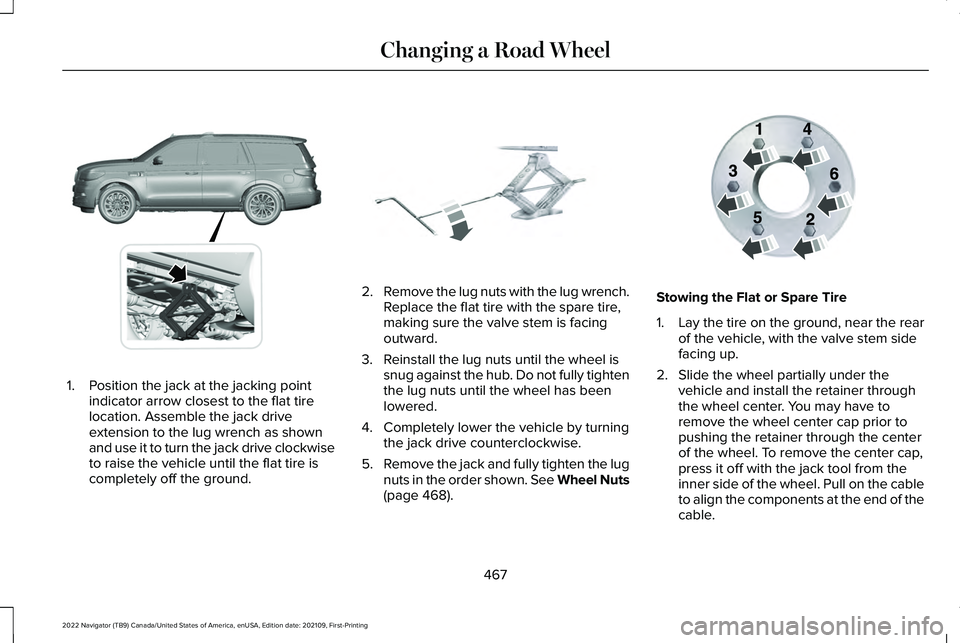
1. Position the jack at the jacking point
indicator arrow closest to the flat tire
location. Assemble the jack drive
extension to the lug wrench as shown
and use it to turn the jack drive clockwise
to raise the vehicle until the flat tire is
completely off the ground. 2.
Remove the lug nuts with the lug wrench.
Replace the flat tire with the spare tire,
making sure the valve stem is facing
outward.
3. Reinstall the lug nuts until the wheel is snug against the hub. Do not fully tighten
the lug nuts until the wheel has been
lowered.
4. Completely lower the vehicle by turning the jack drive counterclockwise.
5. Remove the jack and fully tighten the lug
nuts in the order shown. See Wheel Nuts
(page 468). Stowing the Flat or Spare Tire
1.
Lay the tire on the ground, near the rear
of the vehicle, with the valve stem side
facing up.
2. Slide the wheel partially under the vehicle and install the retainer through
the wheel center. You may have to
remove the wheel center cap prior to
pushing the retainer through the center
of the wheel. To remove the center cap,
press it off with the jack tool from the
inner side of the wheel. Pull on the cable
to align the components at the end of the
cable.
467
2022 Navigator (TB9) Canada/United States of America, enUSA, Edition date: 202109, First-Printing Changing a Road WheelE360357 E325278 E166719
Page 529 of 646

WHAT IS LINCOLN PROTECT
Protect yourself from the rising cost of
vehicle repairs with the Lincoln Protect
extended service plan.
Lincoln Protect Extended Service Plans
(United States Only)
Lincoln Protect means peace of mind. It is
the extended service plan backed by Lincoln,
and provides more protection beyond the
New Vehicle Limited Warranty coverage.
When you visit your Lincoln Dealer, insist on
genuine Lincoln Protect extended service
plans.
Lincoln Protect Extended Service Plan Can
Quickly Pay for Itself
One trip to the Service Center could easily
exceed the price of your Lincoln Protect
extended service plan. With Lincoln Protect,
you minimize your risk for unexpected repair
bills and rising repair costs.
Up to 1000+ Covered Vehicle Components
There are four mechanical Lincoln Protect
extended service plans with different levels
of coverage. Ask your authorized dealer for
details.
1.
PremiumCARE - Our most comprehensive
coverage. With over 1,000 covered
components, this plan is so complete it
is probably easier to list what is not
covered.
2. ExtraCARE - Covers 113 components, and
includes many high-tech items.
3. BaseCARE - Covers 84 components.
4. PowertrainCARE - Covers 29 critical components.
Lincoln Protect extended service plans are
honored by all authorized Lincoln dealers in
the United States, Canada and Mexico.
That means you get:
• Reliable, quality service at any Lincoln or
Ford dealership.
• Repairs performed by factory trained
technicians, using genuine parts. Rental Car Reimbursement
First Day Rental Benefit
If you bring your car into your dealer for
service, we will give you a rental vehicle to
use for the day.
Extended Rental Benefits
If your vehicle is kept overnight for covered
repairs, you are eligible for rental car
coverage, including bumper to bumper
warranty repairs, and field service actions.
Roadside Assistance
Exclusive 24/7 roadside assistance, including:
•
Towing, flat-tire change and battery jump
starts.
• Out of fuel and lock-out assistance.
• Travel expense reimbursement for
lodging, meals and rental car.
• Assistance for taxi, shuttle, rental car
coverage and other transportation.
525
2022 Navigator (TB9) Canada/United States of America, enUSA, Edition date: 202109, First-Printing Lincoln Protect
Page 531 of 646
There are several Lincoln Protect extended
service plans available in various time,
distance and deductible combinations. Each
plan is tailored to fit your own driving needs,
including reimbursement for towing and
rental. When you purchase a Lincoln Protect
extended service plan, you receive added
peace-of-mind protection throughout
Canada, the United States and Mexico,
provided by a network of participating
authorized Lincoln dealers.
Note:
Repairs performed outside of Canada,
the United States and Mexico are not eligible
for Lincoln Protect extended service plan
coverage.
This information is subject to change. For
more information, visit your local Lincoln of
Canada dealer or www.LincolnCanada.com
to find the Lincoln Protect extended service
plan that is right for you.
527
2022 Navigator (TB9) Canada/United States of America, enUSA, Edition date: 202109, First-Printing Lincoln Protect
Page 537 of 646

When to expect the OIL CHANGE REQUIRED Message
Vehicle Use and Example
Interval
Normal
7,500–10,000 mi (12,000–16,000 km) Normal commuting with highway driving
No, or moderate, load or towing
Flat to moderately hilly roads
No extended idling
Severe
5,000–7,500 mi (8,000–12,000 km) Moderate to heavy load or towing
Mountainous or off-road conditions
Extended idling
Extended hot or cold operation
Extreme
3,000–5,000 mi (5,000–8,000 km) Maximum load or towing
Extreme hot or cold operation
533
2022 Navigator (TB9) Canada/United States of America, enUSA, Edition date: 202109, First-Printing Scheduled Maintenance
Page 541 of 646

Towing a Trailer or Using a Car-top Carrier
Change engine oil and filter as indicated by the information display and\
perform services listed in the Normal
Scheduled Maintenance chart.
As required
Inspect and lubricate U-joints (if equipped with grease fittings).
Inspect frequently, service
as required
See axle maintenance items under Exceptions.
Change transfer case fluid (Four-wheel drive vehicles).
Every
60,000 mi
(96,000 km) Replace spark plugs. Extensive Idling or Low-speed Driving for Long Distances, as in Heavy Commercial Use
Change engine oil and filter as indicated by the information display and\
perform services listed in the Normal
Scheduled Maintenance chart.
As required
Replace engine air filter.
Inspect frequently, service
as required
Replace cabin air filter.
Change transfer case fluid (Four-wheel drive vehicles).
Every
60,000 mi
(96,000 km) Replace spark plugs.
537
2022 Navigator (TB9) Canada/United States of America, enUSA, Edition date: 202109, First-Printing Scheduled Maintenance
Page 626 of 646

Connected Vehicle......................................482
Connected Vehicle – Troubleshooting.........483
Connecting the Vehicle to a Mobile
Network............................................................482
Connected Vehicle Data...............................27
Connected Vehicle Limitations.................482
Connected Vehicle Requirements...........482
Connected Vehicle – Troubleshooting.........................................483
Connected Vehicle – Frequently Asked Questions.........................................................483
Connecting a Bluetooth® Device..............512
Connecting a Trailer....................................346 Connecting a Trailer – Troubleshooting.......348
Hitches..................................................................345
Connecting a Trailer Precautions.............345
Connecting a Trailer – Troubleshooting.........................................348
Connecting a Trailer – Information Messages.........................................................348
Connecting the Vehicle to a Mobile Network........................................................482
Connecting Lincoln Way to the Modem.......482
Enabling and Disabling the Modem..............482
What Is the Modem............................................482
Connecting the Vehicle to a Wi-Fi Network........................................................482
Connecting Your Phone.............................506 Contacting Us...................................................17
Cooling System Capacity and
Specification................................................473
Crash and Breakdown Information.........390 Automatic Crash Shutoff..................................394
Jump Starting the Vehicle.................................391
Post-Crash Alert System...................................393
Recovery Towing................................................394
Crash Sensors and Airbag Indicator
..........68
Creating a MyKey...........................................83
Creating a Personal Profile.........................516
Creating a Vehicle Wi-Fi Hotspot.............486
Cross Traffic Alert
..........................................316
Cross Traffic Alert – Troubleshooting............319
Cross Traffic Alert Indicators......................318
Cross Traffic Alert Limitations.....................317
Cross Traffic Alert Precautions..................316
Cross Traffic Alert – Troubleshooting..........................................319
Cross Traffic Alert – Information Messages..........................................................319
Customer Information.................................540 Radio Frequency Certification Labels...........544
Customizing the Instrument Cluster Display...........................................................149 D
Data Privacy
.....................................................24
Department of Transportation Uniform Tire Quality Grades............................................437
Deploying and Stowing the Power Running Boards............................................................110
Digital Radio...................................................491 Digital Radio Indicators.....................................492
Digital Radio Limitations...................................492
How Does Digital Radio Work.........................492
Switching Digital Radio Reception On and
Off......................................................................492
What Is Digital Radio..........................................491
Directing the Flow of Air.............................159
Disposing of Airbags.....................................69
Distance Alert
................................................326
Adjusting the Sensitivity of Distance
Alert...................................................................326
What Is Distance Alert.......................................326
Distance Indication
......................................323
Distance Indication Indicator...........................325
Switching Distance Indication On and
Off......................................................................325
What Is Distance Indication.............................323
Doors and Locks Audible Warnings..........89
Doors and Locks
.............................................87
Autolock..................................................................88
622
2022 Navigator (TB9) Canada/United States of America, enUSA, Edition date: 202109, First-Printing Index