2022 LINCOLN CORSAIR display battery
[x] Cancel search: display batteryPage 359 of 676
Recreational Towing - All-Wheel and
Four-Wheel Drive Vehicles (If Equipped)
You cannot recreational tow your vehicle
with all wheels on the ground because
vehicle or transmission damage could occur.
We recommend towing your vehicle with all
four wheels off the ground, such as when
using a car-hauling trailer. Otherwise, you
cannot recreational tow your vehicle. TOWING THE VEHICLE ON FOUR
WHEELS - PLUG-IN HYBRID
ELECTRIC VEHICLE (PHEV),
AUTOMATIC TRANSMISSION –
HF45
Emergency Towing
If your vehicle becomes inoperable without
access to wheel dollies or a vehicle transport
trailer, it can be flat-towed with all wheels on
the ground, regardless of the powertrain and
transmission configuration, under the
following conditions:
•
Your vehicle is facing forward for towing
in a forward direction.
• You switch
Neutral Tow on.
• You release the parking brake.
• You switch welcome lighting off.
See
Welcome Lighting (page 110).
• Maximum speed is
35 mph (55 km/h).
• Maximum distance is
50 mi (80 km). Switching
Neutral Tow On
1. Switch your vehicle on in accessory mode.
2. Press the menu button on the steering wheel to enter the instrument cluster
display main menu.
3. Select
Settings.
4. Select
Neutral Tow.
5. Follow the instructions on the information
display.
6. Fully press the brake pedal.
7. Shift into neutral (N).
8. Switch the ignition off.
Note: Failure to follow these instructions
could result in damage to the transmission.
Note: Switching neutral tow on requires
battery power.
Note: Put your climate control system in
recirculated air mode to prevent exhaust
fumes from entering your vehicle.
See
Climate Control (page 169).
356
2022 Corsair (CTF) Canada/United States of America, enUSA, Edition date: 202106, First-Printing Towing
Page 360 of 676
Switching Neutral Tow Off
1. Switch your vehicle on in accessory mode.
2. Fully press the brake pedal.
3. Shift into park (P).
Note: Switch welcome lighting on to
reactivate it.
See Welcome Lighting (page
110).
Recreational Towing
Follow these guidelines if you have a need
for recreational towing. An example of
recreational towing is towing your vehicle
behind a motorhome. These guidelines
ensure that you do not damage the
transmission.
If you have a front-wheel drive vehicle, you
can tow with the front wheels off the ground
by using a tow dolly. If you have an all-wheel
drive vehicle, you can tow with all four
wheels off the ground using a vehicle
transport trailer. If you are using a tow dolly
or a vehicle transport trailer, follow the
instruction specified by the equipment
provider. Note:
Put your climate control system in
recirculated air mode to prevent exhaust
fumes from entering your vehicle.
See
Climate Control (page 169).
You can tow your vehicle with all four wheels
on the ground under the following
conditions:
• Your vehicle is facing forward for towing
in a forward direction.
• You switch
Neutral Tow on.
• You release the parking brake.
• You switch welcome lighting off.
See
Welcome Lighting (page 110).
• You do not exceed
70 mph (113 km/h).
Switching
Neutral Tow On
1. Switch your vehicle on in accessory mode.
2. Press the menu button on the steering wheel to enter the information display
main menu.
3. Select
Settings.
4. Select
Neutral Tow. 5.
Follow the instructions on the information
display.
6. Fully press the brake pedal.
7. Shift into neutral (N).
8. Switch the ignition off.
Note: Failure to follow these instructions
could result in damage to the transmission.
Note: Switching on neutral tow mode
requires battery power.
Note: If the parking brake is applied, a
message appears in the instrument cluster
display.
Note: If your vehicle has an ignition key, you
cannot remove the key from the ignition
when the transmission is in neutral (N) and
your vehicle is off.
Note: Start the engine and allow it to run for
a few minutes at the beginning of each day,
and every six hours or fewer. With the engine
running and your foot on the brake, shift into
drive (D) and then into reverse (R) before
shifting back into neutral (N). Before
continuing to tow, re-enable neutral tow.
357
2022 Corsair (CTF) Canada/United States of America, enUSA, Edition date: 202106, First-Printing Towing
Page 411 of 676
Battery Management System (If Equipped)
The system monitors battery conditions and
takes actions to extend battery life. If
excessive battery drain is detected, the
system temporarily disables some electrical
systems to protect the battery.
Systems included are:
• Heated rear window.
• Heated seats.
• Climate control.
• Heated steering wheel.
• Audio unit.
• Navigation system.
A message may appear in the information
display to alert you that battery protection
actions are active. This message is only for
notification that an action is taking place, and
not intended to indicate an electrical problem
or that the battery requires replacement. After battery replacement, or in some cases
after charging the battery with an external
charger, the battery management system
requires eight hours of vehicle sleep time to
relearn the battery state of charge. During
this time, your vehicle must remain fully
locked with the ignition switched off.
Note:
Prior to relearning the battery state of
charge, the battery management system
may temporarily disable some electrical
systems.
Electrical Accessory Installation
To make sure the battery management
system works correctly, do not connect an
electrical device ground connection directly
to the battery negative post. This can cause
inaccurate measurements of the battery
condition and potential incorrect system
operation.
Note: If you add electrical accessories or
components to the vehicle, it may adversely
affect battery performance and durability.
This may also affect the performance of
other electrical systems in the vehicle. Remove and Reinstall the Battery
Install a battery approved for use by our
specifications.
See Capacities and
Specifications (page 461).
To disconnect or remove the battery, do the
following:
1. Apply the parking brake and switch the ignition off.
2. Switch all electrical equipment off, for example lights and radio.
3. Wait a minimum of two minutes before disconnecting the battery.
Note: The engine management system has
a power hold function and remains powered
for a period of time after you switch the
ignition off. This is to allow the system to
store diagnostic and adaptive tables.
Disconnecting the battery without waiting
can cause damage not covered by the
vehicle warranty.
4. Disconnect the negative battery cable terminal.
5. Disconnect the positive battery cable terminal.
408
2022 Corsair (CTF) Canada/United States of America, enUSA, Edition date: 202106, First-Printing Maintenance
Page 551 of 676
Departure Times
Setting Departure Times allows you to
control charging schedules and have the
vehicle cabin heated or cooled while
plugged in, so your vehicle is ready to drive
when you are. By setting a departure time
your vehicle can use your charge time
settings to minimize your electricity costs but
still prioritize finishing charging before your
scheduled departure. A calendar view allows
you to program two departure times per day
for each day of the week.
Note:
You can also set up and use these
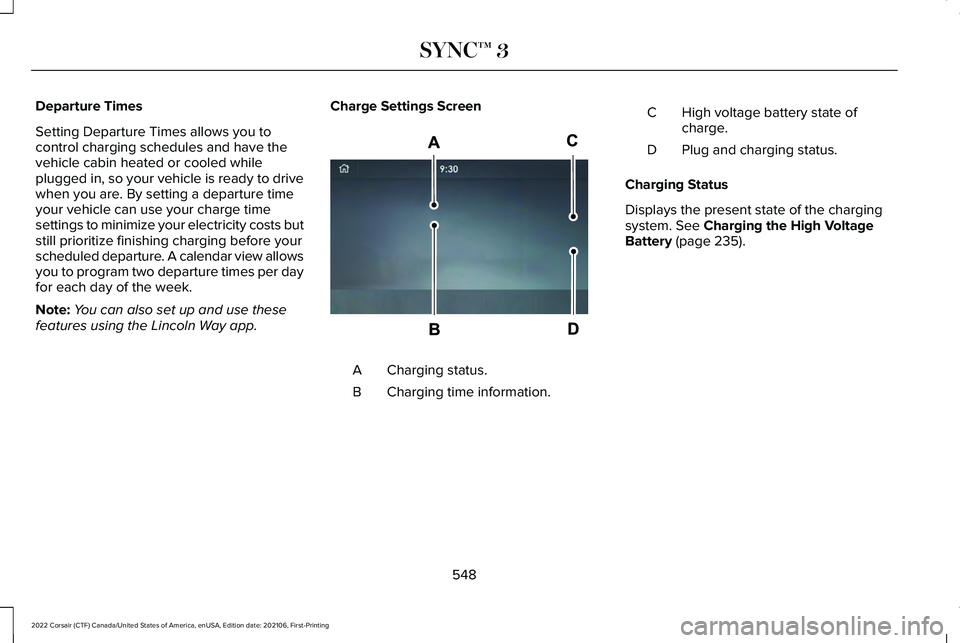
features using the Lincoln Way app. Charge Settings Screen Charging status.
A
Charging time information.
B High voltage battery state of
charge.
C
Plug and charging status.
D
Charging Status
Displays the present state of the charging
system. See Charging the High Voltage
Battery (page 235).
548
2022 Corsair (CTF) Canada/United States of America, enUSA, Edition date: 202106, First-Printing SYNC™ 3E304455
Page 552 of 676
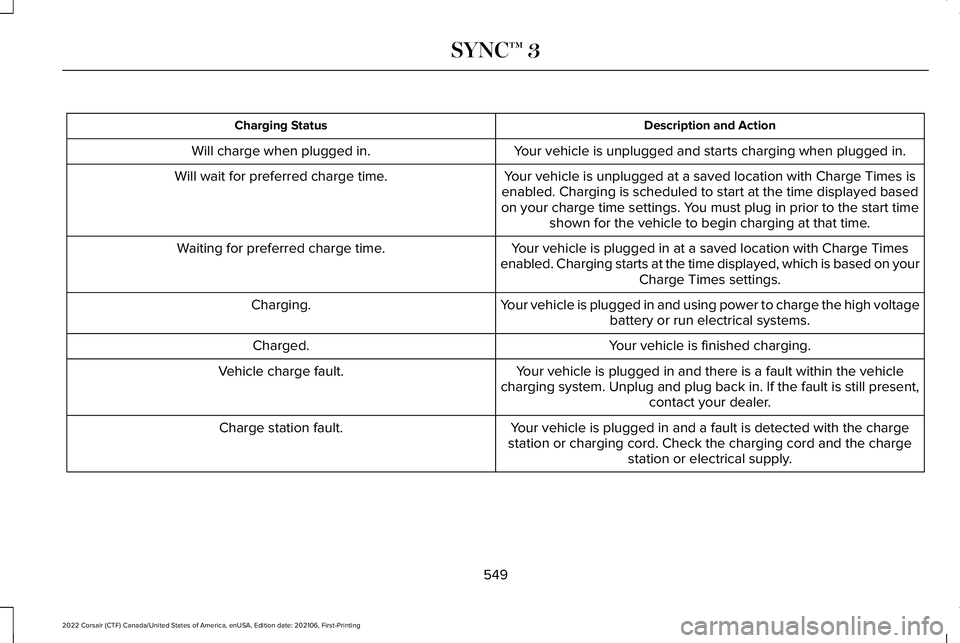
Description and Action
Charging Status
Your vehicle is unplugged and starts charging when plugged in.
Will charge when plugged in.
Your vehicle is unplugged at a saved location with Charge Times is
enabled. Charging is scheduled to start at the time displayed based
on your charge time settings. You must plug in prior to the start time shown for the vehicle to begin charging at that time.
Will wait for preferred charge time.
Your vehicle is plugged in at a saved location with Charge Times
enabled. Charging starts at the time displayed, which is based on your Charge Times settings.
Waiting for preferred charge time.
Your vehicle is plugged in and using power to charge the high voltagebattery or run electrical systems.
Charging.
Your vehicle is finished charging.
Charged.
Your vehicle is plugged in and there is a fault within the vehicle
charging system. Unplug and plug back in. If the fault is still present,\
contact your dealer.
Vehicle charge fault.
Your vehicle is plugged in and a fault is detected with the charge
station or charging cord. Check the charging cord and the charge station or electrical supply.
Charge station fault.
549
2022 Corsair (CTF) Canada/United States of America, enUSA, Edition date: 202106, First-Printing SYNC™ 3
Page 553 of 676
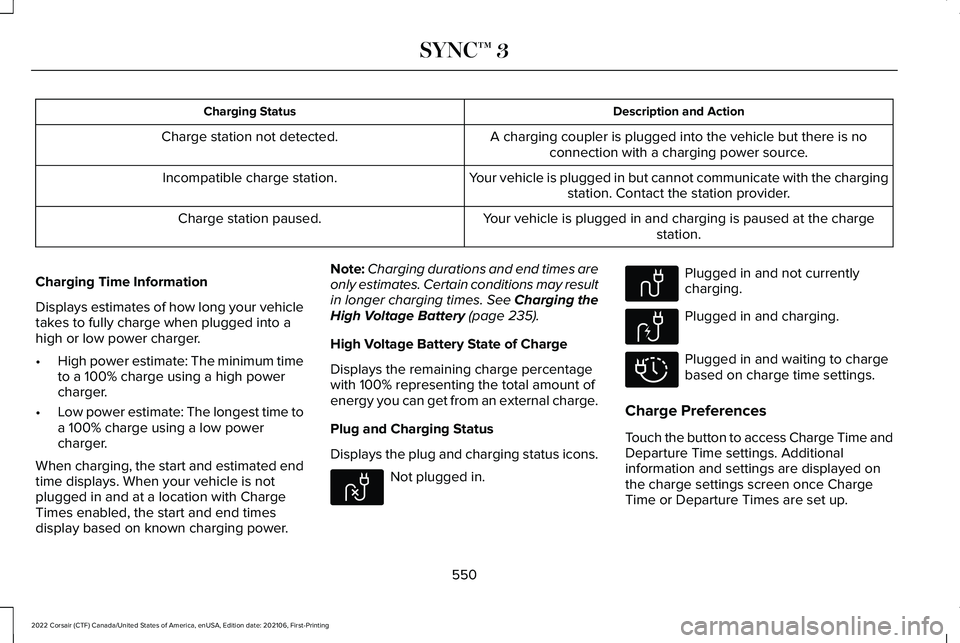
Description and Action
Charging Status
A charging coupler is plugged into the vehicle but there is noconnection with a charging power source.
Charge station not detected.
Your vehicle is plugged in but cannot communicate with the chargingstation. Contact the station provider.
Incompatible charge station.
Your vehicle is plugged in and charging is paused at the chargestation.
Charge station paused.
Charging Time Information
Displays estimates of how long your vehicle
takes to fully charge when plugged into a
high or low power charger.
• High power estimate: The minimum time
to a 100% charge using a high power
charger.
• Low power estimate: The longest time to
a 100% charge using a low power
charger.
When charging, the start and estimated end
time displays. When your vehicle is not
plugged in and at a location with Charge
Times enabled, the start and end times
display based on known charging power. Note:
Charging durations and end times are
only estimates. Certain conditions may result
in longer charging times. See Charging the
High Voltage Battery (page 235).
High Voltage Battery State of Charge
Displays the remaining charge percentage
with 100% representing the total amount of
energy you can get from an external charge.
Plug and Charging Status
Displays the plug and charging status icons. Not plugged in. Plugged in and not currently
charging.
Plugged in and charging.
Plugged in and waiting to charge
based on charge time settings.
Charge Preferences
Touch the button to access Charge Time and
Departure Time settings. Additional
information and settings are displayed on
the charge settings screen once Charge
Time or Departure Times are set up.
550
2022 Corsair (CTF) Canada/United States of America, enUSA, Edition date: 202106, First-Printing SYNC™ 3E304458 E304459 E304460 E304461
Page 584 of 676

Make sure to change your vehicle
’s oils and
fluids at the specified intervals or in
conjunction with a repair. Flushing is a viable
way to change fluid for many vehicle
sub-systems during scheduled maintenance. It is critical that systems are flushed only with
new fluid that is the same as that required
to fill and operate the system or using a
Ford-approved flushing chemical.
Owner Checks and Services
Make sure you perform the following basic
maintenance checks and inspections every
month or at six-month intervals. Check Every Month
Engine oil level.
Function of all interior and exterior lights.
Tires (including spare) for wear and proper pressure. Windshield washer fluid level.
Fuel and water separator. Drain if necessary (or if indicated by the information display). Holes and slots in the tail pipe to make sure they are functional and clear of debris. Check Every Six Months
Battery connections. Clean if necessary.
Body and door drain holes for obstructions. Clean if necessary. Cooling system fluid level and coolant strength.
Door weatherstrips for wear. Lubricate if necessary.
581
2022 Corsair (CTF) Canada/United States of America, enUSA, Edition date: 202106, First-Printing Scheduled Maintenance
Page 670 of 676
G
Garage Door Opener...................................193
Garage Door Opener Limitations..............194
Garage Door Opener Precautions............193
Garage Door Opener Radio Frequencies.................................................196
Gauges - Plug-In Hybrid Electric Vehicle (PHEV), Vehicles With: 12.3 Inch
Instrument Cluster Display Screen.........121
Gauges - Vehicles With: 12.3 Inch Instrument Cluster Display Screen........129
Gauges - Vehicles With: 6.5 Inch Instrument Cluster Display Screen........127
Gearbox See: Transmission..............................................256
General Information on Radio Frequencies..................................................65
General Maintenance Information...........579
Getting Assistance Outside the U.S. and Canada.........................................................373
Getting the Services You Need................369
Global Opening and Closing.......................116
H
Hazard Flashers............................................363 Headlamp Adjusting
See: Adjusting the Headlamps.......................409
Headlamp Exit Delay
....................................107
Headlamp Removal See: Removing a Headlamp.............................412
Headrest See: Head Restraints..........................................176
Head Restraints
..............................................176
Head Up Display...........................................162
Heated Exterior Mirrors................................173
Heated Rear Window
...................................172
Heated Seats..................................................188
Heated Windshield.......................................172
Heating See: Climate Control..........................................169
High Voltage Battery...................................235 General Information...........................................235
Hill Start Assist..............................................273
Hints on Controlling the Interior Climate
............................................................171
Hints on Driving With Anti-Lock Brakes............................................................271
Hood Lock See: Opening and Closing the Hood.............391
Horn...................................................................101
How Does Adaptive Cruise Control With Stop and Go Work
.....................................303 How Does Speed Sign Recognition
Work..............................................................340
How Does the Garage Door Opener Work...............................................................193
How Does the Rear Occupant Alert System Work
................................................................191
Hybrid Vehicle Frequently Asked Questions.....................................................216
Hybrid Vehicle Operation - Hybrid Electric Vehicle (HEV)...............................................213
I
In California (U.S. Only)...............................370
Information Displays
.....................................136
General Information............................................136
Information Messages
..................................142
Installing Child Restraints.............................29
Instrument Cluster
..........................................121
Instrument Lighting Dimmer.......................106
Instrument Panel
.............................................24
Interior Air Quality.........................................174
Interior Lamps
..................................................111
Interior Mirror...................................................118
Introduction........................................................11
667
2022 Corsair (CTF) Canada/United States of America, enUSA, Edition date: 202106, First-Printing Index