2022 LEXUS RX450h battery
[x] Cancel search: batteryPage 155 of 532
1533-5. Opening, closing the windows and moon roof
3
Before driving
This function can be used to prevent
children from accidentally opening or
closing a passenger window.
Press the switch.
The indicator will come on and the pas-
senger windows will be locked.
The passenger windows can still be
opened and closed using the driver’s
switch even if the lock switch is on.
■The power windows can be operated
when
The power switch is in ON mode.
■When the 12-volt battery is discon-
nected
The window lock switch is disabled. If nec-
essary, press the window lock switch after
reconnecting the 12-volt battery.
*: If equipped
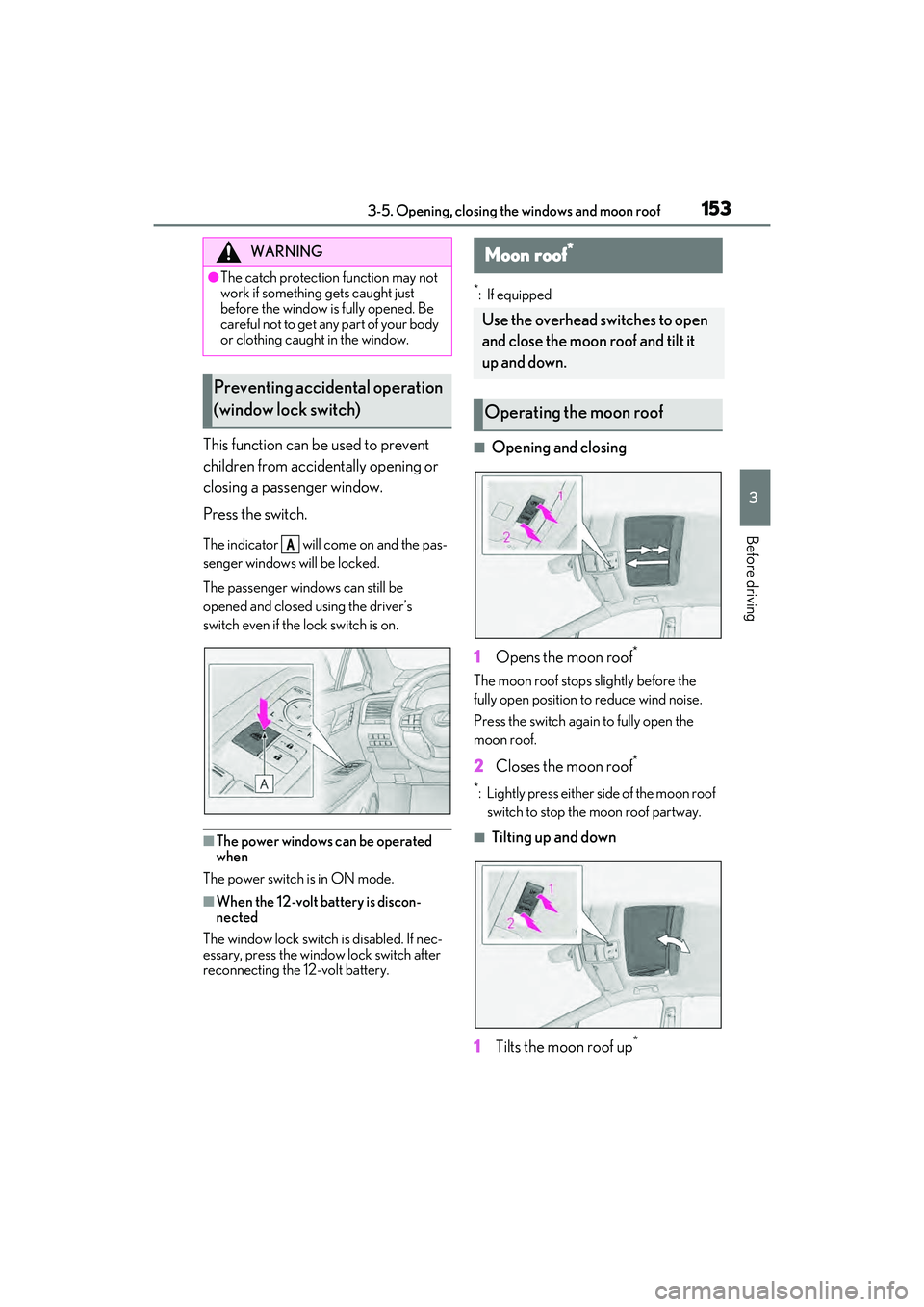
■Opening and closing
1 Opens the moon roof
*
The moon roof stops slightly before the
fully open position to reduce wind noise.
Press the switch again to fully open the
moon roof.
2 Closes the moon roof*
*: Lightly press either side of the moon roof
switch to stop the moon roof partway.
■Tilting up and down
1 Tilts the moon roof up
*
WARNING
●The catch protection function may not
work if something gets caught just
before the window is fully opened. Be
careful not to get any part of your body
or clothing caught in the window.
Preventing accidental operation
(window lock switch)
A
Moon roof*
Use the overhead switches to open
and close the moon roof and tilt it
up and down.
Operating the moon roof
Page 185 of 532

1834-2. Driving procedures
4
Driving
with push-button start. Refer to P.440to
start the hybrid system. However, if the
electronic key is carried inside the vehicle
and the doors are locked ( P.111), the
hybrid system can be started.
■When the ambient temperature is low,
such as during winter driving conditions
When starting the hybrid system, the flash-
ing time of the “READY” indicator may be
long. Leave the vehicle as it is until the
“READY” indicator is steady on, as steady
means the vehicle is able to move.
■Sounds and vibrations specific to a
hybrid vehicle
P.67
■Electronic key battery depletion
P.106
■Conditions affe cting operation
P.126
■Note for the entry function
P.127
■Steering lock function
●After turning the power switch off and
opening and closing the doors, the steer-
ing wheel will be locked due to the steer-
ing lock function. Operating the power
switch again automatically cancels the
steering lock.
●When the steering lock cannot be
released, “Steering Wheel Lock Press
Power Switch while Turning Wheel” will
be displayed on the multi-information dis-
play.
Check that the shift lever is in P. Press the
power switch shortly and firmly while
turning the steering wheel left and right.
●To prevent the steering lock motor from
overheating, operation of the motor may
be suspended if the hybrid system is turned on and off re
peatedly in a short
period of time. In th is case, refrain from
operating the hybrid system. After about
10 seconds, the steeri ng lock motor will
resume functioning.
■When “Access System with Elec. Key
Malfunction See Owner’s Manual” is
displayed on the multi-information dis-
play
The system may be malfunctioning. Have
the vehicle inspected by your Lexus dealer
immediately.
■If the “READY” indica tor does not come
on
In the event that the “READY” indicator
does not come on even after performing
the proper procedures for starting the vehi-
cle, contact your Lexus dealer immediately.
■If the hybrid system is malfunctioning
P.72
■Electronic key battery
P.386
■Operation of the power switch
●If the switch is no t pressed shortly and
firmly, the power switch mode may not
change or the hybrid system may not
start.
●If attempting to restart the hybrid system
immediately after turning the power
switch off, the hybrid system may not start
in some cases. After turning the power
switch off, please wait a few seconds
before restarting the hybrid system.
■Customization
If the smart access system with push-button
start has been deactiva ted in a customized
setting, refer to P.439.
WARNING
■When starting the hybrid system
Always start the hybr id system while sit-
ting in the driver’s seat. Do not depress
the accelerator pedal while starting the
hybrid system under any circumstances.
Doing so may cause an accident result-
ing in death or serious injury.
Page 188 of 532

1864-2. Driving procedures
However, this function cannot entirely pre-
vent 12-volt battery discharge. Do not leave
the vehicle with the power switch in
ACCESSORY or ON mode for long peri-
ods of time when the hybrid system is not
operating.
If the hybrid system is stopped with the
shift lever in a position other than P, the
power switch will not be turned off but
instead be turned to ACCESSORY
mode. Perform the following proce-
dure to turn the switch off:
1 Check that the parking brake is set.
2 Shift the shift lever to P.
3 Check that “Turn Off Vehicle” is
displayed on the multi-information
display and then press the power
switch once.
4 Check that “Turn Off Vehicle” on
the multi-information display is off.
NOTICE
■To prevent 12-vol t battery discharge
●Do not leave the power switch in
ACCESSORY or ON mode for long
periods of time with out the hybrid sys-
tem on.
●If “ACCESSORY” or “IGNITION
ON” is displayed on the meters while
the hybrid system is not operating, the
power switch is not off.
Exit the vehicle after turning the power
switch off.
When stopping the hybrid sys-
tem with the shift lever in a posi-
tion other than P
NOTICE
■To prevent 12-volt battery discharge
Do not stop the hybrid system when the
shift lever is in a posi tion other than P. If
the hybrid system is stopped in another
shift lever position, the power switch will
not be turned off but instead be turned to
ACCESSORY mode. If the vehicle is left
in ACCESSORY mode, 12-volt battery
discharge may occur.
Page 189 of 532

1874-2. Driving procedures
4
DrivingTurns EV drive mode on/off
When EV drive mode is turned on, the EV
drive mode indicator will come on. Press-
ing the switch when in EV drive mode will
return the vehicle to normal driving (using
the gasoline engine and electric motor
[traction motor]).
■Situations in which EV drive mode can-
not be turned on
It may not be possible to turn EV drive
mode on in the following situations. If it can-
not be turned on, a buzzer will sound and a
message will be shown on the multi-infor-
mation display.
●The temperature of the hybrid system is
high.
The vehicle has been left in the sun, driven on a hill, driven
at high speeds, etc.
●The temperature of the hybrid system is
low.
The vehicle has been left in temperatures
lower than about 32°F (0 °C) for a long
period of time, etc.
●The gasoline engine is warming up.
●The hybrid battery (traction battery) is
low.
The remaining battery level indicated in
the “Energy Monitor” display is low.
(P.99)
●Vehicle speed is high.
●The accelerator pedal is depressed firmly
or the vehicle is on a hill, etc.
●The windshield defogger is in use.
■Switching to EV drive mode when the
gasoline engine is cold
If the hybrid system is started while the gas-
oline engine is cold, the gasoline engine will
start automatically after a short period of
time in order to warm up. In this case, you
will become unable to switch to EV drive
mode.
After the hybrid system has started and the
“READY” indicator has illuminated, press
the EV drive mode switch before the gaso-
line engine starts to switch to EV drive
mode.
■Automatic cancelation of EV drive
mode
When driving in EV drive mode, the gaso-
line engine may automatically restart in the
following situations. When EV drive mode
is canceled, a buzzer will sound, the EV
drive mode indicator will go off after flash-
ing, and a message is displayed on the
multi-information display.
●The hybrid battery (traction battery)
becomes low.
The remaining battery level indicated in
the “Energy Monitor” display is low.
( P.99)
●Vehicle speed is high.
●The accelerator pedal is depressed firmly
or the vehicle is on a hill, etc.
EV drive mode
In EV drive mode, electric power is
supplied by the hybrid battery
(traction battery), and only the
electric motor (traction motor) is
used to drive the vehicle.
This mode allows you to drive in res-
idential areas early in the morning
and late at night, or in indoor park-
ing lots, etc., without concern for
noises and gas emissions.
Operating instructions
Page 190 of 532

1884-2. Driving procedures
■Possible driving distance when driving in
EV drive mode
EV drive mode’s possible driving distance
ranges from a few hundred meters to
approximately 0.6 mile (1 km). However,
depending on vehicle conditions, there are
situations when EV drive mode cannot be
used.
(The distance that is possible depends on
the hybrid battery [traction battery] level
and driving conditions.)
■Fuel economy
The hybrid system is designed to achieve
the best possible fuel economy during nor-
mal driving (using the gasoline engine and
electric motor [traction motor]). Driving in
EV drive mode more than necessary may
lower fuel economy.
■If “EV Mode Unavailable” is shown on
the multi-information display
The EV drive mode is not available. The rea-
son the EV drive mode is not available (the
vehicle is idling, batter y charge is low, vehi-
cle speed is higher than the EV drive mode
operating speed range or accelerator pedal
is depressed too much) may be displayed.
Use the EV drive mode when it becomes
available.
■If “EV Mode Deactivated” is shown on
the multi-information display
The EV drive mode has been automatically
canceled. The reason the EV drive mode is
not available (the battery charge is low,
vehicle speed is higher than the EV drive
mode operating speed range or accelera-
tor pedal is depressed too much) may be
displayed. Drive the vehicle for a while
before attempting to turn on the EV drive
mode again.
WARNING
■Caution while driving
When driving in EV drive mode no
engine noise is made. As such, pedestri-
ans, people riding bicycles or other peo-
ple and vehicles in the surrounding area
may not be aware of the vehicle starting
off or approaching them. Therefore, take
extra care while driving even if the
Acoustic Vehicle Alerting System is
active.
Page 191 of 532

1894-2. Driving procedures
4
Driving
*1: To improve fuel efficiency and reduce noise, shift the shift lever to D for normal
driving.
*2: By selecting shift ranges using S mode, you can control accelerating force and
engine braking force.
■When driving with dynamic radar cruise
control with full-speed range activated
Even when performing the following
actions with the intent of enabling engine
braking, engine braking will not occur
because dynamic radar cruise control with
full-speed range will not be canceled.
●While driving in D or S mode,
downshifting to 5 or 4. ( P.236)
●When switching the driving mode to
sport mode while driving in the D position
(P.276)
■Restraining sudden start (Drive-Start
Control)
P.163 While the power switch is in ON
mode, move the shift lever with the
brake pedal depressed.
When shifting the shift lever between P
Hybrid transmission
Select the shift position depending
on your purpose and situation.
Shift position purpose and func-
tions
Shift posi- tionObjective or function
PParking the vehicle/starting the hybrid system
RReversing
NNeutral
DNormal driving*1
SS mode driving*2 (P.191)
WARNING
■When driving on slippery road sur-
faces
Be careful of downsh ifting and sudden
acceleration, as this could result in the
vehicle skidding to the side or spinning.
NOTICE
■Hybrid battery (t raction battery)
charge
If the shift lever is in N, the hybrid battery
(traction battery) will not be charged
even when the engine is running. There-
fore, if the vehicle is left with the shift
lever in N for a long period of time, the
hybrid battery (traction battery) will dis-
charge, and this may re sult in the vehicle
not being able to start.
Shifting the shift lever
Page 201 of 532

1994-3. Operating the lights and wipers
4
Driving
Doing so interferes with the sensor detect-
ing the level of ambient light and may cause
the automatic headlight system to malfunc-
tion.
■Automatic light off system
●When the headlights are on: The head-
lights and tail lights turn off 30 seconds
after the driver’s door is opened and
closed if the power switch is turned to
ACCESSORY mode or turned off. (The
lights turn off immediately if on the
key is pressed after all the doors are
closed.)
●When only the tail lights are on: The tail
lights turn off automatically if the power
switch is turned to ACCESSORY mode
or turned off and the driver’s door is
opened.
■Automatic headlight leveling system (if
equipped)
The level of the headlights is automatically
adjusted according to the number of pas-
sengers and the loading condition of the
vehicle to ensure that the headlights do not
interfere with other road users.
■Light reminder buzzer
A buzzer sounds when the power switch is
turned off or turned to ACCESSORY
mode and the driver’s door is opened while
the lights are turned on.
■Welcome lighting
If the headlight switch is turned to and
the surrounding area is dark, unlocking the
doors using the smart access system with
push-button start or wireless remote con-
trol will turn the parking lights and tail lights
on automatically.
■Windshield wiper linked headlight illu-
mination
When driving during daytime with the
headlight switch turned to , if the wind-
shield wipers are used, the headlights will
turn on automatically after several seconds
to help enhance the visibility of your vehicle.
■12-volt battery-saving function
In order to prevent the 12-volt battery of the vehicle from discharging, if the headlights
and/or tail lights are on when the power
switch is turned off
the 12-volt battery sav-
ing function will operate and automatically
turn off all the lights after approximately 20
minutes. When the power switch is turned
to ON mode, the 12-volt battery-saving
function will be disabled.
When any of the following are performed,
the 12-volt battery-saving function is
canceled once and then reactivated. All the
lights will turn off automatically 20 minutes
after the 12-volt battery-saving function has
been reactivated:
●When the headlight switch is operated
●When a door is opened or closed
■Customization
Some functions can be customized.
( P.472)
1 With the headlights on, push the
lever away from you to turn on the
high beams.
Pull the lever toward you to the center
position to turn the high beams off.
2Pull the lever toward you and
release it to flash the high beams
NOTICE
■To prevent 12-volt battery discharge
Do not leave the lights on longer than
necessary when the hy brid system is off.
Turning on the high beam head-
lights
Page 223 of 532

2214-5. Using the driving support systems
4
Driving
collision with a detected object is high.
Each function is operatio nal at the following speed
●Pre-collision warning
●Pre-collision brake assist
●Pre-collision braking
The system may not operate in the following situations:
●If a 12-volt battery terminal has been disco nnected and reconnected and then the vehicle
has not been driven for a certain amount of time
●If the shift lever is in R
●When the VSC OFF indicator is illuminated (only the pre-collision warning function will
be operational)
■Object detection function
The system detects ob jects based on their
size, profile, motion, etc. However, an object
may not be detected depending on the sur-
rounding brightness and the motion, pos-
ture, and angle of the detected object,
preventing the system from operating prop-
erly. ( P.223)
The illustration shows an image of detect-
able objects.
Detectable objectsVehicle speedRelative speed between your
vehicle and object
VehiclesApprox. 7 to 110 mph (10 to
180 km/h)Approx. 7 to 110 mph (10 to
180 km/h)
Bicyclists and pedestriansApprox. 7 to 50 mph (10 to
80 km/h)Approx. 7 to 50 mph (10 to
80 km/h)
Detectable objectsVehicle speedRelative speed between your vehicle and object
VehiclesApprox. 20 to 110 mph (30
to 180 km/h)Approx. 20 to 110 mph (30
to 180 km/h)
Bicyclists and pedestriansApprox. 20 to 50 mph (30
to 80 km/h)Approx. 20 to 50 mph (30
to 80 km/h)
Detectable objectsVehicle speedRelative speed between your vehicle and object
VehiclesApprox. 7 to 110 mph (10 to
180 km/h)Approx. 7 to 110 mph (10 to
180 km/h)
Bicyclists and pedestriansApprox. 7 to 50 mph (10 to
80 km/h)Approx. 7 to 50 mph (10 to
80 km/h)