Page 21 of 508
19Pictorial index
■Interior
RX350
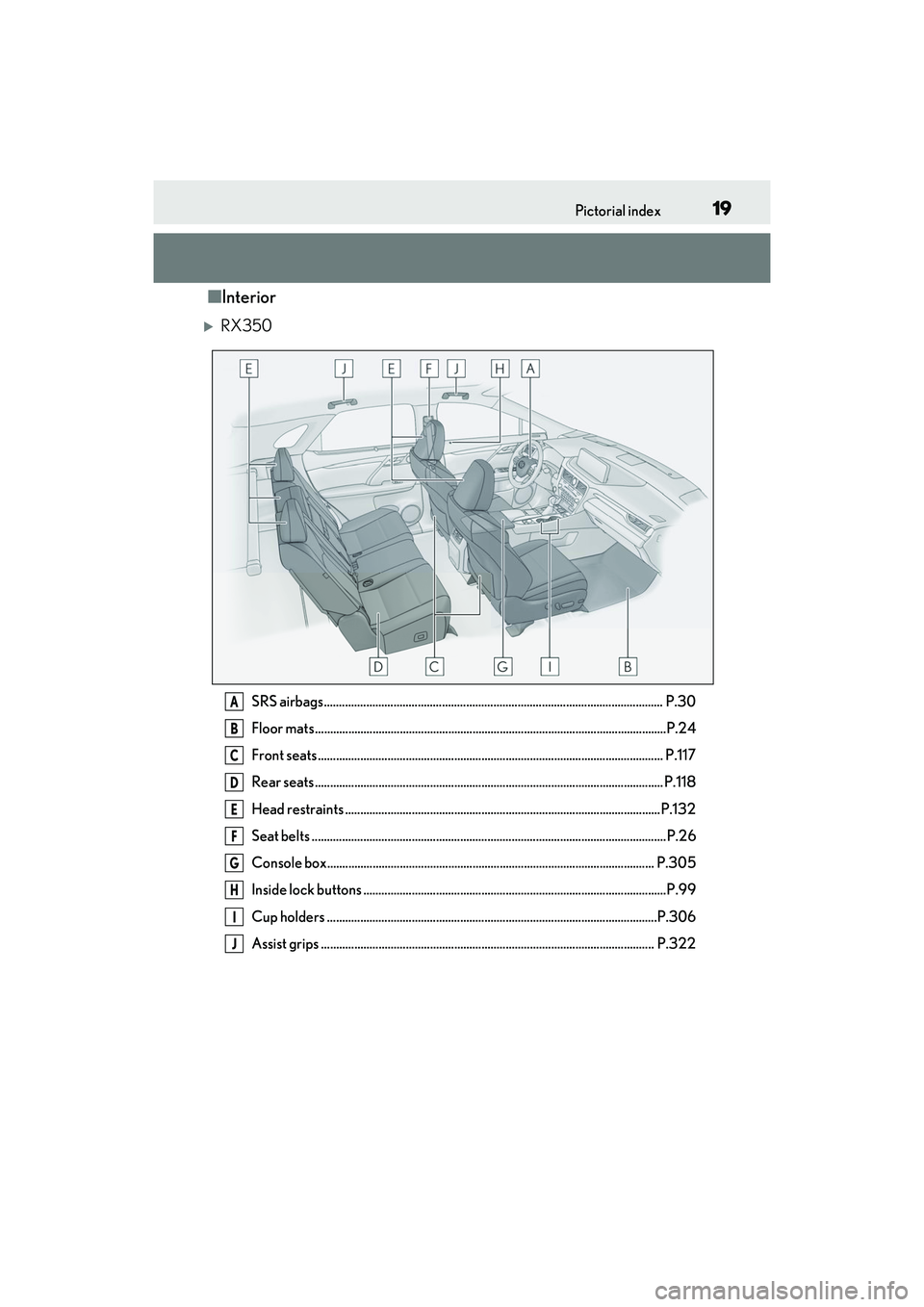
SRS airbags................................................................................................................ P.30
Floor mats ....................................................................................................................P .24
Front seats .................................................................................................................. P. 117
Rear seats ................................................................................................................... P. 118
Head restraints ........................................................................................................P.132
Seat belts ..................................................................................................................... P.26
Console box............................................................................................................ P.305
Inside lock buttons ....................................................................................................P.99
Cup holders .............................................................................................................P.306
Assist grips .............................................................................................................. P.322A
B
C
D
E
F
G
H
I
J
Page 22 of 508
20Pictorial index
RX350L (vehicles with separate-type second-row seats)
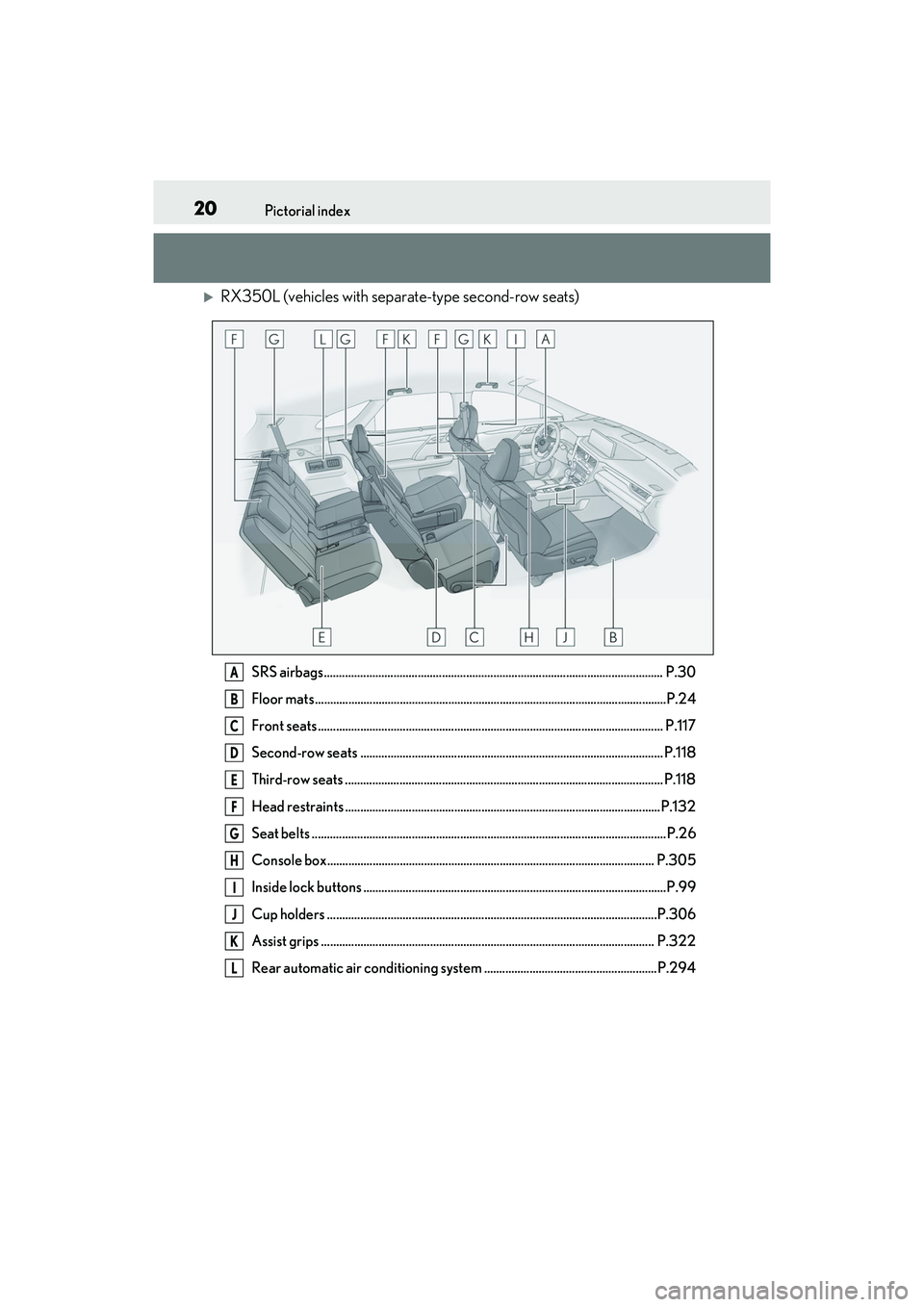
SRS airbags................................................................................................................ P.30
Floor mats ....................................................................................................................P.24
Front seats .................................................................................................................. P. 117
Second-row seats .................................................................................................... P.118
Third-row seats ......................................................................................................... P.118
Head restraints ........................................................................................................P.132
Seat belts ..................................................................................................................... P.26
Console box............................................................................................................ P.305
Inside lock buttons ....................................................................................................P.99
Cup holders .............................................................................................................P.306
Assist grips .............................................................................................................. P.322
Rear automatic air conditioning system .........................................................P.294A
B
C
D
E
F
G
H
I
J
K
L
Page 23 of 508
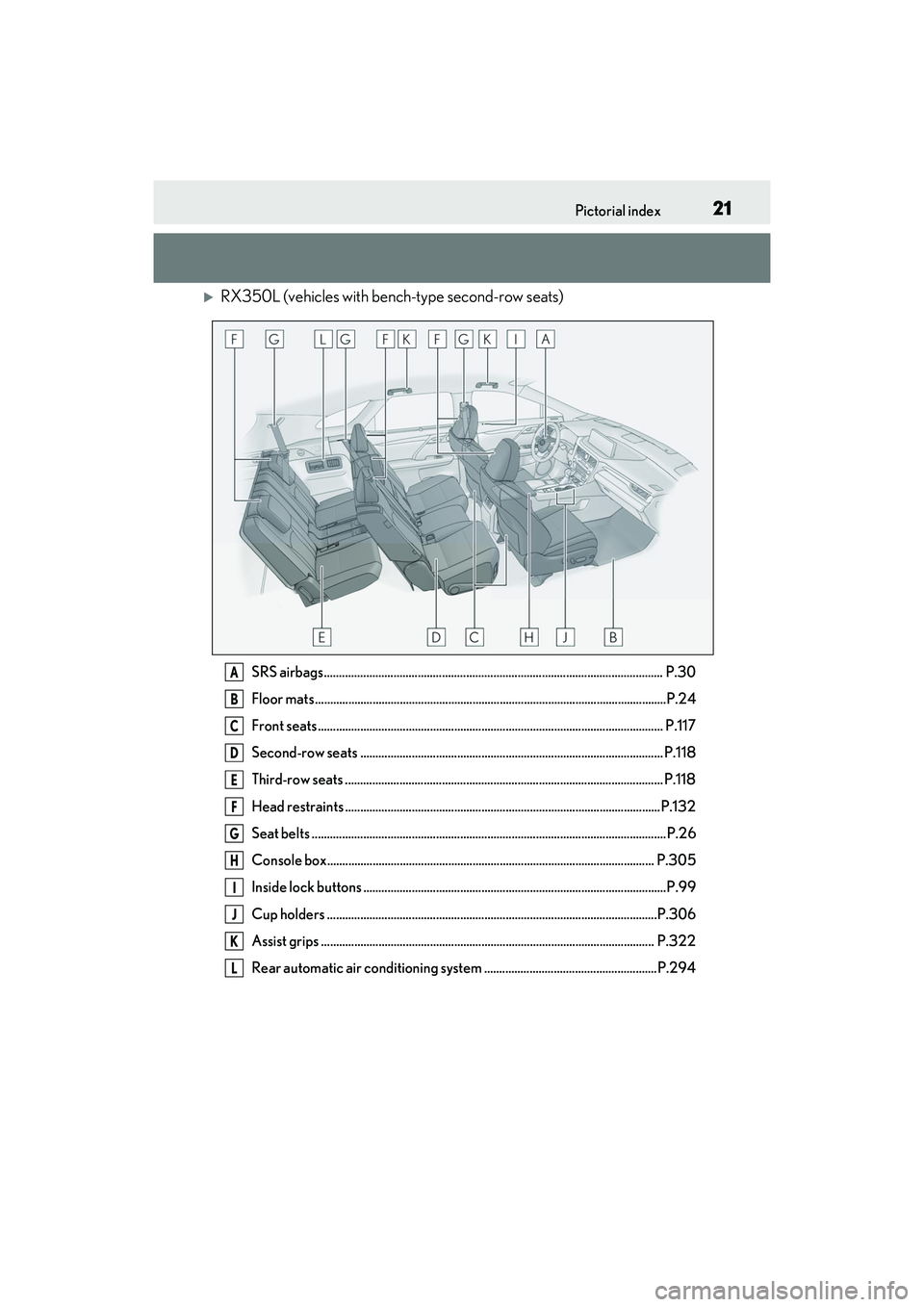
21Pictorial index
RX350L (vehicles with bench-type second-row seats)
SRS airbags................................................................................................................ P.30
Floor mats ....................................................................................................................P .24
Front seats .................................................................................................................. P. 117
Second-row seats .................................................................................................... P.118
Third-row seats ......................................................................................................... P.118
Head restraints ........................................................................................................P.132
Seat belts ..................................................................................................................... P.26
Console box............................................................................................................ P.305
Inside lock buttons ....................................................................................................P.99
Cup holders .............................................................................................................P.306
Assist grips .............................................................................................................. P.322
Rear automatic air conditioning system .........................................................P.294A
B
C
D
E
F
G
H
I
J
K
L
Page 98 of 508
963-1. Key information
the release button and take the key out.
The mechanical key can only be inserted in
one direction, as the key only has grooves
on one side. If the key cannot be inserted in
a lock cylinder, turn it over and re-attempt
to insert it.
After using the mechanical key, store it in
the electronic key. Carry the mechanical
key together with the electronic key. If the
electronic key battery is depleted or the
entry function does not operate properly,
you will need the mechanical key.
( P.421)
■When required to leave the vehicle’s
key with a parking attendant
Lock the glove box as circumstances
demand. ( P.305)
Remove the mechanical key for your own
use and provide the attendant with the elec-
tronic key only.
■If you lose your mechanical keys
P.419
■If a wrong key is used
The key cylinder rotates freely, isolated
from the internal mechanism.
Page 305 of 508
3035-5. Using the storage features
5
Interior features
5-5.Using the storage features
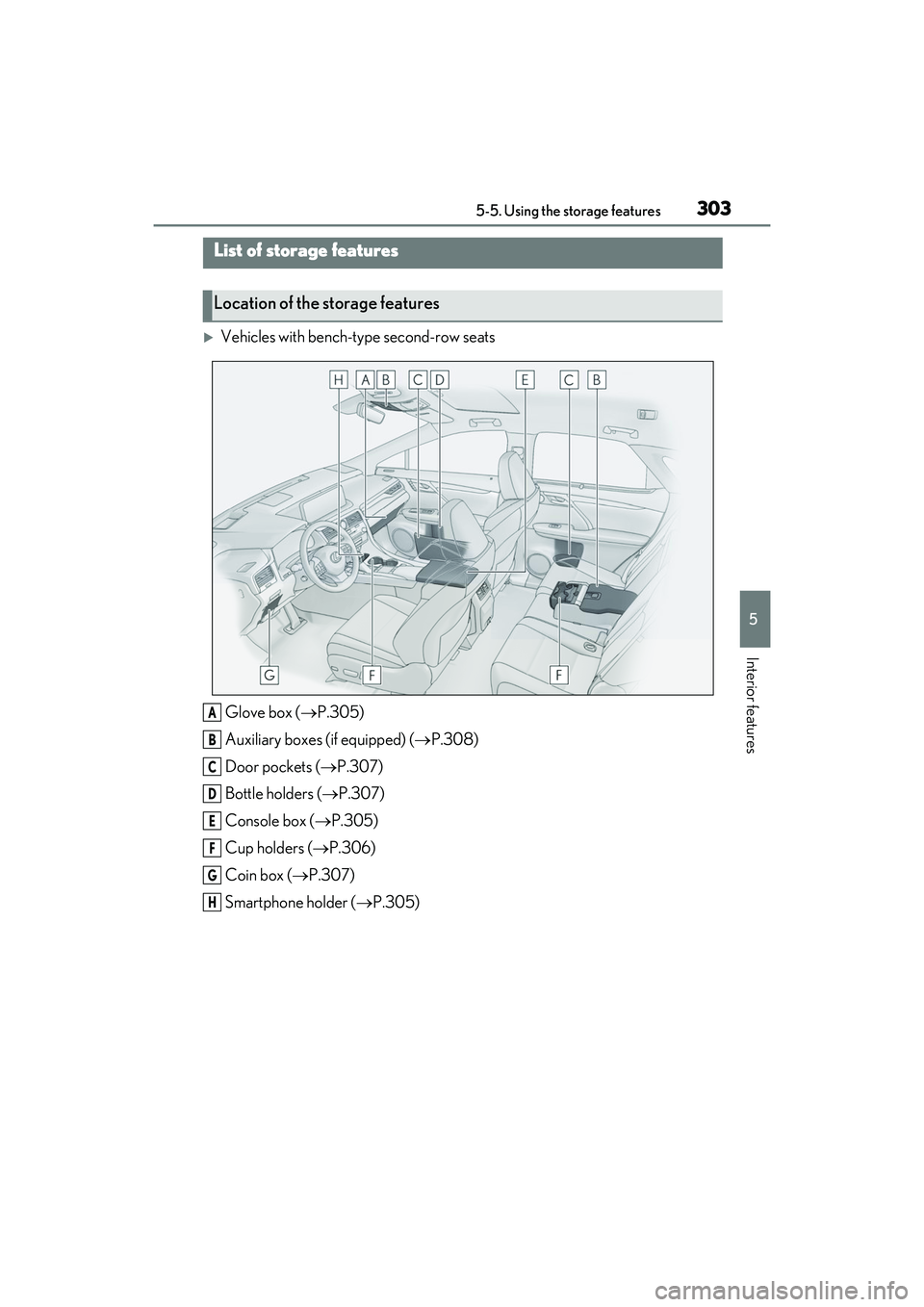
Vehicles with bench-type second-row seatsGlove box ( P.305)
Auxiliary boxes (if equipped) ( P.308)
Door pockets ( P.307)
Bottle holders ( P.307)
Console box ( P.305)
Cup holders ( P.306)
Coin box ( P.307)
Smartphone holder ( P.305)
List of storage features
Location of the storage features
A
B
C
D
E
F
G
H
Page 306 of 508
3045-5. Using the storage features
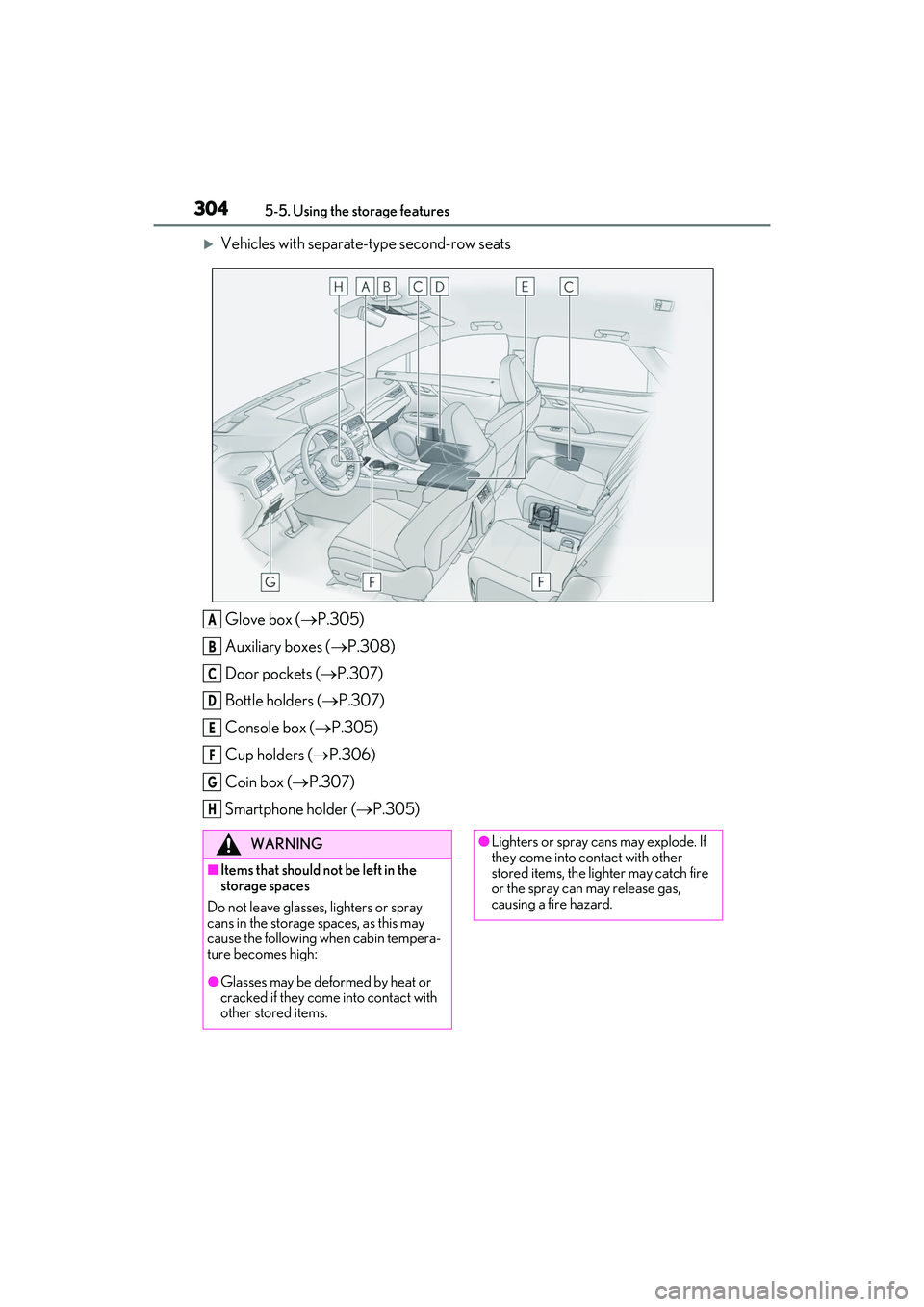
Vehicles with separate-type second-row seatsGlove box ( P.305)
Auxiliary boxes ( P.308)
Door pockets ( P.307)
Bottle holders ( P.307)
Console box ( P.305)
Cup holders ( P.306)
Coin box ( P.307)
Smartphone holder ( P.305)
A
B
C
D
E
F
G
H
WARNING
■Items that should not be left in the
storage spaces
Do not leave glasses, lighters or spray
cans in the storage spaces, as this may
cause the following when cabin tempera-
ture becomes high:
●Glasses may be deformed by heat or
cracked if they come into contact with
other stored items.
●Lighters or spray ca ns may explode. If
they come into contact with other
stored items, the lighter may catch fire
or the spray can may release gas,
causing a fire hazard.
Page 307 of 508
3055-5. Using the storage features
5
Interior features
1Open (press the button)
2 Unlock with the mechanical key
3 Lock with the mechanical key
■Glove box light
The glove box light turns on when the tail
lights are on.
■When cleaning the interior
Remove to clean it.
When installing , engage the left and
right claws and then engage the center
claw.
Push the knob.
Lift by hand to fully open the console box.
■Console box light
The console box light turns on when the tail
lights are on.
■Pen holder
A pen can be stored in the pen holder on
the underside of the lid.
WARNING
■When storage compartments are not
in use
When driving or when the storage com-
partments are not in use, keep the lids
closed.
In the event of sudden braking or sudden
swerving, an accident may occur due to
an occupant being struck by an open lid
or the items stored inside.
Glove box
Smartphone holder
Console box
A
A
Page 332 of 508

3305-6. Using the other interior features
blink twice, indicating that 2-way
communication is enabled.
If the indicators do not flash, perform 2 and
3 within the first 10 presses of the
HomeLink
® button after programming
has been completed.
2 Press a programmed HomeLink®
button to operate a garage door.
3 Within 1 minute of pressing the
HomeLink
® button, after the
garage door operation has
stopped, press the “Learn” or
“Smart” button on the garage door
opener motor. Within 5 seconds of
the establishment of 2-way com-
munication with the garage door
opener, both garage door opera-
tion indicators in the vehicle will
flash rapidly (green) and the light
on the garage door opener motor
will blink twice, indicating that
2-way communication is enabled.
■Reprogramming a single
HomeLink
® button
When the following procedure is per-
formed, buttons which already have
devices registered to them can be
overwritten:
1 With one hand, press and hold the
desired HomeLink
® button.
2 When the HomeLink
® indicator
starts flashing (orange), continue to
hold the HomeLink
® button and
perform “Programming
HomeLink
®” 1 (it takes 20 seconds
for the HomeLink
® indicator to
start flashing).
■Before programming
●Install a new battery in the transmitter.
●The battery side of the transmitter must
be pointed away from the HomeLink®.
Press the appropriate HomeLink®
button. The HomeLink
® indicator light
should turn on.
The status of the opening and closing
of a garage door is shown by the indi-
cators.
Opening
Closing
This function is only available if the garage
door opener motor used is a compatible
device. (To check de vice compatibility,
refer to www.homelink.com.)
The indicators can operate within
approximately 820 ft. (250 m) of the
Operating HomeLink®
ColorStatus
Orange (flashing)Currently open- ing/closing
GreenOpening/closing has completed
Red (flashing)Feedback signals
cannot be received
A
B