2022 LEXUS RX350 ignition
[x] Cancel search: ignitionPage 319 of 508

3175-6. Using the other interior features
5
Interior features
Blinks (orange) 4 times repeatedly
■The wireless charger can be operated
when
The engine switch is in ACCESSORY or
IGNITION ON mode.
■Portable devices t hat can be charged
●Portable devices compatible with the Qi
wireless charging standard can be
charged by the wireless charger. How-
ever, compatibility with all devices which
meet the Qi wireless charging standard is
not guaranteed.
●The wireless charger is designed to sup-
ply low power electricity (5 W or less) to
a cellular phone, smartphone, or other
portable device.
■If a cover or accessory is attached to the
portable device
Do not charge a portable device if a cover
or accessory which is not Qi compatible is
attached. Depending on the type of cover
and/or accessory attached, it may not be
possible to charge the portable device. If
the portable device is placed on the
charging area and does not charge, remove
the cover and/or accessories.
■If interference is heard in AM radio
broadcasts while charging
Turn off the wireless charger and check if
the noise is reduced. If noise is reduced,
press and hold the power supply switch of
the wireless charger for 2 seconds. The fre-
quency of the wireless charger is changed
and noise may be reduced. When the fre-
quency is changed, the operation indicator
light will blink (orange) 2 times.
■Charging precautions
●If the electronic key cannot be detected
in the cabin, charging cannot be per-
formed. When a door is opened and
closed, charging may be temporarily sus-
pended.
●While charging, the wi reless charger and
the portable device will become warm.
This is not a malfunction. If a portable
device becomes warm while charging
and charging stops du e to the protection
function of the portable device, wait until
the portable device cools down and
charge it again.
■Sound generated during operation
When the power supply switch is turned on
or while a portable device is being identi-
fied, operation sounds may be heard. This is
not a malfunction.
■Cleaning the wireless charger
P.339
Suspected causesMeasure
A foreign object
exists between
the portable
device and
charging area.
Remove the foreign
object.
Portable device is
not positioned
properly on the
charging area.Move the portable
device toward the cen-
ter of the charging
area.
Suspected causesMeasure
The temperature
of the wireless
charger is exces-
sively high.Stop charging immedi-
ately and continue
charging after a while.
Page 326 of 508
3245-6. Using the other interior features
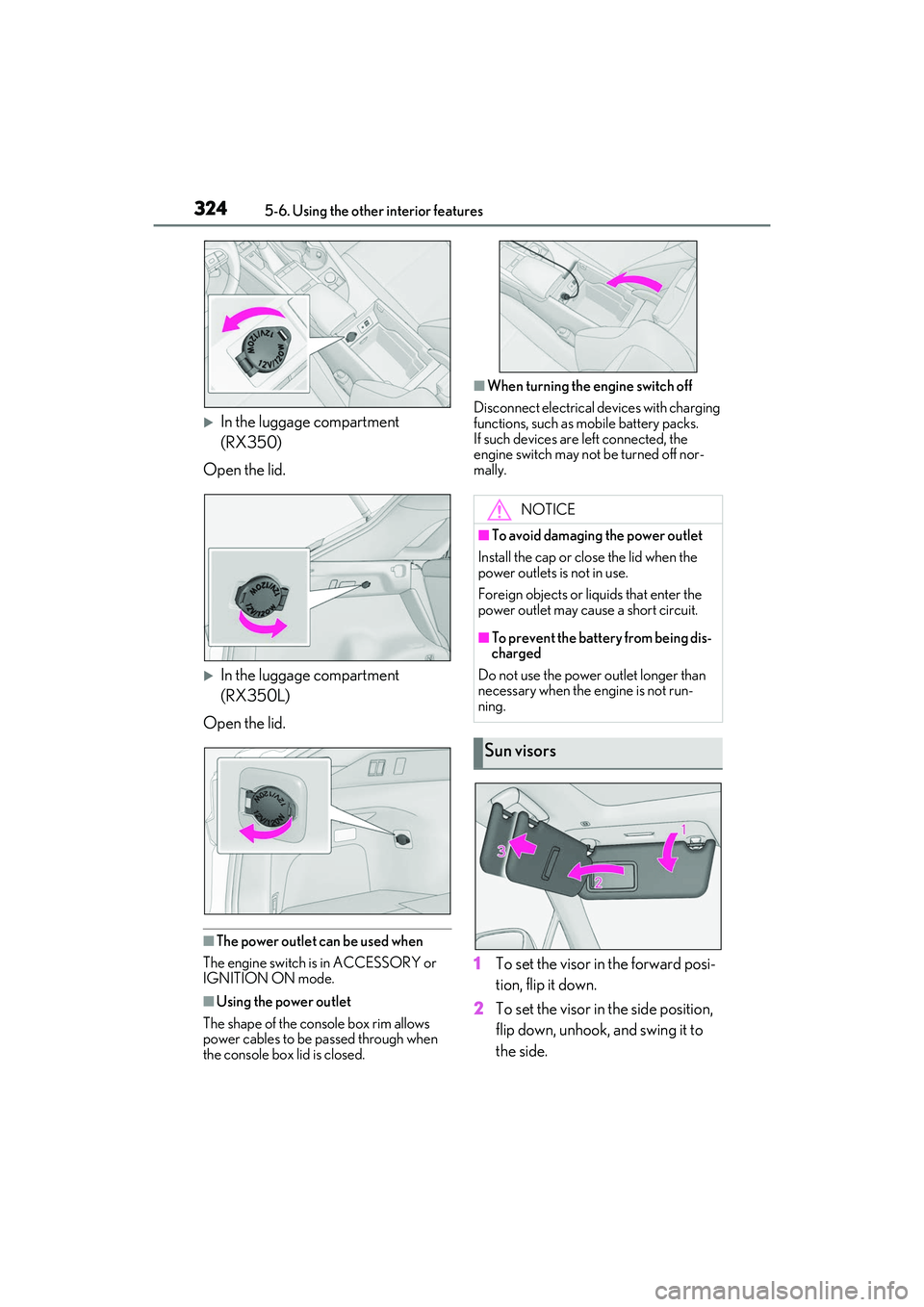
In the luggage compartment
(RX350)
Open the lid.
In the luggage compartment
(RX350L)
Open the lid.
■The power outlet can be used when
The engine switch is in ACCESSORY or
IGNITION ON mode.
■Using the power outlet
The shape of the console box rim allows
power cables to be passed through when
the console box lid is closed.
■When turning the engine switch off
Disconnect electrical devices with charging
functions, such as mobile battery packs.
If such devices are left connected, the
engine switch may not be turned off nor-
mally.
1 To set the visor in the forward posi-
tion, flip it down.
2 To set the visor in the side position,
flip down, unhook, and swing it to
the side.
NOTICE
■To avoid damaging the power outlet
Install the cap or close the lid when the
power outlets is not in use.
Foreign objects or li quids that enter the
power outlet may cause a short circuit.
■To prevent the battery from being dis-
charged
Do not use the power outlet longer than
necessary when the engine is not run-
ning.
Sun visors
Page 350 of 508

3486-3. Do-it-yourself maintenance
Light bulbs
(P.374)
•Bulb with same num-
ber and wattage rat-
ing as original
•Flathead screw- driver
•Wrench
Radiator and con-
denser ( P.354)
Tire inflation pres-
sure (P.363)• Tire pressure gauge
•Compressed air
source
Washer fluid
(P.356)
• Water or washer
fluid containing anti-
freeze (for winter
use)
• Funnel (used only for adding water or
washer fluid)
WARNING
The engine compartment contains many
mechanisms and fluids that may move
suddenly, become hot, or become elec-
trically energized. To avoid death or seri-
ous injury, observe the following
precautions.
■When working on the engine com-
partment
●Keep hands, clothi ng and tools away
from the moving fan and engine drive
belt.
●Be careful not to touch the engine,
radiator, exhaust manifold, etc. right
after driving as they may be hot. Oil
and other fluids may also be hot.
●Do not leave anything that may burn
easily, such as paper and rags, in the
engine compartment.
●Do not smoke, cause sparks or expose
an open flame to fuel or the battery.
Fuel and battery fumes are flammable.
ItemsParts and tools●Be extremely cautious when working
on the battery. It contains poisonous
and corrosive sulfuric acid.
■When working near the electric cool-
ing fan or radiator grille
Be sure the engine switch is off.
With the engine switch in IGNITION
ON mode, the electric cooling fan may
automatically start to run if the air condi-
tioning is on and/or the coolant tempera-
ture is high. ( P.354)
■Safety glasses
Wear safety glasses to prevent flying or
falling material, fluid spray, etc. from get-
ting in your eyes.
NOTICE
■If you remove the air cleaner filter
Driving with the air cleaner filter
removed may cause excessive engine
wear due to dirt in the air.
Page 364 of 508

3626-3. Do-it-yourself maintenance
Make sure to adjust the tire pressure to the
specified cold tire infl ation pressure level.
The tire pressure warning system will oper-
ate based on this pressure level.
3 Turn the engine switch to IGNI-
TION ON mode.
4 Select on the multi-information
display.
5 Press or of the meter con-
trol switch, select the “Vehicle Set-
tings” screen and then press the
.
6 Press or of the meter con-
trol switch, select the “TPMS”
screen and then press and hold the
until the tire pressure warn-
ing light blinks slowly 3 times.
“- -” will be displayed for inflation pressure
of each tire on the multi-information dis-
play while the tire pressure warning system
determines the position of each tire.
7 Drive the vehicle at approximately
25 mph (40 km/h) or more for
approximately 10 to 30 minutes
until the inflation pressure of each
tire is displayed on the multi-infor-
mation display.
When position of each tire is determined,
the inflation pressure of each tire will be
displayed on the multi-information display.
If tire inflation pr essure becomes low before the inflation pressure is displayed,
the tire pressure warning light will come
on.
Depending on the vehicle and driving con-
ditions, initialization may take up to
approximately 1 hour to complete.
■Initializing the tire pressure warning sys-
tem
Initialize the system with the tire inflation
pressure adjusted to the specified level.
■If you press the tire pressure warning
reset switch accidentally
If initialization is perf ormed, adjust the tire
inflation pressure to the specified level and
initialize the tire pres sure warning system
again.
■Initialization procedure
●Make sure to carry out initialization after
adjusting the tire inflation pressure.
Also, make sure the tires are cold before
carrying out initialization or tire inflation
pressure adjustment.
●If you have accidentally turned the engine
switch off during initialization, it is not
necessary to press the reset switch again
as initialization will restart automatically
when the engine switch has been turned
to IGNITION ON mode for the next
time.
●If you accidentally press the reset switch
when initialization is not necessary, adjust
the tire inflation pressure to the specified
level when the tires are cold, and conduct
initialization again.
●While the position of each tire is being
determined and the inflation pressures
are not being displayed on the
multi-information display, if the inflation
pressure of a tire drops, the tire pressure
warning light will come on.
■When initialization of the tire pressure
warning system has failed
Initialization may take longer to complete if
the vehicle is driven on an unpaved road.
When performing initialization, drive on a
paved road if possible. Depending on the
driving environment and condition of the
tires, initialization will be completed in
Page 392 of 508

3907-2. Steps to take in an emergency
vehicle, the towing eyelet must be
installed to your vehicle. Install the tow-
ing eyelet using the following proce-
dure.
1 Take out the towing eyelet.
( P.407)
2 Remove the eyelet cover.
Except F SPORT models
F SPORT models
3 Insert the towing eyelet into the
hole and tighten partially by hand. 4
Tighten down the towing eyelet
securely using a wheel nut wrench
or hard metal bar.
5 Securely attach cables or chains to
the towing eyelet.
Take care not to damage the vehicle body.
6Enter the vehicle being towed and
start the engine.
If the engine does not start, turn the engine
switch to IGNITION ON mode.
7Shift the shift lever to N and release
the parking brake.
Turn automatic mode off. (P.180)
When the shift lever cannot be shifted:
P.175
■While towing
If the engine is not running, the power assist
for the brakes and steer ing will not function,
making steering and braking more difficult.
■Wheel nut wrench
Wheel nut wrench is installed in luggage
compartment. ( P.407)
Page 398 of 508
3967-2. Steps to take in an emergency
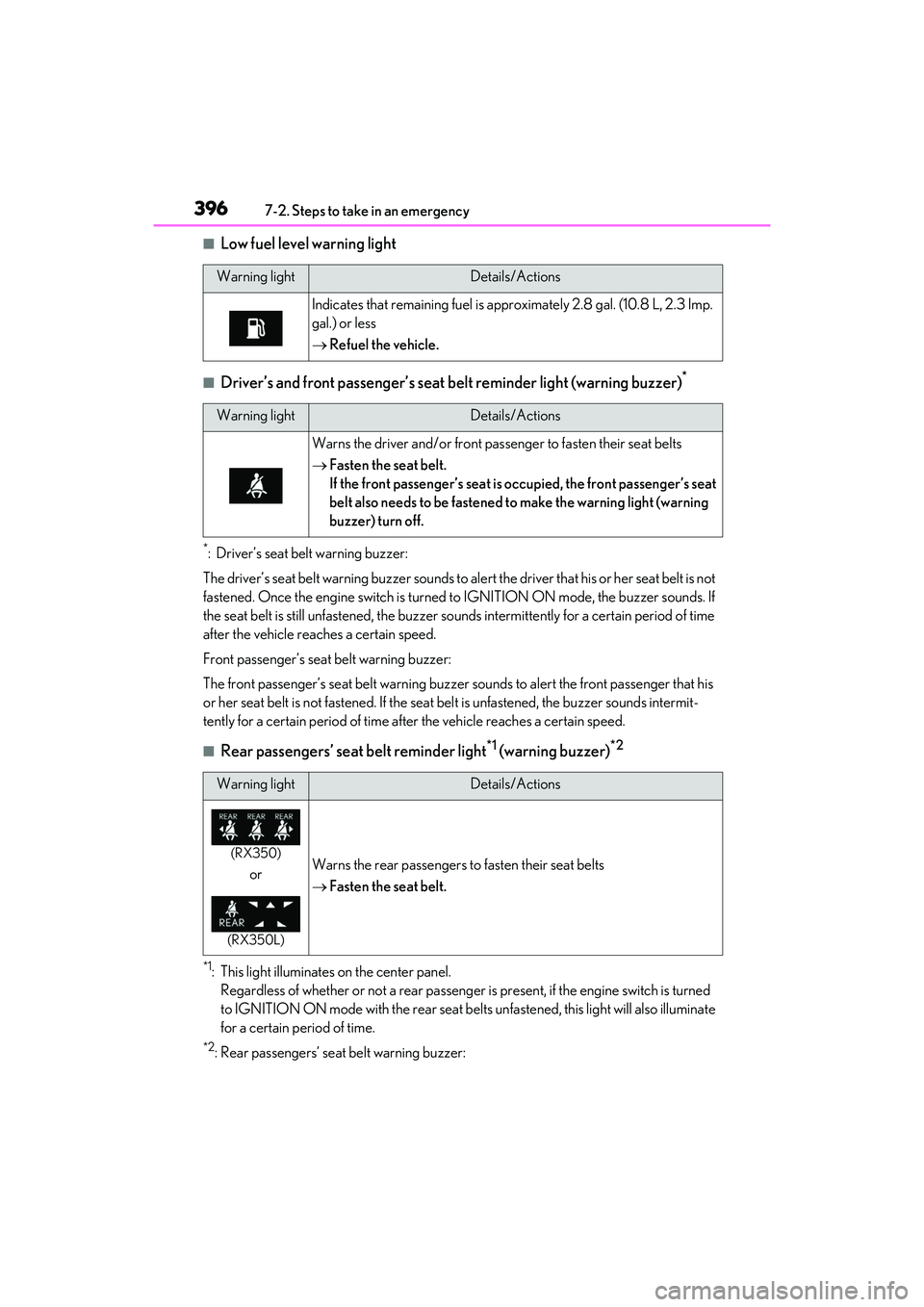
■Low fuel level warning light
■Driver’s and front passenger’s seat belt reminder light (warning buzzer)*
*: Driver’s seat belt warning buzzer:
The driver’s seat belt warning buzzer sounds to alert the driver that his or her seat belt is not
fastened. Once the engine switch is turned to IGNITION ON mode, the buzzer sounds. If
the seat belt is still unfastened, the buzzer sounds intermittently for a certain period of time
after the vehicle reaches a certain speed.
Front passenger’s seat belt warning buzzer:
The front passenger’s seat belt warning buzzer sounds to alert the front passenger that his
or her seat belt is not fastened. If the seat belt is unfastened, the buzzer sounds intermit-
tently for a certain period of time af ter the vehicle reaches a certain speed.
■Rear passengers’ seat belt reminder light*1 (warning buzzer)*2
*1: This light illuminates on the center panel.
Regardless of whether or not a rear passenger is present, if the engine switch is turned
to IGNITION ON mode with the rear seat belts unfastened, this light will also illuminate
for a certain period of time.
*2: Rear passengers’ seat belt warning buzzer:
Warning lightDetails/Actions
Indicates that remaining fu el is approximately 2.8 gal. (10.8 L, 2.3 Imp.
gal.) or less
Refuel the vehicle.
Warning lightDetails/Actions
Warns the driver and/or front passenger to fasten their seat belts
Fasten the seat belt.
If the front passenger’s seat is occupied, the front passenger’s seat
belt also needs to be fastened to make the warning light (warning
buzzer) turn off.
Warning lightDetails/Actions
(RX350)
or
(RX350L)
Warns the rear passengers to fasten their seat belts
Fasten the seat belt.
Page 402 of 508

4007-2. Steps to take in an emergency
The light will go off after several driving
trips.
If the light does not go off even after several
trips, contact your Lexus dealer as soon as
possible.
■Electric power steering system warning
light (warning buzzer)
When the battery charge becomes insuffi-
cient or the voltage temporarily drops, the
electric power steeri ng system warning
light may come on and the warning buzzer
may sound.
■When the tire pressure warning light
comes on
Inspect the tires to check if a tire is punc-
tured.
If a tire is punctured: P.406
If none of the tires are punctured:
Turn the engine switch off then turn it to
IGNITION ON mode. Check if the tire
pressure warning light comes on or blinks.
If the tire pressure wa rning light blinks for
1 minute then stays on
There may be a malfunction in the tire
pressure warning system. Have the vehicle
inspected by your Lexus dealer immedi-
ately.
If the tire pressure warning light comes
on
1 After the temperature of the tires has
lowered sufficiently, check the inflation
pressure of each tire and adjust them to
the specified level.
2 If the warning light does not turn off
even after several minutes have
elapsed, check that the inflation pres-
sure of each tire is at the specified level
and perform initialization. ( P.361)
If the warning light does not turn off several
minutes after the initia lization has been per-
formed, have the vehicle inspected by your
Lexus dealer immediately.
■The tire pressure warning light may
come on due to natural causes
The tire pressure warning light may come
on due to natural causes such as natural air
leaks and tire inflation pressure changes
caused by temperature. In this case, adjust-ing the tire inflation pressure will turn off the
warning light (after a few minutes).
■When a tire is replaced with a spare tire
The compact spare tire is not equipped with
a tire pressure warning valve and transmit-
ter. If a tire goes flat , the tire pressure warn-
ing light will not turn off even though the flat
tire has been replaced with the spare tire.
Replace the spare tire with the repaired tire
and adjust the tire inflation pressure. The
tire pressure warning light will go off after a
few minutes.
■Conditions that the tire pressure warn-
ing system may not function properly
P.360
■Customization
Some functions can be customized.
( P.449)
WARNING
■If both the ABS and the brake system
warning lights remain on
Stop your vehicle in a safe place immedi-
ately and contact your Lexus dealer.
The vehicle will become extremely
unstable during br aking, and the ABS
system may fail, which could cause an
accident resulting in death or serious
injury.
■When the electric power steering
system warning light comes on
When the light comes on yellow, the
assist to the power st eering is restricted.
When the light comes on red, the assist
to the power steering is lost and handling
operations of the steering wheel become
extremely heavy.
When steering wheel operations are
heavier than usual, grip the steering
wheel firmly and operate it using more
force than usual.
Page 424 of 508

4227-2. Steps to take in an emergency
■Key linked functions
1 Closes the windows and the moon
roof
* or panoramic moon roof* (turn
and hold)
2 Opens the windows and the moon
roof
* or panoramic moon roof* (turn
and hold)
These settings must be customized at your
Lexus dealer.
*:If equipped
1 Ensure that the shift lever is in P and
depress the brake pedal.
2 Touch the Lexus emblem side of the
electronic key to the engine switch.
When the electronic key is detected, a
buzzer sounds and the engine switch will
turn to IGNITION ON mode. When the smart access system with
push-button start is deactivated in
customization setting,
the engine switch
will turn to ACCESSORY mode.
3 Firmly depress the brake pedal and
check that is shown on the
multi-information display.
4 Press the engine switch shortly and
firmly.
In the event that the engine still cannot
be started, contact your Lexus dealer.
■Stopping the engine
Shift the shift lever to P, set the parking
brake, and press the engine switch as you
normally do when st opping the engine.
■Replacing the key battery
As the above procedure is a temporary
measure, it is recommended that the elec-
tronic key battery be replaced immediately
when the battery is depleted. ( P.369)
■Alarm (For Canada)
Using the mechanical key to lock the doors
will not set the alarm system.
If a door is unlocked using the mechanical
key when the alarm system is set, the alarm
may be triggered. ( P.67)
■Changing engine switch modes
Release the brake pe dal and press the
engine switch in step 3 above. The engine
does not start and modes will be changed
each time the switch is pressed. ( P.173)
WARNING
■When using the mechanical key and
operating the power windows or the
moon roof or panoramic moon roof
Operate the power window or the moon
roof or panoramic moon roof after
checking to make sure that there is no
possibility of any passe nger having any of
their body parts caught in the window or
the moon roof or panoramic moon roof.
Also, do not allow ch ildren to operate the
mechanical key. It is possible for children
and other passengers to get caught in
the power window or the moon roof or
panoramic moon roof.
Starting the engine