2022 LEXUS RX350 ignition
[x] Cancel search: ignitionPage 248 of 508

2464-5. Using the driving support systems
Use the meter control switches to
enable/disable the RCTA function.
( P.80)
Vehicles without the Intuitive park-
ing assist
1 Press or to select .
2 Press or to select “RCTA”
and then press .
When the RCTA function is disabled, the
RCTA OFF indicator ( P.70) illuminates
on the multi-information display. (Each
time the engine switch is turned off then
changed to IGNITION ON mode, the
RCTA function will be enabled automati-
cally.)
Vehicles with the Intuitive parking
assist
1 Press or to select .
2 Press or to select “PKSA”
and then press .
3 Press or to select “RCTA”
and then press .
When the RCTA function is disabled, the RCTA OFF indicator (
P.70) illuminates
on the multi-informat ion display. (Each
time the engine switch is turned off then
changed to IGNITION ON mode, the
RCTA function will be enabled automati-
cally.)
■Outside rear view mirror indicator visi-
bility
In strong sunlight, the outside rear view mir-
ror indicator may be difficult to see.
■Hearing the RCTA buzzer
The RCTA buzzer may be difficult to hear
over loud noises, such as if the audio system
volume is high.
■When “Rear Cross Traffic Alert
Unavailable” is shown on the
multi-information display
W a t e r , i c e , s n o w , m u d , etc., may be attached
to the rear bumper around the sensors.
( P.233) Removing the water, ice, snow,
mud, etc., from the attached to the rear
bumper around the se nsors to return the
function to normal.
Additionally, the func tion may not operate
normally when driving in extremely hot or
cold environments.
■Rear side radar sensors
P.233
■Operation of the RCTA function
The RCTA function uses rear side radar sensors to detect vehicles approaching
from the right or left at the rear of the ve hicle and alerts the driver of the presence
of such vehicles by flashing the outside rear view mirror indicators and sounding a
buzzer.
Turning the RCTA function
on/off
NOTICE
■Before using the RCTA function
Do not place objects near the sensors.
RCTA function
Page 250 of 508

2484-5. Using the driving support systems
The buzzer can alert the driver of
faster vehicles approaching from far-
ther away.
Example:
■The RCTA function is operational when
The RCTA function operates when all of the
following conditions are met:
●The engine switch is in IGNITION ON
mode.
●The RCTA function is on.
●The shift lever is in R.
●The vehicle speed is approximately 5
mph (8 km/h) or less.
●The approaching vehicle speed is
between approximately 5 mph (8 km/h)
and 18 mph (28 km/h).
■Setting the buzzer volume
The buzzer volume can be adjusted on the
multi-information display. ( P.236)
Use the meter control switches to change
settings. ( P.80)
■Conditions under which the system will
not detect a vehicle
The RCTA function is not designed to
detect the following types of vehicles and/or objects:
●Vehicles approaching from directly
behind
●Vehicles backing up in a parking space
next to your vehicle
●Vehicles that the sensors cannot detect
due to obstructions
●Guardrails, walls, signs, parked vehicles
and similar stationary objects*
●Small motorcycles, bicycles, pedestrians,
etc.*
●Vehicles moving away from your vehicle
●Vehicles approaching from the parking
spaces next to your vehicle*
●The distance between the sensor and
approaching vehicle gets too close
*: Depending on the conditions, detection
of a vehicle and/or object may occur.
■Situations in which the system may not
operate properly
The RCTA function may not detect vehicles
correctly in the following situations:
●When the sensor is misaligned due to a
strong impact to the sensor or itssur-
rounding area
●When mud, snow, ice, a sticker, etc., is
covering the sensor or surrounding area
Approaching vehi- cle speed Approximate
alert distance
18 mph (28 km/h) (fast)65 ft. (20 m)
5 mph (8 km/h) (slow)18 ft. (5.5 m)
A
Page 254 of 508

2524-5. Using the driving support systems
The Parking Support Brake can be
enabled/disabled on the multi-informa-
tion display. All of the Parking Support
Brake functions (static objects and
rear-crossing vehicles) are
enabled/disabled simultaneously.
Use the meter control switches to enable/disable the parking support
brake. (
P.80)
1 Press or to select .
2 Press or to select
and then press .
When the Parking Support Brake is dis-
abled, the PKSB OFF indicator ( P.70)
illuminates on the multi-information dis-
play.
To re-enable the system when it was dis-
abled, select on the multi-information
display, select and turn it on. If the
system is disabled, it wi ll remain off even if
the engine switch is turned to IGNITION
ON mode after the engine switch has
been turned off.
If the engine output restriction control or
brake control operates, a buzzer will sound
and a message will be displayed on the
Center Display and multi-information dis-
play, to alert the driver. On vehicles with a
head-up display, the head-up display (if
equipped) will displa y the same message
as the multi-information display.
Depending on the situat ion, engine output
restriction control will operate to either
limit acceleration or restrict output as
much as possible.
Engine output restriction control is
operating (acceleration restriction)
Acceleration greater than a certain
amount is restricted by the system.
Center Display (Panoramic view monitor)
(If equipped): No warning displayed
Multi-information display: “Object
Detected Acceleration Reduced”
WARNING
●When using automatic car washing
devices
●If the vehicle cannot be driven in a sta-
ble manner, such as when the vehicle
has been in an accident or is malfunc-
tioning
●When the vehicle is driven in a sporty
manner or off-road
●When the tires are not properly
inflated
●When the tires are very worn
●When a tire chains, compact spare tire
or an emergency tire puncture repair
kit is used
NOTICE
■If “Parking Support Brake Unavail-
able” is displayed on the multi-infor-
mation display and the PKSB OFF
indicator is flashing
If this message is displayed immediately
after the engine switch is changed to
IGNITION ON mode, operate the vehi-
cle carefully, paying attention to your
surroundings. It ma y be necessary to
drive the vehicle for a certain amount of
time before the system returns to normal.
(If the system is not return to normal after
driving for a while, clean the sensors and
their surrounding area on the bumpers.)
Enabling/Disabling the Parking
Support Brake
Displays and buzzers for engine
output restriction control and
brake control
Page 266 of 508
2644-5. Using the driving support systems
economy through moderate throttle char-
acteristics and by controlling the operation
of the air conditioning system (heat-
ing/cooling).
When not in Eco drive mode, if the driving
mode select switch is turned to the left, the
Eco drive mode indicator will come on.
3 Sport mode
Controls the transmission and engine to
provide quick, powerful acceleration. This
mode also changes the steering feel, mak-
ing it suitable for when agile driving
response is desired, such as when driving
on roads with many curves.
When not in sport mode, if the driving
mode select switch is turned to the right,
the “Sport” indicator will comes on.
■Operation of the air conditioning sys-
tem in Eco drive mode
Eco drive mode contro ls the heating/cool-
ing operations and fan speed of the air con-
ditioning system to enhance fuel efficiency.
To improve air condit ioning performance,
adjust the fan speed or turn off Eco drive
mode.
■Automatic deactivation of sport mode
and custom mode
If the engine switch is turned off after driv-
ing in sport mode or custom mode, the
drive mode will be changed to normal
mode.
■Driving mode pop-up display (12.3-inch
display only)
When the driving mode is changed, the
selected driving mode will be temporarily
displayed on the side display. (P.280)
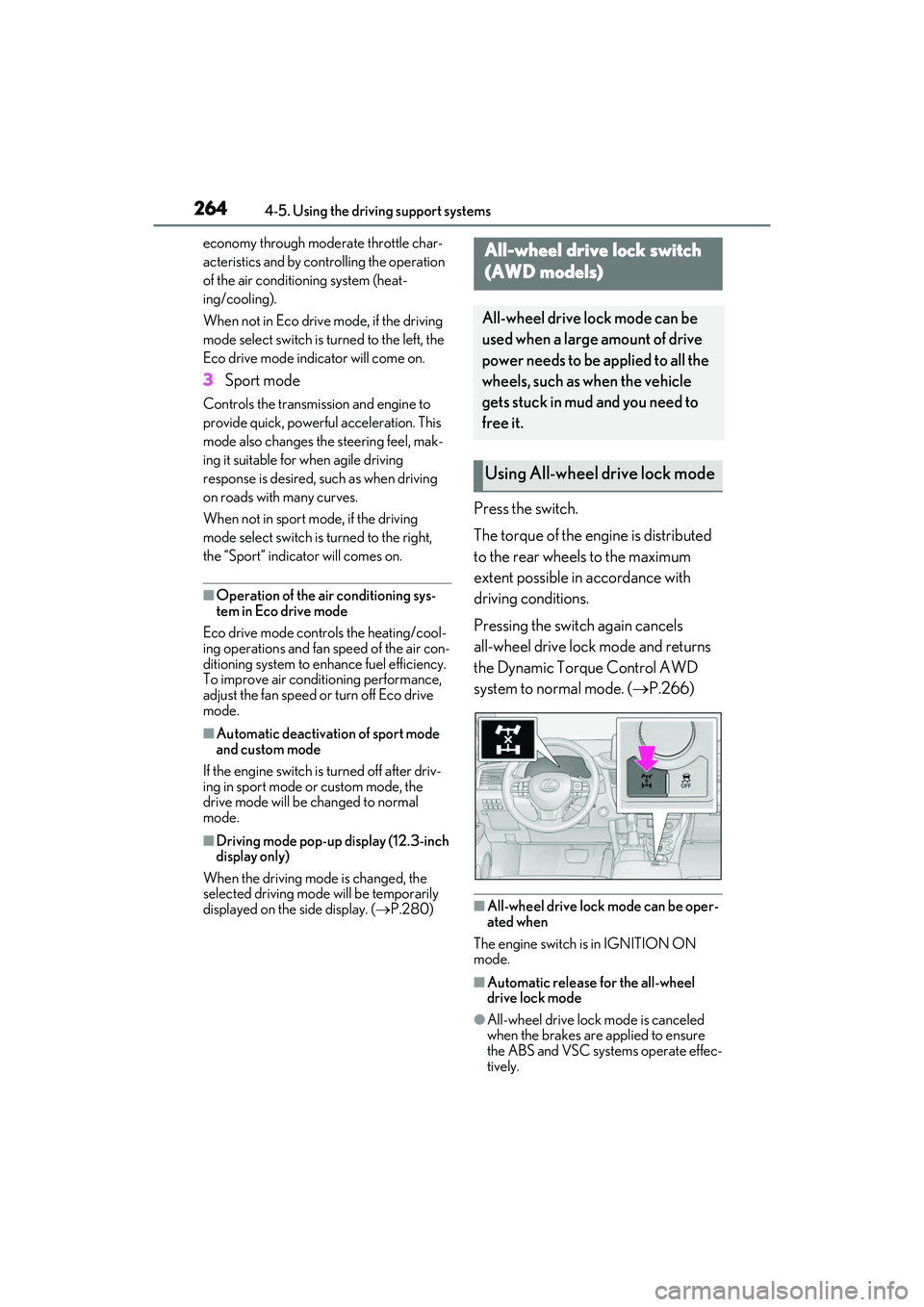
Press the switch.
The torque of the engine is distributed
to the rear wheels to the maximum
extent possible in accordance with
driving conditions.
Pressing the switch again cancels
all-wheel drive lock mode and returns
the Dynamic Torque Control AWD
system to normal mode. ( P.266)
■All-wheel drive lock mode can be oper-
ated when
The engine switch is in IGNITION ON
mode.
■Automatic release for the all-wheel
drive lock mode
●All-wheel drive lock mode is canceled
when the brakes are applied to ensure
the ABS and VSC systems operate effec-
tively.
All-wheel drive lock switch
(AWD models)
All-wheel drive lock mode can be
used when a large amount of drive
power needs to be applied to all the
wheels, such as when the vehicle
gets stuck in mud and you need to
free it.
Using All-wheel drive lock mode
Page 288 of 508

2865-3. Using the air conditioning system and defogger
(outside air mode) modes each
time the button is pressed.
When the system is switched to automatic
mode, the air conditioni ng system operates
automatically.
■Defogging the windshield
Defoggers are used to defog the wind-
shield and front side windows.
Press the windshield defogger switch.
Set the outside/recirc ulated air mode but-
ton to outside air mode if the recirculated
air mode is used. (It may switch automati-
cally.)
To defog the windshield and the side win-
dows early, turn the air flow and tempera-
ture up.
To return to the previous mode, press the
windshield defogger switch again when the
windshield is defogged.
■Defogging the rear window and
outside rear view mirrors
Defoggers are used to defog the rear
window, and to remove raindrops, dew
and frost from the outside rear view
mirrors.
Press the rear window and outside rear
view mirror defoggers switch.
The defoggers will auto matically turn off
after a period of time.
■Windshield wiper de-icer (if
equipped)
P.291
■When the outside temperature exceeds
75°F (24°C) and the air conditioning
system is on
●In order to reduce the air conditioning
power consumption, the air conditioning
system may switch to recirculated air mode automatically. This may also
reduce fuel consumption.
●Recirculated air mode is selected as a
default mode when the engine switch is
turned to IGNITION ON mode.
●It is possible to switch to outside air mode
at any time by pressing the outside/recir-
culated air mode switch.
■Fogging up of the windows
The windows will easily fog up when the
humidity in the vehicle is high. Selecting
“A/C” on will dehumidify the air from the
outlets and defog the windshield effectively.
●If you turn “A/C” off, the windows may fog
up more easily.
●The windows may fog up if the recircu-
lated air mode is used.
■When driving on dusty roads
Close all windows. If dust thrown up by the
vehicle is still drawn into the vehicle after
closing the windows, it is recommended
that the air intake mode be set to outside air
mode and the fan speed to any setting
except off.
■Outside/recirculated air mode
●Setting to the recirculated air mode tem-
porarily is recommended in preventing
dirty air from entering the vehicle interior
and helping to cool the vehicle when the
outside air temperature is high.
●Outside/recirculated air mode may auto-
matically switch depending on the tem-
perature setting or the inside
temperature.
■Registering air conditioning settings to
electronic keys (vehicles with driving
position memory)
●Unlocking the vehicle using an electronic
key and turning the engine switch to
IGNITION ON mode will recall that
key’s registered air conditioning settings.
●When the engine switch is turned off, the
current air conditioning settings will auto-
matically be registered to the electronic
key that was used to unlock the vehicle.
●The system may not operate correctly if
more than one electronic key is in the
vicinity or if the smart access system with
Page 300 of 508
2985-3. Using the air conditioning system and defogger
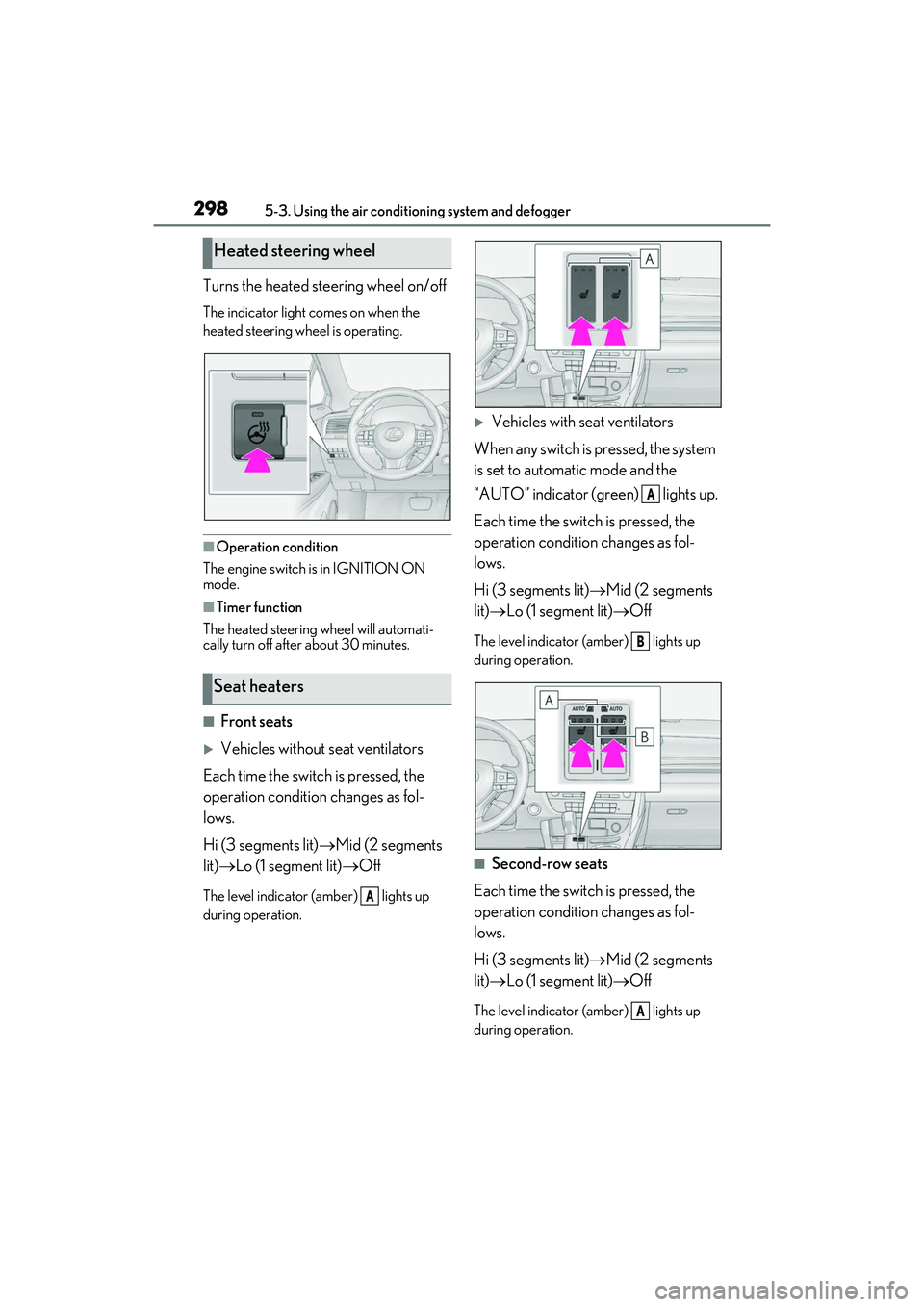
Turns the heated steering wheel on/off
The indicator light comes on when the
heated steering wheel is operating.
■Operation condition
The engine switch is in IGNITION ON
mode.
■Timer function
The heated steering wheel will automati-
cally turn off after about 30 minutes.
■Front seats
Vehicles without seat ventilators
Each time the switch is pressed, the
operation condition changes as fol-
lows.
Hi (3 segments lit) Mid (2 segments
lit) Lo (1 segment lit) Off
The level indicator (amber) lights up
during operation.
Vehicles with seat ventilators
When any switch is pressed, the system
is set to automatic mode and the
“AUTO” indicator (green) lights up.
Each time the switch is pressed, the
operation condition changes as fol-
lows.
Hi (3 segments lit) Mid (2 segments
lit) Lo (1 segment lit) Off
The level indicator (amber) lights up
during operation.
■Second-row seats
Each time the switch is pressed, the
operation condition changes as fol-
lows.
Hi (3 segments lit) Mid (2 segments
lit) Lo (1 segment lit) Off
The level indicator (amber) lights up
during operation.
Heated steering wheel
Seat heaters
A
A
B
A
Page 301 of 508
2995-3. Using the air conditioning system and defogger
5
Interior features
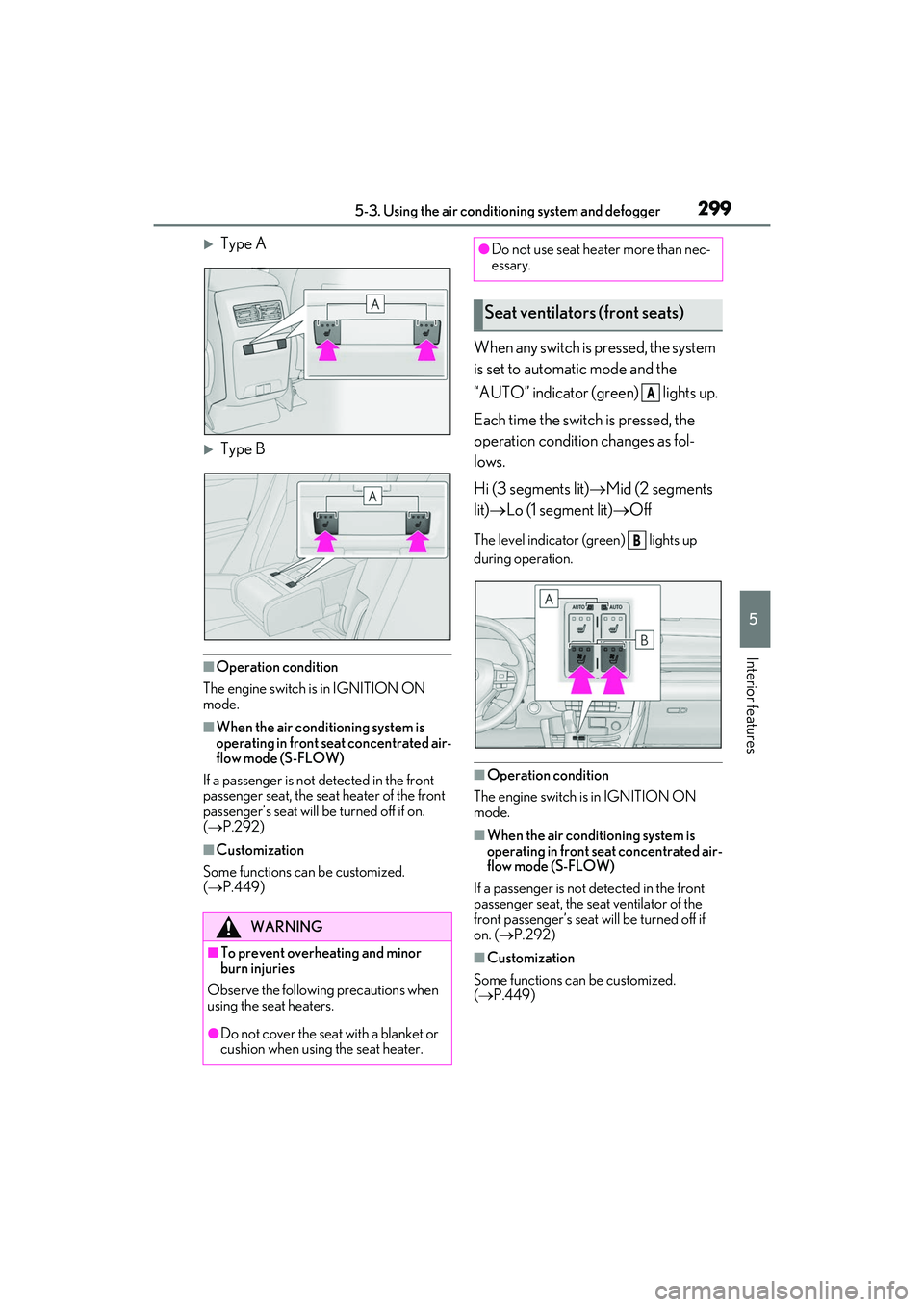
Type A
Type B
■Operation condition
The engine switch is in IGNITION ON
mode.
■When the air conditioning system is
operating in front seat concentrated air-
flow mode (S-FLOW)
If a passenger is not detected in the front
passenger seat, the seat heater of the front
passenger’s seat will be turned off if on.
( P.292)
■Customization
Some functions can be customized.
( P.449)
When any switch is pressed, the system
is set to automatic mode and the
“AUTO” indicator (green) lights up.
Each time the switch is pressed, the
operation condition changes as fol-
lows.
Hi (3 segments lit) Mid (2 segments
lit) Lo (1 segment lit) Off
The level indicator (green) lights up
during operation.
■Operation condition
The engine switch is in IGNITION ON
mode.
■When the air conditioning system is
operating in front seat concentrated air-
flow mode (S-FLOW)
If a passenger is not detected in the front
passenger seat, the se at ventilator of the
front passenger’s seat will be turned off if
on. ( P.292)
■Customization
Some functions can be customized.
( P.449)
WARNING
■To prevent overheating and minor
burn injuries
Observe the following precautions when
using the seat heaters.
●Do not cover the seat with a blanket or
cushion when using the seat heater.
●Do not use seat heater more than nec-
essary.
Seat ventilators (front seats)
A
B
Page 316 of 508
3145-6. Using the other interior features
5-6.Using the other interior features
The USB charging ports are used to
supply 2.1 A of electricity at 5 V to
external devices.
The USB charging ports are for
charging only. They are not designed
for data transfer or other purposes.
Depending on the external device, it
may not charge properly. Refer to the
manual included with the device
before using a USB charging port.
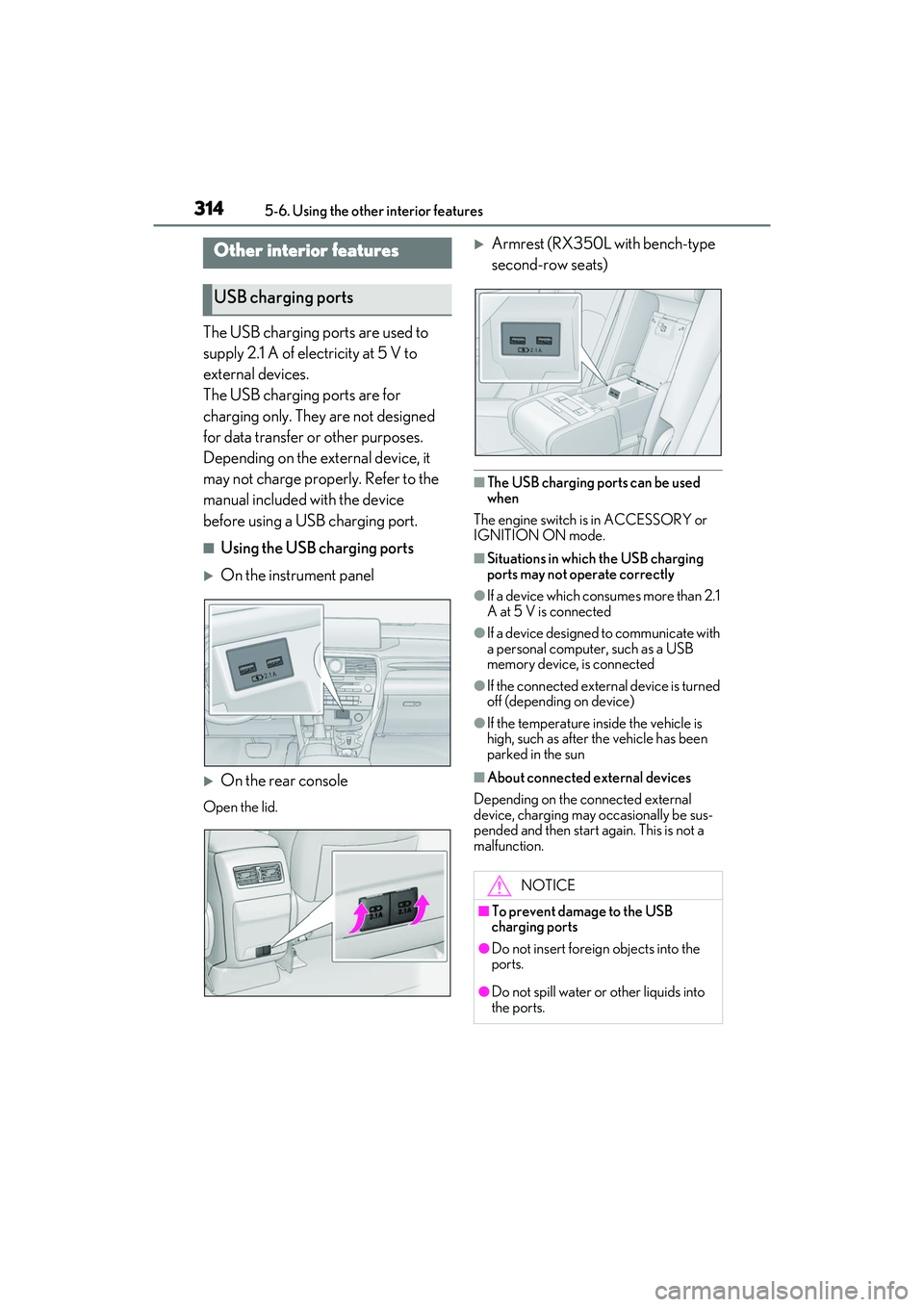
■Using the USB charging ports
On the instrument panel
On the rear console
Open the lid.
Armrest (RX350L with bench-type
second-row seats)
■The USB charging ports can be used
when
The engine switch is in ACCESSORY or
IGNITION ON mode.
■Situations in which the USB charging
ports may not operate correctly
●If a device which consumes more than 2.1
A at 5 V is connected
●If a device designed to communicate with
a personal computer, such as a USB
memory device, is connected
●If the connected external device is turned
off (depending on device)
●If the temperature inside the vehicle is
high, such as after the vehicle has been
parked in the sun
■About connected external devices
Depending on the connected external
device, charging may occasionally be sus-
pended and then start again. This is not a
malfunction.
Other interior features
USB charging ports
NOTICE
■To prevent damage to the USB
charging ports
●Do not insert foreign objects into the
ports.
●Do not spill water or other liquids into
the ports.