2022 LEXUS RX350 Shift
[x] Cancel search: ShiftPage 240 of 508

2384-5. Using the driving support systems
*:If equipped
■Types of sensorsFront corner sensors
Front center sensors
Rear corner sensors
Rear center sensors
■Display
When the sensors detect an object,
such as a wall, a graphic is shown on
the multi-information display, head-up
display (if equipped) and Center Dis-
play depending on the position and dis-
tance to the object.
Multi-information display and head-up display
Front corner sensor detection
Front center sensor detection
Rear corner sensor detection
Rear center sensor detection
Center Display (vehicles with a
Lexus parking assist monitor)
When the R shift lever is selected, a simpli-
fied image is displayed on the Center Dis-
play.
• Vehicles with a 12.3-inch display
When the N, M or D shift lever is selected
(vehicle moving forward), a graphic will be
displayed on the Center Display.
Intuitive parking assist*
The distance from your vehicle to
objects, such as a wall, when paral-
lel parking or maneuvering into a
garage is measured by the sensors
and communicated via the
multi-information display, head-up
display (if equipped), Center Dis-
play and a buzzer. Always check the
surrounding area when using this
system.
System components
A
B
C
D
A
B
C
D
Page 242 of 508

2404-5. Using the driving support systems
■The system can be operated when
●The engine switch is in IGNITION ON
mode.
●Intuitive parking assist function is on.
●The vehicle speed is less than about 6
mph (10 km/h).
●A shift lever other than P.
■Setting the buzzer volume
The buzzer volume can be adjusted on the
multi-information display. ( P.236)
■If “Parking Assist Unavailable” is dis-
played on the multi-information display
●Water may be continuo usly flowing over
the sensor surface, such as in a heavy
rain. When the system determines that it
is normal, the system will return to nor-
mal.
●Initialization may not have been per-
formed after a battery terminal was dis-
connected and reconnec ted. Initialize the system. (
P.240) If this message contin-
ues to be displayed even after initializa-
tion, have the vehicle inspected by your
Lexus dealer.
■If “Parking Assist Unavailable Clean
Parking Assist Sensor” is displayed on
the multi-information display
A sensor may be covered with ice, snow,
dirt, etc. Remove the ice, snow, dirt, etc.,
from the sensor to return the system to nor-
mal.
Also, due to ice forming on a sensor at low
temperatures, a warn ing message may be
displayed or the sensor may not be able to
detect an object. Once the ice melts, the
system will return to normal.
■If a battery terminal has been discon-
nected and reconnected
The system needs to be initialized. To initial-
ize the system, drive the vehicle straight
ahead for 5 seconds or more at a speed of
approximately 22 mph (35 km/h) or more.
■Sensor detection information
The following situations may occur during
use.
●The sensor's detection areas are limited
to the areas around the vehicle front and
rear bumpers.
●Depending on the sh ape of the object
and other factors, the detection distance
may shorten, or detection may be impos-
sible.
●There will be a short delay between
object detection and di splay. Even at low
speeds, there is a possibility that the
object will come wi thin the sensor’s
detection areas befo re the display is
shown and the warning beep sounds.
●It might be difficult to hear the buzzer due
to the volume of the audio system or air
flow noise of the air conditioning system.
●It may be difficult to hear the buzzer if
buzzers for other systems are sounding.
■Objects which the system may not be
properly detected
The shape of the object may prevent the
sensor from detecting it. Pay particular
attention to the following objects:
WARNING
■When to disable the function
In the following situations, disable the
function as it may operate even though
there is no possibility of a collision.
●Failing to observe the warnings above.
●A non-genuine Toyota suspension
(lowered suspension, etc.) is installed.
■Notes when washing the vehicle
Do not apply intensive bursts of water or
steam to the sensor area.
Doing so may result in the sensor mal-
functioning.
●When using a high pressure washer to
wash the vehicle, do not spray the sen-
sors directly, as doing so may cause a
sensor to malfunction.
●When using steam to clean the vehicle,
do not direct steam too close to the
sensors as doing so may cause a sen-
sor to malfunction.
Page 250 of 508

2484-5. Using the driving support systems
The buzzer can alert the driver of
faster vehicles approaching from far-
ther away.
Example:
■The RCTA function is operational when
The RCTA function operates when all of the
following conditions are met:
●The engine switch is in IGNITION ON
mode.
●The RCTA function is on.
●The shift lever is in R.
●The vehicle speed is approximately 5
mph (8 km/h) or less.
●The approaching vehicle speed is
between approximately 5 mph (8 km/h)
and 18 mph (28 km/h).
■Setting the buzzer volume
The buzzer volume can be adjusted on the
multi-information display. ( P.236)
Use the meter control switches to change
settings. ( P.80)
■Conditions under which the system will
not detect a vehicle
The RCTA function is not designed to
detect the following types of vehicles and/or objects:
●Vehicles approaching from directly
behind
●Vehicles backing up in a parking space
next to your vehicle
●Vehicles that the sensors cannot detect
due to obstructions
●Guardrails, walls, signs, parked vehicles
and similar stationary objects*
●Small motorcycles, bicycles, pedestrians,
etc.*
●Vehicles moving away from your vehicle
●Vehicles approaching from the parking
spaces next to your vehicle*
●The distance between the sensor and
approaching vehicle gets too close
*: Depending on the conditions, detection
of a vehicle and/or object may occur.
■Situations in which the system may not
operate properly
The RCTA function may not detect vehicles
correctly in the following situations:
●When the sensor is misaligned due to a
strong impact to the sensor or itssur-
rounding area
●When mud, snow, ice, a sticker, etc., is
covering the sensor or surrounding area
Approaching vehi- cle speed Approximate
alert distance
18 mph (28 km/h) (fast)65 ft. (20 m)
5 mph (8 km/h) (slow)18 ft. (5.5 m)
A
Page 257 of 508
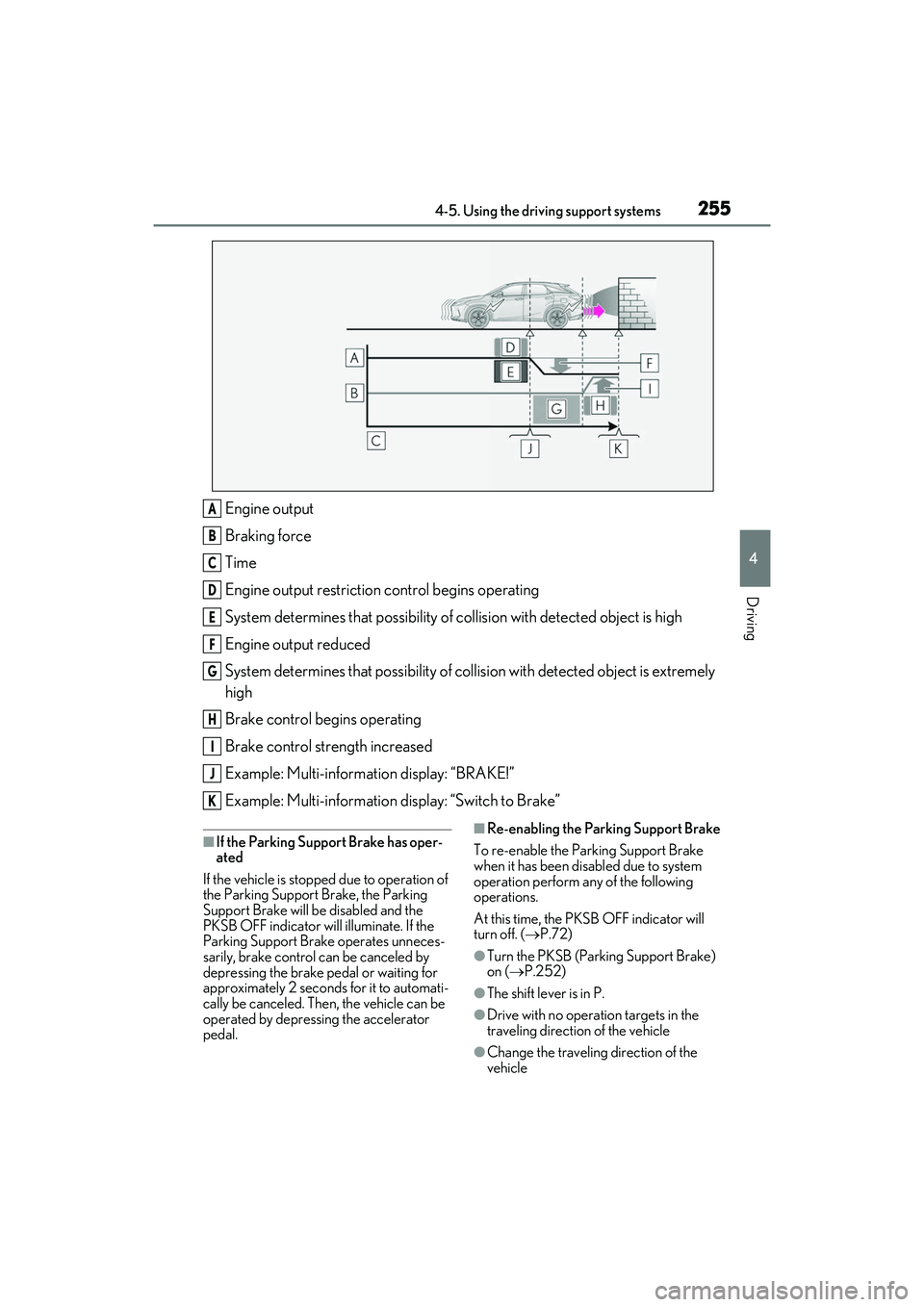
2554-5. Using the driving support systems
4
Driving
Engine output
Braking force
Time
Engine output restriction control begins operating
System determines that possibility of collision with detected object is high
Engine output reduced
System determines that possibility of col lision with detected object is extremely
high
Brake control begins operating
Brake control strength increased
Example: Multi-information display: “BRAKE!”
Example: Multi-information display: “Switch to Brake”
■If the Parking Support Brake has oper-
ated
If the vehicle is stoppe d due to operation of
the Parking Support Brake, the Parking
Support Brake will be disabled and the
PKSB OFF indicator will illuminate. If the
Parking Support Brake operates unneces-
sarily, brake control can be canceled by
depressing the brake pedal or waiting for
approximately 2 seconds for it to automati-
cally be canceled. Then, the vehicle can be
operated by depressing the accelerator
pedal.■Re-enabling the Parking Support Brake
To re-enable the Parking Support Brake
when it has been disabled due to system
operation perform any of the following
operations.
At this time, the PKSB OFF indicator will
turn off. ( P.72)
●Turn the PKSB (Parking Support Brake)
on ( P.252)
●The shift lever is in P.
●Drive with no operation targets in the
traveling direction of the vehicle
●Change the travelin g direction of the
vehicle
A
B
C
D
E
F
G
H
I
J
K
Page 258 of 508

2564-5. Using the driving support systems
■If “Parking Support Brake Unavailable”
is displayed on the multi-information
display and the PKSB OFF indicator is
flashing
If this message is displayed only when the
shift lever is in any position other than R, a
sensor on the front or rear bumper may be
dirty. Clean the sensors and their surround-
ing area on the bumpers.
■If “Parking Assist Unavailable” and
“Parking Assist Unavailable Clean
Parking Assist Sensor” are displayed on
the multi-information display and the
PKSB OFF indicator is flashing
●A sensor may be covered with ice, snow,
dirt, etc. Remove the ice, snow, dirt, etc.,
from the sensor to return the system to
normal.
If this message is shown even after
removing dirt from the sensor, or shown
when the sensor was not dirty to begin
with, have the vehicle inspected by your
Lexus dealer.
●A sensor may be frozen. Once the ice
melts, the system will return to normal.
●Water may be continuo usly flowing over
the sensor surface, such as in a heavy
rain. When the system determines that it
is normal, the system will return to nor-
mal.
■If a battery terminal has been discon-
nected and reconnected
The system needs to be initialized. To initial-
ize the system, drive the vehicle straight
ahead for 5 seconds or more at a speed of
approximately 22 mph (35 km/h) or more.
Additionally, for vehicles with the Parking
Support Brake function, turn the steering
wheel fully to the left and right with the vehi-
cle stopped.
Page 259 of 508

2574-5. Using the driving support systems
4
Driving
*:If equipped
This function will operate in situations such as the following if an object is detected
in the traveling direction of the vehicle.
■When traveling at a low speed and the brake pedal is not depressed, or is
depressed late
Parking Support Brake function (static objects)*
If the sensors detect a static object, such as a wall, in the travelling direction of
the vehicle and the system determines that a collision ma y occur due to the
vehicle suddenly moving forward due to an accidental accelerator pedal oper-
ation, the vehicle moving the unintended direction due to the wrong shift lever
position, or while parking or traveling at low speeds, the system will operate to
lessen the impact with the detected static object and reduce the resulting
damage.
Examples of function operation
Page 260 of 508

2584-5. Using the driving support systems
■When the accelerator pedal is depressed excessively
■When the vehicle moves in the unintend ed direction due to the wrong shift
lever position
P.238
■The Parking Support Brake function
(static object) will operate when
The function will operate when the PKSB
OFF indicator is not illuminated or flashing
Types of sensors
WARNING
■To ensure the system can operate
properly
P.239
■If the Parking Support Brake function
(static objects) operates unnecessar-
ily, such as at a railroad crossing
P.239
■Notes when washing the vehicle
P.240
Page 263 of 508

2614-5. Using the driving support systems
4
Driving
(8 km/h) or more.
• The shift lever is in R.
• The Parking Support Brake determines that a stronger than normal brake opera-
tion is necessary to avoid a collision with
an approaching vehicle.
●Brake control
• Engine output restriction control is oper-
ating.
• The Parking Support Brake determines that an emergency brake operation is
necessary to avoid a collision with an
approaching vehicle.
■The Parking Support Brake function
(rear-crossing vehicles) will stop operat-
ing when
The function will stop operating if any of the
following conditions are met:
●Engine output restriction control
• The Parking Support Brake is disabled.
• The collision becomes avoidable with normal brake operation.
• A vehicle is no longer approaching from the right or left at th e rear of the vehicle.
●Brake control
• The Parking Support Brake is disabled.
• Approximately 2 seconds have elapsed since the vehicle was stopped by brake
control.
• The brake pedal is depressed after the
vehicle is stopped by brake control.
• A vehicle is no longer approaching from the right or left at th e rear of the vehicle.
■Detection area of the Parking Support
Brake function (rear-crossing vehicles)
The detection area of the Parking Support
Brake function (rear-crossing vehicles) dif-
fers from the detection area of the RCTA
function ( P.247). Therefore, even if the
RCTA function detects a vehicle and pro-
vides an alert, the Parking Support Brake
function (rear-crossing vehicles) may not
start operating.
■Situations in which the system may not
operate properly
P.248
■Situations in which the system may
operate even if there is no possibility of a
collision
P.249