2022 LEXUS RX350 engine
[x] Cancel search: enginePage 319 of 508

3175-6. Using the other interior features
5
Interior features
Blinks (orange) 4 times repeatedly
■The wireless charger can be operated
when
The engine switch is in ACCESSORY or
IGNITION ON mode.
■Portable devices t hat can be charged
●Portable devices compatible with the Qi
wireless charging standard can be
charged by the wireless charger. How-
ever, compatibility with all devices which
meet the Qi wireless charging standard is
not guaranteed.
●The wireless charger is designed to sup-
ply low power electricity (5 W or less) to
a cellular phone, smartphone, or other
portable device.
■If a cover or accessory is attached to the
portable device
Do not charge a portable device if a cover
or accessory which is not Qi compatible is
attached. Depending on the type of cover
and/or accessory attached, it may not be
possible to charge the portable device. If
the portable device is placed on the
charging area and does not charge, remove
the cover and/or accessories.
■If interference is heard in AM radio
broadcasts while charging
Turn off the wireless charger and check if
the noise is reduced. If noise is reduced,
press and hold the power supply switch of
the wireless charger for 2 seconds. The fre-
quency of the wireless charger is changed
and noise may be reduced. When the fre-
quency is changed, the operation indicator
light will blink (orange) 2 times.
■Charging precautions
●If the electronic key cannot be detected
in the cabin, charging cannot be per-
formed. When a door is opened and
closed, charging may be temporarily sus-
pended.
●While charging, the wi reless charger and
the portable device will become warm.
This is not a malfunction. If a portable
device becomes warm while charging
and charging stops du e to the protection
function of the portable device, wait until
the portable device cools down and
charge it again.
■Sound generated during operation
When the power supply switch is turned on
or while a portable device is being identi-
fied, operation sounds may be heard. This is
not a malfunction.
■Cleaning the wireless charger
P.339
Suspected causesMeasure
A foreign object
exists between
the portable
device and
charging area.
Remove the foreign
object.
Portable device is
not positioned
properly on the
charging area.Move the portable
device toward the cen-
ter of the charging
area.
Suspected causesMeasure
The temperature
of the wireless
charger is exces-
sively high.Stop charging immedi-
ately and continue
charging after a while.
Page 324 of 508
3225-6. Using the other interior features
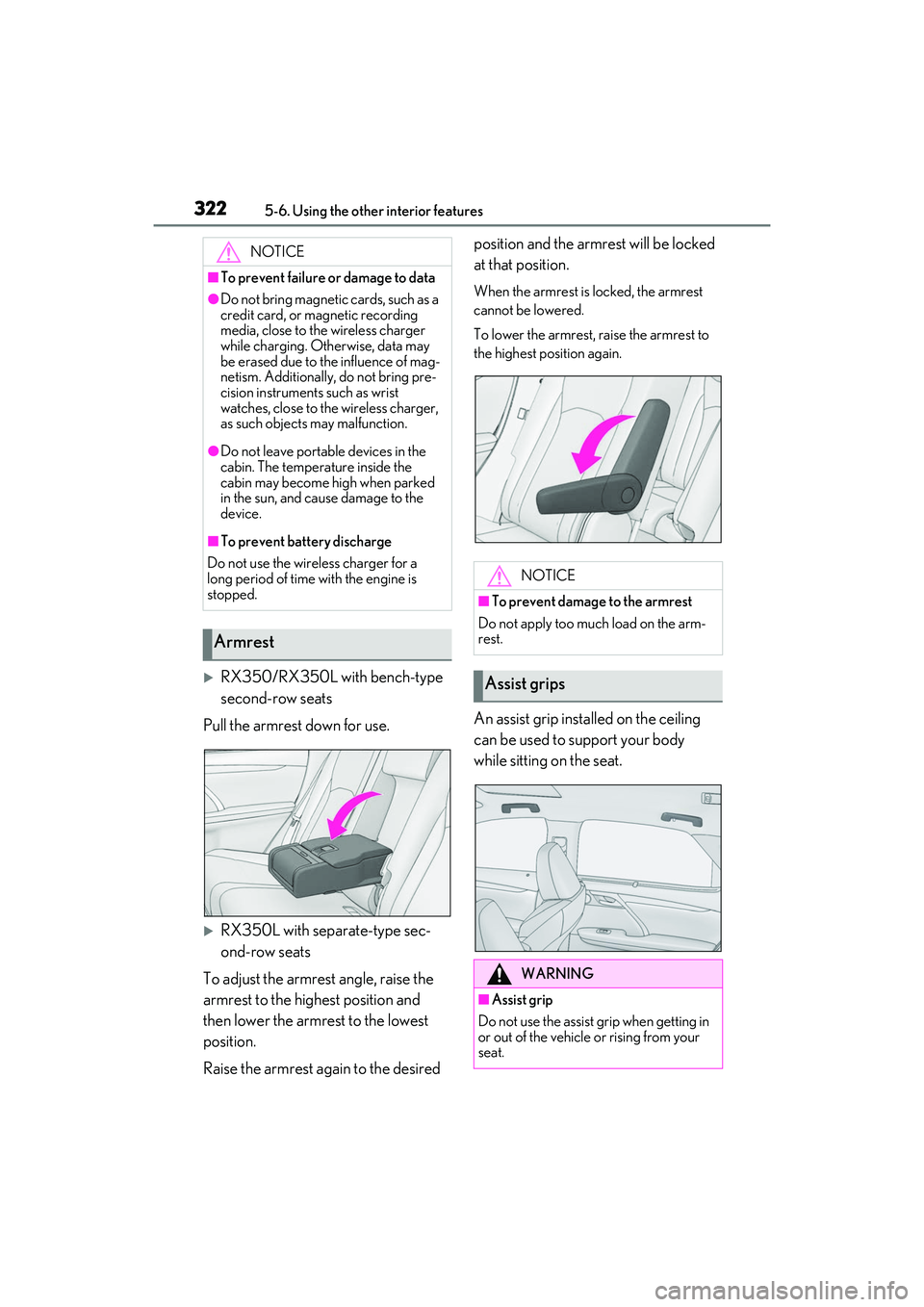
RX350/RX350L with bench-type
second-row seats
Pull the armrest down for use.
RX350L with separate-type sec-
ond-row seats
To adjust the armrest angle, raise the
armrest to the highest position and
then lower the armrest to the lowest
position.
Raise the armrest again to the desired position and the armrest will be locked
at that position.
When the armrest is locked, the armrest
cannot be lowered.
To lower the armrest, raise the armrest to
the highest position again.
An assist grip installed on the ceiling
can be used to support your body
while sitting on the seat.
NOTICE
■To prevent failure or damage to data
●Do not bring magnetic cards, such as a
credit card, or magnetic recording
media, close to the wireless charger
while charging. Otherwise, data may
be erased due to the influence of mag-
netism. Additionally, do not bring pre-
cision instruments such as wrist
watches, close to the wireless charger,
as such objects may malfunction.
●Do not leave portab
le devices in the
cabin. The temperature inside the
cabin may become high when parked
in the sun, and cause damage to the
device.
■To prevent battery discharge
Do not use the wireless charger for a
long period of time with the engine is
stopped.
Armrest
NOTICE
■To prevent damage to the armrest
Do not apply too much load on the arm-
rest.
Assist grips
WARNING
■Assist grip
Do not use the assist grip when getting in
or out of the vehicle or rising from your
seat.
Page 326 of 508
3245-6. Using the other interior features
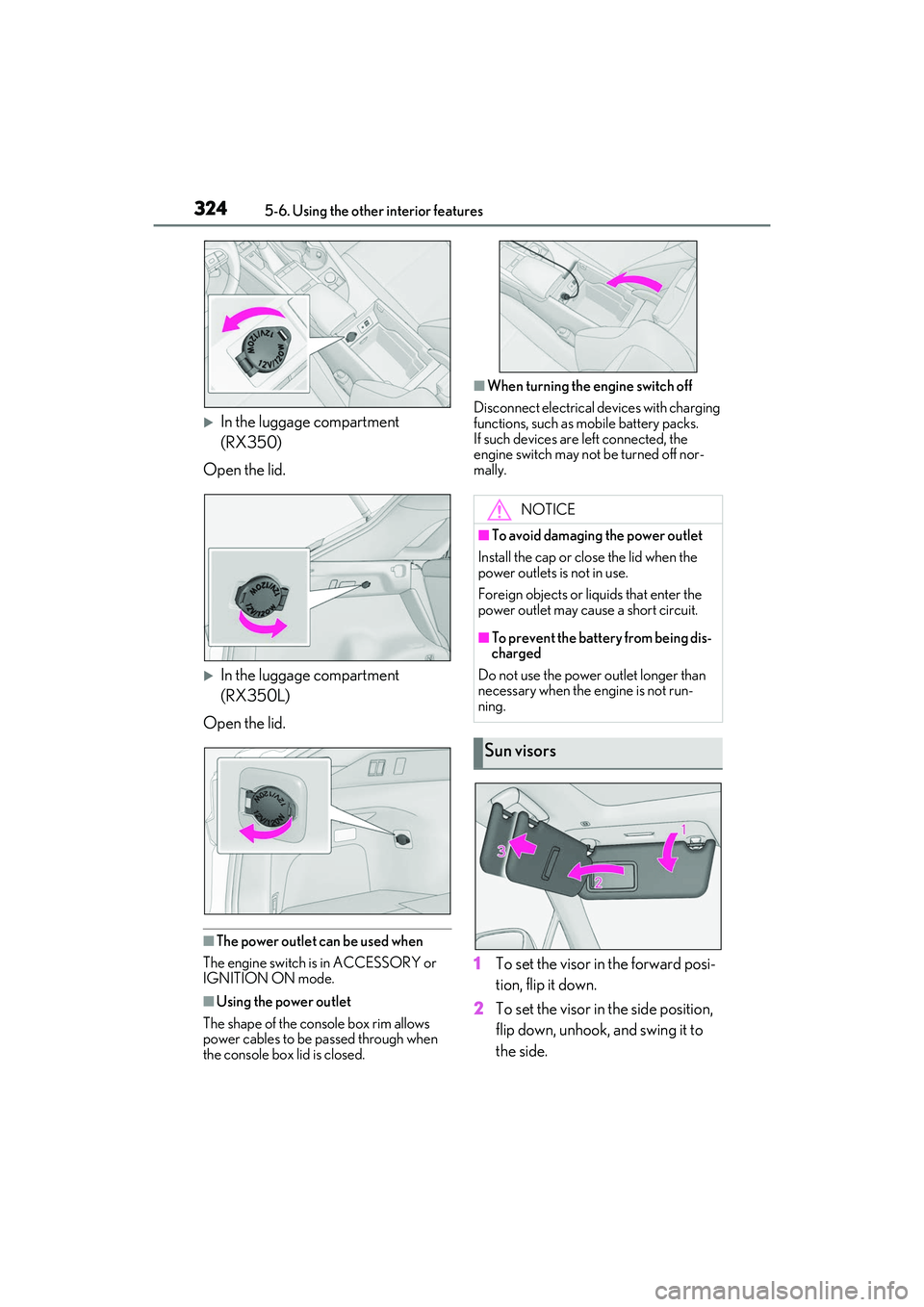
In the luggage compartment
(RX350)
Open the lid.
In the luggage compartment
(RX350L)
Open the lid.
■The power outlet can be used when
The engine switch is in ACCESSORY or
IGNITION ON mode.
■Using the power outlet
The shape of the console box rim allows
power cables to be passed through when
the console box lid is closed.
■When turning the engine switch off
Disconnect electrical devices with charging
functions, such as mobile battery packs.
If such devices are left connected, the
engine switch may not be turned off nor-
mally.
1 To set the visor in the forward posi-
tion, flip it down.
2 To set the visor in the side position,
flip down, unhook, and swing it to
the side.
NOTICE
■To avoid damaging the power outlet
Install the cap or close the lid when the
power outlets is not in use.
Foreign objects or li quids that enter the
power outlet may cause a short circuit.
■To prevent the battery from being dis-
charged
Do not use the power outlet longer than
necessary when the engine is not run-
ning.
Sun visors
Page 327 of 508
3255-6. Using the other interior features
5
Interior features
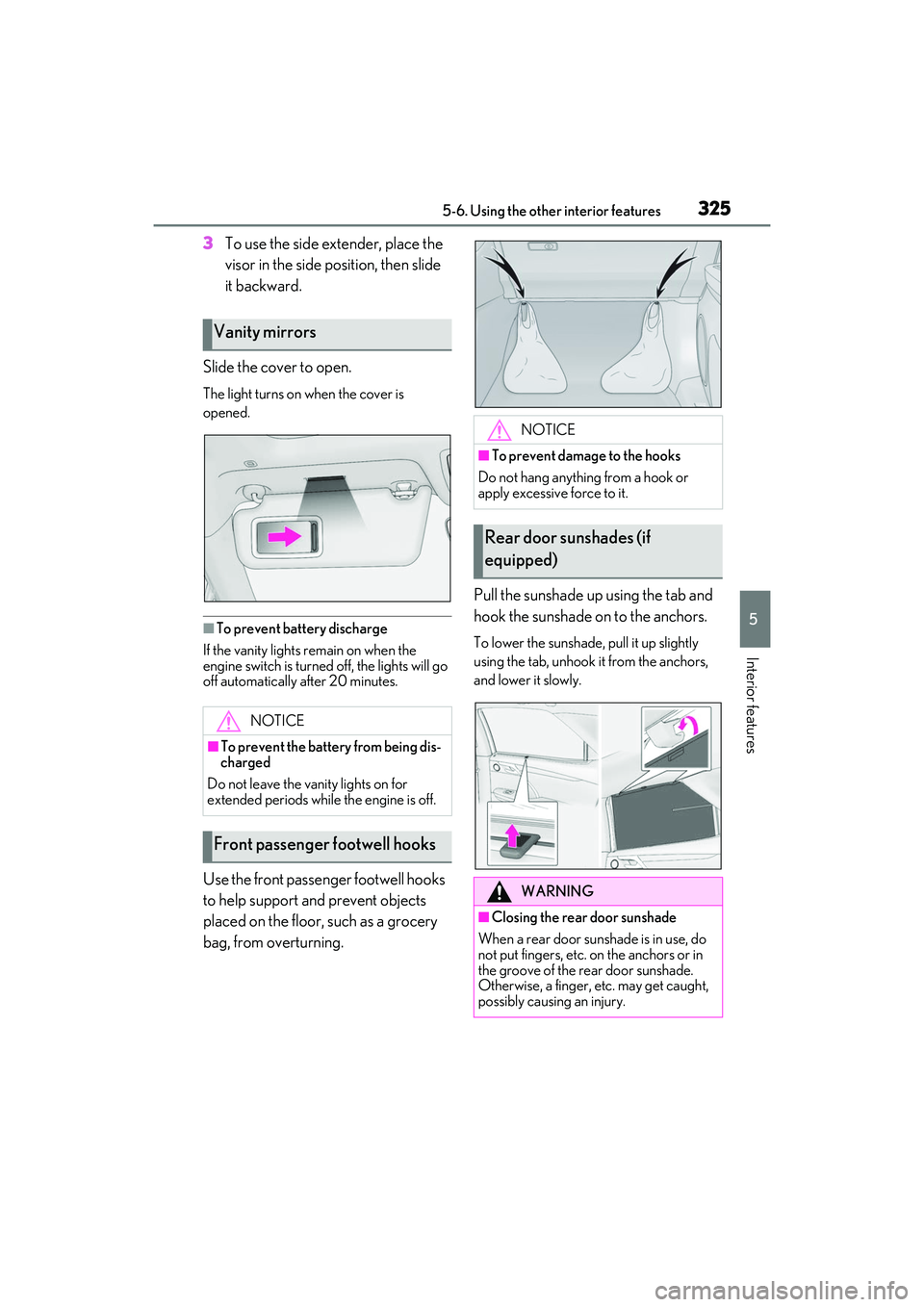
3To use the side extender, place the
visor in the side position, then slide
it backward.
Slide the cover to open.
The light turns on when the cover is
opened.
■To prevent battery discharge
If the vanity lights remain on when the
engine switch is turned off, the lights will go
off automatically after 20 minutes.
Use the front passenger footwell hooks
to help support and prevent objects
placed on the floor, such as a grocery
bag, from overturning. Pull the sunshade up using the tab and
hook the sunshade on to the anchors.
To lower the sunshade, pull it up slightly
using the tab, unhook it from the anchors,
and lower it slowly.
Vanity mirrors
NOTICE
■To prevent the battery from being dis-
charged
Do not leave the vanity lights on for
extended periods whil e the engine is off.
Front passenger footwell hooks
NOTICE
■To prevent damage to the hooks
Do not hang anything from a hook or
apply excessive force to it.
Rear door sunshades (if
equipped)
WARNING
■Closing the rear door sunshade
When a rear door sunshade is in use, do
not put fingers, etc. on the anchors or in
the groove of the rear door sunshade.
Otherwise, a finger, etc. may get caught,
possibly causing an injury.
Page 337 of 508

335
6
6
Maintenance and care
Maintenance and care
.6-1. Maintenance and careCleaning and protecting the vehi-cle exterior ................................ 336
Cleaning and protecting the vehi- cle interior ................................. 339
6-2. Maintenance Maintenance requirements........................................................ 342
General maintenance ............. 343
Emission inspection and mainte- nance (I/M) programs ......... 346
6-3. Do-it-yourself maintenance Do-it-yourself service precautions........................................................ 347
Hood............................................... 349
Positioning a floor jack............ 349
Engine compartment................ 351
Tires ................................................ 357
Tire inflation pressure.............. 363
Wheels........................................... 365
Air conditioning filter...............366
Windshield wiper inserts........ 368
Electronic key battery ............. 369
Checking and replacing fuses ......................................................... 371
Headlight aim.............................. 372
Light bulbs .................................... 374
Page 339 of 508

3376-1. Maintenance and care
6
Maintenance and care
■Brake pads and calipers
Rust may form if the vehicle is parked with
wet brake pads or disc rotors, causing them
to stick. Before parking the vehicle after it is
washed, drive slowly and apply the brakes
several times to dry the parts.
■Bumpers
Do not scrub with abrasive cleaners.
■Front side windows water-repellent
coating
●The following precautions can extend the
effectiveness of the water-repellent coat-
ing.
• Remove any dirt, etc. from the front side
windows regularly.
• Do not allow dirt and dust to accumulate on the windows for a long period.
Clean the windows with a soft, damp
cloth as soon as possible.
• Do not use wax or glass cleaners that
contain abrasives when cleaning the win-
dows.
• Do not use any metallic objects to
remove condensation build up.
●When the water-repellent performance
has become insufficient, the coating can
be repaired. Contact your Lexus dealer.
■Plated portions
If dirt cannot be removed, clean the parts as
follows:
●Use a soft cloth dampened with an
approximately 5% solution of neutral
detergent and water to clean the dirt off.
●Wipe the surface with a dry, soft cloth to
remove any remaining moisture.
●To remove oily deposits, use alcohol wet
wipes or a similar product.
WARNING
■When washing the vehicle
Do not apply water to the inside of the
engine compartment. Doing so may
cause the electrical components, etc. to
catch fire.
■When cleaning the windshield
Set the wiper switch to off.
If the switch is in “AUTO”, the wipers may
operate unexpectedly in the following sit-
uations, and may result in hands being
caught or other serious injuries and
cause damage to the wiper blades.
Off
AUTO
●When the upper part of the windshield
where the raindrop sensor is located is
touched by hand
●When a wet rag or similar is held close
to the raindrop sensor
●If something bumps against the wind-
shield
●If you directly touch the raindrop sen-
sor body or if something bumps into
the raindrop sensor
■Precautions regarding the exhaust
pipes and rear bumper diffusers
Exhaust gasses cause the exhaust pipes
and rear bumper diffusers to become
quite hot.
When washing the vehicle, be careful not
to touch the pipes and diffusers until they
have cooled sufficiently, as touching hot
exhaust pipes and rear bumper diffusers
can cause burns.
■Precaution regarding the rear
bumper
If the paint of the re ar bumper is chipped
or scratched, the following systems may
not function correctly. If this occurs, con-
sult your Lexus dealer.
●Lexus Safety System + 2.0
A
B
Page 344 of 508

3426-2. Maintenance
6-2.Maintenance
■Repair and replacement
It is recommended that genuine Lexus parts
be used for repairs to ensure performance
of each system. If non-Lexus parts are used
in replacement or if a repair shop other than
a Lexus dealer performs repairs, confirm
the warranty coverage.
■Allow inspection and repairs to be per-
formed by a Lexus dealer
●Lexus technicians are well-trained spe-
cialists and are kept up to date with the
latest service information. They are well
informed about the operation of all sys-
tems on your vehicle.
●Keep a copy of the repair order. It proves
that the maintenance that has been per-
formed is under warra nty coverage. If any
problem should arise while your vehicle is
under warranty, your Lexus dealer will
promptly take care of it.
General maintenance should be per-
formed on a daily basis. This can be
done by yourself or by a Lexus dealer.
Scheduled maintenance should be
performed at specified intervals
according to the maintenance sched-
ule.
For details about ma intenance items and
schedules, refer to the “Warranty and Ser-
vice Guide”, “Owner’s Manual Supple-
ment” or “Scheduled Maintenance”.
■Resetting the message indicating main-
tenance is required (U.S.A. only)
After the required maintenance is pre-
formed according to the maintenance
schedule, please reset the message.
To reset the message, follow the procedures
described below:
1 Press or of the meter control
switch to select .
2 Press or of the meter control
switch, select the “Scheduled Mainte-
nance” screen and then press and hold
the .
Maintenance requirements
To ensure safe and economical driv-
ing, day-to-day care and regular
maintenance are essential. It is the
owner’s responsibility to perform
regular checks. Lexus recommends
the following maintenance:
WARNING
■If your vehicle is not properly main-
tained
Improper maintenance could result in
serious damage to the vehicle and possi-
ble death or serious injury.
■Handling of the battery
●Engine exhaust, some of its constitu-
ents, and a wide variety of automobile
components contain or emit chemicals
known to the State of California to
cause cancer and birth defects and
other reproductive harm. Work in a
well ventilated area.
●Oils, fuels and fluids contained in vehi-
cles as well as waste produced by
component wear contain or emit
chemicals known to the State of Cali-
fornia to cause cancer and birth
defects or other re productive harm.
Avoid exposure and wash any affected
area immediately.
●Battery posts, terminals and related
accessories contai n lead and lead
compounds which are known to cause
brain damage. Wash your hands after
handling. ( P.355)
General maintenance
Scheduled maintenance
Page 345 of 508

3436-2. Maintenance
6
Maintenance and care
3Select the “Yes” and press .
4 A message will be displayed on the
multi-information display when the
reset procedure has been completed.
You can perform some maintenance
procedures by yourself.
Please be aware that do-it-yourself
maintenance may affect warranty cov-
erage.
The use of Lexus repair manuals is recom-
mended.
For details about warra nty coverage, refer
to the separate “Owner’s Guide”, “War-
ranty and Service Guide”, “Owner’s Man-
ual Supplement” or “Warranty Booklet”.
Do-it-yourself maintenance
General maintenance
Listed below are the general main-
tenance items that should be per-
formed at the intervals specified in
the “Warranty and Service Guide”
or “Owner’s Manual Supplement”.
It is recommended that any prob-
lem you notice should be brought to
the attention of your Lexus dealer
or qualified service shop for advice.
WARNING
■If the engine is running
Turn the engine off and ensure that there
is adequate ventilation before perform-
ing maintenance checks.
Engine compartment
ItemsCheck points
BatteryCheck the connec-
tions. ( P.355)
Brake fluid
Is the brake fluid at the
correct level?
( P.354)
Engine coolant
Is the engine coolant at
the correct level?
( P.353)
Engine oil
Is the engine oil at the
correct level?
( P.351)
Exhaust system
There should not be
any fumes or strange
sounds.