2022 LEXUS RX350 display
[x] Cancel search: displayPage 407 of 508

4057-2. Steps to take in an emergency
7
When trouble arises
■If “Radar Cruise Control Unavailable” is
displayed
The dynamic radar cruise control with
full-speed range system cannot be used
temporarily. Use the system when it
becomes available again.
■If a message that indicates the malfunc-
tion of front camera is displayed
The following systems may be suspended
until the problem shown in the message is
resolved. ( P.202, 398)
●PCS (Pre-Collision system)
●LTA (Lane Tracing Assist)
●Automatic High Beam
●RSA (Road Sign Assi st) (if equipped)
●Dynamic radar cruise control with
full-speed range
■If a message that indicates the malfunc-
tion of radar sensor is displayed
The following systems may be suspended
until the problem shown in the message is
resolved. ( P.202, 393)
●PCS (Pre-Collision system)
●LTA (Lane Tracing Assist)
●Dynamic radar cruise control with
full-speed range
■If “Check Fuel Cap” is displayed (if
equipped)
The fuel tank cap is no t properly installed.
Correctly install the fuel tank cap.
■If “Maintenance Required Soon” is dis-
played (U.S.A. only)
Indicates that all maintenance according to
the driven distance on the maintenance
schedule
* should be performed soon.
Comes on approximately 4500 miles
(7200 km) after the message has been
reset. If necessary, perform maintenance.
Please reset the message after the mainte-
nance is performed. ( P.342)
*: Refer to the separate “Scheduled Main-
tenance” or “Owner’s Manual Supple-
ment” for the maintenance interval
applicable to your vehicle.
■If “Maintenance Required Visit Your
Dealer” is displayed (U.S.A. only)
Indicates that all mainte nance is required to
correspond to the driven distance on the
maintenance schedule
*.
Comes on approximately 5000 miles
(8000 km) after the message has been
reset. (The indicator will not work properly
unless the message has been reset.) Per-
form the necessary maintenance. Please
reset the message after the maintenance is
performed. ( P.342)
*: Refer to the separate “Scheduled Main-
tenance” or “Owner’s Manual Supple-
ment” for the main tenance interval
applicable to your vehicle.
■If “Oil Maintenance Required Soon” is
displayed
Indicates that the engine oil should be
scheduled to be changed.
Check the engine oil and change it if neces-
sary. After changing th e engine oil, make
sure to reset the message. ( P.353)
■If “Oil Maintenance Required” is dis-
played
Indicates that the engine oil should be
changed.
Check and change the engine oil, and oil fil-
ter by your Lexus dealer. After changing the
engine oil, make sure to reset the message.
( P.353)
■If a message that indicates the need for
visiting your Lexus dealer is displayed
The system or part shown on the
multi-information displa y is malfunctioning.
Have the vehicle inspected by your Lexus
dealer immediately.
■If a message that indicates the need for
referring to Owner’ s Manual is dis-
played
●“Engine Coolant Temp High” is shown on
the multi-information display, follow the
instructions. ( P.426)
●“Transmission Fluid Temp High” is shown
on the multi-informatio n display, the auto-
matic transmission fluid temperature may
be too high. Immediately stop the vehicle
Page 408 of 508

4067-2. Steps to take in an emergency
in a safe place, shift the shift lever to P
with the engine running and wait until the
message is cleared. If the message is not
cleared, contact your Lexus dealer.
●If the following message is shown on the
multi-information display, it may indicate
a malfunction. Have the vehicle inspected
by your Lexus dealer immediately.
• “Access System with Elec. Key Malfunc-
tion”
●If any of the following messages are
shown on the multi-info rmation display, it
may indicate a malfunction. Immediately
stop the vehicle and contact your Lexus
dealer.
• “Braking Power Low”
• “Charging System Malfunction”
• “Oil Pressure Low”
Stop the vehicle in a safe place on a
hard, flat surface.
Set the parking brake.
Shift the shift lever to P.
Stop the engine.
Turn on the emergency flashers.
( P.384)
NOTICE
■If “High Power Co nsumption Partial
Limit On AC/Heater Operation” is
displayed frequently
There is a possible malfunction relating
to the charging system or the battery
may be deteriorating. Have the vehicle
inspected by your Lexus dealer.
If you have a flat tire
Your vehicle is equipped with a
spare tire. The flat tire can be
replaced with the spare tire.
For details about tires: P.357
WARNING
■If you have a flat tire
Do not continue drivin g with a flat tire.
Driving even a short distance with a flat
tire can damage the tire and the wheel
beyond repair, which could result in an
accident.
Before jacking up the vehicle
Page 424 of 508

4227-2. Steps to take in an emergency
■Key linked functions
1 Closes the windows and the moon
roof
* or panoramic moon roof* (turn
and hold)
2 Opens the windows and the moon
roof
* or panoramic moon roof* (turn
and hold)
These settings must be customized at your
Lexus dealer.
*:If equipped
1 Ensure that the shift lever is in P and
depress the brake pedal.
2 Touch the Lexus emblem side of the
electronic key to the engine switch.
When the electronic key is detected, a
buzzer sounds and the engine switch will
turn to IGNITION ON mode. When the smart access system with
push-button start is deactivated in
customization setting,
the engine switch
will turn to ACCESSORY mode.
3 Firmly depress the brake pedal and
check that is shown on the
multi-information display.
4 Press the engine switch shortly and
firmly.
In the event that the engine still cannot
be started, contact your Lexus dealer.
■Stopping the engine
Shift the shift lever to P, set the parking
brake, and press the engine switch as you
normally do when st opping the engine.
■Replacing the key battery
As the above procedure is a temporary
measure, it is recommended that the elec-
tronic key battery be replaced immediately
when the battery is depleted. ( P.369)
■Alarm (For Canada)
Using the mechanical key to lock the doors
will not set the alarm system.
If a door is unlocked using the mechanical
key when the alarm system is set, the alarm
may be triggered. ( P.67)
■Changing engine switch modes
Release the brake pe dal and press the
engine switch in step 3 above. The engine
does not start and modes will be changed
each time the switch is pressed. ( P.173)
WARNING
■When using the mechanical key and
operating the power windows or the
moon roof or panoramic moon roof
Operate the power window or the moon
roof or panoramic moon roof after
checking to make sure that there is no
possibility of any passe nger having any of
their body parts caught in the window or
the moon roof or panoramic moon roof.
Also, do not allow ch ildren to operate the
mechanical key. It is possible for children
and other passengers to get caught in
the power window or the moon roof or
panoramic moon roof.
Starting the engine
Page 428 of 508

4267-2. Steps to take in an emergency
1Stop the vehicle in a safe place and
turn off the air conditioning system,
and then stop the engine.
2 If you see steam:
Carefully lift the hood after the
steam subsides.
If you do not see steam:
Carefully lift the hood.
3 After the engine has cooled down
sufficiently, inspect the hoses and radiator core (radiator) for any
leaks.
Radiator
Cooling fans
If a large amount of coolant leaks, immedi-
ately contact your Lexus dealer.
4
The coolant level is satisfactory if it
is between the “FULL” and “LOW”
lines on the reservoir.
Reservoir
“FULL” line
“LOW” line
Radiator cap
5 Add coolant if necessary.
Water can be used in an emergency if
If your vehicle overheats
The following may indicate that
your vehicle is overheating.
The needle of the engine coolant
temperature gauge ( P.75)
enters the red zone, or a loss of
engine power is experienced.
(For example, the vehicle speed
does not increase.)
“Engine Coolant Temp High Stop
in a Safe Place See Owner’s
Manual” is shown on the
multi-information display.
Steam comes out from under the
hood.
Correction procedures
A
B
A
B
C
D
Page 429 of 508
4277-2. Steps to take in an emergency
7
When trouble arises
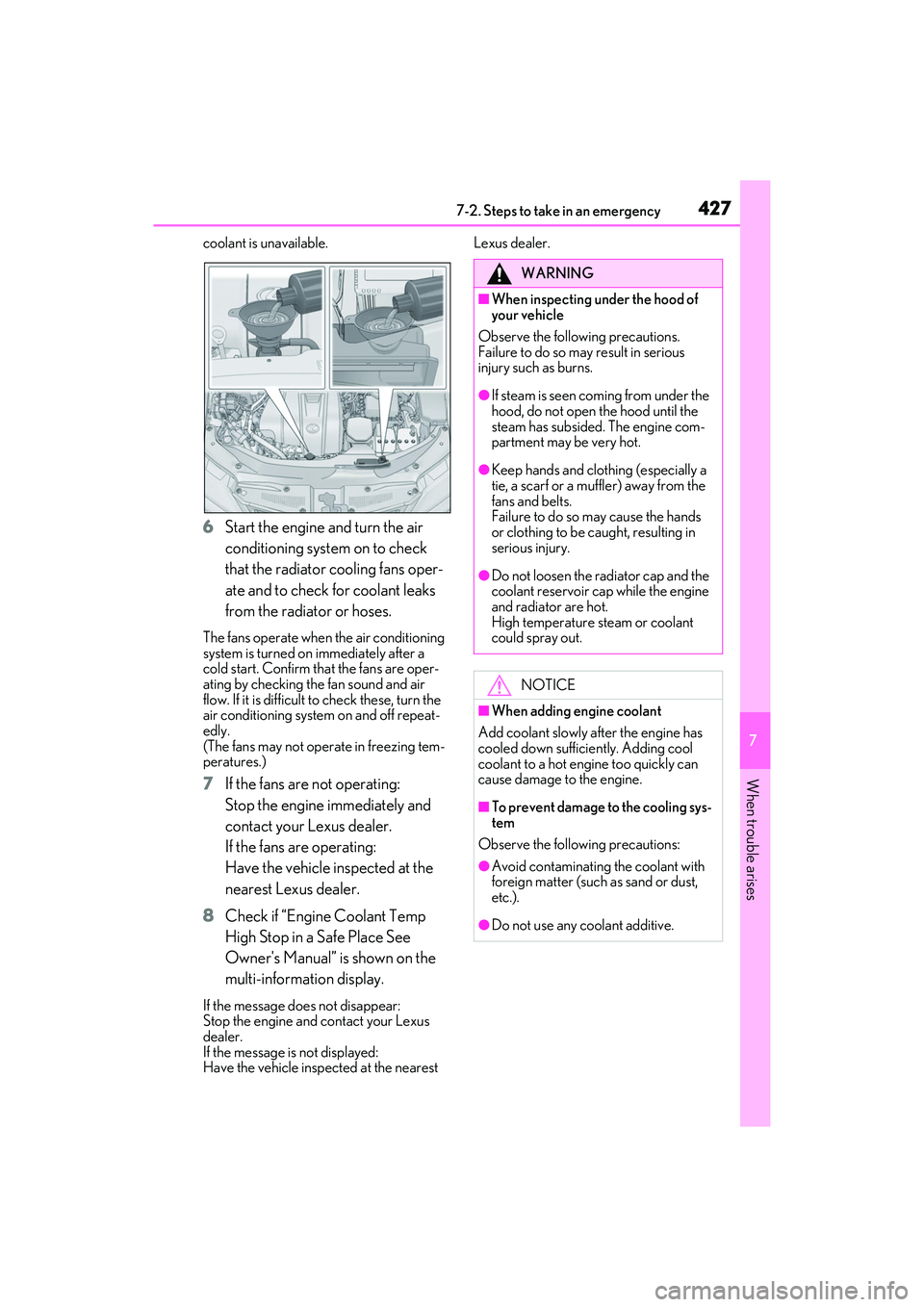
coolant is unavailable.
6Start the engine and turn the air
conditioning system on to check
that the radiator cooling fans oper-
ate and to check for coolant leaks
from the radiator or hoses.
The fans operate when the air conditioning
system is turned on immediately after a
cold start. Confirm that the fans are oper-
ating by checking the fan sound and air
flow. If it is difficult to check these, turn the
air conditioning system on and off repeat-
edly.
(The fans may not operate in freezing tem-
peratures.)
7 If the fans are not operating:
Stop the engine immediately and
contact your Lexus dealer.
If the fans are operating:
Have the vehicle inspected at the
nearest Lexus dealer.
8 Check if “Engine Coolant Temp
High Stop in a Safe Place See
Owner's Manual” is shown on the
multi-information display.
If the message does not disappear:
Stop the engine and contact your Lexus
dealer.
If the message is not displayed:
Have the vehicle inspected at the nearest Lexus dealer.
WARNING
■When inspecting under the hood of
your vehicle
Observe the following precautions.
Failure to do so may result in serious
injury such as burns.
●If steam is seen coming from under the
hood, do not open the hood until the
steam has subsided. The engine com-
partment may be very hot.
●Keep hands and clothing (especially a
tie, a scarf or a muff ler) away from the
fans and belts.
Failure to do so may cause the hands
or clothing to be caught, resulting in
serious injury.
●Do not loosen the radiator cap and the
coolant reservoir cap while the engine
and radiator are hot.
High temperature steam or coolant
could spray out.
NOTICE
■When adding engine coolant
Add coolant slowly after the engine has
cooled down sufficiently. Adding cool
coolant to a hot engine too quickly can
cause damage to the engine.
■To prevent damage to the cooling sys-
tem
Observe the following precautions:
●Avoid contaminating the coolant with
foreign matter (such as sand or dust,
etc.).
●Do not use any coolant additive.
Page 451 of 508
4498-2. Customization
8
Vehicle specifications
8-2.Customization
■Changing by using the Remote
Touch
1 Press the “MENU” button on the
Remote Touch.
2 Select “Setup” on the menu screen
and select “Vehicle”.
3 Select “Vehicle Customization” or
“Drive Mode Customization”.
Various setting can be changed. Refer to
the list of settings that can be changed for
details.
This system can also be operated by the
touch screen.
For details on the Remote Touch, refer
to the “NAVIGATION AND MULTI-
MEDIA SYSTEM OWNER’S MAN- UAL”.
■Changing by using the meter con-
trol switches
1 Press or to select .
2 Operate the meter control
switches to select the desired item
to be customized.
3 According to the display, select the
desired setting and then press
.
To go back to the previous screen or exit
the customize mode, press .
Some function settings are changed simultaneously with other functions being cus-
tomized. Contact your Lexus dealer for further details.
Settings that can be changed using the Remote Touch
Settings that can be changed using the meter control switches
Settings that can be changed by your Lexus dealer
Definition of symbols: O = Available, — = Not available
Customizable features
Your vehicle includes a variety of
electronic features that can be per-
sonalized to suit your preferences.
The settings of these features can
be changed by using the meter con-
trol switches, the Remote Touch, or
at your Lexus dealer.
Customizing vehicle features
WARNING
■During customization
As the engine needs to be running
during customization, ensure that the
vehicle is parked in a place with ade-
quate ventilation. In a closed area such as
a garage, exhaust gases including harm-
ful carbon monoxide (CO) may collect
and enter the vehicle. This may lead to
death or a serious health hazard.
NOTICE
■During customization
To prevent battery discharge, ensure that
the engine is running while customizing
features.
Customizable Features
A
B
C
Page 452 of 508

4508-2. Customization
■Gauges, meters and multi-information display (P.70, 75, 79)
*1: For details abou t each function: P.83
Function*1Default settingCustomized setting
LanguageEnglishFrenchOO—Spanish
Units*2miles (MPG)
km (km/L)
OO—km (L/100km)
miles (MPG Impe-
rial)
Drive information 1
Current fuel con-sumption
Customizable items: P.80—O—
Average fuel econ-omy (after reset)
Drive information 2
Distance (driving range)
Average vehicle
speed (after reset)
Drive information 3
Average fuel econ- omy (after refuel)
Elapsed time (after start)
Clock12-hour display24-hour display—O—
Pop-up displayOnOff—O—
Accent color*3Color 1Color 2OO—
Needle*4Color 1Color 2—O—Color 3
Rev indicator*45000 r/min.
2000 - 6500 r/min.
—O—
Off
Rev peak*4OnOff—O—
Eco Driving Indicator LightOnOff—O—
Suggestion functionOnOff——O
ABC
Page 453 of 508

4518-2. Customization
8
Vehicle specifications
*2: The default setting varies according to country.
*3:Except F SPORT models
*4: F SPORT models
■Head-up Display*( P.86)
*:If equipped
■Door lock ( P.97, 421)
FunctionDefault settingCustomized setting
Gauge informationNo content
Eco Driving Indica-
tor
—O—
Tachometer
Route guidance to destina-
tion/street nameOnOff—O—
Driving support system displayOnOff—O—
CompassOnOff—O—
Audio system operation statusOnOff—O—
FunctionDefault settingCustomized setting
Unlocking using a mechanical
key
Driver’s door
unlocked in one step, all doors
unlocked in two step
All doors unlocked in one step——O
Automatic door locking func-
tionShift position linked
door locking opera- tionOff
O—OSpeed linked door locking operation
Automatic door unlocking
functionShift position linked door unlocking operationOff
O—ODriver’s door linked door unlocking operation
ABC
ABC