2022 LEXUS RX350 display
[x] Cancel search: displayPage 342 of 508
3406-1. Maintenance and care
Remove dirt and dust using a vac-
WARNING
●Do not get any of the SRS components
or wiring in the vehicle interior wet.
( P.30)
An electrical malfunction may cause
the airbags to deploy or not function
properly, resulting in death or serious
injury.
●Vehicles with wireless charger: Do not
let the wireless charger (
P.315) get
wet. Failure to do so may cause the
charger to become hot and cause
burns or could cause electric shock
resulting in death or serious injury.
■Cleaning the interior (especially
instrument panel)
Do not use polish wax or polish cleaner.
The instrument panel may reflect off the
windshield, obstructing the driver’s view
and leading to an accident, resulting in
death or serious injury.
NOTICE
■Cleaning detergents
●Do not use the following liquids, as
they may discolor the vehicle interior
or cause streaks or damage to painted
surfaces:
• Center Display: Organic substances such as benzine or gasoline, alkaline
solutions, and alcohol
• Seats: Alkaline solutions, organic sub- stances such as thinner or benzine,
and alcohol
• Other parts: Organic substances such as benzine or gasoline, alkaline or
acidic solutions, dye, and bleach
●Do not use polish wax or polish
cleaner. The instrument panel’s or
other interior part’s painted surface
may be damaged.
■Preventing damage to leather sur-
faces
Observe the following precautions to
avoid damage to and deterioration of
leather surfaces:
●Remove any dust or dirt from leather
surfaces immediately.
●Do not expose the vehicle to direct
sunlight for extended periods of time.
Park the vehicle in the shade, espe-
cially during summer.
●Do not place items made of vinyl, plas-
tic, or containing wax on the uphol-
stery, as they may stick to the leather
surface if the vehicle interior heats up
significantly.
■Water on the floor
Do not wash the vehicle floor with water.
Vehicle systems such as the audio system
may be damaged if water comes into
contact with electrical components such
as the audio system above or under the
floor of the vehicle. Water may also
cause the body to rust.
■When cleaning the inside of the wind-
shield
Do not allow glass cleaner to contact the
lens. Also, do not touch the lens.
( P.198)
■Cleaning the inside of the rear win-
dow
●Do not use glass cleaner to clean the
rear window, as this may cause dam-
age to the rear window defogger
heater wires or antenna. Use a cloth
dampened with lukewarm water to
gently wipe the window clean. Wipe
the window in strokes running parallel
to the heater wires or antenna.
●Be careful not to scratch or damage
the heater wires or antenna.
Cleaning the leather areas
Page 345 of 508

3436-2. Maintenance
6
Maintenance and care
3Select the “Yes” and press .
4 A message will be displayed on the
multi-information display when the
reset procedure has been completed.
You can perform some maintenance
procedures by yourself.
Please be aware that do-it-yourself
maintenance may affect warranty cov-
erage.
The use of Lexus repair manuals is recom-
mended.
For details about warra nty coverage, refer
to the separate “Owner’s Guide”, “War-
ranty and Service Guide”, “Owner’s Man-
ual Supplement” or “Warranty Booklet”.
Do-it-yourself maintenance
General maintenance
Listed below are the general main-
tenance items that should be per-
formed at the intervals specified in
the “Warranty and Service Guide”
or “Owner’s Manual Supplement”.
It is recommended that any prob-
lem you notice should be brought to
the attention of your Lexus dealer
or qualified service shop for advice.
WARNING
■If the engine is running
Turn the engine off and ensure that there
is adequate ventilation before perform-
ing maintenance checks.
Engine compartment
ItemsCheck points
BatteryCheck the connec-
tions. ( P.355)
Brake fluid
Is the brake fluid at the
correct level?
( P.354)
Engine coolant
Is the engine coolant at
the correct level?
( P.353)
Engine oil
Is the engine oil at the
correct level?
( P.351)
Exhaust system
There should not be
any fumes or strange
sounds.
Page 355 of 508

3536-3. Do-it-yourself maintenance
6
Maintenance and care
with a heavy load, when towing, or when
driving while accelera ting or decelerat-
ing frequently
●When leaving the engine idling for a long
time, or when driving frequently through
heavy traffic
■After changing the engine oil
The engine oil maintena nce data should be
reset. Perform the following procedures:
1 Press or of the meter control
switch to select on the multi-infor-
mation display.
2 Press or of the meter control
switch, select the “Vehicle Settings”
then “Oil Maintenance”. (To confirm
setting, press .)
3 Select the “Yes” and press .
4 A message is displayed on the
multi-information display.
The coolant level is satisfactory if it is
between the “FULL” and “LOW” lines
on the reservoir when the engine is
cold.
Reservoir cap
“FULL” line
“LOW” line
If the level is on or below the “LOW” line,
add coolant up to the “FULL” line.
(P.426)
■Coolant selection
Only use “Toyota Super Long Life Coolant”
or a similar high qua lity ethylene glycol
based non-silicate, non-amine, non-nitrite,
and non-borate coolant with long-life
hybrid organic acid technology.
U.S.A.:
“Toyota Super Long Life Coolant” is a mix-
ture of 50% coolant and 50% deionized
WARNING
■Used engine oil
●Used engine oil contains potentially
harmful contaminants which may
cause skin disorders such as inflamma-
tion and skin cancer, so care should be
taken to avoid prolonged and
repeated contact. To remove used
engine oil from your skin, wash thor-
oughly with soap and water.
●Dispose of used oil and filters only in a
safe and acceptable manner. Do not
dispose of used oil and filters in house-
hold trash, in sewers or onto the
ground.
Call your Lexus dealer, service station
or auto parts store for information
concerning recycling or disposal.
●Do not leave used engine oil within the
reach of children.
NOTICE
■To prevent serious engine damage
Check the oil level on a regular basis.
■When replacing the engine oil
●Be careful not to spill engine oil on the
vehicle components.
●Avoid overfilling, or the engine could
be damaged.
●Check the oil level on the dipstick
every time you re fill the vehicle.
●Be sure the engine o il filler cap is prop-
erly tightened.
Checking the coolant
A
B
C
Page 358 of 508
3566-3. Do-it-yourself maintenance
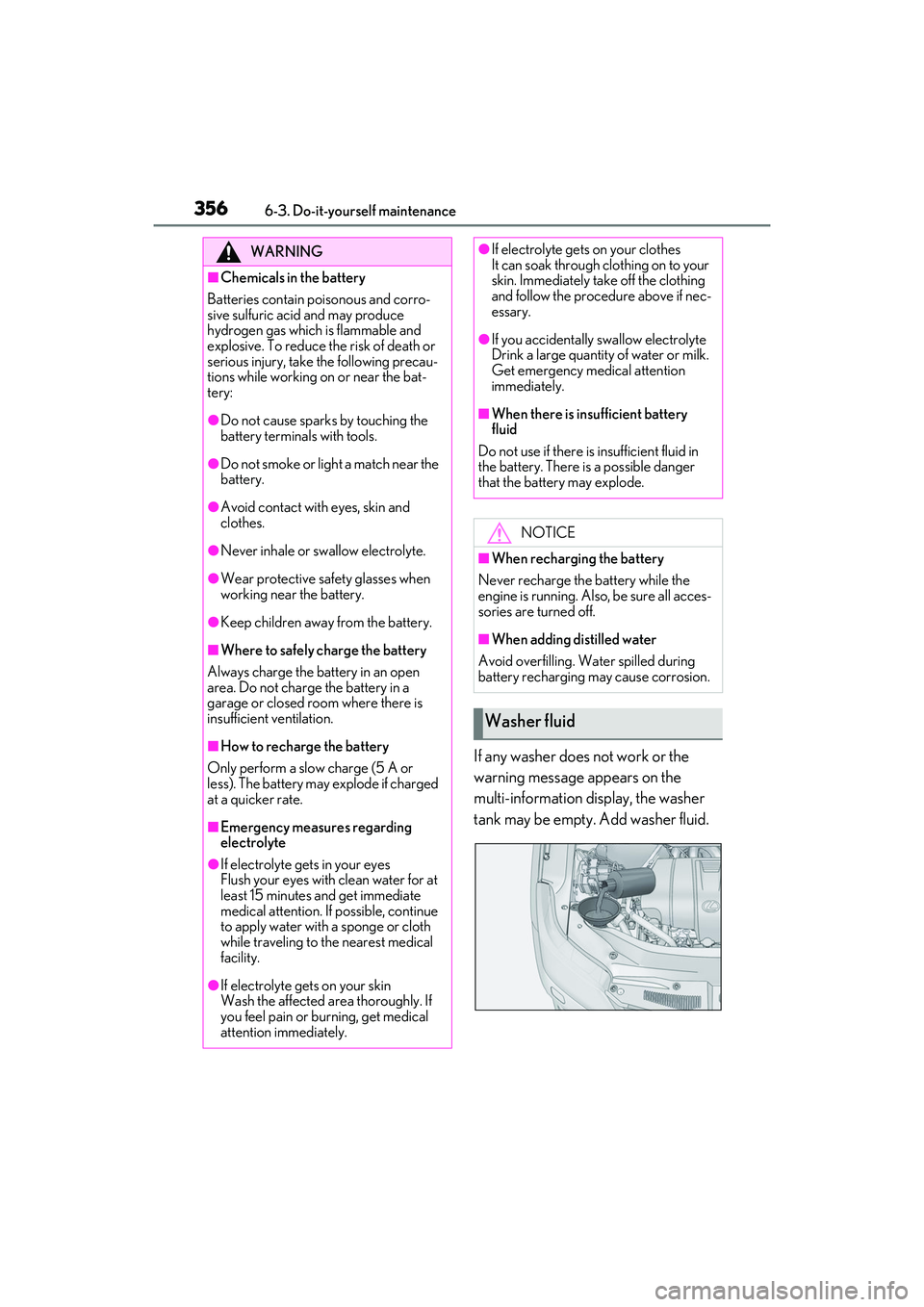
If any washer does not work or the
warning message appears on the
multi-information display, the washer
tank may be empty. Add washer fluid.
WARNING
■Chemicals in the battery
Batteries contain poisonous and corro-
sive sulfuric acid and may produce
hydrogen gas which is flammable and
explosive. To reduce the risk of death or
serious injury, take the following precau-
tions while working on or near the bat-
tery:
●Do not cause sparks by touching the
battery terminals with tools.
●Do not smoke or light a match near the
battery.
●Avoid contact with eyes, skin and
clothes.
●Never inhale or swallow electrolyte.
●Wear protective sa fety glasses when
working near the battery.
●Keep children away from the battery.
■Where to safely charge the battery
Always charge the battery in an open
area. Do not charge the battery in a
garage or closed room where there is
insufficient ventilation.
■How to recharge the battery
Only perform a slow charge (5 A or
less). The battery may explode if charged
at a quicker rate.
■Emergency measures regarding
electrolyte
●If electrolyte gets in your eyes
Flush your eyes with clean water for at
least 15 minutes and get immediate
medical attention. If possible, continue
to apply water with a sponge or cloth
while traveling to the nearest medical
facility.
●If electrolyte gets on your skin
Wash the affected area thoroughly. If
you feel pain or burning, get medical
attention immediately.
●If electrolyte gets on your clothes
It can soak through clothing on to your
skin. Immediately take off the clothing
and follow the procedure above if nec-
essary.
●If you accidentally swallow electrolyte
Drink a large quantity of water or milk.
Get emergency medical attention
immediately.
■When there is insufficient battery
fluid
Do not use if there is insufficient fluid in
the battery. There is a possible danger
that the battery may explode.
NOTICE
■When recharging the battery
Never recharge the battery while the
engine is running. Also, be sure all acces-
sories are turned off.
■When adding distilled water
Avoid overfilling. Water spilled during
battery recharging may cause corrosion.
Washer fluid
Page 362 of 508

3606-3. Do-it-yourself maintenance
tire pressure warning system can be
displayed on the multi-information
display. (P.79)
The illustration used is intended as an
example, and may differ from the image
that is actually displayed on the multi-infor-
mation display.
If the tire pressure drops below a
predetermined level, the driver is
warned by a screen display and a
warning light. ( P.397)
The illustration used is intended as an
example, and may differ from the image
that is actually displayed on the multi-infor-
mation display.
■Routine tire inflation pressure checks
The tire pressure warning system does not
replace routine tire inflation pressure
checks. Make sure to check tire inflation
pressure as part of your routine of daily
vehicle checks.
■Situations in which the tire pressure
warning system may not operate prop-
erly
●In the following cases, the tire pressure
warning system may not operate prop-
erly.
• If non-genuine Lexus wheels are used.
• A tire has been replaced with a tire that is not an OE (Original Equipment) tire.
• A tire has been replaced with a tire that is not of the specified size.
• Tire chains, etc. are equipped.
• If a window tint that affects the radio wave signals is installed.
• If there is a lot of snow or ice on the vehi- cle, particularly around the wheels or
wheel housings.
• If the tire inflation pressure is extremely higher than the specified level.
• If wheel without the tire pressure warning
valve and transmitter is used.
• If the ID code on the tire pressure warn- ing valves and transmitters is not regis-
tered in the tire pressure warning
computer.
●Performance may be af fected in the fol-
lowing situations.
• Near a TV tower, electric power plant,
gas station, radio station, large display,
airport or other fac ility that generates
strong radio waves or electrical noise
• When carrying a portable radio, cellular phone, cordless phone or other wireless
communication device
If tire position information is not correctly
displayed due to the radio wave conditions,
the display may be corrected by driving and
changing the radio wave conditions.
●When the vehicle is parked, the time
taken for the warning to start or go off
could be extended.
●When tire inflation pr essure declines rap-
idly for example when a tire has burst, the
warning may not function.
■Warning performance of the tire pres-
sure warning system
The warning of the tire pressure warning
system will change in accordance with the
conditions under which it was initialized. For
this reason, the system may give a warning
even if the tire pressure does not reach a
Page 364 of 508

3626-3. Do-it-yourself maintenance
Make sure to adjust the tire pressure to the
specified cold tire infl ation pressure level.
The tire pressure warning system will oper-
ate based on this pressure level.
3 Turn the engine switch to IGNI-
TION ON mode.
4 Select on the multi-information
display.
5 Press or of the meter con-
trol switch, select the “Vehicle Set-
tings” screen and then press the
.
6 Press or of the meter con-
trol switch, select the “TPMS”
screen and then press and hold the
until the tire pressure warn-
ing light blinks slowly 3 times.
“- -” will be displayed for inflation pressure
of each tire on the multi-information dis-
play while the tire pressure warning system
determines the position of each tire.
7 Drive the vehicle at approximately
25 mph (40 km/h) or more for
approximately 10 to 30 minutes
until the inflation pressure of each
tire is displayed on the multi-infor-
mation display.
When position of each tire is determined,
the inflation pressure of each tire will be
displayed on the multi-information display.
If tire inflation pr essure becomes low before the inflation pressure is displayed,
the tire pressure warning light will come
on.
Depending on the vehicle and driving con-
ditions, initialization may take up to
approximately 1 hour to complete.
■Initializing the tire pressure warning sys-
tem
Initialize the system with the tire inflation
pressure adjusted to the specified level.
■If you press the tire pressure warning
reset switch accidentally
If initialization is perf ormed, adjust the tire
inflation pressure to the specified level and
initialize the tire pres sure warning system
again.
■Initialization procedure
●Make sure to carry out initialization after
adjusting the tire inflation pressure.
Also, make sure the tires are cold before
carrying out initialization or tire inflation
pressure adjustment.
●If you have accidentally turned the engine
switch off during initialization, it is not
necessary to press the reset switch again
as initialization will restart automatically
when the engine switch has been turned
to IGNITION ON mode for the next
time.
●If you accidentally press the reset switch
when initialization is not necessary, adjust
the tire inflation pressure to the specified
level when the tires are cold, and conduct
initialization again.
●While the position of each tire is being
determined and the inflation pressures
are not being displayed on the
multi-information display, if the inflation
pressure of a tire drops, the tire pressure
warning light will come on.
■When initialization of the tire pressure
warning system has failed
Initialization may take longer to complete if
the vehicle is driven on an unpaved road.
When performing initialization, drive on a
paved road if possible. Depending on the
driving environment and condition of the
tires, initialization will be completed in
Page 365 of 508
3636-3. Do-it-yourself maintenance
6
Maintenance and care
approximately 10 to 30 minutes. If initializa-
tion is not complete after driving approxi-
mately 10 to 30 minu tes, continue driving
for a while.
If the inflation pressure of each tire is not
displayed after driving for approximately 1
hour, perform the following procedure.
●Park the vehicle in a safe place for
approximately 20 minutes. Then drive
straight (with occasi onal left and right
turns) at approximately 25 mph (40
km/h) or more for approximately 10 to
30 minutes.
However, in the following situations, the tire
inflation pressure will not be recorded and
the system will not operate properly. Per-
form initialization again.
●When operating the tire pressure warn-
ing reset switch, the ti re pressure warning
light does not blink 3 times.
●After performing initialization, the tire
pressure warning light blinks for 1 minute
then stays on while driving.
If the inflation pressure of each tire is still not
displayed, have the vehicle inspected by
your Lexus dealer.
The tire pressure warning valve and
transmitter is equipped with a unique
ID code. When replacing a tire pres-
sure warning valve and transmitter, it is
necessary to register the ID code.
Have the ID code registered by your
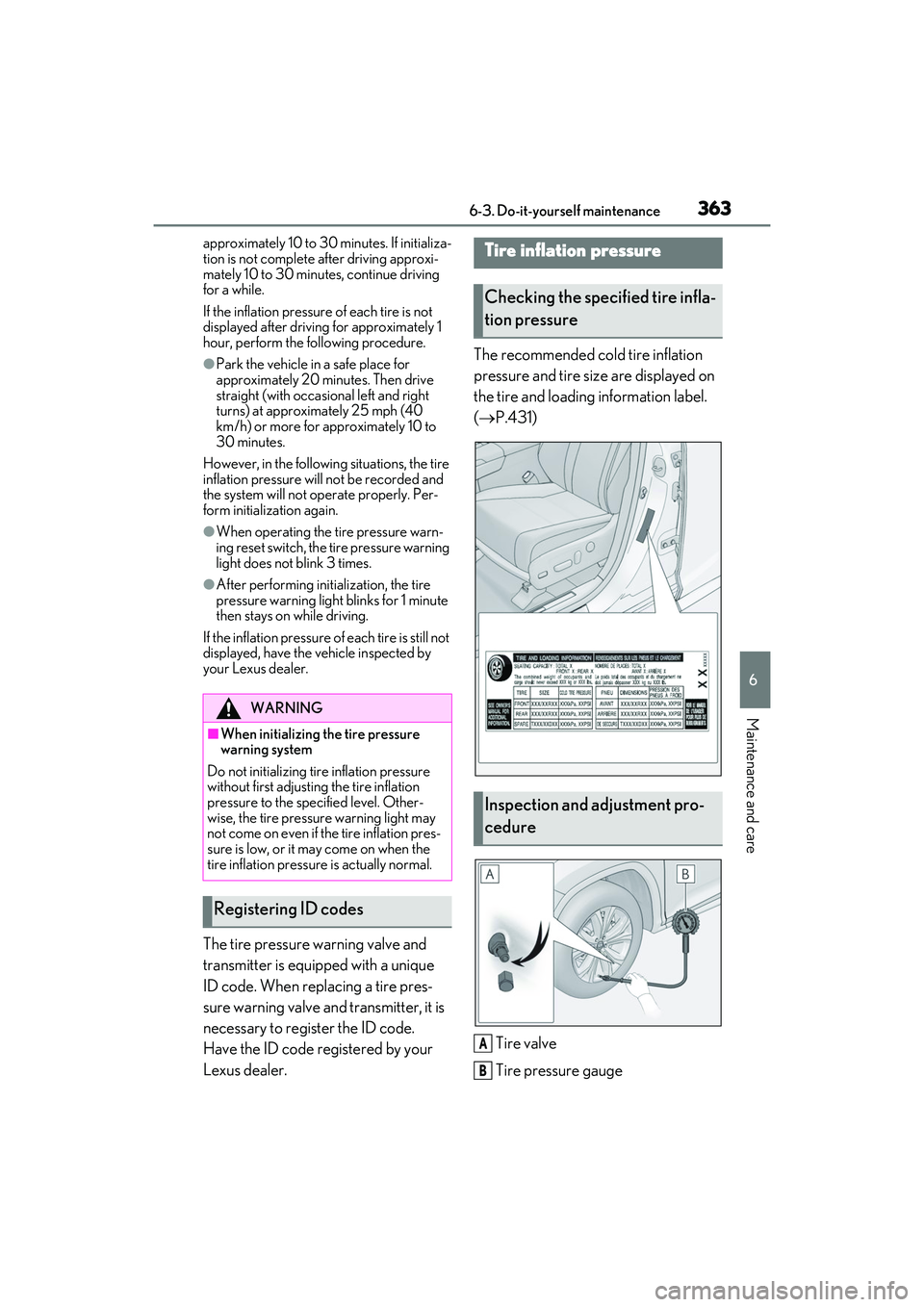
Lexus dealer. The recommended cold tire inflation
pressure and tire size are displayed on
the tire and loading information label.
(
P.431)
Tire valve
Tire pressure gauge
WARNING
■When initializing the tire pressure
warning system
Do not initializing tire inflation pressure
without first adjusting the tire inflation
pressure to the spec ified level. Other-
wise, the tire pressure warning light may
not come on even if the tire inflation pres-
sure is low, or it may come on when the
tire inflation pressure is actually normal.
Registering ID codes
Tire inflation pressure
Checking the specified tire infla-
tion pressure
Inspection and adjustment pro-
cedure
A
B
Page 385 of 508

383
7
7
When trouble arises
When trouble arises
.7-1. Essential informationEmergency flashers.................. 384
If your vehicle has to be stopped in an emergency .......................... 384
If the vehicle is submerged or water on the road is rising
........................................................ 385
7-2. Steps to take in an emergency If your vehicle needs to be towed........................................................ 387
If you think something is wrong ......................................................... 391
Fuel pump shut off system ..... 392
If a warning light turns on or a warning buzzer sounds ....... 393
If a warning message is displayed ........................................................ 402
If you have a flat tire.................. 406
If the engine wi ll not start ........418
If you lose your keys .................. 419
If the fuel filler door cannot be opened........................................ 420
If the electronic key does not operate properly ..................... 421
If the vehicle battery is discharged ........................................................ 423
If your vehicle overheats ........ 426
If the vehicle becomes stuck ........................................................ 428