Page 425 of 508
4237-2. Steps to take in an emergency
7
When trouble arises
If you have a set of jumper (or booster)
cables and a second vehicle with a
12-volt battery, you can jump start your
vehicle by following the steps below.
1Confirm that the electronic key is
being carried.
When connecting the jumper (or booster)
cables, depending on the situation, the
alarm may activate and doors locked.
(P.68)
2 Open the hood. ( P.349)
3 Connect a positive jumper cable clamp to on your vehicle and connect the
clamp on the other end of the positive cab le to on the second vehicle. Then,
connect a negative cable clamp to on the second vehicle and connect the
clamp at the other end of the negative cable to .
Positive (+) battery terminal (your vehicle)
If the vehicle battery is dis-
charged
The following procedures may be
used to start the engine if the vehi-
cle’s battery is discharged.
You can also call your Lexus dealer
or a qualified repair shop.
Restarting the engine
A
B
C
D
A
Page 426 of 508

4247-2. Steps to take in an emergency
Positive (+) battery terminal (second vehicle)
Negative (-) battery terminal (second vehicle)
Solid, stationary, unpainted metallic point away from the battery and any mov-
ing parts as shown in the illustration
4 Start the engine of the second vehi-
cle. Increase the engine speed
slightly and maintain at that level for
approximately 5 minutes to
recharge the battery of your vehi-
cle.
5 Open and close any of the doors of
your vehicle with the engine switch
off.
6 Maintain the engine speed of the
second vehicle and start the engine
of your vehicle by turning the
engine switch to IGNITION ON
mode.
7 Once the vehicle’s engine has
started, remove the jumper cables
in the exact reverse order from
which they were connected.
Once the engine starts, have the vehi-
cle inspected at your Lexus dealer as
soon as possible.
■Starting the engine when the battery is
discharged
The engine cannot be started by push-start-
ing.
■To prevent battery discharge
●Turn off the headlights and the audio sys-
tem while the engine is off.
●Turn off any unnecessary electrical com-
ponents when the vehicle is running at a
low speed for an extended period, such
as in heavy traffic.
■When removing the battery terminals
When the battery terminals are removed, the information stored in the ECU is
cleared. Before removi
ng the battery termi-
nals, contact your Lexus dealer.
■Charging the battery
The electricity stored in the battery will dis-
charge gradually even when the vehicle is
not in use, due to natural discharge and the
draining effects of certain electrical appli-
ances. If the vehicle is left for a long time,
the battery may discharge, and the engine
may be unable to start. (The battery
recharges automatically during driving.)
■When the battery is removed or dis-
charged
●In some cases, it may not be possible to
unlock the doors using the smart access
system with push-button start when the
battery is discharged. Use the wireless
remote control or the mechanical key to
lock or unlock the doors.
●The engine may not start on the first
attempt after the battery has recharged
but will start normally after the second
attempt. This is not a malfunction.
●The engine switch mode is memorized by
the vehicle. When the battery is recon-
nected, the system will return to the
mode it was in before the battery was dis-
charged. Before disconnecting the bat-
tery, turn the engine switch off.
If you are unsure wh at mode the engine
switch was in before the battery dis-
charged, be especially careful when
reconnecting the battery.
●The power back door must be initialized.
( P.107)
■Replacing the battery
●Use a battery with the same case size as
the previous battery and an equivalent
20 hour rate capacity (20HR) or greater.
• If the sizes differ, the battery cannot be
properly secured.
• If the 20 hour rate capacity is low, even if
B
C
D
Page 430 of 508

4287-2. Steps to take in an emergency
1Stop the engine. Shift the shift lever
to P and set the parking brake.
2 Remove the mud, snow or sand
from around the front wheels.
3 Place wood, stones or some other
material under the front wheels to
help provide traction.
4 Restart the engine.
5 AWD models: Activate all-wheel
drive lock mode. ( P.264)
6 Shift the shift lever to D or R and
release the parking brake. Then,
while exercising caution, depress
the accelerator pedal.
■When it is difficult to free the vehicle
Press to turn off TRAC.
If the vehicle becomes stuck
Carry out the following proce-
dures if the tires spin or the vehicle
becomes stuck in mud, dirt or snow:
Recovering procedure
WARNING
■When attempting to free a stuck vehi-
cle
If you choose to push the vehicle back
and forth to free it, make sure the sur-
rounding area is clear to avoid striking
other vehicles, obje cts or people. The
vehicle may also lunge forward or lunge
back suddenly as it becomes free. Use
extreme caution.
■When shifting the shift lever
Be careful not to shift the shift lever with
the accelerator pedal depressed.
This may lead to un expected rapid accel-
eration of the vehicle that may cause an
accident resulting in death or serious
injury.
NOTICE
■To avoid damage to the transmission
and other components
●Avoid spinning the front wheels and
depressing the accelerator pedal
more than necessary.
●If the vehicle remains stuck even after
these procedures are performed, the
vehicle may require towing to be freed.
Page 433 of 508
4318-1. Specifications
8
Vehicle specifications
*1:RX350
*2:RX350L
*3: Vehicles with separate-type second-row seats
*4: Vehicles with bench-type second-row seats
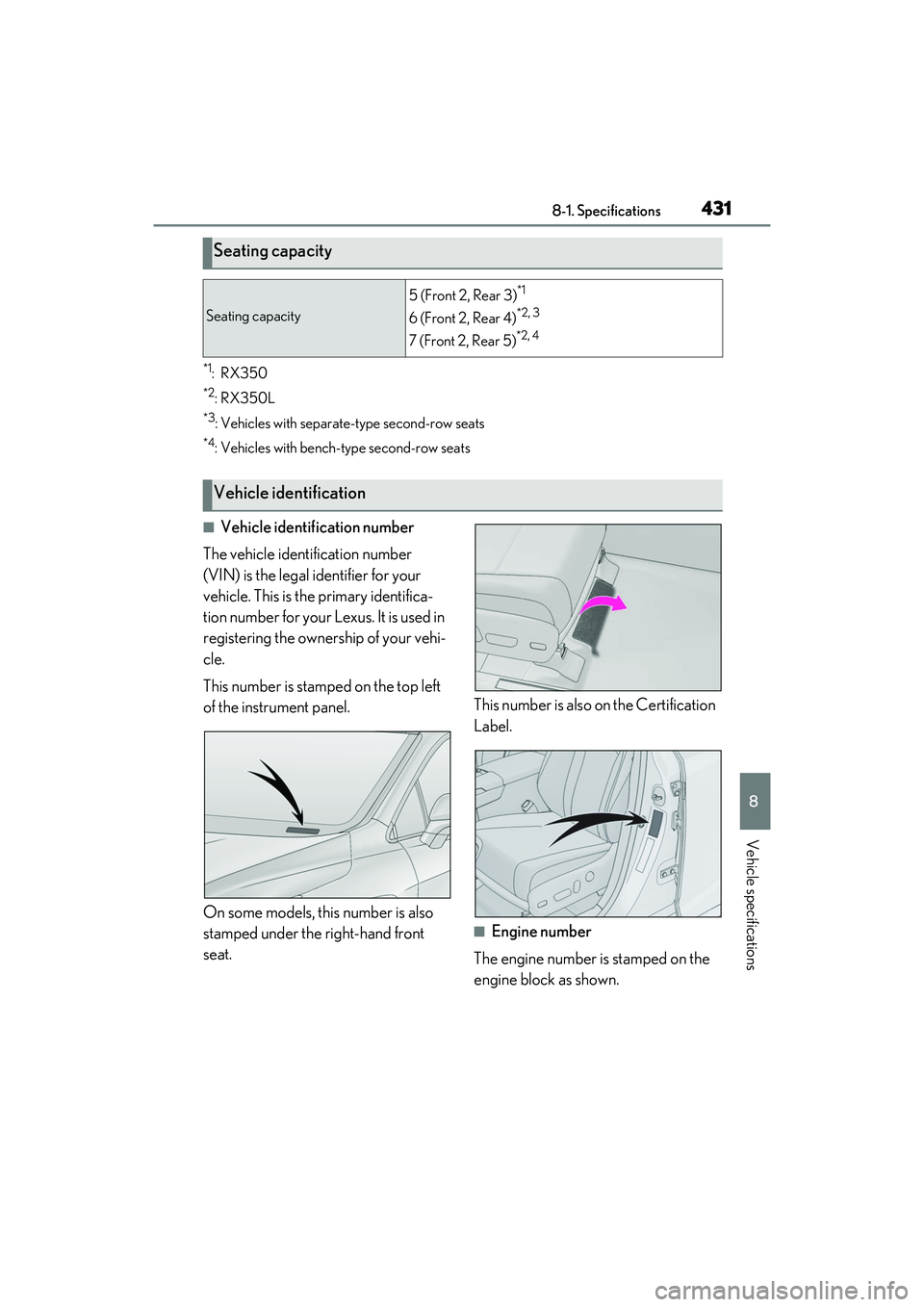
■Vehicle identification number
The vehicle identification number
(VIN) is the legal identifier for your
vehicle. This is the primary identifica-
tion number for your Lexus. It is used in
registering the ownership of your vehi-
cle.
This number is stamped on the top left
of the instrument panel.
On some models, this number is also
stamped under the right-hand front
seat. This number is also on the Certification
Label.
■Engine number
The engine number is stamped on the
engine block as shown.
Seating capacity
Seating capacity
5 (Front 2, Rear 3)*1
6 (Front 2, Rear 4)*2, 3
7 (Front 2, Rear 5)*2, 4
Vehicle identification
Page 452 of 508
4508-2. Customization
■Gauges, meters and multi-information display (P.70, 75, 79)
*1: For details abou t each function: P.83
Function*1Default settingCustomized setting
LanguageEnglishFrenchOO—Spanish
Units*2miles (MPG)
km (km/L)
OO—km (L/100km)
miles (MPG Impe-
rial)
Drive information 1
Current fuel con-sumption
Customizable items: P.80—O—
Average fuel econ-omy (after reset)
Drive information 2
Distance (driving range)
Average vehicle
speed (after reset)
Drive information 3
Average fuel econ- omy (after refuel)
Elapsed time (after start)
Clock12-hour display24-hour display—O—
Pop-up displayOnOff—O—
Accent color*3Color 1Color 2OO—
Needle*4Color 1Color 2—O—Color 3
Rev indicator*45000 r/min.
2000 - 6500 r/min.
—O—
Off
Rev peak*4OnOff—O—
Eco Driving Indicator LightOnOff—O—
Suggestion functionOnOff——O
ABC
Page 453 of 508
4518-2. Customization
8
Vehicle specifications
*2: The default setting varies according to country.
*3:Except F SPORT models
*4: F SPORT models
■Head-up Display*( P.86)
*:If equipped
■Door lock ( P.97, 421)
FunctionDefault settingCustomized setting
Gauge informationNo content
Eco Driving Indica-
tor
—O—
Tachometer
Route guidance to destina-
tion/street nameOnOff—O—
Driving support system displayOnOff—O—
CompassOnOff—O—
Audio system operation statusOnOff—O—
FunctionDefault settingCustomized setting
Unlocking using a mechanical
key
Driver’s door
unlocked in one step, all doors
unlocked in two step
All doors unlocked in one step——O
Automatic door locking func-
tionShift position linked
door locking opera- tionOff
O—OSpeed linked door locking operation
Automatic door unlocking
functionShift position linked door unlocking operationOff
O—ODriver’s door linked door unlocking operation
ABC
ABC
Page 454 of 508
4528-2. Customization
■Power back door (P.101)
*:If equipped
■Smart access system with push-button start and wireless remote control
( P.97, 113)
■Smart access system with push-button start ( P.97, 113)
FunctionDefault settingCustomized setting
Power back doorOnOff—O—
Power back door opening
position51 to 5O——
Buzzer volumeLevel 3Level 1—O—Level 2
Kick sensor*OnOff—O—
Hands free close & lock func-
tion
*OffOn——O
FunctionDefault settingCustomized setting
Operation buzzer volume5OffO—O1 to 7
Operation signal (Emergency
flashers)OnOffO—O
Time elapsed before automatic
door lock function is activated
if door is not opened after
being unlocked
60 seconds
Off
O—O30 seconds
120 seconds
Open door warning buzzerOffOn——O
Reservation lockOnOff——O
FunctionDefault settingCustomized setting
Smart access system with
push-button startOnOff——O
ABC
ABC
ABC
Page 455 of 508
4538-2. Customization
8
Vehicle specifications
■Wireless remote control (P.95, 97, 101)
The doors that are unlocked
using the smart access system
with push-button start can be
selected
Driver’s doorAll the doorsO—O
Number of consecutive door
lock operations2 timesAs many as desired——O
FunctionDefault settingCustomized setting
Wireless remote controlOnOff——O
Unlocking operation
Driver’s door
unlocked in one step, all doors
unlocked in two step
All doors unlocked in one stepO—O
Panic functionOnOff——O
FunctionDefault settingCustomized settingABC
ABC