2022 LEXUS RX350 lock
[x] Cancel search: lockPage 177 of 508

1754-2. Driving procedures
4
Driving
because dynamic radar cruise control with
full-speed range will not be canceled.
●While driving in D position, downshifting
to 7, 6, 5 or 4. (P.222)
●When switching the driving mode to
sport mode while driving in the D position
(P.262)
■Restraining sudden start (Drive-Start
Control)
P.151
■AI-SHIFT
●The AI-SHIFT automatically selects the
suitable gear accordin g to driver perfor-
mance and driving conditions.
The AI-SHIFT automatically operates
when the shift lever is in D. (Shifting the
shift lever to the M position cancels the
function.)
●G AI-SHIFT automatically selects a suit-
able gear for sporty driving according to
driver’s input and driving conditions. G
AI-SHIFT operates automatically when
the shift lever is in D and sport mode is
selected for the driv ing mode. (Selecting
normal mode with the driving mode
select switch or shifti ng the shift lever to
the M position cancels this function.)
While the engine switch is in IGNI-
TION ON mode, move the shift lever
with the brake pedal depressed.
When shifting the shift lever between P
and D, make sure that the vehicle is com-
pletely stopped.
■Shift lock system
The shift lock system is a system to prevent
accidental operation of the shift lever in
starting.
The shift lever can be shifted from P only
when the engine switch is in IGNITION
ON mode and the brake pedal is being
depressed.
■If the shift lever cannot be shifted from P
First, check whether the brake pedal is
being depressed.
If the shift lever cannot be shifted with your
foot on the brake pedal, there may be a
problem with the shift lock system. Have the
vehicle inspected by your Lexus dealer
immediately.
The following steps may be used as an
WARNING
■When driving on slippery road sur-
faces
Be careful of downshifting and sudden
acceleration, as this could result in the
vehicle skidding to th e side or spinning.
Shifting the shift lever
Page 178 of 508

1764-2. Driving procedures
emergency measure to ensure that the shift
lever can be shifted.
Releasing the shift lock:
1Turn the engine switch to IGNITION
ON mode and check that the parking
brake is set. ( P.173, 179)
2 Turn the engine switch to off.
3 Depress the brake pedal.
4 Pry the cover up with a flathead screw-
driver or equivalent tool.
To prevent damage to the cover, cover the
tip of the screwdriver with a rag.
5 Press the shift lock override button.
The shift lever can be shifted while the but-
ton is pressed.
P.262
To drive using temporary shift range
selection, operate the “-” or “+” paddle
shift switch.
When the “-” paddle shift switch is
operated, the shift range will be
downshifted to a range that enables
engine braking force that is suitable to
driving conditions. When the “+” pad-
dle shift switch is operated, the shift
range will be one gear higher than the
gear in use during normal D position
driving.
Changing the shift range allows
restriction of the highest gear, prevent-
ing unnecessary upshifting and
enabling the level of engine braking
force to be selected.
1 Upshifting
2 Downshifting
The selected shift range, from D1 to D8,
will be displayed on the meters.
WARNING
■To prevent an accident when releas-
ing the shift lock
Before pressing the shift lock override
button, make sure to set the parking
brake and depress the brake pedal.
If the accelerator pe dal is accidentally
depressed instead of the brake pedal
when the shift lock override button is
pressed and the shift lever is shifted out
of P, the vehicle may suddenly start, pos-
sibly leading to an accident resulting in
death or serious injury.
Selecting the driving mode
Selecting shift ranges in the D
position
Page 186 of 508

1844-3. Operating the lights and wipers
4-3.Operating the lights and wipers
Operating the switch turns on
the lights as follows:U.S.A.
Canada
1 The side marker, parking, tail,
license plate, instrument panel
lights, and daytime running lights
( P.184) turn on.
2 The headlights and all lights
listed above (except daytime run-
ning lights) turn on.
3 The headlights, daytime run-
ning lights ( P.184) and all the lights listed above turn on and off
automatically.
(When the engine switch is in
IGNITION ON mode.)
4 (U.S.A.) Off
■Daytime running light system
●The daytime running lights illuminate
using the same lights as the parking lights
and illuminate brighter than the parking
lights.
●To make your vehicle more visible to
other drivers during daytime driving, the
daytime running lights turn on automati-
cally when all of the following conditions
are met. (The daytime running lights are
not designed for use at night.)
• The engine is running
• The parking brake is released
• The headlight switch is in the or
* position
*: When the surroundings are bright
The daytime running lights remain on after
they illuminate, even if the parking brake is
set again.
●For the U.S.A.: Daytime running lights
can be turned off by operating the switch.
●Compared to turning on the headlights,
the daytime running light system offers
greater durability and consumes less
electricity, so it can help improve fuel
economy.
■Headlight control sensor
The sensor may not function properly if an
object is placed on the sensor, or anything
that blocks the sensor is affixed to the wind-
shield.
Headlight switch
The headlights can be operated
manually or automatically.
Operating instructions
A
B
Page 187 of 508

1854-3. Operating the lights and wipers
4
Driving
Doing so interferes with the sensor detect-
ing the level of ambient light and may cause
the automatic headlight system to malfunc-
tion.
■Automatic light off system
●When the headlights come on: The head-
lights and tail lights tu rn off 30 seconds
after a door is opened and closed if the
engine switch is turned to ACCESSORY
mode or turned off. (The lights turn off
immediately if on the key is pressed
after all the doors are locked.)
●When only the tail lights are on: The tail
lights turn off automatically if the engine
switch is turned to ACCESSORY mode
or turned off and the driver’s door is
opened.
To turn the lights on again, turn the engine
switch to IGNITION ON mode, or turn the
light switch off once and then back to
or .
■Automatic headlight leveling system (if
equipped)
The level of the headlights is automatically
adjusted according to the number of pas-
sengers and the loading condition of the
vehicle to ensure that the headlights do not
interfere with other road users.
■Light reminder buzzer
A buzzer sounds when the engine switch is
turned off or turned to ACCESSORY
mode and the driver’s door is opened while
the lights are turned on.
■Welcome lighting
If the headlight switch is turned to and
the surrounding area is dark, unlocking the
doors using the smart access system with
push-button start or wireless remote con-
trol will turn the parking lights and tail lights
on automatically.
■Windshield wiper linked headlight illu-
mination
When driving during daytime with the
headlight switch turned to , if the wind-
shield wipers are used, the headlights will turn on automatically after several seconds
to help enhance the visibility of your vehicle.
■Battery-saving function
In order to prevent the battery of the vehicle
from discharging, if the headlights and/or
tail lights are on when the engine switch is
turned off the battery saving function will
operate and automatically turn off all the
lights after approximately 20 minutes.
When the engine switch is turned to IGNI-
TION ON mode, the battery-saving func-
tion will be disabled.
When any of the following are performed,
the battery-saving function is canceled
once and then reactivated. All the lights will
turn off automatically 20 minutes after the
battery- saving function has been reacti-
vated:
●When the headlight switch is operated
●When a door is opened or closed
■Customization
Some functions can be customized.
( P.449)
1 With the headlights on, push the
lever away from you to turn on the
high beams.
NOTICE
■To prevent battery discharge
Do not leave the lights on longer than
necessary when the engine is off.
Turning on the high beam head-
lights
Page 194 of 508

1924-3. Operating the lights and wipers
present on the windshield
●If the wiper switch is turned to the
“AUTO” position while the engine switch
is in IGNITION ON mode, the wipers
will operate once to show that AUTO
mode is activated.
●When the sensor sensitivity ring is turned
toward high while in “AUTO” position, the
wipers will operate once to indicate that
the sensor sensitivity is enhanced.
●If the temperature of the raindrop sensor
is 194°F (90°C) or higher, or 5°F (-15°C)
or lower, automatic operation may not
occur. In this case, operate the wipers in
any mode other than AUTO mode.
■If no windshield washer fluid sprays
Check that the washer nozzles are not
blocked, if there is washer fluid in the
washer fluid tank.
■Front door opening linked windshield
wiper stop function
When “AUTO” is selected and the wind-
shield wipers are operatin g, if a front door is
opened, the operation of the windshield
wipers will be stopped to prevent anyone
near the vehicle from being sprayed by
water from the wipers, provided the vehicle
is stopped with the parking brake applied or
the shift lever in P. Wh en the front door is
closed, wiper operation will resume.
■Customization
Some functions can be customized.
( P.449)
When the windshield wipers are not
being used, they retract to below the
hood. To enable the windshield wipers
to be lifted when parking in cold condi-
tions or when replacing a windshield
wiper insert, change the rest position of
the windshield wipers to the service
position using the wiper lever.
WARNING
■Caution regarding the use of wind-
shield wipers in AUTO mode
The windshield wipers may operate
unexpectedly if the se nsor is touched or
the windshield is subj ect to vibration in
AUTO mode. Take care that your fingers,
etc. do not become caught in the wind-
shield wipers.
■Caution regarding the use of washer
fluid
When it is cold, do not use the washer
fluid until the windshield becomes warm.
The fluid may freeze on the windshield
and cause low visibility. This may lead to
an accident, resulting in death or serious
injury.
NOTICE
■When the washer fluid tank is empty
Do not operate the switch continually as
the washer fluid pump may overheat.
■When a nozzle becomes blocked
In this case, contact your Lexus dealer.
Do not try to clear it with a pin or other
object. The nozzle will be damaged.
Changing the windshield wiper
rest position/Lifting the wind-
shield wipers
Page 196 of 508

1944-3. Operating the lights and wipers
Operating the switch operates
the rear wiper as follows.
1 (U.S.A.) or (Canada)
Off
2 (U.S.A.) or (Canada) Inter-
mittent operation
3 (U.S.A.) or (Canada) Nor-
mal operation 4
Washer/wiper dual opera-
tionPushing the lever operates the wiper and
washer.
The wiper will automatically operate a cou-
ple of times after the washer squirts.
■The rear window wiper and washer can
be operated when
The engine switch is in IGNITION ON
mode.
■If no washer fluid sprays
Check that the washer nozzle is not
blocked if there is washer fluid in the washer
fluid tank.
Rear window wiper and
washer
NOTICE
■When the rear window is dry
Do not use the wiper, as it may damage
the rear window.
Operating the wiper lever
NOTICE
■When the washer fluid tank is empty
Do not operate the switch continually as
the washer fluid pump may overheat.
■When a nozzle becomes blocked
In this case, contact your Lexus dealer.
Do not try to clear it with a pin or other
object. The nozzle will be damaged.
Page 198 of 508
1964-4. Refueling
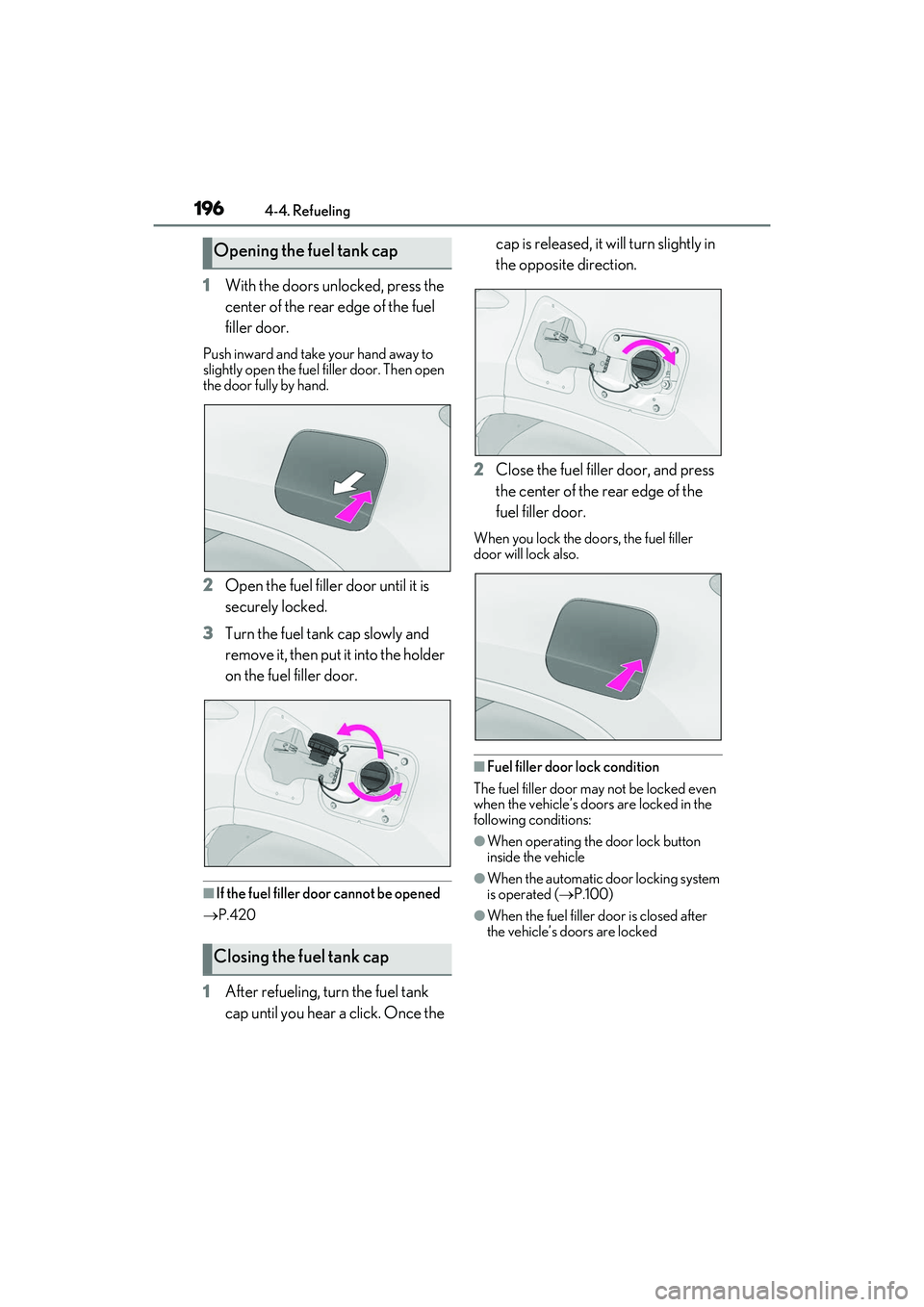
1With the doors unlocked, press the
center of the rear edge of the fuel
filler door.
Push inward and take your hand away to
slightly open the fuel filler door. Then open
the door fully by hand.
2Open the fuel filler door until it is
securely locked.
3 Turn the fuel tank cap slowly and
remove it, then put it into the holder
on the fuel filler door.
■If the fuel filler door cannot be opened
P.420
1 After refueling, turn the fuel tank
cap until you hear a click. Once the cap is released, it will turn slightly in
the opposite direction.
2 Close the fuel filler door, and press
the center of the rear edge of the
fuel filler door.
When you lock the do ors, the fuel filler
door will lock also.
■Fuel filler door lock condition
The fuel filler door may not be locked even
when the vehicle’s doors are locked in the
following conditions:
●When operating the door lock button
inside the vehicle
●When the automatic door locking system
is operated ( P.100)
●When the fuel filler door is closed after
the vehicle’s doors are locked
Opening the fuel tank cap
Closing the fuel tank cap
Page 212 of 508
2104-5. Using the driving support systems
• If a vehicle ahead is a child sized bicycle, a bicycle that is carrying a large load, a
bicycle ridden by more than one person,
or a uniquely shaped bicycle (bicycle with
a child seat, tandem bicycle, etc.)
• If a pedestrian/or the riding height of a
bicyclist ahead is shorter than approxi-
mately 3.2 ft. (1 m) or taller than approxi-
mately 6.5 ft. (2 m)
• If a pedestrian/bicyclist is wearing over- sized clothing (a rain coat, long skirt,
etc.), making their silhouette obscure
• If a pedestrian is bending forward or squatting or bicyclist is bending forward
• If a pedestrian/bicyc list is moving fast
• If a pedestrian is pushing a stroller, wheel- chair, bicycle or other vehicle
• When driving in inclement weather such
as heavy rain, fog, snow or a sandstorm
• When driving through steam or smoke
• When the surrounding area is dim, such as at dawn or dusk, or while at night or in
a tunnel, making a detectable object
appear to be nearly the same color as its
surroundings
• When driving in a place where the sur- rounding brightness changes suddenly,
such as at the entrance or exit of a tunnel
• After the engine has started the vehicle has not been driven for a certain amount
of time
• While making a left/right turn and for a few seconds after making a left/right turn
• While driving on a curve and for a few seconds after driving on a curve
• If your vehicle is skidding
• If the front of the vehicle is raised or low-
ered
• If the wheels are misaligned
• If a wiper blade is blocking the front cam- era
• The vehicle is being driven at extremely
high speeds
• When driving on a hill • If the radar sensor or front camera is mis-
aligned
●In some situations su ch as the following,
sufficient braking force may not be
obtained, preventing the system from
performing properly:
• If the braking functions cannot operate to their full extent, such as when the brake
parts are extremely cold, extremely hot,
or wet
• If the vehicle is not properly maintained
(brakes or tires are excessively worn,
improper tire inflation pressure, etc.)
• When the vehicle is being driven on a
gravel road or other slippery surface
■If VSC is disabled
●If VSC is disabled ( P.267), the pre-col-
lision brake assist and pre-collision brak-
ing functions are also disabled.
●The PCS warning light will turn on and
“VSC Turned Off Pre-Collision Brake
System Unavailable” will be displayed on
the multi-information display.