2022 LEXUS RCF light
[x] Cancel search: lightPage 224 of 412
2225-3. Using the interior lights
RC F Owner's Manual
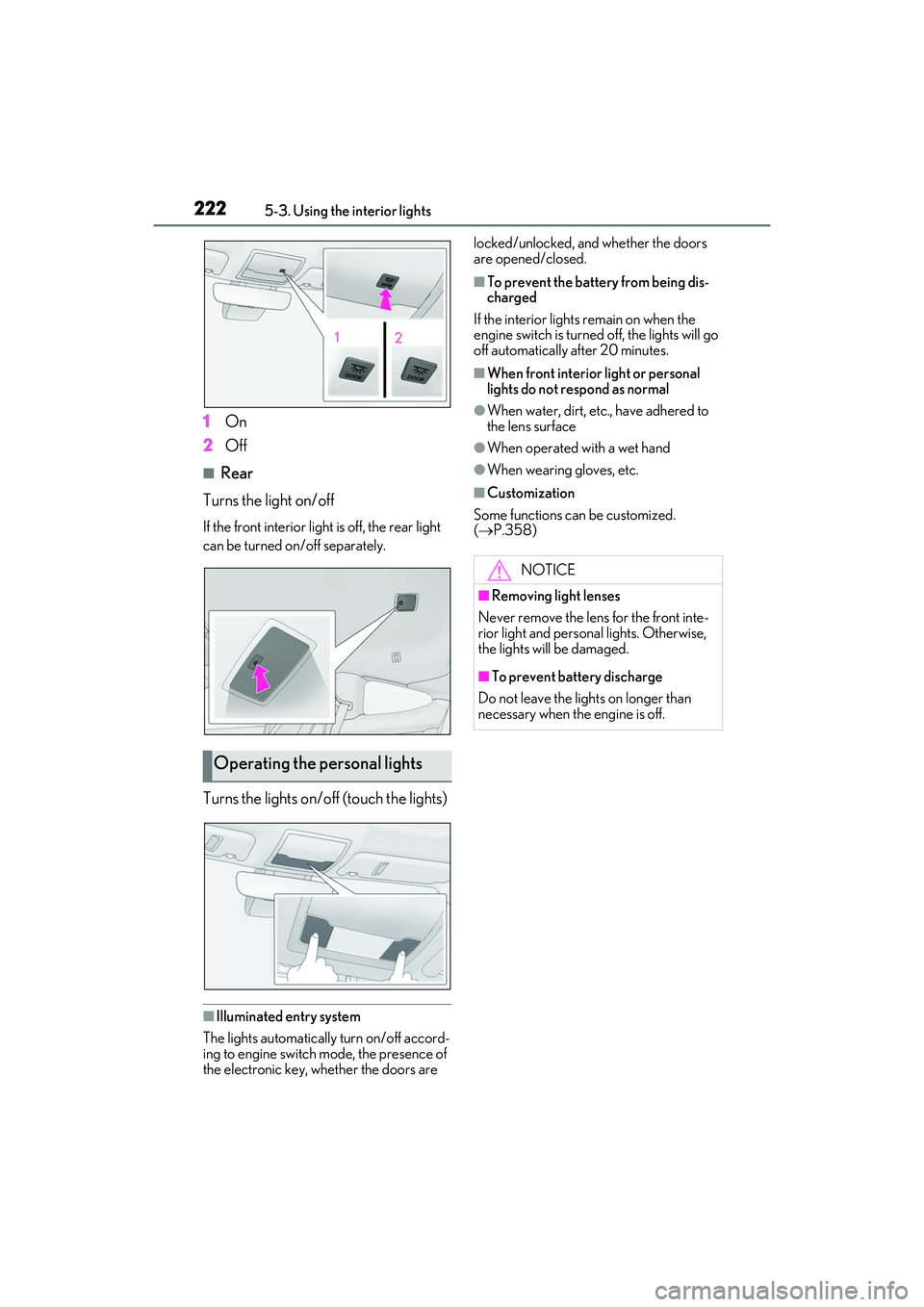
1On
2 Off
■Rear
Turns the light on/off
If the front interior light is off, the rear light
can be turned on/off separately.
Turns the lights on/off (touch the lights)
■Illuminated entry system
The lights automatically turn on/off accord-
ing to engine switch mode, the presence of
the electronic key, whether the doors are locked/unlocked, and whether the doors
are opened/closed.
■To prevent the battery from being dis-
charged
If the interior lights remain on when the
engine switch is turned off, the lights will go
off automatically after 20 minutes.
■When front interior light or personal
lights do not respond as normal
●When water, dirt, etc., have adhered to
the lens surface
●When operated with a wet hand
●When wearing gloves, etc.
■Customization
Some functions can be customized.
( P.358)
Operating the personal lights
NOTICE
■Removing light lenses
Never remove the lens for the front inte-
rior light and personal lights. Otherwise,
the lights will be damaged.
■To prevent battery discharge
Do not leave the lights on longer than
necessary when the engine is off.
Page 225 of 412

2235-4. Using the storage features
RC F Owner's Manual
5
Interior features
5-4.Using the storage features
Glove box (P.224)
Front cup holders ( P.224)
Rear cup holders
* ( P.224)
Console box ( P.225)
*:If equipped
List of storage features
Location of the storage features
A
B
C
D
WARNING
■Items that should not be left in the
storage spaces
Do not leave glasses, lighters or spray
cans in the storage spaces, as this may
cause the following when cabin tempera-
ture becomes high:
●Glasses may be deformed by heat or
cracked if they come into contact with
other stored items.
●Lighters or spray ca ns may explode. If
they come into contact with other
stored items, the lighter may catch fire
or the spray can may release gas,
causing a fire hazard.
Page 226 of 412

2245-4. Using the storage features
RC F Owner's Manual
1Open (press the button)
2 Unlock with the mechanical key
3 Lock with the mechanical key
■Glove box light
The glove box light turns on when the
engine switch is in ACCESSORY or IGNI-
TION ON mode.
■Trunk opener main switch
The trunk opener main switch is located in
the glove box. ( P.98)
■Removing the partition
The insert inside the glove box can be
removed.
■Removing the insert
Rear cup holder insert can be removed.
Glove box
WARNING
■Caution while driving
Keep the glove box closed. In the event
of sudden braking or sudden swerving,
an accident may occur due to an occu-
pant being struck by the open glove box
or the items stored inside.
Front cup holders
WARNING
■Items unsuitable for the cup holder
Do not place anything other than cups or
aluminum cans in the cup holders.
Other items may be thrown out of the
holders in the event of an accident or
sudden braking, causing injury. If possi-
ble, cover hot drinks to prevent burns.
Rear cup holders (if equipped)
Page 230 of 412

2285-5. Using the other interior features
RC F Owner's Manual
The GPS clock’s time is automatically
adjusted by utilizing GPS time infor-
mation. For details, refer to “NAVIGA-
TION AND MULTIMEDIA SYSTEM
OWNER’S MANUAL”.
1To set the visor in the forward posi-
tion, flip it down.
2 To set the visor in the side position,
flip down, unhook, and swing it to
the side. 3
To use the side extender, place the
visor in the side position, then slide
it backward.
Slide the cover to open.
The light turns on when the cover is
opened.
■To prevent battery discharge
If the vanity lights remain on when the
engine switch is turned off, the lights will go
off automatically after 20 minutes.
WARNING
■Items that cannot be hung on the coat
hook
Do not hang coat hangers or other hard
or sharp objects on the hook. If the SRS
curtain shield airbags deploy, these items
may become projectiles, causing death
or serious injury.
Clock
Sun visors
Vanity mirrors
NOTICE
■To prevent the battery from being dis-
charged
Do not leave the lights on longer than
necessary when the engine is off.
Page 231 of 412

2295-5. Using the other interior features
RC F Owner's Manual
5
Interior features
■HomeLink® programming procedure
The programming procedures can also be
found at the following URL.
Website: www.homelink.com/lexus
For support, contact customer support at
the following.
Help Line: 1-800-355-3515
The HomeLink® wireless control sys-
tem in your vehicle has 3 buttons which
can be programmed to operate 3 dif-
ferent devices. Refer to the program-
ming methods on the following pages
to determine the method which is
appropriate for the device. HomeLink
® indicator light
Garage door operation indicators
HomeLink
® icon
Illuminates while HomeLink® is operating.
Buttons
■Codes stored in the HomeLink® mem-
ory
●The registered codes are not erased even
if the battery cable is disconnected.
●If learning failed when registering a dif-
ferent code to a HomeLink® button that
already has a code registered to it, the
already registered code will not be
erased.
Garage door opener
The garage door opener can be
programmed to operate garage
doors, gates, entry doors, door
locks, home lighting systems, secu-
rity systems, and other devices.
System componentsWARNING
■When programming a garage door or
other remote control device
The garage door or other device may
operate, so ensure people and objects
are out of danger to prevent potential
harm.
A
B
C
D
Page 232 of 412

2305-5. Using the other interior features
RC F Owner's Manual
■Before programming HomeLink®
During programming, it is possible
that garage doors, gates, or other
devices may operate. For this rea-
son, make sure that people and
objects are clear of the garage door
or other devices to prevent injury or
other potential harm.
It is recommended that a new bat-
tery be placed in the remote control
transmitter for more accurate pro-
gramming.
Garage door opener motors manu-
factured after 1995 may be
equipped with rolling code protec-
tion. If this is the case, you may need
a stepladder or other sturdy, safe
device to reach the “Learn” or
“Smart” button on the garage door
opener motor.
■Programming HomeLink®
Steps 1 through 3 must be performed
within 60 seconds, otherwise the indi-
cator light will stop flashing and pro-
gramming will not be able to be
completed.
1 Press and release the HomeLink
®
button you want to program and
check that the HomeLink
® indica-
tor light flashes (orange).
2 Point the remote control transmit-
ter for the device at the rear view
mirror, 1 to 3 in. (25 to 75 mm)
from the HomeLink
® buttons.
Keep the HomeLink® indicator light in
view while programming.
3 Program a device.
Programming a device other than
an entry gate (for U.S.A. owners)
Press and hold the handheld transmit-
WARNING
■Conforming to federal safety stan-
dards
Do not use the HomeLink
® compatible
transceiver with any garage door opener
or device that lacks safety stop and
reverse features as required by federal
safety standards.
This includes any ga rage door that can-
not detect an interfering object. A door
or device without these features
increases the risk of death or serious
injury.
■When operating or programming
HomeLink®
Never allow a child to operate or play
with the HomeLink® buttons.
Programming the HomeLink®
Page 233 of 412

2315-5. Using the other interior features
RC F Owner's Manual
5
Interior features
ter button until the HomeLink® indica-
tor light changes from slowly flashing
orange to rapidly flashing green (roll-
ing code) or continuously lit green
(fixed code), then release the button.
Programming an entry gate (for
U.S.A. owners)/Programming a
device in the Canadian market
Press and release th e remote control
transmitter button at 2 second inter-
vals, repeatedly, until the HomeLink
®
indicator light changes from slowly
flashing (orange) to rapidly flashing
(green) (rolling code ) or continuously
lit (green) (fixed code).
4 Test the HomeLink
® operation by
pressing the newly programmed
button and observing the indicator
light:
Indicator light illuminates: Program-
ming of a fixed code device has
completed. The garage door or
other device should operate when a
HomeLink
® button is pressed and
released.
Indicator light flashes rapidly: The
garage door opener motor or other
device is equipped with a rolling
code. To complete programming,
firmly press and hold the
HomeLink
® button for 2 seconds
then release it.
If the garage door or other device
does not operate, proceed to “Pro-
gramming a rolling code system”. 5
Repeat the steps above to program
another device for any of the
remaining HomeLink
® buttons.
■Programming a rolling code sys-
tem
2 or more people may be necessary to
complete rolling code programming.
1 Locate the “Learn” or “Smart” but-
ton on the garage door opener
motor in the garage.
This button can usually be found where the
hanging antenna wire is attached to the
unit. The name and color of the button may
vary by manufacturer. Refer to the owner’s
manual supplied with the garage door
opener motor for details.
2Press and release the “Learn” or
“Smart” button.
Perform 3 within 30 seconds after
performing 2.
3 Press and hold the desired
HomeLink
® button (inside the
Page 234 of 412

2325-5. Using the other interior features
RC F Owner's Manual
vehicle) for 2 seconds and release
it. Repeat this sequence
(press/hold/release) up to 3 times
to complete programming.
If the garage door opener motor
operates when the HomeLink
®
button is pressed, the garage door
opener motor recognizes the
HomeLink
® signal.
■Enabling 2-way communication
with a garage door (only available
for compatible devices)
When enabled, 2-way communication
allows you to check the status of the
opening and closing of a garage door
through indicators in your vehicle.
2-way communication is only available
if the garage door opener motor used
is a compatible device. (To check
device compatibility, refer to
www.homelink.com.)
1 Within 5 seconds after program-
ming the garage door opener has
been completed, if the garage door
opener motor is trained to
HomeLink
®, both garage door
operation indicators will flash rap-
idly (green) and the light on the
garage door opener motor will blink twice, indicating that 2-way
communication is enabled.
If the indicators do not flash, perform
2 and
3 within the first 10 presses of the
HomeLink
® button after programming
has been completed.
2 Press a programmed HomeLink®
button to operate a garage door.
3 Within 1 minute of pressing the
HomeLink
® button, after the
garage door operation has
stopped, press the “Learn” or
“Smart” button on the garage door
opener motor. Within 5 seconds of
the establishment of 2-way com-
munication with the garage door
opener, both garage door opera-
tion indicators in the vehicle will
flash rapidly (green) and the light
on the garage door opener motor
will blink twice, indicating that
2-way communication is enabled.
■Reprogramming a single
HomeLink
® button
When the following procedure is per-
formed, buttons which already have
devices registered to them can be
overwritten:
1 With one hand, press and hold the
desired HomeLink
® button.
2 When the HomeLink
® indicator
starts flashing (orange), continue to
hold the HomeLink
® button and
perform “Programming
HomeLink
®” 1(it takes 20 seconds
for the HomeLink
® indicator to
start flashing).