Page 221 of 400

2195-2. Using the air conditioning system
RC350/RC300 Owner's Manual
5
Interior features
●During use, various odors from inside and
outside the vehicle may enter into and
accumulate in the air conditioning sys-
tem. This may then cause odor to be
emitted from the vents.
●To reduce potential odors from occur-
ring:
• It is recommended that the air condition-
ing system be set to outside air mode
prior to turning the vehicle off.
• The start timing of the blower may be
delayed for a short period of time imme-
diately after the air conditioning system is
started in automatic mode.
■Air conditioning filter
P.273
■Air conditioning system refrigerant
●A label regarding the refrigerant of the
air conditioning system is attached to the
hood at the location shown in the follow-
ing illustration.
●The meaning of each symbol on the label
are as follows:
■Customization
Some functions can be customized.
( P.349)
Caution
Air conditioning system
Air conditioning system
lubricant type
Requires registered tech-
nician to service air condi-
tioning system
Flammable refrigerant
WARNING
■To prevent the windshield from fog-
ging up
●Do not use during cool air
operation in extremely humid weather.
The difference between the tempera-
ture of the outside air and that of the
windshield can cause the outer surface
of the windshield to fog up, blocking
your vision.
●Do not place anything on the instru-
ment panel which may cover the air
outlets. Otherwise, air flow may be
obstructed, preventing the windshield
defoggers from defogging.
■To prevent burns
●Do not touch the rear view mirror sur-
faces when the outside rear view mir-
ror defoggers are on.
●Do not touch the glass at lower part of
the windshield or to the side of the
front pillars when th e windshield wiper
de-icer is on.
NOTICE
■To prevent battery discharge
Do not leave the air conditioning system
on longer than necessary when the
engine is stopped.
Page 226 of 400

2245-3. Using the interior lights
RC350/RC300 Owner's Manual
1On
2 Off
■Rear
Turns the light on/off
If the front interior light is off, the rear light
can be turned on/off separately.
Turns the lights on/off (touch the lights)
■Illuminated entry system
The lights automatically turn on/off accord-
ing to engine switch mode, the presence of
the electronic key, whether the doors are locked/unlocked, and whether the doors
are opened/closed.
■To prevent the battery from being dis-
charged
If the interior lights remain on when the
engine switch is turned off, the lights will go
off automatically after 20 minutes.
■When front interior light or personal
lights do not respond as normal
●When water, dirt, etc., have adhered to
the lens surface
●When operated with a wet hand
●When wearing gloves, etc.
■Customization
Some functions can be customized.
( P.349)
Operating the personal lights
NOTICE
■Removing light lenses
Never remove the lens for the front inte-
rior light and personal lights. Otherwise,
the lights will be damaged.
■To prevent battery discharge
Do not leave the lights on longer than
necessary when the engine is off.
Page 227 of 400
2255-4. Using the storage features
RC350/RC300 Owner's Manual
5
Interior features
5-4.Using the storage features
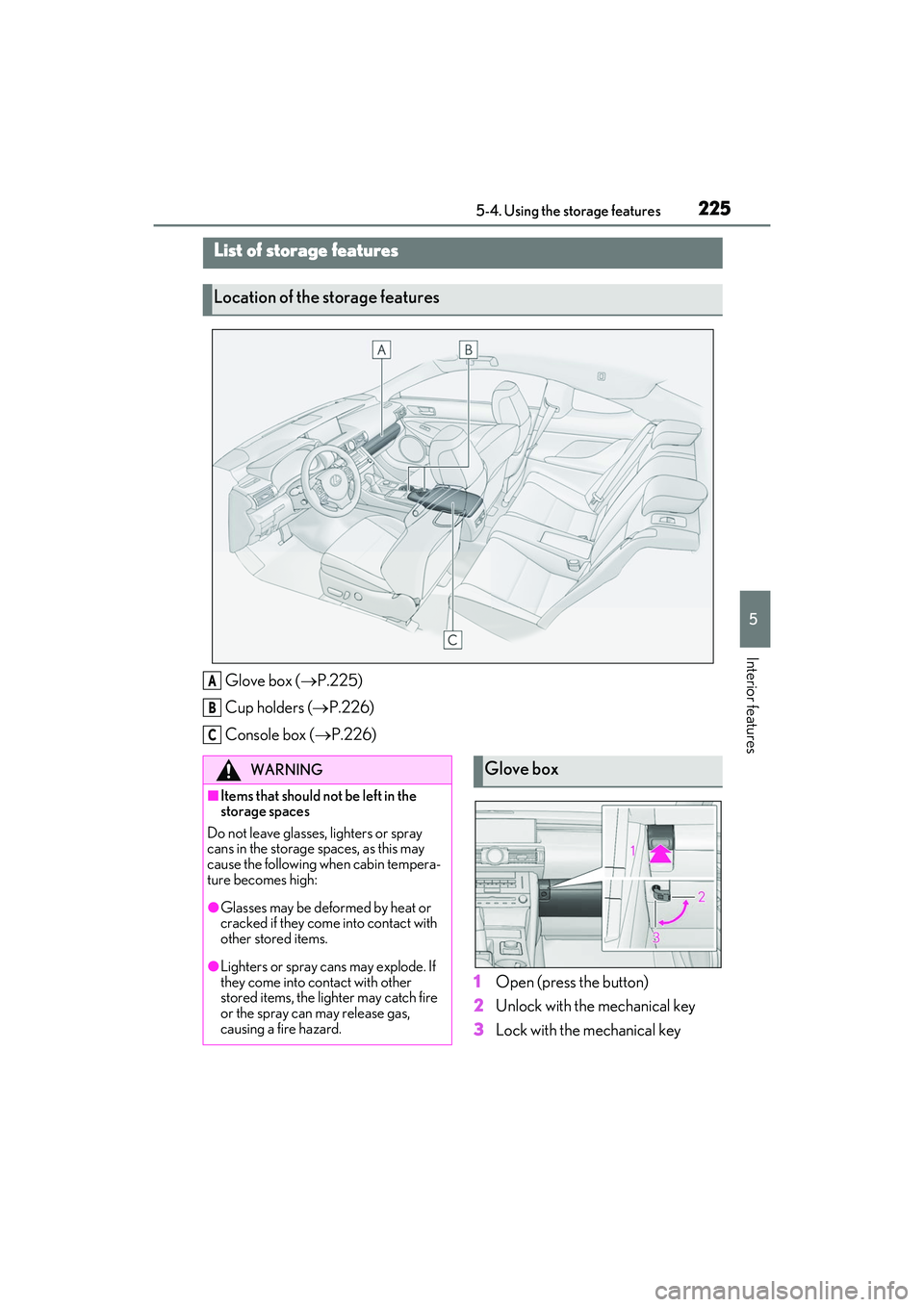
Glove box (P.225)
Cup holders ( P.226)
Console box ( P.226)
1Open (press the button)
2 Unlock with the mechanical key
3 Lock with the mechanical key
List of storage features
Location of the storage features
A
B
C
WARNING
■Items that should not be left in the
storage spaces
Do not leave glasses, lighters or spray
cans in the storage spaces, as this may
cause the following when cabin tempera-
ture becomes high:
●Glasses may be deformed by heat or
cracked if they come into contact with
other stored items.
●Lighters or spray can s may explode. If
they come into contact with other
stored items, the lighter may catch fire
or the spray can may release gas,
causing a fire hazard.
Glove box
Page 230 of 400

2285-5. Using the other interior features
RC350/RC300 Owner's Manual
5-5.Using the other interior features
An assist grip installed on the ceiling
can be used to support your body
while sitting on the seat.
To use the coat hook, push it in.The GPS clock’s time is automatically
adjusted by utilizing GPS time infor-
mation. For details, refer to “NAVIGA-
TION AND MULTIMEDIA SYSTEM
OWNER’S MANUAL”.
Please use as a power supply for elec-
tronic goods that use less than 12
VDC/10 A (power consumption of
120 W).
Open the lid.
Other interior features
Assist grips
WARNING
■Assist grip
Do not use the assist grip when getting in
or out of the vehicle or rising from your
seat.
NOTICE
■To prevent damage to the assist grip
Do not put a heavy load on the assist grip.
Coat hooks
WARNING
■Items that cannot be hung on the coat
hook
Do not hang coat hangers or other hard
or sharp objects on the hook. If the SRS
curtain shield airbags deploy, these items
may become projectiles, causing death
or serious injury.
Clock
Power outlet
Page 232 of 400

2305-5. Using the other interior features
RC350/RC300 Owner's Manual
■HomeLink® programming procedure
The programming procedures can also be
found at the following URL.
Website: www.homelink.com/lexus
For support, contact customer support at
the following.
Help Line: 1-800-355-3515
The HomeLink® wireless control sys-
tem in your vehicle has 3 buttons which
can be programmed to operate 3 dif-
ferent devices. Refer to the program-
ming methods on the following pages
to determine the method which is
appropriate for the device. HomeLink
® indicator light
Garage door operation indicators
HomeLink
® icon
Illuminates while HomeLink® is operating.
Buttons
■Codes stored in the HomeLink® mem-
ory
●The registered codes are not erased even
if the battery cable is disconnected.
●If learning failed when registering a dif-
ferent code to a HomeLink® button that
already has a code registered to it, the
already registered code will not be
erased.
Garage door opener
The garage door opener can be
programmed to operate garage
doors, gates, entry doors, door
locks, home lighting systems, secu-
rity systems, and other devices.
System componentsWARNING
■When programming a garage door or
other remote control device
The garage door or other device may
operate, so ensure people and objects
are out of danger to prevent potential
harm.
A
B
C
D
Page 239 of 400
2375-5. Using the other interior features
RC350/RC300 Owner's Manual
5
Interior features
If there is not enough space to drive in a
circle, drive around the block until the
direction is displayed.
WARNING
■When doing the circling calibration
Secure a wide space, and watch out for
people and vehicles in the neighbor-
hood. Do not violate any local traffic
rules while performing circling calibra-
tion.
Page 242 of 400

2406-1. Maintenance and care
RC350/RC300 Owner's Manual
6-1.Maintenance and care
Working from top to bottom, liber-
ally apply water to the vehicle body,
wheel wells and underside of the
vehicle to remove any dirt and dust.
Wash the vehicle body using a
sponge or soft cloth, such as a
chamois.
For hard-to-remove marks, use car
wash soap and rinse thoroughly with
water.
Wipe away any water.
Wax the vehicle when the water-
proof coating deteriorates.
If water does not bead on a clean surface,
apply wax when the vehicle body is cool.
■Black stainless steel window moldings (F
SPORT models)
The stainless steel window moldings are
made of black oxide coated stainless steel.
When cleaning the vehicle, do not scrub the
moldings with an abrasive cleaner as their
finish may be damaged or the color may
change.
■Self-restoring coat
The vehicle body has a self-restoring coat-
ing that is resistant to small surface
scratches caused in a car wash etc.
●The coating lasts for 5 to 8 years from
when the vehicle is delivered from the
plant.
●The restoration time differs depending on
the depth of the scratch and outside tem-
perature.
The restoration time may become shorter
when the coating is warmed by applying
warm water.
●Deep scratches caused by keys, coins,
etc. cannot be restored.
●Do not use wax that contains abrasives.
■Automatic car washes
●Fold the mirrors before washing the vehi-
cle. Start washing from the front of the
vehicle. Make sure to extend the mirrors
before driving.
●Brushes used in automatic car washes
may scratch the vehicle surface, parts
(wheel, etc.) and damage the paint.
■High pressure car washes
As water may enter the cabin, do not bring
the nozzle tip near the gaps around the
doors or perimeter of the windows, or spray
these areas continuously.
■When using a car wash
If the door handle becomes wet while the
electronic key is within the effective range,
the door may lock and unlock repeatedly. In
that case, follow the following correction
procedures to wash the vehicle:
●Place the key in a position 6 ft. (2 m) or
more separate from the vehicle while the
vehicle is being washed. (Take care to
ensure that the key is not stolen.)
●Set the electronic key to battery-saving
mode to disable the smart access system
with push-button start. ( P.93)
■Wheels and wheel ornaments
●Remove any dirt immediately by using a
neutral detergent.
●Wash detergent off with water immedi-
Cleaning and protecting the
vehicle exterior
Perform cleaning in a manner
appropriate to each component
and its material.
Cleaning instructions
Page 250 of 400

2486-2. Maintenance
RC350/RC300 Owner's Manual
Radiator, con-
denser and inter-
cooler radiator
The radiator, con-
denser and inter-
cooler radiator should
be free from foreign
objects. (P.260)
Washer fluid
Is there sufficient
washer fluid?
(P.262)
Vehicle interior
ItemsCheck points
Accelerator
pedal
• The accelerator
pedal should move
smoothly (without
uneven pedal effort
or catching).
Automatic trans-
mission “Park”
mechanism
•When parked on a slope and the shift
lever is in P, is the
vehicle securely
stopped?
Brake pedal
• Does the brake pedal move
smoothly?
• Does the brake pedal have appro-
priate clearance
from the floor?
• Does the brake pedal have the cor-
rect amount of free
play?
ItemsCheck points
Brakes
• The vehicle should not pull to one side
when the brakes are
applied.
• The brakes should work effectively.
• The brake pedal should not feel
spongy.
• The brake pedal should not get too
close to the floor
when the brakes are
applied.
Head restraints
•Do the head restraints move
smoothly and lock
securely?
Indicators/buzz-
ers•Do the indicators and buzzers function
properly?
Lights• Do all the lights come on?
Parking brake
•Does the parking brake pedal move
smoothly?
• When parked on a slope and the park-
ing brake is on, is the
vehicle securely
stopped?
Seat belts
• Do the seat belts operate smoothly?
• The seat belts should not be damaged.
ItemsCheck points