2022 LEXUS IS350 light
[x] Cancel search: lightPage 267 of 440

2655-5. Using the other interior features
5
Interior features
ter button until the HomeLink® indica-
tor light changes from slowly flashing
orange to rapidly flashing green (roll-
ing code) or continuously lit green
(fixed code), then release the button.
Programming an entry gate (for
U.S.A. owners)/Programming a
device in the Canadian market
Press and release th e remote control
transmitter button at 2 second inter-
vals, repeatedly, until the HomeLink
®
indicator light changes from slowly
flashing (orange) to rapidly flashing
(green) (rolling code ) or continuously
lit (green) (fixed code).
4 Test the HomeLink
® operation by
pressing the newly programmed
button and observing the indicator
light:
Indicator light illuminates: Program-
ming of a fixed code device has
completed. The garage door or
other device should operate when a
HomeLink
® button is pressed and
released.
Indicator light flashes rapidly: The
garage door opener motor or other
device is equipped with a rolling
code. To complete programming,
firmly press and hold the
HomeLink
® button for 2 seconds
then release it.
If the garage door or other device
does not operate, proceed to “Pro-
gramming a rolling code system”. 5
Repeat the steps above to program
another device for any of the
remaining HomeLink
® buttons.
■Programming a rolling code sys-
tem
2 or more people may be necessary to
complete rolling code programming.
1 Locate the “Learn” or “Smart” but-
ton on the garage door opener
motor in the garage.
This button can usually be found where the
hanging antenna wire is attached to the
unit. The name and color of the button may
vary by manufacturer. Refer to the owner’s
manual supplied with the garage door
opener motor for details.
2Press and release the “Learn” or
“Smart” button.
Perform 3 within 30 seconds after per-
forming 2.
3 Press and hold the desired
HomeLink
® button (inside the
vehicle) for 2 seconds and release
Page 268 of 440
2665-5. Using the other interior features
it. Repeat this sequence
(press/hold/release) up to 3 times
to complete programming.
If the garage door opener motor
operates when the HomeLink
®
button is pressed, the garage door
opener motor recognizes the
HomeLink
® signal.
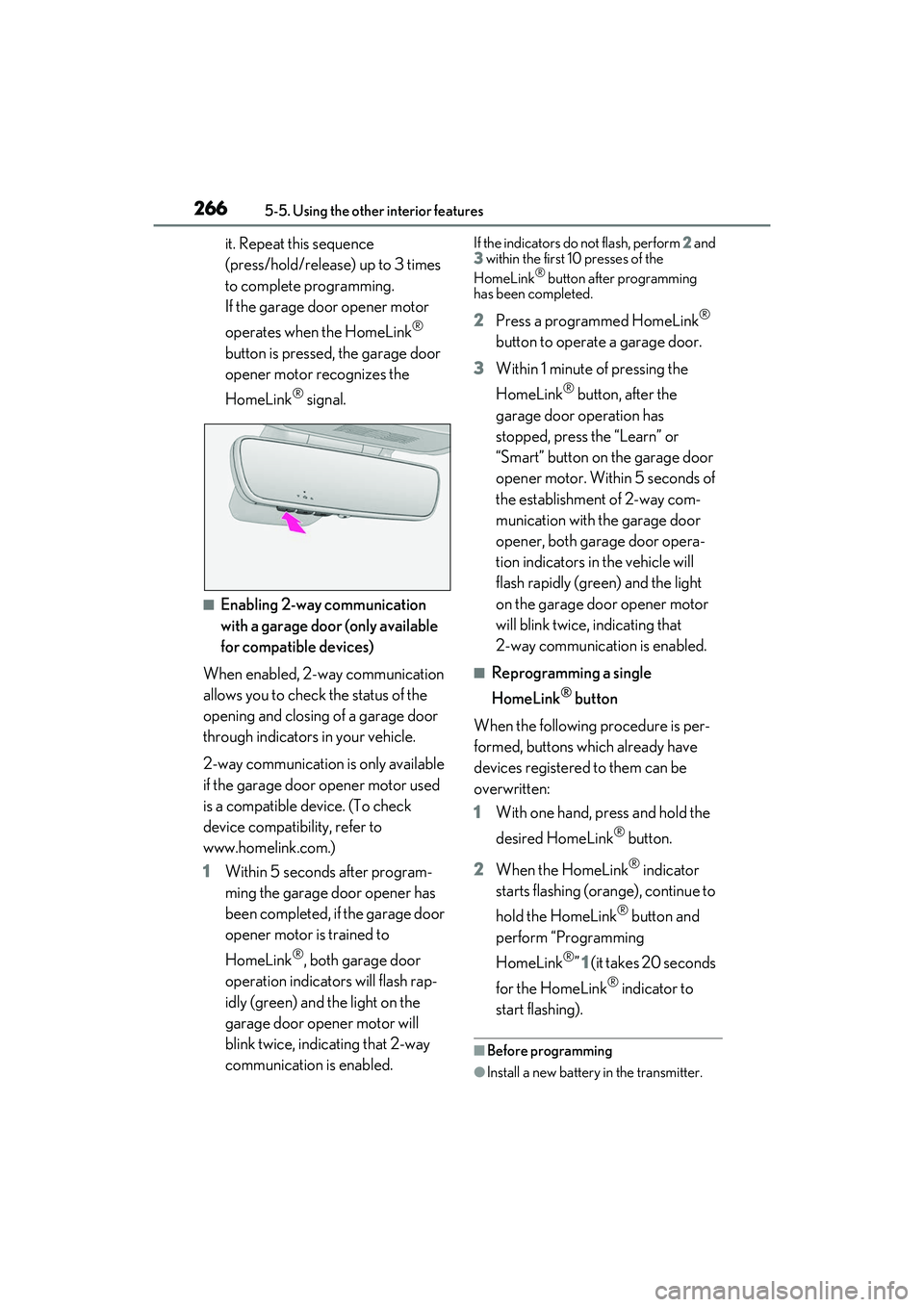
■Enabling 2-way communication
with a garage door (only available
for compatible devices)
When enabled, 2-way communication
allows you to check the status of the
opening and closing of a garage door
through indicators in your vehicle.
2-way communication is only available
if the garage door opener motor used
is a compatible device. (To check
device compatibility, refer to
www.homelink.com.)
1 Within 5 seconds after program-
ming the garage door opener has
been completed, if the garage door
opener motor is trained to
HomeLink
®, both garage door
operation indicators will flash rap-
idly (green) and the light on the
garage door opener motor will
blink twice, indicating that 2-way
communication is enabled.
If the indicators do not flash, perform 2 and
3 within the first 10 presses of the
HomeLink
® button after programming
has been completed.
2 Press a programmed HomeLink®
button to operate a garage door.
3 Within 1 minute of pressing the
HomeLink
® button, after the
garage door operation has
stopped, press the “Learn” or
“Smart” button on the garage door
opener motor. Within 5 seconds of
the establishment of 2-way com-
munication with the garage door
opener, both garage door opera-
tion indicators in the vehicle will
flash rapidly (green) and the light
on the garage door opener motor
will blink twice, indicating that
2-way communication is enabled.
■Reprogramming a single
HomeLink
® button
When the following procedure is per-
formed, buttons which already have
devices registered to them can be
overwritten:
1 With one hand, press and hold the
desired HomeLink
® button.
2 When the HomeLink
® indicator
starts flashing (orange), continue to
hold the HomeLink
® button and
perform “Programming
HomeLink
®” 1 (it takes 20 seconds
for the HomeLink
® indicator to
start flashing).
■Before programming
●Install a new battery in the transmitter.
Page 269 of 440

2675-5. Using the other interior features
5
Interior features
●The battery side of the transmitter must
be pointed away from the HomeLink®.
Press the appropriate HomeLink®
button. The HomeLink
® indicator light
should turn on.
The status of the opening and closing
of a garage door is shown by the indi-
cators.
Opening
Closing
This function is only available if the garage
door opener motor used is a compatible
device. (To check device compatibility,
refer to www.homelink.com.)
The indicators can operate within
approximately 820 ft. (250 m) of the
garage door. However, if there are
obstructions between the garage door
and the vehicle, such as houses and trees, feedback signals from the
garage door may not be received.
To recall the previous door operation
status, press and release either
HomeLink
® buttons and
or and simulta-
neously. The last recorded status will
be displayed for 3 seconds.
Press and hold the 2 outside buttons
for 10 seconds until the HomeLink
®
indicator light changes from continu-
ously lit (orange) to rapidly flashing
(green).
If you sell your vehicle, be sure to erase the
programs stored in the HomeLink
® mem-
ory.
Operating HomeLink®
ColorStatus
Orange (flashing)Currently open- ing/closing
GreenOpening/closing has completed
Red (flashing)Feedback signals
cannot be received
A
B
Erasing the entire HomeLink®
memory (all three codes)
Page 271 of 440

269
6
6
Maintenance and care
Maintenance and care
.6-1. Maintenance and careCleaning and protecting the vehi-cle exterior ................................ 270
Cleaning and protecting the vehi- cle interior ................................. 274
6-2. Maintenance Maintenance requirements........................................................ 278
General maintenance ............. 279
Emission inspection and mainte- nance (I/M) programs ......... 282
6-3. Do-it-yourself maintenance Do-it-yourself service precautions........................................................ 283
Hood............................................... 285
Positioning a floor jack............ 285
Engine compartment............... 287
Tires ................................................ 296
Tire inflation pressure.............. 304
Wheels........................................... 305
Air conditioning filter...............307
Electronic key battery ............. 308
Checking and replacing fuses ......................................................... 310
Headlight aim............................... 312
Light bulbs ..................................... 313
Page 274 of 440

2726-1. Maintenance and care
WARNING
■When cleaning the windshield (vehi-
cles with rain-sensing windshield wip-
ers)
Set the wipers to the intermittent wind-
shield wipers. ( P.150)
If AUTO mode is se lected, the wipers
may operate unexpectedly in the follow-
ing situations, and may result in hands
being caught or other serious injuries
and cause damage to the wiper blades.
●When the upper part of the windshield
where the raindrop sensor is located is
touched by hand
●When a wet rag or si milar is held close
to the raindrop sensor
●If something bumps against the wind-
shield
●If you directly touch the raindrop sen-
sor body or if something bumps into
the raindrop sensor
■Precautions regarding the exhaust
pipes and rear bumper diffusers
Exhaust gases cause the exhaust pipes
and rear bumper diffusers to become
quite hot.
When washing the vehicle, be careful not
to touch the pipes and diffusers until they
have cooled sufficiently, as touching hot
exhaust pipes and rear bumper diffusers
can cause burns.
■Precaution regarding the rear
bumper
If the paint of the rear bumper is chipped
or scratched, the following systems may
not function correctly. If this occurs, con-
sult your Lexus dealer.
●Lexus Safety System + 2.5
●BSM
●RCTA
●PKSB (if equipped)
NOTICE
■To prevent paint deterioration and
corrosion on the body and compo-
nents (aluminum wheels, etc.)
●Wash the vehicle immediately in the
following cases:
• After driving near the sea coast
• After driving on salted roads
• If coal tar or tree sap is present on the paint surface
• If dead insects, insect droppings or bird droppings are present on the
paint surface
• After driving in an area contaminated with soot, oily smoke, mine dust, iron
powder or chemical substances
• If the vehicle becomes heavily soiled with dust or mud
• If liquids such as benzene and gasoline are spilled on the paint surface
●If the paint is chipped or scratched,
have it repaired immediately.
●To prevent the wheels from corroding,
remove any dirt and store in a place
with low humidity when storing the
wheels.
■Cleaning the exterior lights
●Wash carefully. Do not use organic
substances or scrub with a hard brush.
This may damage the surfaces of the
lights.
●Do not apply wax to the surfaces of the
lights.
Wax may cause damage to the lenses.
Page 277 of 440

2756-1. Maintenance and care
6
Maintenance and care
Remove dirt using a soft cloth or
synthetic chamois dampened in a
baking soda (sodium bicarbonate)
solution.
Use a solution of approximately 9% baking
soda dissolved in water.
Wipe the surface with a dry, soft
cloth to remove any remaining
moisture.
Remove dirt and dust using a vac-
uum cleaner.
Wipe off any excess dirt and dust
with a soft cloth dampened with
diluted detergent.
Use a diluted water so lution of approxi-
mately 5% neutral wool detergent.
Wring out any excess water from
the cloth and thoroughly wipe off all
remaining traces of detergent.
Wipe the surface with a dry, soft
cloth to remove any remaining
moisture. Allow the leather to dry in
a shaded and ventilated area.
■Caring for leather areas
Lexus recommends cleani ng the interior of
the vehicle at least twice a year to maintain
the quality of the vehicle’s interior.
NOTICE
■Preventing damage to leather sur-
faces
Observe the following precautions to
avoid damage to and deterioration of
leather surfaces:
●Remove any dust or dirt from leather
surfaces immediately.
●Do not expose the vehicle to direct
sunlight for extended periods of time.
Park the vehicle in the shade, espe-
cially during summer.
●Do not place items made of vinyl, plas-
tic, or containing wax on the uphol-
stery, as they may stick to the leather
surface if the vehicle interior heats up
significantly.
■Water on the floor
Do not wash the vehicle floor with water.
Vehicle systems such as the audio system
may be damaged if water comes into
contact with electrical components such
as the audio system above or under the
floor of the vehicl e. Water may also
cause the body to rust.
■When cleaning the inside of the wind-
shield
Do not allow glass cleaner to contact the
lens. Also, do not touch the lens.
(
P.160)
■Cleaning the inside of the rear win-
dow
●Do not use glass cleaner to clean the
rear window, as this may cause dam-
age to the rear window defogger
heater wires or antenna. Use a cloth
dampened with lukewarm water to
gently wipe the window clean. Wipe
the window in strokes running parallel
to the heater wires or antenna.
●Be careful not to scratch or damage
the heater wires or antenna.
■Cleaning the front side windows
Do not use any compound or abrasive
product (e.g., glass cleaner, detergent,
wax) to clean the windows. It may dam-
age the coating.
Cleaning the area s with satin-fin-
ish metal accents
Cleaning the leather areas
Page 278 of 440

2766-1. Maintenance and care
Remove dirt and dust using a vac-
uum cleaner.
Wipe it off with a soft cloth damp-
ened with neutral detergent diluted
to approximately 1%.
Wring out any excess water from
the cloth and thoroughly wipe off
remaining traces of detergent and
water.
It is recommended that regular mainte-
nance should be performed for areas
that are frequently touched to maintain
quality.
■Routine maintenance
This maintenance is most effective if
performed regularly (around once per
month).
1 Soak a cloth in lukewarm water
(approximately 104°F [40°C]),
wring it out thoroughly and then
wipe the entire body.
Wipe carefully so that the pile is not dishev-
eled. Be sure to prepare a clean cloth.
Once you have wiped the part with the
cloth, rinse it until it is completely clean
before using the cloth again.
2 Once it has dried, use a lint brush
or the like to comb the pile.
■When cleaning the artificial
leather (Ultrasuede
®)
If liquid is spilled onto the surface, apply tissue paper or the like to
absorb the liquid.
If any substance such as mud or cof-
fee dries and becomes stuck to the
surface, use a lint brush or the like to
lightly brush the dirty area and
remove the substance. Then, it is
recommended to clean the dried
substance from the surface using a
vacuum cleaner.
For oil-based substances, use a dry
cloth or tissue paper to wipe off the
substance as much as possible,
while being careful not to spread it.
If the substance still cannot be
removed, use the following procedure
to remove it.
1 Liquid substances: Soak a cloth in
lukewarm water (approximately
104°F [40°C]), wring it out thor-
oughly and then wipe the dirty area
from the outside inward.
Wipe carefully so that the pile is not dishev-
eled. Be sure to prepare a clean cloth and
use the clean portion of it to clean the sur-
face.
Oil-based substances: Dab a cloth soaked
in benzene, lukewarm water or pure ethyl
alcohol (for drinking) within the dirty area
from the outside inward, and then dab a
dry cloth on the dirty area to absorb the
substance.
2 If the pile on the surface is dishev-
eled, use a lint brush or the like to
lightly brush the surface, and then
allow the surface to dry completely.
■To remove substances adhered to
the pile
To clean dust or other adhered sub-
stances, use a lint brush or the like to
Cleaning the synthetic leather
areas
Cleaning the artificial leather
(Ultrasuede
®*) areas (IS500)
Page 279 of 440

2776-1. Maintenance and care
6
Maintenance and care
lightly brush the area and remove the
substance. If the substance still cannot
be removed, use adhesive tape to
remove it.
*:Ultrasuede® is a registered trademark
of Toray Industries, Inc.
NOTICE
■When driving
Areas that are frequently touched are
more likely to attrac t dirt. Ensure that
your hands are clean before touching
anything.
■To prevent damage to artificial
leather (Ultrasuede®)
Observe the following precautions to
avoid damage to and deterioration of
artificial leather (Ultrasuede
®):
●Do not apply excessive force
●Do not dig your nails into it
●Do not rub it with your hands
●Do not touch it if your hands are dirty
■When using adhesive tape
If a strong adhesive tape is used, there is
a possibility that the surface of the carpet
could be damaged.