2022 LEXUS IS350 light
[x] Cancel search: lightPage 182 of 440
1804-5. Using the driving support systems
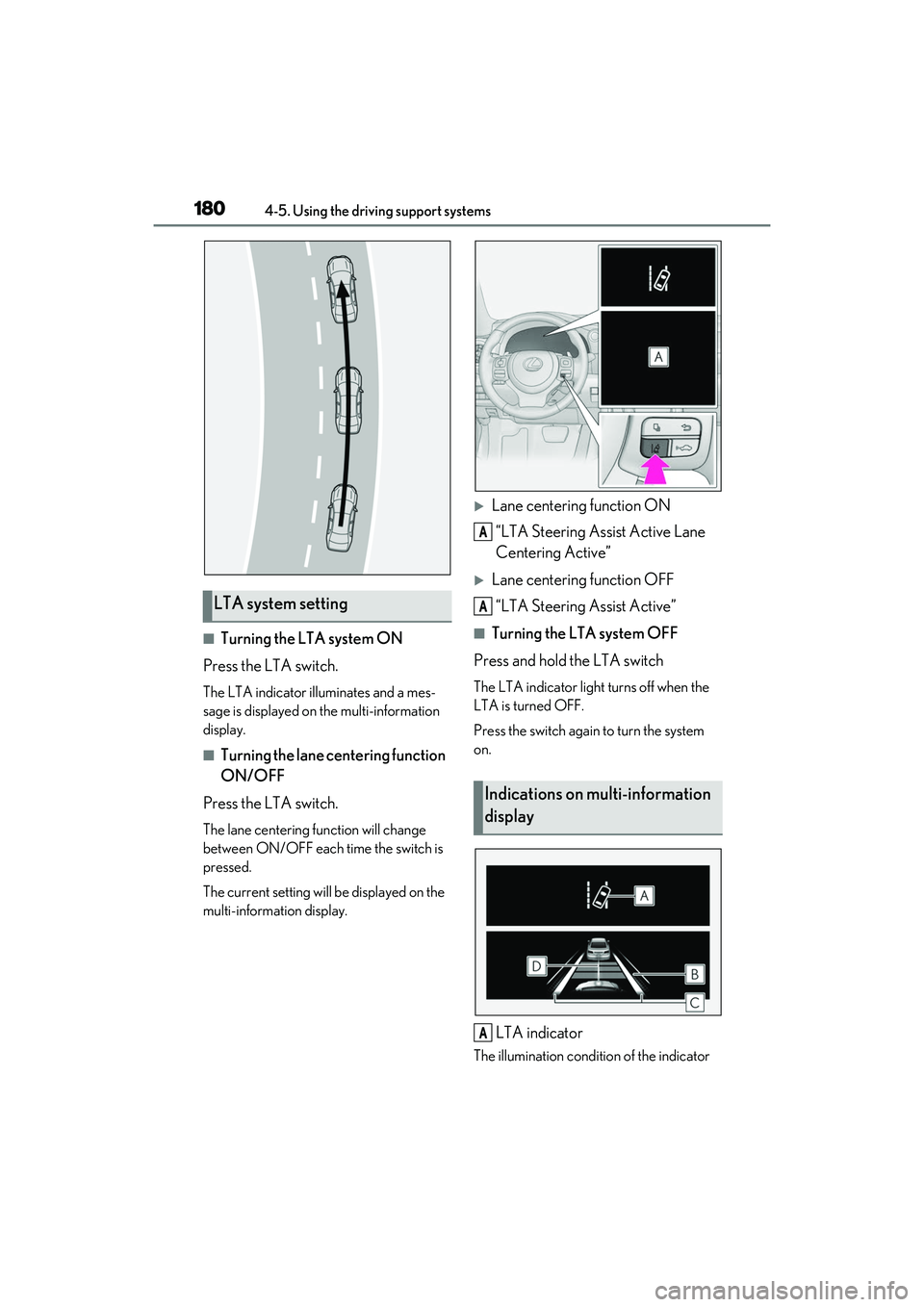
■Turning the LTA system ON
Press the LTA switch.
The LTA indicator illuminates and a mes-
sage is displayed on the multi-information
display.
■Turning the lane centering function
ON/OFF
Press the LTA switch.
The lane centering function will change
between ON/OFF each time the switch is
pressed.
The current setting will be displayed on the
multi-information display.
Lane centering function ON “LTA Steering Assist Active Lane
Centering Active”
Lane centering function OFF
“LTA Steering Assist Active”
■Turning the LTA system OFF
Press and hold the LTA switch
The LTA indicator light turns off when the
LTA is turned OFF.
Press the switch again to turn the system
on.
LTA indicator
The illumination condition of the indicator
LTA system setting
Indications on multi-information
display
A
A
A
Page 188 of 440

1864-5. Using the driving support systems
■Setting procedure
1 Press or of the meter control
switches and select .
2 Press or of the meter control
switches and select , then press
.
3 Press or of the meter control
switches and select “RSA”, then press
.
■Automatic turn-off of RSA sign display
In the following situations, a displayed
speed limit sign and/or do not enter sign will
stop being displayed automatically:
●No sign has been recognized for a cer-
tain distance.
●The road changes due to a left or right
turn, etc.
In the following situations, stop and yield
signs will stop being displayed automati-
cally:
●The system determines that your vehicle
has passed the sign.
●The road changes due to a left or right
turn, etc.
■Conditions in which the function may
not operate or detect correctly
In the following situations, RSA does not
operate normally and may not recognize
signs, display the incorrect sign, etc. How-
ever, this does not indicate a malfunction.
●The front camera is misaligned due to a
strong impact being applied to the sen-
sor, etc.
●Dirt, snow, stickers, etc. are on the wind-
shield near the front camera.
●In inclement weather such as heavy rain,
fog, snow or sand storms.
●Light from an oncoming vehicle, the sun,
etc. enters the front camera.
●The sign is dirty, faded, tilted or bent.
●The contrast of electronic sign is low.
●All or part of the sign is hidden by the leaves of a tree, a pole, etc.
●The sign is only visible to the front camera
for a short amount of time.
●The driving scene (turning, lane change,
etc.) is judged incorrectly.
●If a sign not appropriate for the currently
traveled lane, but the sign exists directly
after a freeway branches, or in an adja-
cent lane just before merging.
●Stickers are attached
to the rear of the
preceding vehicle.
●A sign resembling a system compatible
sign is recognized.
●Side road speed signs may be detected
and displayed (if positioned in sight of the
front camera) while the vehicle is
traveling on the main road.
●Roundabout exit road speed signs may
be detected and displayed (if positioned
in sight of the fr ont camera) while
traveling on a roundabout.
●The front of the vehicle is raised or low-
ered due to the carried load.
●The surrounding brightness is not suffi-
cient or changes suddenly.
●When a sign intended for trucks, etc. is
recognized.
●The navigation system map data is out-
dated.
●The navigation system is not operating.
●The speed information displayed on the
meter and on the navigation system may
be different due to the navigation system
using map data.
■Speed limit sign display
If the engine switch was last turned off while
a speed limit sign was displayed on the
multi-information displa y, the same sign dis-
plays again when the engine switch is
turned to IGNITION ON mode.
■Customization
Some functions can be customized.
(Customizable features: P.388)
Page 191 of 440

1894-5. Using the driving support systems
4
Driving
This mode employs a radar to detect the presence of vehicles up to approximately
328 ft. (100 m) ahead, determines the cu rrent vehicle-to-vehicle following dis-
tance, and operates to maintain a suitab le following distance from the vehicle
ahead. The desired vehicle-to-vehicle distance can also be set by operating the
vehicle-to-vehicle distance switch.
When driving on downhill sl opes, the vehicle-to-vehicle distance may become shorter.
Example of constant speed cruising
When there are no vehicles ahead
The vehicle travels at the speed set by the driver.
Example of deceleration cruising and follow-up cruising
When a preceding vehicle driving slower than the set speed appears
When a vehicle is detected running ahead of you, the system automatically decelerates
your vehicle. When a greater reduction in vehicle speed is necessary, the system applies
the brakes (the stop lights will come on at this time). The system will respond to changes in
the speed of the vehicle ahead in order to maintain the vehicle-to-vehicle distance set by
the driver. Approach warning warns you when th e system cannot decelerate sufficiently to
prevent your vehicle from clos ing in on the vehicle ahead.
When the vehicle ahead of you stops, your vehi cle will also stop (vehicle is stopped by sys-
tem control). After the vehicle ahead starts of f, pushing the cruise control lever up or
depressing the accelerator peda l (start-off operation) will resume follow-up cruising. If the
start-off operation is not performed, system control continues to keep your vehicle
stopped.
When the turn signal lever is operated and your vehicle moves to an overtaking lane while
driving at 50 mph (80 km/h) or more, the vehi cle will accelerate to help to overtake a
passing vehicle.
The system’s identification of what is an overtaking lane may be dete rmined solely based on
Driving in vehicle-to-vehicle distance control mode
A
B
Page 199 of 440

1974-5. Using the driving support systems
4
Driving
Meter control switches
Turning the Blind Spot Monitor on/off.
Outside rear view mirror indicators
When a vehicle is detected in a blind spot
of the outside rear view mirrors or
approaching rapidly from behind into a
blind spot, the outside rear view mirror
indicator on the detected side will illumi-
nate. If the turn signal lever is operated
toward the detected side, the outside rear
view mirror indicator flashes.
■Outside rear view mirror indicator visi-
bility
In strong sunlight, the outside rear view mir-
ror indicator may be difficult to see.
■When “Blind Spot Monitor Unavailable”
is shown on the multi-information dis-
play
Ice, snow, mud, etc., may be attached to the
rear bumper around the sensors. ( P.197)
The system should return to normal opera-
tion after removing the ice, snow, mud, etc.
from the rear bumper. Additionally, the sen-
sors may not operate normally when driving
in extremely hot or cold environments.
■Customization
Some functions can be customized.
( P.388)
BSM (Blind Spot Monitor)
The Blind Spot Monitor is a system
that uses rear side radar sensors
installed on the in ner side of the
rear bumper on the left and right
side to assist the driver in confirm-
ing safety when changing lanes.
WARNING
■Cautions regarding the use of the sys-
tem
The driver is solely responsible for safe
driving. Always drive safely, taking care
to observe your surroundings.
The Blind Spot Monitor is a supplemen-
tary function which alerts the driver that a
vehicle is in a blind spot of the outside
rear view mirrors or is approaching rap-
idly from behind into a blind spot. Do not
overly rely on the Blind Spot Monitor. As
the function cannot judge if it is safe to
change lanes, over reliance could lead to
an accident resulting in death or serious
injury.
As the system may not function correctly
under certain conditions, the driver’s own
visual confirmation of safety is necessary.
System components
A
B
WARNING
■To ensure the system can operate
properly
Blind Spot Monitor sensors are installed
behind the left and right sides of the rear
bumper respectively. Observe the fol-
lowing to ensure the Blind Spot Monitor
can operate correctly.
Page 200 of 440

1984-5. Using the driving support systems
Use the meter control switches to turn
on/off the function.
1Press or to select .
2 Press or to select and
then press .
When the BSM function is disabled, the
BSM OFF indicator (P.66) illuminates
on the multi-informat ion display. (Each
time the engine switch is turned off then
changed to IGNITION ON mode, the
BSM function will be enabled automati-
cally.)
WARNING
●Keep the sensors and the surrounding
areas on the rear bumper clean at all
times.
If a sensor or its su rrounding area on the
rear bumper is dirty or covered with
snow, the Blind Spot Monitor may not
operate and a warning message
( P.197) will be displa yed. In this situa-
tion, clear off the dirt or snow and drive
the vehicle with the operation conditions
of the BSM function ( P.200) satisfied
for approximately 10 minutes. If the
warning message does not disappear,
have the vehicle inspected by your Lexus
dealer.
●Do not attach stickers to the sensor or
surrounding area on the rear bumper.
●Do not subject a sensor or its sur-
rounding area on the rear bumper to a
strong impact.
If a sensor is moved even slightly off
position, the system may malfunction
and vehicles may not be detected cor-
rectly.
In the following situations, have your
vehicle inspected by your Lexus
dealer.
• A sensor or its surrounding area is subject to a strong impact.
• If the surrounding area of a sensor is scratched or dented, or part of them
has become disconnected.
●Do not disassemb le the sensor.
●Do not modify the sensor or surround-
ing area on the rear bumper.
●If a sensor or the rear bumper needs to
be removed/installed or replaced,
contact your Lexus dealer.
●Do not paint the rear bumper any
color other than an official Lexus color.
Turning the Blind Spot Monitor
on/off
Page 206 of 440

2044-5. Using the driving support systems
ing assist monitor is displayed.
A simplified image is displayed on the
Center Display when an object is detected.
Center Display (vehicles with a Pan-
oramic view monitor)
When an object is de tected, a graphic will
be displayed on the panoramic view moni-
tor.
Use the meter control switches to
enable/disable the Lexus parking
assist-sensor. ( P.76)
1 Press or to select .
2 Press or to select “PKSA”
and then press .
3 Press or to select and
then press .
When the intuitive parking assist func- tion is disabled, th
e intuitive parking
assist OFF indicator ( P.66) illumi-
nates on the multi-information display .
When the intuitive parking assist func-
tion is turned on or off, operation of the
intuitive parking assist function contin-
ues in the same condition the next time
the engine is started.
Turning intuitive parking assist
on/off
WARNING
■Cautions regarding the use of the sys-
tem
There is a limit to the degree of recogni-
tion accuracy and control performance
that this system can provide, do not
overly rely on this system. The driver is
always responsible for paying attention
to the vehicle’ surroundings and driving
safely.
■To ensure the system can operate
properly
Observe the following precautions.
Failing to do so may result in the vehicle
being unable to be dr iven safely and pos-
sibly cause an accident.
●Do not damage the sensors, and
always keep them clean.
●Do not attach a sticker or install an
electronic compon ent, such as a
backlit license plate (especially fluo-
rescent type), fog lights, fender pole or
wireless antenna near a radar sensor.
●Do not subject the surrounding area of
the sensor to a strong impact. If sub-
jected to an impact, have the vehicle
inspected by your Lexus dealer. If the
front or rear bumper needs to be
emoved/installed or replaced, contact
your Lexus dealer.
●Do not modify, disassemble or paint
the sensors.
●Do not attach a license plate cover.
●Keep your tires properly inflated.
Page 213 of 440

2114-5. Using the driving support systems
4
Driving
after the RCTA function is turned on.
Use the meter control switches to
enable/disable the RCTA function.
( P.76)
Vehicles without the Intuitive park-
ing assist
1 Press or to select .
2 Press or to select “RCTA”
and then press .
Each time the engine switch is turned off
then changed to ON, the RCTA function
will be enabled automatically.
Vehicles with the Intuitive parking
assist
1 Press or to select .
2 Press or to select “PKSA”
and then press . 3
Press or to select “RCTA”
and then press .
Each time the engine switch is turned off
then changed to ON, the RCTA function
will be enabled automatically.
■Outside rear view mirror indicator visi-
bility
In strong sunlight, the outside rear view mir-
ror indicator may be difficult to see.
■Hearing the RCTA buzzer
The RCTA buzzer may be difficult to hear
over loud noises, such as if the audio system
volume is high.
■When “Rear Cross Traffic Alert
Unavailable” is shown on the
multi-information display
W a t e r , i c e , s n o w , m u d , etc., may be attached
to the rear bumper around the sensors.
( P.197) Removing the water, ice, snow,
mud, etc., from the attached to the rear
bumper around the se nsors to return the
function to normal.
Additionally, the func tion may not operate
normally when driving in extremely hot or
cold environments.
■Rear side radar sensors
P.197
■Operation of the RCTA function
The RCTA function uses rear side radar sensors to detect vehicles approaching
from the right or left at the rear of the ve hicle and alerts the driver of the presence
of such vehicles by flashing the outside rear view mirror indicators and sounding a
buzzer.
Turning the RCTA function
on/off
RCTA function
Page 232 of 440

2304-5. Using the driving support systems
controlling the brakes, engine output
and steering assist.
■The Secondary Collision Brake
When the SRS airbag sensor detects a
collision and the system operates, the
brakes and brake lights are automati-
cally controlled to reduce the vehicle
speed and help redu ce the possibility
of further damage due to a secondary
collision.
■When the TRAC/VSC systems are
operating
The slip indicator light will flash while the
TRAC/VSC systems are operating.
■Disabling the TRAC system
If the vehicle gets stuck in mud, dirt or snow,
the TRAC system may reduce power from
the engine to the wheels. Pressing the
switch to turn the sy stem off may make it
easier for you to rock the vehicle in order to
free it.
To turn the TRAC system off, quickly press
and release switch.
The “Traction Control Turned Off” will be
shown on the multi-information display.
Press the switch again to turn the sys-
tem back on.
■Turning off both TRAC and VSC sys-
tems
To turn the TRAC and VSC systems off,
press and hold the switch for more
than 3 seconds while the vehicle is stopped.
The VSC OFF indicator light will come on
and the “Traction Control Turned Off” will
be shown on the multi-information display.
*
Press the switch again to turn the sys-
tem back on.
*: Pre-collision brake assist and pre-colli- sion braking will also be disabled. The
pre-collision system warning light will
come on and the messa ge will be shown
on the multi-information display.
( P.174)
■When the message is displayed on the
multi-information display showing that
TRAC has been disabled even if the
VSC OFF switch has not been pressed
TRAC is temporary deactivated. If the infor-
mation continues to show, contact your
Lexus dealer.
■Operating conditions of hill-start assist
control
When the following four conditions are met,
the hill-start assist control will operate:
●The shift lever is in a position other than P
or N (when starting off forward/back-
ward on an upward incline)
●The vehicle is stopped
●The accelerator pedal is not depressed
●The parking brake is not engaged
●Engine switch is turned to IGNITION
ON mode