2022 LEXUS ES350 air condition
[x] Cancel search: air conditionPage 272 of 468
2705-3. Using the air conditioning system
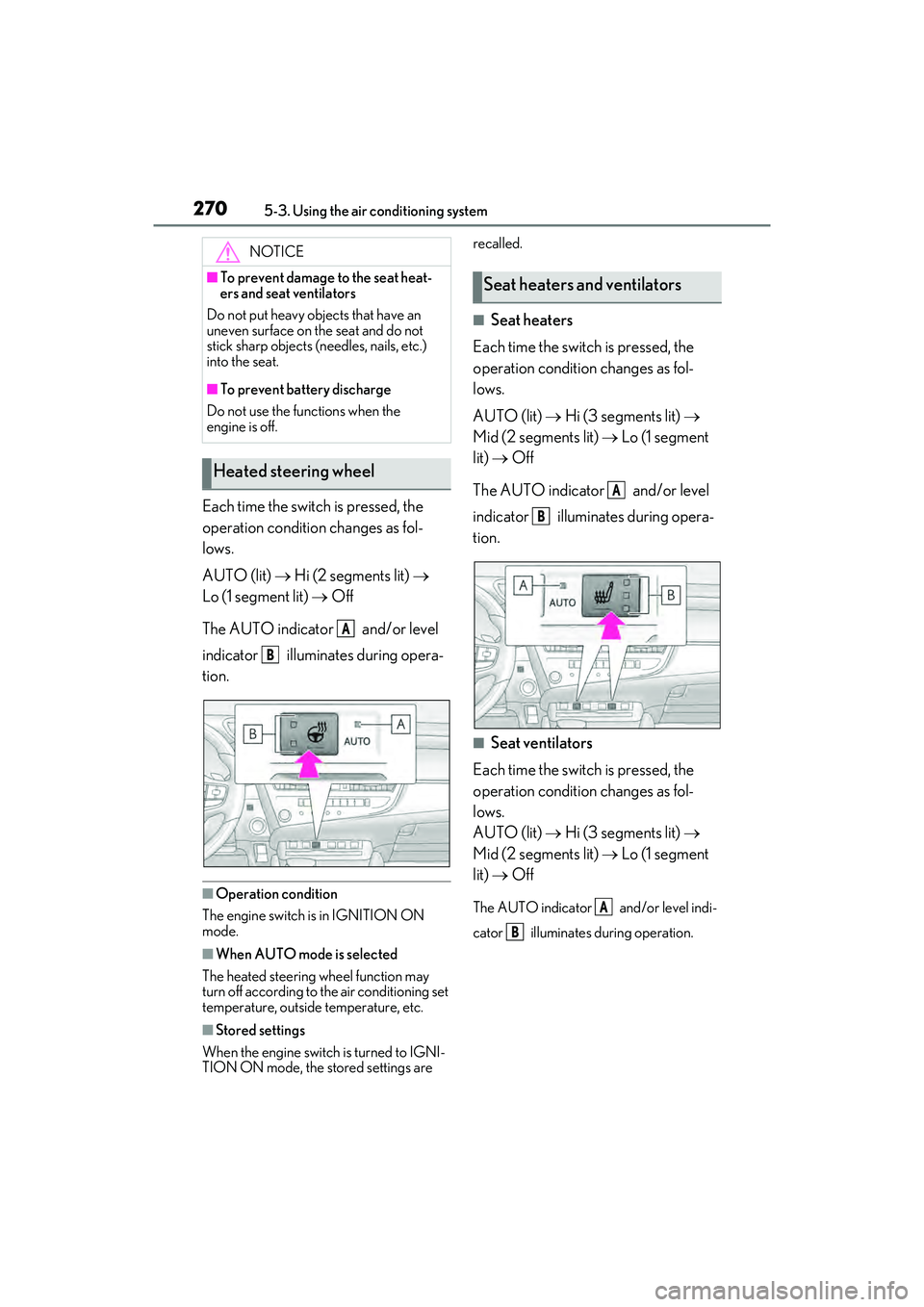
Each time the switch is pressed, the
operation condition changes as fol-
lows.
AUTO (lit) Hi (2 segments lit)
Lo (1 segment lit) Off
The AUTO indicator and/or level
indicator illuminates during opera-
tion.
■Operation condition
The engine switch is in IGNITION ON
mode.
■When AUTO mode is selected
The heated steering wheel function may
turn off according to the air conditioning set
temperature, outside temperature, etc.
■Stored settings
When the engine switch is turned to IGNI-
TION ON mode, the stored settings are recalled.
■Seat heaters
Each time the switch is pressed, the
operation condition changes as fol-
lows.
AUTO (lit) Hi (3 segments lit)
Mid (2 segments lit) Lo (1 segment
lit) Off
The AUTO indicator and/or level
indicator illuminates during opera-
tion.
■Seat ventilators
Each time the switch is pressed, the
operation condition changes as fol-
lows.
AUTO (lit) Hi (3 segments lit)
Mid (2 segments lit) Lo (1 segment
lit) Off
The AUTO indicator and/or level indi-
cator illuminates during operation.
NOTICE
■To prevent damage to the seat heat-
ers and seat ventilators
Do not put heavy objects that have an
uneven surface on the seat and do not
stick sharp objects (needles, nails, etc.)
into the seat.
■To prevent battery discharge
Do not use the functions when the
engine is off.
Heated steering wheel
A
B
Seat heaters and ventilators
A
B
A
B
Page 273 of 468

2715-3. Using the air conditioning system
5
Interior features
■Operation condition
The engine switch is in IGNITION ON
mode.
■Air conditioning system-linked control
mode
When the seat ventilator fan speed level is
Hi (when “AUTO” is selected), the seat
ventilator fan speed may become higher
according to the fan speed of the air condi-
tioning system.
■When AUTO mode is selected
The following functions may turn off
according to the air conditioning set tem-
perature, outside temperature, etc.
●Seat heaters
●Seat ventilators
■Stored settings
When the engine switch is turned to IGNI-
TION ON mode, the stored settings of the
following functions are recalled.
●Seat heaters
●Seat ventilators
■Main display
Using the touchpad of the Remote
Touch, select the button on the screen.
This system can also be operated by
the touch screen.
Adjust the seat ventilator fan speed
level
The seat ventilator can be adjusted in 3
levels.
When the seat ventilator is operated, the
fan speed level is displayed on the screen.
Adjust the seat heater temperature
level
The seat heater can be adjusted in 3 levels.
When the seat heater is operated, the tem-
perature level is displayed on the screen.
Adjust the heated steering wheel
temperature level
The heated steering wheel can be adjusted
in 2 levels.
When the heated steering wheel is oper-
ated, the temperature level is displayed on
the screen.
Automatic mode on/off indicators
When the automatic mode is on, the indi-
cator illuminates on the screen.
Sub function menu
WARNING
■To prevent overheating and minor
burn injuries
Observe the following precautions when
using the seat heaters.
●Do not cover the seat with a blanket or
cushion when using the seat heater.
●Do not use seat heater more than nec-
essary.
Control screen
A
B
C
D
E
Page 274 of 468

2725-3. Using the air conditioning system
When the sub function button on the
Remote Touch is pressed, the following
functions can be set to automatic mode.: Left-hand side seat heater/seat
ventilator
: Heated steering wheel
: Right-hand side seat heater/seat
ventilator
■Side display (12.3-inch display
model)
Display the air conditioning control
screen ( P.267)
Adjust the seat heater temperature
level
Each time the switch is selected, the tem-
perature level and level indicator (orange)
change as follows:
AUTO Hi Mid Lo Off
Adjust the seat ventilator fan speed
level
Each time the switch is selected, the fan
speed level and level indicator (blue)
change as follows:
AUTO Hi Mid Lo Off
Adjust the heated steering wheel
temperature level
Each time the switch is selected, the tem-
perature level and level indicator change
as follows: AUTO
Hi Lo Off
■Customization
Steering wheel heating preference in auto-
matic mode and the automatic mode set-
tings for the seat heaters and ventilators can
be changed. (Customizable features:
P.408)
A
B
C
D
Page 287 of 468

2855-6. Using the other interior features
5
Interior features
suspended.
●When charging, the wireless charging
device and portable device will get
warmer, however this is not a malfunc-
tion.
When a portable device gets warm while
charging, charging may stop due to the
protection function on the portable
device side. In this case, when the tem-
perature of the portable device drops
significantly, charge again.
■Operation sounds
When the power supply is turned on, while
searching for the portable device a sound
will be produced, however this is not a mal-
function.
WARNING
■Caution while driving
When charging a portable device, for
safety reasons, the driver should not
operate the main the part of the portable
device while driving.
■Caution regarding interference with
electronic devices
People with implantable cardiac pace-
makers, cardiac resynchronization ther-
apy-pacemakers or implantable
cardioverter defibrillators, as well as any
other electrical medical device, should
consult their physician about the usage of
the wireless charger.
The operations of the wireless charger
may have an affect on medical devices.
■To prevent damage or burns
Observe the following precautions.
Failure to do so may result in a possibility
of equipment failure and damage, catch
fire, burns due to overheat.
●Do not insert any metallic objects
between the charging area and the
portable device while charging
●Do not attach stickers, metallic
objects, etc., to the charger area or
portable device
●Do not cover with cloth, etc., and
charge
●Do not charge portable devices other
than designated
●Do not attempt to dismantle for disas-
sembly or modifications
●Do not hit or apply a strong force
NOTICE
■Conditions in which the function may
not operate correctly
In the following conditions, it may not
operate correctly
●The portable device is fully charged
●There is foreign matter between the
charge area and portable device
●The temperature of the portable
device gets higher from charging
●The charging surface of the portable
device is facing up
●The placement of the portable device
is out of alignment with the charge
area
●Near a TV tower, electric power plant,
gas station, radio station, large display,
airport or other facility that generates
strong radio waves or electrical noise
●When the electronic key is in contact
with, or is covered by the following
metallic objects
• Cards to which aluminum foil is attached
• Cigarette boxes that have aluminum foil inside
• Metallic wallets or bags
•Coins
• Hand warmers made of metal
• Media such as CDs and DVDs
Page 299 of 468

297
6
6
Maintenance and care
Maintenance and care
6-1. Maintenance and careCleaning and protecting the vehi-cle exterior ................................ 298
Cleaning and protecting the vehi- cle interior .................................. 301
6-2. Maintenance Maintenance requirements .. 303
General maintenance ............. 304
Emission inspection and mainte- nance (I/M) programs ......... 307
6-3. Do-it-yourself maintenance Do-it-yourself service precautions ............................... 308
Hood................................................ 310
Positioning a floor jack ............. 310
Engine compartment................ 312
Tires ................................................ 320
Tire inflation pressure .............. 328
Wheels........................................... 330
Air conditioning filter................ 331
Electronic key battery ............. 333
Checking and replacing fuses ........................................................ 335
Headlight aim.............................. 337
Light bulbs .................................... 338
Page 302 of 468
3006-1. Maintenance and care
WARNING
■Precaution regarding the rear
bumper with Blind Spot Monitor
If the paint of the rear bumper is chipped
or scratched, the system may malfunc-
tion. If this occurs, consult your Lexus
dealer.
NOTICE
■To prevent paint deterioration and
corrosion on the body and compo-
nents (aluminum wheels etc.)
●Wash the vehicle immediately in the
following cases:
• After driving near the sea coast
• After driving on salted roads
• If coal tar, pollen or tree sap is present on the paint surface
• If dead insects, insect droppings or bird droppings are present on the
paint surface
• After driving in an area contaminated with soot, oily smoke, mine dust, iron
powder or chemical substances
• If the vehicle becomes heavily soiled with dust or mud
• If liquids such as benzene and gasoline are spilled on the paint surface
●If the paint is chipped or scratched,
have it repaired immediately.
●To prevent the wheels from corroding,
remove any dirt and store in a place
with low humidity when storing the
wheels.
■Cleaning the exterior lights
●Wash carefully. Do not use organic
substances or scrub with a hard brush.
This may damage the surfaces of the
lights.
●Do not apply wax to the surfaces of the
lights.
Wax may cause damage to the lenses.
■When using an automatic car wash
(vehicles with rain-s ensing windshield
wipers)
Set the wiper switch to the off position.
If the wiper switch is in “AUTO”, the wip-
ers may operate and the wiper blades
may be damaged.
■When using a high pressure car wash
●When washing the vehicle, do not
spray the camera or its surrounding
area directly with a high pressure
washer. Shock applied from high pres-
sure water may cause the device to not
operate normally.
●Do not spray water directly on the
radar which is equipped behind the
emblem. Otherwise it may cause the
device to be damaged.
●Do not bring the nozzle tip close to
boots (rubber or resin manufactured
cover), connectors or the following
parts. The parts may be damaged if
they come into contact with high-pres-
sure water.
• Traction related parts
•Steering parts
• Suspension parts
• Brake parts
●Keep the cleaning nozzle at least 11.9
in. (30 cm) away from the vehicle
body. Otherwise resin section, such as
moldings and bumpers, may be
deformed and damaged. Also, do not
continuously hold the nozzle in the
same place.
●Do not spray the lower part of the
windshield continuously.
If water enters the air conditioning sys-
tem intake located near the lower part
of the windshield, the air conditioning
system may not operate correctly.
●Do not wash the underside of the vehi-
cle using a high pressure car washer.
Page 322 of 468
3206-3. Do-it-yourself maintenance
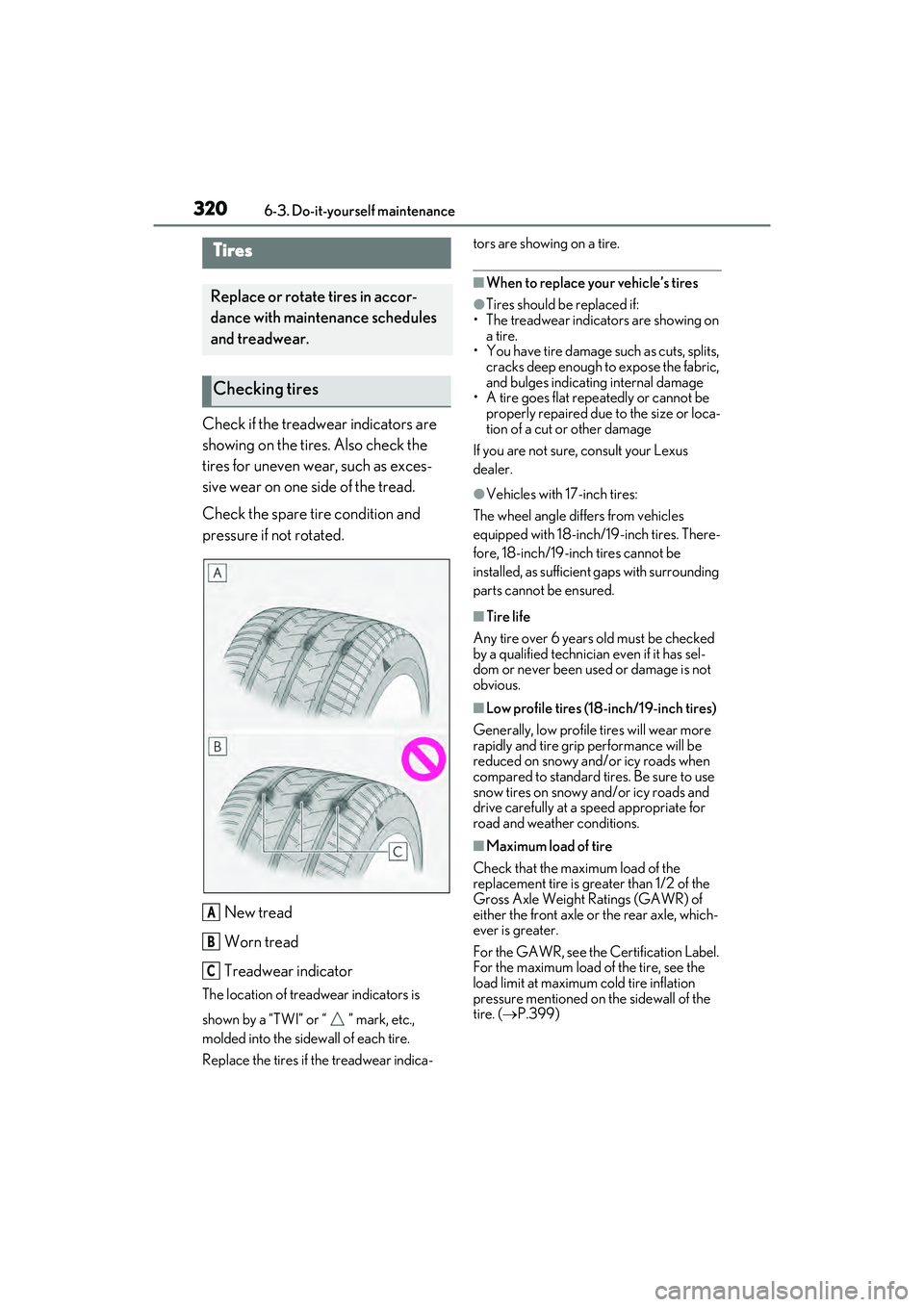
Check if the treadwear indicators are
showing on the tires. Also check the
tires for uneven wear, such as exces-
sive wear on one side of the tread.
Check the spare tire condition and
pressure if not rotated.New tread
Worn tread
Treadwear indicator
The location of treadwear indicators is
shown by a “TWI” or “ ” mark, etc.,
molded into the sidewall of each tire.
Replace the tires if the treadwear indica- tors are showing on a tire.
■When to replace your vehicle’s tires
●Tires should be replaced if:
• The treadwear indicators are showing on
a tire.
• You have tire damage such as cuts, splits, cracks deep enough to expose the fabric,
and bulges indicating internal damage
• A tire goes flat repeatedly or cannot be properly repaired due to the size or loca-
tion of a cut or other damage
If you are not sure, consult your Lexus
dealer.
●Vehicles with 17-inch tires:
The wheel angle differs from vehicles
equipped with 18-inch/19-inch tires. There-
fore, 18-inch/19-inch tires cannot be
installed, as sufficient gaps with surrounding
parts cannot be ensured.
■Tire life
Any tire over 6 years old must be checked
by a qualified technician even if it has sel-
dom or never been used or damage is not
obvious.
■Low profile tires (18-inch/19-inch tires)
Generally, low profile tires will wear more
rapidly and tire grip performance will be
reduced on snowy and/or icy roads when
compared to standard tires. Be sure to use
snow tires on snowy and/or icy roads and
drive carefully at a speed appropriate for
road and weather conditions.
■Maximum load of tire
Check that the maximum load of the
replacement tire is greater than 1/2 of the
Gross Axle Weight Ratings (GAWR) of
either the front axle or the rear axle, which-
ever is greater.
For the GAWR, see the Certification Label.
For the maximum load of the tire, see the
load limit at maximum cold tire inflation
pressure mentioned on the sidewall of the
tire. ( P.399)
Tires
Replace or rotate tires in accor-
dance with maintenance schedules
and treadwear.
Checking tires
A
B
C
Page 325 of 468

3236-3. Do-it-yourself maintenance
6
Maintenance and care
●Tire inflation pressure changes with tem-
perature. The displayed values may also
be different from the values measured
using a tire pressure gauge.
■Situations in which the tire pressure
warning system may not operate prop-
erly
●In the following cases, the tire pressure
warning system may not operate prop-
erly.
• If non-genuine Lexus wheels are used.
• A tire has been replaced with a tire that is
not an OE (Original Equipment) tire.
• A tire has been replaced with a tire that is not of the specified size.
• Tire chains etc. are equipped.
• An auxiliary-supported run-flat tire is equipped.
• If a window tint that affects the radio wave signals is installed.
• If there is a lot of snow or ice on the vehi-
cle, particularly around the wheels or
wheel housings.
• If the tire inflation pressure is extremely
higher than the specified level.
• If wheel without tire pressure warning valves and transmitters are used.
• If the ID code on the tire pressure warn- ing valves and transmitters is not regis-
tered in the tire pressure warning
computer.
●Performance may be affected in the fol-
lowing situations.
• Near a TV tower, electric power plant, gas station, radio station, large display,
airport or other facility that generates
strong radio waves or electrical noise
• When carrying a portable radio, cellular
phone, cordless phone or other wireless
communication device
If tire position information is not correctly
displayed due to the radio wave conditions,
the display may be corrected by driving and
changing the radio wave conditions.
●When the vehicle is parked, the time
taken for the warning to start or go off
could be extended.
●When tire inflation pressure declines rap-
idly for example when a tire has burst, the
warning may not function.
■Warning performance of the tire pres-
sure warning system
The warning of the tire pressure warning
system will change in accordance with driv-
ing conditions. For this reason, the system
may give a warning even if the tire pressure
does not reach a low enough level, or if the
pressure is higher than the pressure that
was adjusted to when the system was initial-
ized.
When replacing tires or wheels, tire
pressure warning valves and transmit-
ters must also be installed.
When new tire pressure warning
valves and transmitters are installed,
new ID codes must be registered in the
tire pressure warning computer and
the tire pressure warning system must
be initialized. ( P.326)
■When replacing the tires and wheels
If the ID code of the tire pressure warning
valve and transmitter is not registered, the
tire pressure warning system will not work
properly. After driving for about 20 min-
utes, the tire pressure warning light blinks
for 1 minute and stays on to indicate a sys-
tem malfunction.
Installing tire pressure warning
valves and transmitters
NOTICE
■Repairing or replacing tires, wheels,
tire pressure warning valves, trans-
mitters and tire valve caps
●When removing or fitting the wheels,
tires or the tire pressure warning
valves and transmitters, contact your
Lexus dealer as the tire pressure warn-
ing valves and transmitters may be
damaged if not handled correctly.