2022 LEXUS ES350 fuel
[x] Cancel search: fuelPage 59 of 468
571-3. Lexus Enform
1
For safety and security
■Automatic Collision Notification
In case of either airbag deployment or
severe rear-end collision, the system is
designed to automatically call the
response center. The responding
agent receives the vehicle’s location
and attempts to speak with the vehicle
occupants to assess the level of emer-
gency. If the occupants are unable to
communicate, the agent automatically
treats the call as an emergency, con-
tacts the nearest emergency services
provider to describe the situation, and
requests that assistance be sent to the
location.
■Stolen Vehicle Location
If your vehicle is stolen, Safety Connect
can work with local authorities to assist
them in locating and recovering the
vehicle. After filing a police report, call
the Safety Connect response center at
1-800-25-LEXUS (1-800-255-
3987) in the United States, 1-877-
539-8777 in Puerto Rico or 1-800-
265-3987 in Canada, and follow the
prompts for Safety Connect to initiate
this service.
In addition to assisting law enforce-
ment with recovery of a stolen vehicle,
Safety-Connect-equipped vehicle
location data may, under certain cir-
cumstances, be shared with third par-
ties to locate your vehicle. Further
information is available at Lexus.com.
■Emergency Assistance Button
(“SOS”)
In the event of an emergency on the
road, push the “SOS” button to reach
the Safety Connect response center.
The answering agent will determine
your vehicle’s location, assess the
emergency, and dispatch the neces-
sary assistance required.
If you accidentally press the “SOS” button,
tell the response-center agent that you are
not experiencing an emergency.
■Enhanced Roadside Assistance
Enhanced Roadside Assistance adds
GPS data to the already included war-
ranty-based Lexus roadside service.
Subscribers can press the “SOS” but-
ton to reach a Safety Connect
response-center agent, who can help
with a wide range of needs, such as:
towing, flat tire, fuel delivery, etc. For a
description of the Roadside Assistance
services and their limitations, please
see the Safety Connect Terms and
Conditions, which are available at
Lexus.com.
Important! Read this information about
exposure to radio frequency signals
before using Safety Connect;
The Safety Connect system installed in
your vehicle is a low-power radio
transmitter and receiver. It receives
and also sends out radio frequency
(RF) signals.
Safety Connect services
Safety information for Safety
Connect
Page 65 of 468

63
2
2
Vehicle status information and indicators
Vehicle status informationand indicators
2-1. Instrument cluster
Warning lights and indicators . 64
Gauges and meters (except F SPORT models) ........................ 68
Gauges and meters (F SPORT models)............................................ 71
Multi-information display .......... 76
Head-up display ........................... 83
Fuel consumption screen.......... 87
Page 67 of 468
652-1. Instrument cluster
2
Vehicle status information and indicators
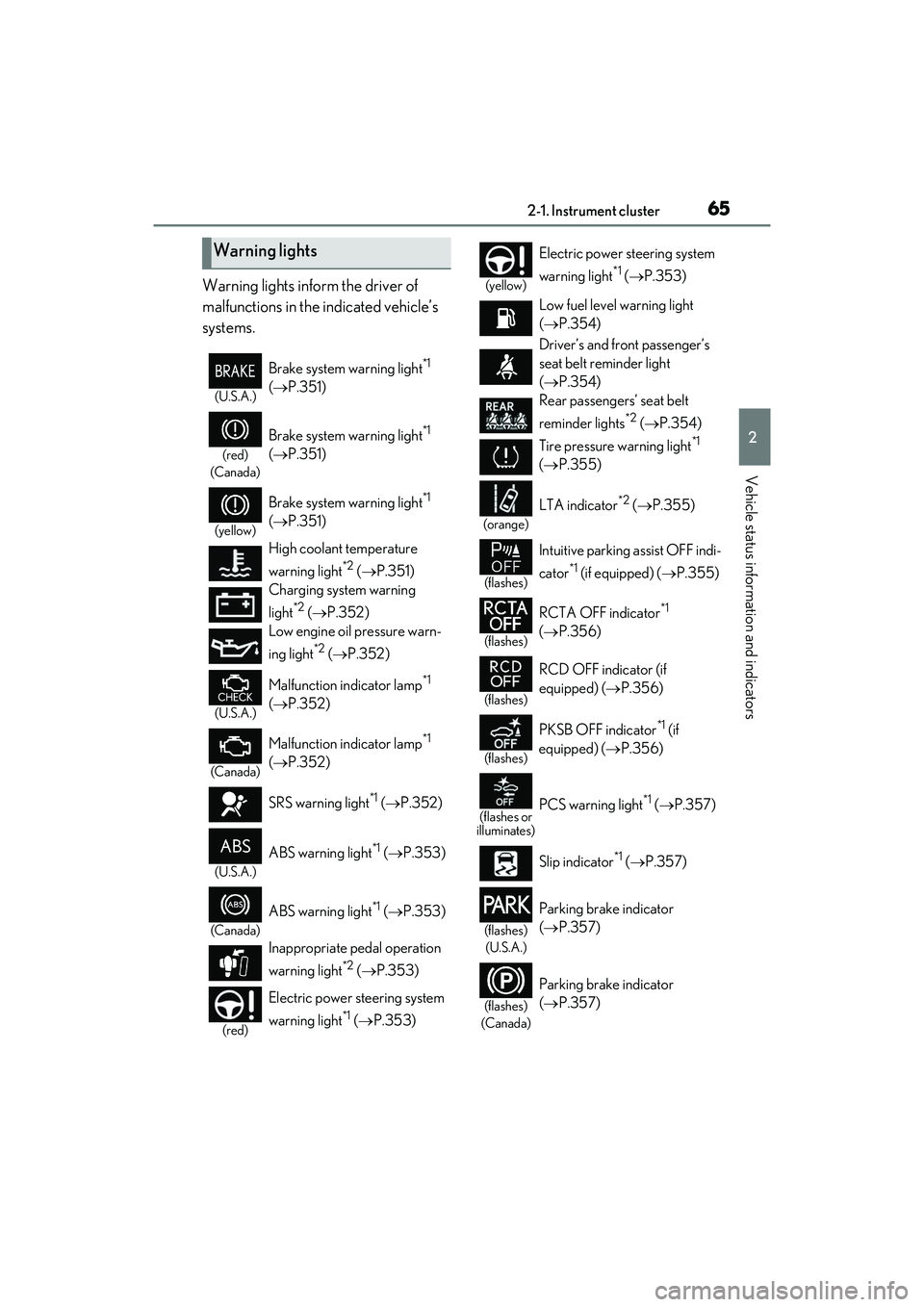
Warning lights inform the driver of
malfunctions in the indicated vehicle’s
systems.
Warning lights
(U.S.A.)
Brake system warning light*1
( P.351)
(red)
(Canada)
Brake system warning light*1
( P.351)
(yellow)
Brake system warning light*1
( P.351)
High coolant temperature
warning light
*2 ( P.351)
Charging system warning
light
*2 ( P.352)
Low engine oil pressure warn-
ing light
*2 ( P.352)
(U.S.A.)
Malfunction indicator lamp*1
( P.352)
(Canada)
Malfunction indicator lamp*1
( P.352)
SRS warning light
*1 ( P.352)
(U.S.A.)
ABS warning light*1 ( P.353)
(Canada)
ABS warning light*1 ( P.353)
Inappropriate pedal operation
warning light
*2 ( P.353)
(red)
Electric power steering system
warning light
*1 ( P.353)
(yellow)
Electric power steering system
warning light
*1 ( P.353)
Low fuel level warning light
( P.354)
Driver’s and front passenger’s
seat belt reminder light
( P.354)
Rear passengers’ seat belt
reminder lights
*2 ( P.354)
Tire pressure warning light
*1
( P.355)
(orange)
LTA indicator*2 ( P.355)
(flashes)
Intuitive parking assist OFF indi-
cator
*1 (if equipped) ( P.355)
(flashes)
RCTA OFF indicator*1
( P.356)
(flashes)
RCD OFF indicator (if
equipped) ( P.356)
(flashes)
PKSB OFF indicator*1 (if
equipped) ( P.356)
(flashes or
illuminates)PCS warning light*1 ( P.357)
Slip indicator
*1 ( P.357)
(flashes)
(U.S.A.)
Parking brake indicator
( P.357)
(flashes)
(Canada)
Parking brake indicator
( P.357)
Page 70 of 468

682-1. Instrument cluster
■Locations of gauges and meters
The units of measure may differ depending on the intended destination of the vehicle.
Multi-information display
Presents the driver with a variety of vehicle data (P.76)
Displays warning messages if a malfunction occurs (P.361)
Outside temperature
Displays the outside temperature within the range of -40°F (-40°C) to 122°F (50°C)
Low outside temperature indicator comes on when the ambient temperature is 37°F
(3°C) or lower
Tachometer
Displays the engine speed in revolutions per minute
When sport mode is selected for the drivin g mode, the periphery of the tachometer will
change color and the scale of the tachometer will be emphasized.
Speedometer
Clock
Time displayed is linked to the analog clock on the center panel. ( P.280)
Engine coolant temperature gauge
Displays the engine coolant temperature
Fuel gauge
Displays the quantity of fuel remaining in the tank
Gauges and meters (e xcept F SPORT models)
Meter display
A
B
C
D
E
F
G
Page 71 of 468

692-1. Instrument cluster
2
Vehicle status information and indicators
In the following situations, the actual quantity of fuel remaining in the tank may not be dis-
played correctly. Refer to P.69 if the actual quantity of fuel remaining in the tank is not dis-
played correctly.
• A small amount of fuel is added.
• Fuel is added with the fuel gauge near or at “F”.
• The vehicle is stopped on an uneven surface, such as a slope.
• The vehicle is driven on a slope or around a curve.
Shift position and shift range (P.149)
Odometer and trip meter display ( P.70)
■Manually updating the fuel gauge and
possible driving range
The fuel gauge and the possible driving
range are linked. If the displays of the fuel
gauge and possible driving range do not
update after adding a small amount of fuel,
the displays can be updated by performing
the following procedure.
1 Stop the vehicle on a level surface.
2 Press the “ODO TRIP” switch to
change the odometer and trip meter
display to odometer.
3 Turn the engine switch off.
4 While pressing and holding the “ODO
TRIP” switch, turn the engine switch to
IGNITION ON mode.
5 Continue to hold the “ODO TRIP”
switch for approximately 5 seconds,
and then release it once the odometer
begins flashing.
Updating is complete once the odometer
flashes for approximately 5 seconds and
then the display returns to normal.
■Outside temperature display
●In the following situations, the correct
outside temperature may not be dis-
played, or the display may take longer
than normal to change:
• When stopped, or driving at low speeds (less than 12 mph [20 km/h])
• When the outside temperature has
changed suddenly (at the entrance/exit
of a garage, tunnel, etc.)
●When “--” or “E” is displayed, the system
may be malfunctioning. Take your vehicle
to your Lexus dealer.
■Liquid crystal display
P.77
■Customization
The gauges and meters can be customized
on of the multi-information display.
( P.80)
H
I
WARNING
■The information display at low tem-
peratures
Allow the interior of the vehicle to warm
up before using the liquid crystal infor-
mation display. At extremely low tem-
peratures, the information display
monitor may respond slowly, and display
changes may be delayed.
For example, there is a lag between the
driver’s shifting and the new gear num-
ber appearing on the display. This lag
could cause the driver to downshift
again, causing rapid and excessive
engine braking and possibly an accident
resulting in death or injury.
NOTICE
■To prevent damage to the engine and
its components
●Do not let the indicator needle of the
tachometer enter the red zone, which
indicates the maximum engine speed.
Page 74 of 468

722-1. Instrument cluster
Clock
Time displayed is linked to the analog clock on the center panel. (P.280)
Fuel gauge
Displays the quantity of fuel remaining in the tank
In the following situations, the actual quantity of fuel remaining in the tank may not be dis-
played correctly. Refer to P.74 if the actual quantity of fuel remaining in the tank is not dis-
played correctly.
• A small amount of fuel is added.
• Fuel is added with the fuel gauge near or at “F”.
• The vehicle is stopped on an uneven surface, such as a slope.
• The vehicle is driven on a slope or around a curve.
Multi-information display
Presents the driver with a variety of vehicle data ( P.76)
Displays warning messages if a malfunction occurs (P.361)
Main meter moved to the right
The units of measure may differ depending on the intended destination of the vehicle.
Outside temperature
Displays the outside temperature within the range of -40°F (-40°C) to 122°F (50°C)
Low outside temperature indicator comes on when the ambient temperature is 37°F
(3°C) or lower
Clock
Time displayed is linked to the analog clock on the center panel. ( P.280)
Tachometer
Displays the engine speed in revolutions per minute
When sport mode is selected for the drivin g mode, the periphery of the tachometer will
change color and the scale of the tachometer will be emphasized.
G
H
I
A
B
C
Page 75 of 468

732-1. Instrument cluster
2
Vehicle status information and indicators
• Rev indicator (P.73)
•Rev peak ( P.73)
Speedometer
Shift position and shift range ( P.149)
Odometer and trip meter display ( P.74)
Fuel gauge
Displays the quantity of fuel remaining in the tank
In the following situations, the actual quantity of fuel remaining in the tank may not be dis-
played correctly. Refer to P.74 if the actual quantity of fuel remaining in the tank is not dis-
played correctly.
• A small amount of fuel is added.
• Fuel is added with the fuel gauge near or at “F”.
• The vehicle is stopped on an uneven surface, such as a slope.
• The vehicle is driven on a slope or around a curve.
Engine coolant temperature gauge
Displays the engine coolant temperature
Multi-information display
Presents the driver with a variety of vehicle data ( P.76)
Displays warning messages if a malfunction occurs (P.361)
■Rev indicator
When the engine speed reaches a set
speed or the red zone, a ring-shaped
indicator ( ) will be displayed on the
tachometer.
The indicators will be displayed in amber
when the engine speed reaches a set
speed, and in red when the engine speed
reaches the red zone.
The engine speed at which the rev indica-
tor will begin to be displayed can be set on
of the multi-information display.
( P.80)
■Rev peak
When the engine speed reaches or
exceeds 5000 rpm, an afterimage of
the tachometer will be displayed at the
highest engine speed for approxi-
mately 1 second.
D
E
F
G
H
I
A
Page 76 of 468

742-1. Instrument cluster
■Manually updating the fuel gauge and
possible driving range
The fuel gauge and the possible driving
range are linked. If the displays of the fuel
gauge and possible driving range do not
update after adding a small amount of fuel,
the displays can be updated by performing
the following procedure.
1 Stop the vehicle on a level surface.
2 Press the “ODO TRIP” switch to
change the odometer and trip meter
display to odometer.
3 Turn the engine switch off.
4 While pressing and holding the “ODO
TRIP” switch, turn the engine switch to
IGNITION ON mode.
5 Continue to hold the “ODO TRIP”
switch for approximately 5 seconds,
and then release it once the odometer
begins flashing.
Updating is complete once the odometer
flashes for approximately 5 seconds and
then the display returns to normal.
■Outside temperature display
●In the following situations, the correct
outside temperature may not be dis-
played, or the display may take longer
than normal to change:
• When stopped, or driving at low speeds (less than 12 mph [20 km/h])
• When the outside temperature has changed suddenly (at the entrance/exit
of a garage, tunnel, etc.)
●When “--” or “E” is displayed, the system
may be malfunctioning. Take your vehicle
to your Lexus dealer.
■Liquid crystal display
P.77
■Customization
The gauges and meters can be customized
on of the multi-information display.
( P.80)
■Display items
Odometer
Displays the total distance the vehicle has
been driven.
Trip meter A/trip meter B
WARNING
■The information display at low tem-
peratures
Allow the interior of the vehicle to warm
up before using the liquid crystal infor-
mation display. At extremely low tem-
peratures, the information display
monitor may respond slowly, and display
changes may be delayed.
For example, there is a lag between the
driver’s shifting and the new gear num-
ber appearing on the display. This lag
could cause the driver to downshift
again, causing rapid and excessive
engine braking and possibly an accident
resulting in death or injury.
NOTICE
■To prevent damage to the engine and
its components
●Do not let the indicator needle of the
tachometer enter the red zone, which
indicates the maximum engine speed.
●The engine may be overheating if the
engine coolant temperature gauge is
in the red zone (H). In this case, imme-
diately stop the vehicle in a safe place,
and check the engine after it has
cooled completely. ( P.382)
Odometer and trip meter dis-
play