2022 LEXUS ES350 child lock
[x] Cancel search: child lockPage 100 of 468

983-2. Opening, closing and locking the doors and trunk
gage, etc. in the rear seat, when the
engine switch is turned off after any of the
following conditions are met, a buzzer
will sound and a message will be dis-
played on the multi-information display
for approximately 6 seconds.
• The engine is started within 10 minutes after opening and closing a rear door.
• A rear door has been opened and closed after the engine was started.
However, if a rear door is opened and then
closed within approximately 2 seconds, the
rear seat reminder function may not oper-
ate.
●The rear seat reminder function deter-
mines that luggage, etc. has been placed
in a rear seat based on opening and clos-
ing of a rear door. Therefore, depending
on the situation, the rear seat reminder
function may not operate and you may
still forget luggage, etc. in the rear seat,
or it may operate unnecessarily.
●The rear seat reminder function can be
enabled/disabled. ( P.408)
■Customization
Settings (e.g. unlocking function using a
key) can be changed.
(Customizable features: P.408)
■Door lock switches (to
lock/unlock)
1 Locks all the doors
2 Unlocks all the doors
■Inside lock buttons (to lock)
Push down the inside lock button to
lock the door.
WARNING
■To prevent an accident
Observe the following precautions while
driving the vehicle.
Failure to do so may result in a door
opening and an occupant being thrown
out of the vehicle, resulting in death or
serious injury.
●Ensure that all doors are properly
closed and locked.
●Do not pull the inside handle of the
doors while driving.
Be especially careful for the front
doors, as the doors may be opened
even if the inside lock buttons are in
locked position.
●Set the rear door child-protector locks
when children are seated in the rear
seats.
■When opening or closing a door
Check the surroundings of the vehicle
such as whether the vehicle is on an
incline, whether there is enough space
for a door to open and whether a strong
wind is blowing. When opening or clos-
ing the door, hold the door handle tightly
to prepare for any unpredictable move-
ment.
Unlocking and locking the doors
from the inside
Page 101 of 468

993-2. Opening, closing and locking the doors and trunk
3
Before driving
■Inside door handles (to unlock)
For the front doors
Pull the handle to unlock and open the
door.
When the door is unlo cked, the inside lock
button will pop up.
For the rear doors
Pull the handle to unlock the door. Pull
the handle a second time to open the
door.
When the door is unlo cked, the inside lock
button will pop up.
■Locking the front door s from the outside
without a key
1 Push down the inside lock button.
2 Close the door.
The door cannot be locked if the engine
switch is in ACCESSORY or IGNITION
ON mode, or the electronic key is left
inside the vehicle. However, the key may
not be detected correctly and the door may
be locked.
■Open door warning buzzer
If the vehicle speed reaches 3 mph (5
km/h), a buzzer sounds to indicate that the
door(s), the hood or the trunk is not fully
closed.
The open door(s), the hood or the trunk is
displayed on the multi-information display.
The door cannot be opened from inside the vehicle when the lock is set.
1
Unlock
2 Lock
These locks can be set to prevent chil-
dren from opening the rear doors.
Push down on each rear door switch to
lock both rear doors.
The following functions can be set or
canceled:
For instructions on customizing, refer to
P.408.
Rear door child-protector lock
Automatic door locking and
unlocking systems
FunctionOperation
Speed linked
door locking
function
All doors are automati-
cally locked when vehi-
cle speed is
approximately 12 mph
(20 km/h) or higher.
Shift position
linked door lock-
ing functionAll doors are automati-
cally locked when the
shift lever is shifted to a
position other than P.
Page 102 of 468
1003-2. Opening, closing and locking the doors and trunk
Shift position
linked door
unlocking func-
tionAll doors are automati-
cally unlocked when
the shift lever is shifted
to P.
Driver’s door
linked door
unlocking func-
tion
All doors are automati-
cally unlocked when
driver’s door is opened
within approximately
45 seconds after turn-
ing the engine switch
off.
FunctionOperationTrunk
The trunk can be opened using the
trunk opener switch, entry function
or wireless remote control.
If the vehicle is equipped with a
power trunk lid, the trunk can be
closed using the trunk closer.
WARNING
Observe the following precautions.
Failure to do so may result in death or
serious injury.
■Before driving
●Make sure that the trunk lid is fully
closed. If the trunk lid is not fully
closed, it may open unexpectedly
while driving and hit near-by objects or
luggage in the trunk may be thrown
out, causing an accident.
●Do not allow children to play in the
trunk.
If a child is accidentally locked in the
trunk, they could suffer from heat
exhaustion, suffocation or other inju-
ries.
●Do not allow a child to open or close
the trunk lid.
Doing so may cause the trunk lid to
open unexpectedly, or cause the
child’s hands, head, or neck to be
caught by the closing trunk lid.
■Important points while driving
Never let anyone sit in the trunk. In the
event of sudden braking or a collision,
they are susceptible to death or serious
injury.
■Using the trunk
Observe the following precautions.
Failure to do so may cause parts of the
body to be caught, resulting in serious
injury.
Page 126 of 468

1243-5. Opening and closing the windows and moon roof
If you release the switch while the side win-
dow is moving, start again from the begin-
ning.
If the side window reverses and cannot be
fully closed or opened, have the vehicle
inspected by your Lexus dealer.
■Door lock linked window operation
●The power windows can be opened and
closed using the mechanical key.*
( P.377)
●The power windows can be opened using
the wireless remote control.* ( P.96)
●The alarm may be triggered if the alarm is
set and the power window is closed using
the door lock linked power window oper-
ation function. ( P.60)
*: These settings must be customized at
your Lexus dealer.
■Power windows open warning buzzer
The buzzer sounds and “Window Open” is
shown on the multi-information display
when the engine switch is turned off and the
driver’s door is opened with the power win-
dows open.
■Customization
Settings (e.g. linked door lock operation)
can be changed.
(Customizable features: P.408)
This function can be used to prevent
children from accidentally opening or
WARNING
Observe the following precautions.
Failure to do so may result in death or
serious injury.
■Closing the windows
●The driver is responsible for all the
power window operations, including
the operation for the passengers. In
order to prevent accidental operation,
especially by a child, do not let a child
operate the power windows. It is possi-
ble for children and other passengers
to have body parts caught in the power
window. Also, when riding with a child,
it is recommended to use the window
lock switch. ( P.124)
●Check to make sure that all passen-
gers do not have any part of their body
in a position where it could be caught
when a window is being operated.
●When using the wireless remote con-
trol or mechanical key and operating
the power windows, operate the
power window after checking to make
sure that there is no possibility of any
passenger having any of their body
parts caught in the window. Also do
not let a child operate window by the
wireless remote control or mechanical
key. It is possible for children and other
passengers to get caught in the power
window.
●When exiting the vehicle, turn the
engine switch off, carry the key and
exit the vehicle along with the child.
There may be accidental operation,
due to mischief, etc., that may possibly
lead to an accident.
■Jam protection function
●Never use any part of your body to
intentionally activat e the jam protec-
tion function.
●The jam protection function may not
work if something gets jammed just
before the window is fully closed. Be
careful not to get any part of your body
jammed in the window.
■Catch protection function
●Never use any part of your body or
clothing to intentionally activate the
catch protection function.
●The catch protection function may not
work if something gets caught just
before the window is fully opened. Be
careful not to get any part of your body
or clothing caught in the window.
Preventing accidental opera-
tion (window lock switch)
Page 132 of 468

1303-5. Opening and closing the windows and moon roof
If the panoramic moon roof or electronic
roof sunshade does not fully close even
after performing the above procedure cor-
rectly, have the vehicle inspected by your
Lexus dealer.
■Panoramic moon roof open warning
buzzer
A buzzer sounds and a message is shown
on the multi-information display when the
engine switch is turned off and the driver’s
door is opened with the panoramic moon
roof open.
■Customization
Settings (e.g. linked door lock operation)
can be changed. (Customizable fea-
tures: P.408)
WARNING
Observe the following precautions.
Failing to do so may cause death or seri-
ous injury.
■Opening and closing the electronic
roof sunshade
●Check to make sure that all passen-
gers do not have any part of their body
in a position where it could be caught
when the electronic roof sunshade is
being operated.
●Do not let a child operate the elec-
tronic roof sunshade. Closing the elec-
tronic roof sunshade on someone can
cause death or serious injury.
■Opening the panoramic moon roof
●Do not allow any passengers to put
their hands or heads outside the vehi-
cle while it is moving.
●Do not sit on top of the panoramic
moon roof.
■Opening and closing the panoramic
moon roof
●The driver is responsible for pan-
oramic moon roof opening and closing
operations. In order to prevent acci-
dental operation, especially by a child,
do not let a child operate the pan-
oramic moon roof. It is possible for
children and other passengers to have
body parts caught in the panoramic
moon roof.
●Check to make sure that all passen-
gers do not have any part of their body
in a position where it could be caught
when the panoramic moon roof is
being operated.
●When using the wireless remote con-
trol or mechanical key and operating
the panoramic moon roof, operate the
panoramic moon roof after checking
to make sure that there is no possibility
of any passenger having any of their
body parts caught in the panoramic
moon roof. Also, do not let a child
operate panoramic moon roof by the
wireless remote control or mechanical
key. It is possible for children and other
passengers to get caught in the pan-
oramic moon roof.
Page 187 of 468
1854-5. Using the driving support systems
4
Driving
bicycle ridden by more than one person,
or a uniquely shaped bicycle (bicycle with
a child seat, tandem bicycle, etc.)
• If a pedestrian/or the riding height of a bicyclist ahead is shorter than approxi-
mately 3.2 ft. (1 m) or taller than approxi-
mately 6.5 ft. (2 m)
• If a pedestrian/bicyclist is wearing over- sized clothing (a rain coat, long skirt,
etc.), making their silhouette obscure
• If a pedestrian is bending forward or squatting or bicyclist is bending forward
• If a pedestrian/bicyclist is moving fast
• If a pedestrian is pushing a stroller, wheelchair, bicycle or other vehicle
• When driving in incl ement weather such
as heavy rain, fog, snow or a sandstorm
• When driving through steam or smoke
• When the surrounding area is dim, such as at dawn or dusk, or while at night or in
a tunnel, making a detectable object
appear to be nearly the same color as its
surroundings
• When driving in a place where the sur-
rounding brightness changes suddenly,
such as at the entrance or exit of a tunnel
• After the engine has started the vehicle
has not been driven for a certain amount
of time
• While making a left/right turn and for a
few seconds after making a left/right turn
• While driving on a curve and for a few seconds after driving on a curve
• If your vehicle is skidding
• If the front of the vehicle is raised or low- ered
• If the wheels are misaligned
• If a wiper blade is blocking the front cam- era
• The vehicle is being driven at extremely
high speeds
• When driving on a hill
• If the radar sensor or front camera is mis-
aligned • When driving in a traffic lane separated
by more than one lane where oncoming
vehicles are driving while making a
right/left turn
• When largely out of place with the oppo- site facing targeted oncoming vehicle
during a right/left turn
• While making a right/left turn, when a pedestrian approaches from behind or
side of your vehicle
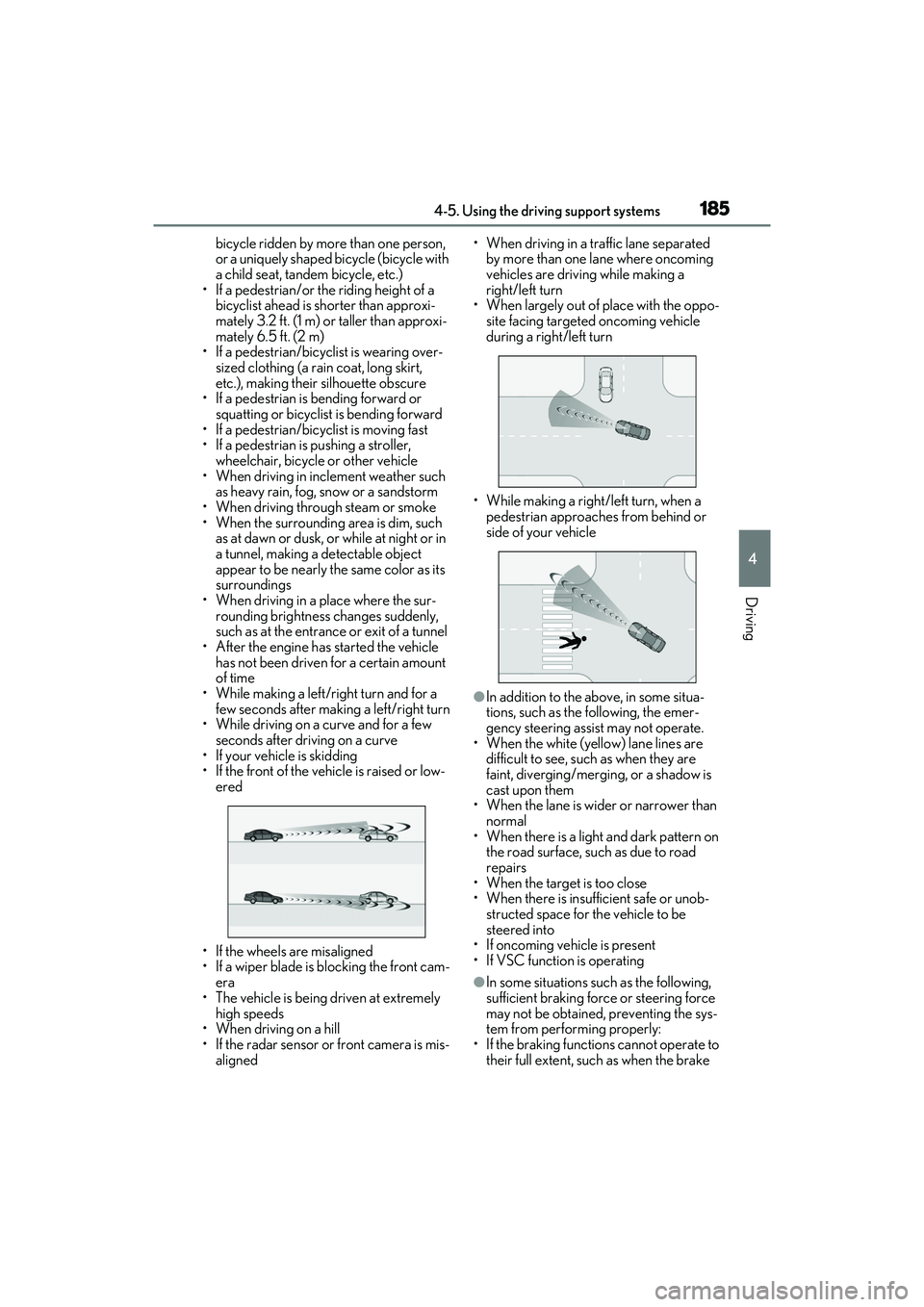
●In addition to the above, in some situa-
tions, such as the following, the emer-
gency steering assist may not operate.
• When the white (yellow) lane lines are difficult to see, such as when they are
faint, diverging/merging, or a shadow is
cast upon them
• When the lane is wider or narrower than normal
• When there is a light and dark pattern on the road surface, such as due to road
repairs
• When the target is too close
• When there is insufficient safe or unob- structed space for the vehicle to be
steered into
• If oncoming vehicle is present
• If VSC function is operating
●In some situations such as the following,
sufficient braking force or steering force
may not be obtained, preventing the sys-
tem from performing properly:
• If the braking functions cannot operate to their full extent, such as when the brake
Page 317 of 468

3156-3. Do-it-yourself maintenance
6
Maintenance and care
A25A-FKS engine
1 Remove the oil filler cap by turning
it counterclockwise.
2 Add engine oil slowly, checking the
dipstick.
3 Install the oil filler cap by turning it
clockwise.
■Engine oil consumption
A certain amount of engine oil will be con-
sumed while driving. In the following situa-
tions, oil consumption may increase, and
engine oil may need to be refilled in
between oil maintenance intervals.
●When the engine is new, for example
directly after purchasing the vehicle or
after replacing the engine
●If low quality oil or o il of an inappropriate
viscosity is used
●When driving at high engine speeds or
with a heavy load, or when driving while
accelerating or decelerating frequently
●When leaving the engine idling for a long
time, or when driving frequently through
heavy traffic
■After changing the engine oil
The engine oil maintenance data should be
reset. Perform the following procedures:
1 While the vehicle is stopped, press
of the meter control switches.
2 Press or of the meter control
switches, and select . 3
Press or of the meter control
switches, select “Veh icle Settings”, and
then press “OK”.
4 Press or of the meter control
switches, select “Oil Maintenance”, and
then press “OK”.
5 Select “Yes” and then press “OK”.
A message will be displayed on the multi-
information display when the reset proce-
dure has been completed.
WARNING
■Used engine oil
●Used engine oil contains potentially
harmful contaminants which may
cause skin disorders such as inflamma-
tion and skin cancer, so care should be
taken to avoid prolonged and
repeated contact. To remove used
engine oil from your skin, wash thor-
oughly with soap and water.
●Dispose of used oil an d filters only in a
safe and acceptable manner. Do not
dispose of used oil and filters in house-
hold trash, in sewers or onto the
ground.
Call your Lexus dealer, service station
or auto parts store for information
concerning recycling or disposal.
●Do not leave used engine oil within the
reach of children.
NOTICE
■To prevent serious engine damage
Check the oil level on a regular basis.
■When replacing the engine oil
●Be careful not to spill engine oil on the
vehicle components.
●Avoid overfilling, or the engine could
be damaged.
●Check the oil level on the dipstick
every time you refill the vehicle.
Page 320 of 468

3186-3. Do-it-yourself maintenance
■Before recharging
When recharging, the battery produces
hydrogen gas which is flammable and
explosive. Therefore, observe the following
precautions before recharging:
●If recharging with the battery installed on
the vehicle, be sure to disconnect the
ground cable.
●Make sure the power switch on the char-
ger is off when connecting and discon-
necting the charger cables to the battery.
■After recharging/reconnecting the bat-
tery
●The engine may not start.
Follow the procedure below to initialize
the system.
1 Shift the shift lever to P.
2 Open and close any of the doors.
3 Restart the engine.
●Unlocking the doors using the smart
access system with push-button start may
not be possible immediately after recon-
necting the battery. If this happens, use
the wireless remote control or the
mechanical key to lock/unlock the doors.
●Start the engine with the engine switch in
ACCESSORY mode. The engine may
not start with the engine switch turned off.
However, the engine will operate nor-
mally from the second attempt.
●The engine switch mode is recorded by
the vehicle. If the battery is reconnected,
the vehicle will return the engine switch
mode to the status it was in before the
battery was disconnected. Make sure to
turn off the engine switch before discon-
nect the battery. Take extra care when
connecting the battery if the engine
switch mode prior to discharge is
unknown.
If the engine will not start even after multiple
attempts at all methods above, contact your
Lexus dealer.
WARNING
■Chemicals in the battery
Battery contains poisonous and corro-
sive sulfuric acid and may produce
hydrogen gas which is flammable and
explosive. To reduce the risk of death or
serious injury, take the following precau-
tions while working on or near the bat-
tery:
●Do not cause sparks by touching the
battery terminals with tools.
●Do not smoke or light a match near the
battery.
●Avoid contact with eyes, skin and
clothes.
●Never inhale or swallow electrolyte.
●Wear protective safety glasses when
working near the battery.
●Keep children away from the battery.
■Where to safely charge the battery
Always charge the battery in an open
area. Do not charge the battery in a
garage or closed room where there is
insufficient ventilation.
■Emergency measures regarding
electrolyte
●If electrolyte gets in your eyes
Flush your eyes with clean water for at
least 15 minutes and get immediate
medical attention. If possible, continue
to apply water with a sponge or cloth
while traveling to the nearest medical
facility.
●If electrolyte gets on your skin
Wash the affected area thoroughly. If
you feel pain or burning, get medical
attention immediately.
●If electrolyte gets on your clothes
It can soak through clothing on to your
skin. Immediately take off the clothing
and follow the procedure above if nec-
essary.